วิเคราะห์เนื้อหา
เคล็ดลับ
ดูแท็บ ข้อความและรูปภาพ สําหรับรายละเอียดเพิ่มเติม!
ในการวิเคราะห์เนื้อหาของไฟล์ คุณสามารถใช้ Azure Content Understanding API เพื่อส่งไปยังจุดสิ้นสุด คุณสามารถระบุเนื้อหาเป็น URL (สําหรับไฟล์ที่โฮสต์ในตําแหน่งที่เข้าถึงอินเทอร์เน็ตได้) หรืออัปโหลดข้อมูลไฟล์ไบนารีโดยตรง (เช่น เอกสาร .pdf รูปภาพ .png ไฟล์เสียง .mp3 หรือไฟล์วิดีโอ .mp4) คําขอการวิเคราะห์รวมถึงเครื่องวิเคราะห์ที่จะใช้
การวิเคราะห์เป็นการดําเนินการแบบอะซิงโครนัส หลังจากส่งคําขอ คุณจะได้รับรหัสการดําเนินการที่คุณสามารถใช้เพื่อตรวจสอบสถานะและดึงผลลัพธ์เมื่อการดําเนินการเสร็จสมบูรณ์
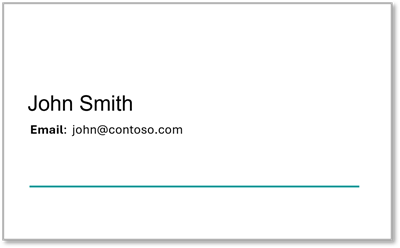
ตัวอย่างเช่น สมมติว่าคุณต้องการใช้ตัววิเคราะห์นามบัตรที่กล่าวถึงก่อนหน้านี้เพื่อแยกชื่อและที่อยู่อีเมลออกจากรูปภาพนามบัตรที่สแกนต่อไปนี้:
การใช้ Python SDK
Python SDK สําหรับความเข้าใจเนื้อหา (azure-ai-contentunderstanding) มี ContentUnderstandingClient คลาสที่ช่วยลดความยุ่งยากในการโต้ตอบกับบริการ SDK จัดการการรับรองความถูกต้อง การจัดรูปแบบคําขอ และการสํารวจอัตโนมัติสําหรับการดําเนินการแบบอะซิงโครนัส
โค้ด Python ต่อไปนี้ใช้ SDK เพื่อส่งนามบัตรเพื่อวิเคราะห์และดึงผลลัพธ์:
from azure.ai.contentunderstanding import ContentUnderstandingClient
from azure.ai.contentunderstanding.models import AnalysisInput
from azure.core.credentials import AzureKeyCredential

# Authenticate the client
endpoint = "<YOUR_ENDPOINT>"
credential = AzureKeyCredential("<YOUR_API_KEY>")
client = ContentUnderstandingClient(endpoint=endpoint, credential=credential)

# Analyze the business card using the custom analyzer
analyzer_name = "business_card_analyser"
poller = client.begin_analyze(
    analyzer_id=analyzer_name,
    inputs=[AnalysisInput(url="https://host.com/business-card.png")]
)

# Wait for the operation to complete and get the results
result = poller.result()

# Extract field values from the results
content = result.contents[0]
if content.fields:
    for field_name, field_data in content.fields.items():
        if field_data.type == "string":
            print(f"{field_name}: {field_data.value}")
เคล็ดลับ
วิธีการของ begin_analyze SDK ส่งคืนออบเจ็กต์ poller การโทร .result() หาผู้สํารวจจะจัดการการสํารวจโดยอัตโนมัติจนกว่าการดําเนินการจะเสร็จสิ้น คุณจึงไม่จําเป็นต้องเขียนลูปการสํารวจของคุณเอง
การใช้ REST API
คุณยังสามารถส่งคําขอการวิเคราะห์ได้โดยตรงโดยใช้ REST API แอปพลิเคชันไคลเอ็นต์ของคุณส่งการเรียก HTTP ไปยังจุดสิ้นสุดการทําความเข้าใจเนื้อหาสําหรับทรัพยากร Microsoft Foundry ของคุณ โดยส่งคีย์ API ในส่วนหัว
โค้ด Python ต่อไปนี้ส่งคําขอสําหรับการวิเคราะห์โดยใช้ URL แล้วสํารวจบริการจนกว่าการดําเนินการจะเสร็จสมบูรณ์และผลลัพธ์จะถูกส่งกลับ
import json
import requests

## Use a POST request to submit the file URL to the analyzer
analyzer_name = "business_card_analyser"

headers = {
        "Ocp-Apim-Subscription-Key": "<YOUR_API_KEY>",
        "Content-Type": "application/json"}

url = f"{<YOUR_ENDPOINT>}/contentunderstanding/analyzers/{analyzer_name}:analyze?api-version=2025-11-01"

request_body = {
    "inputs": [
        {
            "url": "https://host.com/business-card.png"
        }
    ]
}

response = requests.post(url, headers=headers, json=request_body)

# Get the response and extract the ID assigned to the analysis operation
response_json = response.json()
id_value = response_json.get("id")

# Use a GET request to check the status of the analysis operation
result_url = f"{<YOUR_ENDPOINT>}/contentunderstanding/analyzerResults/{id_value}?api-version=2025-11-01"

result_response = requests.get(result_url, headers=headers)

# Keep polling until the analysis is complete
status = result_response.json().get("status")
while status == "Running":
        result_response = requests.get(result_url, headers=headers)
        status = result_response.json().get("status")

# Get the analysis results
if status == "Succeeded":
    result_json = result_response.json()
Note
คุณสามารถระบุ URL สําหรับตําแหน่งไฟล์เนื้อหาได้ดังที่แสดงไว้ที่นี่ หากต้องการส่งข้อมูลไฟล์ไบนารีโดยตรง ให้ใช้การดําเนินการแทนanalyzeBinary
การประมวลผลผลลัพธ์การวิเคราะห์
ผลลัพธ์ขึ้นอยู่กับ:
- ชนิดของเนื้อหาที่ตัววิเคราะห์ออกแบบมาเพื่อวิเคราะห์ (เช่น เอกสาร วิดีโอ รูปภาพ หรือเสียง)
- สคีมาสําหรับตัววิเคราะห์
- เนื้อหาของไฟล์ที่ถูกวิเคราะห์
ตัวอย่างเช่น การตอบสนองจากตัววิเคราะห์นามบัตรตาม เอกสารเมื่อวิเคราะห์นามบัตรที่อธิบายไว้ก่อนหน้านี้ประกอบด้วย:
- เขตข้อมูลที่แยกออกมา
- เค้าโครงการรู้จําอักขระด้วยแสง (OCR) ของเอกสาร รวมถึงตําแหน่งที่ตั้งของบรรทัดข้อความ คําแต่ละคํา และย่อหน้าในแต่ละหน้า
การใช้ Python SDK
เมื่อใช้ SDK ออบเจ็กต์จะ AnalysisResult ให้การเข้าถึงผลลัพธ์แบบพิมพ์ คุณสมบัติประกอบด้วย contents รายการของออบเจ็กต์เนื้อหา โดยแต่ละรายการมีฟิลด์ มาร์กดาวน์ และเมตาดาต้า รหัสต่อไปนี้แสดงวิธีการแยกค่าเขตข้อมูลสตริง:
# (continued from previous SDK code example)

content = result.contents[0]
if content.fields:
    for field_name, field_data in content.fields.items():
        if field_data.type == "string":
            print(f"{field_name}: {field_data.value}")
การใช้ REST API
เมื่อใช้ REST API การตอบสนองจะเป็นเพย์โหลด JSON ที่แอปพลิเคชันของคุณต้องแยกวิเคราะห์ นี่คือการตอบสนอง JSON ที่สมบูรณ์สําหรับการวิเคราะห์นามบัตร:
{
    "id": "00000000-0000-0000-0000-a00000000000",
    "status": "Succeeded",
    "result": {
        "analyzerId": "biz_card_analyser_2",
        "apiVersion": "2025-11-01",
        "createdAt": "2025-05-16T03:51:46Z",
        "warnings": [],
        "contents": [
            {
                "markdown": "John Smith\nEmail: john@contoso.com\n",
                "fields": {
                    "ContactName": {
                        "type": "string",
                        "valueString": "John Smith",
                        "spans": [
                            {
                                "offset": 0,
                                "length": 10
                            }
                        ],
                        "confidence": 0.994,
                        "source": "D(1,69,234,333,234,333,283,69,283)"
                    },
                    "EmailAddress": {
                        "type": "string",
                        "valueString": "john@contoso.com",
                        "spans": [
                            {
                                "offset": 18,
                                "length": 16
                            }
                        ],
                        "confidence": 0.998,
                        "source": "D(1,179,309,458,309,458,341,179,341)"
                    }
                },
                "kind": "document",
                "startPageNumber": 1,
                "endPageNumber": 1,
                "unit": "pixel",
                "pages": [
                    {
                        "pageNumber": 1,
                        "angle": 0.03410444,
                        "width": 1000,
                        "height": 620,
                        "spans": [
                            {
                                "offset": 0,
                                "length": 35
                            }
                        ],
                        "words": [
                            {
                                "content": "John",
                                "span": {
                                    "offset": 0,
                                    "length": 4
                                },
                                "confidence": 0.992,
                                "source": "D(1,69,234,181,234,180,283,69,283)"
                            },
                            {
                                "content": "Smith",
                                "span": {
                                    "offset": 5,
                                    "length": 5
                                },
                                "confidence": 0.998,
                                "source": "D(1,200,234,333,234,333,282,200,283)"
                            },
                            {
                                "content": "Email:",
                                "span": {
                                    "offset": 11,
                                    "length": 6
                                },
                                "confidence": 0.995,
                                "source": "D(1,75,310,165,309,165,340,75,340)"
                            },
                            {
                                "content": "john@contoso.com",
                                "span": {
                                    "offset": 18,
                                    "length": 16
                                },
                                "confidence": 0.977,
                                "source": "D(1,179,309,458,311,458,340,179,341)"
                            }
                        ],
                        "lines": [
                            {
                                "content": "John Smith",
                                "source": "D(1,69,234,333,233,333,282,69,282)",
                                "span": {
                                    "offset": 0,
                                    "length": 10
                                }
                            },
                            {
                                "content": "Email: john@contoso.com",
                                "source": "D(1,75,309,458,309,458,340,75,340)",
                                "span": {
                                    "offset": 11,
                                    "length": 23
                                }
                            }
                        ]
                    }
                ],
                "paragraphs": [
                    {
                        "content": "John Smith Email: john@contoso.com",
                        "source": "D(1,69,233,458,233,458,340,69,340)",
                        "span": {
                            "offset": 0,
                            "length": 34
                        }
                    }
                ],
                "sections": [
                    {
                        "span": {
                            "offset": 0,
                            "length": 34
                        },
                        "elements": [
                            "/paragraphs/0"
                        ]
                    }
                ]
            }
        ]
    }
}
แอปพลิเคชันของคุณต้องแยกวิเคราะห์ JSON เพื่อดึงข้อมูลค่าของเขตข้อมูล ตัวอย่างเช่น โค้ด Python ต่อไปนี้จะแยกค่า สตริง ทั้งหมด:
# (continued from previous code example)

# Iterate through the fields and extract the names and type-specific values
contents = result_json["result"]["contents"]
for content in contents:
    if "fields" in content:
        fields = content["fields"]
        for field_name, field_data in fields.items():
            if field_data['type'] == "string":
                print(f"{field_name}: {field_data['valueString']}")
ผลลัพธ์จากรหัสนี้จะแสดงที่นี่:
ContactName: John Smith
EmailAddress: john@contoso.com