แบบฝึกหัด - พร้อมท์ Copilot เพื่อสร้างโค้ด
ในบางครั้ง Copilot อาจไม่แนะนําโค้ดที่คุณต้องการ คุณสามารถใช้พร้อมท์ที่เฉพาะเจาะจงมากขึ้นด้วย Copilot เพื่อสร้างผลลัพธ์ที่คุณต้องการ ในแบบฝึกหัดนี้ คุณจะใช้ Copilot เพื่อสร้างวิธีการใหม่ในโครงการ Trie มาเริ่มต้นกันเลย!
ป้อนบรรทัดใหม่หลังจากวิธีการ
GetAllWordsWithPrefixจากนั้นป้อนรหัสต่อไปนี้:// Delete a word from the trie public bool Delete(string word) {รอให้ Copilot สร้างโค้ด จากนั้นกด Tab หรือคลิก ยอมรับ เพื่อใช้คําแนะนําโค้ด
คุณอาจสังเกตเห็นว่า Copilot มีหลายคําแนะนํา คุณสามารถคลิกลูกศรเพื่อนําทางผ่านคําแนะนําต่างๆ
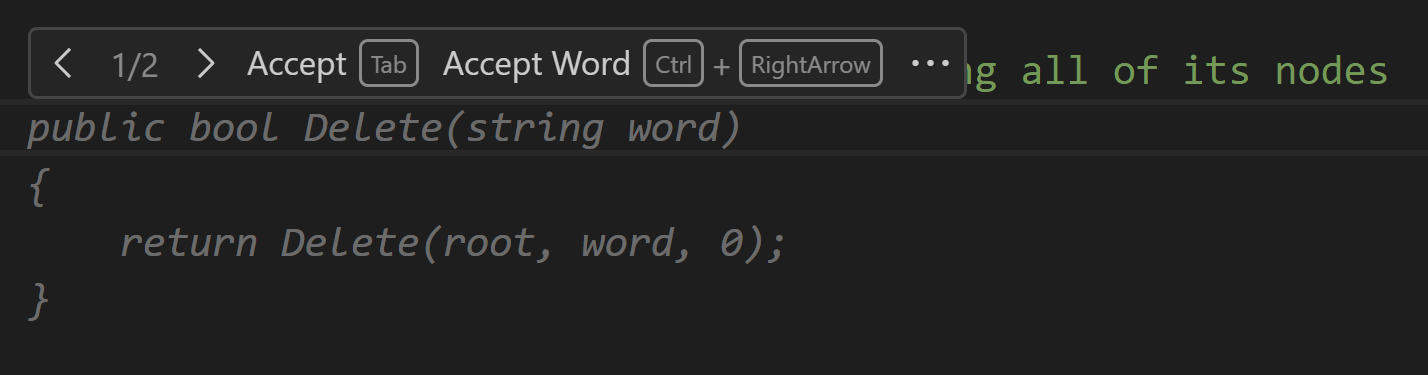
ใช้เวลาสักครู่เพื่อพิจารณาโค้ดที่ Copilot autocompleted
อย่าลังเลที่จะพร้อมท์ให้ Copilot สร้างข้อคิดเห็นเพื่ออธิบายโค้ดโดยการใส่บรรทัดใหม่ด้วยเครื่องหมายทับไปข้างหน้า
คุณอาจมีวิธีการที่คล้ายกับโค้ดต่อไปนี้:
// Delete a word from the trie public bool Delete(string word) { TrieNode current = root; foreach (char c in word) { if (!current.HasChild(c)) { // Word doesn't exist in trie return false; } current = current.Children[c]; } if (!current.IsEndOfWord) { // Word doesn't exist in trie return false; } // Word exists in trie // Set IsEndOfWord to false current.IsEndOfWord = false; return true; }โปรดสังเกตว่ารหัสนี้ตั้งค่าของ
IsEndOfWordเป็นเท็จ แต่จะไม่ลบโหนดของคําออกจาก trie หากต้องการลบโหนดเหล่านี้ คุณต้องแจ้งให้ Copilot มีความเฉพาะเจาะจงมากขึ้น
พร้อมท์ Copilot เพื่อสร้างโค้ดเฉพาะ
ลบวิธีการ
Deleteที่สร้างขึ้นก่อนหน้านี้บนบรรทัดใหม่ ให้พิมพ์ข้อคิดเห็นต่อไปนี้:
// Helper method to delete a word from the trie by recursively removing its nodesป้อนบรรทัดใหม่และรอให้ Copilot แนะนํารหัส
หากคุณกําลังประสบกับปัญหาในการทําให้ Copilot สมบูรณ์อัตโนมัติคุณสามารถเพิ่มพารามิเตอร์ต่อไปนี้และรอให้ Copilot เสร็จสมบูรณ์รหัสวิธีการ:
private bool _delete(TrieNode current, string word, int index)
{
ใช้เวลาสักครู่ในการพิจารณาโค้ดที่ Copilot แนะนํา
คุณอาจต้องการพร้อมท์ Copilot เพื่อสร้างข้อคิดเห็นเพื่ออธิบายโค้ดโดยการใส่บรรทัดใหม่ด้วยเครื่องหมายทับไปข้างหน้า
โค้ดที่สร้างขึ้นควรทํางานต่อไปนี้:
- กําหนดว่าคําที่จะลบมีอยู่ใน trie หรือไม่
- อัปเดต
IsEndOfWordของโหนดสุดท้ายในคํา - ตรวจสอบว่าโหนดไม่ได้เป็นส่วนหนึ่งของคําอื่นก่อนที่จะลบออก
- ส่งกลับ จริง ถ้าลบคําแล้ว มิฉะนั้นจะส่งกลับ false
private bool _delete(TrieNode root, string word, int index)
{
    // Base case: we've reached the end of the word
    if (index == word.Length)
    {
        // If the current node is not the end of a word, we can't delete it
        if (!root.IsEndOfWord)
        {
            return false;
        }
        // Otherwise, we can delete it by setting the end of word flag to false
        root.IsEndOfWord = false;
        // And returning true to indicate that the node can be deleted
        return true;
    }
    // Recursive case: we haven't reached the end of the word yet
    char currentChar = word[index];
    // If the current node doesn't have a child with the current character, we can't delete it
    if (!root.HasChild(currentChar))
    {
        return false;
    }
    // Otherwise, we can delete it if its child can be deleted
    bool canDelete = _delete(root.Children[currentChar], word, index + 1);
    // If the child can be deleted and the current node is not the end of a word, we can delete it
    if (canDelete && !root.IsEndOfWord)
    {
        root.Children.Remove(currentChar);
        return true;
    }
    // Otherwise, we can't delete it
    return false;
}
กด Tab หรือคลิก ยอมรับ เพื่อใช้คําแนะนํารหัส
บนบรรทัดใหม่ ให้ป้อน
public bool DeleteWordและรอให้ Copilot เพื่อแนะนํารหัสCopilot ควรแนะนําโค้ดที่เรียกใช้
_deleteเมธอด โดยระบุโหนดรูท คําที่จะลบ และดัชนีเริ่มต้นเป็น 0กด Tab หรือคลิก ยอมรับ เพื่อใช้คําแนะนํารหัส
ตรวจสอบงานของคุณ
ในงานนี้ คุณจะทดสอบวิธีการที่คุณสร้างขึ้นด้วย Copilot เพื่อตรวจสอบว่าวิธีการดังกล่าวทํางานตามที่คาดไว้หรือไม่
เปิดไฟล์ Program.cs
แสดงความคิดเห็นในการเรียกวิธีการใด ๆ และไม่ใส่ความคิดเห็นในการเรียกใช้วิธีการ
DeleteWord:Trie dictionary = InitializeTrie(words); // SearchWord(); // PrefixAutocomplete(); DeleteWord(); // GetSpellingSuggestions();นําทางไปยังเมธอด
DeleteWord()และยกเลิกการใส่ความคิดเห็นในโค้ดต่อไปนี้:/* if (input != null && dictionary.Search(input)) { dictionary.Delete(input); Console.WriteLine($"Deleted \"{input}\" from dictionary\n"); PrintTrie(dictionary); } */ในตัวสํารวจไฟล์ คลิกขวาที่ไฟล์ Program.cs และคลิก เปิดในเทอร์มินัลที่รวม
ใส่
dotnet runเพื่อเรียกใช้โปรแกรมใส่คําที่จะลบ เช่น "follows" หรือ "beans"
ตรวจสอบว่าเอาต์พุตของคุณคล้ายกับรายการต่อไปนี้
The dictionary contains the following words:
as, astronaut, asteroid, are, around, cat, cars, cares, careful, carefully, for, forgot, follows, from, front, mellow, mean, money, monday, monster, place, plan, planet, planets, plans, the, their, they, there, towards,

Enter a word to delete, or press Enter to exit.
follows
Deleted "follows" from dictionary

The dictionary contains the following words:
as, astronaut, asteroid, are, around, cat, cares, careful, carefully, for, forgot, follows, from, front, mellow, mean, money, monday, monster, place, plan, planet, planets, plans, the, their, they, there, towards,

Enter a word to delete, or press Enter to exit.
beans
Did not find "beans" in dictionary

Enter a word to delete, or press Enter to exit.
หากรหัสของคุณแสดงผลลัพธ์ที่แตกต่างกัน ให้ตรวจสอบรหัสของคุณเพื่อค้นหาข้อผิดพลาดและทําการอัปเดต เรียกใช้รหัสอีกครั้งเพื่อดูว่าคุณได้แก้ไขปัญหาหรือไม่ อัปเดตและเรียกใช้โค้ดของคุณต่อจนกว่ารหัสของคุณจะสร้างผลลัพธ์ที่คาดหวัง
แสดงความคิดเห็นในการเรียกเมธอด
Delete