สร้างตัวแทน Voice Live
Tip
ดูแท็บ ข้อความและรูปภาพ สําหรับรายละเอียดเพิ่มเติม!
คุณสามารถสร้างและเรียกใช้แอปพลิเคชันเพื่อใช้ Voice Live กับตัวแทน Microsoft Foundry ได้ การใช้ตัวแทนกับ Voice Live มีข้อดีมากกว่าการเชื่อมต่อโดยตรงกับโมเดลดังต่อไปนี้
- เอเจนต์จะห่อหุ้มคําสั่งและการกําหนดค่าภายในเอเจนต์เอง แทนที่จะระบุคําแนะนําในโค้ดเซสชัน
- ตัวแทนรองรับตรรกะและพฤติกรรมที่ซับซ้อน ทําให้ง่ายต่อการจัดการและอัปเดตโฟลว์การสนทนาโดยไม่ต้องเปลี่ยนรหัสไคลเอ็นต์
- แนวทางตัวแทนช่วยเพิ่มความคล่องตัวในการรวม รหัสตัวแทนใช้เพื่อเชื่อมต่อและการตั้งค่าที่จําเป็นทั้งหมดจะถูกจัดการภายใน ซึ่งช่วยลดความจําเป็นในการกําหนดค่าด้วยตนเองในโค้ด
- การแยกตรรกะของตัวแทนออกจากการใช้งานด้วยเสียงจะสนับสนุนการบํารุงรักษาและความสามารถในการปรับขนาดที่ดีขึ้นสําหรับสถานการณ์ที่ต้องการประสบการณ์การสนทนาที่หลากหลายหรือรูปแบบตรรกะทางธุรกิจ
สร้างตัวแทนเสียงใน Playground ของตัวแทน
เมื่อคุณพัฒนาตัวแทนในพอร์ทัล Microsoft Foundry คุณสามารถเปิดใช้งาน โหมดเสียง เพื่อรวม Voice Live เข้ากับตัวแทนของคุณได้อย่างง่ายดาย และทดสอบใน Playground
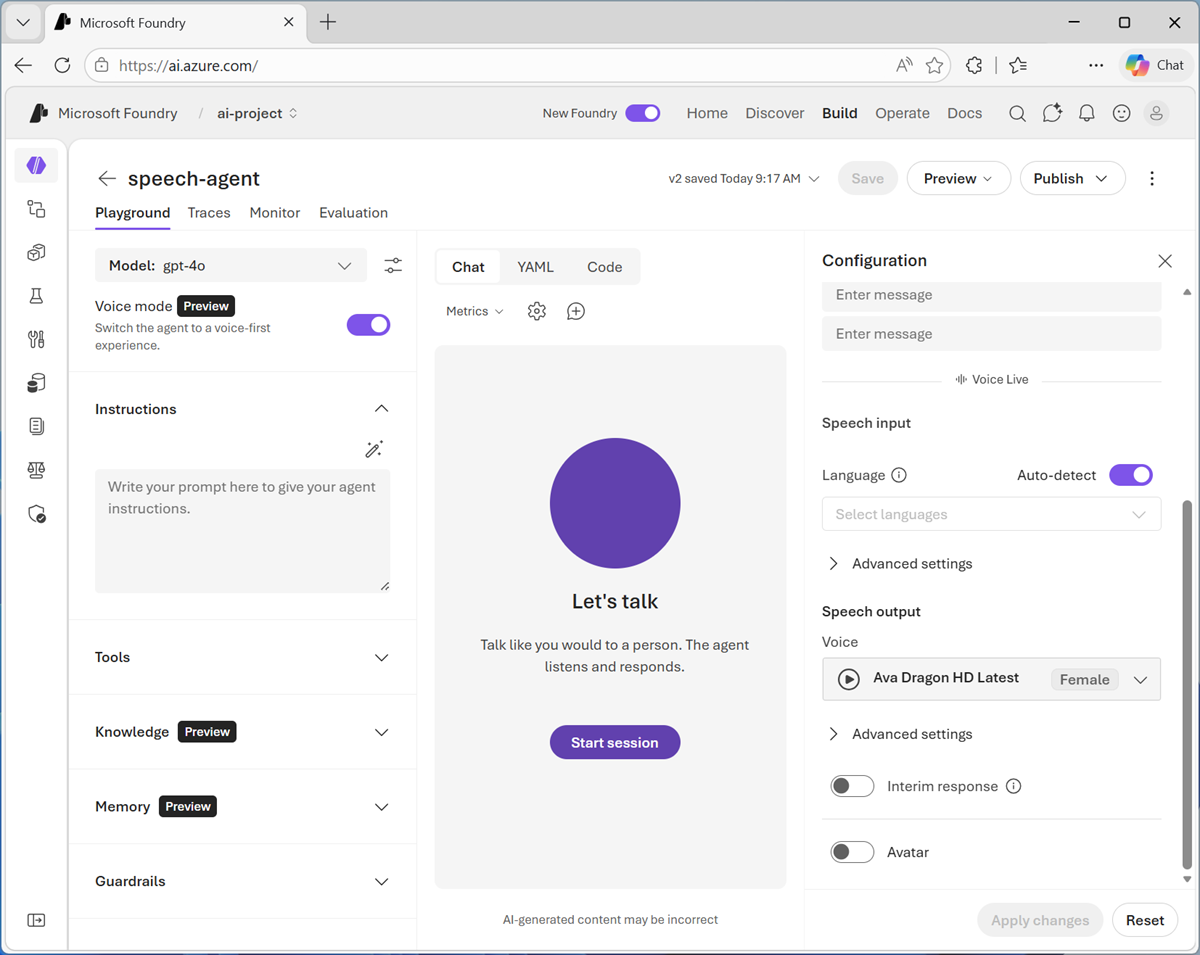
หลังจากเปิดใช้โหมดเสียงแล้ว คุณจะใช้บานหน้าต่าง การกําหนดค่า เพื่อเปิดใช้การตั้งค่า Voice Live ได้ ซึ่งรวมถึง
- ภาษา: ภาษาที่ตัวแทนพูดและเข้าใจ
-
การตั้งค่าขั้นสูง:
- การตั้งค่าการตรวจจับกิจกรรมเสียง (VAD) เพื่อตรวจจับการขัดจังหวะและการสิ้นสุดการพูด
- การปรับปรุงเสียงเพื่อลดเสียงรบกวนรอบข้างและคุณภาพเสียง
- เสียง: เสียงเฉพาะที่ตัวแทนใช้ และการตั้งค่าเสียงขั้นสูงเพื่อควบคุมน้ําเสียงและอัตราการพูด
- การตอบสนองชั่วคราว: ตัวแทนสามารถสร้างคําพูดโดยอัตโนมัติในขณะที่รอการตอบกลับของโมเดล
- อวตาร: การรวมอวาตาร์ภาพเพื่อเป็นตัวแทนของตัวแทน
สร้างตัวแทนเสียงโดยใช้รหัส
หากต้องการสร้างเอเจนต์โดยใช้โค้ด คุณสามารถใช้ Foundry Agent SDK ที่เหมาะสม (เช่น Foundry SDK สําหรับ Python) เพื่อสร้างเอเจนต์ และเพิ่มข้อมูลเมตา Voice Live ลงในคําจํากัดความ
import os
import json
from azure.identity import DefaultAzureCredential
from azure.ai.projects import AIProjectClient
from azure.ai.projects.models import PromptAgentDefinition

load_dotenv()

# Setup client
project_client = AIProjectClient(
    "PROJECT_ENDPOINT",
    credential=DefaultAzureCredential(),
)

# Define Voice Live session settings
voice_live_config = {
    "session": {
        "voice": {
            "name": "en-US-Ava:DragonHDLatestNeural",
            "type": "azure-standard",
            "temperature": 0.8
        },
        "input_audio_transcription": {
            "model": "azure-speech"
        },
        "turn_detection": {
            "type": "azure_semantic_vad",
            "end_of_utterance_detection": {
                "model": "semantic_detection_v1_multilingual"
            }
        },
        "input_audio_noise_reduction": {"type": "azure_deep_noise_suppression"},
        "input_audio_echo_cancellation": {"type": "server_echo_cancellation"}
    }
}

# Create agent with Voice Live configuration in metadata
agent = project_client.agents.create_version(
    agent_name="AGENT_NAME",
    definition=PromptAgentDefinition(
        model="MODEL_DEPLOYMENT_NAME",
        instructions="You are a helpful assistant.",
    ),
    metadata=chunk_config(json.dumps(voice_live_config))
)
print(f"Agent created: {agent.name} (version {agent.version})")


# Helper function for Voice Live configuration chunking (to handle 512-char metadata limit)
def chunk_config(config_json: str, limit: int = 512) -> dict:
    """Split config into chunked metadata entries."""
    metadata = {"microsoft.voice-live.configuration": config_json[:limit]}
    remaining = config_json[limit:]
    chunk_num = 1
    while remaining:
        metadata[f"microsoft.voice-live.configuration.{chunk_num}"] = remaining[:limit]
        remaining = remaining[limit:]
        chunk_num += 1
    return metadata
ใช้ตัวแทนของคุณในแอปพลิเคชันไคลเอ็นต์
หากต้องการใช้เอเจนต์ คุณต้องสร้างแอปพลิเคชันไคลเอ็นต์ที่:
- เชื่อมต่อกับตัวแทน
- กําหนดค่าอินพุตและเอาต์พุตฮาร์ดแวร์เสียง
- สร้างเซสชันสดของ Voice
- ตรวจสอบระบบเสียงสําหรับกิจกรรม
- ประมวลผลเหตุการณ์ (เช่น การป้อนข้อมูลด้วยเสียงของผู้ใช้และการตอบกลับจากตัวแทน)
แม้ว่าคุณจะใช้งานเหล่านี้ได้โดยใช้ฟังก์ชันการทํางานที่มีอยู่ใน API แต่รูปแบบที่แนะนําสําหรับแอปพลิเคชันไคลเอ็นต์ Voice Live มีดังนี้
- ใช้การรับรองความถูกต้อง Microsoft Entra ID เพื่อเชื่อมต่อกับตัวแทนในโครงการ Microsoft Foundry
- ใช้คลาส VoiceAssistant แบบกําหนดเองที่ห่อหุ้มการกําหนดค่าตัวแทนที่พิมพ์อย่างเข้มงวด กําหนดฟังก์ชันเพื่อกําหนดค่าและเริ่มเซสชันสดของ Voice และประมวลผลเหตุการณ์ทางเสียง
- ใช้คลาส AudioProcessor แบบกําหนดเองที่ห่อหุ้มอินพุตและเอาต์พุตผ่านอุปกรณ์เสียง
ตัวอย่างต่อไปนี้แสดงการใช้งานรูปแบบนี้เพียงเล็กน้อยใน Python (โดยใช้ไลบรารี PyAudio สําหรับอินพุตและเอาต์พุตเสียง)
import os
import asyncio
import base64
import queue
from dotenv import load_dotenv
import pyaudio
from azure.identity.aio import AzureCliCredential
from azure.ai.voicelive.aio import connect
from azure.ai.voicelive.models import (
    InputAudioFormat,
    Modality,
    OutputAudioFormat,
    RequestSession,
    ServerEventType,
    AudioNoiseReduction,
    AudioEchoCancellation,
    AzureSemanticVadMultilingual
)


# Main program entry point
def main():
    """Main entry point."""

    try:
        # Get required configuration from environment variables
        load_dotenv()
        endpoint = os.environ.get("AZURE_VOICELIVE_ENDPOINT")
        agent_name = os.environ.get("AZURE_VOICELIVE_AGENT_ID")
        project_name = os.environ.get("AZURE_VOICELIVE_PROJECT_NAME")

        # Create credential for authentication
        credential = AzureCliCredential()

        # Create and start the voice assistant
        assistant = VoiceAssistant(
            endpoint=endpoint,
            credential=credential,
            agent_name=agent_name,
            project_name=project_name
        )

        # Run the assistant
        try:
            asyncio.run(assistant.start())
        except KeyboardInterrupt:
            # Exit if the user enters CTRL+C
            print("\nGoodbye!")


    except Exception as e:
        print(f"An error occurred: {e}")


# VoiceAssistant class
class VoiceAssistant:
    """Main voice assistant - coordinates the conversation"""

    def __init__(self, endpoint, credential, agent_name, project_name):
        self.endpoint = endpoint
        self.credential = credential

        # Agent configuration
        self.agent_config = {
            "agent_name": agent_name,
            "project_name": project_name
        }

    async def start(self):
        """Start the voice assistant."""

        try:
            # Connect the agent
            async with connect(
                endpoint=self.endpoint,
                credential=self.credential,
                api_version="2026-01-01-preview",
                agent_config=self.agent_config
            ) as connection:
                self.connection = connection

                # Initialize audio processor
                self.audio_processor = AudioProcessor(connection)

                # Configure the session
                await self.setup_session()

                # Start audio I/O
                self.audio_processor.start_playback()
                print("\nVoice session started...")
                print("Press Ctrl+C to exit\n")

                # Process events
                await self.process_events()


        finally:
            if hasattr(self, 'audio_processor'):
                self.audio_processor.shutdown()

    async def setup_session(self):
        """Configure the session with audio settings."""

        session_config = RequestSession(
            # Enable both text and audio
            modalities=[Modality.TEXT, Modality.AUDIO],

            # Audio format (16-bit PCM at 24kHz)
            input_audio_format=InputAudioFormat.PCM16,
            output_audio_format=OutputAudioFormat.PCM16,

            # Voice activity detection (when to detect speech)
            turn_detection=AzureSemanticVadMultilingual(),

            # Prevent echo from speaker feedback
            input_audio_echo_cancellation=AudioEchoCancellation(),

            # Reduce background noise
            input_audio_noise_reduction=AudioNoiseReduction(type="azure_deep_noise_suppression")
        )

        await self.connection.session.update(session=session_config)
        print("Session configured")

    async def process_events(self):
        """Process events from the VoiceLive service."""

        # Listen for events from the service
        async for event in self.connection:
            await self.handle_event(event)

    async def handle_event(self, event):
        """Handle different event types from the service."""

        # Session is ready - start capturing audio
        if event.type == ServerEventType.SESSION_UPDATED:
            print(f"Connected to agent: {event.session.agent.name}")
            self.audio_processor.start_capture()

        # User speech was transcribed
        elif event.type == ServerEventType.CONVERSATION_ITEM_INPUT_AUDIO_TRANSCRIPTION_COMPLETED:
            print(f'You: {event.get("transcript", "")}')

        # Agent is responding with audio transcript
        elif event.type == ServerEventType.RESPONSE_AUDIO_TRANSCRIPT_DONE:
            print(f'Agent: {event.get("transcript", "")}')

        # User started speaking (interrupt any playing audio)
        elif event.type == ServerEventType.INPUT_AUDIO_BUFFER_SPEECH_STARTED:
            self.audio_processor.clear_playback_queue()
            print("Listening...")

        # User stopped speaking
        elif event.type == ServerEventType.INPUT_AUDIO_BUFFER_SPEECH_STOPPED:
            print("Thinking...")

        # Receiving audio response chunks
        elif event.type == ServerEventType.RESPONSE_AUDIO_DELTA:
            self.audio_processor.queue_audio(event.delta)

        # Audio response complete
        elif event.type == ServerEventType.RESPONSE_AUDIO_DONE:
            print("Response complete\n")

        # Handle errors
        elif event.type == ServerEventType.ERROR:
            print(f"Error: {event.error.message}")


# AudioProcessor class
class AudioProcessor:
    """Handles audio input (microphone) and output (speakers) """

    def __init__(self, connection):
        self.connection = connection
        self.audio = pyaudio.PyAudio()

        # Audio settings: 24kHz, 16-bit PCM, mono
        self.format = pyaudio.paInt16
        self.channels = 1
        self.rate = 24000
        self.chunk_size = 1200  # 50ms chunks

        # Streams for input and output
        self.input_stream = None
        self.output_stream = None
        self.playback_queue = queue.Queue()

    def start_capture(self):
        """Start capturing audio from the microphone."""

        def capture_callback(in_data, frame_count, time_info, status):
            # Convert audio to base64 and send to VoiceLive
            audio_base64 = base64.b64encode(in_data).decode("utf-8")
            asyncio.run_coroutine_threadsafe(
                self.connection.input_audio_buffer.append(audio=audio_base64),
                self.loop
            )
            return (None, pyaudio.paContinue)

        # Store event loop for use in callback thread
        self.loop = asyncio.get_event_loop()

        self.input_stream = self.audio.open(
            format=self.format,
            channels=self.channels,
            rate=self.rate,
            input=True,
            frames_per_buffer=self.chunk_size,
            stream_callback=capture_callback
        )
        print("Microphone started")

    def start_playback(self):
        """Start audio playback system."""

        remaining = bytes()

        def playback_callback(in_data, frame_count, time_info, status):
            nonlocal remaining

            # Calculate bytes needed
            bytes_needed = frame_count * pyaudio.get_sample_size(pyaudio.paInt16)
            output = remaining[:bytes_needed]
            remaining = remaining[bytes_needed:]

            # Get more audio from queue if needed
            while len(output) < bytes_needed:
                try:
                    audio_data = self.playback_queue.get_nowait()
                    if audio_data is None:  # End signal
                        break
                    output += audio_data
                except queue.Empty:
                    # Pad with silence if no audio available
                    output += bytes(bytes_needed - len(output))
                    break

            # Keep any extra for next callback
            if len(output) > bytes_needed:
                remaining = output[bytes_needed:]
                output = output[:bytes_needed]

            return (output, pyaudio.paContinue)

        self.output_stream = self.audio.open(
            format=self.format,
            channels=self.channels,
            rate=self.rate,
            output=True,
            frames_per_buffer=self.chunk_size,
            stream_callback=playback_callback
        )
        print("Speakers ready")

    def queue_audio(self, audio_data):
        """Add audio data to the playback queue."""
        self.playback_queue.put(audio_data)

    def clear_playback_queue(self):
        """Clear any pending audio (used when user interrupts)."""
        while not self.playback_queue.empty():
            try:
                self.playback_queue.get_nowait()
            except queue.Empty:
                break

    def shutdown(self):
        """Clean up audio resources."""
        if self.input_stream:
            self.input_stream.stop_stream()
            self.input_stream.close()

        if self.output_stream:
            self.playback_queue.put(None)  # Signal end
            self.output_stream.stop_stream()
            self.output_stream.close()

        self.audio.terminate()
        print("Audio stopped")


if __name__ == "__main__":
    main()