หมายเหตุ
การเข้าถึงหน้านี้ต้องได้รับการอนุญาต คุณสามารถลอง ลงชื่อเข้าใช้หรือเปลี่ยนไดเรกทอรีได้
การเข้าถึงหน้านี้ต้องได้รับการอนุญาต คุณสามารถลองเปลี่ยนไดเรกทอรีได้
The info command of the winget tool displays metadata about the system, including version numbers, system architecture, log location, links to legal agreements, and Group Policy state.
When submitting an issue to the winget repository on GitHub, this information is helpful for troubleshooting. It may also explain why the winget client behaves differently than expected in the case of Group Policy configuration.
Usage
winget --info
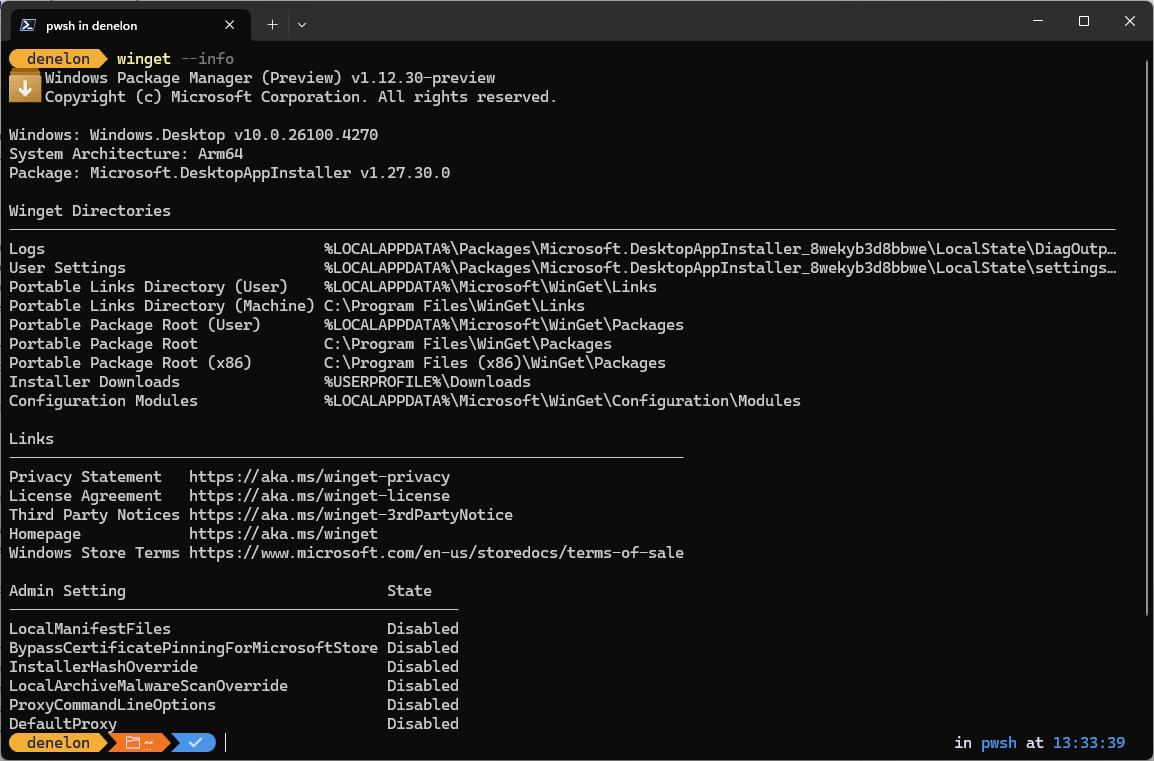
Result fields include:
- Windows Package Manager version number installed
- System architecture type
- MSIX package version number (WinGet is delivered as a part of the "App Installer" package)
- WinGet Directories (Paths to directories used by WinGet)
- Links to privacy statement, license agreement, third party notices, homepage, and store terms
- Group policy and state - this will only appear if a policy has been manually configured. (Learn more about how to configure Group Policies for Windows Package Manager).
- Admin Settings
Related topics
ทํางานร่วมกับเราใน GitHub
แหล่งที่มาสำหรับเนื้อหานี้สามารถพบได้บน GitHub ซึ่งคุณยังสามารถสร้างและตรวจสอบปัญหาและคำขอดึงข้อมูลได้ สำหรับข้อมูลเพิ่มเติม ให้ดูคู่มือผู้สนับสนุนของเรา

Windows developer