Not
Bu sayfaya erişim yetkilendirme gerektiriyor. Oturum açmayı veya dizinleri değiştirmeyi deneyebilirsiniz.
Bu sayfaya erişim yetkilendirme gerektiriyor. Dizinleri değiştirmeyi deneyebilirsiniz.
ŞUNLARA UYGULANIR: Azure Data Factory Azure Synapse Analytics
İpucu
Microsoft Fabric'te Data Factory'deki eşdeğer etkinlik için bkz. If Condition activity.
If Koşulu etkinliği, programlama dilerindeki If deyimiyle aynı işlevselliği sağlar. Koşul true olarak değerlendirildiğinde bir dizi etkinliği, false olarak değerlendirildiğinde başka bir dizi etkinliği yürütür.
Kullanıcı arabirimiyle If Koşulu etkinliği oluşturma
İşlem hattında If Koşulu etkinliğini kullanmak için aşağıdaki adımları tamamlayın:
İşlem hattı Etkinlikleri bölmesinde If ifadesini arayın ve if Koşulu etkinliğini işlem hattı tuvaline sürükleyin.
Tuvalde henüz seçili değilse yeni If Koşulu etkinliğini ve ayrıntılarını düzenlemek için Etkinlikler sekmesini seçin.
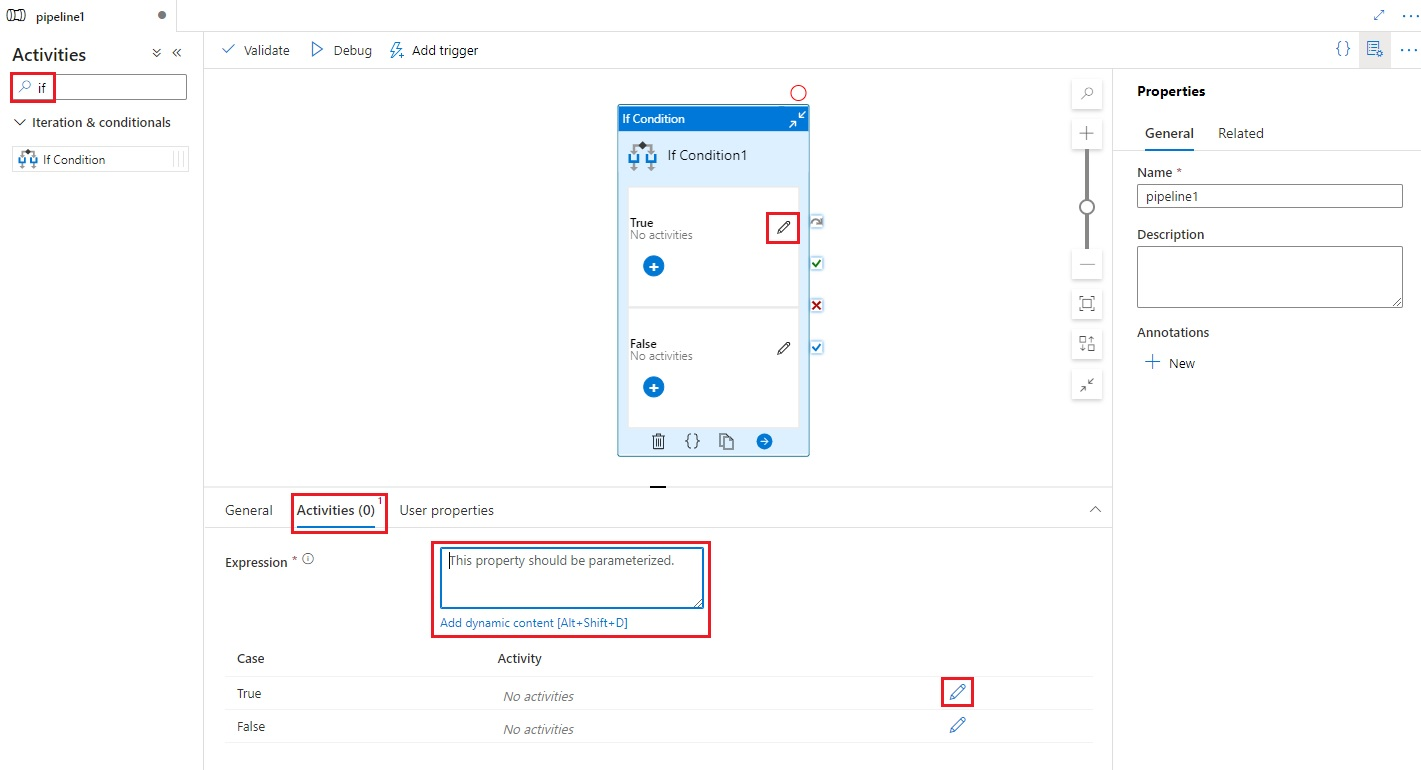
Boolean true veya false değeri döndüren bir ifade girin. Bu, dinamik ifadelerin, işlevlerin,sistem değişkenlerinin veya diğer etkinliklerden gelen çıkışların herhangi bir bileşimi olabilir.
trueveyafalseolarak değerlendirilen ifadeye göre yürütülecek etkinlikleri eklemek için, Etkinlikler sekmesinde bulunan If Koşulu için Etkinlikleri Düzenle düğmelerine, veya doğrudan işlem hattı tuvalindeki If Koşulu'na tıklayın.
Sözdizimi
{
    "name": "<Name of the activity>",
    "type": "IfCondition",
    "typeProperties": {
		    "expression": {
            "value": "<expression that evaluates to true or false>",
            "type": "Expression"
		    },

		    "ifTrueActivities": [
            {
                "<Activity 1 definition>"
            },
            {
                "<Activity 2 definition>"
            },
            {
                "<Activity N definition>"
            }
        ],

        "ifFalseActivities": [
            {
                "<Activity 1 definition>"
            },
            {
                "<Activity 2 definition>"
            },
            {
                "<Activity N definition>"
            }
		    ]
    }
}
Tür özellikleri
| Özellik | Açıklama | İzin verilen değerler | Gerekli |
|---|---|---|---|
| isim | If-condition etkinliğinin adı. | Dize | Yes |
| tür | IfCondition olarak ayarlanmalıdır | Dize | Yes |
| ifade | Doğru veya yanlış olarak değerlendirilecek ifade | Sonuç türü boole olan ifade | Yes |
| ifTrueActivities | İfade true olarak değerlendirildiğinde yürütülen etkinlikler kümesi. |
Array | Yes |
| ifFalseActivities (Yanlış durumda yapılacak aktiviteler) | İfade false olarak değerlendirildiğinde yürütülen etkinlikler kümesi. |
Array | Yes |
Örnek
Bu örnekteki işlem hattı, bir giriş klasöründeki verileri çıkış klasörüne kopyalar. Çıkış klasörü, routeSelection işlem hattı parametresinin değerine göre belirlenir. routeSelection değeri true ise, veriler outputPath1'e kopyalanır. RouteSelection değeri false ise veriler outputPath2'ye kopyalanır.
Note
Bu bölümde, işlem hattını çalıştırmak için JSON tanımları ve örnek PowerShell komutları sağlanır. Azure PowerShell ve JSON tanımlarını kullanarak işlem hattı oluşturmaya yönelik adım adım yönergeler içeren bir kılavuz için bkz. tutorial: Azure PowerShell kullanarak veri fabrikası oluşturma.
IF-Condition etkinliği olan işlem hattı (Adfv2QuickStartPipeline.json)
{
    "name": "Adfv2QuickStartPipeline",
    "properties": {
        "activities": [
            {
                "name": "MyIfCondition",
                "type": "IfCondition",
                "typeProperties": {
                    "expression":  {
                        "value":  "@bool(pipeline().parameters.routeSelection)",
                        "type": "Expression"
                     },

                    "ifTrueActivities": [
                        {
                            "name": "CopyFromBlobToBlob1",
                            "type": "Copy",
                            "inputs": [
                                {
                                    "referenceName": "BlobDataset",
                                    "parameters": {
                                        "path": "@pipeline().parameters.inputPath"
                                    },
                                    "type": "DatasetReference"
                                }
                            ],
                            "outputs": [
                                {
                                    "referenceName": "BlobDataset",
                                    "parameters": {
                                        "path": "@pipeline().parameters.outputPath1"
                                    },
                                    "type": "DatasetReference"
                                }
                            ],
                            "typeProperties": {
                                "source": {
                                    "type": "BlobSource"
                                },
                                "sink": {
                                    "type": "BlobSink"
                                }
                            }
                        }
                    ],
                    "ifFalseActivities": [
                        {
                            "name": "CopyFromBlobToBlob2",
                            "type": "Copy",
                            "inputs": [
                                {
                                    "referenceName": "BlobDataset",
                                    "parameters": {
                                        "path": "@pipeline().parameters.inputPath"
                                    },
                                    "type": "DatasetReference"
                                }
                            ],
                            "outputs": [
                                {
                                    "referenceName": "BlobDataset",
                                    "parameters": {
                                        "path": "@pipeline().parameters.outputPath2"
                                    },
                                    "type": "DatasetReference"
                                }
                            ],
                            "typeProperties": {
                                "source": {
                                    "type": "BlobSource"
                                },
                                "sink": {
                                    "type": "BlobSink"
                                }
                            }
                        }
                    ]
                }
            }
        ],
        "parameters": {
            "inputPath": {
                "type": "String"
            },
            "outputPath1": {
                "type": "String"
            },
            "outputPath2": {
                "type": "String"
            },
            "routeSelection": {
                "type": "String"
            }
        }
    }
}
İfade için başka bir örnek:
"expression":  {
    "value":  "@equals(pipeline().parameters.routeSelection,1)",
    "type": "Expression"
}
Azure Depolama bağlı hizmeti (AzureStorageLinkedService.json)
{
    "name": "AzureStorageLinkedService",
    "properties": {
        "type": "AzureStorage",
        "typeProperties": {
            "connectionString": "DefaultEndpointsProtocol=https;AccountName=<Azure Storage account name>;AccountKey=<Azure Storage account key>"
        }
    }
}
Parametreli Azure Blob veri kümesi (BlobDataset.json)
İşlem hattı, folderPath değerini, outputPath1 veya outputPath2 parametrelerinden birine ayarlar.
{
    "name": "BlobDataset",
    "properties": {
        "type": "AzureBlob",
        "typeProperties": {
            "folderPath": {
                "value": "@{dataset().path}",
                "type": "Expression"
            }
        },
        "linkedServiceName": {
            "referenceName": "AzureStorageLinkedService",
            "type": "LinkedServiceReference"
        },
        "parameters": {
            "path": {
                "type": "String"
            }
        }
    }
}
İşlem hattı parametresi JSON (PipelineParameters.json)
{
    "inputPath": "adftutorial/input",
    "outputPath1": "adftutorial/outputIf",
    "outputPath2": "adftutorial/outputElse",
    "routeSelection": "false"
}
PowerShell komutları
Note
Azure ile etkileşime geçmek için Azure Az PowerShell modülünü kullanmanızı öneririz. Başlamak için bkz. Azure PowerShell yükleme. Az PowerShell modülüne nasıl geçiş yapılacağını öğrenmek için bkz. AzureRM'den Az Azure PowerShell dağıtma.
Bu komutlar, JSON dosyalarını C:\ADF klasörüne kaydettiğinizi varsayar.
Connect-AzAccount
Select-AzSubscription "<Your subscription name>"

$resourceGroupName = "<Resource Group Name>"
$dataFactoryName = "<Data Factory Name. Must be globally unique>";
Remove-AzDataFactoryV2 $dataFactoryName -ResourceGroupName $resourceGroupName -force


Set-AzDataFactoryV2 -ResourceGroupName $resourceGroupName -Location "East US" -Name $dataFactoryName
Set-AzDataFactoryV2LinkedService -DataFactoryName $dataFactoryName -ResourceGroupName $resourceGroupName -Name "AzureStorageLinkedService" -DefinitionFile "C:\ADF\AzureStorageLinkedService.json"
Set-AzDataFactoryV2Dataset -DataFactoryName $dataFactoryName -ResourceGroupName $resourceGroupName -Name "BlobDataset" -DefinitionFile "C:\ADF\BlobDataset.json"
Set-AzDataFactoryV2Pipeline -DataFactoryName $dataFactoryName -ResourceGroupName $resourceGroupName -Name "Adfv2QuickStartPipeline" -DefinitionFile "C:\ADF\Adfv2QuickStartPipeline.json"
$runId = Invoke-AzDataFactoryV2Pipeline -DataFactoryName $dataFactoryName -ResourceGroupName $resourceGroupName -PipelineName "Adfv2QuickStartPipeline" -ParameterFile C:\ADF\PipelineParameters.json
while ($True) {
    $run = Get-AzDataFactoryV2PipelineRun -ResourceGroupName $resourceGroupName -DataFactoryName $DataFactoryName -PipelineRunId $runId

    if ($run) {
        if ($run.Status -ne 'InProgress') {
            Write-Host "Pipeline run finished. The status is: " $run.Status -foregroundcolor "Yellow"
            $run
            break
        }
        Write-Host  "Pipeline is running...status: InProgress" -foregroundcolor "Yellow"
    }

    Start-Sleep -Seconds 30
}
Write-Host "Activity run details:" -foregroundcolor "Yellow"
$result = Get-AzDataFactoryV2ActivityRun -DataFactoryName $dataFactoryName -ResourceGroupName $resourceGroupName -PipelineRunId $runId -RunStartedAfter (Get-Date).AddMinutes(-30) -RunStartedBefore (Get-Date).AddMinutes(30)
$result

Write-Host "Activity 'Output' section:" -foregroundcolor "Yellow"
$result.Output -join "`r`n"

Write-Host "\nActivity 'Error' section:" -foregroundcolor "Yellow"
$result.Error -join "`r`n"
İlgili içerik
Desteklenen diğer denetim akışı etkinliklerine bakın: