Not
Bu sayfaya erişim yetkilendirme gerektiriyor. Oturum açmayı veya dizinleri değiştirmeyi deneyebilirsiniz.
Bu sayfaya erişim yetkilendirme gerektiriyor. Dizinleri değiştirmeyi deneyebilirsiniz.
Bu makalede, doğru yüklenmemiş, düzgün çalışan veya Azure'a bağlı olmayan iyi durumda olmayan uzantıları tanımlamanın yolları açıklanmaktadır.
İyi durumda olmayan uzantıları belirleme
Azure portalında yerleşik uzantı durumu panosunu kullanma
SQL Server için dağıtılan tüm Azure uzantılarının sistem durumunu göstermek için Azure portalındaki yerleşik uzantı sistem durumu panosunu kullanabilirsiniz.
Bahşiş
Sql-server-samples GitHub deposundan bu dosyayla kendi özel panonuzu oluşturun: Arc özellikli SQL Server Health.json.
Azure Kaynak Grafı'nı kullanarak iyi durumda olmayan uzantıları sorgulama
Azure Arc özellikli sunucularınızda SQL Server için Azure uzantısının durumunu belirlemek için Azure Kaynak Grafı'nı kullanın.
Bahşiş
Henüz aşina değilseniz Azure Kaynak Grafı hakkında bilgi edinin:
Bu sorgu, uzantıların yüklü olduğu sunucularda SQL Server örneklerini döndürür, ancak iyi durumda değildir.
resources
| where type == "microsoft.hybridcompute/machines/extensions"
| where properties.type in ("WindowsAgent.SqlServer", "LinuxAgent.SqlServer")
| extend targetMachineName = tolower(tostring(split(id, '/')[8])) // Extract the machine name from the extension's id
| join kind=leftouter (
    resources
    | where type == "microsoft.hybridcompute/machines"
    | project machineId = id, MachineName = name, subscriptionId, LowerMachineName = tolower(name), resourceGroup , MachineStatus= properties.status , MachineProvisioningStatus= properties.provisioningState, MachineErrors = properties.errorDetails //Project relevant machine health information.
) on $left.targetMachineName == $right.LowerMachineName and $left.resourceGroup == $right.resourceGroup and $left.subscriptionId == $right.subscriptionId // Join Based on MachineName in the id and the machine's name, the resource group, and the subscription. This join allows us to present the data of the machine as well as the extension in the final output.
| extend statusExpirationLengthRange = 3d // Change this value to change the acceptable range for the last time an extension should have reported its status.
| extend startDate = startofday(now() - statusExpirationLengthRange), endDate = startofday(now()) // Get the start and end position for the given range.
| extend extractedDateString = extract("timestampUTC : (\\d{4}\\W\\d{2}\\W\\d{2})", 1, tostring(properties.instanceView.status.message)) // Extracting the date string for the LastUploadTimestamp. Is empty if none is found.
| extend extractedDateStringYear = split(extractedDateString, '/')[0], extractedDateStringMonth = split(extractedDateString, '/')[1], extractedDateStringDay = split(extractedDateString, '/')[2] // Identifying each of the parts of the date that was extracted from the message.
| extend extractedDate = todatetime(strcat(extractedDateStringYear,"-",extractedDateStringMonth,"-",extractedDateStringDay,"T00:00:00Z")) // Converting to a datetime object and rewriting string into ISO format because todatetime() does not work using the previous format.
| extend isNotInDateRange = not(extractedDate >= startDate and extractedDate <= endDate) // Created bool which is true if the date we extracted from the message is not within the specified range. This bool will also be true if the date was not found in the message.
| where properties.instanceView.status.message !contains "SQL Server Extension Agent: Healthy" // Begin searching for unhealthy extensions using the following 1. Does extension report being healthy. 2. Is last upload within the given range. 3. Is the upload status in an OK state. 4. Is provisioning state not in a succeeded state.
    or isNotInDateRange
    or properties.instanceView.status.message !contains "uploadStatus : OK"
    or properties.provisioningState != "Succeeded"
    or MachineStatus != "Connected"
| extend FailureReasons = strcat( // Makes a String to list all the reason that this resource got flagged for
        iif(MachineStatus != "Connected",strcat("- Machine's status is ", MachineStatus," -"),"") ,
        iif(MachineErrors != "[]","- Machine reports errors -", ""),
        iif(properties.instanceView.status.message !contains "SQL Server Extension Agent: Healthy","- Extension reported unhealthy -",""),
        iif(isNotInDateRange,"- Last upload outside acceptable range -",""),
        iif(properties.instanceView.status.message !contains "uploadStatus : OK","- Upload status is not reported OK -",""),
        iif(properties.provisioningState != "Succeeded",strcat("- Extension provisiong state is ", properties.provisioningState," -"),"")
    )
| extend RecommendedAction = //Attempt to Identify RootCause based on information gathered, and point customer to what they should investigate first.
    iif(MachineStatus == "Disconnected", "Machine is disconnected. Please reconnect the machine.",
        iif(MachineStatus == "Expired", "Machine cert is expired. Go to the machine on the Azure portal for more information on how to resolve this issue.",
            iif(MachineStatus != "Connected", strcat("Machine status is ", MachineStatus,". Investigate and resolve this issue."),
                iif(MachineProvisioningStatus != "Succeeded", strcat("Machine provisioning status is ", MachineProvisioningStatus, ". Investigate and resolve machine provisioning status"),
                    iff(MachineErrors != "[]", "Machine is reporting errors. Investigate and resolve machine errors",
                        iif(properties.provisioningState != "Succeeded", strcat("Extension provisioning status is ", properties.provisioningState,". Investigate and resolve extension provisioning state."),
                            iff(properties.instanceView.status.message !contains "SQL Server Extension Agent:" and properties.instanceView.status.message contains "SQL Server Extension Agent Deployer", "SQL Server extension employer ran. However, SQL Server extension seems to not be running. Verify that the extension is currently running.",
                                iff(properties.instanceView.status.message !contains "uploadStatus : OK" or isNotInDateRange or properties.instanceView.status.message !contains "SQL Server Extension Agent: Healthy", "Extension reported as unhealthy. View FailureReasons and LastExtensionStatusMessage for more information as to the cause of the failure.",
                                    "Unable to recommend actions. Please view FailureReasons."
                                )
                            )
                        )
                    )
                )
            )
        )
    )
| project ID = id, MachineName, ResourceGroup = resourceGroup, SubscriptionID = subscriptionId, Location = location, RecommendedAction, FailureReasons, LicenseType = properties.settings.LicenseType,
    LastReportedExtensionHealth = iif(properties.instanceView.status.message !contains "SQL Server Extension Agent: Healthy", "Unhealthy", "Healthy"),
    LastExtensionUploadTimestamp = iif(indexof(properties.instanceView.status.message, "timestampUTC : ") > 0,
        substring(properties.instanceView.status.message, indexof(properties.instanceView.status.message, "timestampUTC : ") + 15, 10),
        "no timestamp"),
    LastExtensionUploadStatus = iif(indexof(properties.instanceView.status.message, "uploadStatus : OK") > 0, "OK", "Unhealthy"),
    ExtensionProvisioningState = properties.provisioningState,
    MachineStatus, MachineErrors, MachineProvisioningStatus,MachineId = machineId,
    LastExtensionStatusMessage = properties.instanceView.status.message
Olası sorunları belirlemek için RecommendedAction veya FailureReasons sütunundaki değeri gözden geçirin. RecommendedAction sütunu, sorunu çözmek için olası ilk adımları veya önce nelerin denetlenecekleri hakkında ipuçları sağlar. FailureReasons sütununda kaynağın iyi durumda olmadığının nedenleri listelenir. Son olarak, aracı tarafından bildirilen son iletiyi görmek için LastExtensionStatusMessage
Öneriler
| Önerilen Eylem | Eylem Ayrıntıları |
|---|---|
| Makine sertifikasının süresi doldu. Bu sorunun nasıl çözüleceğini öğrenmek için Azure portalında makineye gidin. |
Azure'da kimlik doğrulaması yapmak için kullanılan sertifikanın süresi dolduğundan Arc özellikli makinenin Arc'a yeniden yüklenmesi gerekir. Arc makinesi durumu Azure portalında Süresi dolmuş. Aracıyı kaldırıpyeniden ekleyebilirsiniz. Yeniden ekleniyorsanız portalda Arc özellikli SQL Server kaynaklarını silmeniz gerekmez. otomatik ekleme etkinleştirildiği sürece (varsayılan) SQL uzantısı otomatik olarak yeniden yüklenir. |
| Makinenin bağlantısı kesildi. Makineyi yeniden bağlayın. |
Arc makinesi, state = Disconnected'da. Bu durum çeşitli nedenlerden dolayı olabilir:Arc'a bağlı makine aracısı durduruldu, devre dışı bırakıldı veya sürekli çöküyor. veya Aracı ile Azure arasındaki bağlantı engellenir. Arc'a bağlı makine hizmetlerinin/daemon'larının durumunu denetleereketkinleştirildiğinden ve çalıştığından emin olun. Bağlantıyıdenetleyin. Ayrıntılı günlükkullanarak aracı sorunlarını giderin. |
| Uzantı iyi durumda değil olarak bildirildi. Hatanın nedeni hakkında daha fazla bilgi için FailureReasons ve LastExtensionStatusMessage değerlerini görüntüleyin. Kabul edilebilir aralığın dışına son yükleme (son üç gün içinde). |
LastExtensionUploadTimestamp sütununu denetleyin.
Zaman damgası yok ise Azure'a envanter veya kullanım verilerini bildirmez.
Veri işleme hizmeti ve telemetri uç noktalarıyla bağlantı sorunlarını giderme. Son karşıya yükleme kabul edilebilir aralığın dışındaysa (son üç gün içinde) ve LastExtensionUploadStatus, ExtensionProvisioningState ve MachineStatus gibi diğer her şey Tamam görünüyorsa, SQL Server hizmeti/daemon için Azure Uzantısı durdurulabilir. Neden durdurulduğunu öğrenin ve yeniden başlatın. Sorunla ilgili diğer ipuçları için LastExtensionStatusMessage denetleyin. |
| Uzantı sağlama durumu Başarısız. Uzantı sağlama durumunu inceleyin ve çözümleyin. |
SQL uzantısının ilk yüklemesi veya güncelleştirme başarısız oldu. SQL Server dağıtımı için Azure uzantısı sorunlarını giderme. LastExtensionStatusMessagedeğerini kontrol edin. |
| Karşıya yükleme durumu bildirildi Tamam | Panodaki LastExtensionMessage sütununu kontrol edin ve uploadStatus değerine ve uploadMessage değerine bakın (varsa, sürüme bağlı olarak). uploadStatus değeri genellikle bir HTTP hata kodudur. 'ı gözden geçirin,hata kodlarıyla ilgili sorunları giderin. uploadMessage daha ayrıntılı bilgilere sahip olabilir. Veri işleme hizmeti ve telemetri uç noktalarıyla bağlantı sorunlarını giderme. |
| Uzantı sağlanma durumu Güncelleniyor veya Uzantı sağlanma durumu Oluşturuluyor veya Uzantı sağlama durumu başarısız veya Uzantı sağlama durumu Silme |
Belirli bir uzantı 30 dakikadan fazla süre bu durumlardan birinde kalırsa sağlama sürecinde bir sorun yaşanıyor olabilir. Uzantıyı kaldırın ve CLI veya portal kullanarak yeniden yükleyin. Sorun devam ederse dağıtıcı ve uzantı günlüklerini denetleyin. Uzantı oluşturma işlemi başarısız olursa aracının bağlı olduğunu ve ilişkili aracı hizmetlerinin çalıştığını doğrulayın. Silme işlemi başarısız olursa aracıyı kaldırmayı ve gerekirse portalda Arc makinesi kaynağını silmeyi ve sonra yeniden dağıtmayı deneyin. Aracıyı kaldırıpyeniden ekleyebilirsiniz. |
İyi durumda olmayan uzantıyı belirleme (PowerShell)
Bu örnek PowerShell'de çalışır. Örnek, bir PowerShell betiği aracılığıyla önceki sorguyla aynı sonucu döndürür.
# PowerShell script to execute an Azure Resource Graph query using Azure CLI
# where the extension status is unhealthy or the extension last upload time isn't in this month or the previous month.

# Requires the Az.ResourceGraph PowerShell module

# Login to Azure if needed
#az login

# Define the Azure Resource Graph query
$query = @"
resources
| where type == "microsoft.hybridcompute/machines/extensions"
| where properties.type in ("WindowsAgent.SqlServer", "LinuxAgent.SqlServer")
| extend targetMachineName = tolower(tostring(split(id, '/')[8])) // Extract the machine name from the extension's id
| join kind=leftouter (
    resources
    | where type == "microsoft.hybridcompute/machines"
    | project machineId = id, MachineName = name, subscriptionId, LowerMachineName = tolower(name), resourceGroup , MachineStatus= properties.status , MachineProvisioningStatus= properties.provisioningState, MachineErrors = properties.errorDetails //Project relevant machine health information.
) on $left.targetMachineName == $right.LowerMachineName and $left.resourceGroup == $right.resourceGroup and $left.subscriptionId == $right.subscriptionId // Join Based on MachineName in the id and the machine's name, the resource group, and the subscription. This join allows us to present the data of the machine as well as the extension in the final output.
| extend statusExpirationLengthRange = 3d // Change this value to change the acceptable range for the last time an extension should have reported its status.
| extend startDate = startofday(now() - statusExpirationLengthRange), endDate = startofday(now()) // Get the start and end position for the given range.
| extend extractedDateString = extract("timestampUTC : (\\d{4}\\W\\d{2}\\W\\d{2})", 1, tostring(properties.instanceView.status.message)) // Extracting the date string for the LastUploadTimestamp. Is empty if none is found.
| extend extractedDateStringYear = split(extractedDateString, '/')[0], extractedDateStringMonth = split(extractedDateString, '/')[1], extractedDateStringDay = split(extractedDateString, '/')[2] // Identifying each of the parts of the date that was extracted from the message.
| extend extractedDate = todatetime(strcat(extractedDateStringYear,"-",extractedDateStringMonth,"-",extractedDateStringDay,"T00:00:00Z")) // Converting to a datetime object and rewriting string into ISO format because todatetime() does not work using the previous format.
| extend isNotInDateRange = not(extractedDate >= startDate and extractedDate <= endDate) // Created bool which is true if the date we extracted from the message is not within the specified range. This bool will also be true if the date was not found in the message.
| where properties.instanceView.status.message !contains "SQL Server Extension Agent: Healthy" // Begin searching for unhealthy extensions using the following 1. Does extension report being healthy. 2. Is last upload within the given range. 3. Is the upload status in an OK state. 4. Is provisioning state not in a succeeded state.
    or isNotInDateRange
    or properties.instanceView.status.message !contains "uploadStatus : OK"
    or properties.provisioningState != "Succeeded"
    or MachineStatus != "Connected"
| extend FailureReasons = strcat( // Makes a String to list all the reason that this resource got flagged for
        iif(MachineStatus != "Connected",strcat("- Machine's status is ", MachineStatus," -"),"") ,
        iif(MachineErrors != "[]","- Machine reports errors -", ""),
        iif(properties.instanceView.status.message !contains "SQL Server Extension Agent: Healthy","- Extension reported unhealthy -",""),
        iif(isNotInDateRange,"- Last upload outside acceptable range -",""),
        iif(properties.instanceView.status.message !contains "uploadStatus : OK","- Upload status is not reported OK -",""),
        iif(properties.provisioningState != "Succeeded",strcat("- Extension provisiong state is ", properties.provisioningState," -"),"")
    )
| extend RecommendedAction = //Attempt to Identify RootCause based on information gathered, and point customer to what they should investigate first.
    iif(MachineStatus == "Disconnected", "Machine is disconnected. Please reconnect the machine.",
        iif(MachineStatus == "Expired", "Machine cert is expired. Go to the machine on the Azure portal for more information on how to resolve this issue.",
            iif(MachineStatus != "Connected", strcat("Machine status is ", MachineStatus,". Investigate and resolve this issue."),
                iif(MachineProvisioningStatus != "Succeeded", strcat("Machine provisioning status is ", MachineProvisioningStatus, ". Investigate and resolve machine provisioning status"),
                    iff(MachineErrors != "[]", "Machine is reporting errors. Investigate and resolve machine errors",
                        iif(properties.provisioningState != "Succeeded", strcat("Extension provisioning status is ", properties.provisioningState,". Investigate and resolve extension provisioning state."),
                            iff(properties.instanceView.status.message !contains "SQL Server Extension Agent:" and properties.instanceView.status.message contains "SQL Server Extension Agent Deployer", "SQL Server extension employer ran. However, SQL Server extension seems to not be running. Verify that the extension is currently running.",
                                iff(properties.instanceView.status.message !contains "uploadStatus : OK" or isNotInDateRange or properties.instanceView.status.message !contains "SQL Server Extension Agent: Healthy", "Extension reported as unhealthy. View FailureReasons and LastExtensionStatusMessage for more information as to the cause of the failure.",
                                    "Unable to recommend actions. Please view FailureReasons."
                                )
                            )
                        )
                    )
                )
            )
        )
    )
| project ID = id, MachineName, ResourceGroup = resourceGroup, SubscriptionID = subscriptionId, Location = location, RecommendedAction, FailureReasons, LicenseType = properties.settings.LicenseType,
    LastReportedExtensionHealth = iif(properties.instanceView.status.message !contains "SQL Server Extension Agent: Healthy", "Unhealthy", "Healthy"),
    LastExtensionUploadTimestamp = iif(indexof(properties.instanceView.status.message, "timestampUTC : ") > 0,
        substring(properties.instanceView.status.message, indexof(properties.instanceView.status.message, "timestampUTC : ") + 15, 10),
        "no timestamp"),
    LastExtensionUploadStatus = iif(indexof(properties.instanceView.status.message, "uploadStatus : OK") > 0, "OK", "Unhealthy"),
    ExtensionProvisioningState = properties.provisioningState,
    MachineStatus, MachineErrors, MachineProvisioningStatus,MachineId = machineId,
    LastExtensionStatusMessage = properties.instanceView.status.message
"@

# Execute the Azure Resource Graph query
$result = Search-AzGraph -Query $query

# Output the results
$result | Format-Table -Property ExtensionHealth, LastUploadTimestamp, LastUploadStatus, Message
Olası sorunları belirlemek için RecommendedAction veya FailureReasons sütunundaki değeri gözden geçirin. RecommendedAction sütunu, sorunu çözmek için olası ilk adımları veya önce nelerin denetlenecekleri hakkında ipuçları sağlar. FailureReasons sütununda kaynağın iyi durumda olmadığının nedenleri listelenir. Son olarak, aracı tarafından bildirilen son iletiyi görmek için LastExtensionStatusMessage
Güncelleme eksikliği olan uzantıları belirle
Son durum güncelleştirmeleri olmadan uzantıları tanımlayın. Bu sorgu, uzantının durumunu son güncelleştirmesinin üzerinden geçen gün sayısına göre sıralanmış SQL Server için Azure uzantılarının listesini döndürür. '-1' değeri, uzantının çöktüğünü ve uzantı durumunda bir çağrı yığını bulunduğunu gösterir.
// Show the timestamp extracted
// If an extension has crashed (i.e. no heartbeat), fill timestamp with "1900/01/01, 00:00:00.000"
//
resources
| where type =~ 'microsoft.hybridcompute/machines/extensions'
| extend extensionStatus = parse_json(properties).instanceView.status.message
| extend timestampExtracted = extract(@"timestampUTC\s*:\s*(\d{4}/\d{2}/\d{2}, \d{2}:\d{2}:\d{2}\.\d{3})", 1, tostring(extensionStatus))
| extend timestampNullFilled = iff(isnull(timestampExtracted) or timestampExtracted == "", "1900/01/01, 00:00:00.000", timestampExtracted)
| extend timestampKustoFormattedString = strcat(replace(",", "", replace("/", "-", replace("/", "-", timestampNullFilled))), "Z")
| extend agentHeartbeatUtcTimestamp = todatetime(timestampKustoFormattedString)
| extend agentHeartbeatLagInDays = datetime_diff('day', now(), agentHeartbeatUtcTimestamp)
| project id, extensionStatus, agentHeartbeatUtcTimestamp, agentHeartbeatLagInDays
| limit 100
| order by ['agentHeartbeatLagInDays'] asc
Bu sorgu, uzantının durumunu son güncelleştirmesinin üzerinden geçen gün sayısına göre gruplandırılmış bir uzantı sayısı döndürür. '-1' değeri, uzantının çöktüğünü ve uzantı durumunda bir çağrı yığını bulunduğunu gösterir.
// Aggregate by timestamp
//
// -1: Crashed extension with no heartbeat, we got a stacktrace instead
//  0: Healthy
// >1: Stale/Offline
//
resources
| where type =~ 'microsoft.hybridcompute/machines/extensions'
| extend extensionStatus = parse_json(properties).instanceView.status.message
| extend timestampExtracted = extract(@"timestampUTC\s*:\s*(\d{4}/\d{2}/\d{2}, \d{2}:\d{2}:\d{2}\.\d{3})", 1, tostring(extensionStatus))
| extend timestampNullFilled = iff(isnull(timestampExtracted) or timestampExtracted == "", "1900/01/01, 00:00:00.000", timestampExtracted)
| extend timestampKustoFormattedString = strcat(replace(",", "", replace("/", "-", replace("/", "-", timestampNullFilled))), "Z")
| extend agentHeartbeatUtcTimestamp = todatetime(timestampKustoFormattedString)
| extend agentHeartbeatLagInDays = iff(agentHeartbeatUtcTimestamp == todatetime("1900/01/01, 00:00:00.000Z"), -1, datetime_diff('day', now(), agentHeartbeatUtcTimestamp))
| summarize numExtensions = count() by agentHeartbeatLagInDays
| order by numExtensions desc
Uzantıyı yükseltme
Geçerli uzantı sürümünü belirlemek için sürüm notlarını gözden geçirin.
Uzantınızın sürümünü denetlemek için aşağıdaki PowerShell komutunu kullanın:
azcmagent version
Uzantı yükseltmelerini basitleştirmek için otomatik güncelleştirmeleri etkinleştirdiğinizden emin olun. Ayrıca Azure portalını, PowerShell'i ve Azure CLI'yı kullanarak uzantıyı el ile yükseltebilirsiniz.
Azure portalında uzantıyı yükseltmek için şu adımları izleyin:
Azure portalında Makineler - Azure Arc'a gidin.
Sunucunuzun Genel Bakış bölmesini açmak için SQL Server'ın yüklü olduğu makinenin adını seçin.
Ayarlar'ın altında Uzantılar'ı seçin.
Uzantı kutusunu
WindowsAgent.SqlServerişaretleyin ve gezinti menüsünden Güncelleştir'i seçin.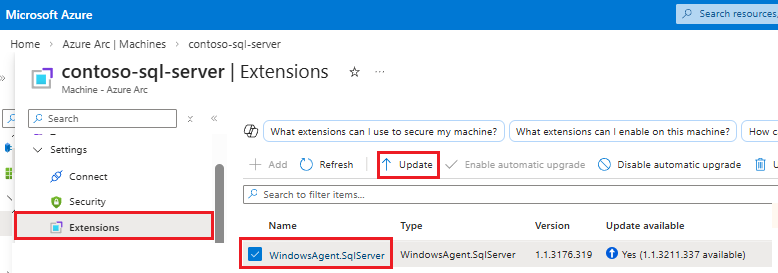
Yükseltmeyi tamamlamak için Uzantıyı güncelleştir onay iletişim kutusunda Evet'i seçin.
SQL Server için Azure uzantısını yükseltme hakkında daha fazla bilgi için bkz. Uzantıyı yükseltme.