Not
Bu sayfaya erişim yetkilendirme gerektiriyor. Oturum açmayı veya dizinleri değiştirmeyi deneyebilirsiniz.
Bu sayfaya erişim yetkilendirme gerektiriyor. Dizinleri değiştirmeyi deneyebilirsiniz.
Node.js istemci kitaplığıyla Azure DocumentDB'de vektör araması kullanın. Vektör verilerini verimli bir şekilde depolayın ve sorgulayın.
Bu hızlı başlangıçta modelden text-embedding-3-small vektörler içeren bir JSON dosyasında örnek bir otel veri kümesi kullanılmaktadır. Veri kümesi otel adlarını, konumlarını, açıklamalarını ve vektör eklemelerini içerir.
GitHub'da örnek kodu bulun.
Prerequisites
Azure aboneliği
- Azure aboneliğiniz yoksa ücretsiz bir hesap oluşturun
Mevcut bir Azure DocumentDB kümesi
-
Özel alan adı yapılandırıldı
text-embedding-3-smalldağıtılan model
Azure Cloud Shell'de Bash ortamını kullanın. Daha fazla bilgi için bkz. Azure Cloud Shell'i kullanmaya başlama.

CLI referans komutlarını yerel olarak çalıştırmayı tercih ediyorsanız, Azure CLI'yi yükleyin. Windows veya macOS üzerinde çalışıyorsanız, Azure CLI'yi bir Docker konteynerinde çalıştırmayı düşünün. Daha fazla bilgi için Azure CLI'nin bir Docker konteynerında nasıl çalıştırılacağını inceleyin.
Yerel bir kurulum kullanıyorsanız, az login komutunu kullanarak Azure CLI'ye giriş yapın. Kimlik doğrulama işlemini tamamlamak için, terminalinizde görüntülenen adımları takip edin. Diğer oturum açma seçenekleri için bkz. Azure CLI kullanarak Azure'da kimlik doğrulaması.
İstendiğinde, ilk kullanımda Azure CLI uzantısını yükleyin. Uzantılar hakkında daha fazla bilgi için bkz. Azure CLI ile uzantıları kullanma ve yönetme.
Yüklü olan sürümü ve bağımlı kütüphaneleri bulmak için az version komutunu çalıştırın. En son sürüme yükseltmek için az upgrade komutunu çalıştırın.
TypeScript: TypeScript'i genel olarak yükleyin:
npm install -g typescript
Vektörlerle veri dosyası oluşturma
Oteller veri dosyası için yeni bir veri dizini oluşturun:
mkdir dataVektörleri olan
Hotels_Vector.jsonham veri dosyasını dizininizedatakopyalayın.
Node.js projesi oluşturma
Projeniz için veri diziniyle aynı düzeyde yeni bir eşdüzey dizin oluşturun ve bunu Visual Studio Code'da açın:
mkdir vector-search-quickstart
code vector-search-quickstart
Terminalde bir Node.js projesi başlatın:
npm init -y
npm pkg set type="module"
Gerekli paketleri yükleyin:
npm install mongodb @azure/identity openai @types/node-
mongodb: MongoDB Node.js sürücüsü -
@azure/identity: Parolasız kimlik doğrulaması için Azure Kimlik kitaplığı -
openai: Vektör oluşturmak için OpenAI istemci kitaplığı -
@types/node: Node.js için tür tanımları
-
Ortam değişkenleri için proje kökünde bir
.envdosya oluşturun:# Identity for local developer authentication with Azure CLI AZURE_TOKEN_CREDENTIALS=AzureCliCredential # Azure OpenAI Embedding Settings AZURE_OPENAI_EMBEDDING_MODEL=text-embedding-3-small AZURE_OPENAI_EMBEDDING_API_VERSION=2023-05-15 AZURE_OPENAI_EMBEDDING_ENDPOINT= EMBEDDING_SIZE_BATCH=16 # MongoDB configuration MONGO_CLUSTER_NAME= # Data file DATA_FILE_WITH_VECTORS=../data/Hotels_Vector.json FIELD_TO_EMBED=Description EMBEDDED_FIELD=DescriptionVector EMBEDDING_DIMENSIONS=1536 LOAD_SIZE_BATCH=100Dosyadaki
.envyer tutucu değerlerini kendi bilgilerinizle değiştirin:-
AZURE_OPENAI_EMBEDDING_ENDPOINT: Azure OpenAI kaynak uç noktası URL'niz -
MONGO_CLUSTER_NAME: Kaynak adınız
-
TypeScript'i yapılandırmak için bir
tsconfig.jsondosya ekleyin:{ "compilerOptions": { "target": "ES2020", "module": "NodeNext", "moduleResolution": "nodenext", "declaration": true, "outDir": "./dist", "strict": true, "esModuleInterop": true, "skipLibCheck": true, "noImplicitAny": false, "forceConsistentCasingInFileNames": true, "sourceMap": true, "resolveJsonModule": true, }, "include": [ "src/**/*" ], "exclude": [ "node_modules", "dist" ] }
Npm betikleri oluşturma
package.json Dosyayı düzenleyin ve şu betikleri ekleyin:
TypeScript dosyalarını derlemek ve DiskANN dizin uygulamasını çalıştırmak için bu betikleri kullanın.
"scripts": {
    "build": "tsc",
    "start:diskann": "node --env-file .env dist/diskann.js"
}
Vektör araması için kod dosyaları oluşturma
TypeScript dosyalarınız için bir src dizin oluşturun. İki dosya ekleyin: diskann.ts ve utils.ts DiskANN dizin uygulaması için:
mkdir src
touch src/diskann.ts
touch src/utils.ts
Vektör araması için kod oluşturma
Aşağıdaki kodu dosyaya yapıştırın diskann.ts .
import path from 'path';
import { readFileReturnJson, getClientsPasswordless, insertData, printSearchResults } from './utils.js';

// ESM specific features - create __dirname equivalent
import { fileURLToPath } from "node:url";
import { dirname } from "node:path";
const __filename = fileURLToPath(import.meta.url);
const __dirname = dirname(__filename);

const config = {
    query: "quintessential lodging near running trails, eateries, retail",
    dbName: "Hotels",
    collectionName: "hotels_diskann",
    indexName: "vectorIndex_diskann",
    dataFile: process.env.DATA_FILE_WITH_VECTORS!,
    batchSize: parseInt(process.env.LOAD_SIZE_BATCH! || '100', 10),
    embeddedField: process.env.EMBEDDED_FIELD!,
    embeddingDimensions: parseInt(process.env.EMBEDDING_DIMENSIONS!, 10),
    deployment: process.env.AZURE_OPENAI_EMBEDDING_MODEL!,
};

async function main() {

    const { aiClient, dbClient } = getClientsPasswordless();

    try {

        if (!aiClient) {
            throw new Error('AI client is not configured. Please check your environment variables.');
        }
        if (!dbClient) {
            throw new Error('Database client is not configured. Please check your environment variables.');
        }

        await dbClient.connect();
        const db = dbClient.db(config.dbName);
        const collection = await db.createCollection(config.collectionName);
        console.log('Created collection:', config.collectionName);
        const data = await readFileReturnJson(path.join(__dirname, "..", config.dataFile));
        const insertSummary = await insertData(config, collection, data);
        console.log('Created vector index:', config.indexName);

        // Create the vector index
        const indexOptions = {
            createIndexes: config.collectionName,
            indexes: [
                {
                    name: config.indexName,
                    key: {
                        [config.embeddedField]: 'cosmosSearch'
                    },
                    cosmosSearchOptions: {
                        kind: 'vector-diskann',
                        dimensions: config.embeddingDimensions,
                        similarity: 'COS', // 'COS', 'L2', 'IP'
                        maxDegree: 20, // 20 - 2048,  edges per node
                        lBuild: 10 // 10 - 500, candidate neighbors evaluated
                    }
                }
            ]
        };
        const vectorIndexSummary = await db.command(indexOptions);

        // Create embedding for the query
        const createEmbeddedForQueryResponse = await aiClient.embeddings.create({
            model: config.deployment,
            input: [config.query]
        });

        // Perform the vector similarity search
        const searchResults = await collection.aggregate([
            {
                $search: {
                    cosmosSearch: {
                        vector: createEmbeddedForQueryResponse.data[0].embedding,
                        path: config.embeddedField,
                        k: 5
                    }
                }
            },
            {
                $project: {
                    score: {
                        $meta: "searchScore"
                    },
                    document: "$$ROOT"
                }
            }
        ]).toArray();

        // Print the results
        printSearchResults(insertSummary, vectorIndexSummary, searchResults);

    } catch (error) {
        console.error('App failed:', error);
        process.exitCode = 1;
    } finally {
        console.log('Closing database connection...');
        if (dbClient) await dbClient.close();
        console.log('Database connection closed');
    }
}

// Execute the main function
main().catch(error => {
    console.error('Unhandled error:', error);
    process.exitCode = 1;
});
Bu ana modül şu özellikleri sağlar:
- Yardımcı program işlevlerini içerir
- Ortam değişkenleri için bir yapılandırma nesnesi oluşturur
- Azure OpenAI ve DocumentDB için istemciler oluşturur
- MongoDB'ye bağlanır, veritabanı ve koleksiyon oluşturur, veri ekler ve standart dizinler oluşturur
- IVF, HNSW veya DiskANN kullanarak vektör dizini oluşturur
- OpenAI istemcisini kullanarak örnek sorgu metni için ekleme oluşturur. Dosyanın en üstündeki sorguyu değiştirebilirsiniz
- Ekleme işlemini kullanarak vektör araması çalıştırır ve sonuçları yazdırır
Yardımcı program işlevleri oluşturma
Aşağıdaki kodu içine utils.tsyapıştırın:
import { MongoClient, OIDCResponse, OIDCCallbackParams } from 'mongodb';
import { AzureOpenAI } from 'openai/index.js';
import { promises as fs } from "fs";
import { AccessToken, DefaultAzureCredential, TokenCredential, getBearerTokenProvider } from '@azure/identity';

// Define a type for JSON data
export type JsonData = Record<string, any>;

export const AzureIdentityTokenCallback = async (params: OIDCCallbackParams, credential: TokenCredential): Promise<OIDCResponse> => {
    const tokenResponse: AccessToken | null = await credential.getToken(['https://ossrdbms-aad.database.windows.net/.default']);
    return {
        accessToken: tokenResponse?.token || '',
        expiresInSeconds: (tokenResponse?.expiresOnTimestamp || 0) - Math.floor(Date.now() / 1000)
    };
};
export function getClients(): { aiClient: AzureOpenAI; dbClient: MongoClient } {
    const apiKey = process.env.AZURE_OPENAI_EMBEDDING_KEY!;
    const apiVersion = process.env.AZURE_OPENAI_EMBEDDING_API_VERSION!;
    const endpoint = process.env.AZURE_OPENAI_EMBEDDING_ENDPOINT!;
    const deployment = process.env.AZURE_OPENAI_EMBEDDING_MODEL!;
    const mongoConnectionString = process.env.MONGO_CONNECTION_STRING!;

    if (!apiKey || !apiVersion || !endpoint || !deployment || !mongoConnectionString) {
        throw new Error('Missing required environment variables: AZURE_OPENAI_EMBEDDING_KEY, AZURE_OPENAI_EMBEDDING_API_VERSION, AZURE_OPENAI_EMBEDDING_ENDPOINT, AZURE_OPENAI_EMBEDDING_MODEL, MONGO_CONNECTION_STRING');
    }

    const aiClient = new AzureOpenAI({
        apiKey,
        apiVersion,
        endpoint,
        deployment
    });
    const dbClient = new MongoClient(mongoConnectionString, {
        // Performance optimizations
        maxPoolSize: 10,         // Limit concurrent connections
        minPoolSize: 1,          // Maintain at least one connection
        maxIdleTimeMS: 30000,    // Close idle connections after 30 seconds
        connectTimeoutMS: 30000, // Connection timeout
        socketTimeoutMS: 360000, // Socket timeout (for long-running operations)
        writeConcern: {          // Optimize write concern for bulk operations
            w: 1,                // Acknowledge writes after primary has written
            j: false             // Don't wait for journal commit
        }
    });

    return { aiClient, dbClient };
}

export function getClientsPasswordless(): { aiClient: AzureOpenAI | null; dbClient: MongoClient | null } {
    let aiClient: AzureOpenAI | null = null;
    let dbClient: MongoClient | null = null;

    // Validate all required environment variables upfront
    const apiVersion = process.env.AZURE_OPENAI_EMBEDDING_API_VERSION!;
    const endpoint = process.env.AZURE_OPENAI_EMBEDDING_ENDPOINT!;
    const deployment = process.env.AZURE_OPENAI_EMBEDDING_MODEL!;
    const clusterName = process.env.MONGO_CLUSTER_NAME!;

    if (!apiVersion || !endpoint || !deployment || !clusterName) {
        throw new Error('Missing required environment variables: AZURE_OPENAI_EMBEDDING_API_VERSION, AZURE_OPENAI_EMBEDDING_ENDPOINT, AZURE_OPENAI_EMBEDDING_MODEL, MONGO_CLUSTER_NAME');
    }

    console.log(`Using Azure OpenAI Embedding API Version: ${apiVersion}`);
    console.log(`Using Azure OpenAI Embedding Deployment/Model: ${deployment}`);

    const credential = new DefaultAzureCredential();

    // For Azure OpenAI with DefaultAzureCredential
    {
        const scope = "https://cognitiveservices.azure.com/.default";
        const azureADTokenProvider = getBearerTokenProvider(credential, scope);
        aiClient = new AzureOpenAI({
            apiVersion,
            endpoint,
            deployment,
            azureADTokenProvider
        });
    }

    // For DocumentDB with DefaultAzureCredential (uses signed-in user)
    {
        dbClient = new MongoClient(
            `mongodb+srv://${clusterName}.mongocluster.cosmos.azure.com/`, {
            connectTimeoutMS: 120000,
            tls: true,
            retryWrites: false,
            maxIdleTimeMS: 120000,
            authMechanism: 'MONGODB-OIDC',
            authMechanismProperties: {
                OIDC_CALLBACK: (params: OIDCCallbackParams) => AzureIdentityTokenCallback(params, credential),
                ALLOWED_HOSTS: ['*.azure.com']
            }
        }
        );
    }

    return { aiClient, dbClient };
}

export async function readFileReturnJson(filePath: string): Promise<JsonData[]> {

    console.log(`Reading JSON file from ${filePath}`);

    const fileAsString = await fs.readFile(filePath, "utf-8");
    return JSON.parse(fileAsString);
}
export async function writeFileJson(filePath: string, jsonData: JsonData): Promise<void> {
    const jsonString = JSON.stringify(jsonData, null, 2);
    await fs.writeFile(filePath, jsonString, "utf-8");

    console.log(`Wrote JSON file to ${filePath}`);
}
export async function insertData(config, collection, data) {
    console.log(`Processing in batches of ${config.batchSize}...`);
    const totalBatches = Math.ceil(data.length / config.batchSize);

    let inserted = 0;
    let updated = 0;
    let skipped = 0;
    let failed = 0;

    for (let i = 0; i < totalBatches; i++) {
        const start = i * config.batchSize;
        const end = Math.min(start + config.batchSize, data.length);
        const batch = data.slice(start, end);

        try {
            const result = await collection.insertMany(batch, { ordered: false });
            inserted += result.insertedCount || 0;
            console.log(`Batch ${i + 1} complete: ${result.insertedCount} inserted`);
        } catch (error: any) {
            if (error?.writeErrors) {
                // Some documents may have been inserted despite errors
                console.error(`Error in batch ${i + 1}: ${error?.writeErrors.length} failures`);
                failed += error?.writeErrors.length;
                inserted += batch.length - error?.writeErrors.length;
            } else {
                console.error(`Error in batch ${i + 1}:`, error);
                failed += batch.length;
            }
        }

        // Small pause between batches to reduce resource contention
        if (i < totalBatches - 1) {
            await new Promise(resolve => setTimeout(resolve, 100));
        }
    }
    const indexColumns = [
        "HotelId",
        "Category",
        "Description",
        "Description_fr"
    ];
    for (const col of indexColumns) {
        const indexSpec = {};
        indexSpec[col] = 1; // Ascending index
        await collection.createIndex(indexSpec);
    }

    return { total: data.length, inserted, updated, skipped, failed };
}

export function printSearchResults(insertSummary, indexSummary, searchResults) {


    if (!searchResults || searchResults.length === 0) {
        console.log('No search results found.');
        return;
    }

    searchResults.map((result, index) => {

        const { document, score } = result as any;

        console.log(`${index + 1}. HotelName: ${document.HotelName}, Score: ${score.toFixed(4)}`);
        //console.log(`   Description: ${document.Description}`);
    });

}
Bu yardımcı program modülü şu özellikleri sağlar:
-
JsonData: Veri yapısı arabirimi -
scoreProperty: Vektör arama yöntemine göre sorgu sonuçlarında puanın konumu -
getClients: Azure OpenAI ve Azure DocumentDB için istemciler oluşturur ve döndürür -
getClientsPasswordless: Parolasız kimlik doğrulaması kullanarak Azure OpenAI ve Azure DocumentDB için istemciler oluşturur ve döndürür. Her iki kaynakta da RBAC'yi etkinleştirin ve Azure CLI'da oturum açın -
readFileReturnJson: Bir JSON dosyasını okur ve içeriğini bir nesne dizisiJsonDataolarak döndürür -
writeFileJson: JSON dosyasına bir nesne dizisiJsonDatayazar -
insertData: MongoDB koleksiyonuna toplu olarak veri ekler ve belirtilen alanlarda standart dizinler oluşturur -
printSearchResults: Puan ve otel adı dahil olmak üzere bir vektör aramasının sonuçlarını yazdırır
Azure CLI ile kimlik doğrulaması
Uygulamanın Azure kaynaklarına güvenli bir şekilde erişebilmesi için uygulamayı çalıştırmadan önce Azure CLI'da oturum açın.
az login
Kod, Azure DocumentDB ve Azure OpenAI'ye getClientsPasswordless işlevi ve utils.ts ile erişmek için yerel geliştirici kimlik doğrulamanızı kullanır. ayarladığınızda AZURE_TOKEN_CREDENTIALS=AzureCliCredential, bu ayar işleve kimlik doğrulaması için belirleyici olarak Azure CLI kimlik bilgilerini kullanmasını söyler. İşlev, ortamda Azure kimlik bilgilerinizi bulmak için @azure/identity'denDefaultAzureCredential kullanır.
Azure Kimlik kitaplığını kullanarak Azure hizmetlerinde JavaScript uygulamalarının kimliğini doğrulama hakkında daha fazla bilgi edinin.
Uygulamayı derleme ve çalıştırma
TypeScript dosyalarını derleyin ve uygulamayı çalıştırın:
Uygulamanın günlük ve çıktıları şunları gösterir:
- Koleksiyon oluşturma ve veri ekleme durumu
- Vektör dizini oluşturma
- Otel adları ve benzerlik puanları ile arama sonuçları
Using Azure OpenAI Embedding API Version: 2023-05-15
Using Azure OpenAI Embedding Deployment/Model: text-embedding-3-small-2
Created collection: hotels_diskann
Reading JSON file from \documentdb-samples\ai\data\Hotels_Vector.json
Processing in batches of 50...
Batch 1 complete: 50 inserted
Created vector index: vectorIndex_diskann
1. HotelName: Royal Cottage Resort, Score: 0.4991
2. HotelName: Country Comfort Inn, Score: 0.4785
3. HotelName: Nordick's Valley Motel, Score: 0.4635
4. HotelName: Economy Universe Motel, Score: 0.4461
5. HotelName: Roach Motel, Score: 0.4388
Closing database connection...
Database connection closed
Visual Studio Code'da verileri görüntüleme ve yönetme
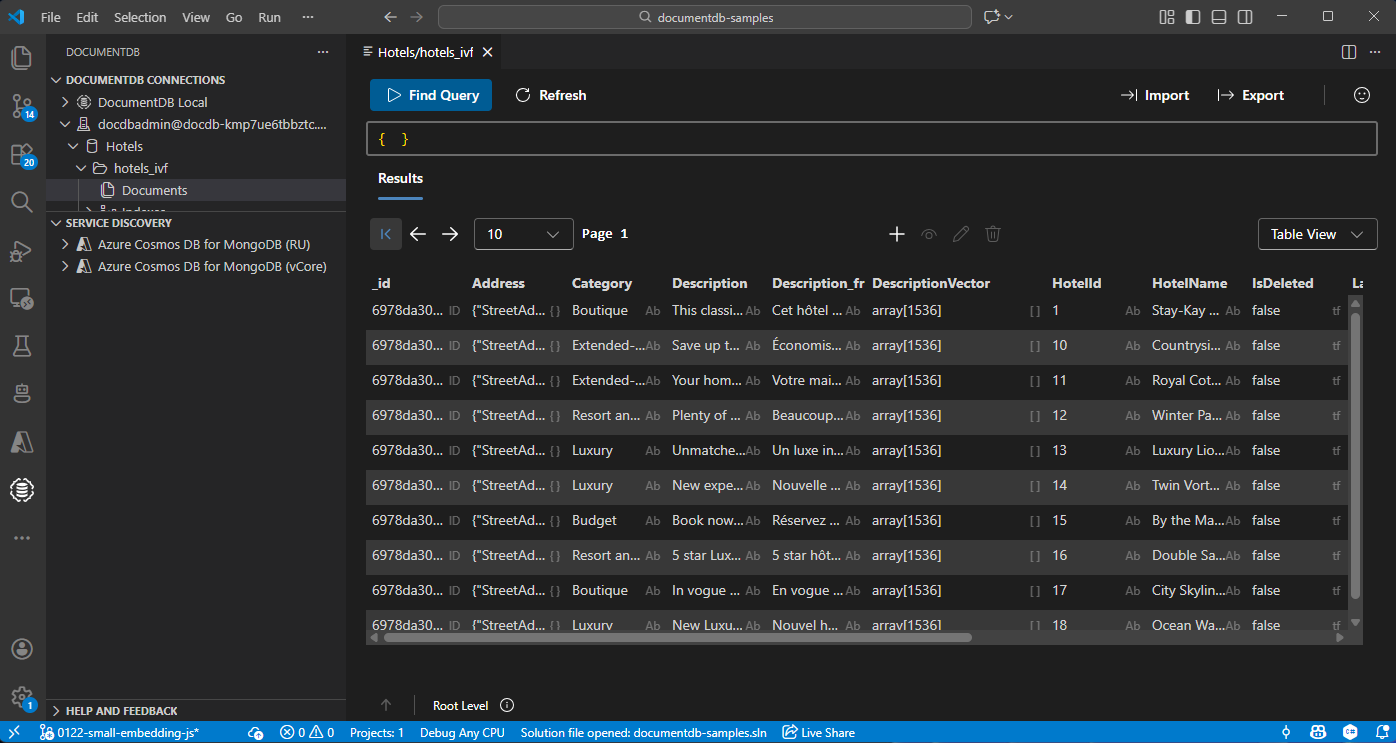
Azure DocumentDB hesabınıza bağlanmak için Visual Studio Code'da DocumentDB uzantısını seçin.
Hotels veritabanındaki verileri ve dizinleri görüntüleyin.
Kaynakları temizle
Ek maliyetlerden kaçınmak için gerekli olmadığında kaynak grubunu, DocumentDB hesabını ve Azure OpenAI kaynağını silin.