Not
Bu sayfaya erişim yetkilendirme gerektiriyor. Oturum açmayı veya dizinleri değiştirmeyi deneyebilirsiniz.
Bu sayfaya erişim yetkilendirme gerektiriyor. Dizinleri değiştirmeyi deneyebilirsiniz.
Python istemci kitaplığıyla Azure DocumentDB'de vektör aramasını kullanın. Vektör verilerini verimli bir şekilde depolayın ve sorgulayın.
Bu hızlı başlangıçta, modelden text-embedding-3-small önceden hesaplanmış vektörlere sahip bir JSON dosyasında örnek bir otel veri kümesi kullanılmaktadır. Veri kümesi otel adlarını, konumlarını, açıklamalarını ve vektör eklemelerini içerir.
GitHub'da örnek kodu bulun.
Prerequisites
Azure aboneliği
- Azure aboneliğiniz yoksa ücretsiz bir hesap oluşturun
Mevcut bir Azure DocumentDB kümesi
-
Özel alan adı yapılandırıldı
text-embedding-3-smalldağıtılan model
Azure Cloud Shell'de Bash ortamını kullanın. Daha fazla bilgi için bkz. Azure Cloud Shell'i kullanmaya başlama.

CLI referans komutlarını yerel olarak çalıştırmayı tercih ediyorsanız, Azure CLI'yi yükleyin. Windows veya macOS üzerinde çalışıyorsanız, Azure CLI'yi bir Docker konteynerinde çalıştırmayı düşünün. Daha fazla bilgi için Azure CLI'nin bir Docker konteynerında nasıl çalıştırılacağını inceleyin.
Yerel bir kurulum kullanıyorsanız, az login komutunu kullanarak Azure CLI'ye giriş yapın. Kimlik doğrulama işlemini tamamlamak için, terminalinizde görüntülenen adımları takip edin. Diğer oturum açma seçenekleri için bkz. Azure CLI kullanarak Azure'da kimlik doğrulaması.
İstendiğinde, ilk kullanımda Azure CLI uzantısını yükleyin. Uzantılar hakkında daha fazla bilgi için bkz. Azure CLI ile uzantıları kullanma ve yönetme.
Yüklü olan sürümü ve bağımlı kütüphaneleri bulmak için az version komutunu çalıştırın. En son sürüme yükseltmek için az upgrade komutunu çalıştırın.
- Python 3.9 veya üzeri
Vektörlerle veri dosyası oluşturma
Oteller veri dosyası için yeni bir veri dizini oluşturun:
mkdir dataVektörleri olan
Hotels_Vector.jsonham veri dosyasını dizininizedatakopyalayın.
Python projesi oluşturma
Projeniz için yeni bir dizin oluşturun ve Visual Studio Code'da açın:
mkdir vector-search-quickstart
code vector-search-quickstart
Terminalde bir sanal ortam oluşturun ve etkinleştirin:
Windows için:
python -m venv venv
venv\\Scripts\\activate
macOS/Linux için:
python -m venv venv
source venv/bin/activate
Gerekli paketleri yükleyin:
pip install pymongo azure-identity openai python-dotenv-
pymongo: Python için MongoDB sürücüsü -
azure-identity: Parolasız kimlik doğrulaması için Azure Kimlik kitaplığı -
openai: Vektör oluşturmak için OpenAI istemci kitaplığı -
python-dotenv: .env dosyalarından ortam değişkeni yönetimi
-
.envortam değişkenleri içinvector-search-quickstartiçinde bir dosya oluşturun.# Identity for local developer authentication with Azure CLI AZURE_TOKEN_CREDENTIALS=AzureCliCredential # Azure OpenAI configuration AZURE_OPENAI_EMBEDDING_ENDPOINT= AZURE_OPENAI_EMBEDDING_MODEL=text-embedding-3-small AZURE_OPENAI_EMBEDDING_API_VERSION=2023-05-15 # Azure DocumentDB configuration MONGO_CLUSTER_NAME= # Data Configuration (defaults should work) DATA_FILE_WITH_VECTORS=../data/Hotels_Vector.json EMBEDDED_FIELD=DescriptionVector EMBEDDING_DIMENSIONS=1536 EMBEDDING_SIZE_BATCH=16 LOAD_SIZE_BATCH=50Bu makalede kullanılan parolasız kimlik doğrulaması için dosyadaki
.envyer tutucu değerlerini kendi bilgilerinizle değiştirin:-
AZURE_OPENAI_EMBEDDING_ENDPOINT: Azure OpenAI kaynak uç noktası URL'niz -
MONGO_CLUSTER_NAME: Azure DocumentDB kaynak adınız
Her zaman parolasız kimlik doğrulamasını tercih etmelisiniz, ancak ek kurulum gerektirir. Yönetilen kimliği ayarlama ve kimlik doğrulama seçeneklerinizin tamamı hakkında daha fazla bilgi için bkz. Python için Azure SDK'sını kullanarak Azure hizmetlerinde Python uygulamalarının kimliğini doğrulama.
-
Vektör araması için kod dosyaları oluşturma
Vektör araması için kod dosyaları oluşturarak projeye devam edin. İşiniz bittiğinde proje yapısı şu şekilde görünmelidir:
├── data/
│   ├── Hotels.json              # Source hotel data (without vectors)
│   └── Hotels_Vector.json       # Hotel data with vector embeddings
└── vector-search-quickstart/
    ├── src/
    │   ├── diskann.py           # DiskANN vector search implementation
    │   ├── hnsw.py              # HNSW vector search implementation
    │   ├── ivf.py               # IVF vector search implementation
    │   └── utils.py              # Shared utility functions
    ├── requirements.txt         # Python dependencies
    ├── .env                     # Environment variables template
Python dosyalarınız için bir src dizini oluşturun. İki dosya ekleyin: diskann.py ve utils.py DiskANN dizin uygulaması için:
mkdir src
touch src/diskann.py
touch src/utils.py
Vektör araması için kod oluşturma
Aşağıdaki kodu dosyaya yapıştırın diskann.py .
import os
from typing import List, Dict, Any
from utils import get_clients, get_clients_passwordless, read_file_return_json, insert_data, print_search_results, drop_vector_indexes
from dotenv import load_dotenv

# Load environment variables
load_dotenv()


def create_diskann_vector_index(collection, vector_field: str, dimensions: int) -> None:

    print(f"Creating DiskANN vector index on field '{vector_field}'...")

    # Drop any existing vector indexes on this field first
    drop_vector_indexes(collection, vector_field)

    # Use the native MongoDB command for DocumentDB vector indexes
    index_command = {
        "createIndexes": collection.name,
        "indexes": [
            {
                "name": f"diskann_index_{vector_field}",
                "key": {
                    vector_field: "cosmosSearch"  # DocumentDB vector search index type
                },
                "cosmosSearchOptions": {
                    # DiskANN algorithm configuration
                    "kind": "vector-diskann",

                    # Vector dimensions must match the embedding model
                    "dimensions": dimensions,

                    # Vector similarity metric - cosine is good for text embeddings
                    "similarity": "COS",

                    # Maximum degree: number of edges per node in the graph
                    # Higher values improve accuracy but increase memory usage
                    "maxDegree": 20,

                    # Build parameter: candidates evaluated during index construction
                    # Higher values improve index quality but increase build time
                    "lBuild": 10
                }
            }
        ]
    }

    try:
        # Execute the createIndexes command directly
        result = collection.database.command(index_command)
        print("DiskANN vector index created successfully")

    except Exception as e:
        print(f"Error creating DiskANN vector index: {e}")

        # Check if it's a tier limitation and suggest alternatives
        if "not enabled for this cluster tier" in str(e):
            print("\nDiskANN indexes require a higher cluster tier.")
            print("Try one of these alternatives:")
            print("  • Upgrade your DocumentDB cluster to a higher tier")
            print("  • Use HNSW instead: python src/hnsw.py")
            print("  • Use IVF instead: python src/ivf.py")
        raise


def perform_diskann_vector_search(collection,
                                 azure_openai_client,
                                 query_text: str,
                                 vector_field: str,
                                 model_name: str,
                                 top_k: int = 5) -> List[Dict[str, Any]]:

    print(f"Performing DiskANN vector search for: '{query_text}'")

    try:
        # Generate embedding for the query text
        embedding_response = azure_openai_client.embeddings.create(
            input=[query_text],
            model=model_name
        )

        query_embedding = embedding_response.data[0].embedding

        # Construct the aggregation pipeline for vector search
        # DocumentDB uses $search with cosmosSearch
        pipeline = [
            {
                "$search": {
                    # Use cosmosSearch for vector operations in DocumentDB
                    "cosmosSearch": {
                        # The query vector to search for
                        "vector": query_embedding,

                        # Field containing the document vectors to compare against
                        "path": vector_field,

                        # Number of final results to return
                        "k": top_k
                    }
                }
            },
            {
                # Add similarity score to the results
                "$project": {
                    "document": "$$ROOT",
                    # Add search score from metadata
                    "score": {"$meta": "searchScore"}
                }
            }
        ]

        # Execute the aggregation pipeline
        results = list(collection.aggregate(pipeline))

        return results

    except Exception as e:
        print(f"Error performing DiskANN vector search: {e}")
        raise


def main():

    # Load configuration from environment variables
    config = {
        'cluster_name': os.getenv('MONGO_CLUSTER_NAME'),
        'database_name': 'Hotels',
        'collection_name': 'hotels_diskann',
        'data_file': os.getenv('DATA_FILE_WITH_VECTORS', '../data/Hotels_Vector.json'),
        'vector_field': os.getenv('EMBEDDED_FIELD', 'DescriptionVector'),
        'model_name': os.getenv('AZURE_OPENAI_EMBEDDING_MODEL', 'text-embedding-3-small'),
        'dimensions': int(os.getenv('EMBEDDING_DIMENSIONS', '1536')),
        'batch_size': int(os.getenv('LOAD_SIZE_BATCH', '100'))
    }

    try:
        # Initialize clients
        print("\nInitializing MongoDB and Azure OpenAI clients...")
        mongo_client, azure_openai_client = get_clients_passwordless()

        # Get database and collection
        database = mongo_client[config['database_name']]
        collection = database[config['collection_name']]

        # Load data with embeddings
        print(f"\nLoading data from {config['data_file']}...")
        data = read_file_return_json(config['data_file'])
        print(f"Loaded {len(data)} documents")

        # Verify embeddings are present
        documents_with_embeddings = [doc for doc in data if config['vector_field'] in doc]
        if not documents_with_embeddings:
            raise ValueError(f"No documents found with embeddings in field '{config['vector_field']}'. "
                           "Please run create_embeddings.py first.")

        # Insert data into collection
        print(f"\nInserting data into collection '{config['collection_name']}'...")

        # Insert the hotel data
        stats = insert_data(
            collection,
            documents_with_embeddings,
            batch_size=config['batch_size']
        )

        if stats['inserted'] == 0 and not stats.get('skipped'):
            raise ValueError("No documents were inserted successfully")

        # Create DiskANN vector index (skip if data was already present)
        if not stats.get('skipped'):
            create_diskann_vector_index(
                collection,
                config['vector_field'],
                config['dimensions']
            )

            # Wait briefly for index to be ready
            import time
            print("Waiting for index to be ready...")
            time.sleep(2)

        # Perform sample vector search
        query = "quintessential lodging near running trails, eateries, retail"

        results = perform_diskann_vector_search(
            collection,
            azure_openai_client,
            query,
            config['vector_field'],
            config['model_name'],
            top_k=5
        )

        # Display results
        print_search_results(results, max_results=5, show_score=True)


    except Exception as e:
        print(f"\nError during DiskANN demonstration: {e}")
        raise

    finally:
        # Close the MongoDB client
        if 'mongo_client' in locals():
            mongo_client.close()


if __name__ == "__main__":
    main()
Bu ana modül şu özellikleri sağlar:
Yardımcı program işlevlerini içerir
Ortam değişkenleri için bir yapılandırma nesnesi oluşturur
Azure OpenAI ve Azure DocumentDB için istemciler oluşturur
MongoDB'ye bağlanır, veritabanı ve koleksiyon oluşturur, veri ekler ve standart dizinler oluşturur
IVF, HNSW veya DiskANN kullanarak vektör dizini oluşturur
OpenAI istemcisini kullanarak örnek sorgu metni için ekleme oluşturur. Dosyanın en üstündeki sorguyu değiştirebilirsiniz
Ekleme işlemini kullanarak vektör araması çalıştırır ve sonuçları yazdırır
Yardımcı program işlevleri oluşturma
Aşağıdaki kodu içine utils.pyyapıştırın:
import json
import os
import time
import warnings
from typing import Dict, List, Any, Optional, Tuple

# Suppress the PyMongo CosmosDB cluster detection warning
# Must be set before importing pymongo
warnings.filterwarnings(
    "ignore",
    message="You appear to be connected to a CosmosDB cluster.*",
)

from pymongo import MongoClient, InsertOne
from pymongo.collection import Collection
from pymongo.errors import BulkWriteError
from azure.identity import DefaultAzureCredential
from pymongo.auth_oidc import OIDCCallback, OIDCCallbackContext, OIDCCallbackResult
from openai import AzureOpenAI
from dotenv import load_dotenv

# Load environment variables from .env file
load_dotenv()

class AzureIdentityTokenCallback(OIDCCallback):
    def __init__(self, credential):
        self.credential = credential

    def fetch(self, context: OIDCCallbackContext) -> OIDCCallbackResult:
        token = self.credential.get_token(
            "https://ossrdbms-aad.database.windows.net/.default").token
        return OIDCCallbackResult(access_token=token)

def get_clients() -> Tuple[MongoClient, AzureOpenAI]:

    # Get MongoDB connection string - required for DocumentDB access
    mongo_connection_string = os.getenv("MONGO_CONNECTION_STRING")
    if not mongo_connection_string:
        raise ValueError("MONGO_CONNECTION_STRING environment variable is required")

    # Create MongoDB client with optimized settings for DocumentDB
    mongo_client = MongoClient(
        mongo_connection_string,
        maxPoolSize=50,  # Allow up to 50 connections for better performance
        minPoolSize=5,   # Keep minimum 5 connections open
        maxIdleTimeMS=30000,  # Close idle connections after 30 seconds
        serverSelectionTimeoutMS=5000,  # 5 second timeout for server selection
        socketTimeoutMS=20000  # 20 second socket timeout
    )

    # Get Azure OpenAI configuration
    azure_openai_endpoint = os.getenv("AZURE_OPENAI_EMBEDDING_ENDPOINT")
    azure_openai_key = os.getenv("AZURE_OPENAI_EMBEDDING_KEY")

    if not azure_openai_endpoint or not azure_openai_key:
        raise ValueError("Azure OpenAI endpoint and key are required")

    # Create Azure OpenAI client for generating embeddings
    azure_openai_client = AzureOpenAI(
        azure_endpoint=azure_openai_endpoint,
        api_key=azure_openai_key,
        api_version=os.getenv("AZURE_OPENAI_EMBEDDING_API_VERSION", "2023-05-15")
    )

    return mongo_client, azure_openai_client


def get_clients_passwordless() -> Tuple[MongoClient, AzureOpenAI]:

    # Get MongoDB cluster name for passwordless authentication
    cluster_name = os.getenv("MONGO_CLUSTER_NAME")
    if not cluster_name:
        raise ValueError("MONGO_CLUSTER_NAME environment variable is required")

    # Create credential object for Azure authentication
    credential = DefaultAzureCredential()

    authProperties = {"OIDC_CALLBACK": AzureIdentityTokenCallback(credential)}

    # Create MongoDB client with Azure AD token callback
    mongo_client = MongoClient(
        f"mongodb+srv://{cluster_name}.global.mongocluster.cosmos.azure.com/",
        connectTimeoutMS=120000,
        tls=True,
        retryWrites=True,
        authMechanism="MONGODB-OIDC",
        authMechanismProperties=authProperties
    )

    # Get Azure OpenAI endpoint
    azure_openai_endpoint = os.getenv("AZURE_OPENAI_EMBEDDING_ENDPOINT")
    if not azure_openai_endpoint:
        raise ValueError("AZURE_OPENAI_EMBEDDING_ENDPOINT environment variable is required")

    # Create Azure OpenAI client with credential-based authentication
    azure_openai_client = AzureOpenAI(
        azure_endpoint=azure_openai_endpoint,
        azure_ad_token_provider=lambda: credential.get_token("https://cognitiveservices.azure.com/.default").token,
        api_version=os.getenv("AZURE_OPENAI_EMBEDDING_API_VERSION", "2023-05-15")
    )

    return mongo_client, azure_openai_client


def azure_identity_token_callback(credential: DefaultAzureCredential) -> str:

    # DocumentDB requires this specific scope
    token_scope = "https://cosmos.azure.com/.default"

    # Get token from Azure AD
    token = credential.get_token(token_scope)

    return token.token


def read_file_return_json(file_path: str) -> List[Dict[str, Any]]:

    try:
        with open(file_path, 'r', encoding='utf-8') as file:
            return json.load(file)
    except FileNotFoundError:
        print(f"Error: File '{file_path}' not found")
        raise
    except json.JSONDecodeError as e:
        print(f"Error: Invalid JSON in file '{file_path}': {e}")
        raise


def write_file_json(data: List[Dict[str, Any]], file_path: str) -> None:

    try:
        with open(file_path, 'w', encoding='utf-8') as file:
            json.dump(data, file, indent=2, ensure_ascii=False)
        print(f"Data successfully written to '{file_path}'")
    except IOError as e:
        print(f"Error writing to file '{file_path}': {e}")
        raise


def insert_data(collection: Collection, data: List[Dict[str, Any]],
                batch_size: int = 100, index_fields: Optional[List[str]] = None) -> Dict[str, int]:

    total_documents = len(data)

    # Check if data already exists in the collection
    existing_count = collection.count_documents({})
    if existing_count >= total_documents:
        print(f"Collection already has {existing_count} documents, skipping insert and index creation")
        return {'total': total_documents, 'inserted': 0, 'failed': 0, 'skipped': True}

    # Clear existing data if counts don't match to ensure clean state
    if existing_count > 0:
        print(f"Collection has {existing_count} documents but expected {total_documents}, clearing and re-inserting...")
        collection.delete_many({})

    inserted_count = 0
    failed_count = 0

    print(f"Starting batch insertion of {total_documents} documents...")

    # Create indexes if specified
    if index_fields:
        for field in index_fields:
            try:
                collection.create_index(field)
                print(f"Created index on field: {field}")
            except Exception as e:
                print(f"Warning: Could not create index on {field}: {e}")

    # Process data in batches to manage memory and error recovery
    for i in range(0, total_documents, batch_size):
        batch = data[i:i + batch_size]
        batch_num = (i // batch_size) + 1
        total_batches = (total_documents + batch_size - 1) // batch_size

        try:
            # Prepare bulk insert operations
            operations = [InsertOne(document) for document in batch]

            # Execute bulk insert
            result = collection.bulk_write(operations, ordered=False)
            inserted_count += result.inserted_count

            print(f"Batch {batch_num} completed: {result.inserted_count} documents inserted")

        except BulkWriteError as e:
            # Handle partial failures in bulk operations
            inserted_count += e.details.get('nInserted', 0)
            failed_count += len(batch) - e.details.get('nInserted', 0)

            print(f"Batch {batch_num} had errors: {e.details.get('nInserted', 0)} inserted, "
                  f"{failed_count} failed")

            # Print specific error details for debugging
            for error in e.details.get('writeErrors', []):
                print(f"  Error: {error.get('errmsg', 'Unknown error')}")

        except Exception as e:
            # Handle unexpected errors
            failed_count += len(batch)
            print(f"Batch {batch_num} failed completely: {e}")

        # Small delay between batches to avoid overwhelming the database
        time.sleep(0.1)

    # Return summary statistics
    stats = {
        'total': total_documents,
        'inserted': inserted_count,
        'failed': failed_count
    }

    return stats


def drop_vector_indexes(collection, vector_field: str) -> None:

    try:
        # Get all indexes for the collection
        indexes = list(collection.list_indexes())

        # Find vector indexes on the specified field
        vector_indexes = []
        for index in indexes:
            if 'key' in index and vector_field in index['key']:
                if index['key'][vector_field] == 'cosmosSearch':
                    vector_indexes.append(index['name'])

        # Drop each vector index found
        for index_name in vector_indexes:
            print(f"Dropping existing vector index: {index_name}")
            collection.drop_index(index_name)

        if vector_indexes:
            print(f"Dropped {len(vector_indexes)} existing vector index(es)")
        else:
            print("No existing vector indexes found to drop")

    except Exception as e:
        print(f"Warning: Could not drop existing vector indexes: {e}")
        # Continue anyway - the error might be that no indexes exist


def print_search_resultsx(results: List[Dict[str, Any]],
                        max_results: int = 5,
                        show_score: bool = True) -> None:

    if not results:
        print("No search results found.")
        return

    print(f"\nSearch Results (showing top {min(len(results), max_results)}):")
    print("=" * 80)

    for i, result in enumerate(results[:max_results], 1):

        # Display hotel name and ID
        print(f"HotelName: {result['HotelName']}, Score: {result['score']:.4f}")

def print_search_results(results: List[Dict[str, Any]],
                        max_results: int = 5,
                        show_score: bool = True) -> None:

    if not results:
        print("No search results found.")
        return

    print(f"\nSearch Results (showing top {min(len(results), max_results)}):")
    print("=" * 80)

    for i, result in enumerate(results[:max_results], 1):

        # Check if results are nested under 'document' (when using $$ROOT)
        if 'document' in result:
            doc = result['document']
        else:
            doc = result

        # Display hotel name and ID
        print(f"HotelName: {doc['HotelName']}, Score: {result['score']:.4f}")


    if len(results) > max_results:
        print(f"\n... and {len(results) - max_results} more results")
Bu yardımcı program modülü şu özellikleri sağlar:
-
get_clients: Azure OpenAI ve Azure DocumentDB için istemciler oluşturur ve döndürür -
get_clients_passwordless: Parolasız kimlik doğrulaması kullanarak Azure OpenAI ve Azure DocumentDB için istemciler oluşturur ve döndürür -
azure_identity_token_callback: MongoDB OIDC kimlik doğrulaması tarafından kullanılan bir Azure AD belirtecini alır -
read_file_return_json: Bir JSON dosyasını okur ve içeriğini bir nesne dizisi olarak döndürür -
write_file_json: JSON dosyasına bir nesne dizisi yazar -
insert_data: MongoDB koleksiyonuna toplu olarak veri ekler ve belirtilen alanlarda standart dizinler oluşturur -
drop_vector_indexes: Mevcut vektör dizinlerini hedef vektör alanına bırakır -
print_search_results: Puan ve otel adı dahil olmak üzere vektör arama sonuçlarını yazdırır
Azure CLI ile kimlik doğrulaması
Uygulamayı çalıştırmadan önce Azure CLI'da oturum açın; böylece Azure kaynaklarına güvenli bir şekilde erişebilir.
az login
Kod, Azure DocumentDB ve Azure OpenAI'ye erişmek için yerel geliştirici kimlik doğrulamanızı kullanır. ayarladığınızda AZURE_TOKEN_CREDENTIALS=AzureCliCredential, bu ayar işleve kimlik doğrulaması için belirleyici olarak Azure CLI kimlik bilgilerini kullanmasını söyler. Kimlik doğrulaması, azure kimlik bilgilerinizi ortamda bulmak için azure-identity içindeki DefaultAzureCredential'a dayanır.
Azure Kimlik kitaplığını kullanarak Azure hizmetlerinde Python uygulamalarının kimliğini doğrulama hakkında daha fazla bilgi edinin.
Uygulamayı çalıştırma
Python betiklerini çalıştırmak için:
Vektör arama sorgusuyla ve benzerlik puanlarıyla eşleşen ilk beş oteli görürsünüz.
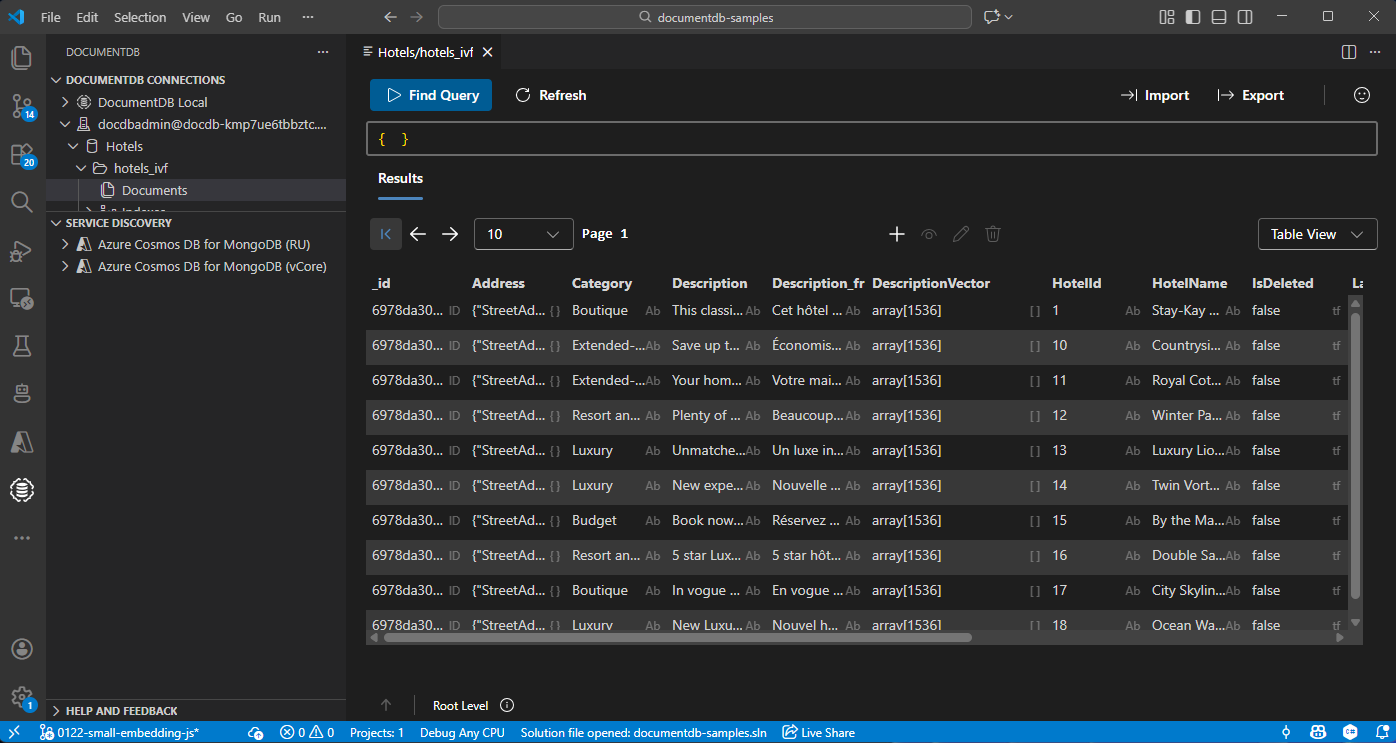
Visual Studio Code'da verileri görüntüleme ve yönetme
Azure DocumentDB hesabınıza bağlanmak için Visual Studio Code'da DocumentDB uzantısını seçin.
Hotels veritabanındaki verileri ve dizinleri görüntüleyin.
Kaynakları temizle
Ek maliyetlerden kaçınmak için gerekli olmadığında kaynak grubunu, Azure DocumentDB hesabını ve Azure OpenAI kaynağını silin.