TextBlock.LineStackingStrategy Özellik
Tanım
Önemli
Bazı bilgiler ürünün ön sürümüyle ilgilidir ve sürüm öncesinde önemli değişiklikler yapılmış olabilir. Burada verilen bilgilerle ilgili olarak Microsoft açık veya zımni hiçbir garanti vermez.
içindeki her metin satırı için bir satır kutusunun belirlendiği mekanizmayı TextBlockalır veya ayarlar.
public:
 property System::Windows::LineStackingStrategy LineStackingStrategy { System::Windows::LineStackingStrategy get(); void set(System::Windows::LineStackingStrategy value); };
public System.Windows.LineStackingStrategy LineStackingStrategy { get; set; }member this.LineStackingStrategy : System.Windows.LineStackingStrategy with get, setPublic Property LineStackingStrategy As LineStackingStrategyÖzellik Değeri
içindeki TextBlockher metin satırı için bir çizgi kutusunun belirlendiği mekanizma. Varsayılan değer: MaxHeight.
Örnekler
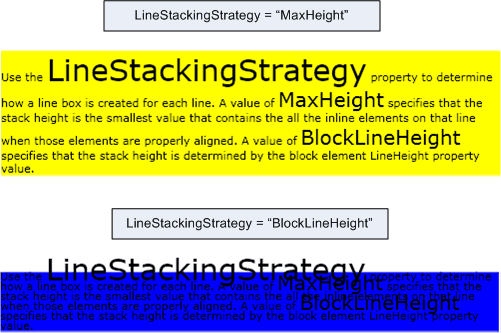
Aşağıdaki örnekte, bir metin satırları için satır kutularının nasıl oluşturulduğunu belirlemek için özelliğinin nasıl kullanılacağı LineStackingStrategy gösterilmektedir TextBlock. birincisinin TextBlockMaxHeight değeriLineStackingStrategy, ikincisinde TextBlock ise değeri BlockLineHeightvardır.
<Page xmlns="http://schemas.microsoft.com/winfx/2006/xaml/presentation"
  xmlns:x="http://schemas.microsoft.com/winfx/2006/xaml">
  <StackPanel>

    <!-- This TextBlock has a LineStackingStrategy set to "MaxHeight". -->
    <TextBlock LineStackingStrategy="MaxHeight" LineHeight="10" Width="500" TextWrapping="Wrap"
     Background="Yellow">
      Use the <Span FontSize="30">LineStackingStrategy</Span> property to determine how a line box is
      created for each line. A value of <Span FontSize="20">MaxHeight</Span> specifies that the stack
      height is the smallest value that contains all the inline elements on that line when those
      elements are properly aligned. A value of <Span FontSize="20">BlockLineHeight</Span> specifies
      that the stack height is determined by the block element LineHeight property value.
    </TextBlock>

    <!-- Here is the same TextBlock but the LineStackingStrategy is set to "BlockLineHeight". -->
    <TextBlock LineStackingStrategy="BlockLineHeight" LineHeight="10" Width="500" TextWrapping="Wrap"
     Background="Blue" Margin="0,40,0,0">
      Use the <Span FontSize="30">LineStackingStrategy</Span> property to determine how a line box is
      created for each line. A value of <Span FontSize="20">MaxHeight</Span> specifies that the stack
      height is the smallest value that contains all the inline elements on that line when those
      elements are properly aligned. A value of <Span FontSize="20">BlockLineHeight</Span> specifies
      that the stack height is determined by the block element LineHeight property value.
    </TextBlock>

  </StackPanel>
</Page>
Aşağıdaki çizimde, önceki kodun sonucu gösterilmektedir.
Açıklamalar
Bu bağımlılık özelliğinin ekli özellik kullanımı da vardır. XAML'de kullanım, <object TextBlock.LineStackingStrategy="value".../>nesnenin içinde yer alan TextBlockbir nesne öğesi (genellikle akış öğesi), değer ise sabit listesinin LineStackingStrategy dize değeri olduğu şeklindedir. Kodda, ekli özellik kullanımı ve SetLineStackingStrategytarafından GetLineStackingStrategy desteklenir. Ekli özellik kullanımı yaygın değildir.
Bağımlılık Özelliği Bilgileri
| Öğe | Değer |
|---|---|
| Tanımlayıcı alanı | LineStackingStrategyProperty |
Meta veri özellikleri olarak ayarlandı true |
AffectsMeasure, AffectsRender |
