BlockUIContainer.Child Özellik
Tanım
Önemli
Bazı bilgiler ürünün ön sürümüyle ilgilidir ve sürüm öncesinde önemli değişiklikler yapılmış olabilir. Burada verilen bilgilerle ilgili olarak Microsoft açık veya zımni hiçbir garanti vermez.
tarafından UIElementbarındırılan öğesini BlockUIContainer alır veya ayarlar.
public:
 property System::Windows::UIElement ^ Child { System::Windows::UIElement ^ get(); void set(System::Windows::UIElement ^ value); };
public System.Windows.UIElement Child { get; set; }member this.Child : System.Windows.UIElement with get, setPublic Property Child As UIElementÖzellik Değeri
UIElement tarafından barındırılanBlockUIContainer.
Örnekler
Aşağıdaki örnekte, akış içeriğindeki BlockUIContainer öğeleri barındırmak UIElement için öğelerin nasıl kullanılacağı gösterilmektedir.
<FlowDocument ColumnWidth="400">
  <Section Background="GhostWhite">
    <Paragraph>
      A UIElement element may be embedded directly in flow content
      by enclosing it in a BlockUIContainer element.
    </Paragraph>
    <BlockUIContainer>
      <Button>Click me!</Button>
    </BlockUIContainer>
    <Paragraph>
      The BlockUIContainer element may host no more than one top-level
      UIElement.  However, other UIElements may be nested within the
      UIElement contained by an BlockUIContainer element.  For example,
      a StackPanel can be used to host multiple UIElement elements within
      a BlockUIContainer element.
    </Paragraph>
    <BlockUIContainer>
      <StackPanel>
        <Label Foreground="Blue">Choose a value:</Label>
        <ComboBox>
          <ComboBoxItem IsSelected="True">a</ComboBoxItem>
          <ComboBoxItem>b</ComboBoxItem>
          <ComboBoxItem>c</ComboBoxItem>
        </ComboBox>
        <Label Foreground ="Red">Choose a value:</Label>
        <StackPanel>
          <RadioButton>x</RadioButton>
          <RadioButton>y</RadioButton>
          <RadioButton>z</RadioButton>
        </StackPanel>
        <Label>Enter a value:</Label>
        <TextBox>
          A text editor embedded in flow content.
        </TextBox>
      </StackPanel>
    </BlockUIContainer>
  </Section>
</FlowDocument>
Aşağıdaki şekil bu örneğin nasıl işlediğini göstermektedir.
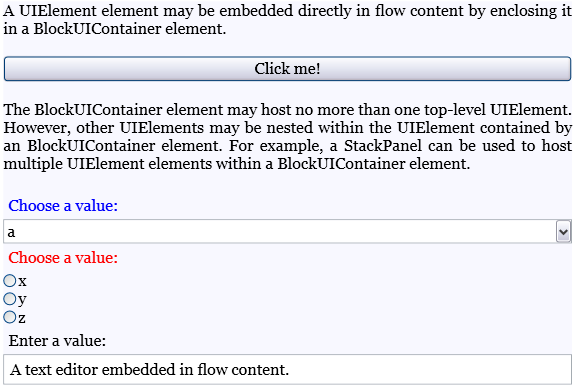
Aşağıdaki örnekte özelliğin Child program aracılığıyla nasıl kullanılacağı gösterilmektedir.
Section secx = new Section();
Paragraph par1 = new Paragraph(new Run(" Text to precede the button... "));
Paragraph par2 = new Paragraph(new Run(" Text to follow the button... "));

// Create a new button to be hosted in the section.
Button buttonx = new Button();
buttonx.Content = "Click me!";

// Create a new BlockUIContainer, and assign the button
// as the UI container's child.
BlockUIContainer uiCont = new BlockUIContainer();
uiCont.Child = buttonx;

// Add the text runs and UI container to the paragraph, in order.
secx.Blocks.Add(par1);
secx.Blocks.Add(uiCont);
secx.Blocks.Add(par2);
Dim secx As New Section()
Dim par1 As New Paragraph(New Run(" Text to precede the button... "))
Dim par2 As New Paragraph(New Run(" Text to follow the button... "))

' Create a new button to be hosted in the section.
Dim buttonx2 As New Button()
buttonx2.Content = "Click me!"

' Create a new BlockUIContainer, and assign the button
' as the UI container's child.
Dim uiCont2 As New BlockUIContainer()
uiCont2.Child = buttonx2

' Add the text runs and UI container to the paragraph, in order.
secx.Blocks.Add(par1)
secx.Blocks.Add(uiCont2)
secx.Blocks.Add(par2)
Açıklamalar
doğrudan BlockUIContainer birden UIElement fazla alt öğe barındıramaz. Ancak, bir BlockUIContainer tarafından barındırılan alt öğe kendi alt öğelerini barındırabilir.
XAML'de, bir UIElement içinde sarmalama BlockUIContainer özelliğin değeri olarak ayarlamakla UIElementChild eşdeğerdir.
