Not
Bu sayfaya erişim yetkilendirme gerektiriyor. Oturum açmayı veya dizinleri değiştirmeyi deneyebilirsiniz.
Bu sayfaya erişim yetkilendirme gerektiriyor. Dizinleri değiştirmeyi deneyebilirsiniz.
Note
Bu makale, standard harness ile desteklenen ajanlarda veya ajan akışlarında kullanılan özellikleri açıklamaktadır.
Temsilci arayüzü, temsilcinin kullanıcılara nasıl görüneceğini denetler. Tuvali iki şekilde özelleştirebilirsiniz:
Web sitenizde JavaScript ve CSS kullanarak varsayılan tuvali özelleştirin. Basit değişiklikler için bu seçeneği kullanın.
Bot Framework Web Sohbet tuvalini temel alan özel bir tuval kullanın. Bu seçenek geliştirme deneyimi gerektirir ve tam özelleştirmeyi destekler.
Ayrıca, özelleştirilmiş tuvali otomatik konuşma başlatma yapılandırmasıyla birleştirebilirsiniz.
Portalda aracı adını ve simgesini değiştirebilirsiniz.
Siz aracıyı yayımladıktan sonra, kullanıcılar Web Sohbeti tuval aracılığıyla bu aracıyla etkileşimde bulunabilir.
Important
Bu makalede yer alan örnek kodu yalnızca Copilot Studio ile kullanmak üzere yükleyebilir ve kullanabilirsiniz. Örnek kod "olduğu gibi" lisanslanır ve tüm servis düzeyi sözleşmelerinden veya destek hizmetlerinden hariç tutulur. Bunu kullanma riski size aittir.
Microsoft hiçbir açık garanti veya koşul sunmaz ve satılabilirlik, belirli bir amaca uygunluk ve hak ihlali bulunmaması dahil olmak üzere tüm zımni garantileri açık bir şekilde reddeder.
Ajanın adını ve simgesini değiştirin
Important
- Bir aracının simgesini güncelledikten sonra, yeni simgenin her yerde görünmesi 24 saate kadar sürebilir.
- Ajanınız Müşteri Hizmetleri'ne Yönelik Omnichannel'a bağlıysa, Azure portalında bulunan kayıt içerisindeki Görünen ad özelliği ajanınızın adını tanımlar.
- Temsilcinizin Teams'de yayımlanması amaçlanıyorsa Microsoft Teams geliştirici belgelerindeki simgelerin gereksinimlerini gözden geçirin.
Temsilciniz için Genel Bakış sayfasına gidin.
Detayların yanındaki Düzenle'yi seçin.
Ajanın adını ve simgesini istediğiniz gibi değiştirin.
Kaydetseçeneğini seçin.
Varsayılan tuvali özelleştirme (basit)
Varsayılan tuvali ayarlamak için JavaScript ve CSS kullanın.
Öncelikle, ajan tuvalinizi nereye yerleştireceğinizi yapılandırın.
Örnek HTML kodunu adlı
index.htmlbir dosyaya kopyalayın. HTML try-it düzenleyicisini de kullanabilirsiniz.<!DOCTYPE html> <html lang="en"> <head> <meta charset="UTF-8" /> <meta name="viewport" content="width=device-width, initial-scale=1.0" /> <meta name="description" content="Contoso Web Chat Assistant" /> <title>Contoso Sample Web Chat Test</title> <script src="https://cdn.botframework.com/botframework-webchat/latest/webchat.js"></script> <script> let webChatInstance = null; let directLineUrl = null; // Replace with your token endpoint const tokenEndpoint = "<YOUR TOKEN ENDPOINT>"; const styleOptions = { "accent": "#0078D4", "autoScrollSnapOnPage": true, "autoScrollSnapOnPageOffset": 0, "avatarBorderRadius": "7%", "avatarSize": 31, "backgroundColor": "#e8e9eb", "botAvatarBackgroundColor": "#ffffff00", "botAvatarImage": "https://powercatexternal.blob.core.windows.net/creatorkit/Assets/ChatbotLogoBlue.png", "botAvatarInitials": "B", "bubbleAttachmentMaxWidth": 480, "bubbleAttachmentMinWidth": 250, "bubbleBackground": "#f0eded", "bubbleBorderColor": "#f5f5f5", "bubbleBorderRadius": 41, "bubbleBorderStyle": "solid", "bubbleBorderWidth": 1, "bubbleFromUserBackground": "#ebefff", "bubbleFromUserBorderColor": "#f5f5f5", "bubbleFromUserBorderRadius": 41, "bubbleFromUserBorderStyle": "solid", "bubbleFromUserBorderWidth": 1, "bubbleFromUserNubOffset": 0, "bubbleFromUserNubSize": 0, "bubbleFromUserTextColor": "#242424", "bubbleImageHeight": 10, "bubbleImageMaxHeight": 240, "bubbleImageMinHeight": 240, "bubbleMessageMaxWidth": 480, "bubbleMessageMinWidth": 120, "bubbleMinHeight": 50, "bubbleNubOffset": 0, "bubbleTextColor": "#242424", "emojiSet": true, "fontSizeSmall": "70%", "hideUploadButton": false, "messageActivityWordBreak": "break-word", "monospaceFont": "Consolas", "paddingRegular": 10, "paddingWide": 10, "primaryFont": null, "sendBoxBackground": "#e8e9eb", "sendBoxBorderTop": "solid 1px #808080", "sendBoxButtonColor": "#0078d4", "sendBoxButtonColorOnHover": "#006cbe", "sendBoxButtonShadeBorderRadius": 40, "sendBoxButtonShadeColorOnHover": "", "sendBoxHeight": 60, "sendBoxPlaceholderColor": "#171616", "sendBoxTextColor": "#2e2d2d", "showAvatarInGroup": "status", "spinnerAnimationHeight": 16, "spinnerAnimationPadding": 12, "spinnerAnimationWidth": 16, "subtleColor": "#000000FF", "suggestedActionBackgroundColor": "#006FC4FF", "suggestedActionBackgroundColorOnHover": "#0078D4", "suggestedActionBorderColor": "", "suggestedActionBorderRadius": 10, "suggestedActionBorderWidth": 1, "suggestedActionLayout": "flow", "suggestedActionTextColor": "#FFFFFFFF", "typingAnimationBackgroundImage": "url('https://wpamelia.com/wp-content/uploads/2018/11/ezgif-2-6d0b072c3d3f.gif')", "typingAnimationDuration": 5000, "typingAnimationHeight": 20, "typingAnimationWidth": 64, "userAvatarBackgroundColor": "#222222", "userAvatarImage": "https://avatars.githubusercontent.com/u/8174072?v=4&size=64", "userAvatarInitials": "U" }; const backgroundImage = ""; document.addEventListener('DOMContentLoaded', () => { const root = document.documentElement; root.style.setProperty('--primary-color', createGradient(styleOptions.accent)); root.style.setProperty('--header-textColor', styleOptions.suggestedActionTextColor); if (backgroundImage) { const webchatElement = document.getElementById('webchat'); webchatElement.style.backgroundImage = `url(${backgroundImage})`; webchatElement.style.backgroundSize = 'cover'; webchatElement.style.backgroundPosition = 'center'; webchatElement.style.backgroundRepeat = 'no-repeat'; const overlay = document.createElement('div'); overlay.className = 'webchat-overlay'; webchatElement.appendChild(overlay); } }); function createGradient(baseColor) { const r = parseInt(baseColor.slice(1, 3), 16); const g = parseInt(baseColor.slice(3, 5), 16); const b = parseInt(baseColor.slice(5, 7), 16); const lighterColor = `#${Math.min(255, r + 30).toString(16).padStart(2, '0')}${Math.min(255, g + 30).toString(16).padStart(2, '0')}${Math.min(255, b + 30).toString(16).padStart(2, '0')}`; const darkerColor = `#${Math.max(0, r - 30).toString(16).padStart(2, '0')}${Math.max(0, g - 30).toString(16).padStart(2, '0')}${Math.max(0, b - 30).toString(16).padStart(2, '0')}`; return `linear-gradient(135deg, ${lighterColor}, ${baseColor}, ${darkerColor})`; } const environmentEndPoint = tokenEndpoint.slice( 0, tokenEndpoint.indexOf("/powervirtualagents") ); const apiVersion = tokenEndpoint .slice(tokenEndpoint.indexOf("api-version")) .split("=")[1]; const regionalChannelSettingsURL = `${environmentEndPoint}/powervirtualagents/regionalchannelsettings?api-version=${apiVersion}`; function showChat() { const popup = document.getElementById("chatbot-popup"); const openButton = document.getElementById("open-chat"); popup.classList.add("visible"); openButton.classList.add("hidden"); } function hideChat() { const popup = document.getElementById("chatbot-popup"); const openButton = document.getElementById("open-chat"); popup.classList.remove("visible"); openButton.classList.remove("hidden"); } function createCustomStore() { return window.WebChat.createStore( {}, ({ dispatch }) => (next) => (action) => { if (action.type === "DIRECT_LINE/CONNECT_FULFILLED") { dispatch({ type: "DIRECT_LINE/POST_ACTIVITY", meta: { method: "keyboard" }, payload: { activity: { channelData: { postBack: true }, name: "startConversation", type: "event", }, }, }); } return next(action); } ); } async function restartConversation() { try { if (!directLineUrl) { console.error("DirectLine URL not initialized"); return; } const response = await fetch(tokenEndpoint); const conversationInfo = await response.json(); if (!conversationInfo.token) { throw new Error("Failed to get conversation token"); } const newDirectLine = window.WebChat.createDirectLine({ domain: `${directLineUrl}v3/directline`, token: conversationInfo.token, }); const webchatElement = document.getElementById("webchat"); webChatInstance = window.WebChat.renderWebChat( { directLine: newDirectLine, styleOptions, store: createCustomStore(), }, webchatElement ); } catch (err) { console.error("Failed to restart conversation:", err); } } async function initializeChat() { try { const response = await fetch(regionalChannelSettingsURL); const data = await response.json(); directLineUrl = data.channelUrlsById.directline; if (!directLineUrl) { throw new Error("Failed to get DirectLine URL"); } const conversationResponse = await fetch(tokenEndpoint); const conversationInfo = await conversationResponse.json(); if (!conversationInfo.token) { throw new Error("Failed to get conversation token"); } const directLine = window.WebChat.createDirectLine({ domain: `${directLineUrl}v3/directline`, token: conversationInfo.token, }); webChatInstance = window.WebChat.renderWebChat( { directLine, styleOptions, store: createCustomStore(), }, document.getElementById("webchat") ); } catch (err) { console.error("Failed to initialize chat:", err); } } initializeChat(); </script> <style> :root { --primary-gradient: var(--primary-color); --chat-width: 450px; --chat-height: 520px; --header-height: 56px; --border-radius: 16px; --transition-speed: 0.3s; } * { margin: 0; padding: 0; box-sizing: border-box; font-family: system-ui, -apple-system, BlinkMacSystemFont, "Segoe UI", Roboto, sans-serif; } body { min-height: 100vh; background-color: #f3f4f6; } #chatbot-popup { display: none; position: fixed; bottom: 32px; right: 32px; width: var(--chat-width); height: var(--chat-height); background: white; border-radius: var(--border-radius); box-shadow: 0 18px 40px -5px rgba(0, 0, 0, 0.2), 0 15px 20px -5px rgba(0, 0, 0, 0.1); overflow: hidden; opacity: 0; transform-origin: bottom right; transform: scale(0.95); transition: all var(--transition-speed) ease-in-out; z-index: 999; } #chatbot-popup.visible { display: block; opacity: 1; transform: scale(1); } #chatbot-header { background: var(--primary-color); padding: 16px 20px; height: var(--header-height); display: flex; justify-content: space-between; align-items: center; color: var(--header-textColor); } .header-title { display: flex; align-items: center; gap: 12px; font-size: 16px; font-weight: 500; } .header-buttons { display: flex; gap: 12px; align-items: center; } .icon-button { background: none; border: none; color: var(--header-textColor); cursor: pointer; padding: 8px; border-radius: 8px; display: flex; align-items: center; justify-content: center; transition: all 0.2s ease; } .icon-button:hover { color: var(--header-textColor); background: rgba(255, 255, 255, 0.1); } .icon-button:focus { outline: 2px solid rgba(255, 255, 255, 0.5); outline-offset: 2px; } #webchat { height: calc(100% - var(--header-height)); background-color: #f9fafb; position: relative; } .webchat-overlay { position: absolute; top: 0; left: 0; right: 0; bottom: 0; background: rgba(255, 255, 255, 0.85); pointer-events: none; z-index: 1; } #webchat > div { position: relative; z-index: 2; } #webchat .webchat__basic-transcript__content { white-space: pre-wrap !important; word-break: break-word !important; } #webchat .webchat__bubble__content { padding: 8px 12px !important; } #webchat .webchat__bubble { max-width: 85% !important; margin: 8px !important; } #webchat .webchat__basic-transcript__content ul, #webchat .webchat__basic-transcript__content ol, #webchat .webchat__bubble__content ul, #webchat .webchat__bubble__content ol { padding-left: 24px !important; margin: 8px 0 !important; list-style-position: outside !important; } #webchat .webchat__basic-transcript__content li, #webchat .webchat__bubble__content li { margin: 4px 0 !important; padding-left: 4px !important; } #open-chat { position: fixed; bottom: 32px; right: 32px; width: 64px; height: 64px; border-radius: 50%; background: var(--primary-gradient); border: none; cursor: pointer; display: flex; align-items: center; justify-content: center; box-shadow: 0 4px 6px -1px rgba(0, 0, 0, 0.1); transition: all var(--transition-speed) ease-in-out; z-index: 998; } #open-chat.hidden { opacity: 0; transform: scale(0.95) translateY(10px); pointer-events: none; } #open-chat:hover { transform: translateY(-4px); box-shadow: 0 10px 15px -3px rgba(0, 0, 0, 0.1); } #open-chat:focus { outline: 3px solid rgba(79, 70, 229, 0.5); outline-offset: 2px; } #open-chat svg { width: 28px; height: 28px; color: white; transition: transform 0.2s ease; } .main-content { max-width: 1200px; margin: 0 auto; padding: 48px 24px; } .main-content h1 { font-size: 36px; color: #111827; text-align: center; } .main-content p { font-size: 18px; color: #4b5563; line-height: 1.6; margin-bottom: 48px; text-align: center; max-width: 800px; margin-left: auto; margin-right: auto; } .content-grid { display: grid; grid-template-columns: repeat(2, 1fr); gap: 32px; margin-bottom: 32px; } .content-box { background: linear-gradient(135deg, #e6e6e6, #c4c4c4, #9f9f9f); padding: 32px; border-radius: 12px; box-shadow: 0 4px 6px -1px rgba(0, 0, 0, 0.1), 0 2px 4px -1px rgba(0, 0, 0, 0.06); min-height: 300px; display: flex; flex-direction: column; justify-content: center; align-items: center; text-align: center; position: relative; overflow: hidden; } .content-box::before { content: ''; position: absolute; top: 0; left: 0; right: 0; height: 4px; } .content-box.featured { grid-column: span 2; min-height: 350px; background: linear-gradient(135deg, #e6e6e6, #c4c4c4, #9f9f9f); color: #000000; } .content-box h2 { font-size: 24px; margin-bottom: 16px; position: relative; } .content-box p { font-size: 16px; color: #6b7280; margin-bottom: 0; } .content-box.featured p { color: #000000; } @media (max-width: 768px) { .content-grid { grid-template-columns: 1fr; } .content-box.featured { grid-column: span 1; } .main-content { padding: 24px 16px; } .main-content h1 { font-size: 28px; } #chatbot-popup { width: 100%; height: 100%; bottom: 0; right: 0; border-radius: 0; } } </style> </head> <body> <div class="main-content"> <h1>Header</h1> <p>Lorem ipsum dolor sit amet consectetur adipiscing elit. Quisque faucibus ex sapien vitae pellentesque sem placerat.</p> <div class="content-grid"> <div class="content-box featured"> <h2>Featured Content</h2> <p>Primary content area with custom styling and gradient background</p> </div> <div class="content-box"> <h2>Section One</h2> <p>Content box with minimal design</p> </div> <div class="content-box"> <h2>Section Two</h2> <p>Another content section with consistent styling</p> </div> </div> </div> <div id="chatbot-popup" role="complementary" aria-label="Chat Assistant"> <div id="chatbot-header"> <div class="header-title"> <svg class="chat-icon" width="24" height="24" viewBox="0 0 24 24" fill="none" stroke="currentColor" stroke-width="2" stroke-linecap="round" stroke-linejoin="round" aria-hidden="true" > <path d="M21 15a2 2 0 0 1-2 2H7l-4 4V5a2 2 0 0 1 2-2h14a2 2 0 0 1 2 2z" ></path> </svg> <span>Contoso Assistant</span> </div> <div class="header-buttons"> <button class="icon-button" id="restart-button" onclick="restartConversation()" aria-label="Restart Conversation" > <svg width="20" height="20" viewBox="0 0 24 24" fill="none" stroke="currentColor" stroke-width="2" stroke-linecap="round" stroke-linejoin="round" aria-hidden="true" > <path d="M3 12a9 9 0 1 0 9-9 9.75 9.75 0 0 0-6.74 2.74L3 8" ></path> <path d="M3 3v5h5"></path> </svg> </button> <button class="icon-button" id="close-button" onclick="hideChat()" aria-label="Close Chat" > <svg width="20" height="20" viewBox="0 0 24 24" fill="none" stroke="currentColor" stroke-width="2" stroke-linecap="round" stroke-linejoin="round" aria-hidden="true" > <line x1="18" y1="6" x2="6" y2="18"></line> <line x1="6" y1="6" x2="18" y2="18"></line> </svg> </button> </div> </div> <div id="webchat" role="main"></div> </div> <button id="open-chat" onclick="showChat()" aria-label="Open Chat Assistant" > <svg viewBox="0 0 24 24" fill="none" stroke="currentColor" stroke-width="2" stroke-linecap="round" stroke-linejoin="round" aria-hidden="true" > <path d="M21 15a2 2 0 0 1-2 2H7l-4 4V5a2 2 0 0 1 2-2h14a2 2 0 0 1 2 2z" ></path> </svg> </button> </body> </html>içinde
index.html, şunu değiştir:const tokenEndpoint = "<YOUR TOKEN ENDPOINT>";Bunun için belirteç uç noktanızı kullanır.
index.htmlMicrosoft Edge gibi modern bir tarayıcıda açın.Ajanı test edin.
Aracı yanıt vermezse:
- Aracının yayımlandığından emin olun.
- Belirteç uç noktası değerini doğrulayın.
- Belirteç uç noktasının
=sonrasında gösterildiğini ve iki tırnak işaretiyle"çevrili olduğunu teyit edin.
Aracınız için belirteç uç noktasını alma
İster varsayılan tuval ister bağlandığınız özel tuval olsun, tuvalinizi özelleştirmek için aracınızın belirteç uç noktasına ihtiyacınız vardır.
Ayarlar'daKanallar'ı seçin.
E-posta'yı seçin.
Belirteç Uç Noktası'nın yanında Kopyala'yı seçin.
Ajan simgesini, arka plan rengini ve adını özelleştirin
styleOptions Önceden tanımlanmış stilleri yapılandırmak için nesnesini kullanın.
Neleri özelleştirebileceğiniz hakkında daha fazla bilgi edinmek ve defaultStyleOptions.js dosyasına bağlantılar için bkz. Web Sohbeti özelleştirme.
Aracı simgesini değiştirme
index.htmlDosyayı aşağıdaki örnek kodla güncelleştirin:const styleOptions = { "accent": "#00809d", "botAvatarBackgroundColor": "#FFFFFF", "botAvatarImage": "https://learn.microsoft.com/azure/bot-service/v4sdk/media/logo_bot.svg", "botAvatarInitials": "BT", "userAvatarImage": "https://avatars.githubusercontent.com/u/661465", "userAvatarInitials": "U" };Her iki avatar görselini de şirket görsellerinizle değiştirin. Bir resim URL'niz yoksa, bunun yerine Base64 kodlu bir resim dizesi kullanın.
Arka plan rengini değiştirme
index.htmliçinde,styleOptionstanımınıza birbackgroundColoröğesi ekleyin:const styleOptions = { "backgroundColor": "lightgray", // ... };İstediğiniz renge geçin
backgroundColor. Standart CSS renk isimleri, RGB değerleri veya HEX kullanın.
Aracı adını değiştirme
Dosyadaki
<h1>başlık metnini aşağıdaki kodla güncelleyinindex.html:<body> <div id="banner"> <h1><img src="contoso-agent.png"> Contoso agent name</h1> </div> <!-- ... -->Metni, aracıyı adlandırmak istediğiniz herhangi bir adla değiştirin. Ayrıca bir görsel ekleyebilirsiniz ama başlık bölümüne uyması için stilize etmeniz gerekebilir.
Sohbet tuvalinizi özelleştirme ve barındırma (gelişmiş)
Copilot Studio ajanınızı, tek başına çalışan bir web uygulaması olarak barındırdığınız özel bir tuvale bağlayabilirsiniz. Bu seçenek, birden fazla web sayfasına özelleştirilmiş bir iFrame gömmeniz gerekiyorsa en iyi şekilde çalışır.
Note
Özel bir tuvali barındırmak yazılım geliştirme gerektirir. Bu kılavuz, BT yöneticileri veya geliştirici araçlarını, yardımcı programları ve tümleşik geliştirme ortamlarını (IDE) iyi bilen geliştiriciler gibi deneyimli BT uzmanlarına yöneliktir.
Copilot Studio ile çalışmak için özel olarak oluşturulmuş şu örneklerden biriyle başlayın:
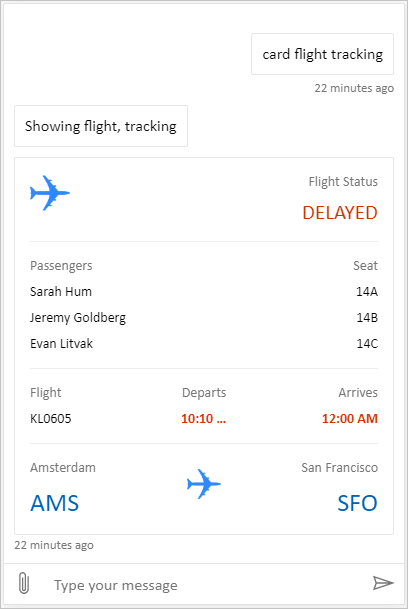
Full bundle Copilot Studio'dan tüm zengin içeriği gösterebilen özel bir tuvaldir. Örneğin:
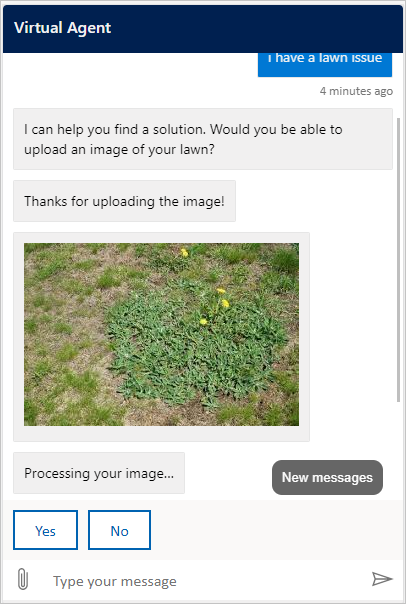
Location ve dosya yükleme kullanıcının konumunu alıp Copilot Studio aracısına gönderebilen özel bir tuvaldir. Örneğin:
Alternatif olarak Bot Framework'ten başka sample Web Sohbeti tuvalleri deneyin.
Varsayılan tuvalde olduğu gibi, özel tuvali ayarlamak için kullanabilirsin styleSetOptions . Tüm özelleştirilebilir özellikler defaultStyleOptions.jsiçinde listelenir. Neleri özelleştirebileceğiniz hakkında daha fazla bilgi için bkz. Web Sohbeti özelleştirme.
Özel bir tuvalde bağlantı kurulumunu destekleme
Standart altyapıyla çalışan bir aracının kullanıcı bağlantısına ihtiyacı olduğunda sohbet tuvali bağlantı gerektiren bir Uyarlamalı Kart alır. Özel tuvaliniz kartın Action.OpenUrlDialog eylemini işlemelidir. Bu işleme olmadan Bağlan seçeneğinin belirlenmesi odaklanmış bağlantı penceresini açmaz.
Bağlantı penceresini aç
-
Action.OpenUrlDialogöğesini Uyarlamalı Kartlar oluşturucunuza kaydedin veurlözelliğini okuyun. Sadece mutlakhttp://veyahttps://URL kabul edin. - Hedef kaynağı açmadan önce güvenilir olup olmadığına karar verin. Sadece kontrol ettiğiniz veya güvenlik ekibinizin inceleyip izin listesine aldığı kökenlere güvenin.
- URL'yi doğrudan kullanıcının seçiminden açın.
window.open(url, "_blank", "popup")Pencerenin kullanıcı eylemiyle açılması, tarayıcının onu engelleme riskini azaltır. - Güvenilir bir hedef için,
window.openiçindekiwindowFeaturesbağımsız değişkenindewindow.openervenoreferreröğelerini atlayın; böylece bağlantı penceresinoopeneröğesine bir sonuç döndürebilir. Başka herhangi bir varış noktası içinnoopener,noreferrerkullanın ve dönüş iletisini kabul etmeyin. - Bağlantı gerektiren kartın
Windowdöndürülen referansını ve etkinlik kimliğini sakla. Açılır pencere engellenirse veya kullanıcı bunu geçerli bir sonuç almadan kapatırsa, Devam seçeneğini veya başka bir kurtarma işlemini kullanılabilir tutun. Pencere kapanmasını başarılı bağlantı kurulumu olarak yorumlamayın.
Uyarlamalı Kartlar JavaScript SDK'sı, Action.OpenUrlDialog öğesini varsayılan olarak uygulamaz. Eylemi SerializationContext.actionRegistry aracılığıyla kaydedin veya işlemi doğrudan sahip olduğunuz bir renderer'da yönetin. Bir Action.OpenUrl geri dönüşü, iletişim kutusu eylemini desteklemeyen istemcilerde hedefi açabilir ancak geri dönüş bir açılır pencere sonucu döndüremez.
Important
window.opener erişimi olan bir bağlantı penceresi, sohbet sayfasında gezinebilir veya sayfayı başka şekillerde etkileyebilir. Web güvenlik ekibinizle birlikte hedefi ve yönlendirmelerini gözden geçirin. Güvenilir bir hedefin opener erişimini koruyarak güvenilmeyen bir siteye yönlendirmesine izin vermeyin.
Bot Framework Web Sohbeti'i eklerseniz Web Sohbeti'in Action.OpenUrlDialog işlemesi bağlantı penceresini açar. Aynı kaynaktan gelen pencereler varsayılan olarak güvenilir kabul edilir. İncelenmiş bir çapraz kaynak hedefi için styleOptions.callURLActionTrustedOrigin değerini tam olarak izin verilen kaynağa ayarlayın. Birden fazla kaynağı virgülle ayırın. Ayrıca callURLActionPopupWindowWidth ve callURLActionPopupWindowHeight ayarlayabilirsiniz. İncelemediğiniz bir kaynağı eklemeyin.
Başarılı bağlantı kurulumundan sonra devam edin (önizleme)
[Bu bölüm yayın öncesi belgedir ve değişebilir.]
Important
Bu makale Microsoft Copilot Studio önizleme belgelerini içerir ve değiştirilebilir.
Önizleme özellikleri, üretimde kullanıma yönelik değildir ve sınırlı işlevselliğe sahip olabilir. Bu özellikler, önceden erişebilmeniz ve geri bildirim sağlamanız amacıyla resmi sürümden önce kullanıma sunulur.
Üretime hazır bir aracı oluşturuyorsanız bkz. Microsoft Copilot Studio Overview.
Güvenilir bağlantı penceresi, sohbet sayfasına tamamlanma sonucunu window.opener.postMessage ile gönderebilir. Sohbet sayfasının tam origin’ini hedef origin olarak kullanın, * değil.
Sohbet sayfasında:
window.open,nulldeğerini döndürdüyse bu deneme için ileti kabul etmeyin. Aksi takdirde, mesajı yalnızcaevent.sourcesaklanan açılır pencere referansıyla eşleştiğinde veevent.originbeklenen kaynağa uyduğunda kabul edin.İleti verilerinin
type: "postback"ve aracınızın veya çalışma zamanınızın beklediği biçimde bir değer içerdiğini doğrulayın.Aşağıdaki örnek, ajana "hello-world" mesajı gönderir. Sohbet arayüzünde görünmüyor.
{ "type": "postback", "value": { hello: "World!" } }Aşağıdaki örnek, JSON
{ hello: "World!" }ile bir mesajı ajana gönderir.{ "type": "postback", "value": { hello: "World!" } }Kabul edilen değeri Bot Framework geri gönderme mekanizması üzerinden gönderin. Korunan etkinlik kimliğini
replyToIdolarak kullanın; açılır pencereden bir yanıt etkinliği kimliğini kabul etmeyin.Her açılır pencere için en fazla bir sonuç kabul edin. Bir sonucu kabul ettikten, güvenilen açılır pencereden gelen hatalı biçimlendirilmiş bir iletiyi reddettikten, açılır pencerenin kapandığını algıladıktan veya süre sınırına ulaştıktan sonra olay dinleyicisini kaldırın ve zamanlayıcısını temizleyin. Web Sohbeti beş dakikalık bir sınır kullanır.
Geri göndermeyi özgün bağlantı gerektiren etkileşimle ilişkilendirmek ve ilgili turu tam olarak bir kez sürdürmek için aracı veya çalışma zamanıyla koordinasyon sağlayın.
Tarayıcı iletişimi en iyi çaba esasına göre çalışır. Açılır pencere engelleyicileri, gezinti, çapraz kaynak açıcı ilkesi veya kapatılmış bir pencere otomatik devam etmeyi engelleyebilir. Devam seçeneğini veya başka bir kurtarma yolunu kullanılabilir tutun ve eksik bir iletiyi başarı olarak yorumlamayın.
Özelleştirilmiş tuvalinizi yayımlayın
Özel tuvalinizi barındırmak için tüm dosyaları bir web uygulamasına dağıtın.