Lưu ý
Cần có ủy quyền mới truy nhập được vào trang này. Bạn có thể thử đăng nhập hoặc thay đổi thư mục.
Cần có ủy quyền mới truy nhập được vào trang này. Bạn có thể thử thay đổi thư mục.
Lakebase is a fully managed Postgres database integrated into the Databricks platform. Build real-time transactional applications alongside your lakehouse data, with automatic scaling, instant branching, and native Unity Catalog integration.
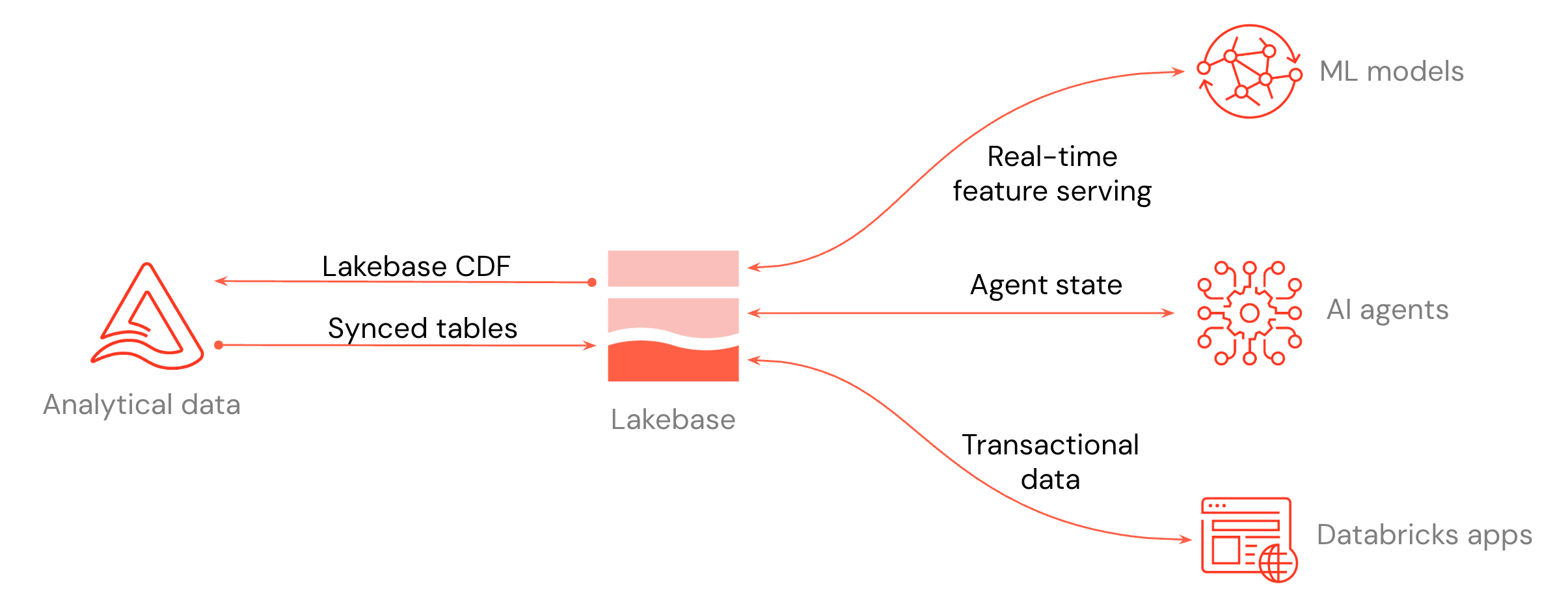
- Build low-latency apps: Connect Databricks Apps or any application to Lakebase for transactional workloads.
- Serve lakehouse data: Sync Unity Catalog tables into Lakebase so applications can query them at low latency.
- Store Postgres changes: Store Postgres changes as Delta tables for downstream pipelines and audit.
- AI and ML: Use Lakebase as an online feature store for ML models, or as a state store for AI agents.
If you have existing Lakebase Provisioned instances, they are being upgraded to Lakebase Autoscaling. See Upgrade to Lakebase Autoscaling.
Get started
| Quickstart | Description |
|---|---|
| Get a Postgres database | Create a project, branch, and database. Connect with psql or any Postgres driver. |
| Serve lakehouse data | Sync Unity Catalog tables into Postgres for low-latency app reads. |
| Store Postgres changes in the lakehouse | (Public Preview) Store Postgres changes as Delta with full change history. |
| Build applications | Build apps backed by Lakebase using Databricks Apps, external integrations, or the Data API. |
Key features
Explore features that optimize performance, reduce costs, and enable flexible development workflows.
| Feature | Description |
|---|---|
| Autoscaling | Automatically adjust compute resources based on workload demand. |
| Scale to zero | Automatically suspend inactive computes to minimize costs. |
| Branches | Create isolated branches for development and testing. |
| Read replicas | Create read-only replicas to scale read operations. |
| Instant restore | Create a new branch from any point in time within your history window. |
| High availability | Configure automatic failover to keep your database available during compute failures. |
Connect and query
Use various tools and interfaces to connect to and query your database.
| Task | Description |
|---|---|
| Connect to your database | Learn different ways to connect to your Lakebase database. |
| Query with SQL Editor | Use the built-in SQL Editor to query and manage your database. |
| Tables editor | Use the visual interface to view, edit, and manage data and schemas. |
| Postgres clients | Connect using standard Postgres clients and tools. |
| Querying data at a point in time | Query data using point-in-time branches. |
Databricks integrations
Connect Lakebase with your existing Databricks data and workflows.
| Integration | Description |
|---|---|
| Register in Unity Catalog | Register your Lakebase database in Unity Catalog for unified governance. |
| Serve data with synced tables | Serve lakehouse data through your Lakebase database for low-latency applications. |
| Lakebase Change Data Feed | Store row-level changes from Lakebase Postgres tables as Unity Catalog Delta tables for downstream pipelines, audit, and external consumers. (Public Preview) |
| Databricks Apps | Build and deploy interactive applications with Lakebase as the managed Postgres backend. |
| Agent state and memory | Store durable short-term and long-term agent memory in Lakebase for AI agents built with LangGraph or the OpenAI Agents SDK. |
| Feature Store and Model Serving | Use Lakebase as a low-latency online feature store backend for ML models served with Model Serving. |
Learn more
| Resource | Description |
|---|---|
| Use cases | Lakebase patterns: serve lakehouse data, replicate to the lakehouse, application backend, AI agents and ML. |
| Region availability | Supported AWS and Azure regions for Lakebase Postgres. |