Lưu ý
Cần có ủy quyền mới truy nhập được vào trang này. Bạn có thể thử đăng nhập hoặc thay đổi thư mục.
Cần có ủy quyền mới truy nhập được vào trang này. Bạn có thể thử thay đổi thư mục.
A drop-down button can present users with a list of options. To create this style of button, specify the BTNS_DROPDOWN style (also called TBSTYLE_DROPDOWN for compatibility with previous versions of the common controls). To show a drop-down button with an arrow, you must also set the TBSTYLE_EX_DRAWDDARROWS toolbar style by sending a TB_SETEXTENDEDSTYLE message.
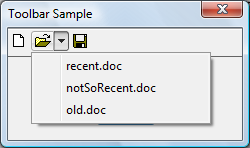
The following illustration shows a drop-down "Open" button with the context menu open and showing a list of files. In this example, the toolbar has the TBSTYLE_EX_DRAWDDARROWS style.
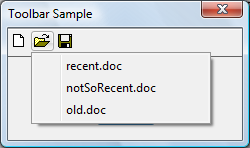
The following illustration shows the same toolbar, this time without the TBSTYLE_EX_DRAWDDARROWS style.
When users click a toolbar button that uses the BTNS_DROPDOWN style, the toolbar control sends its parent window a TBN_DROPDOWN notification code.
What you need to know
Technologies
Prerequisites
- C/C++
- Windows User Interface Programming
Instructions
Handle a Drop-down Button
The following code example demonstrates how an application can support a drop-down button in a toolbar control.
BOOL DoNotify(HWND hwnd, UINT msg, WPARAM wParam, LPARAM lParam)
{

    #define lpnm   ((LPNMHDR)lParam)
    #define lpnmTB ((LPNMTOOLBAR)lParam)

    switch(lpnm->code)
    {
        case TBN_DROPDOWN:
        {
            // Get the coordinates of the button.
            RECT rc;
            SendMessage(lpnmTB->hdr.hwndFrom, TB_GETRECT, (WPARAM)lpnmTB->iItem, (LPARAM)&rc);

            // Convert to screen coordinates.
            MapWindowPoints(lpnmTB->hdr.hwndFrom, HWND_DESKTOP, (LPPOINT)&rc, 2);

            // Get the menu.
            HMENU hMenuLoaded = LoadMenu(g_hinst, MAKEINTRESOURCE(IDR_POPUP));

            // Get the submenu for the first menu item.
            HMENU hPopupMenu = GetSubMenu(hMenuLoaded, 0);

            // Set up the pop-up menu.
            // In case the toolbar is too close to the bottom of the screen,
            // set rcExclude equal to the button rectangle and the menu will appear above
            // the button, and not below it.

            TPMPARAMS tpm;

            tpm.cbSize    = sizeof(TPMPARAMS);
            tpm.rcExclude = rc;

            // Show the menu and wait for input.
            // If the user selects an item, its WM_COMMAND is sent.

            TrackPopupMenuEx(hPopupMenu,
                             TPM_LEFTALIGN | TPM_LEFTBUTTON | TPM_VERTICAL,
                             rc.left, rc.bottom, g_hwndMain, &tpm);

            DestroyMenu(hMenuLoaded);

        return (FALSE);

        }
    }

    return FALSE;
}
Related topics