Lưu ý
Cần có ủy quyền mới truy nhập được vào trang này. Bạn có thể thử đăng nhập hoặc thay đổi thư mục.
Cần có ủy quyền mới truy nhập được vào trang này. Bạn có thể thử thay đổi thư mục.
Important
Azure Data Studio is retired as of February 28, 2026. You should migrate to Visual Studio Code. For more information, see What's happening with Azure Data Studio.
Server groups provide a way to organize your connections to the servers and databases you work with. When you create server groups, the configuration details are saved into User Settings.
Create and edit server groups
Click New Server Group at the top of the SERVERS sidebar.
Enter a group name and select a color for the group. Optionally, add a description.
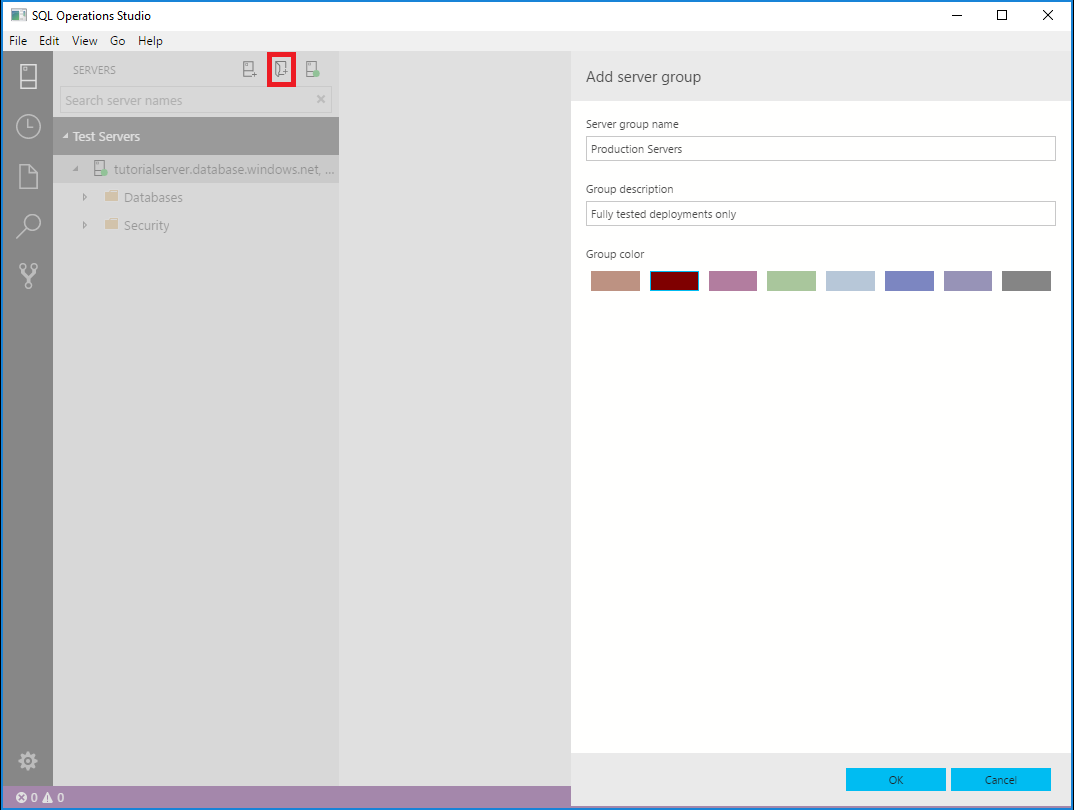
To edit an existing server group, right-click the group, and select Edit Server Group.
To edit available server group colors, edit the Server Groups values in User Settings.
Tip
You can drag and drop servers between different Server Groups.