Lưu ý
Cần có ủy quyền mới truy nhập được vào trang này. Bạn có thể thử đăng nhập hoặc thay đổi thư mục.
Cần có ủy quyền mới truy nhập được vào trang này. Bạn có thể thử thay đổi thư mục.
This article shows high-level architecture diagrams for scenarios to extend, or "burst", an on-premises render farm to Azure. The examples show different options for Azure compute, networking, and storage services.
Hybrid with NFS or CFS
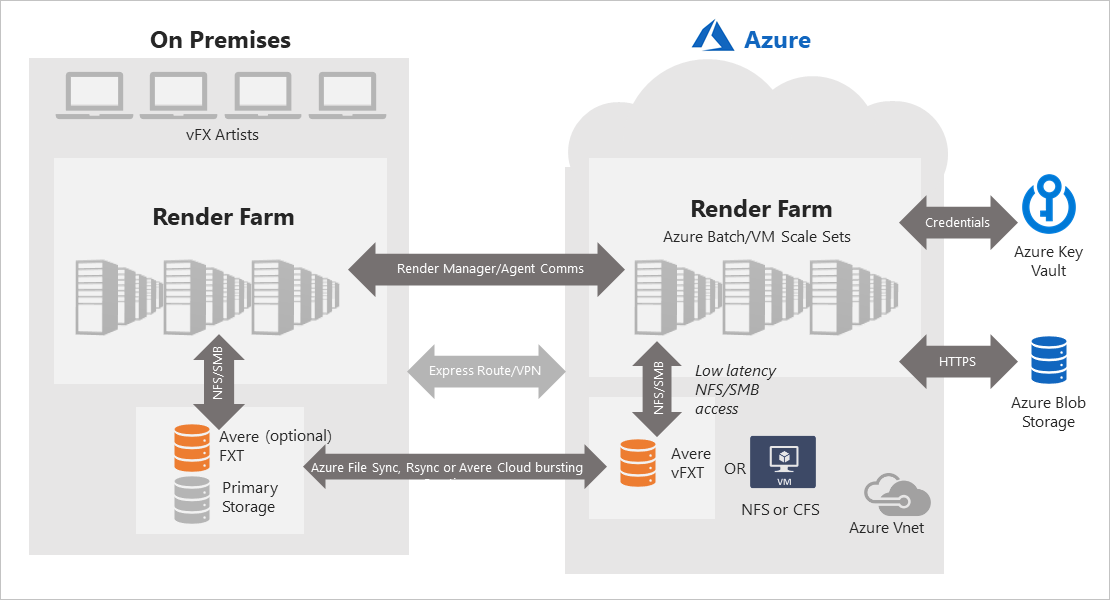
The following diagram shows a hybrid scenario that includes the following Azure services:
Compute - Azure Batch pool or Virtual Machine Scale Set.
Network - On-premises: Azure ExpressRoute or VPN. Azure: Azure VNet.
Storage - Input and output files: NFS or CFS using Azure VMs, synchronized with on-premises storage via Azure File Sync or RSync. Alternatively: Avere vFXT to input or output files from on-premises NAS devices using NFS.
Hybrid with Blobfuse
The following diagram shows a hybrid scenario that includes the following Azure services:
Compute - Azure Batch pool or Virtual Machine Scale Set.
Network - On-premises: Azure ExpressRoute or VPN. Azure: Azure VNet.
Storage - Input and output files: Blob storage, mounted to compute resources via Azure Blobfuse.

Hybrid compute and storage
The following diagram shows a fully connected hybrid scenario for both compute and storage and includes the following Azure services:
Compute - Azure Batch pool or Virtual Machine Scale Set.
Network - On-premises: Azure ExpressRoute or VPN. Azure: Azure VNet.
Storage - Cross-premises: Avere vFXT. Optional archiving of on-premises files via Azure Data Box to Blob storage, or on-premises Avere FXT for NAS acceleration.

Next steps
- Learn more about options for rendering in Azure.
- Learn about using rendering applications with Batch.