Lưu ý
Cần có ủy quyền mới truy nhập được vào trang này. Bạn có thể thử đăng nhập hoặc thay đổi thư mục.
Cần có ủy quyền mới truy nhập được vào trang này. Bạn có thể thử thay đổi thư mục.
What: Lets you immediately generate the declaration or definition of a function.
When: You have a function that needs a declaration, or vice-versa.
Why: You could manually create the declaration/definition, but this will create it automatically, creating the header/code file if necessary.
How:
Place your text or mouse cursor over the function for which you want to create the declaration or definition.
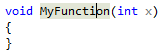
Next, do one of the following:
- Keyboard
- Press Ctrl+. to trigger the Quick Actions and Refactorings menu and select Create Declaration / Definition from the context menu.
- Mouse
- Right-click and select the Quick Actions and Refactorings menu and select Create Declaration / Definition from the context menu.
- Keyboard
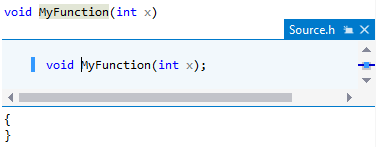
The function's declaration/definition will be created in the source or header file, which you'll see in a popup preview window. If the source or header file doesn't exist, it will also be created and placed in the project.