Lưu ý
Cần có ủy quyền mới truy nhập được vào trang này. Bạn có thể thử đăng nhập hoặc thay đổi thư mục.
Cần có ủy quyền mới truy nhập được vào trang này. Bạn có thể thử thay đổi thư mục.
Tip
This content is an excerpt from the eBook, Architecting Cloud Native .NET Applications for Azure, available on .NET Docs or as a free downloadable PDF that can be read offline.

Duende IdentityServer is a framework to build an OpenID Connect (OIDC) and OAuth 2.x standards-compliant authentication server using ASP.NET Core.
It is designed to provide a common way to authenticate requests to all of your applications, whether they're web, native, mobile, or API endpoints. IdentityServer can be used to implement Single Sign-On (SSO) for multiple applications and application types. It can be used to authenticate actual users via sign-in forms and similar user interfaces as well as service-based authentication that typically involves token issuance, verification, and renewal without any user interface. It can also act as a federation gateway to unify authentication providers.
IdentityServer is designed to be a customizable solution. Each instance is typically customized to suit an individual organization or the needs of a set of applications.
Common web app scenarios
Typically, applications need to support some or all of the following scenarios:
- Human users accessing web applications with a browser.
- Human users accessing back-end Web APIs from browser-based apps.
- Human users on mobile/native clients accessing back-end Web APIs.
- Other applications accessing back-end Web APIs (without an active user or user interface).
- Any application may need to interact with other Web APIs, using its own identity or delegating to the user's identity.
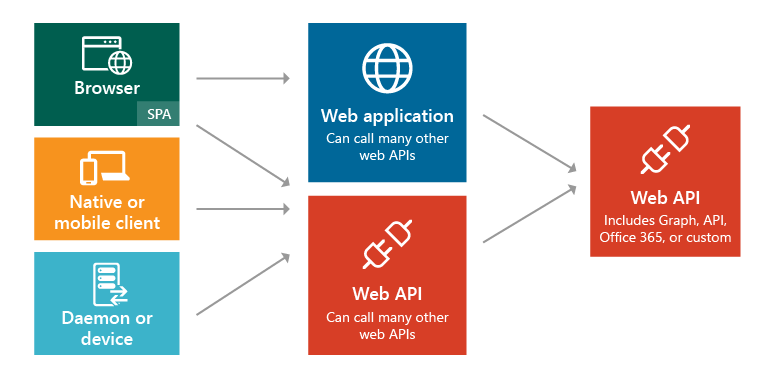
Figure 8-1. Application types and scenarios.
In each of these scenarios, the exposed functionality needs to be secured against unauthorized use. At a minimum, this typically requires authenticating the user or principal making a request for a resource. This authentication may use one of several common protocols such as SAML2p, WS-Fed, or OpenID Connect. Communicating with APIs typically uses the OAuth 2 protocol and its support for security tokens. Separating these critical cross-cutting security concerns and their implementation details from the applications themselves ensures consistency and improves security and maintainability. Outsourcing these concerns to a dedicated product like IdentityServer helps the requirement for every application to solve these problems itself.
IdentityServer provides middleware that runs within an ASP.NET Core application and adds support for OpenID Connect and OAuth 2.x (see supported specifications). Using IdentityServer, organizations can create their own ASP.NET Core app using IdentityServer middleware to act as the authorization server for all of their token-based security protocols. The IdentityServer middleware exposes endpoints to support standard functionality, including:
- Authorize (authenticate the end user)
- Token (request a token programmatically)
- Discovery (metadata about the server)
- User Info (get user information with a valid access token)
- Device Authorization (used to start device flow authorization)
- Introspection (token validation)
- Revocation (token revocation)
- End Session (trigger single sign-out across all apps)
- Pushed Authorization Requests (for a more secure authentication process)
Getting started
IdentityServer is available:
- With a community license, which lets you use the IdentityServer free for small companies and non-profits (conditions apply)
- Paid, which lets you use the IdentityServer in a commercial scenario
For more information about pricing, see the official product's pricing page.
You can add it to your applications using its NuGet packages. The main package is IdentityServer, which has been downloaded over four million times. The base package doesn't include any user interface code and only supports in-memory configuration. To use it with a database, you'll also want a data provider like Duende.IdentityServer.Storage, which uses Entity Framework Core to store configuration and operational data for IdentityServer. For user interface, you can copy files from the samples repository into your ASP.NET Core MVC application to add support for sign in and sign out using IdentityServer middleware.
Configuration
IdentityServer supports different kinds of protocols and social authentication providers that can be configured as part of each custom installation. This is typically done in the ASP.NET Core application's Program class. The configuration involves specifying the supported protocols and the paths to the servers and endpoints that will be used. Figure 8-2 shows an example configuration taken from the IdentityServer Quickstart for ASP.NET Core applications project:
// some details omitted
builder.Services.AddIdentityServer();

builder.Services.AddAuthentication(options =>
    {
        options.DefaultScheme = "Cookies";
        options.DefaultChallengeScheme = "oidc";
    })
    .AddCookie("Cookies")
    .AddGoogle("Google", options =>
    {
        options.SignInScheme = IdentityServerConstants.ExternalCookieAuthenticationScheme;

        options.ClientId = "<insert here>";
        options.ClientSecret = "<insert here>";
    })
    .AddOpenIdConnect("oidc", options =>
    {
        options.Authority = "https://localhost:5001";

        options.ClientId = "web";
        options.ClientSecret = "secret";
        options.ResponseType = "code";

        options.Scope.Clear();
        options.Scope.Add("openid");
        options.Scope.Add("profile");

        options.MapInboundClaims = false; // Don't rename claim types

        options.SaveTokens = true;
    });
}
Figure 8-2. Configuring IdentityServer.
JavaScript clients
Many cloud-native applications use server-side APIs and rich client single page applications (SPAs) on the front end, for example, using React, Angular, or Blazor WebAssembly. The backend-for-frontend (BFF) pattern is used for these types of clients, which makes it possible to keep tokens out of the browser's reach. This pattern follows IETF's OAuth 2.0 for Browser-Based Applications spec.
References
Cộng tác với chúng tôi trên GitHub
Bạn có thể tìm thấy nguồn cho nội dung này trên GitHub, nơi bạn cũng có thể tạo và xem lại các vấn đề và yêu cầu kéo. Để biết thêm thông tin, hãy xem hướng dẫn dành cho người đóng góp của chúng tôi.
