Lưu ý
Cần có ủy quyền mới truy nhập được vào trang này. Bạn có thể thử đăng nhập hoặc thay đổi thư mục.
Cần có ủy quyền mới truy nhập được vào trang này. Bạn có thể thử thay đổi thư mục.
Simulates token-based rate limiting for language model APIs by tracking prompt and completion token consumption within configurable time windows.
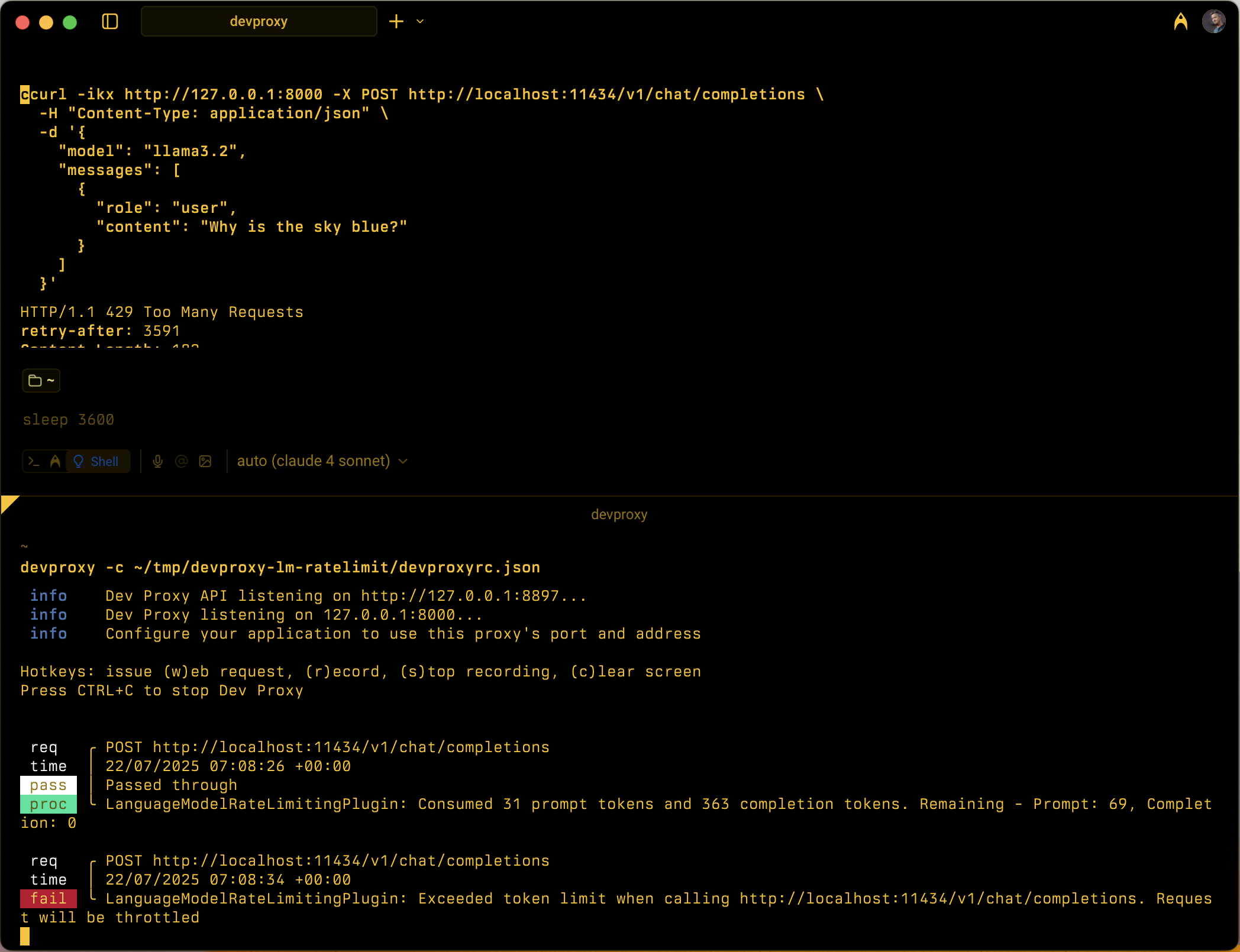
Configuration example
{
  "$schema": "https://raw.githubusercontent.com/dotnet/dev-proxy/main/schemas/v2.0.0/rc.schema.json",
  "plugins": [
    {
      "name": "LanguageModelRateLimitingPlugin",
      "enabled": true,
      "pluginPath": "~appFolder/plugins/DevProxy.Plugins.dll",
      "configSection": "languageModelRateLimitingPlugin"
    }
  ],
  "urlsToWatch": [
    "https://api.openai.com/*",
    "http://localhost:11434/*"
  ],
  "languageModelRateLimitingPlugin": {
    "$schema": "https://raw.githubusercontent.com/dotnet/dev-proxy/main/schemas/v2.0.0/languagemodelratelimitingplugin.schema.json",
    "promptTokenLimit": 5000,
    "completionTokenLimit": 5000,
    "resetTimeWindowSeconds": 60,
    "whenLimitExceeded": "Throttle",
    "headerRetryAfter": "retry-after"
  }
}
Configuration properties
| Property | Description | Default |
|---|---|---|
promptTokenLimit |
Maximum number of prompt tokens allowed within the time window. | 5000 |
completionTokenLimit |
Maximum number of completion tokens allowed within the time window. | 5000 |
resetTimeWindowSeconds |
Time window in seconds after which token limits reset. | 60 |
whenLimitExceeded |
Response behavior when token limits are exceeded. Can be Throttle or Custom. |
Throttle |
headerRetryAfter |
Name of the HTTP header to include retry-after information. | retry-after |
customResponseFile |
Path to file containing custom response when whenLimitExceeded is set to Custom. |
token-limit-response.json |
Custom response configuration
When whenLimitExceeded is set to Custom, you can define a custom response in a separate JSON file:
{
  "$schema": "https://raw.githubusercontent.com/dotnet/dev-proxy/main/schemas/v2.0.0/languagemodelratelimitingplugin.customresponsefile.schema.json",
  "statusCode": 429,
  "headers": [
    {
      "name": "retry-after",
      "value": "@dynamic"
    },
    {
      "name": "content-type",
      "value": "application/json"
    }
  ],
  "body": {
    "error": {
      "message": "You have exceeded your token quota. Please wait before making additional requests.",
      "type": "insufficient_quota",
      "code": "token_quota_exceeded"
    }
  }
}
Custom response properties
| Property | Description |
|---|---|
statusCode |
HTTP status code to return when token limit is exceeded. |
headers |
Array of HTTP headers to include in the response. Use @dynamic for retry-after to automatically calculate seconds until reset. |
body |
Response body object that is serialized to JSON. |
How it works
The LanguageModelRateLimitingPlugin works by:
- Intercepting OpenAI API requests: Monitors POST requests to configured URLs that contain OpenAI-compatible request bodies
- Tracking token consumption: Parses responses to extract
prompt_tokensandcompletion_tokensfrom the usage section - Enforcing limits: Maintains running totals of consumed tokens within the configured time window
- Providing throttling responses: When limits are exceeded, returns either standard throttling responses or custom responses
Supported request types
The plugin supports both OpenAI completion and chat completion requests:
- Completion requests: Requests with a
promptproperty - Chat completion requests: Requests with a
messagesproperty
Token tracking
Token consumption is tracked separately for:
- Prompt tokens: Input tokens consumed by the request
- Completion tokens: Output tokens generated by the response
When either limit is exceeded, subsequent requests are throttled until the time window resets.
Time window behavior
- Token limits reset after the configured
resetTimeWindowSeconds - The reset timer starts when the first request is processed
- When a time window expires, both prompt and completion token counters reset to their configured limits
Default throttling response
When whenLimitExceeded is set to Throttle, the plugin returns a standard OpenAI-compatible error response:
{
  "error": {
    "message": "You exceeded your current quota, please check your plan and billing details.",
    "type": "insufficient_quota",
    "param": null,
    "code": "insufficient_quota"
  }
}
The response includes:
- HTTP status code:
429 Too Many Requests retry-afterheader with seconds until token limits reset- CORS headers when the original request includes an
Originheader
Use cases
The LanguageModelRateLimitingPlugin is useful for:
- Testing token-based rate limiting: Simulate how your application behaves when language model providers enforce token quotas
- Development cost simulation: Understand token consumption patterns during development before hitting real API limits
- Resilience testing: Verify that your application properly handles token limit errors and implements appropriate retry logic
- Local LLM testing: Test token limiting scenarios with local language models (like Ollama) that don't enforce their own limits
Example scenarios
Scenario 1: Basic token limiting
{
  "languageModelRateLimitingPlugin": {
    "promptTokenLimit": 1000,
    "completionTokenLimit": 500,
    "resetTimeWindowSeconds": 300
  }
}
This configuration allows up to 1,000 prompt tokens and 500 completion tokens within a 5-minute window.
Scenario 2: Custom error responses
{
  "languageModelRateLimitingPlugin": {
    "promptTokenLimit": 2000,
    "completionTokenLimit": 1000,
    "resetTimeWindowSeconds": 60,
    "whenLimitExceeded": "Custom",
    "customResponseFile": "custom-token-error.json"
  }
}
This configuration uses a custom response file to provide specialized error messages when token limits are exceeded.
Next step
Cộng tác với chúng tôi trên GitHub
Bạn có thể tìm thấy nguồn cho nội dung này trên GitHub, nơi bạn cũng có thể tạo và xem lại các vấn đề và yêu cầu kéo. Để biết thêm thông tin, hãy xem hướng dẫn dành cho người đóng góp của chúng tôi.
