Lưu ý
Cần có ủy quyền mới truy nhập được vào trang này. Bạn có thể thử đăng nhập hoặc thay đổi thư mục.
Cần có ủy quyền mới truy nhập được vào trang này. Bạn có thể thử thay đổi thư mục.
ToggleSwitch is a simple formatting slice which is used to represent bool object type from capabilities.json file.
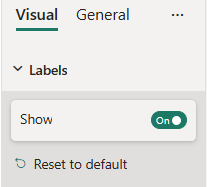
Example: ToggleSwitch implementation
In this example, we show how to build a ToggleSwitch slice using formatting model utils.
Capabilities object
Insert the following JSON fragment into the capabilities.json file.
{
  // ... same level as dataRoles and dataViewMappings
  "objects": {
    "labels": {
      "properties": {
        "show": {
          "type": {
            "bool": true
          }
        }
      }
    }
  }
}
Formatting model class
Insert the following code fragment into the settings file.
import { formattingSettings } from "powerbi-visuals-utils-formattingmodel";

class LabelsCardSetting extends formattingSettings.SimpleCard {
    name: string = "labels"; // same as capabilities object name
    displayName: string = "Labels";

    public showLabels: formattingSettings.ToggleSwitch = new formattingSettings.ToggleSwitch({
        name: "show", // same as capabilities property name
        displayName: "Show",
        value: true
    });

    public slices: formattingSettings.Slice[] = [ this.showLabels ];
}

export class VisualSettings extends formattingSettings.Model {
    public labels: LabelsCardSetting = new LabelsCardSetting();
    public cards: formattingSettings.SimpleCard[] = [this.labels];
}
More options
ToggleSwitch slice can also be used as a top-level card toggle.
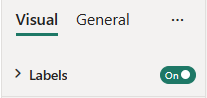
To make ToggleSwitch top-level, remove slice from the slices array and add the following line to the card settings class:
topLevelSlice: formattingSettings.ToggleSwitch = this.showLabels;
Your final formatting settings file should match this example:
import { formattingSettings } from "powerbi-visuals-utils-formattingmodel";

class LabelsCardSetting extends formattingSettings.SimpleCard {
    name: string = "labels"; // same as capabilities object name
    displayName: string = "Labels";

    public showLabels: formattingSettings.ToggleSwitch = new formattingSettings.ToggleSwitch({
        name: "show", // same as capabilities property name
        displayName: "Show",
        value: true
    });

    topLevelSlice: formattingSettings.ToggleSwitch = this.showLabels;
    public slices: formattingSettings.Slice[] = [];
}

export class VisualSettings extends formattingSettings.Model {
    public labels: LabelsCardSetting = new LabelsCardSetting();
    public cards: formattingSettings.SimpleCard[] = [this.labels];
}