Lưu ý
Cần có ủy quyền mới truy nhập được vào trang này. Bạn có thể thử đăng nhập hoặc thay đổi thư mục.
Cần có ủy quyền mới truy nhập được vào trang này. Bạn có thể thử thay đổi thư mục.
This section describes the CaptionClass functionality and explains how the CaptionClassTranslate function trigger with ID 15 in Codeunit 1 handles this functionality. The topics in this section describe the syntax and the function code of the CaptionClass.
When you set the CaptionClass Property on a field or control, users can configure the caption of a text box that is connected to a label or the caption of a check box without having to modify code. If you set the CaptionClass property on other controls, such as Buttons or Menu Items, the caption will not be displayed.
Dynamics NAV passes the value of the CaptionClass property to the CaptionClassTranslate function trigger, which has ID 15 on Codeunit 1. This function translates the CaptionClass to a caption that users can see. The following illustration shows this sequence.
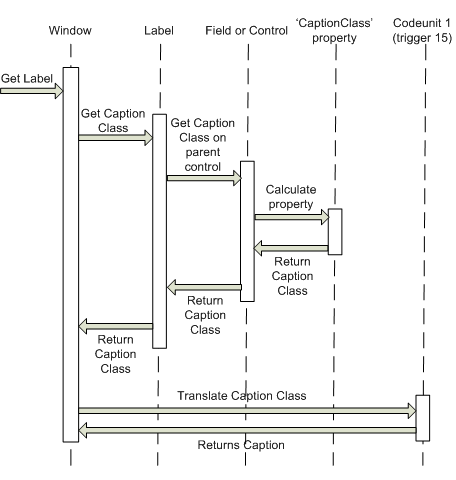
Codeunit 1, function trigger ID 15 is called by using a language and a CaptionClass. The trigger converts the CaptionClass into the specific caption for that language and returns it as a string. Language is specified as an integer. CaptionClass is a text.