Lưu ý
Cần có ủy quyền mới truy nhập được vào trang này. Bạn có thể thử đăng nhập hoặc thay đổi thư mục.
Cần có ủy quyền mới truy nhập được vào trang này. Bạn có thể thử thay đổi thư mục.
The following example demonstrates how to create a standard tooltip control for a window's entire client area.
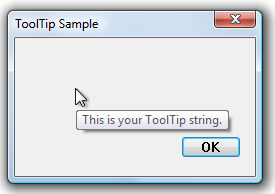
The following illustration shows the tooltip that is displayed when the mouse pointer is within the client window of a dialog box. The handle of the dialog box was passed to the function shown in the preceding example.
What you need to know
Technologies
Prerequisites
- C/C++
- Windows User Interface Programming
Instructions
Create a Tooltip for a Rectangular Area
The following example demonstrates how to create a standard tooltip control for a window's entire client area.
void CreateToolTipForRect(HWND hwndParent)
{
    // Create a tooltip.
    HWND hwndTT = CreateWindowEx(WS_EX_TOPMOST, TOOLTIPS_CLASS, NULL,
                                 WS_POPUP | TTS_NOPREFIX | TTS_ALWAYSTIP,
                                 CW_USEDEFAULT, CW_USEDEFAULT, CW_USEDEFAULT, CW_USEDEFAULT,
                                 hwndParent, NULL, g_hInst,NULL);

    SetWindowPos(hwndTT, HWND_TOPMOST, 0, 0, 0, 0,
                 SWP_NOMOVE | SWP_NOSIZE | SWP_NOACTIVATE);

    // Set up "tool" information. In this case, the "tool" is the entire parent window.

    TOOLINFO ti = { 0 };
    ti.cbSize   = sizeof(TOOLINFO);
    ti.uFlags   = TTF_SUBCLASS;
    ti.hwnd     = hwndParent;
    ti.hinst    = g_hInst;
    ti.lpszText = TEXT("This is your tooltip string.");

    GetClientRect (hwndParent, &ti.rect);

    // Associate the tooltip with the "tool" window.
    SendMessage(hwndTT, TTM_ADDTOOL, 0, (LPARAM) (LPTOOLINFO) &ti);
}
Related topics