Note
Access to this page requires authorization. You can try signing in or changing directories.
Access to this page requires authorization. You can try changing directories.
Microsoft Copilot in Viva Glint is an AI-powered analysis tool that helps HR users and organizational leaders quickly understand and act on employee feedback. Copilot in Viva Glint coordinates the following components:
- Microsoft-hosted large language models (LLMs) provided through Azure OpenAI Service
- Raw survey responses, including comments and ratings
- Survey questions and program configuration
- Demographic filters based on user permissions
Important
- Raw survey responses, prompts, and respondent user attributes processed by Copilot in Viva Glint aren’t used to train foundation LLMs, including those raw survey responses, prompts, and respondent user attributes used by Microsoft Copilot.
- Raw survey responses and respondent user attributes stored in Viva Glint aren’t used to train foundation LLMs.
- Copilot in Viva Glint respects your organization's existing data access permissions and confidentiality thresholds.
Who uses Copilot in Viva Glint
Copilot in Viva Glint is designed for multiple organizational roles:
- Admins and HR leaders: Summarize large datasets to identify key insights and support stakeholder requests
- Organizational leaders: Analyze comments for their teams and uncover patterns across employee populations
- Managers: Identify themes from team feedback to guide conversations and action planning
What this article covers
This article provides information about data, privacy, and security for Microsoft Copilot in Viva Glint, including answers to the following questions:
- What is the license requirement to access Copilot in Viva Glint?
- How does Copilot in Viva Glint work with Microsoft Copilot in distinct boundaries?
- How does Copilot in Viva Glint protect employee feedback data privacy?
- What enterprise data protections apply to Copilot in Viva Glint?
- Where is data stored and processed when using Copilot in Viva Glint?
- How does Copilot in Viva Glint help customers meet regulatory compliance requirements?
- How does Microsoft review Copilot in Viva Glint for responsible AI?
- What safeguards protect against harmful content and prompt injection attacks?
License requirements
- A license for Viva Glint, Microsoft Viva Suite, or Microsoft Viva Workplace Analytics and Employee Feedback is required to access Copilot in Viva Glint.
- A license for Microsoft Copilot is not required to access Copilot in Viva Glint.
Copilot in Viva Glint and Microsoft Copilot
Copilot in Viva Glint operates within a dedicated data architecture for processing employee feedback and survey data. This is separate from Microsoft Copilot’s data processing boundaries, designed to support appropriate data isolation.
Copilot in Viva Glint features
When using Copilot in Viva Glint features (such as comment summarization in Copilot in Viva Glint), raw survey responses, prompts, and respondent user attributes are processed entirely within the Microsoft 365 service boundary. Raw survey responses, prompts, and respondent user attributes aren't shared with Microsoft Copilot.
Copilot in Viva Glint uses Microsoft-hosted large language models provided through Azure OpenAI Service. Model requests are processed within Microsoft's Microsoft 365 compliance boundary using Microsoft-managed infrastructure.
Important
- Raw survey responses, prompts, and respondent user attributes processed by Copilot in Viva Glint aren't used to train foundation LLMs.
- Raw survey responses and respondent user attributes stored in the Viva Glint database aren't used to train foundation LLMs.
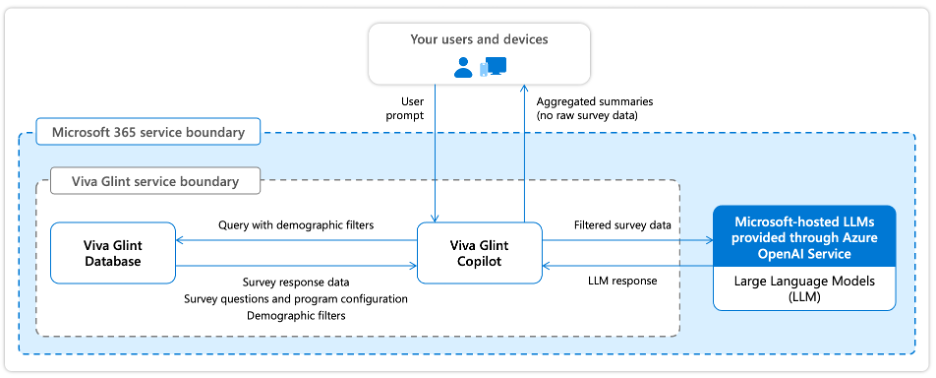
How Copilot in Viva Glint protects employee feedback data privacy
Copilot in Viva Glint respects your organization's existing data access permissions and confidentiality protections. When Copilot summarizes employee feedback, it applies the same privacy mechanisms that protect Viva Glint reports and dashboards.
Privacy protection mechanisms
Viva Glint protects survey taker privacy through three core mechanisms:
Minimum response thresholds
Survey results are only reported when a minimum number of responses are received. The default minimum is 5 responses for rating questions and 10 responses for comments. Organizations can configure these thresholds per survey program to balance privacy protection with reporting needs.
Role-based access controls
Copilot in Viva Glint only processes survey results the signed-in user has permission to view in Viva Glint as configured by customer’s administrator. The user's role in the reporting hierarchy determines access. If a team doesn't meet the minimum response threshold, the Copilot in Viva Glint feature is either unavailable to the user or Copilot in Viva Glint informs the user that it can't provide a summary of the survey responses.
Suppression thresholds
Even when minimum response thresholds are met, feedback can be suppressed if filtering by demographic attributes might allow identification of individual respondents. Viva Glint's suppression logic ensures that comparing filtered results can't reveal individual responses.
How Copilot applies privacy protections
When you ask Copilot to summarize feedback:
- Copilot can only access raw survey responses, comments, and ratings that the signed-in user has permission to view as configured by the administrator.
- Summaries respect the same confidentiality thresholds as Viva Glint reports.
- If survey responses don’t meet minimum response thresholds, Copilot can't access or summarize that feedback.
- Demographic filtering in Copilot follows the same suppression rules as Viva Glint dashboards.
For more information, see Privacy protection in reporting.
Enterprise data protection
Copilot in Viva Glint follows the same enterprise data protection principles as Microsoft Viva and Microsoft 365. These protections are designed to help keep customer data secure, private, and under your control. For more information, see Viva security.
Copilot in Viva Glint data residency
Copilot in Viva Glint follows the same data residency commitments as Viva Glint for customer data storage and processing.
Customer data storage
Customer data (including survey responses, comments, and respondent user attributes) is stored in one of three regional data centers based on your Microsoft 365 tenant location. For complete details on Viva Glint data residency, see Data residency for Viva Glint.
LLM processing and the EU Data Boundary
When Copilot in Viva Glint calls Microsoft-hosted large language models to process raw survey responses, prompts, and respondent user attributes, processing is aligned with Viva Glint’s data residency commitments for your tenant's region. For complete details on Viva Glint data residency, see Data residency for Viva Glint.
How Copilot in Viva Glint supports regulatory compliance
Copilot in Viva Glint follows the same security and compliance framework as Viva Glint. Viva Glint provides controls and protections that help your organization meet its obligations under applicable data protection regulations such as the European Union General Data Protection Regulation (GDPR). For detailed information, see Security and compliance for data usage.
EU AI Act
Microsoft assesses its services in alignment with applicable EU AI Act classifications. Microsoft doesn't classify Copilot in Viva Glint as a high-risk AI solution under the EU AI Act. Copilot in Viva Glint is designed to summarize employee feedback for HR and organizational leaders, and doesn't perform functions such as making decisions affecting terms of work-related relationships, biometric identification, critical infrastructure management, or other activities that would place it in the high-risk category as defined by the EU AI Act. For more information on Microsoft's approach to EU AI Act compliance, see Innovating in line with the EU AI Act.
Responsible AI and data security reviews for Copilot in Viva Glint
Copilot in Viva Glint features are built on the same data protection, privacy, security, and Responsible AI foundations that govern Microsoft Copilot. To maintain customer trust and reduce the risk of harm, each feature release is evaluated through Responsible AI impact assessment and data security review processes designed to identify, assess, and mitigate potential risks before features are made available.
These review processes are intended to reduce harms that can arise from AI systems in workplace scenarios, including:
- Bias, unfairness, or discriminatory outcomes, especially in people-related insights and summaries.
- Workplace harms, such as inappropriate inferences or judgments about employee performance, emotional state, or personal characteristics.
- Inaccurate or misleading AI-generated content that could be over trusted or misapplied.
- Unauthorized data access, exposure, or misuse, including risks related to tenant isolation and permission boundaries.
- Security and privacy risks that could compromise the confidentiality, integrity, or residency of customer data.
Copilot in Viva Glint is designed to help mitigate these risks through a defense-in-depth approach that combines Responsible AI governance, technical safeguards, and security and privacy controls.
Responsible AI impact assessment
Copilot in Viva Glint features are subject to Responsible AI impact assessment aligned with Microsoft’s Responsible AI principles and standards. These assessments are designed to evaluate how AI capabilities may affect users and organizations in real-world scenarios and to identify potential harms early in the product lifecycle.
As described in Microsoft Copilot governance, Responsible AI reviews consider:
- Intended use and limitations of the feature and whether outputs could be misunderstood or misused.
- Potential for bias or unfair treatment, including fairness related harms.
- Risk of workplace harms, defined as AI systems making inferences, judgments, or evaluations about employees based on workplace communication.
- Appropriateness of safeguards, such as content filtering, blocking restricted scenarios, and user in the loop design.
Microsoft explicitly restricts the use of generative AI for making inferences or judgments about employee performance, attitude, internal state, or personal characteristics, and applies mitigations to help prevent these workplace harms.
The outcomes of Responsible AI impact assessments inform design decisions, including feature scope, guardrails, transparency cues, and user controls.
Important
- Responsible AI impact assessments are revisited as features evolve, so that risk mitigations remain appropriate as capabilities change or expand.
Data security review
In parallel, Copilot in Viva Glint features are reviewed against Microsoft’s established data security and privacy commitments for Microsoft Copilot.
These reviews validate that features:
- Access and process data only within the user’s existing Microsoft 365 and Viva Glint permission boundaries.
- Respect tenant isolation, role-based access control, and identity-based authorization.
- Verify that raw survey responses, prompts, respondent user attributes, and AI-generated outputs are not used to train foundation LLMs.
- Protect data using encryption technologies aligned with Microsoft’s security commitments.
- Align with data residency, EU Data Boundary, and contractual privacy commitments.
These controls are designed to help Copilot in Viva Glint features meet Microsoft’s security, privacy, and compliance expectations before release. For more information on Microsoft’s Responsible AI principles and standards, refer to:
How does Copilot in Viva Glint block harmful content?
Copilot in Viva Glint uses the same safeguards as Microsoft Copilot to help reduce the risk of detect and block harmful content. These protections apply to both user prompts and AI-generated responses.
Content harm filters
Microsoft Copilot employs content harm filters that identify harmful content in four categories:
- Hate & fairness: Pejorative or discriminatory language based on protected attributes
- Sexual content: Inappropriate discussions of reproductive organs, erotic acts, or sexual abuse
- Violence: Language related to physical actions intended to harm or kill, weapons, and related entities
- Self-harm: Content related to deliberate actions intended to injure or kill oneself
Workplace harms filter
Certain Microsoft Copilot scenarios include mitigations to prevent workplace harms by restricting the use of generative AI from making inferences, judgments, or evaluations about employees regarding performance, attitude, internal or emotional state, or personal characteristics.
Additional protections
Microsoft Copilot provides detection for protected materials, including text subject to copyright and code subject to licensing restrictions. For detailed information about harmful content protections, see How does Copilot block harmful content?
Does Copilot block prompt injections (jailbreak attacks)?
Copilot in Viva Glint uses the same safeguards as Microsoft Copilot to help detect and block prompt injection and jailbreak attacks. These safeguards work alongside content harm filters and built-in model safety mitigations as part of a layered security strategy. For detailed information, see Does Copilot block prompt injections?
What happens when foundation LLM changes occur?
The AI models that power Copilot in Viva Glint are regularly updated and enhanced. Model updates bring performance improvements, more advanced reasoning, and expanded capabilities, but they don't change your security, privacy, or compliance settings. For more information, see Understanding foundation model changes in Microsoft Copilot
Change management and customer notification
Viva Glint follows Microsoft's standard change management process to notify customers about updates. Microsoft provides at least 30 days' advance notice for changes that require administrator action.
Communication channels:
- Message Center: Primary source for change notifications in the Microsoft 365 Admin Center
- Microsoft 365 Roadmap: Public website showing development status and release dates
- Microsoft 365 Blog: Announcements about latest releases and features
For comprehensive information about Microsoft's change management process, see Microsoft 365 change guide.
Frequently asked questions
Where are LLM calls processed for EU, non-EU, and Australian customers?
- For EU customers: LLM processing stays within the EU Data Boundary. EU traffic is routed to data centers within the EU, in alignment with EU Data Boundary commitments.
- For Non-EU customers: LLM calls are routed to the closest available data centers in the region. During high utilization periods, calls may be routed to other regions where capacity is available.
- For Australian customers: Customer data may temporarily move outside Australia for processing via Microsoft 365 core services but doesn't reside outside Australia for more than 24 hours.