你当前正在访问 Microsoft Azure Global Edition 技术文档网站。 如果需要访问由世纪互联运营的 Microsoft Azure 中国技术文档网站,请访问 https://docs.azure.cn。
Durable Task SDK 为 Durable Task 计划程序提供轻型客户端库。 在本快速入门中,你将创建一个示例应用,该应用使用 扇出/扇入应用程序模式 并行处理多个工作项,然后聚合结果。
在本快速入门的最后,您将尝试一个工作业务流程,其中要求将任务扇出到并行工作线程并扇入结果,所有这些操作都将使用持久任务计划程序模拟器在本地运行。
重要
目前,PowerShell Durable Task SDK 不可用。
注释
对持久任务 SDK 的 PowerShell 支持处于预览状态。 想要完整的快速入门体验,请选择上方不同的语言标签页(C#、Python、Java、JavaScript 或 Go)。
- 设置并运行 Durable Task Scheduler 模拟器进行本地开发。
- 运行工作进程和客户端。
- 通过 Durable Task Scheduler 仪表板查看业务流程状态和历史记录。
先决条件
开始之前:
- 请确保具有 .NET 10 SDK 或更高版本。
- 安装 Docker 以运行模拟器。
- 克隆 Durable Task Scheduler GitHub 存储库 以使用快速入门示例。
- 请确保具有 Python 3.9+ 或更高版本。
- 安装 Docker 以运行模拟器。
- 克隆 Durable Task Scheduler GitHub 存储库 以使用快速入门示例。
- 请确保具有 Java 8 或 11。
- 安装 Docker 以运行模拟器。
- 克隆 Durable Task Scheduler GitHub 存储库 以使用快速入门示例。
- 请确保Node.js 22或更高版本。
- 安装 Docker 以运行模拟器。
- 克隆 Durable Task Scheduler GitHub 存储库 以使用快速入门示例。
- 安装 Go 1.25或更高版本。
- 安装 Docker 或兼容的容器运行时。
注释
Go SDK 处于测试阶段。 这个快速入门使用 github.com/microsoft/durabletask-go@v1.0.0-beta3 并创建一个新的自托管 Go 应用。 你不需要 Azure 订阅或检出示例存储库。
设置持久任务计划程序模拟器
模拟器模拟 Durable Task Scheduler 和 Docker 容器中的任务中心,使其成为本地开发的理想工具。
默认情况下,示例代码在未设置环境变量时连接到模拟器。
从
Azure-Samples/Durable-Task-Scheduler根目录导航到 .NET SDK 示例目录。cd samples/durable-task-sdks/dotnet/FanOutFanIn拉取 Docker 映像以供模拟器使用。
docker pull mcr.microsoft.com/dts/dts-emulator:latest运行模拟器。 容器可能需要几秒钟才能准备就绪。
docker run --name dtsemulator -d -p 8080:8080 -p 8082:8082 mcr.microsoft.com/dts/dts-emulator:latest
由于示例代码自动使用默认模拟器设置,因此无需设置任何环境变量。 本快速入门的默认模拟器设置包括:
- 终结点:
http://localhost:8080 - 任务中心:
default
从
Azure-Samples/Durable-Task-Scheduler根目录导航到 Python SDK 示例目录。cd samples/durable-task-sdks/python/fan-out-fan-in拉取 Docker 映像以供模拟器使用。
docker pull mcr.microsoft.com/dts/dts-emulator:latest运行模拟器。 容器可能需要几秒钟才能准备就绪。
docker run --name dtsemulator -d -p 8080:8080 -p 8082:8082 mcr.microsoft.com/dts/dts-emulator:latest
由于示例代码自动使用默认模拟器设置,因此无需设置任何环境变量。 本快速入门的默认模拟器设置包括:
- 终结点:
http://localhost:8080 - 任务中心:
default
从
Azure-Samples/Durable-Task-Scheduler根目录导航到 Java SDK 示例目录。cd samples/durable-task-sdks/java/fan-out-fan-in拉取 Docker 映像以供模拟器使用。
docker pull mcr.microsoft.com/dts/dts-emulator:latest运行模拟器。 容器可能需要几秒钟才能准备就绪。
docker run --name dtsemulator -d -p 8080:8080 -p 8082:8082 mcr.microsoft.com/dts/dts-emulator:latest
由于示例代码自动使用默认模拟器设置,因此无需设置任何环境变量。 本快速入门的默认模拟器设置包括:
- 终结点:
http://localhost:8080 - 任务中心:
default
从
Azure-Samples/Durable-Task-Scheduler根目录导航到 JavaScript SDK 示例目录。cd samples/durable-task-sdks/javascript/fan-out-fan-in拉取 Docker 映像以供模拟器使用。
docker pull mcr.microsoft.com/dts/dts-emulator:latest运行模拟器。 容器可能需要几秒钟才能准备就绪。
docker run --name dtsemulator -d -p 8080:8080 -p 8082:8082 mcr.microsoft.com/dts/dts-emulator:latest
由于示例代码自动使用默认模拟器设置,因此无需设置任何环境变量。 本快速入门的默认模拟器设置包括:
- 终结点:
http://localhost:8080 - 任务中心:
default
启动一个专用模拟器。 把端口绑定到回环,这样未认证的模拟器就仅限本机。
docker run --name go-dts-emulator -d \
  -p 127.0.0.1:8080:8080 -p 127.0.0.1:8082:8082 \
  mcr.microsoft.com/dts/dts-emulator:latest
等仪表盘 http://localhost:8082 可用。 如果其他模拟器已经使用这些端口,请改用该模拟器,或在启动第二个模拟器前先将其关闭。
在你运行 Go 应用的终端里配置连接。
export DTS_CONNECTION_STRING="Endpoint=http://localhost:8080;TaskHub=default;Authentication=None"创建一个 Go 模块并安装 SDK。
mkdir durable-task-go-quickstart
cd durable-task-go-quickstart
go mod init example.com/durable-task-go-quickstart
go get github.com/microsoft/durabletask-go@v1.0.0-beta3
运行快速入门
从
FanOutFanIn目录中导航到要生成并运行辅助角色的Worker目录。cd Worker dotnet build dotnet run在单独的终端中,从
FanOutFanIn目录导航到要生成并运行客户端的Client目录。cd Client dotnet build dotnet run
理解输出内容
运行此示例时,你会收到工作进程和客户端进程的输出。 解压缩运行项目时代码中发生的情况。
工人产出
工作器输出显示:
- 业务流程协调程序和活动的注册
- 调用每个活动时记录条目
- 多个工作项的并行处理
- 结果的最终聚合
客户端输出
客户端输出显示:
- 从工作项列表开始的业务流程
- 唯一的业务流程实例 ID
- 最终聚合结果,显示每个工作项及其相应的结果
- 已处理项的总计数
示例输出
Starting Fan-Out Fan-In Pattern - Parallel Processing Client
Using local emulator with no authentication
Starting parallel processing orchestration with 5 work items
Work items: ["Task1","Task2","Task3","LongerTask4","VeryLongTask5"]
Started orchestration with ID: 7f8e9a6b-1c2d-3e4f-5a6b-7c8d9e0f1a2b
Waiting for orchestration to complete...
Orchestration completed with status: Completed
Processing results:
Work item: Task1, Result: 5
Work item: Task2, Result: 5
Work item: Task3, Result: 5
Work item: LongerTask4, Result: 11
Work item: VeryLongTask5, Result: 13
Total items processed: 5
激活 Python 虚拟环境。
python -m venv venv /venv/Scripts/activate安装所需程序包。
pip install -r requirements.txt启动辅助角色。
python worker.py预期输出
显示的输出指示辅助角色已启动并正在等待工作项。
Starting Fan Out/Fan In pattern worker...
Using taskhub: default
Using endpoint: http://localhost:8080
Starting gRPC worker that connects to http://localhost:8080
Successfully connected to http://localhost:8080. Waiting for work items...
在新终端中,激活虚拟环境并运行客户端。
venv/Scripts/activate python client.py可以将工作项数作为参数提供。 如果未提供任何参数,则示例默认运行 10 个项目。
python client.py [number_of_items]
理解输出内容
运行此示例时,你会收到工作进程和客户端进程的输出。 解压缩运行项目时代码中发生的情况。
工人产出
工作器输出显示:
- 业务流程协调程序和活动的注册。
- 并行处理每个工作项时的状态消息,显示它们正在并发执行。
- 每个工作项的随机延迟(介于 0.5 到 2 秒之间),以模拟不同的处理时间。
- 显示结果聚合的最终消息。
客户端输出
客户端输出显示:
- 以指定的工作项数开始的业务流程。
- 唯一的业务流程实例 ID。
- 最终聚合结果,其中包括:
- 已处理的项总数
- 所有结果的总和(每个项结果是其值的平方)
- 所有结果的平均值
示例输出
Starting fan out/fan in orchestration with 10 items
Waiting for 10 parallel tasks to complete
Orchestrator yielded with 10 task(s) and 0 event(s) outstanding.
Processing work item: 1
Processing work item: 2
Processing work item: 10
Processing work item: 9
Processing work item: 8
Processing work item: 7
Processing work item: 6
Processing work item: 5
Processing work item: 4
Processing work item: 3
Orchestrator yielded with 9 task(s) and 0 event(s) outstanding.
Orchestrator yielded with 8 task(s) and 0 event(s) outstanding.
Orchestrator yielded with 7 task(s) and 0 event(s) outstanding.
Orchestrator yielded with 6 task(s) and 0 event(s) outstanding.
Orchestrator yielded with 5 task(s) and 0 event(s) outstanding.
Orchestrator yielded with 4 task(s) and 0 event(s) outstanding.
Orchestrator yielded with 3 task(s) and 0 event(s) outstanding.
Orchestrator yielded with 2 task(s) and 0 event(s) outstanding.
Orchestrator yielded with 1 task(s) and 0 event(s) outstanding.
All parallel tasks completed, aggregating results
Orchestrator yielded with 1 task(s) and 0 event(s) outstanding.
Aggregating results from 10 items
Orchestration completed with status: COMPLETED
fan-out-fan-in从目录中,使用 Gradle 生成并运行应用程序。
./gradlew runFanOutFanInPattern
小窍门
如果收到错误消息 zsh: permission denied: ./gradlew,请尝试在运行应用程序之前运行 chmod +x gradlew 。
理解输出内容
运行此示例时,您会看到输出显示:
- 业务流程协调程序和活动的注册。
- 并行处理每个工作项时的状态消息,显示它们正在并发执行。
- 每个工作项的随机延迟(介于 0.5 到 2 秒之间),以模拟不同的处理时间。
- 显示结果聚合的最终消息。
示例输出
Starting a Gradle Daemon (subsequent builds will be faster)

> Task :runFanOutFanInPattern
Durable Task worker is connecting to sidecar at localhost:8080.
Started new orchestration instance
Orchestration completed: [Name: 'FanOutFanIn_WordCount', ID: '<id-number>', RuntimeStatus: COMPLETED, CreatedAt: 2025-04-25T15:24:47.170Z, LastUpdatedAt: 2025-04-25T15:24:47.287Z, Input: '["Hello, world!","The quick brown fox jumps over t...', Output: '60']
Output: 60
安装所需的 npm 包。
npm install启动辅助角色。
npm run worker预期输出
显示的输出指示辅助角色已启动并正在等待工作项。
Using local emulator with no authentication
Starting worker...
Worker is ready and listening for tasks.
在新终端中,从
fan-out-fan-in目录运行客户端。npm run client可以将工作项数作为参数提供。 如果未提供任何参数,则示例默认运行 10 个项目。
npm run client -- 15
理解输出内容
运行此示例时,你会收到工作进程和客户端进程的输出。 解压缩运行项目时代码中发生的情况。
工人产出
工作器输出显示:
- 并行处理每个工作项时的状态消息,显示它们正在并发执行。
- 每个工作项的随机延迟(介于 0.5 到 2 秒之间),以模拟不同的处理时间。
- 显示结果聚合的最终消息。
客户端输出
客户端输出显示:
- 以指定的工作项数开始的业务流程。
- 唯一的业务流程实例 ID。
- 最终聚合结果,其中包括:
- 已处理的项总数
- 所有结果的总和(每个项结果是其值的平方)
- 所有结果的平均值
示例输出
Using local emulator with no authentication
Starting fan out/fan in orchestration with 10 items
Started orchestration with ID: abc123-def456-ghi789
Waiting for orchestration to complete...
Processing work item 1 (delay 823ms)
Processing work item 2 (delay 1205ms)
Processing work item 3 (delay 512ms)
Processing work item 4 (delay 1890ms)
Processing work item 5 (delay 645ms)
Processing work item 6 (delay 1102ms)
Processing work item 7 (delay 933ms)
Processing work item 8 (delay 1567ms)
Processing work item 9 (delay 701ms)
Processing work item 10 (delay 1344ms)
Aggregating 10 results...
Orchestration completed with status: COMPLETED
Result: {"totalItems":10,"sum":385,"average":38.5,"results":[...]}
将以下完整程序保存为 durable-task-go-quickstart 中的 main.go:
package main

import (
	"context"
	"errors"
	"fmt"
	"os"
	"time"

	"github.com/microsoft/durabletask-go/api"
	"github.com/microsoft/durabletask-go/client"
	"github.com/microsoft/durabletask-go/durabletaskscheduler"
	"github.com/microsoft/durabletask-go/task"
)

type summary struct {
	TotalItems int     `json:"total_items"`
	Sum        int64   `json:"sum"`
	Average    float64 `json:"average"`
}

func fanOutFanIn(ctx *task.OrchestrationContext) (any, error) {
	var items []int64
	if err := ctx.GetInput(&items); err != nil {
		return nil, err
	}
	if len(items) > 100 {
		return nil, fmt.Errorf("batch contains more than 100 items")
	}

	pending := make([]task.Task, len(items))
	for i, item := range items {
		pending[i] = ctx.CallActivity("ProcessWorkItem", task.WithActivityInput(item))
	}
	if err := ctx.WhenAll(pending...); err != nil {
		return nil, fmt.Errorf("process batch: %w", err)
	}

	result := summary{TotalItems: len(items)}
	for _, work := range pending {
		var squared int64
		if err := work.Await(&squared); err != nil {
			return nil, err
		}
		result.Sum += squared
	}
	if result.TotalItems != 0 {
		result.Average = float64(result.Sum) / float64(result.TotalItems)
	}
	return result, nil
}

func processWorkItem(ctx task.ActivityContext) (any, error) {
	var item int64
	if err := ctx.GetInput(&item); err != nil {
		return nil, err
	}
	if item < -1_000_000 || item > 1_000_000 {
		return nil, fmt.Errorf("item %d exceeds the sample's safe arithmetic range", item)
	}
	return item * item, nil
}

func run(ctx context.Context) (err error) {
	options, err := durabletaskscheduler.NewOptionsFromConnectionString(
		os.Getenv("DTS_CONNECTION_STRING"))
	if err != nil {
		return err
	}

	registry := task.NewTaskRegistry()
	if err := registry.AddOrchestratorN("FanOutFanIn", fanOutFanIn); err != nil {
		return err
	}
	if err := registry.AddActivityN("ProcessWorkItem", processWorkItem); err != nil {
		return err
	}

	logger := api.DefaultLogger()
	durableClient, err := durabletaskscheduler.NewClient(ctx, options, logger)
	if err != nil {
		return err
	}
	defer func() {
		err = errors.Join(err, durableClient.Close())
	}()

	worker, err := durabletaskscheduler.NewWorker(
		options, registry, logger, client.WithAutoWorkItemFilters())
	if err != nil {
		return err
	}
	if err := worker.Start(ctx); err != nil {
		return err
	}
	defer func() {
		shutdownCtx, cancel := context.WithTimeout(context.Background(), 20*time.Second)
		defer cancel()
		err = errors.Join(err, worker.Shutdown(shutdownCtx))
	}()

	id, err := durableClient.ScheduleNewOrchestration(
		ctx, "FanOutFanIn",
		api.WithInput([]int64{1, 2, 3, 4, 5, 6, 7, 8, 9, 10}))
	if err != nil {
		return err
	}
	metadata, err := durableClient.WaitForOrchestrationCompletion(
		ctx, id, api.WithFetchPayloads(true))
	if err != nil {
		return err
	}
	if metadata.RuntimeStatus != api.RUNTIME_STATUS_COMPLETED {
		return fmt.Errorf("orchestration ended with %s: %+v",
			metadata.RuntimeStatus, metadata.FailureDetails)
	}
	var result summary
	if err := metadata.ReadOutput(&result); err != nil {
		return err
	}
	fmt.Printf("Instance: %s\nStatus: %s\n", id, metadata.RuntimeStatus)
	fmt.Printf("Items: %d\nSum: %d\nAverage: %.1f\n",
		result.TotalItems, result.Sum, result.Average)
	return nil
}

func main() {
	ctx, cancel := context.WithTimeout(context.Background(), 2*time.Minute)
	defer cancel()
	if err := run(ctx); err != nil {
		fmt.Fprintln(os.Stderr, err)
		os.Exit(1)
	}
}
运行程序:
go mod tidy
go run .
保存代码后运行 go mod tidy ,Go会记录SDK的传递依赖关系和校验和。
工作线程和客户端在同一进程中运行。 演示结束后,工作进程会排空,客户端会关闭。 实例会保留在模拟器中,你可以查看它的历史记录。
理解输出内容
该程序会并行计算数字 1 到 10 的平方,并汇总结果。 实例ID会有所不同,但最终值如下:
Instance: <generated-instance-id>
Status: ORCHESTRATION_STATUS_COMPLETED
Items: 10
Sum: 385
Average: 38.5
连接、活动、解码或关机错误都会产生非零的退出状态。 终端工作流失败不被视为成功完成。
你已在本地运行了项目,现在来了解如何部署到托管在 Azure 容器应用中的 Azure。
查看编排状态和历史记录
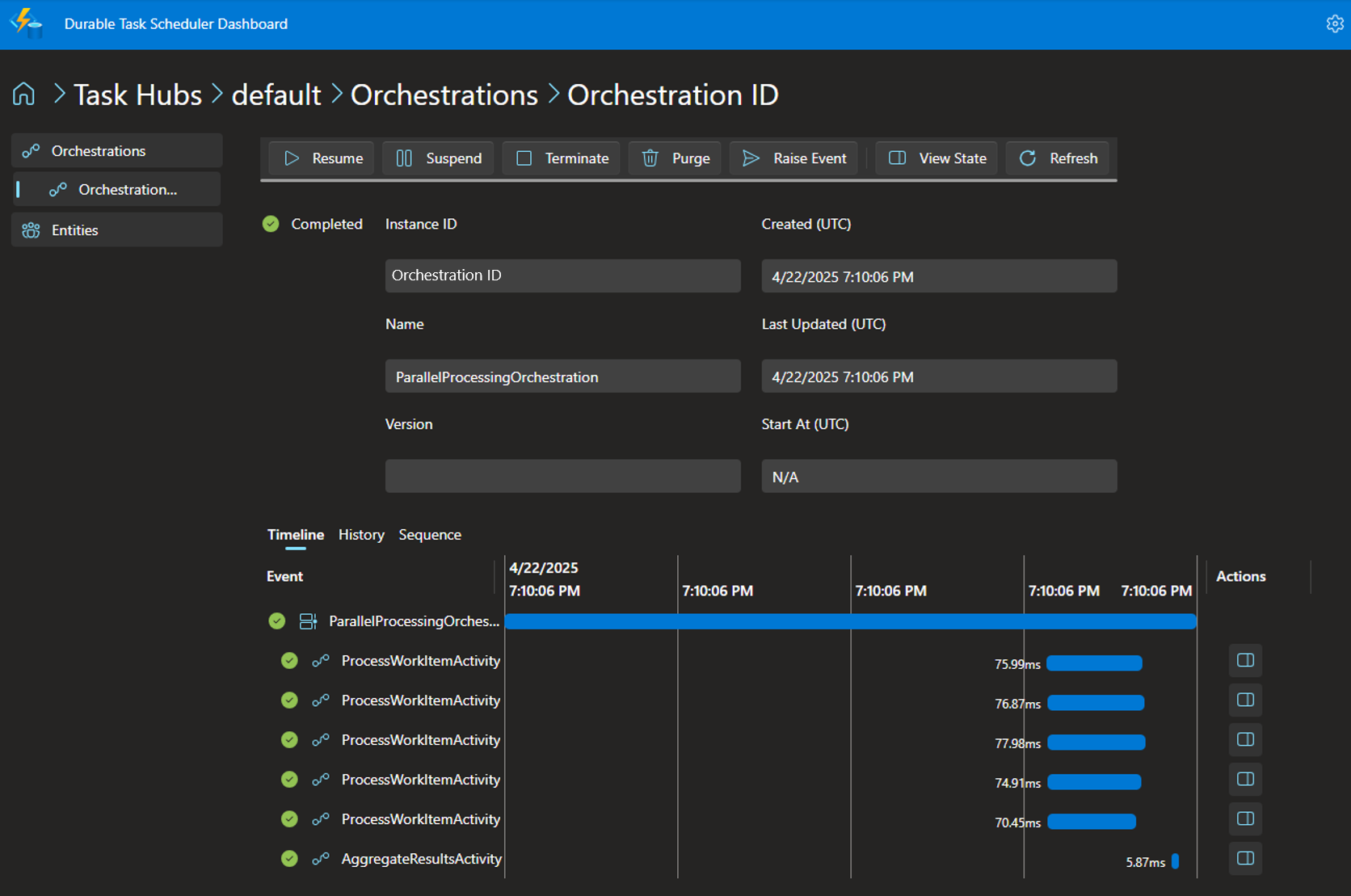
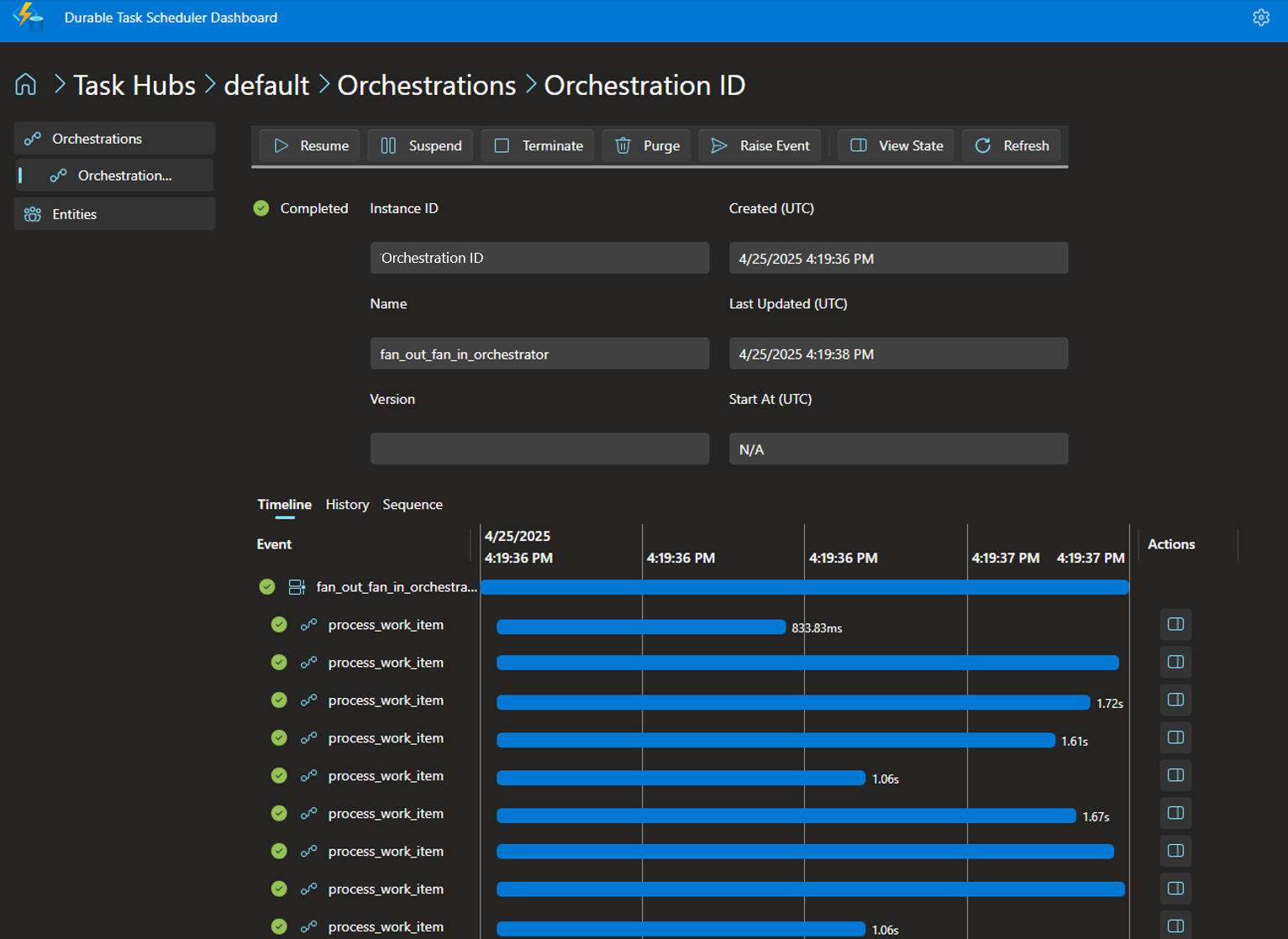
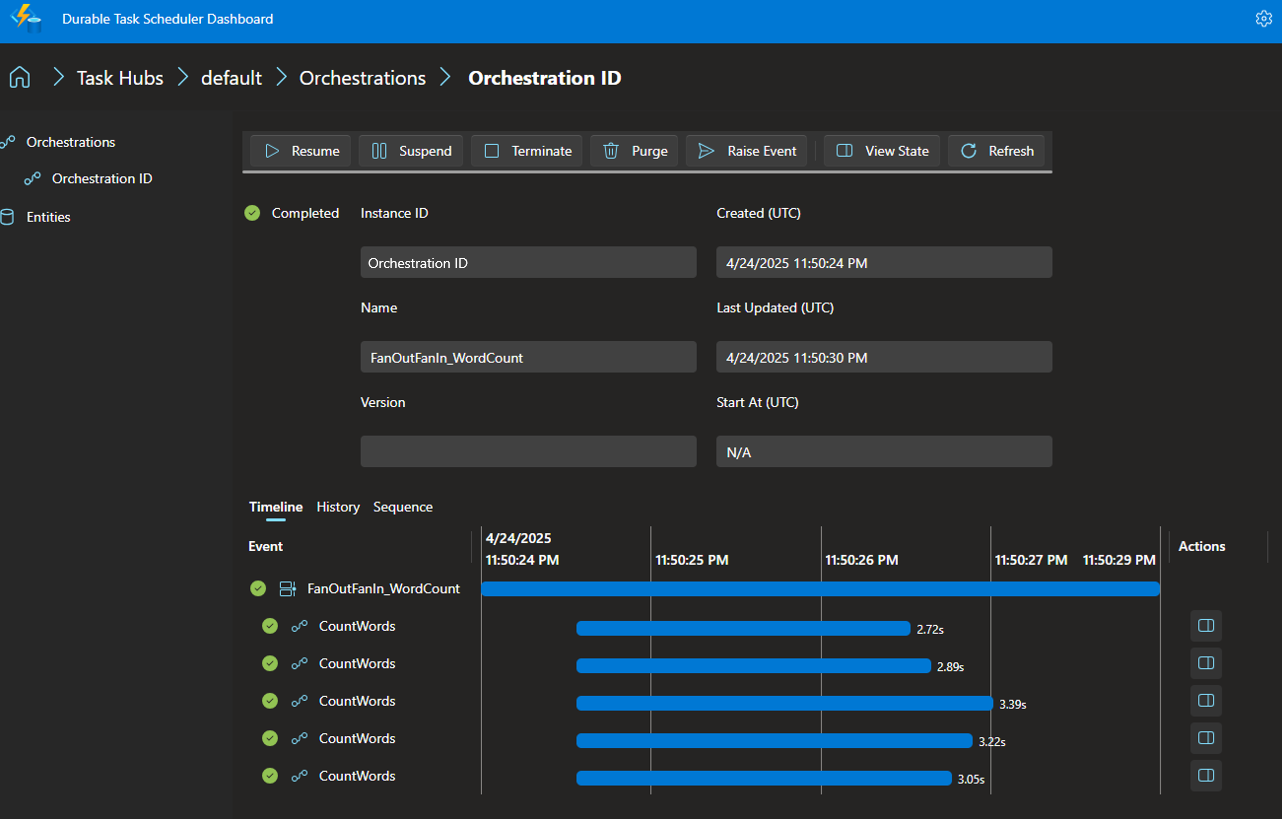
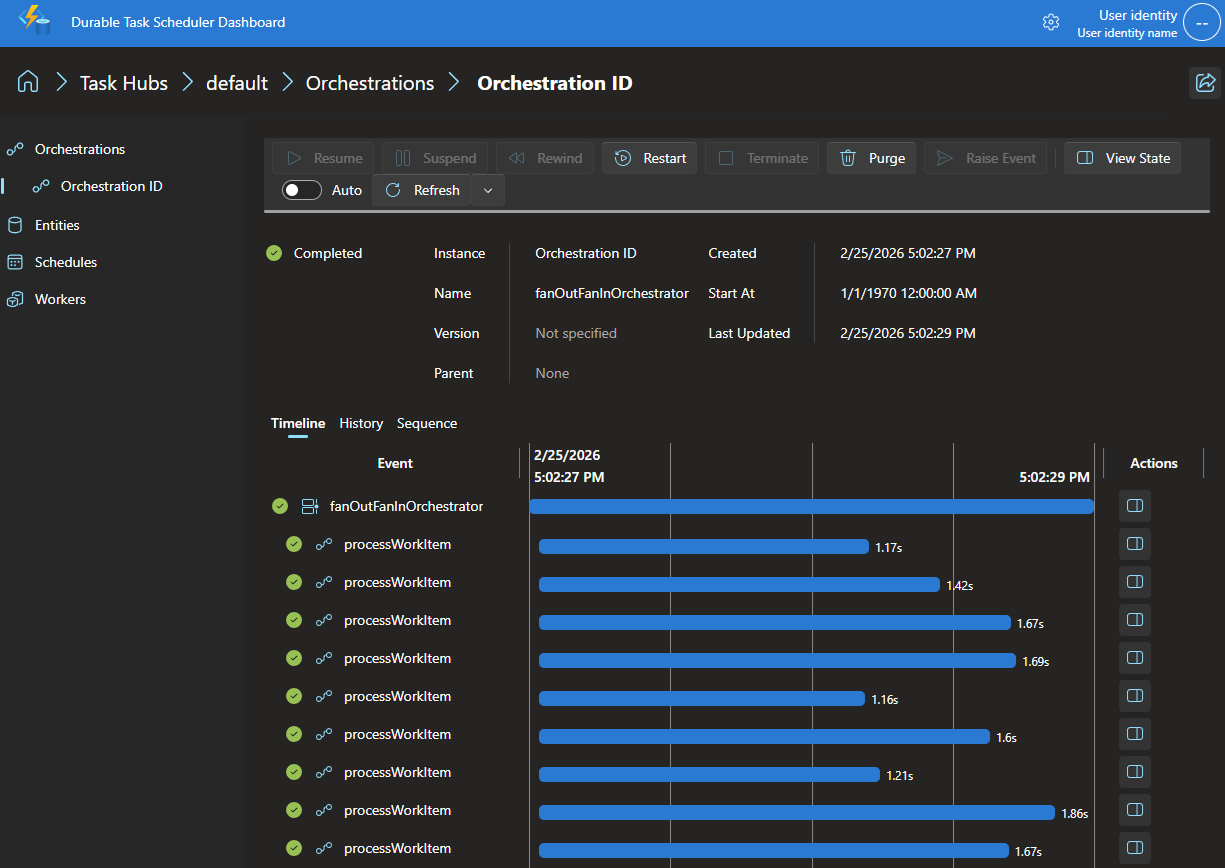
可以通过 Durable Task Scheduler 仪表板查看业务流程状态和历史记录。 默认情况下,仪表板在端口 8082 上运行。
- 在 Web 浏览器中导航到 http://localhost:8082 。
- 单击 默认 任务中心。 您创建的协调实例位于列表中。
- 单击编排实例 ID 以查看执行详细信息,其中包括:
- 多个活动任务的并行执行
- 扇入聚合步骤
- 每个步骤中的输入和输出
- 每个步骤所用的时间
了解代码结构
辅助角色项目
为了演示扇出/扇入模式,辅助角色项目业务流程会创建并行活动任务,并等待所有任务完成。 对于业务流程协调程序:
- 将工作项列表作为输入。
- 通过使用
ProcessWorkItemActivity为每个工作项创建单独的任务来扇出。 - 并行执行所有任务。
- 使用
Task.WhenAll等待所有任务都完成。 - 通过使用
AggregateResultsActivity聚合所有单个结果来扇入。 - 将最终聚合结果返回到客户端。
辅助角色项目包含:
- ParallelProcessingOrchestration.cs:在单个文件中定义业务流程协调程序和活动函数。
- Program.cs:配置工作主机,并正确处理连接字符串。
ParallelProcessingOrchestration.cs
通过使用扇出/扇入,业务流程会创建并行活动任务,并等待所有任务完成。
public override async Task<Dictionary<string, int>> RunAsync(TaskOrchestrationContext context, List<string> workItems)
{
    // Step 1: Fan-out by creating a task for each work item in parallel
    List<Task<Dictionary<string, int>>> processingTasks = new List<Task<Dictionary<string, int>>>();

    foreach (string workItem in workItems)
    {
        // Create a task for each work item (fan-out)
        Task<Dictionary<string, int>> task = context.CallActivityAsync<Dictionary<string, int>>(
            nameof(ProcessWorkItemActivity), workItem);
        processingTasks.Add(task);
    }

    // Step 2: Wait for all parallel tasks to complete
    Dictionary<string, int>[] results = await Task.WhenAll(processingTasks);

    // Step 3: Fan-in by aggregating all results
    Dictionary<string, int> aggregatedResults = await context.CallActivityAsync<Dictionary<string, int>>(
        nameof(AggregateResultsActivity), results);

    return aggregatedResults;
}
每个活动都作为单独的类实现,并用 [DurableTask] 特性进行修饰。
[DurableTask]
public class ProcessWorkItemActivity : TaskActivity<string, Dictionary<string, int>>
{
    // Implementation processes a single work item
}

[DurableTask]
public class AggregateResultsActivity : TaskActivity<Dictionary<string, int>[], Dictionary<string, int>>
{
    // Implementation aggregates individual results
}
Program.cs
工人使用 Microsoft.Extensions.Hosting 进行适当的生命周期管理。
using Microsoft.Extensions.Hosting;
//..

builder.Services.AddDurableTaskWorker()
    .AddTasks(registry =>
    {
        registry.AddOrchestrator<ParallelProcessingOrchestration>();
        registry.AddActivity<ProcessWorkItemActivity>();
        registry.AddActivity<AggregateResultsActivity>();
    })
    .UseDurableTaskScheduler(connectionString);
客户项目
客户端项目:
- 使用与工作器相同的连接字符串逻辑。
- 创建要并行处理的工作项的列表。
- 将列表用作输入来计划业务流程实例。
- 等待编排完成并显示汇总结果。
- 使用
WaitForInstanceCompletionAsync以实现高效的轮询。
List<string> workItems = new List<string>
{
    "Task1",
    "Task2",
    "Task3",
    "LongerTask4",
    "VeryLongTask5"
};

// Schedule the orchestration with the work items
string instanceId = await client.ScheduleNewOrchestrationInstanceAsync(
    "ParallelProcessingOrchestration",
    workItems);

// Wait for completion
var instance = await client.WaitForInstanceCompletionAsync(
    instanceId,
    getInputsAndOutputs: true,
    cts.Token);
worker.py
为了演示扇出/扇入模式,辅助角色项目业务流程会创建并行活动任务,并等待所有任务完成。 对于业务流程协调程序:
- 接收一个工作项列表作为输入。
- 它通过为每个工作项创建并行任务(为每个工作项调用
process_work_item)来“扇出”。 - 它使用
task.when_all等待所有任务完成。 - 然后,它通过将结果与
aggregate_results活动聚合在一起来“扇入”。 - 最终聚合结果将返回到客户端。
通过使用扇出/扇入,业务流程会创建并行活动任务,并等待所有任务完成。
# Orchestrator function
def fan_out_fan_in_orchestrator(ctx, work_items: list) -> dict:
    logger.info(f"Starting fan out/fan in orchestration with {len(work_items)} items")

    # Fan out: Create a task for each work item
    parallel_tasks = []
    for item in work_items:
        parallel_tasks.append(ctx.call_activity("process_work_item", input=item))

    # Wait for all tasks to complete
    logger.info(f"Waiting for {len(parallel_tasks)} parallel tasks to complete")
    results = yield task.when_all(parallel_tasks)

    # Fan in: Aggregate all the results
    logger.info("All parallel tasks completed, aggregating results")
    final_result = yield ctx.call_activity("aggregate_results", input=results)

    return final_result
client.py
客户端项目:
- 使用与工作器相同的连接字符串逻辑。
- 创建要并行处理的工作项的列表。
- 将列表用作输入来计划业务流程实例。
- 等待编排完成并显示汇总结果。
- 使用
wait_for_orchestration_completion以实现高效的轮询。
# Generate work items (default 10 items if not specified)
count = int(sys.argv[1]) if len(sys.argv) > 1 else 10
work_items = list(range(1, count + 1))

logger.info(f"Starting new fan out/fan in orchestration with {count} work items")

# Schedule a new orchestration instance
instance_id = client.schedule_new_orchestration(
    "fan_out_fan_in_orchestrator",
    input=work_items
)

logger.info(f"Started orchestration with ID = {instance_id}")

# Wait for orchestration to complete
logger.info("Waiting for orchestration to complete...")
result = client.wait_for_orchestration_completion(
    instance_id,
    timeout=60
)
为了演示扇出/扇入模式,FanOutFanInPattern 项目业务流程会创建并行活动任务,并等待所有任务完成。 对于业务流程协调程序:
- 将工作项列表作为输入。
- 通过使用
callActivity为每个工作项创建单独的任务来扇出。 - 并行执行所有任务。
- 使用
allOf等待所有任务都完成。 - 通过使用
stream().mapToInt().sum()聚合所有单个结果来扇入。 - 将最终聚合结果返回到客户端。
项目包含:
-
DurableTaskSchedulerWorkerExtensions辅助角色:定义业务流程协调程序和活动函数。 -
DurableTaskSchedulerClientExtension客户端:设置工作主机以正确处理连接字符串。
工人
通过使用扇出/扇入,业务流程会创建并行活动任务,并等待所有任务完成。
DurableTaskGrpcWorker worker = DurableTaskSchedulerWorkerExtensions.createWorkerBuilder(connectionString)
    .addOrchestration(new TaskOrchestrationFactory() {
        @Override
        public String getName() { return "FanOutFanIn_WordCount"; }

        @Override
        public TaskOrchestration create() {
            return ctx -> {
                List<?> inputs = ctx.getInput(List.class);
                List<Task<Integer>> tasks = inputs.stream()
                        .map(input -> ctx.callActivity("CountWords", input.toString(), Integer.class))
                        .collect(Collectors.toList());
                List<Integer> allWordCountResults = ctx.allOf(tasks).await();
                int totalWordCount = allWordCountResults.stream().mapToInt(Integer::intValue).sum();
                ctx.complete(totalWordCount);
            };
        }
    })
    .addActivity(new TaskActivityFactory() {
        @Override
        public String getName() { return "CountWords"; }

        @Override
        public TaskActivity create() {
            return ctx -> {
                String input = ctx.getInput(String.class);
                StringTokenizer tokenizer = new StringTokenizer(input);
                return tokenizer.countTokens();
            };
        }
    })
    .build();

// Start the worker
worker.start();
客户
客户端项目:
- 使用与工作器相同的连接字符串逻辑。
- 创建要并行处理的工作项的列表。
- 将列表用作输入来计划业务流程实例。
- 等待编排完成并显示汇总结果。
- 使用
waitForInstanceCompletion以实现高效的轮询。
DurableTaskClient client = DurableTaskSchedulerClientExtensions.createClientBuilder(connectionString).build();

// The input is an arbitrary list of strings.
List<String> listOfStrings = Arrays.asList(
        "Hello, world!",
        "The quick brown fox jumps over the lazy dog.",
        "If a tree falls in the forest and there is no one there to hear it, does it make a sound?",
        "The greatest glory in living lies not in never falling, but in rising every time we fall.",
        "Always remember that you are absolutely unique. Just like everyone else.");

// Schedule an orchestration which will reliably count the number of words in all the given sentences.
String instanceId = client.scheduleNewOrchestrationInstance(
        "FanOutFanIn_WordCount",
        new NewOrchestrationInstanceOptions().setInput(listOfStrings));
logger.info("Started new orchestration instance: {}", instanceId);

// Block until the orchestration completes. Then print the final status, which includes the output.
OrchestrationMetadata completedInstance = client.waitForInstanceCompletion(
        instanceId,
        Duration.ofSeconds(30),
        true);
logger.info("Orchestration completed: {}", completedInstance);
logger.info("Output: {}", completedInstance.readOutputAs(int.class));
为了演示扇出/扇入模式,该示例编排会创建并行活动任务并等待全部完成。 对于业务流程协调程序:
- 接收一个工作项列表作为输入。
- 通过为每个工作项创建并行任务进行扇出(为每个工作项调用
processWorkItem)。 - 使用
whenAll等待所有任务都完成。 - 通过使用
aggregateResults活动聚合结果来进行扇入。 - 将最终聚合结果返回到客户端。
项目包含:
-
worker.mjs:定义协调器和活动函数。 -
client.mjs:调度编排并等待完成。
worker.mjs
通过使用扇出/扇入,业务流程会创建并行活动任务,并等待所有任务完成。
import { whenAll } from "@microsoft/durabletask-js";
import { createAzureManagedWorkerBuilder } from "@microsoft/durabletask-js-azuremanaged";

// Orchestrator function using generator syntax
const fanOutFanInOrchestrator = async function* (ctx, workItems) {
  const items = Array.isArray(workItems) ? workItems : [];

  // Fan out: schedule parallel activity calls
  const tasks = items.map((item) => ctx.callActivity(processWorkItem, item));

  // Wait for all tasks using whenAll
  const processedResults = yield whenAll(tasks);

  // Fan in: aggregate results
  const finalResult = yield ctx.callActivity(aggregateResults, processedResults);

  return finalResult;
};

// Activity that processes a single work item
const processWorkItem = async (_ctx, workItem) => {
  const normalizedItem = Number(workItem);
  const delayMs = 500 + Math.floor(Math.random() * 1500);
  console.log(`Processing work item ${normalizedItem} (delay ${delayMs}ms)`);

  await new Promise((resolve) => setTimeout(resolve, delayMs));

  return {
    item: normalizedItem,
    result: normalizedItem * normalizedItem,
  };
};

// Activity that aggregates results
const aggregateResults = async (_ctx, results) => {
  const sum = results.reduce((acc, curr) => acc + curr.result, 0);

  return {
    totalItems: results.length,
    sum,
    average: results.length ? sum / results.length : 0,
    results,
  };
};

// Build and start worker
const connectionString = `Endpoint=http://localhost:8080;Authentication=None;TaskHub=default`;
const worker = createAzureManagedWorkerBuilder(connectionString)
  .addOrchestrator(fanOutFanInOrchestrator)
  .addActivity(processWorkItem)
  .addActivity(aggregateResults)
  .build();

await worker.start();
client.mjs
客户端项目:
- 使用与工作器相同的连接字符串逻辑。
- 创建要并行处理的工作项的列表。
- 将列表用作输入来计划业务流程实例。
- 等待编排完成并显示汇总结果。
- 使用
waitForOrchestrationCompletion以实现高效的轮询。
import { OrchestrationStatus } from "@microsoft/durabletask-js";
import { createAzureManagedClient } from "@microsoft/durabletask-js-azuremanaged";

// Create work items array
const count = 10;
const workItems = Array.from({ length: count }, (_unused, index) => index + 1);

const connectionString = `Endpoint=http://localhost:8080;Authentication=None;TaskHub=default`;
const client = createAzureManagedClient(connectionString);

// Schedule orchestration
const instanceId = await client.scheduleNewOrchestration(
  "fanOutFanInOrchestrator",
  workItems
);

console.log(`Started orchestration with ID: ${instanceId}`);

// Wait for completion
const state = await client.waitForOrchestrationCompletion(instanceId, true, 120);

if (state.runtimeStatus === OrchestrationStatus.COMPLETED) {
  console.log(`Result: ${state.serializedOutput}`);
}

await client.stop();
fanOutFanIn 在等待前安排所有活动。
ctx.WhenAll 会等待整个批次完成,包括某项任务失败时的其余任务。
Await 然后解码每个活动结果。 这种方法提供了持久的并发;编排器不创建原生的 goroutine。
processWorkItem 运行在编排器外部,可以执行普通的 Go I/O。 该样本改为使用算术计算,并对输入加以限制以避免溢出。 编排器还会限制批次大小。
run 注册任务名称,创建独立的客户端和工作者连接,启动工作者,并调度一个实例。 它请求输出有效载荷,检查 RuntimeStatus,并读取类型化输出。 它的延迟关机使用了新的上下文,因此清理工作在主超时后仍然可以运行。
关于其他工作流程模式和测试版限制,请参见 使用 Durable Task SDK for Go 开发。
清理资源
完成后停止模拟器容器:
docker stop dtsemulator && docker rm dtsemulator
如果你为此快速入门启动了 go-dts-emulator,请停止并移除它:
docker stop go-dts-emulator && docker rm go-dts-emulator
后续步骤
现在,你已使用 Durable Task Scheduler 模拟器在本地运行示例,请尝试创建计划程序和任务中心资源并部署到 Azure 容器应用。