MSSQL 扩展支持两种键盘快捷键机制:
-
Visual Studio Code 键绑定(
keybindings.json):使用这些键绑定用于命令面板命令,如执行查询、连接和断开。 -
结果视图快捷方式 (
mssql.shortcuts在settings.json中):在查询结果面板中使用这些快捷方式,如导航网格、复制数据和保存结果。
选择配置方法
- 如果你想要熟悉的 Azure Data Studio 或 SSMS 风格快捷方式,可以使用 MSSQL 数据库管理 Keymap 扩展。
- 使用 快捷方式配置 进行日常快捷方式更改。
- 使用高级:手动自定义 Visual Studio Code 键绑定来直接控制
keybindings.json。 - 使用高级:手动自定义结果视图快捷方式,以便在
settings.json中直接控制mssql.shortcuts。
安装 MSSQL 数据库管理键位映射扩展
如果你是从 SQL Server Management Studio(SSMS)或 Azure Data Studio 迁移过来的,安装 MSSQL 数据库管理 Keymap 配套扩展,以便使用熟悉的快捷方式。
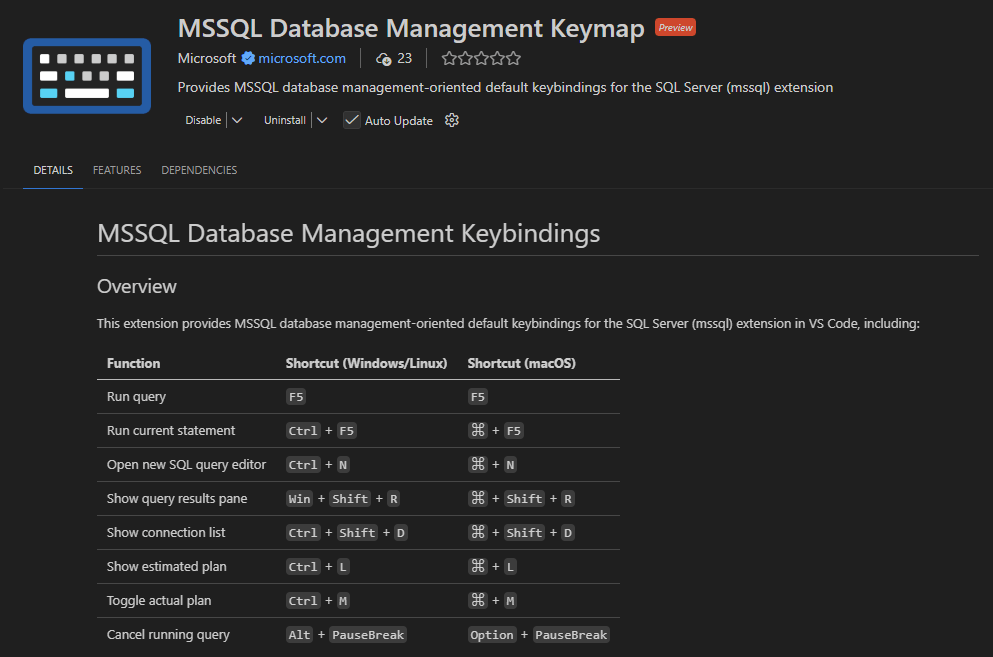
该扩展提供以下键绑定:
| Function | Windows/Linux | macOS |
|---|---|---|
| 运行查询 | F5 | F5 |
| 运行当前语句 | Ctrl+F5 | Cmd+F5 |
| 打开新的 SQL 查询编辑器 | Ctrl+N | Cmd+N |
| 显示查询结果窗格 | Win+Shift+R | Command+Shift+R |
| 显示连接列表 | CtrlShift+D | Cmd+Shift+D |
| 显示估计计划 | Ctrl+L | Cmd+L |
| 切换实际计划 | Ctrl+M | Cmd+M |
| 取消正在运行的查询 | Alt+Pause/Break | 选项+停顿/休息 |
注释
该键映射不包含 Azure Data Studio 用户自定义的按键绑定。 在 命令面板的 MSSQL 键盘偏好设置中手动配置自定义按键绑定。 此扩展会替代数据库管理方案的一些默认 Visual Studio Code 快捷方式。
你可以从Azure Data Studio迁移对话框安装此扩展,也可以直接从Visual Studio Code市场安装。
使用快捷键配置
MSSQL 扩展包含快捷 指令配置 界面,用于查看和配置键盘快捷指令。
你可以用这个界面同时使用两个快捷方式:
-
Visual Studio Code keybindings (
keybindings.json) -
结果视图快捷键 (
mssql.shortcuts在settings.json)
从MSSQL扩展工具栏打开快捷方式配置页面。

打开 扩展快捷键 标签,查看两个键盘快捷键部分:
- 查询编辑器:显示 MSSQL 命令中最常用的 Visual Studio Code 键绑定,按组如查询执行、连接和其他分类。
- 结果视图:显示查询结果面板的结果 视图快捷方式 ,包括 导航 和 结果等组。

高级:手动自定义 Visual Studio Code 快捷键绑定
对于大多数快捷方式的更改,请使用 快捷方式配置。
使用本部分可在keybindings.json中对 Visual Studio Code 键绑定进行高级手动控制。
若要自定义快捷方式:
打开键盘快捷键编辑器:
- macOS: Cmd+K,然后 Cmd+S
- Windows和Linux:先按Ctrl+K,再按Ctrl+S
搜索命令名称,例如
mssql.newQuery。选择命令旁边的铅笔图标,按下新的按键组合。
按 Enter 以确认。
你也可以直接编辑 keybindings.json :
打开 命令面板:
- macOS: Cmd+Shift+P
- Windows 和 Linux:Ctrl+Shift+P
选择偏好设置:打开键盘快捷键(JSON)。
添加快捷方式。
[
    {
        "key": "ctrl+shift+n",
        "command": "mssql.newQuery",
        "when": "editorTextFocus && editorLangId == 'sql'"
    }
]
注释
你可能会覆盖现有快捷方式。 保存更改前,先检查键盘快捷键编辑器中的冲突。
MSSQL 扩展命令
该扩展在 命令面板中提供命令。
下表列出了常用的命令和默认快捷方式:
| 命令 | Description | Windows/Linux | macOS |
|---|---|---|---|
MS SQL: Connect |
连接SQL Server、Azure SQL或Microsoft Fabric中的SQL数据库 | Ctrl+Shift+C | Cmd+Shift+C |
MS SQL: Disconnect |
断开当前编辑器会话 | CtrlShift+D | Cmd+Shift+D |
MS SQL: Execute Query |
运行当前活跃SQL文档的查询 | Ctrl+Shift+E | Cmd+Shift+E |
MS SQL: Execute Selection or Current Statement |
只执行光标下的 Transact-SQL 语句 | 无 | 无 |
MS SQL: Cancel Query |
取消正在进行的查询 | 无 | 无 |
MS SQL: New Query |
打开一个新的SQL查询文件 | 无 | 无 |
MS SQL: Toggle SQLCMD Mode |
启用或禁用当前SQL文档的SQLCMD模式 | 无 | 无 |
MS SQL: Change Connection |
更改主动 SQL 文档的连接 | 无 | 无 |
MS SQL: Change Database |
更改当前SQL文档的数据库 | 无 | 无 |
MS SQL: Estimated Plan |
查看估计查询执行计划 | 无 | 无 |
MS SQL: Toggle Actual Plan |
切换 SQL 查询的实际执行计划集合 | 无 | 无 |
MS SQL: Copy All |
复制所有查询结果内容 | 无 | 无 |
MS SQL: Toggle Query Result Panel |
显示或隐藏查询结果面板 | 无 | 无 |
高级:手动自定义结果视图快捷方式
对于大多数快捷方式的更改,请使用 快捷方式配置。
使用此部分在 mssql.shortcuts(settings.json)中对结果视图快捷方式进行高级手动配置。 这些快捷键仅适用于查询结果面板。
在自定义这些快捷键时,可以用 ctrlcmd 来表示两个和弦:
- Windows 和 Linux 上的 Ctrl
- macOS 上的 Cmd
例如,ctrlcmd+c映射到 Windows 和 Linux 上的 Ctrl+C,以及 macOS 上的 Cmd+C。
默认配置
{
    "mssql.shortcuts": {
        "event.queryResults.switchToResultsTab": "ctrl+alt+r",
        "event.queryResults.switchToMessagesTab": "ctrl+alt+y",
        "event.queryResults.switchToQueryPlanTab": "ctrl+alt+e",
        "event.queryResults.prevGrid": "ctrlcmd+up",
        "event.queryResults.nextGrid": "ctrlcmd+down",
        "event.queryResults.switchToTextView": "",
        "event.queryResults.maximizeGrid": "",
        "event.queryResults.saveAsJSON": "",
        "event.queryResults.saveAsCSV": "",
        "event.queryResults.saveAsExcel": "",
        "event.queryResults.saveAsInsert": "",
        "event.resultGrid.copySelection": "ctrlcmd+c",
        "event.resultGrid.copyWithHeaders": "",
        "event.resultGrid.copyAllHeaders": "",
        "event.resultGrid.selectAll": "ctrlcmd+a",
        "event.resultGrid.copyAsCSV": "",
        "event.resultGrid.copyAsJSON": "",
        "event.resultGrid.copyAsInsert": "",
        "event.resultGrid.copyAsInClause": "",
        "event.resultGrid.changeColumnWidth": "alt+shift+s",
        "event.resultGrid.expandSelectionLeft": "shift+left",
        "event.resultGrid.expandSelectionRight": "shift+right",
        "event.resultGrid.expandSelectionUp": "shift+up",
        "event.resultGrid.expandSelectionDown": "shift+down",
        "event.resultGrid.openColumnMenu": "f3",
        "event.resultGrid.openFilterMenu": "",
        "event.resultGrid.moveToRowStart": "ctrlcmd+left",
        "event.resultGrid.moveToRowEnd": "ctrlcmd+right",
        "event.resultGrid.selectColumn": "ctrl+space",
        "event.resultGrid.selectRow": "shift+space",
        "event.resultGrid.toggleSort": "alt+shift+o"
    }
}
查询结果快捷键引用
| 快捷方式事件 | 默认绑定 | Description |
|---|---|---|
event.queryResults.switchToResultsTab |
Ctrl+Alt+R | 切换到结果标签页 |
event.queryResults.switchToMessagesTab |
Ctrl+Alt+Y | 切换到消息标签页 |
event.queryResults.switchToQueryPlanTab |
Ctrl+Alt+E | 切换到查询计划标签页 |
event.queryResults.prevGrid |
Ctrl/Cmd+上箭头 | 返回之前的结果网格 |
event.queryResults.nextGrid |
Ctrl/Cmd+向下箭头 | 进入下一个结果网格 |
event.queryResults.switchToTextView |
无 | 将结果切换为文本视图 |
event.queryResults.maximizeGrid |
无 | 最大化或最小化当前网格 |
event.queryResults.saveAsJSON |
无 | 将结果保存为 JSON |
event.queryResults.saveAsCSV |
无 | 将结果保存为CSV |
event.queryResults.saveAsExcel |
无 | 将结果保存为Excel |
event.queryResults.saveAsInsert |
无 | 将结果保存为 INSERT 语句 |
结果网格快捷键参考
| 快捷方式事件 | 默认绑定 | Description |
|---|---|---|
event.resultGrid.copySelection |
Ctrl/Cmd+C | 复制当前的选择 |
event.resultGrid.copyWithHeaders |
无 | 复制所选内容(包含列标题) |
event.resultGrid.copyAllHeaders |
无 | 复制所有列标题 |
event.resultGrid.selectAll |
Ctrl/Cmd+A | 选择活跃网格中的所有数据 |
event.resultGrid.copyAsCSV |
无 | 将所选内容复制为 CSV 格式 |
event.resultGrid.copyAsJSON |
无 | 将选区复制为 JSON |
event.resultGrid.copyAsInsert |
无 | 将所选内容复制为 INSERT 语句 |
event.resultGrid.copyAsInClause |
无 | 将所选内容复制为 IN 子句 |
event.resultGrid.changeColumnWidth |
Alt+Shift+S | 调整列宽 |
event.resultGrid.expandSelectionLeft |
Shift+左 | 向左扩大所选内容 |
event.resultGrid.expandSelectionRight |
Shift+右 | 将所选内容向右扩展 |
event.resultGrid.expandSelectionUp |
Shift+向上 | 向上扩展选择 |
event.resultGrid.expandSelectionDown |
Shift+向下 | 向下扩展选择 |
event.resultGrid.openColumnMenu |
F3 | 打开列上下文菜单 |
event.resultGrid.openFilterMenu |
无 | 打开筛选菜单 |
event.resultGrid.moveToRowStart |
Ctrl/Cmd+左箭头 | 移至行首 |
event.resultGrid.moveToRowEnd |
Ctrl/Cmd+向右键 | 移到排尾 |
event.resultGrid.selectColumn |
Ctrl+空格 | 选择整列 |
event.resultGrid.selectRow |
Shift+Space | 选择整行 |
event.resultGrid.toggleSort |
Alt+Shift+O | 切换当前列的排序方式 |