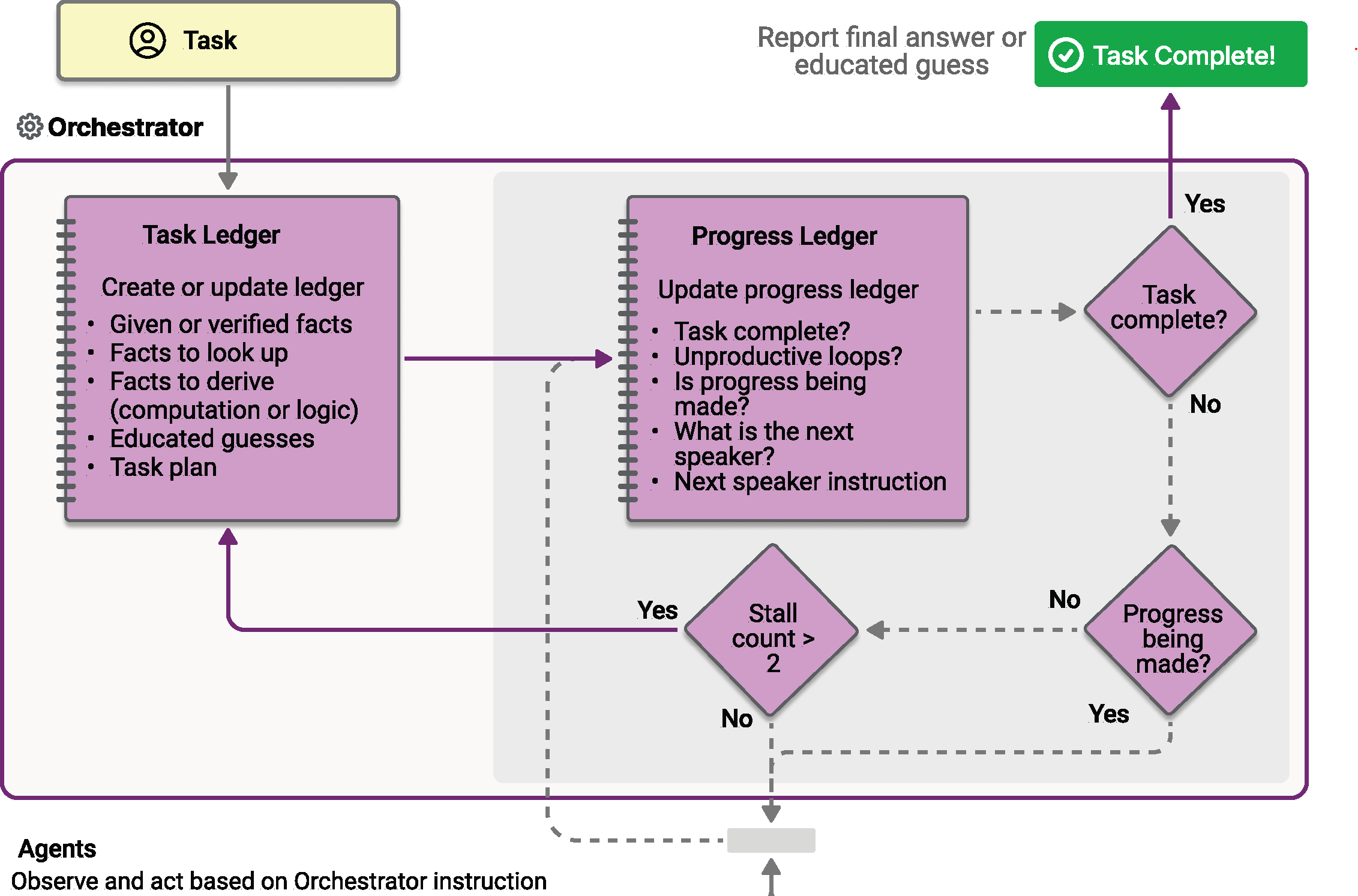
Magentic 编排是根据 AutoGen 发明的 Magentic-One 系统设计的。 它是一种灵活的常规用途多代理模式,专为需要动态协作的复杂开放式任务而设计。 在此模式中,Magentic 管理器协调一个专门代理团队,并根据不断变化的上下文、任务进度和代理能力选择哪个代理应在接下来的步骤中采取行动。
Magentic 经理维护共享上下文、跟踪进度并实时调整工作流。 这使系统能够分解复杂的问题、委托子任务,并通过代理协作迭代优化解决方案。 协调特别适用于方案路径事先未知的情况,这可能需要多轮推理、研究和计算。
Tip
磁性编排的体系结构与群聊编排模式相同,拥有一个非常强大的管理器,它通过计划来协调代理之间的协作。 如果你的方案需要更简单的协调而不进行复杂的规划,请考虑改用群聊模式。
注释
在 Magentic-One 论文中,4 个高度专业化的代理旨在解决一组非常具体的任务。 在 Agent Framework 中的 Magentic 业务流程中,可以定义自己的专用代理以满足特定的应用程序需求。 然而,在原始 Magentic-One 设计之外,Magentic 编排的表现如何尚未经过测试。
学习内容
- 如何设置 Magentic 管理器以协调多个专用代理
- 如何使用
WorkflowEvent来处理流事件 - 如何实现人在回路中的计划审查
- 如何跟踪代理协作及在复杂任务中的进展
定义专用代理
在 Magentic 编排中,您定义的专用代理可以由管理器根据任务要求进行动态选择。
#pragma warning disable MAAIW001  // Magentic types are experimental
#pragma warning disable OPENAI001 // HostedCodeInterpreterTool is experimental

using Azure.AI.Projects;
using Azure.Identity;
using Microsoft.Agents.AI;
using Microsoft.Agents.AI.Workflows;
using Microsoft.Agents.AI.Workflows.Specialized.Magentic;
using Microsoft.Extensions.AI;

string endpoint = Environment.GetEnvironmentVariable("AZURE_AI_PROJECT_ENDPOINT")
    ?? throw new InvalidOperationException("AZURE_AI_PROJECT_ENDPOINT is not set.");
string deploymentName = Environment.GetEnvironmentVariable("AZURE_AI_MODEL_DEPLOYMENT_NAME") ?? "gpt-5.4-mini";

AIProjectClient projectClient = new(new Uri(endpoint), new DefaultAzureCredential());

AIAgent researcherAgent = projectClient.AsAIAgent(
    deploymentName,
    name: "ResearcherAgent",
    description: "Specialist in research and information gathering.",
    instructions: "You are a researcher. Find relevant information without doing additional computation or quantitative analysis.");

AIAgent coderAgent = projectClient.AsAIAgent(
    deploymentName,
    name: "CoderAgent",
    description: "A helpful assistant that writes and executes code to analyze data.",
    instructions: "You solve quantitative questions by writing and running code. Show the analysis and the computation process clearly.",
    tools: [new HostedCodeInterpreterTool()]);

AIAgent managerAgent = projectClient.AsAIAgent(
    deploymentName,
    name: "MagenticManager",
    description: "Orchestrator that coordinates the research and coding workflow.",
    instructions: "You coordinate the team to complete complex tasks efficiently.");
import os

from agent_framework import Agent
from agent_framework.foundry import FoundryChatClient
from azure.identity import AzureCliCredential

client = FoundryChatClient(
    project_endpoint=os.environ["FOUNDRY_PROJECT_ENDPOINT"],
    model=os.environ["FOUNDRY_MODEL"],
    credential=AzureCliCredential(),
)

researcher_agent = Agent(
    name="ResearcherAgent",
    description="Specialist in research and information gathering",
    instructions=(
        "You are a Researcher. You find information without additional computation or quantitative analysis."
    ),
    client=client,
)

coder_agent = Agent(
    name="CoderAgent",
    description="A helpful assistant that writes and executes code to process and analyze data.",
    instructions="You solve questions using code. Please provide detailed analysis and computation process.",
    client=client,
    tools=client.get_code_interpreter_tool(),
)

# Create a manager agent for orchestration
manager_agent = Agent(
    name="MagenticManager",
    description="Orchestrator that coordinates the research and coding workflow",
    instructions="You coordinate a team to complete complex tasks efficiently.",
    client=client,
)
生成 磁性 工作流
使用 Magentic 工作流生成器通过经理和一组参与者配置工作流。 构建器还提供了内部循环限制(最大协调轮次、重新规划前允许的最大连续停滞次数、最大计划重置次数)以及用于人工参与计划审查的标志。
Workflow workflow = new MagenticWorkflowBuilder(managerAgent)
    .AddParticipants([researcherAgent, coderAgent])
    .WithName("Magentic Orchestration Workflow")
    .WithDescription("Coordinates a researcher and coder to solve a complex analytical task.")
    .RequirePlanSignoff(false)
    .WithMaxRounds(10)
    .WithMaxStalls(3)
    .WithMaxResets(2)
    .Build();
from agent_framework.orchestrations import MagenticBuilder

workflow = MagenticBuilder(
    participants=[researcher_agent, coder_agent],
    intermediate_output_from=[researcher_agent, coder_agent],
    manager_agent=manager_agent,
    max_round_count=10,
    max_stall_count=3,
    max_reset_count=2,
).build()
Tip
标准管理器基于 Magentic-One 设计,其固定提示取自原始论文。 通过将提示传递给 MagenticBuilder,自定义管理器的行为。
自定义初始事实数据表或计划提示时,还自定义相应的更新提示,以便重新规划保留格式。 自定义 progress_ledger_prompt 必须保留内置 JSON 响应架构。
有关提示参数及其可用占位符,请参阅 自定义管理器提示示例。 若要进一步自定义管理器,子类 MagenticManagerBase。
中间输出
注释
本部分目前仅适用于 Python 分支。
将 intermediate_output_from=[...] 传递给 MagenticBuilder 会将特定参与者指定为中间输出源。 它们的 yield_output 调用会发出 "intermediate" 事件,而管理器最终合成的回答仍然是 "output"(终端)事件。 如果没有此参数(默认值),则仅显示管理器的终端 AgentResponse。
这对于 Magentic 工作流特别有用,因为:
- 任务通常需要较长时间运行,并涉及多个轮次的代理协作。
- 当工作流在流式处理模式下进行时,可以实时显示每个代理的贡献
- 它提供了对工作流中间推理步骤的可视化
通过事件流运行工作流
执行复杂任务并处理流式输出和编排更新的事件。 终端工作流输出包含管理器的合成最终答案。
const string TaskPrompt =
    "I am preparing a report on the energy efficiency of different machine learning model architectures. " +
    "Compare the estimated training and inference energy consumption of ResNet-50, BERT-base, and GPT-2 " +
    "on standard datasets (for example, ImageNet for ResNet, GLUE for BERT, WebText for GPT-2). " +
    "Then, estimate the CO2 emissions associated with each, assuming training on an Azure Standard_NC6s_v3 " +
    "VM for 24 hours. Provide tables for clarity, and recommend the most energy-efficient model " +
    "per task type (image classification, text classification, and text generation).";

await using StreamingRun run = await InProcessExecution.RunStreamingAsync(
    workflow,
    new List<ChatMessage> { new(ChatRole.User, TaskPrompt) });

await run.TrySendMessageAsync(new TurnToken(emitEvents: true));

string? lastResponseId = null;
WorkflowOutputEvent? finalOutput = null;

await foreach (WorkflowEvent workflowEvent in run.WatchStreamAsync())
{
    switch (workflowEvent)
    {
        case AgentResponseUpdateEvent updateEvent:
            // Stream per-participant deltas. Group by ResponseId / MessageId / ExecutorId so
            // each new contiguous response prints its executor header once.
            string responseId = updateEvent.Update.ResponseId
                ?? updateEvent.Update.MessageId
                ?? updateEvent.ExecutorId;
            if (!string.Equals(responseId, lastResponseId, StringComparison.Ordinal))
            {
                if (lastResponseId is not null)
                {
                    Console.WriteLine();
                }
                Console.Write($"- {updateEvent.ExecutorId}: ");
                lastResponseId = responseId;
            }
            Console.Write(updateEvent.Update.Text);
            break;

        case MagenticPlanCreatedEvent planCreated:
            Console.WriteLine($"\n[Magentic Initial Plan]\n{planCreated.FullTaskLedger.Text}");
            break;

        case MagenticReplannedEvent replanned:
            Console.WriteLine($"\n[Magentic Replanned]\n{replanned.FullTaskLedger.Text}");
            break;

        case MagenticProgressLedgerUpdatedEvent progressUpdated:
            MagenticProgressLedger ledger = progressUpdated.ProgressLedger;
            Console.WriteLine(
                $"\n[Magentic Progress Ledger] satisfied={ledger.IsRequestSatisfied}, " +
                $"inLoop={ledger.IsInLoop}, progressing={ledger.IsProgressBeingMade}, " +
                $"nextSpeaker={ledger.NextSpeaker}, instruction={ledger.InstructionOrQuestion}");
            break;

        case WorkflowOutputEvent outputEvent when outputEvent.Is<List<ChatMessage>>():
            finalOutput = outputEvent;
            break;

        case WorkflowErrorEvent workflowError:
            Console.Error.WriteLine(workflowError.Exception?.ToString() ?? "Unknown workflow error.");
            break;

        case ExecutorFailedEvent executorFailed:
            Console.Error.WriteLine(
                $"Executor '{executorFailed.ExecutorId}' failed: " +
                (executorFailed.Data?.ToString() ?? "unknown error"));
            break;
    }
}

if (finalOutput?.As<List<ChatMessage>>() is { } transcript)
{
    Console.WriteLine("\n\n=== Final Conversation Transcript ===\n");
    foreach (ChatMessage message in transcript)
    {
        Console.WriteLine($"{message.AuthorName ?? message.Role.ToString()}: {message.Text}");
    }
}
import json
import asyncio
from typing import cast

from agent_framework import (
    AgentResponseUpdate,
    Message,
    WorkflowEvent,
)
from agent_framework.orchestrations import MagenticProgressLedger

task = (
    "I am preparing a report on the energy efficiency of different machine learning model architectures. "
    "Compare the estimated training and inference energy consumption of ResNet-50, BERT-base, and GPT-2 "
    "on standard datasets (for example, ImageNet for ResNet, GLUE for BERT, WebText for GPT-2). "
    "Then, estimate the CO2 emissions associated with each, assuming training on an Azure Standard_NC6s_v3 "
    "VM for 24 hours. Provide tables for clarity, and recommend the most energy-efficient model "
    "per task type (image classification, text classification, and text generation)."
)

# Keep track of the last executor to format output nicely in streaming mode
last_message_id: str | None = None
stream = workflow.run(task, stream=True)
async for event in stream:
    if event.type in ("intermediate", "output") and isinstance(event.data, AgentResponseUpdate):
        message_id = event.data.message_id
        if message_id != last_message_id:
            if last_message_id is not None:
                print("\n")
            print(f"- {event.executor_id}:", end=" ", flush=True)
            last_message_id = message_id
        print(event.data, end="", flush=True)

    elif event.type == "magentic_orchestrator":
        print(f"\n[Magentic Orchestrator Event] Type: {event.data.event_type.name}")
        if isinstance(event.data.content, Message):
            print(f"Please review the plan:\n{event.data.content.text}")
        elif isinstance(event.data.content, MagenticProgressLedger):
            print(f"Please review progress ledger:\n{json.dumps(event.data.content.to_dict(), indent=2)}")
        else:
            print(f"Unknown data type in MagenticOrchestratorEvent: {type(event.data.content)}")

        # Block to allow user to read the plan/progress before continuing
        # Note: this is for demonstration only and is not the recommended way to handle human interaction.
        # Please refer to `with_plan_review` for proper human interaction during planning phases.
        await asyncio.get_event_loop().run_in_executor(None, input, "Press Enter to continue...")

result = await stream.get_final_response()
if outputs := result.get_outputs():
    print(outputs[-1])
Magentic 显示三个标记规划和进度里程碑的编排器事件:
- 创建的初始计划 - 经理已生成初始任务计划。
- 重新计划 — 生成了新计划,原因可能是停滞检测,或者是因为人类通过计划审查修订了计划。
- 进度账本更新 — 每个协调轮发出一次;承载当前进度账本(是否满足请求、团队是否处于循环中、是否正在进行进度、下一位演讲者以及发送给他们的指令)。
在Python,这些项在单个 MagenticOrchestratorEvent中携带,其 event_type 枚举区分 PLAN_CREATED、REPLANNED 和 PROGRESS_LEDGER_UPDATED。 在.NET,它们作为三种不同的类型(MagenticPlanCreatedEvent、MagenticReplannedEvent 和 MagenticProgressLedgerUpdatedEvent)发出,所有这些类型都派生自 MagenticOrchestratorEvent。
高级:人在回路中的计划审查
启用人力在环 (HITL),以允许用户在执行前审查和批准管理器提出的计划。 这可用于确保计划符合用户的期望和要求。
计划评审有两个选项:
- 修订:用户提供反馈来修改计划,该计划会触发经理根据反馈重新规划。
- 批准:用户批准计划 as-is,从而允许工作流继续。
在构建 Magentic 工作流时启用计划审核。 语言之间的默认值不同:在 Python 中,计划评审默认为 off(enable_plan_review=False),并且你选择显式加入; 在 .NET 中,计划评审默认为 on (RequirePlanSignoff 默认为 true),并且本页前面的基本示例已选择退出,因此它可以在无交互的情况下运行端到端。 下面的代码演示如何选择加入和处理生成的评审请求。
计划审查暂停通过工作流的请求/响应机制以及 MagenticPlanReviewRequest 数据显示。 你在事件流中处理这些,并在人类批准或修订计划后使用 MagenticPlanReviewResponse 恢复工作流。
Tip
在 “请求和响应 ”指南中了解有关请求和响应的详细信息。
Workflow workflow = new MagenticWorkflowBuilder(managerAgent)
    .AddParticipants([researcherAgent, coderAgent])
    .RequirePlanSignoff(true)
    .WithMaxRounds(10)
    .WithMaxStalls(1)
    .WithMaxResets(2)
    .Build();

CheckpointManager checkpointManager = CheckpointManager.CreateInMemory();
InProcessExecutionEnvironment environment = ExecutionEnvironment.InProcess_Lockstep
    .ToWorkflowExecutionEnvironment()
    .WithCheckpointing(checkpointManager);

await using StreamingRun run = await environment.OpenStreamingAsync(workflow);
await run.TrySendMessageAsync(new List<ChatMessage> { new(ChatRole.User, TaskPrompt) });
await run.TrySendMessageAsync(new TurnToken(emitEvents: true));

ExternalRequest? pendingRequest = null;
CheckpointInfo? lastCheckpoint = null;
WorkflowOutputEvent? finalOutput = null;

async Task<WorkflowOutputEvent?> DrainAsync(StreamingRun activeRun)
{
    WorkflowOutputEvent? output = null;
    await foreach (WorkflowEvent evt in activeRun.WatchStreamAsync(blockOnPendingRequest: false))
    {
        switch (evt)
        {
            case AgentResponseUpdateEvent updateEvent:
                Console.Write(updateEvent.Update.Text);
                break;
            case RequestInfoEvent requestInfo
                when requestInfo.Request.Data.As<MagenticPlanReviewRequest>() is not null:
                pendingRequest = requestInfo.Request;
                break;
            case SuperStepCompletedEvent stepCompleted:
                lastCheckpoint = stepCompleted.CompletionInfo?.Checkpoint ?? lastCheckpoint;
                break;
            case WorkflowOutputEvent outputEvent when outputEvent.Is<List<ChatMessage>>():
                output = outputEvent;
                break;
        }
    }
    return output;
}

finalOutput = await DrainAsync(run);

// Loop until the workflow finishes or the user accepts a plan that runs to completion.
while (finalOutput is null && pendingRequest is not null)
{
    MagenticPlanReviewRequest reviewRequest = pendingRequest.Data.As<MagenticPlanReviewRequest>()!;

    Console.WriteLine("\n\n[Magentic Plan Review Request]");
    if (reviewRequest.CurrentProgress is { } progress)
    {
        Console.WriteLine(
            $"Current progress: satisfied={progress.IsRequestSatisfied}, " +
            $"inLoop={progress.IsInLoop}, progressing={progress.IsProgressBeingMade}");
    }
    if (reviewRequest.IsStalled)
    {
        Console.WriteLine("(Replan triggered by stall detection.)");
    }
    Console.WriteLine($"Proposed plan:\n{reviewRequest.Plan.Text}\n");
    Console.Write("Press Enter to approve, or type feedback to request a revision: ");

    string reply = Console.ReadLine() ?? string.Empty;
    MagenticPlanReviewResponse reviewResponse = string.IsNullOrWhiteSpace(reply)
        ? reviewRequest.Approve()
        : reviewRequest.Revise(reply);

    ExternalResponse response = pendingRequest.CreateResponse(reviewResponse);
    pendingRequest = null;

    await using StreamingRun resumed = await environment.ResumeStreamingAsync(workflow, lastCheckpoint!);
    await resumed.SendResponseAsync(response);
    finalOutput = await DrainAsync(resumed);
}

if (finalOutput?.As<List<ChatMessage>>() is { } transcript)
{
    Console.WriteLine("\n\n=== Final Conversation Transcript ===\n");
    foreach (ChatMessage message in transcript)
    {
        Console.WriteLine($"{message.AuthorName ?? message.Role.ToString()}: {message.Text}");
    }
}
import json
import asyncio
from typing import cast

from agent_framework import (
    AgentResponseUpdate,
    Agent,
    Message,
    WorkflowEvent,
)
from agent_framework.orchestrations import (
    MagenticBuilder,
    MagenticPlanReviewRequest,
    MagenticPlanReviewResponse,
)

workflow = MagenticBuilder(
    participants=[researcher_agent, coder_agent],
    intermediate_output_from=[researcher_agent, coder_agent],
    enable_plan_review=True,
    manager_agent=manager_agent,
    max_round_count=10,
    max_stall_count=1,
    max_reset_count=2,
).build()

pending_request: WorkflowEvent | None = None
pending_responses: dict[str, MagenticPlanReviewResponse] | None = None
final_response: object | None = None

while not final_response:
    if pending_responses is not None:
        stream = workflow.run(stream=True, responses=pending_responses)
    else:
        stream = workflow.run(task, stream=True)

    last_message_id: str | None = None
    async for event in stream:
        if event.type in ("intermediate", "output") and isinstance(event.data, AgentResponseUpdate):
            message_id = event.data.message_id
            if message_id != last_message_id:
                if last_message_id is not None:
                    print("\n")
                print(f"- {event.executor_id}:", end=" ", flush=True)
                last_message_id = message_id
            print(event.data, end="", flush=True)

        elif event.type == "request_info" and event.request_type is MagenticPlanReviewRequest:
            pending_request = event

    result = await stream.get_final_response()
    if outputs := result.get_outputs():
        final_response = outputs[-1]

    pending_responses = None

    # Handle plan review request if any
    if pending_request is not None:
        event_data = cast(MagenticPlanReviewRequest, pending_request.data)

        print("\n\n[Magentic Plan Review Request]")
        if event_data.current_progress is not None:
            print("Current Progress Ledger:")
            print(json.dumps(event_data.current_progress.to_dict(), indent=2))
            print()
        print(f"Proposed Plan:\n{event_data.plan.text}\n")
        print("Please provide your feedback (press Enter to approve):")

        reply = await asyncio.get_event_loop().run_in_executor(None, input, "> ")
        if reply.strip() == "":
            print("Plan approved.\n")
            pending_responses = {pending_request.request_id: event_data.approve()}
        else:
            print("Plan revised by human.\n")
            pending_responses = {pending_request.request_id: event_data.revise(reply)}
        pending_request = None
一个 MagenticPlanReviewRequest 携带提议的计划、当前进度分类账(在初始审查时 null / None,在停滞触发的重新计划时填充),以及一个指示重新计划是否由停滞检测触发的标志。 通过调用 approve() 按原样接受该计划,或调用 revise(...) 并提供反馈以请经理重新规划,来生成响应。
关键概念
- 动态协调:Magentic 管理器会根据不断变化的上下文动态选择接下来应由哪个代理执行。
-
Terminal Output:终端工作流的输出包含管理器综合生成的最终答案(在 Python 中为
AgentResponse;在 .NET 中为带有WorkflowOutputEvent负载的List<ChatMessage>)。 -
编排器事件:计划创建、重新计划和进度分类账更新里程碑通过
MagenticOrchestratorEvent显示(在 Python 中是一个带有event_type枚举的事件;在 .NET 中是三种派生类型)。 每个参与者的流式增量通过框架的标准智能体响应更新事件传递。 - 迭代优化:系统可以分解复杂的问题,并通过多个轮迭代优化解决方案。
- 进度跟踪和停滞检测:进度记录会跟踪请求是否已得到满足、团队是否陷入循环,以及是否正在取得进展。 连续的非进展轮次会增加停滞计数器,超过配置的最大值会触发自动重置和重新计划。
- 灵活协作:可以按经理确定的任何顺序多次调用代理。
-
人工监督:通过
MagenticPlanReviewRequest/MagenticPlanReviewResponse的可选人在回路计划审查。 -
中间输出(目前仅支持 Python):指定哪些参与者的
yield_output调用应与 manager 的终端输出一同显示为"intermediate"事件。
工作流执行过程
Magentic 编排遵循此执行模式:
- 规划阶段:经理分析任务并创建初始计划
- 可选计划评审:如果启用,人类可以审阅和批准/修改计划
- 代理选择:管理器为每个子任务选择最合适的代理
- 执行:所选代理执行其部分任务
- 进度评估:经理评估进度并更新计划
- 停滞检测:如果进度停滞,自动重新计划并附带可选的人工审查过程
- 迭代:步骤 3-6 重复,直到任务完成或达到限制
- 最终合成:管理器将所有代理输出合成到最终结果中
完整的示例
请参阅 Agent Framework 示例存储库中的完整示例。
请参阅 Agent Framework 示例存储库中的完整示例。
注释
Go 语言对该功能的支持即将推出。 有关最新状态,请参阅 Agent Framework Go 存储库 。