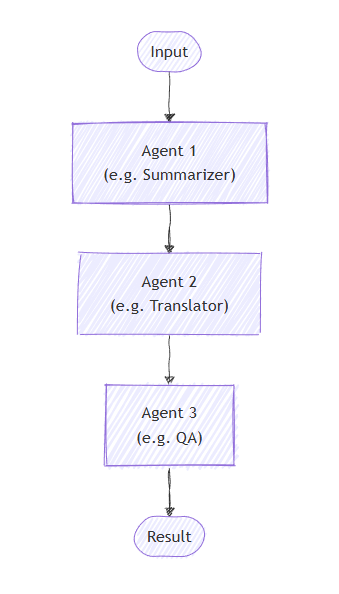
在顺序业务流程中,智能体按管道进行组织。 每个代理反过来处理任务,将其输出传递给序列中的下一个代理。 对于每个步骤基于上一步(例如文档审阅、数据处理管道或多阶段推理)构建的工作流来说,这是理想的选择。
重要
默认情况下,序列中的每个智能体都会使用上一个智能体的完整对话,包括提供给上一个智能体的输入消息及其响应消息。 可以将代理配置为仅处理上一代理的响应消息。 有关详细信息,请参阅 代理之间的控制上下文 。
学习内容
- 如何创建一个顺序的代理流水线
- 如何链接分别利用先前输出的智能体
- 如何为敏感工具调用添加人工干预审批
- 如何将代理与专用任务的自定义执行程序混合使用
- 如何跟踪通过管道的会话流
定义智能体
在顺序业务流程中,代理组织在管道中,每个代理依次处理任务,并将输出传递到序列中的下一个代理。
设置 Azure OpenAI 客户端
using System;
using System.Collections.Generic;
using System.Linq;
using System.Threading.Tasks;
using Azure.AI.Projects;
using Azure.Identity;
using Microsoft.Agents.AI.Workflows;
using Microsoft.Extensions.AI;
using Microsoft.Agents.AI;

// 1) Set up the Azure OpenAI client
var endpoint = Environment.GetEnvironmentVariable("AZURE_OPENAI_ENDPOINT") ??
    throw new InvalidOperationException("AZURE_OPENAI_ENDPOINT is not set.");
var deploymentName = Environment.GetEnvironmentVariable("AZURE_OPENAI_DEPLOYMENT_NAME") ?? "gpt-4o-mini";
var client = new AIProjectClient(new Uri(endpoint), new DefaultAzureCredential())
    .GetProjectOpenAIClient()
    .GetProjectResponsesClient()
    .AsIChatClient(deploymentName);
Warning
DefaultAzureCredential 对于开发来说很方便,但在生产中需要仔细考虑。 在生产环境中,请考虑使用特定凭据(例如), ManagedIdentityCredential以避免延迟问题、意外凭据探测以及回退机制的潜在安全风险。
创建将按顺序工作的专用代理:
// 2) Helper method to create translation agents
static ChatClientAgent GetTranslationAgent(string targetLanguage, IChatClient chatClient) =>
    new(chatClient,
        $"You are a translation assistant who only responds in {targetLanguage}. Respond to any " +
        $"input by outputting the name of the input language and then translating the input to {targetLanguage}.");

// Create translation agents for sequential processing
var translationAgents = (from lang in (string[])["French", "Spanish", "English"]
                         select GetTranslationAgent(lang, client));
设置顺序业务流程
使用 AgentWorkflowBuilder以下命令生成工作流:
// 3) Build sequential workflow
var workflow = AgentWorkflowBuilder.BuildSequential(translationAgents);
运行顺序工作流
执行工作流并处理事件:
// 4) Run the workflow
var messages = new List<ChatMessage> { new(ChatRole.User, "Hello, world!") };

await using StreamingRun run = await InProcessExecution.RunStreamingAsync(workflow, messages);
await run.TrySendMessageAsync(new TurnToken(emitEvents: true));

string? lastExecutorId = null;
List<ChatMessage> result = [];
await foreach (WorkflowEvent evt in run.WatchStreamAsync())
{
    if (evt is AgentResponseUpdateEvent e)
    {
        if (e.ExecutorId != lastExecutorId)
        {
            lastExecutorId = e.ExecutorId;
            Console.WriteLine();
            Console.Write($"{e.ExecutorId}: ");
        }

        Console.Write(e.Update.Text);
    }
    else if (evt is WorkflowOutputEvent outputEvt)
    {
        result = outputEvt.As<List<ChatMessage>>()!;
        break;
    }
}

// Display final result
Console.WriteLine();
foreach (var message in result)
{
    Console.WriteLine($"{message.Role}: {message.Text}");
}
示例输出
French_Translation: User: Hello, world!
French_Translation: Assistant: English detected. Bonjour, le monde !
Spanish_Translation: Assistant: French detected. ¡Hola, mundo!
English_Translation: Assistant: Spanish detected. Hello, world!
含人工干预的顺序业务流程
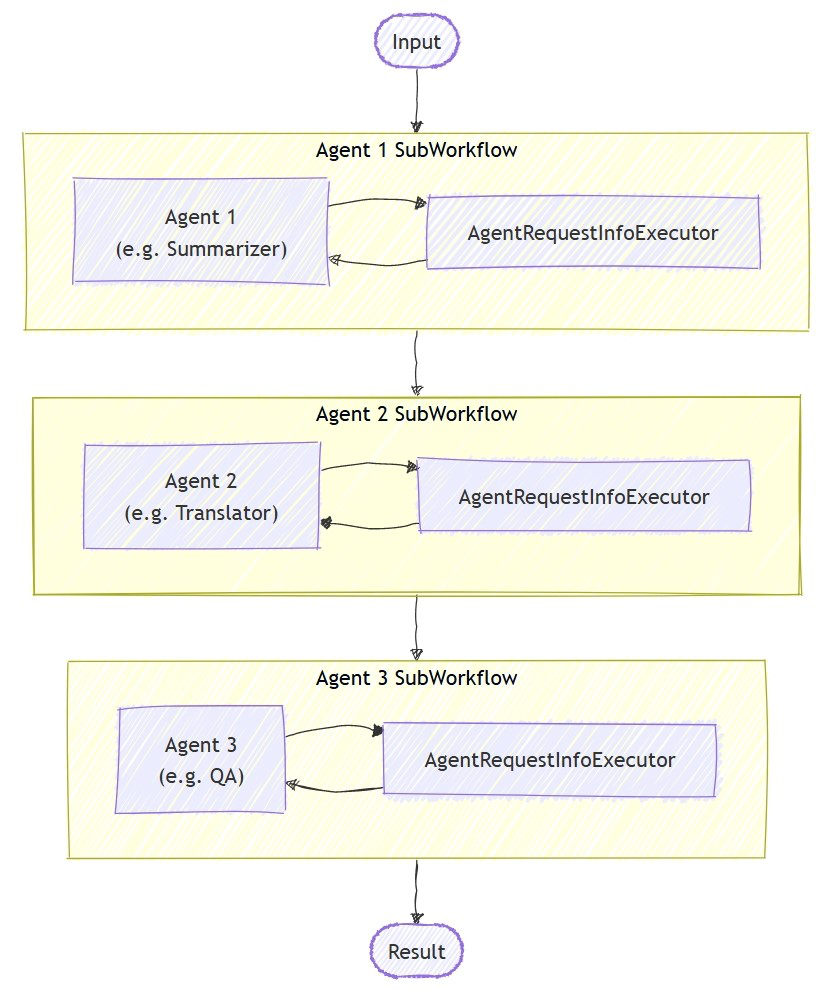
通过工具审批,顺序业务流程支持人工干预交互。 当智能体使用通过 ApprovalRequiredAIFunction 包装的工具时,工作流将暂停并发出包含 ToolApprovalRequestContent 的 RequestInfoEvent。 外部系统(如人工操作员)可以检查工具调用、批准或拒绝该工具,工作流会相应地恢复。
Tip
有关请求和响应模型的更多详细信息,请参阅 Human-in-the-Loop。
使用需审批工具定义代理
创建将敏感工具使用ApprovalRequiredAIFunction包装的代理:
ChatClientAgent deployAgent = new(
    client,
    "You are a DevOps engineer. Check staging status first, then deploy to production.",
    "DeployAgent",
    "Handles deployments",
    [
        AIFunctionFactory.Create(CheckStagingStatus),
        new ApprovalRequiredAIFunction(AIFunctionFactory.Create(DeployToProduction))
    ]);

ChatClientAgent verifyAgent = new(
    client,
    "You are a QA engineer. Verify that the deployment was successful and summarize the results.",
    "VerifyAgent",
    "Verifies deployments");
使用审批处理来构建和运行
构建通常的顺序工作流。 审批流通过事件流系统处理。
var workflow = AgentWorkflowBuilder.BuildSequential([deployAgent, verifyAgent]);

await foreach (WorkflowEvent evt in run.WatchStreamAsync())
{
    if (evt is RequestInfoEvent e &&
        e.Request.TryGetDataAs(out ToolApprovalRequestContent? approvalRequest))
    {
        await run.SendResponseAsync(
            e.Request.CreateResponse(approvalRequest.CreateResponse(approved: true)));
    }
}
注释
AgentWorkflowBuilder.BuildSequential() 支持开箱即用的工具审批,无需其他配置。 当代理调用包装 ApprovalRequiredAIFunction的工具时,工作流会自动暂停并发出一个 RequestInfoEvent。
Tip
有关此审批流的完整可运行示例,请参阅 GroupChatToolApproval 示例。 相同的 RequestInfoEvent 处理模式适用于其他编排流程。
超越工具审批:交互式反馈
工具审批允许人工接受或拒绝特定工具调用,但顺序业务流程不包括用于暂停代理之间的自由格式用户反馈的内置步骤,并且无法将控制权返回到以前的代理。 当代理需要以交互方式向用户询问更多信息,并在继续之前进行多轮迭代时;例如,在调用预订工具之前先收集预订详情;请改用以下方法之一:
- 交接编排默认是交互式的:当某个代理在未进行交接的情况下作出响应时,控制权会返回给用户以进行下一次输入,从而在该编排中实现多轮往返交互。 将每个智能体限制为仅有一个转接目标,以模拟一种在等待用户输入时仍会暂停的顺序流。
- 使用 和
WorkflowBuilder构建的RequestPort使你能够在任意节点向用户发送类型化的请求,并将响应路由回执行器;你可以将该执行器放在管道中代理的前面或后面。
关键概念
- 顺序处理:每个代理按顺序处理上一个代理的输出
- AgentWorkflowBuilder.BuildSequential():从代理集合创建管道工作流
- ChatClientAgent:表示由聊天客户端支持的代理,其中包含特定说明
-
InProcessExecution.RunStreamingAsync():运行工作流并返回实时事件流
StreamingRun -
事件处理:通过
AgentResponseUpdateEvent监视代理进度,通过WorkflowOutputEvent监视其完成情况 -
工具审批:使用
ApprovalRequiredAIFunction包装敏感工具,从而在执行之前需要人工审批 -
RequestInfoEvent:当工具需要审批时发出;包含
ToolApprovalRequestContent工具调用详细信息 -
交互式 HITL:顺序编排涵盖工具审批;对于智能体需要从用户处收集更多信息的交互式往返对话,使用转接编排或自定义
RequestPort工作流
在顺序业务流程中,每个代理依次处理任务,输出从一个流向下一个。 首先为两个阶段过程定义代理:
import os
from agent_framework.foundry import FoundryChatClient
from azure.identity import AzureCliCredential

# 1) Create agents using FoundryChatClient
chat_client = FoundryChatClient(
    project_endpoint=os.environ["FOUNDRY_PROJECT_ENDPOINT"],
    model=os.environ["FOUNDRY_MODEL"],
    credential=AzureCliCredential(),
)

writer = chat_client.as_agent(
    instructions=(
        "You are a concise copywriter. Provide a single, punchy marketing sentence based on the prompt."
    ),
    name="writer",
)

reviewer = chat_client.as_agent(
    instructions=(
        "You are a thoughtful reviewer. Give brief feedback on the previous assistant message."
    ),
    name="reviewer",
)
设置顺序业务流程
该 SequentialBuilder 类创建一个管道,其中代理按顺序处理任务。 每个代理都会看到完整的对话历史记录并添加其响应:
from agent_framework.orchestrations import SequentialBuilder

# 2) Build sequential workflow: writer -> reviewer
workflow = SequentialBuilder(participants=[writer, reviewer]).build()
运行顺序工作流
执行工作流并收集最终输出。 终端输出是一个包含最后一个代理响应消息的AgentResponse:
from agent_framework import AgentResponse

# 3) Run and print the last agent's response
events = await workflow.run("Write a tagline for a budget-friendly eBike.")
outputs = events.get_outputs()

if outputs:
    print("===== Final Response =====")
    final: AgentResponse = outputs[0]
    for msg in final.messages:
        name = msg.author_name or "assistant"
        print(f"[{name}]\n{msg.text}")
示例输出
===== Final Response =====
[reviewer]
This tagline clearly communicates affordability and the benefit of extended travel, making it
appealing to budget-conscious consumers. It has a friendly and motivating tone, though it could
be slightly shorter for more punch. Overall, a strong and effective suggestion!
高级:将代理与自定义执行程序混合
顺序业务流程支持将代理与自定义执行程序混合,以便进行专用处理。 当你需要不需要 LLM 的自定义逻辑时,这非常有用:
定义自定义执行程序
注释
当自定义执行器在序列中跟随代理时,其处理程序会收到AgentExecutorResponse(因为代理在内部被AgentExecutor包装)。 使用agent_response.full_conversation访问完整的对话历史记录。 用作 最后一个参与者 (终止符)的自定义执行程序必须调用 ctx.yield_output(AgentResponse(...)) ,以便其输出成为工作流的终端输出。
from agent_framework import AgentExecutorResponse, AgentResponse, Executor, WorkflowContext, handler
from agent_framework import Message
from typing_extensions import Never

class Summarizer(Executor):
    """Terminator custom executor: consumes full conversation and yields a summary as the workflow's final answer."""

    @handler
    async def summarize(
        self,
        agent_response: AgentExecutorResponse,
        ctx: WorkflowContext[Never, AgentResponse]
    ) -> None:
        if not agent_response.full_conversation:
            await ctx.yield_output(AgentResponse(messages=[Message("assistant", ["No conversation to summarize."])]))
            return

        users = sum(1 for m in agent_response.full_conversation if m.role == "user")
        assistants = sum(1 for m in agent_response.full_conversation if m.role == "assistant")
        summary = Message("assistant", [f"Summary -> users:{users} assistants:{assistants}"])
        await ctx.yield_output(AgentResponse(messages=[summary]))
生成混合顺序工作流
# Create a content agent
content = chat_client.as_agent(
    instructions="Produce a concise paragraph answering the user's request.",
    name="content",
)

# Build sequential workflow: content -> summarizer
summarizer = Summarizer(id="summarizer")
workflow = SequentialBuilder(participants=[content, summarizer]).build()
使用自定义执行程序的示例输出
===== Final Summary =====
Summary -> users:1 assistants:1
控制代理之间的上下文环境
默认情况下,工作流中的每个代理都会使用上一 SequentialBuilder 个代理的完整会话(输入 + 响应消息)。 若设置 chain_only_agent_responses=True,则会改为将序列中的所有智能体配置为仅使用上一个代理的响应消息:
workflow = SequentialBuilder(
    participants=[writer, translator, reviewer],
    chain_only_agent_responses=True,
).build()
这对于转换管道、渐进式优化和其他方案非常有用,其中每个代理应仅专注于转换先前代理的输出,而不会受到早期会话轮次的影响。
有关完整示例,请参阅 Agent Framework 存储库中的 sequential_chain_only_agent_responses.py 。
Tip
有关上下文流(包括自定义筛选器函数)的更精细控制,请参阅代理执行器参考中的 上下文模式 。
中间输出
默认情况下, SequentialBuilder 将最后一个 参与者 指定为终端输出源(output_from)。 只有该参与者的输出会显示为 "output" 事件。
若要显示早期参与者的输出,请与要指定为中间源的参与者一起传递 intermediate_output_from 。 这会将这些参与者从默认最终集合中隐式降级——它们产生的是 "intermediate" 事件,而不是 "output" 事件:
workflow = SequentialBuilder(
    participants=[writer, reviewer, editor],
    intermediate_output_from=[writer, reviewer],
).build()
您可以在流式模式下实时处理 "intermediate" 和 "output" 事件:
from agent_framework import AgentResponseUpdate

# Track the last author to format streaming output.
last_author: str | None = None

async for event in workflow.run("Write a tagline for a budget-friendly eBike.", stream=True):
    if event.type in ("output", "intermediate") and isinstance(event.data, AgentResponseUpdate):
        update = event.data
        author = update.author_name
        if author != last_author:
            if last_author is not None:
                print()  # Newline between different authors
            label = "FINAL" if event.type == "output" else "intermediate"
            print(f"[{label}] {author}: {update.text}", end="", flush=True)
            last_author = author
        else:
            print(update.text, end="", flush=True)
将流式更新合并到消息中时,两个非空 author_name 值之间的更改将启动一个新消息。 此更改使每个代理的流式输出在最终响应中保持独立。 缺少作者时不会启动新消息。
含人工干预的顺序业务流程
顺序业务流程采用两种方式支持人工干预:用于控制敏感工具调用的工具审批,以及用于在每个智能体响应后暂停来收集反馈的请求信息。
Tip
有关请求和响应模型的更多详细信息,请参阅 Human-in-the-Loop。
顺序工作流中的工具审批
用于 @tool(approval_mode="always_require") 标记在执行前需要人工审批的工具。 当代理尝试调用该工具时,工作流将暂停并发出事件 request_info 。
@tool(approval_mode="always_require")
def execute_database_query(query: str) -> str:
    return f"Query executed successfully: {query}"


database_agent = Agent(
    client=chat_client,
    name="DatabaseAgent",
    instructions="You are a database assistant.",
    tools=[execute_database_query],
)

workflow = SequentialBuilder(participants=[database_agent]).build()
处理事件流并处理审批请求:
async def process_event_stream(stream):
    responses = {}
    async for event in stream:
        if event.type == "request_info" and event.data.type == "function_approval_request":
            responses[event.request_id] = event.data.to_function_approval_response(approved=True)
    return responses if responses else None

stream = workflow.run("Check the schema and update all pending orders", stream=True)

pending_responses = await process_event_stream(stream)
while pending_responses is not None:
    stream = workflow.run(stream=True, responses=pending_responses)
    pending_responses = await process_event_stream(stream)
Tip
有关完整的可运行示例,请参阅 sequential_builder_tool_approval.py。 工具授权与SequentialBuilder兼容,无需任何额外的构建器配置。
请求代理反馈信息
用于 .with_request_info() 在特定代理响应后暂停,允许在下一个代理开始之前进行外部输入(如人工评审):
值 agents 必须与编排代理标识符完全匹配,包括大小写。 工作流在构造过程中针对未知或大小写不匹配的标识符引发 ValueError。
request_info 事件包含正在审查的响应。 在批准响应之前,工作流不会发出该响应作为正常输出。 如果恢复工作流后再次因请求信息而暂停,工作流仍不会为新的待处理响应生成输出。
drafter = Agent(
    client=chat_client,
    name="drafter",
    instructions="You are a document drafter. Create a brief draft on the given topic.",
)

editor = Agent(
    client=chat_client,
    name="editor",
    instructions="You are an editor. Review and improve the draft. Incorporate any human feedback.",
)

finalizer = Agent(
    client=chat_client,
    name="finalizer",
    instructions="You are a finalizer. Create a polished final version.",
)

# Enable request info for the editor agent only
workflow = (
    SequentialBuilder(participants=[drafter, editor, finalizer])
    .with_request_info(agents=["editor"])
    .build()
)

async def process_event_stream(stream):
    responses = {}
    async for event in stream:
        if event.type == "request_info":
            responses[event.request_id] = AgentRequestInfoResponse.approve()
    return responses if responses else None

stream = workflow.run("Write a brief introduction to artificial intelligence.", stream=True)

pending_responses = await process_event_stream(stream)
while pending_responses is not None:
    stream = workflow.run(stream=True, responses=pending_responses)
    pending_responses = await process_event_stream(stream)
关键概念
- 共享上下文:默认情况下,每个代理使用上一代理的完整对话,包括输入和响应消息
-
上下文控制:使用
chain_only_agent_responses=True配置代理,仅消费上一个代理的响应消息 -
AgentResponse 输出:工作流的终端输出是包含最后一个
AgentResponse代理的响应(而不是完整对话) -
订单事项:代理严格按照列表中的指定
participants顺序执行 - 灵活参与者:可以按任意顺序混合代理和自定义执行程序
-
自定义终止器合约:用作最后参与者的自定义执行程序必须调用
ctx.yield_output(AgentResponse(...))以生成终值输出 -
中间输出:使用
intermediate_output_from=[...]或intermediate_output_from="all_other"显示参与者进度作为中间工作流事件,而不仅仅是最后一个参与者的终端输出 -
工具审批:用于
@tool(approval_mode="always_require")需要人工评审的敏感操作 -
请求信息:使用
.with_request_info(agents=[...])在特定智能体后暂停,以便寻求外部反馈。
Go 可以使用 workflow/agentworkflow 构建顺序代理工作流。
NewSequentialWorkflowBuilder 将每个代理托管为工作流执行器,按顺序将它们连接起来,并将最终消息批次作为工作流输出。
设置 Foundry 配置
endpoint := os.Getenv("FOUNDRY_PROJECT_ENDPOINT")
model := cmp.Or(os.Getenv("FOUNDRY_MODEL"), "gpt-4o-mini")

token, err := azidentity.NewDefaultAzureCredential(nil)
if err != nil {
    return err
}
Warning
azidentity.NewDefaultAzureCredential 对于开发来说很方便,但在生产中需要仔细考虑。 在生产环境中,请考虑使用特定的凭据,例如 azidentity.NewManagedIdentityCredential,避免延迟问题、意外凭据探测以及回退机制的潜在安全风险。
定义 Go 智能体
创建将按顺序工作的专用代理:
newTranslationAgent := func(language string) *agent.Agent {
    return foundryprovider.NewAgent(
        endpoint,
        token,
        foundryprovider.ModelDeployment(model),
        foundryprovider.AgentConfig{
            Instructions: fmt.Sprintf(
                "You are a translation assistant who only responds in %s. Respond to any input by outputting the name of the input language and then translating the input to %s.",
                language,
                language,
            ),
            Config: agent.Config{Name: language},
        },
    )
}

frenchAgent := newTranslationAgent("French")
spanishAgent := newTranslationAgent("Spanish")
englishAgent := newTranslationAgent("English")
设置顺序业务流程
wf, err := agentworkflow.NewSequentialWorkflowBuilder(
    frenchAgent,
    spanishAgent,
    englishAgent,
).
    WithName("translation-pipeline").
    Build()
if err != nil {
    return err
}
运行顺序工作流
执行工作流并处理输出事件:
run, err := inproc.Default.RunStreaming(ctx, wf, []*message.Message{message.NewText("Hello, world!")})
if err != nil {
    return err
}
defer run.Close(ctx)

emitEvents := true
if err := run.SendMessage(ctx, workflow.TurnToken{EmitEvents: &emitEvents}); err != nil {
    return err
}

lastExecutorID := ""
for evt, err := range run.WatchStream(ctx) {
    if err != nil {
        return err
    }
    switch e := evt.(type) {
    case workflow.OutputEvent:
        switch value := e.Output.(type) {
        case *agent.ResponseUpdate:
            if e.ExecutorID != lastExecutorID {
                lastExecutorID = e.ExecutorID
                fmt.Printf("\n%s: ", e.ExecutorID)
            }
            fmt.Print(value.String())
        case []*message.Message:
            fmt.Println("\n===== Final Response =====")
            for _, msg := range value {
                fmt.Printf("%s: %s\n", msg.Role, msg.String())
            }
        }
    case workflow.ErrorEvent:
        return e.Error
    case workflow.ExecutorFailedEvent:
        return fmt.Errorf("executor %q failed: %w", e.ExecutorID, e.Error)
    }
}
示例输出
French: English detected. Bonjour, le monde !
Spanish: French detected. ¡Hola, mundo!
English: Spanish detected. Hello, world!

===== Final Response =====
assistant: Spanish detected. Hello, world!
含人工干预的顺序业务流程
当托管代理使用需要审批的工具时,顺序工作流可以暂停,等待工具审批。 使用 tool.ApprovalRequiredFunc 包装该工具,然后侦听 workflow.RequestInfoEvent,并通过 ToolApprovalResponseContent 进行响应。
使用需审批工具定义代理
deployAgent := foundryprovider.NewAgent(
    endpoint,
    token,
    foundryprovider.ModelDeployment(model),
    foundryprovider.AgentConfig{
        Instructions: "You are a DevOps engineer. Check staging status first, then deploy to production.",
        Config: agent.Config{
            Name:  "DeployAgent",
            Tools: []tool.Tool{tool.ApprovalRequiredFunc(deployTool)},
        },
    },
)

verifyAgent := foundryprovider.NewAgent(
    endpoint,
    token,
    foundryprovider.ModelDeployment(model),
    foundryprovider.AgentConfig{
        Instructions: "You are a QA engineer. Verify that the deployment was successful and summarize the results.",
        Config:      agent.Config{Name: "VerifyAgent"},
    },
)

wf, err := agentworkflow.NewSequentialWorkflowBuilder(deployAgent, verifyAgent).
    WithName("deployment-pipeline").
    Build()
if err != nil {
    return err
}
使用审批处理来构建和运行
处理事件流中的审批请求:
for evt, err := range run.WatchStream(ctx) {
    if err != nil {
        return err
    }

    requestEvent, ok := evt.(workflow.RequestInfoEvent)
    if !ok {
        continue
    }

    requestContent, ok := requestEvent.Request.Data.As(reflect.TypeFor[*message.ToolApprovalRequestContent]())
    if !ok {
        continue
    }

    approvalRequest := requestContent.(*message.ToolApprovalRequestContent)
    response, err := requestEvent.Request.CreateResponse(approvalRequest.CreateResponse(true, "approved"))
    if err != nil {
        return err
    }

    if err := run.SendResponse(ctx, response); err != nil {
        return err
    }
}
高级:将代理与自定义执行程序混合
对于混合管道,使用带有 agentworkflow.New 的主机代理,并将其连接到带有 workflow.NewBuilder 的自定义执行器:
writer := agentworkflow.New(writerAgent, agentworkflow.Config{})

summarizer := workflow.NewExecutor("Summarizer", func(messages []*message.Message) string {
    return summarizeMessages(messages)
}).Bind()

wf, err := workflow.NewBuilder(writer).
    AddEdge(writer, summarizer).
    WithOutputFrom(summarizer).
    Build()
if err != nil {
    return err
}
控制代理之间的上下文环境
NewSequentialWorkflowBuilder 使用默认的托管代理配置,其中每个下游代理接收以前的代理传入消息和响应消息。 若要仅链接以前的代理响应,请设置 WithChainOnlyAgentResponses(true):
wf, err := agentworkflow.NewSequentialWorkflowBuilder(frenchAgent, spanishAgent, englishAgent).
    WithChainOnlyAgentResponses(true).
    Build()
if err != nil {
    return err
}
中间输出
默认情况下, NewSequentialWorkflowBuilder 将每个参与者的输出作为中间工作流输出发出,并将最终消息批处理作为终端输出发出。 若要显式选择所需的参与者输出,请合并 WithIntermediateOutputFrom 并 WithOutputFrom:
wf, err := agentworkflow.NewSequentialWorkflowBuilder(frenchAgent, spanishAgent, englishAgent).
    WithIntermediateOutputFrom(frenchAgent, spanishAgent).
    WithOutputFrom(englishAgent).
    Build()
if err != nil {
    return err
}
用于 OutputEvent.IsIntermediate() 区分中间参与者输出与终端输出。
关键概念
- 顺序处理:每个代理或执行程序按顺序处理上一步的输出。
- agentworkflow。NewSequentialWorkflowBuilder():从代理集合创建管道工作流。
-
托管代理:
agentworkflow.New公开消息转发、角色重新分配、更新事件和请求拦截的代理配置选项。 -
自定义执行程序:手动
workflow.NewBuilder管道可以混合托管代理和确定性执行程序。 -
工具审批:需要审批的工具会暂停工作流,并输出包含
RequestInfoEvent的ToolApprovalRequestContent值。 -
中间输出:
WithIntermediateOutputFrom使用workflow.OutputTagIntermediate标记所选参与者输出。