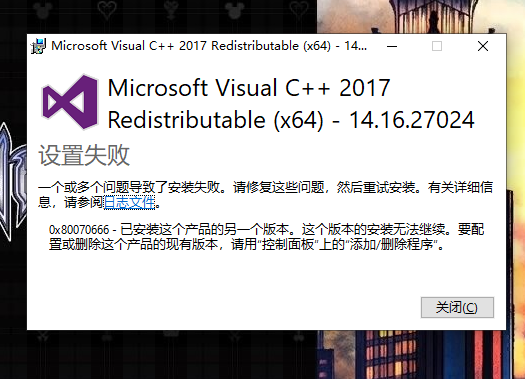
求助WIN10专业版 Microsoft visual C++2017 无法安装显示0x80070666,日志如下:
[3068:158C][2020-01-25T19:55:51]i001: Burn v3.10.1.2213, Windows v10.0 (Build 18363: Service Pack 0), path: F:\GAME\DanJi\vc_redist.x64\vc_redist.x64.exe
[3068:158C][2020-01-25T19:55:51]i009: Command Line: ''
[3068:158C][2020-01-25T19:55:51]i000: Setting string variable 'WixBundleLog' to value 'C:\Users\Administrator.VP90LT2HHORW43N\AppData\Local\Temp\dd_vcredist_amd64_20200125195551.log'
[3068:158C][2020-01-25T19:55:51]i000: Setting string variable 'WixBundleOriginalSource' to value 'F:\GAME\DanJi\vc_redist.x64\vc_redist.x64.exe'
[3068:158C][2020-01-25T19:55:51]i000: Setting string variable 'WixBundleOriginalSourceFolder' to value 'F:\GAME\DanJi\vc_redist.x64'
[3068:158C][2020-01-25T19:55:51]i000: Setting string variable 'WixBundleName' to value 'Microsoft Visual C++ 2017 Redistributable (x64) - 14.16.27024'
[3068:158C][2020-01-25T19:55:51]i000: Setting string variable 'WixBundleManufacturer' to value 'Microsoft Corporation'
[3068:4CB8][2020-01-25T19:55:51]i000: Setting version variable 'WixBundleFileVersion' to value '14.16.27024.1'
[3068:158C][2020-01-25T19:55:51]i100: Detect begin, 10 packages
[3068:158C][2020-01-25T19:55:51]i000: Setting version variable 'windows_uCRT_DetectKey' to value '10.0.18362.387'
[3068:158C][2020-01-25T19:55:51]i000: Setting numeric variable 'windows_uCRT_DetectKeyExists' to value 1
[3068:158C][2020-01-25T19:55:51]i102: Detected related bundle: {282975d8-55fe-4991-bbbb-06a72581ce58}, type: Upgrade, scope: PerMachine, version: 14.24.28127.4, operation: Downgrade
[3068:158C][2020-01-25T19:55:51]i052: Condition '(VersionNT = v6.3 AND NOT VersionNT64) AND (windows_uCRT_DetectKeyExists AND windows_uCRT_DetectKey >= v10.0.10240.0)' evaluates to false.
[3068:158C][2020-01-25T19:55:51]i052: Condition '(VersionNT = v6.3 AND VersionNT64) AND (windows_uCRT_DetectKeyExists AND windows_uCRT_DetectKey >= v10.0.10240.0)' evaluates to false.
[3068:158C][2020-01-25T19:55:51]i052: Condition '(VersionNT = v6.2 AND NOT VersionNT64) AND (windows_uCRT_DetectKeyExists AND windows_uCRT_DetectKey >= v10.0.10240.0)' evaluates to false.
[3068:158C][2020-01-25T19:55:51]i052: Condition '(VersionNT = v6.2 AND VersionNT64) AND (windows_uCRT_DetectKeyExists AND windows_uCRT_DetectKey >= v10.0.10240.0)' evaluates to false.
[3068:158C][2020-01-25T19:55:51]i052: Condition '(VersionNT = v6.1 AND NOT VersionNT64) AND (windows_uCRT_DetectKeyExists AND windows_uCRT_DetectKey >= v10.0.10240.0)' evaluates to false.
[3068:158C][2020-01-25T19:55:51]i052: Condition '(VersionNT = v6.1 AND VersionNT64) AND (windows_uCRT_DetectKeyExists AND windows_uCRT_DetectKey >= v10.0.10240.0)' evaluates to false.
[3068:158C][2020-01-25T19:55:51]i052: Condition '(VersionNT = v6.0 AND NOT VersionNT64) AND (windows_uCRT_DetectKeyExists AND windows_uCRT_DetectKey >= v10.0.10240.0)' evaluates to false.
[3068:158C][2020-01-25T19:55:51]i052: Condition '(VersionNT = v6.0 AND VersionNT64) AND (windows_uCRT_DetectKeyExists AND windows_uCRT_DetectKey >= v10.0.10240.0)' evaluates to false.
[3068:158C][2020-01-25T19:55:51]i103: Detected related package: {7DC387B8-E6A2-480C-8EF9-A6E51AE81C19}, scope: PerMachine, version: 14.24.28127.0, language: 0 operation: Downgrade
[3068:158C][2020-01-25T19:55:51]i103: Detected related package: {8678BA04-D161-45BE-ACA4-CC5D13073F35}, scope: PerMachine, version: 14.24.28127.0, language: 0 operation: Downgrade
[3068:158C][2020-01-25T19:55:51]i101: Detected package: Windows81_x86, state: Absent, cached: None
[3068:158C][2020-01-25T19:55:51]i101: Detected package: Windows81_x64, state: Absent, cached: None
[3068:158C][2020-01-25T19:55:51]i101: Detected package: Windows8_x86, state: Absent, cached: None
[3068:158C][2020-01-25T19:55:51]i101: Detected package: Windows8_x64, state: Absent, cached: None
[3068:158C][2020-01-25T19:55:51]i101: Detected package: Windows7_MSU_x86, state: Absent, cached: None
[3068:158C][2020-01-25T19:55:51]i101: Detected package: Windows7_MSU_x64, state: Absent, cached: None
[3068:158C][2020-01-25T19:55:51]i101: Detected package: WindowsVista_MSU_x86, state: Absent, cached: None
[3068:158C][2020-01-25T19:55:51]i101: Detected package: WindowsVista_MSU_x64, state: Absent, cached: None
[3068:158C][2020-01-25T19:55:51]i101: Detected package: vcRuntimeMinimum_x64, state: Obsolete, cached: None
[3068:158C][2020-01-25T19:55:51]i101: Detected package: vcRuntimeAdditional_x64, state: Obsolete, cached: None
[3068:158C][2020-01-25T19:55:51]i052: Condition 'VersionNT64 >= v6.0 OR (VersionNT64 = v5.2 AND ServicePackLevel >= 1)' evaluates to true.
[3068:158C][2020-01-25T19:55:51]i199: Detect complete, result: 0x0
[3068:4CB8][2020-01-25T19:55:53]i000: Setting numeric variable 'EulaAcceptCheckbox' to value 1
[3068:4CB8][2020-01-25T19:55:53]e000: Error 0x80070666: Cannot install a product when a newer version is installed.
' cx='32' cy='32' r='32' /%3E%3Ctext x='50%25' y='55%25' dominant-baseline='middle' text-anchor='middle' fill='%23FFF' %3EA%3C/text%3E%3C/svg%3E)
