使用了GitHub上开源项目:https://github.com/tsgrgo/windows-update-disabler.git自动禁止Windows更新的脚本后,尝试恢复Windows自动更新,但是设置中的Windows更新页面无法正常显示
:: Author: tsgrgo
:: Completely disable Windows Update
:: PsExec is required to get system privileges - it should be in this directory

if not "%1"=="admin" (powershell start -verb runas '%0' admin & exit /b)
if not "%2"=="system" (powershell . '%~dp0\PsExec.exe' /accepteula -i -s -d '%0' admin system & exit /b)

:: Disable update related services
for %%i in (wuauserv, UsoSvc, uhssvc, WaaSMedicSvc) do (
	net stop %%i
	sc config %%i start= disabled
	sc failure %%i reset= 0 actions= ""
)

:: Brute force rename services
for %%i in (WaaSMedicSvc, wuaueng) do (
	takeown /f C:\Windows\System32\%%i.dll && icacls C:\Windows\System32\%%i.dll /grant *S-1-1-0:F
	rename C:\Windows\System32\%%i.dll %%i_BAK.dll
	icacls C:\Windows\System32\%%i_BAK.dll /setowner "NT SERVICE\TrustedInstaller" && icacls C:\Windows\System32\%%i_BAK.dll /remove *S-1-1-0
)

:: Update registry
reg add "HKLM\SYSTEM\CurrentControlSet\Services\WaaSMedicSvc" /v Start /t REG_DWORD /d 4 /f
reg add "HKLM\SYSTEM\CurrentControlSet\Services\WaaSMedicSvc" /v FailureActions /t REG_BINARY /d 000000000000000000000000030000001400000000000000c0d4010000000000e09304000000000000000000 /f
reg add "HKLM\Software\Policies\Microsoft\Windows\WindowsUpdate\AU" /v NoAutoUpdate /t REG_DWORD /d 1 /f

:: Delete downloaded update files
erase /f /s /q c:\windows\softwaredistribution\*.* && rmdir /s /q c:\windows\softwaredistribution

:: Disable all update related scheduled tasks
powershell -command "Get-ScheduledTask -TaskPath '\Microsoft\Windows\InstallService\*' | Disable-ScheduledTask; Get-ScheduledTask -TaskPath '\Microsoft\Windows\UpdateOrchestrator\*' | Disable-ScheduledTask; Get-ScheduledTask -TaskPath '\Microsoft\Windows\UpdateAssistant\*' | Disable-ScheduledTask; Get-ScheduledTask -TaskPath '\Microsoft\Windows\WaaSMedic\*' | Disable-ScheduledTask; Get-ScheduledTask -TaskPath '\Microsoft\Windows\WindowsUpdate\*' | Disable-ScheduledTask; Get-ScheduledTask -TaskPath '\Microsoft\WindowsUpdate\*' | Disable-ScheduledTask"

echo Finished
pause
:: Author: tsgrgo
:: PsExec is required to get system privileges - it should be in this directory

@echo off
if not "%1"=="admin" (powershell start -verb runas '%0' admin & exit /b)
if not "%2"=="system" (powershell . '%~dp0\PsExec.exe' /accepteula -i -s -d '%0' admin system & exit /b)

:: Restore renamed services
for %%i in (wuaueng) do (
	takeown /f C:\Windows\System32\%%i_BAK.dll && icacls C:\Windows\System32\%%i_BAK.dll /grant *S-1-1-0:F
	rename C:\Windows\System32\%%i_BAK.dll %%i.dll
	icacls C:\Windows\System32\%%i.dll /setowner "NT SERVICE\TrustedInstaller" && icacls C:\Windows\System32\%%i.dll /remove *S-1-1-0
)

:: Change service config
sc config wuauserv start= auto

echo.
echo Enabled Windows Update Service
echo You can now use software that relies on the Windows Update Service.
echo When finished, you can run the disabler again.
echo More info in README
echo.
pause
:: Author: tsgrgo
:: Re-enable Windows auto updates and undo all changes by 'disable updates.bat'
:: PsExec is required to get system privileges - it should be in this directory
if not "%1"=="admin" (powershell start -verb runas '%0' admin & exit /b)
if not "%2"=="system" (powershell . '%~dp0\PsExec.exe' /accepteula -i -s -d '%0' admin system & exit /b)
:: Enable update related services
sc config wuauserv start= auto
sc config UsoSvc start= auto
sc config uhssvc start= delayed-auto
:: Restore renamed services
for %%i in (WaaSMedicSvc, wuaueng) do (
	takeown /f C:\Windows\System32\%%i_BAK.dll && icacls C:\Windows\System32\%%i_BAK.dll /grant *S-1-1-0:F
	rename C:\Windows\System32\%%i_BAK.dll %%i.dll
	icacls C:\Windows\System32\%%i.dll /setowner "NT SERVICE\TrustedInstaller" && icacls C:\Windows\System32\%%i.dll /remove *S-1-1-0
)
:: Update registry
reg add "HKLM\SYSTEM\CurrentControlSet\Services\WaaSMedicSvc" /v Start /t REG_DWORD /d 3 /f
reg add "HKLM\SYSTEM\CurrentControlSet\Services\WaaSMedicSvc" /v FailureActions /t REG_BINARY /d 840300000000000000000000030000001400000001000000c0d4010001000000e09304000000000000000000 /f
reg delete "HKLM\Software\Policies\Microsoft\Windows\WindowsUpdate\AU" /v "NoAutoUpdate" /f
:: Enable all update related scheduled tasks
powershell -command "Get-ScheduledTask -TaskPath '\Microsoft\Windows\InstallService\*' | Enable-ScheduledTask; Get-ScheduledTask -TaskPath '\Microsoft\Windows\UpdateOrchestrator\*' | Enable-ScheduledTask; Get-ScheduledTask -TaskPath '\Microsoft\Windows\UpdateAssistant\*' | Enable-ScheduledTask; Get-ScheduledTask -TaskPath '\Microsoft\Windows\WaaSMedic\*' | Enable-ScheduledTask; Get-ScheduledTask -TaskPath '\Microsoft\Windows\WindowsUpdate\*' | Enable-ScheduledTask; Get-ScheduledTask -TaskPath '\Microsoft\WindowsUpdate\*' | Enable-ScheduledTask"
echo Finished
pause
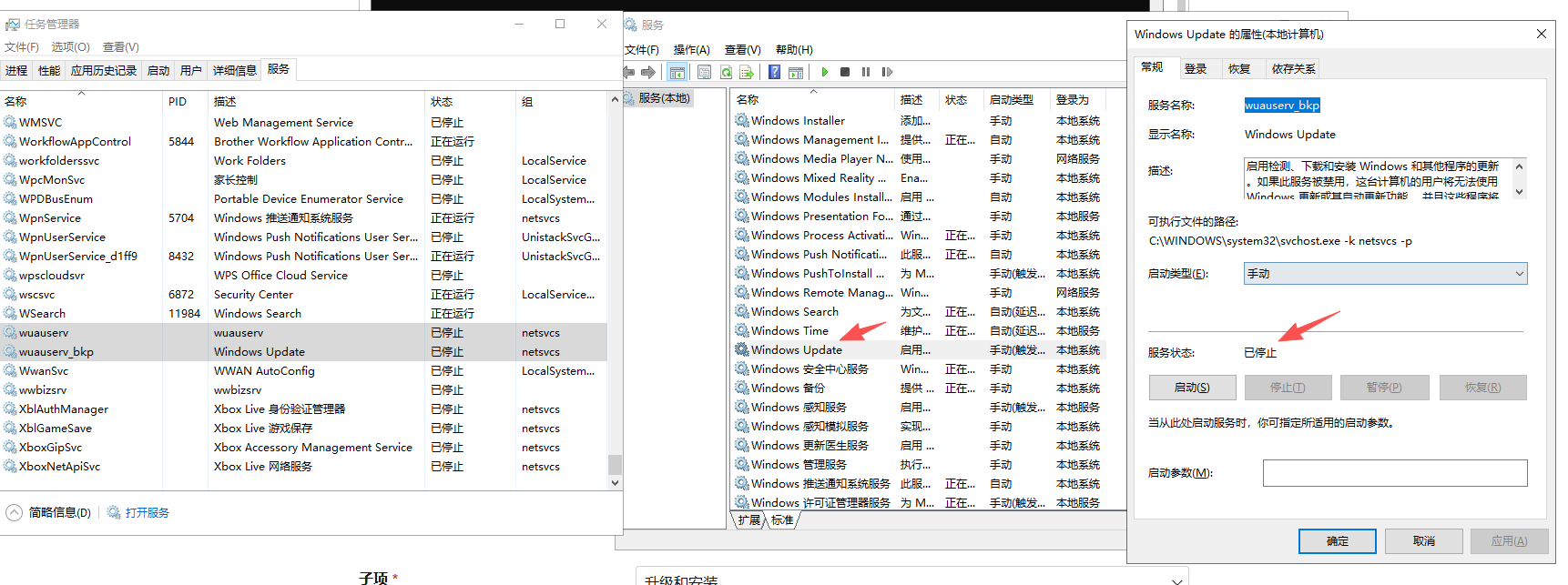
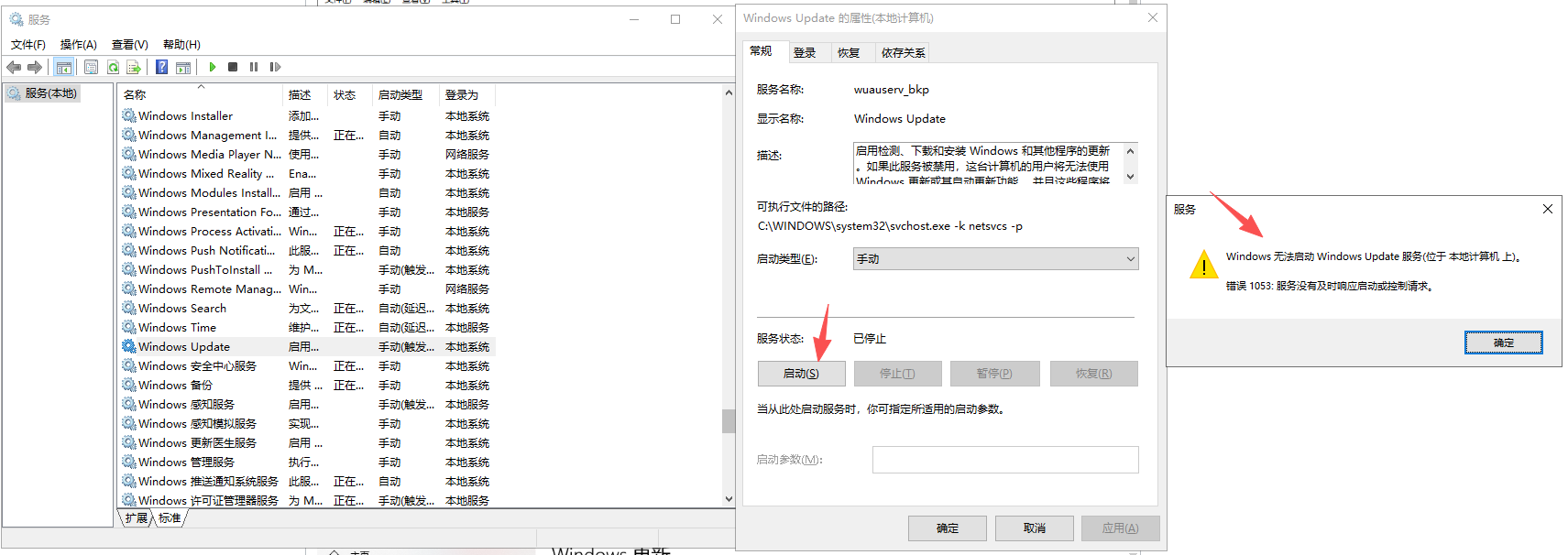
且无法启动服务,如以下图片信息所示:
' cx='32' cy='32' r='32' /%3E%3Ctext x='50%25' y='55%25' dominant-baseline='middle' text-anchor='middle' fill='%23FFF' %3EM%3C/text%3E%3C/svg%3E)

' cx='32' cy='32' r='32' /%3E%3Ctext x='50%25' y='55%25' dominant-baseline='middle' text-anchor='middle' fill='%23FFF' %3ELV%3C/text%3E%3C/svg%3E)