Note
此版本不是本文的最新版本。 有关当前版本,请参阅 本文的 .NET 10 版本。
Warning
此版本的 ASP.NET Core 不再受支持。 有关详细信息,请参阅 .NET 和 NET Core 支持策略。 有关当前版本,请参阅 本文的 .NET 10 版本。
本文介绍如何通过 JavaScript (JS) 调用 .NET 方法。
有关如何从 .NET 调用 JS 函数的信息,请参阅在 ASP.NET Core Blazor 中从 .NET 方法调用 JavaScript 函数。
Note
C# 联合类型受支持。
调用静态 .NET 方法
若要从 JavaScript (JS) 调用静态 .NET 方法,可以使用 JS 函数:
-
DotNet.invokeMethodAsync(推荐):同时对服务器端和客户端组件执行异步操作。 -
DotNet.invokeMethod:仅对客户端组件执行同步操作。
传入包含该方法的程序集的名称、静态 .NET 方法的标识符以及任意自变量。
在以下示例中:
-
{PACKAGE ID/ASSEMBLY NAME}占位符是应用的库或程序集名称的项目包 ID(项目文件中的<PackageId>)。 -
{.NET METHOD ID}占位符是 .NET 方法标识符。 -
{ARGUMENTS}占位符是要传递给该方法的以逗号分隔的可选参数,其中每个参数都必须是可执行 JSON 序列化的。
DotNet.invokeMethodAsync('{PACKAGE ID/ASSEMBLY NAME}', '{.NET METHOD ID}', {ARGUMENTS});
DotNet.invokeMethodAsync 返回表示操作结果的 JS Promise。
DotNet.invokeMethod(客户端组件)返回操作的结果。
Important
对于服务器端组件,建议使用异步函数 (invokeMethodAsync) 而不是同步版本 (invokeMethod)。
.NET 方法必须是公共的静态方法,并且包含 [JSInvokable] 特性。
在以下示例中:
-
{<T>}占位符指示返回类型,只有返回值的方法才需要返回类型。 -
{.NET METHOD ID}占位符是方法标识符。
@code {
    [JSInvokable]
    public static Task{<T>} {.NET METHOD ID}()
    {
        ...
    }
}
Note
静态 .NET 方法不支持调用开放式泛型方法,但实例方法支持该操作。 有关详细信息,请参阅调用 .NET 泛型类方法部分。
在下面的组件中,ReturnArrayAsync C# 方法返回 int 数组。
[JSInvokable] 特性应用于该方法,这使得该方法可由 JS 调用。
CallDotnet1.razor:
@page "/call-dotnet-1"
@implements IAsyncDisposable
@inject IJSRuntime JS

<PageTitle>Call .NET 1</PageTitle>

<h1>Call .NET Example 1</h1>

<p>
    <button id="btn">Trigger .NET static method</button>
</p>

<p>
    See the result in the developer tools console.
</p>

@code {
    private IJSObjectReference? module;

    protected override async Task OnAfterRenderAsync(bool firstRender)
    {
        if (firstRender)
        {
            module = await JS.InvokeAsync<IJSObjectReference>("import",
                "./Components/Pages/CallDotnet1.razor.js");

            await module.InvokeVoidAsync("addHandlers");
        }
    }

    [JSInvokable]
    public static Task<int[]> ReturnArrayAsync() =>
        Task.FromResult(new int[] { 11, 12, 13 });

    async ValueTask IAsyncDisposable.DisposeAsync()
    {
        if (module is not null)
        {
            try
            {
                await module.DisposeAsync();
            }
            catch (JSDisconnectedException)
            {
            }
        }
    }
}
CallDotnet1.razor.js:
export function returnArrayAsync() {
  DotNet.invokeMethodAsync('BlazorSample', 'ReturnArrayAsync')
    .then(data => {
      console.log(data);
    });
}

export function addHandlers() {
  const btn = document.getElementById("btn");
  btn.addEventListener("click", returnArrayAsync);
}
addHandlers
JS 函数会将 click 事件添加到按钮。
returnArrayAsync
JS 函数被指定为处理程序。
returnArrayAsync
JS 函数调用此组件的 ReturnArrayAsync .NET 方法,并将结果记录到浏览器的 Web 开发人员工具控制台。
BlazorSample 是应用的程序集名称。
CallDotnet1.razor:
@page "/call-dotnet-1"
@implements IAsyncDisposable
@inject IJSRuntime JS

<PageTitle>Call .NET 1</PageTitle>

<h1>Call .NET Example 1</h1>

<p>
    <button id="btn">Trigger .NET static method</button>
</p>

<p>
    See the result in the developer tools console.
</p>

@code {
    private IJSObjectReference? module;

    protected override async Task OnAfterRenderAsync(bool firstRender)
    {
        if (firstRender)
        {
            module = await JS.InvokeAsync<IJSObjectReference>("import",
                "./Components/Pages/CallDotnet1.razor.js");

            await module.InvokeVoidAsync("addHandlers");
        }
    }

    [JSInvokable]
    public static Task<int[]> ReturnArrayAsync() =>
        Task.FromResult(new int[] { 11, 12, 13 });

    async ValueTask IAsyncDisposable.DisposeAsync()
    {
        if (module is not null)
        {
            try
            {
                await module.DisposeAsync();
            }
            catch (JSDisconnectedException)
            {
            }
        }
    }
}
CallDotnet1.razor.js:
export function returnArrayAsync() {
  DotNet.invokeMethodAsync('BlazorSample', 'ReturnArrayAsync')
    .then(data => {
      console.log(data);
    });
}

export function addHandlers() {
  const btn = document.getElementById("btn");
  btn.addEventListener("click", returnArrayAsync);
}
addHandlers
JS 函数会将 click 事件添加到按钮。
returnArrayAsync
JS 函数被指定为处理程序。
returnArrayAsync
JS 函数调用此组件的 ReturnArrayAsync .NET 方法,并将结果记录到浏览器的 Web 开发人员工具控制台。
BlazorSample 是应用的程序集名称。
CallDotNetExample1.razor:
@page "/call-dotnet-example-1"

<h1>Call .NET Example 1</h1>

<p>
    <button onclick="returnArrayAsync()">
        Trigger .NET static method
    </button>
</p>

@code {
    [JSInvokable]
    public static Task<int[]> ReturnArrayAsync()
    {
        return Task.FromResult(new int[] { 1, 2, 3 });
    }
}
CallDotNetExample1.razor:
@page "/call-dotnet-example-1"

<h1>Call .NET Example 1</h1>

<p>
    <button onclick="returnArrayAsync()">
        Trigger .NET static method
    </button>
</p>

@code {
    [JSInvokable]
    public static Task<int[]> ReturnArrayAsync()
    {
        return Task.FromResult(new int[] { 1, 2, 3 });
    }
}
CallDotNetExample1.razor:
@page "/call-dotnet-example-1"

<h1>Call .NET Example 1</h1>

<p>
    <button onclick="returnArrayAsync()">
        Trigger .NET static method
    </button>
</p>

@code {
    [JSInvokable]
    public static Task<int[]> ReturnArrayAsync()
    {
        return Task.FromResult(new int[] { 1, 2, 3 });
    }
}
CallDotNetExample1.razor:
@page "/call-dotnet-example-1"

<h1>Call .NET Example 1</h1>

<p>
    <button onclick="returnArrayAsync()">
        Trigger .NET static method
    </button>
</p>

@code {
    [JSInvokable]
    public static Task<int[]> ReturnArrayAsync()
    {
        return Task.FromResult(new int[] { 1, 2, 3 });
    }
}
<button> 元素的 onclick HTML 特性是 JavaScript 的 onclick 事件处理程序分配,用于处理 click 事件,而不是 Blazor 的 @onclick 指令属性。
returnArrayAsync
JS 函数被指定为处理程序。
以下 returnArrayAsyncJS 函数调用此组件的 ReturnArrayAsync .NET 方法,并将结果记录到浏览器的 Web 开发人员工具控制台。
BlazorSample 是应用的程序集名称。
<script>
  window.returnArrayAsync = () => {
    DotNet.invokeMethodAsync('BlazorSample', 'ReturnArrayAsync')
      .then(data => {
        console.log(data);
      });
    };
</script>
Note
有关 JS 的常规指导和我们对常规应用的建议,请参阅 ASP.NET Core Blazor 应用中的 JavaScript 位置。
选择“Trigger .NET static method”按钮时,浏览器的开发人员工具控制台输出会显示数组数据。 各个浏览器的输出格式略有不同。 以下输出显示 Microsoft Edge 使用的格式:
Array(3) [ 11, 12, 13 ]
通过将数据作为参数传递,在调用 invokeMethodAsync 函数时将数据传递给 .NET 方法。
若要演示如何将数据传递到 .NET,请将起始位置传递给在 ReturnArrayAsync 方法(如果 JS 中调用了此方法)。
export function returnArrayAsync() {
  DotNet.invokeMethodAsync('BlazorSample', 'ReturnArrayAsync', 14)
    .then(data => {
      console.log(data);
    });
}
<script>
  window.returnArrayAsync = () => {
    DotNet.invokeMethodAsync('BlazorSample', 'ReturnArrayAsync', 14)
      .then(data => {
        console.log(data);
      });
    };
</script>
组件的可调用 ReturnArrayAsync 方法接收起始位置并从中构造数组。 返回数组以记录到控制台:
[JSInvokable]
public static Task<int[]> ReturnArrayAsync(int startPosition) =>
    Task.FromResult(Enumerable.Range(startPosition, 3).ToArray());
重新编译应用并刷新浏览器后,选择按钮时,浏览器控制台中会显示以下输出:
Array(3) [ 14, 15, 16 ]
默认情况下,JS 调用的 .NET 方法标识符是 .NET 方法名称,但你可以使用 [JSInvokable] attribute 构造函数来指定其他标识符。 在以下示例中,DifferentMethodName 是 ReturnArrayAsync 方法的指定方法标识符:
[JSInvokable("DifferentMethodName")]
在调用 DotNet.invokeMethodAsync(服务器端或客户端组件)或 DotNet.invokeMethod(仅限客户端组件)时,调用 DifferentMethodName 以执行 ReturnArrayAsync .NET 方法:
DotNet.invokeMethodAsync('BlazorSample', 'DifferentMethodName');-
DotNet.invokeMethod('BlazorSample', 'DifferentMethodName');(仅限客户端组件)
Note
本部分中的 ReturnArrayAsync 方法示例返回 Task 的结果,而不使用显式 C# async 和 await 关键字。 使用 async 和 await 对方法进行编码,是使用 await 关键字返回异步操作值的一种典型方法。
由 ReturnArrayAsync 和 async 关键字组成的 await 方法:
[JSInvokable]
public static async Task<int[]> ReturnArrayAsync() =>
    await Task.FromResult(new int[] { 11, 12, 13 });
有关详细信息,请参阅 C# 指南中的使用 Async 和 Await 的异步编程。
创建 JavaScript 对象和数据引用以传递到 .NET
调用 DotNet.createJSObjectReference(jsObject) 以构造 JS 对象引用,以便可以将其传递到 .NET,其中 jsObject 是用于创建 JS Object 对象引用的 JS。 以下示例将对不可序列化的 window 对象的引用传递给 .NET,后者在 ReceiveWindowObject C# 方法中接收它作为 IJSObjectReference:
DotNet.invokeMethodAsync('{PACKAGE ID/ASSEMBLY NAME}', 'ReceiveWindowObject',
  DotNet.createJSObjectReference(window));
[JSInvokable]
public static void ReceiveWindowObject(IJSObjectReference objRef)
{
    ...
}
在前面的示例中,{PACKAGE ID/ASSEMBLY NAME} 占位符是应用的库或程序集名称的项目包 ID(项目文件中的 <PackageId>)。
Note
前面的示例不需要释放 JSObjectReference,因为对 window 对象的引用不保存在 JS 中。
维护对 JSObjectReference 的引用需要释放它,以避免客户端上的 JS 内存泄漏。 下面的示例重构前面的代码来捕获对 JSObjectReference 的引用,然后调用 DotNet.disposeJSObjectReference() 以释放引用:
var jsObjectReference = DotNet.createJSObjectReference(window);

DotNet.invokeMethodAsync('{PACKAGE ID/ASSEMBLY NAME}', 'ReceiveWindowObject', jsObjectReference);

DotNet.disposeJSObjectReference(jsObjectReference);
在前面的示例中,{PACKAGE ID/ASSEMBLY NAME} 占位符是应用的库或程序集名称的项目包 ID(项目文件中的 <PackageId>)。
调用 DotNet.createJSStreamReference(streamReference) 来构造 JS 流引用,以便可以传递给 .NET,其中 streamReference 是 ArrayBuffer、Blob 或任何 类型化数组(例如 Uint8Array 或 Float32Array),用于创建 JS 流引用。
调用实例 .NET 方法
若要从 JavaScript (JS) 调用实例 .NET 方法,请执行以下操作:
通过将实例包装在 JS 中并对其调用 DotNetObjectReference,将 .NET 实例通过引用传递给 Create。
使用传递的 JS 中的
invokeMethodAsync(推荐)或invokeMethod(仅限客户端组件)从 DotNetObjectReference 调用 .NET 实例方法。 传入实例 .NET 方法的标识符以及任意自变量。 在从 JS 调用其他 .NET 方法时,也可以将 .NET 实例作为参数传递。在以下示例中:
-
dotNetHelper为 DotNetObjectReference。 -
{.NET METHOD ID}占位符是 .NET 方法标识符。 -
{ARGUMENTS}占位符是要传递给该方法的以逗号分隔的可选参数,其中每个参数都必须是可执行 JSON 序列化的。
dotNetHelper.invokeMethodAsync('{.NET METHOD ID}', {ARGUMENTS});Note
在调用实例方法时,
invokeMethodAsync和invokeMethod不接受程序集名称参数。invokeMethodAsync返回表示操作结果的 JSPromise。invokeMethod(仅限客户端组件)返回操作的结果。Important
对于服务器端组件,建议使用异步函数 (
invokeMethodAsync) 而不是同步版本 (invokeMethod)。-
本文的以下部分演示了调用实例 .NET 方法的各种方法:
避免剪裁 JavaScript 可调用的 .NET 方法
本部分适用于启用了预 (AOT) 编译和运行时重新链接的客户端应用。
以下部分中的多个示例基于类实例方法,其中标有 [JSInvokable] 属性 的 JavaScript 可调用 .NET 方法是非 Razor 组件的类的成员。 此类 .NET 方法位于 Razor 组件中时会受到保护,不受运行时重新链接/剪裁的影响。 为保护 .NET 方法免于在 Razor 组件之外被剪裁,请在类的构造函数中实现具有 DynamicDependency 属性的方法,如下例所示:
using System.Diagnostics.CodeAnalysis;
using Microsoft.JSInterop;

public class ExampleClass {

    [DynamicDependency(nameof(ExampleJSInvokableMethod))]
    public ExampleClass()
    {
    }

    [JSInvokable]
    public string ExampleJSInvokableMethod()
    {
        ...
    }
}
有关详细信息,请参阅准备 .NET 库以进行剪裁:DynamicDependency。
将 DotNetObjectReference 传递到单个 JavaScript 函数
本部分中的示例演示如何将 DotNetObjectReference 传递给单个 JavaScript (JS) 函数。
以下 sayHello1JS 函数接收 DotNetObjectReference 并调用 invokeMethodAsync 以调用组件的 GetHelloMessage .NET 方法:
<script>
  window.sayHello1 = (dotNetHelper) => {
    return dotNetHelper.invokeMethodAsync('GetHelloMessage');
  };
</script>
Note
有关 JS 的常规指导和我们对常规应用的建议,请参阅 ASP.NET Core Blazor 应用中的 JavaScript 位置。
在上一示例中,变量名称 dotNetHelper 是任意的,可更改为任何首选名称。
对于以下 组件:
- 组件有一个可以进行 JS 调用的 .NET 方法,名为
GetHelloMessage。 - 选择“
Trigger .NET instance method”按钮后,会使用 JS 调用sayHello1函数 DotNetObjectReference。 -
sayHello1:- 调用
GetHelloMessage并接收消息结果。 - 将消息结果返回给进行调用的
TriggerDotNetInstanceMethod方法。
- 调用
- 向用户显示
sayHello1中从result返回的消息。 - 为避免内存泄漏并允许进行垃圾回收,在 DotNetObjectReference 方法中释放了由
Dispose创建的 .NET 对象引用。
CallDotnet2.razor:
@page "/call-dotnet-2"
@implements IDisposable
@inject IJSRuntime JS

<PageTitle>Call .NET 2</PageTitle>

<h1>Call .NET Example 2</h1>

<p>
    <label>
        Name: <input @bind="name" />
    </label>
</p>

<p>
    <button @onclick="TriggerDotNetInstanceMethod">
        Trigger .NET instance method
    </button>
</p>

<p>
    @result
</p>

@code {
    private string? name;
    private string? result;
    private DotNetObjectReference<CallDotnet2>? objRef;

    protected override void OnInitialized() =>
        objRef = DotNetObjectReference.Create(this);

    public async Task TriggerDotNetInstanceMethod() =>
        result = await JS.InvokeAsync<string>("sayHello1", objRef);

    [JSInvokable]
    public string GetHelloMessage() => $"Hello, {name}!";

    public void Dispose() => objRef?.Dispose();
}
CallDotnet2.razor:
@page "/call-dotnet-2"
@implements IDisposable
@inject IJSRuntime JS

<PageTitle>Call .NET 2</PageTitle>

<h1>Call .NET Example 2</h1>

<p>
    <label>
        Name: <input @bind="name" />
    </label>
</p>

<p>
    <button @onclick="TriggerDotNetInstanceMethod">
        Trigger .NET instance method
    </button>
</p>

<p>
    @result
</p>

@code {
    private string? name;
    private string? result;
    private DotNetObjectReference<CallDotnet2>? objRef;

    protected override void OnInitialized() =>
        objRef = DotNetObjectReference.Create(this);

    public async Task TriggerDotNetInstanceMethod() =>
        result = await JS.InvokeAsync<string>("sayHello1", objRef);

    [JSInvokable]
    public string GetHelloMessage() => $"Hello, {name}!";

    public void Dispose() => objRef?.Dispose();
}
CallDotNetExample2.razor:
@page "/call-dotnet-example-2"
@implements IDisposable
@inject IJSRuntime JS

<h1>Call .NET Example 2</h1>

<p>
    <label>
        Name: <input @bind="name" />
    </label>
</p>

<p>
    <button @onclick="TriggerDotNetInstanceMethod">
        Trigger .NET instance method
    </button>
</p>

<p>
    @result
</p>

@code {
    private string? name;
    private string? result;
    private DotNetObjectReference<CallDotNetExample2>? objRef;

    protected override void OnInitialized()
    {
        objRef = DotNetObjectReference.Create(this);
    }

    public async Task TriggerDotNetInstanceMethod()
    {
        result = await JS.InvokeAsync<string>("sayHello1", objRef);
    }

    [JSInvokable]
    public string GetHelloMessage() => $"Hello, {name}!";

    public void Dispose()
    {
        objRef?.Dispose();
    }
}
CallDotNetExample2.razor:
@page "/call-dotnet-example-2"
@implements IDisposable
@inject IJSRuntime JS

<h1>Call .NET Example 2</h1>

<p>
    <label>
        Name: <input @bind="name" />
    </label>
</p>

<p>
    <button @onclick="TriggerDotNetInstanceMethod">
        Trigger .NET instance method
    </button>
</p>

<p>
    @result
</p>

@code {
    private string? name;
    private string? result;
    private DotNetObjectReference<CallDotNetExample2>? objRef;

    protected override void OnInitialized()
    {
        objRef = DotNetObjectReference.Create(this);
    }

    public async Task TriggerDotNetInstanceMethod()
    {
        result = await JS.InvokeAsync<string>("sayHello1", objRef);
    }

    [JSInvokable]
    public string GetHelloMessage() => $"Hello, {name}!";

    public void Dispose()
    {
        objRef?.Dispose();
    }
}
CallDotNetExample2.razor:
@page "/call-dotnet-example-2"
@implements IDisposable
@inject IJSRuntime JS

<h1>Call .NET Example 2</h1>

<p>
    <label>
        Name: <input @bind="name" />
    </label>
</p>

<p>
    <button @onclick="TriggerDotNetInstanceMethod">
        Trigger .NET instance method
    </button>
</p>

<p>
    @result
</p>

@code {
    private string name;
    private string result;
    private DotNetObjectReference<CallDotNetExample2> objRef;

    protected override void OnInitialized()
    {
        objRef = DotNetObjectReference.Create(this);
    }

    public async Task TriggerDotNetInstanceMethod()
    {
        result = await JS.InvokeAsync<string>("sayHello1", objRef);
    }

    [JSInvokable]
    public string GetHelloMessage() => $"Hello, {name}!";

    public void Dispose()
    {
        objRef?.Dispose();
    }
}
CallDotNetExample2.razor:
@page "/call-dotnet-example-2"
@implements IDisposable
@inject IJSRuntime JS

<h1>Call .NET Example 2</h1>

<p>
    <label>
        Name: <input @bind="name" />
    </label>
</p>

<p>
    <button @onclick="TriggerDotNetInstanceMethod">
        Trigger .NET instance method
    </button>
</p>

<p>
    @result
</p>

@code {
    private string name;
    private string result;
    private DotNetObjectReference<CallDotNetExample2> objRef;

    protected override void OnInitialized()
    {
        objRef = DotNetObjectReference.Create(this);
    }

    public async Task TriggerDotNetInstanceMethod()
    {
        result = await JS.InvokeAsync<string>("sayHello1", objRef);
    }

    [JSInvokable]
    public string GetHelloMessage() => $"Hello, {name}!";

    public void Dispose()
    {
        objRef?.Dispose();
    }
}
在上一示例中,变量名称 dotNetHelper 是任意的,可更改为任何首选名称。
使用以下指南将参数传递给实例方法:
向 .NET 方法调用添加参数。 在下面的示例中,一个名称被传递给方法。 根据需要将其他参数添加到列表。
<script>
  window.sayHello2 = (dotNetHelper, name) => {
    return dotNetHelper.invokeMethodAsync('GetHelloMessage', name);
  };
</script>
在上一示例中,变量名称 dotNetHelper 是任意的,可更改为任何首选名称。
向 .NET 方法提供参数列表。
CallDotnet3.razor:
@page "/call-dotnet-3"
@implements IDisposable
@inject IJSRuntime JS

<PageTitle>Call .NET 3</PageTitle>

<h1>Call .NET Example 3</h1>

<p>
    <label>
        Name: <input @bind="name" />
    </label>
</p>

<p>
    <button @onclick="TriggerDotNetInstanceMethod">
        Trigger .NET instance method
    </button>
</p>

<p>
    @result
</p>

@code {
    private string? name;
    private string? result;
    private DotNetObjectReference<CallDotnet3>? objRef;

    protected override void OnInitialized() =>
        objRef = DotNetObjectReference.Create(this);

    public async Task TriggerDotNetInstanceMethod() =>
        result = await JS.InvokeAsync<string>("sayHello2", objRef, name);

    [JSInvokable]
    public string GetHelloMessage(string passedName) => $"Hello, {passedName}!";

    public void Dispose() => objRef?.Dispose();
}
CallDotnet3.razor:
@page "/call-dotnet-3"
@implements IDisposable
@inject IJSRuntime JS

<PageTitle>Call .NET 3</PageTitle>

<h1>Call .NET Example 3</h1>

<p>
    <label>
        Name: <input @bind="name" />
    </label>
</p>

<p>
    <button @onclick="TriggerDotNetInstanceMethod">
        Trigger .NET instance method
    </button>
</p>

<p>
    @result
</p>

@code {
    private string? name;
    private string? result;
    private DotNetObjectReference<CallDotnet3>? objRef;

    protected override void OnInitialized() =>
        objRef = DotNetObjectReference.Create(this);

    public async Task TriggerDotNetInstanceMethod() =>
        result = await JS.InvokeAsync<string>("sayHello2", objRef, name);

    [JSInvokable]
    public string GetHelloMessage(string passedName) => $"Hello, {passedName}!";

    public void Dispose() => objRef?.Dispose();
}
CallDotNetExample3.razor:
@page "/call-dotnet-example-3"
@implements IDisposable
@inject IJSRuntime JS

<h1>Call .NET Example 3</h1>

<p>
    <label>
        Name: <input @bind="name" />
    </label>
</p>

<p>
    <button @onclick="TriggerDotNetInstanceMethod">
        Trigger .NET instance method
    </button>
</p>

<p>
    @result
</p>

@code {
    private string? name;
    private string? result;
    private DotNetObjectReference<CallDotNetExample3>? objRef;

    protected override void OnInitialized()
    {
        objRef = DotNetObjectReference.Create(this);
    }

    public async Task TriggerDotNetInstanceMethod()
    {
        result = await JS.InvokeAsync<string>("sayHello2", objRef, name);
    }

    [JSInvokable]
    public string GetHelloMessage(string passedName) => $"Hello, {passedName}!";

    public void Dispose()
    {
        objRef?.Dispose();
    }
}
CallDotNetExample3.razor:
@page "/call-dotnet-example-3"
@implements IDisposable
@inject IJSRuntime JS

<h1>Call .NET Example 3</h1>

<p>
    <label>
        Name: <input @bind="name" />
    </label>
</p>

<p>
    <button @onclick="TriggerDotNetInstanceMethod">
        Trigger .NET instance method
    </button>
</p>

<p>
    @result
</p>

@code {
    private string? name;
    private string? result;
    private DotNetObjectReference<CallDotNetExample3>? objRef;

    protected override void OnInitialized()
    {
        objRef = DotNetObjectReference.Create(this);
    }

    public async Task TriggerDotNetInstanceMethod()
    {
        result = await JS.InvokeAsync<string>("sayHello2", objRef, name);
    }

    [JSInvokable]
    public string GetHelloMessage(string passedName) => $"Hello, {passedName}!";

    public void Dispose()
    {
        objRef?.Dispose();
    }
}
CallDotNetExample3.razor:
@page "/call-dotnet-example-3"
@implements IDisposable
@inject IJSRuntime JS

<h1>Call .NET Example 3</h1>

<p>
    <label>
        Name: <input @bind="name" />
    </label>
</p>

<p>
    <button @onclick="TriggerDotNetInstanceMethod">
        Trigger .NET instance method
    </button>
</p>

<p>
    @result
</p>

@code {
    private string name;
    private string result;
    private DotNetObjectReference<CallDotNetExample3> objRef;

    protected override void OnInitialized()
    {
        objRef = DotNetObjectReference.Create(this);
    }

    public async Task TriggerDotNetInstanceMethod()
    {
        result = await JS.InvokeAsync<string>("sayHello2", objRef, name);
    }

    [JSInvokable]
    public string GetHelloMessage(string passedName) => $"Hello, {passedName}!";

    public void Dispose()
    {
        objRef?.Dispose();
    }
}
CallDotNetExample3.razor:
@page "/call-dotnet-example-3"
@implements IDisposable
@inject IJSRuntime JS

<h1>Call .NET Example 3</h1>

<p>
    <label>
        Name: <input @bind="name" />
    </label>
</p>

<p>
    <button @onclick="TriggerDotNetInstanceMethod">
        Trigger .NET instance method
    </button>
</p>

<p>
    @result
</p>

@code {
    private string name;
    private string result;
    private DotNetObjectReference<CallDotNetExample3> objRef;

    protected override void OnInitialized()
    {
        objRef = DotNetObjectReference.Create(this);
    }

    public async Task TriggerDotNetInstanceMethod()
    {
        result = await JS.InvokeAsync<string>("sayHello2", objRef, name);
    }

    [JSInvokable]
    public string GetHelloMessage(string passedName) => $"Hello, {passedName}!";

    public void Dispose()
    {
        objRef?.Dispose();
    }
}
在上一示例中,变量名称 dotNetHelper 是任意的,可更改为任何首选名称。
将 DotNetObjectReference 传递到具有多个 JavaScript 函数的类
本部分中的示例演示如何将 DotNetObjectReference 传递给具有多个函数的 JavaScript (JS) 类。
创建一个 DotNetObjectReference 并通过 OnAfterRenderAsync 生命周期方法将其传递到 JS 类,供多个函数使用。 请确保 .NET 代码释放 DotNetObjectReference,如以下示例所示。
在以下组件中,Trigger JS function 按钮通过设置 JSJS 属性(而不是 onclick 的 Blazor 指令特性)来调用 @onclick 函数。
CallDotNetExampleOneHelper.razor:
@page "/call-dotnet-example-one-helper"
@implements IAsyncDisposable
@inject IJSRuntime JS

<PageTitle>Call .NET Example</PageTitle>

<h1>Pass <code>DotNetObjectReference</code> to a JavaScript class</h1>

<p>
    <label>
        Message: <input @bind="name" />
    </label>
</p>

<p>
    <button id="sayHelloBtn">
        Trigger JS function <code>sayHello</code>
    </button>
</p>

<p>
    <button id="welcomeVisitorBtn">
        Trigger JS function <code>welcomeVisitor</code>
    </button>
</p>

@code {
    private IJSObjectReference? module;
    private string? name;
    private DotNetObjectReference<CallDotNetExampleOneHelper>? dotNetHelper;

    protected override async Task OnAfterRenderAsync(bool firstRender)
    {
        if (firstRender)
        {
            module = await JS.InvokeAsync<IJSObjectReference>("import",
                "./Components/Pages/CallDotNetExampleOneHelper.razor.js");

            dotNetHelper = DotNetObjectReference.Create(this);
            await module.InvokeVoidAsync("GreetingHelpers.setDotNetHelper",
                dotNetHelper);

            await module.InvokeVoidAsync("addHandlers");
        }
    }

    [JSInvokable]
    public string GetHelloMessage() => $"Hello, {name}!";

    [JSInvokable]
    public string GetWelcomeMessage() => $"Welcome, {name}!";

    async ValueTask IAsyncDisposable.DisposeAsync()
    {
        if (module is not null)
        {
            try
            {
                await module.DisposeAsync();
            }
            catch (JSDisconnectedException)
            {
            }
        }

        dotNetHelper?.Dispose();
    }
}
在上面的示例中:
-
JS是一个注入的 IJSRuntime 实例。 IJSRuntime 由 Blazor 框架注册。 - 变量名称
dotNetHelper是任意的,可更改为任何首选名称。 - 组件必须显式释放 DotNetObjectReference 以允许垃圾回收并防止内存泄漏。
-
JSDisconnectedException在模块处置过程中捕获,以防BlazorSignalR线路丢失。 如果前面的代码用于 Blazor WebAssembly 应用,则不会丢失 SignalR 连接,因此可以删除
try-catch代码块,并保留释放模块 (await module.DisposeAsync();) 的代码行。 有关详细信息,请参阅 ASP.NET Core BlazorJavaScript 互操作性(JS 互操作)。
CallDotNetExampleOneHelper.razor.js:
export class GreetingHelpers {
  static dotNetHelper;

  static setDotNetHelper(value) {
    GreetingHelpers.dotNetHelper = value;
  }

  static async sayHello() {
    const msg =
      await GreetingHelpers.dotNetHelper.invokeMethodAsync('GetHelloMessage');
    alert(`Message from .NET: "${msg}"`);
  }

  static async welcomeVisitor() {
    const msg =
      await GreetingHelpers.dotNetHelper.invokeMethodAsync('GetWelcomeMessage');
    alert(`Message from .NET: "${msg}"`);
  }
}

export function addHandlers() {
  const sayHelloBtn = document.getElementById("sayHelloBtn");
  sayHelloBtn.addEventListener("click", GreetingHelpers.sayHello);

  const welcomeVisitorBtn = document.getElementById("welcomeVisitorBtn");
  welcomeVisitorBtn.addEventListener("click", GreetingHelpers.welcomeVisitor);
}
在上一示例中,变量名称 dotNetHelper 是任意的,可更改为任何首选名称。
@page "/call-dotnet-example-one-helper"
@implements IDisposable
@inject IJSRuntime JS

<h1>Pass <code>DotNetObjectReference</code> to a JavaScript class</h1>

<p>
    <label>
        Message: <input @bind="name" />
    </label>
</p>

<p>
    <button onclick="GreetingHelpers.sayHello()">
        Trigger JS function <code>sayHello</code>
    </button>
</p>

<p>
    <button onclick="GreetingHelpers.welcomeVisitor()">
        Trigger JS function <code>welcomeVisitor</code>
    </button>
</p>

@code {
    private string? name;
    private DotNetObjectReference<CallDotNetExampleOneHelper>? dotNetHelper;

    protected override async Task OnAfterRenderAsync(bool firstRender)
    {
        if (firstRender)
        {
            dotNetHelper = DotNetObjectReference.Create(this);
            await JS.InvokeVoidAsync("GreetingHelpers.setDotNetHelper",
                dotNetHelper);
        }
    }

    [JSInvokable]
    public string GetHelloMessage() => $"Hello, {name}!";

    [JSInvokable]
    public string GetWelcomeMessage() => $"Welcome, {name}!";

    public void Dispose()
    {
        dotNetHelper?.Dispose();
    }
}
在上面的示例中:
-
JS是一个注入的 IJSRuntime 实例。 IJSRuntime 由 Blazor 框架注册。 - 变量名称
dotNetHelper是任意的,可更改为任何首选名称。 - 组件必须显式释放 DotNetObjectReference 以允许垃圾回收并防止内存泄漏。
<script>
  class GreetingHelpers {
    static dotNetHelper;

    static setDotNetHelper(value) {
      GreetingHelpers.dotNetHelper = value;
    }

    static async sayHello() {
      const msg =
        await GreetingHelpers.dotNetHelper.invokeMethodAsync('GetHelloMessage');
      alert(`Message from .NET: "${msg}"`);
    }

    static async welcomeVisitor() {
      const msg =
        await GreetingHelpers.dotNetHelper.invokeMethodAsync('GetWelcomeMessage');
      alert(`Message from .NET: "${msg}"`);
    }
  }

  window.GreetingHelpers = GreetingHelpers;
</script>
在上面的示例中:
- 将
GreetingHelpers类添加到window对象以全局定义该类,从而允许 Blazor 查找用于 JS 互操作的类。 - 变量名称
dotNetHelper是任意的,可更改为任何首选名称。
Note
有关 JS 的常规指导和我们对常规应用的建议,请参阅 ASP.NET Core Blazor 应用中的 JavaScript 位置。
调用 .NET 泛型类方法
JavaScript (JS) 函数可以调用 .NET 泛型类方法,其中 JS 函数调用泛型类的 .NET 方法。
在以下泛型类型类 (GenericType<TValue>) 中:
- 类具有单个类型参数 (
TValue) 和单个泛型Value属性。 - 类具有两个标记有
[JSInvokable]特性的非泛型方法,每个方法都有一个名为newValue的泛型类型参数:-
Update从Value同步更新newValue的值。 - 使用
UpdateAsync创建在等待时异步产生当前上下文的可等待任务时,Value从newValue异步更新 Task.Yield 的值。
-
- 每个类方法都将
TValue的类型和Value的值写入控制台。 写入控制台操作仅用于演示目的。 生产应用通常避免写入控制台,而是支持应用日志记录。 有关详细信息,请参阅 ASP.NET Core 日志记录Blazor和.NET 和 ASP.NET Core 中的日志记录。
Note
开放式泛型类型和方法不为类型占位符指定类型。 相反,封闭式泛型为所有类型占位符提供类型。 本部分中的示例演示了封闭式泛型,但支持使用开放式泛型调用 JS 互操作实例方法。 静态 .NET 方法调用不支持使用开放式泛型,本文前面已对此进行了介绍。
有关详细信息,请参阅以下文章:
GenericType.cs:
using Microsoft.JSInterop;

public class GenericType<TValue>
{
    public TValue? Value { get; set; }

    [JSInvokable]
    public void Update(TValue newValue)
    {
        Value = newValue;

        Console.WriteLine($"Update: GenericType<{typeof(TValue)}>: {Value}");
    }

    [JSInvokable]
    public async Task UpdateAsync(TValue newValue)
    {
        await Task.Yield();
        Value = newValue;

        Console.WriteLine($"UpdateAsync: GenericType<{typeof(TValue)}>: {Value}");
    }
}
在以下 invokeMethodsAsync 函数中:
- 泛型类型类的
Update和UpdateAsync方法是通过表示字符串和数字的参数调用的。 - 客户端组件支持与
invokeMethod同步调用 .NET 方法。syncInterop接收一个布尔值,该值指示客户端是否发生 JS 互操作。 如果syncInterop为true,则可安全地调用invokeMethod。 如果syncInterop的值为false,则仅调用异步函数invokeMethodAsync,因为 JS 互操作是在客户端组件中执行的。 - 出于演示目的,将 DotNetObjectReference 函数调用(
invokeMethod或invokeMethodAsync)、调用的 .NET 方法(Update或UpdateAsync)以及参数写入控制台。 参数使用一个随机数,以允许将 JS 函数调用与 .NET 方法调用相匹配(也会写入 .NET 端的控制台)。 通常,在客户端或服务器上,生产代码不会写入控制台。 生产应用通常依赖于应用日志记录。 有关详细信息,请参阅 ASP.NET Core 日志记录Blazor和.NET 和 ASP.NET Core 中的日志记录。
<script>
  const randomInt = () => Math.floor(Math.random() * 99999);

  window.invokeMethodsAsync = async (syncInterop, dotNetHelper1, dotNetHelper2) => {
    var n = randomInt();
    console.log(`JS: invokeMethodAsync:Update('string ${n}')`);
    await dotNetHelper1.invokeMethodAsync('Update', `string ${n}`);

    n = randomInt();
    console.log(`JS: invokeMethodAsync:UpdateAsync('string ${n}')`);
    await dotNetHelper1.invokeMethodAsync('UpdateAsync', `string ${n}`);

    if (syncInterop) {
      n = randomInt();
      console.log(`JS: invokeMethod:Update('string ${n}')`);
      dotNetHelper1.invokeMethod('Update', `string ${n}`);
    }

    n = randomInt();
    console.log(`JS: invokeMethodAsync:Update(${n})`);
    await dotNetHelper2.invokeMethodAsync('Update', n);

    n = randomInt();
    console.log(`JS: invokeMethodAsync:UpdateAsync(${n})`);
    await dotNetHelper2.invokeMethodAsync('UpdateAsync', n);

    if (syncInterop) {
      n = randomInt();
      console.log(`JS: invokeMethod:Update(${n})`);
      dotNetHelper2.invokeMethod('Update', n);
    }
  };
</script>
Note
有关 JS 的常规指导和我们对常规应用的建议,请参阅 ASP.NET Core Blazor 应用中的 JavaScript 位置。
在下面的 GenericsExample 组件中:
- 选择 JS 按钮时会调用
invokeMethodsAsync函数Invoke Interop。 - 将为 DotNetObjectReference 的实例创建一对 JS 类型,并将其作为
GenericType和string传递给int函数。
GenericsExample.razor:
@page "/generics-example"
@implements IDisposable
@inject IJSRuntime JS

<p>
    <button @onclick="InvokeInterop">Invoke Interop</button>
</p>

<ul>
    <li>genericType1: @genericType1?.Value</li>
    <li>genericType2: @genericType2?.Value</li>
</ul>

@code {
    private GenericType<string> genericType1 = new() { Value = "string 0" };
    private GenericType<int> genericType2 = new() { Value = 0 };
    private DotNetObjectReference<GenericType<string>>? objRef1;
    private DotNetObjectReference<GenericType<int>>? objRef2;

    protected override void OnInitialized()
    {
        objRef1 = DotNetObjectReference.Create(genericType1);
        objRef2 = DotNetObjectReference.Create(genericType2);
    }

    public async Task InvokeInterop()
    {
        var syncInterop = OperatingSystem.IsBrowser();

        await JS.InvokeVoidAsync(
            "invokeMethodsAsync", syncInterop, objRef1, objRef2);
    }

    public void Dispose()
    {
        objRef1?.Dispose();
        objRef2?.Dispose();
    }
}
@page "/generics-example"
@implements IDisposable
@inject IJSRuntime JS

<p>
    <button @onclick="InvokeInterop">Invoke Interop</button>
</p>

<ul>
    <li>genericType1: @genericType1?.Value</li>
    <li>genericType2: @genericType2?.Value</li>
</ul>

@code {
    private GenericType<string> genericType1 = new() { Value = "string 0" };
    private GenericType<int> genericType2 = new() { Value = 0 };
    private DotNetObjectReference<GenericType<string>>? objRef1;
    private DotNetObjectReference<GenericType<int>>? objRef2;

    protected override void OnInitialized()
    {
        objRef1 = DotNetObjectReference.Create(genericType1);
        objRef2 = DotNetObjectReference.Create(genericType2);
    }

    public async Task InvokeInterop()
    {
        var syncInterop = OperatingSystem.IsBrowser();

        await JS.InvokeVoidAsync(
            "invokeMethodsAsync", syncInterop, objRef1, objRef2);
    }

    public void Dispose()
    {
        objRef1?.Dispose();
        objRef2?.Dispose();
    }
}
在前面的示例中,JS 是一个注入的 IJSRuntime 实例。
IJSRuntime 由 Blazor 框架注册。
下面演示了在客户端组件中选择 Invoke Interop 按钮时上述示例的典型输出:
JS:invokeMethodAsync:Update(‘string 37802’)
.NET: Update: GenericType<System.String>: string 37802
JS:invokeMethodAsync:UpdateAsync('string 53051')
JS:invokeMethod:Update('string 26784')
.NET:Update:GenericType<System.String>:string 26784
JS:invokeMethodAsync:Update(14107)
.NET:更新:GenericType<System.Int32>:14107
JS:invokeMethodAsync:UpdateAsync(48995)
JS:invokeMethod:Update(12872)
.NET:更新:GenericType<System.Int32>:12872
.NET: UpdateAsync: GenericType<System.String>: string 53051
.NET: UpdateAsync: GenericType<System.Int32>: 48995
如果前面的示例是在客户端组件中实现的,则将避免与 invokeMethod 的同步调用。 对于服务器端组件,建议使用异步函数 (invokeMethodAsync) 而不是同步版本 (invokeMethod)。
服务器端组件的典型输出:
JS:invokeMethodAsync:Update(‘string 34809’)
.NET: Update: GenericType<System.String>: string 34809
JS:invokeMethodAsync:UpdateAsync('string 93059')
JS:invokeMethodAsync:Update(41997)
.NET:更新:GenericType<System.Int32>:41997
JS:invokeMethodAsync:UpdateAsync(24652)
.NET:UpdateAsync:GenericType<System.String>:字符串 93059
.NET:UpdateAsync:GenericType<System.Int32>:24652
上述输出示例演示了异步方法以任意顺序执行和完成,该过程具体取决于多个因素,包括线程计划和方法执行速度。 无法可靠地预测异步方法调用的完成顺序。
类实例示例
以下 sayHello1JS 函数:
- 对传递的
GetHelloMessage调用 DotNetObjectReference .NET 方法。 - 将消息从
GetHelloMessage返回给sayHello1调用方。
<script>
  window.sayHello1 = (dotNetHelper) => {
    return dotNetHelper.invokeMethodAsync('GetHelloMessage');
  };
</script>
Note
有关 JS 的常规指导和我们对常规应用的建议,请参阅 ASP.NET Core Blazor 应用中的 JavaScript 位置。
在上一示例中,变量名称 dotNetHelper 是任意的,可更改为任何首选名称。
以下 HelloHelper 类有一个可以进行 JS 调用的 .NET 方法,名为 GetHelloMessage。 创建 HelloHelper 时,Name 属性中的名称用于从 GetHelloMessage 返回消息。
HelloHelper.cs:
using Microsoft.JSInterop;

namespace BlazorSample;

public class HelloHelper(string? name)
{
    public string? Name { get; set; } = name ?? "No Name";

    [JSInvokable]
    public string GetHelloMessage() => $"Hello, {Name}!";
}
using Microsoft.JSInterop;

namespace BlazorSample;

public class HelloHelper(string? name)
{
    public string? Name { get; set; } = name ?? "No Name";

    [JSInvokable]
    public string GetHelloMessage() => $"Hello, {Name}!";
}
using Microsoft.JSInterop;

public class HelloHelper
{
    public HelloHelper(string? name)
    {
        Name = name ?? "No Name";
    }

    public string? Name { get; set; }

    [JSInvokable]
    public string GetHelloMessage() => $"Hello, {Name}!";
}
using Microsoft.JSInterop;

public class HelloHelper
{
    public HelloHelper(string? name)
    {
        Name = name ?? "No Name";
    }

    public string? Name { get; set; }

    [JSInvokable]
    public string GetHelloMessage() => $"Hello, {Name}!";
}
using Microsoft.JSInterop;

public class HelloHelper
{
    public HelloHelper(string name)
    {
        Name = name;
    }

    public string Name { get; set; }

    [JSInvokable]
    public string GetHelloMessage() => $"Hello, {Name}!";
}
using Microsoft.JSInterop;

public class HelloHelper
{
    public HelloHelper(string name)
    {
        Name = name;
    }

    public string Name { get; set; }

    [JSInvokable]
    public string GetHelloMessage() => $"Hello, {Name}!";
}
以下 CallHelloHelperGetHelloMessage 类中的 JsInteropClasses3 方法使用一个新实例 JS 调用 sayHello1 函数 HelloHelper。
JsInteropClasses3.cs:
using Microsoft.JSInterop;

namespace BlazorSample;

public class JsInteropClasses3(IJSRuntime js)
{
    private readonly IJSRuntime js = js;

    public async ValueTask<string> CallHelloHelperGetHelloMessage(string? name)
    {
        using var objRef = DotNetObjectReference.Create(new HelloHelper(name));
        return await js.InvokeAsync<string>("sayHello1", objRef);
    }
}
using Microsoft.JSInterop;

namespace BlazorSample;

public class JsInteropClasses3(IJSRuntime js)
{
    private readonly IJSRuntime js = js;

    public async ValueTask<string> CallHelloHelperGetHelloMessage(string? name)
    {
        using var objRef = DotNetObjectReference.Create(new HelloHelper(name));
        return await js.InvokeAsync<string>("sayHello1", objRef);
    }
}
using Microsoft.JSInterop;

public class JsInteropClasses3
{
    private readonly IJSRuntime js;

    public JsInteropClasses3(IJSRuntime js)
    {
        this.js = js;
    }

    public async ValueTask<string> CallHelloHelperGetHelloMessage(string? name)
    {
        using var objRef = DotNetObjectReference.Create(new HelloHelper(name));
        return await js.InvokeAsync<string>("sayHello1", objRef);
    }
}
using Microsoft.JSInterop;

public class JsInteropClasses3
{
    private readonly IJSRuntime js;

    public JsInteropClasses3(IJSRuntime js)
    {
        this.js = js;
    }

    public async ValueTask<string> CallHelloHelperGetHelloMessage(string? name)
    {
        using var objRef = DotNetObjectReference.Create(new HelloHelper(name));
        return await js.InvokeAsync<string>("sayHello1", objRef);
    }
}
using System.Threading.Tasks;
using Microsoft.JSInterop;

public class JsInteropClasses3
{
    private readonly IJSRuntime js;

    public JsInteropClasses3(IJSRuntime js)
    {
        this.js = js;
    }

    public async ValueTask<string> CallHelloHelperGetHelloMessage(string name)
    {
        using var objRef = DotNetObjectReference.Create(new HelloHelper(name));
        return await js.InvokeAsync<string>("sayHello1", objRef);
    }
}
using System.Threading.Tasks;
using Microsoft.JSInterop;

public class JsInteropClasses3
{
    private readonly IJSRuntime js;

    public JsInteropClasses3(IJSRuntime js)
    {
        this.js = js;
    }

    public async ValueTask<string> CallHelloHelperGetHelloMessage(string name)
    {
        using var objRef = DotNetObjectReference.Create(new HelloHelper(name));
        return await js.InvokeAsync<string>("sayHello1", objRef);
    }
}
为了避免内存泄漏并允许垃圾回收,当 DotNetObjectReference 创建的 .NET 对象引用超出 using var 语法范围时,将释放该对象引用。
在以下组件中选择“Trigger .NET instance method”按钮后,将使用值 JsInteropClasses3.CallHelloHelperGetHelloMessage 调用 name。
CallDotnet4.razor:
@page "/call-dotnet-4"
@inject IJSRuntime JS

<PageTitle>Call .NET 4</PageTitle>

<h1>Call .NET Example 4</h1>

<p>
    <label>
        Name: <input @bind="name" />
    </label>
</p>

<p>
    <button @onclick="TriggerDotNetInstanceMethod">
        Trigger .NET instance method
    </button>
</p>

<p>
    @result
</p>

@code {
    private string? name;
    private string? result;
    private JsInteropClasses3? jsInteropClasses;

    protected override void OnInitialized() =>
        jsInteropClasses = new JsInteropClasses3(JS);

    private async Task TriggerDotNetInstanceMethod()
    {
        if (jsInteropClasses is not null)
        {
            result = await jsInteropClasses.CallHelloHelperGetHelloMessage(name);
        }
    }
}
CallDotnet4.razor:
@page "/call-dotnet-4"
@inject IJSRuntime JS

<PageTitle>Call .NET 4</PageTitle>

<h1>Call .NET Example 4</h1>

<p>
    <label>
        Name: <input @bind="name" />
    </label>
</p>

<p>
    <button @onclick="TriggerDotNetInstanceMethod">
        Trigger .NET instance method
    </button>
</p>

<p>
    @result
</p>

@code {
    private string? name;
    private string? result;
    private JsInteropClasses3? jsInteropClasses;

    protected override void OnInitialized() =>
        jsInteropClasses = new JsInteropClasses3(JS);

    private async Task TriggerDotNetInstanceMethod()
    {
        if (jsInteropClasses is not null)
        {
            result = await jsInteropClasses.CallHelloHelperGetHelloMessage(name);
        }
    }
}
CallDotNetExample4.razor:
@page "/call-dotnet-example-4"
@inject IJSRuntime JS

<h1>Call .NET Example 4</h1>

<p>
    <label>
        Name: <input @bind="name" />
    </label>
</p>

<p>
    <button @onclick="TriggerDotNetInstanceMethod">
        Trigger .NET instance method
    </button>
</p>

<p>
    @result
</p>

@code {
    private string? name;
    private string? result;
    private JsInteropClasses3? jsInteropClasses;

    protected override void OnInitialized()
    {
        jsInteropClasses = new JsInteropClasses3(JS);
    }

    private async Task TriggerDotNetInstanceMethod()
    {
        if (jsInteropClasses is not null)
        {
            result = await jsInteropClasses.CallHelloHelperGetHelloMessage(name);
        }
    }
}
CallDotNetExample4.razor:
@page "/call-dotnet-example-4"
@inject IJSRuntime JS

<h1>Call .NET Example 4</h1>

<p>
    <label>
        Name: <input @bind="name" />
    </label>
</p>

<p>
    <button @onclick="TriggerDotNetInstanceMethod">
        Trigger .NET instance method
    </button>
</p>

<p>
    @result
</p>

@code {
    private string? name;
    private string? result;
    private JsInteropClasses3? jsInteropClasses;

    protected override void OnInitialized()
    {
        jsInteropClasses = new JsInteropClasses3(JS);
    }

    private async Task TriggerDotNetInstanceMethod()
    {
        if (jsInteropClasses is not null)
        {
            result = await jsInteropClasses.CallHelloHelperGetHelloMessage(name);
        }
    }
}
CallDotNetExample4.razor:
@page "/call-dotnet-example-4"
@inject IJSRuntime JS

<h1>Call .NET Example 4</h1>

<p>
    <label>
        Name: <input @bind="name" />
    </label>
</p>

<p>
    <button @onclick="TriggerDotNetInstanceMethod">
        Trigger .NET instance method
    </button>
</p>

<p>
    @result
</p>

@code {
    private string name;
    private string result;
    private JsInteropClasses3 jsInteropClasses;

    protected override void OnInitialized()
    {
        jsInteropClasses = new JsInteropClasses3(JS);
    }

    private async Task TriggerDotNetInstanceMethod()
    {
        result = await jsInteropClasses.CallHelloHelperGetHelloMessage(name);
    }
}
CallDotNetExample4.razor:
@page "/call-dotnet-example-4"
@inject IJSRuntime JS

<h1>Call .NET Example 4</h1>

<p>
    <label>
        Name: <input @bind="name" />
    </label>
</p>

<p>
    <button @onclick="TriggerDotNetInstanceMethod">
        Trigger .NET instance method
    </button>
</p>

<p>
    @result
</p>

@code {
    private string name;
    private string result;
    private JsInteropClasses3 jsInteropClasses;

    protected override void OnInitialized()
    {
        jsInteropClasses = new JsInteropClasses3(JS);
    }

    private async Task TriggerDotNetInstanceMethod()
    {
        result = await jsInteropClasses.CallHelloHelperGetHelloMessage(name);
    }
}
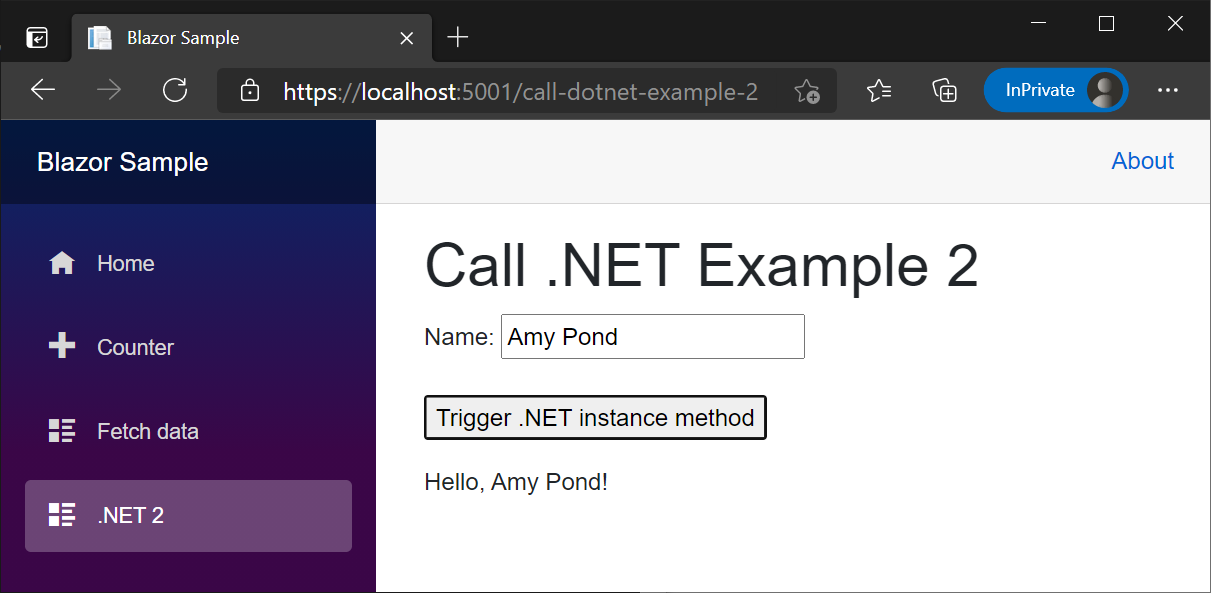
下图显示了在 Amy Pond 字段中具有名称 Name 的呈现组件。 选择该按钮后,UI 中将显示 Hello, Amy Pond!:
还可以在组件中完全实现上述 JsInteropClasses3 类中所示的模式。
CallDotnet5.razor:
@page "/call-dotnet-5"
@inject IJSRuntime JS

<PageTitle>Call .NET 5</PageTitle>

<h1>Call .NET Example 5</h1>

<p>
    <label>
        Name: <input @bind="name" />
    </label>
</p>

<p>
    <button @onclick="TriggerDotNetInstanceMethod">
        Trigger .NET instance method
    </button>
</p>

<p>
    @result
</p>

@code {
    private string? name;
    private string? result;

    public async Task TriggerDotNetInstanceMethod()
    {
        using var objRef = DotNetObjectReference.Create(new HelloHelper(name));
        result = await JS.InvokeAsync<string>("sayHello1", objRef);
    }
}
CallDotnet5.razor:
@page "/call-dotnet-5"
@inject IJSRuntime JS

<PageTitle>Call .NET 5</PageTitle>

<h1>Call .NET Example 5</h1>

<p>
    <label>
        Name: <input @bind="name" />
    </label>
</p>

<p>
    <button @onclick="TriggerDotNetInstanceMethod">
        Trigger .NET instance method
    </button>
</p>

<p>
    @result
</p>

@code {
    private string? name;
    private string? result;

    public async Task TriggerDotNetInstanceMethod()
    {
        using var objRef = DotNetObjectReference.Create(new HelloHelper(name));
        result = await JS.InvokeAsync<string>("sayHello1", objRef);
    }
}
CallDotNetExample5.razor:
@page "/call-dotnet-example-5"
@inject IJSRuntime JS

<h1>Call .NET Example 5</h1>

<p>
    <label>
        Name: <input @bind="name" />
    </label>
</p>

<p>
    <button @onclick="TriggerDotNetInstanceMethod">
        Trigger .NET instance method
    </button>
</p>

<p>
    @result
</p>

@code {
    private string? name;
    private string? result;

    public async Task TriggerDotNetInstanceMethod()
    {
        using var objRef = DotNetObjectReference.Create(new HelloHelper(name));
        result = await JS.InvokeAsync<string>("sayHello1", objRef);
    }
}
CallDotNetExample5.razor:
@page "/call-dotnet-example-5"
@inject IJSRuntime JS

<h1>Call .NET Example 5</h1>

<p>
    <label>
        Name: <input @bind="name" />
    </label>
</p>

<p>
    <button @onclick="TriggerDotNetInstanceMethod">
        Trigger .NET instance method
    </button>
</p>

<p>
    @result
</p>

@code {
    private string? name;
    private string? result;

    public async Task TriggerDotNetInstanceMethod()
    {
        using var objRef = DotNetObjectReference.Create(new HelloHelper(name));
        result = await JS.InvokeAsync<string>("sayHello1", objRef);
    }
}
CallDotNetExample5.razor:
@page "/call-dotnet-example-5"
@inject IJSRuntime JS

<h1>Call .NET Example 5</h1>

<p>
    <label>
        Name: <input @bind="name" />
    </label>
</p>

<p>
    <button @onclick="TriggerDotNetInstanceMethod">
        Trigger .NET instance method
    </button>
</p>

<p>
    @result
</p>

@code {
    private string name;
    private string result;

    public async Task TriggerDotNetInstanceMethod()
    {
        using var objRef = DotNetObjectReference.Create(new HelloHelper(name));
        result = await JS.InvokeAsync<string>("sayHello1", objRef);
    }
}
CallDotNetExample5.razor:
@page "/call-dotnet-example-5"
@inject IJSRuntime JS

<h1>Call .NET Example 5</h1>

<p>
    <label>
        Name: <input @bind="name" />
    </label>
</p>

<p>
    <button @onclick="TriggerDotNetInstanceMethod">
        Trigger .NET instance method
    </button>
</p>

<p>
    @result
</p>

@code {
    private string name;
    private string result;

    public async Task TriggerDotNetInstanceMethod()
    {
        using var objRef = DotNetObjectReference.Create(new HelloHelper(name));
        result = await JS.InvokeAsync<string>("sayHello1", objRef);
    }
}
为了避免内存泄漏并允许垃圾回收,当 DotNetObjectReference 创建的 .NET 对象引用超出 using var 语法范围时,将释放该对象引用。
在 Hello, Amy Pond! 字段中提供名称 Amy Pond 时,组件显示的输出是 name。
在前面的 组件中,释放了 .NET 对象引用。 如果某个类或组件没有释放 DotNetObjectReference,则通过对传递的 dispose 调用 DotNetObjectReference 从客户端对其进行释放:
window.{JS FUNCTION NAME} = (dotNetHelper) => {
  dotNetHelper.invokeMethodAsync('{.NET METHOD ID}');
  dotNetHelper.dispose();
}
在上面的示例中:
-
{JS FUNCTION NAME}占位符是 JS 函数的名称。 - 变量名称
dotNetHelper是任意的,可更改为任何首选名称。 -
{.NET METHOD ID}占位符是 .NET 方法标识符。
组件实例 .NET 方法帮助程序类
帮助程序类可以将 .NET 实例方法作为 Action 进行调用。 在使用静态 .NET 方法不适用的情况下,帮助程序类非常有用:
- 同一类型的多个组件呈现在同一页上。
- 在客户端应用中,有多个用户同时使用同一组件。
在以下示例中:
- 组件包含若干
ListItem1组件。 - 每个
ListItem1组件都由一个消息和一个按钮组成。 - 选择
ListItem1组件按钮后,ListItem1的UpdateMessage方法会更改列表项文本并隐藏该按钮。
以下 MessageUpdateInvokeHelper 类维护一个可进行 JS 调用的 .NET 方法 UpdateMessageCaller,以调用在实例化类时指定的 Action。
MessageUpdateInvokeHelper.cs:
using Microsoft.JSInterop;

namespace BlazorSample;

public class MessageUpdateInvokeHelper(Action action)
{
    private readonly Action action = action;

    [JSInvokable]
    public void UpdateMessageCaller() => action.Invoke();
}
using Microsoft.JSInterop;

namespace BlazorSample;

public class MessageUpdateInvokeHelper(Action action)
{
    private readonly Action action = action;

    [JSInvokable]
    public void UpdateMessageCaller() => action.Invoke();
}
using Microsoft.JSInterop;

public class MessageUpdateInvokeHelper
{
    private Action action;

    public MessageUpdateInvokeHelper(Action action)
    {
        this.action = action;
    }

    [JSInvokable]
    public void UpdateMessageCaller()
    {
        action.Invoke();
    }
}
using Microsoft.JSInterop;

public class MessageUpdateInvokeHelper
{
    private Action action;

    public MessageUpdateInvokeHelper(Action action)
    {
        this.action = action;
    }

    [JSInvokable]
    public void UpdateMessageCaller()
    {
        action.Invoke();
    }
}
using System;
using Microsoft.JSInterop;

public class MessageUpdateInvokeHelper
{
    private Action action;

    public MessageUpdateInvokeHelper(Action action)
    {
        this.action = action;
    }

    [JSInvokable]
    public void UpdateMessageCaller()
    {
        action.Invoke();
    }
}
using System;
using Microsoft.JSInterop;

public class MessageUpdateInvokeHelper
{
    private Action action;

    public MessageUpdateInvokeHelper(Action action)
    {
        this.action = action;
    }

    [JSInvokable]
    public void UpdateMessageCaller()
    {
        action.Invoke();
    }
}
以下 updateMessageCallerJS 函数调用 UpdateMessageCaller .NET 方法。
<script>
  window.updateMessageCaller = (dotNetHelper) => {
    dotNetHelper.invokeMethodAsync('UpdateMessageCaller');
    dotNetHelper.dispose();
  }
</script>
Note
有关 JS 的常规指导和我们对常规应用的建议,请参阅 ASP.NET Core Blazor 应用中的 JavaScript 位置。
在上一示例中,变量名称 dotNetHelper 是任意的,可更改为任何首选名称。
下面的 ListItem1 组件是一个共享组件,可在父组件中使用任意次,为一个 HTML 列表(<li>...</li> 或 <ul>...</ul>)创建列表项 (<ol>...</ol>)。 每个 ListItem1 组件实例都建立了一个 MessageUpdateInvokeHelper 的实例,其中 Action 设置为其 UpdateMessage 方法。
选择 ListItem1 组件的“InteropCall”按钮后,就会使用为 updateMessageCaller 实例创建的 DotNetObjectReference 调用 MessageUpdateInvokeHelper。 这允许框架对该 UpdateMessageCaller 的 ListItem1 实例调用 MessageUpdateInvokeHelper。 传递的 DotNetObjectReference 在 JS (dotNetHelper.dispose()) 中被释放。
ListItem1.razor:
@inject IJSRuntime JS

<li>
    @message
    <button @onclick="InteropCall" style="display:@display">InteropCall</button>
</li>

@code {
    private string message = "Select one of these list item buttons.";
    private string display = "inline-block";
    private MessageUpdateInvokeHelper? messageUpdateInvokeHelper;

    protected override void OnInitialized()
    {
        messageUpdateInvokeHelper = new MessageUpdateInvokeHelper(UpdateMessage);
    }

    protected async Task InteropCall()
    {
        if (messageUpdateInvokeHelper is not null)
        {
            await JS.InvokeVoidAsync("updateMessageCaller",
                DotNetObjectReference.Create(messageUpdateInvokeHelper));
        }
    }

    private void UpdateMessage()
    {
        message = "UpdateMessage Called!";
        display = "none";
        StateHasChanged();
    }
}
@inject IJSRuntime JS

<li>
    @message
    <button @onclick="InteropCall" style="display:@display">InteropCall</button>
</li>

@code {
    private string message = "Select one of these list item buttons.";
    private string display = "inline-block";
    private MessageUpdateInvokeHelper? messageUpdateInvokeHelper;

    protected override void OnInitialized()
    {
        messageUpdateInvokeHelper = new MessageUpdateInvokeHelper(UpdateMessage);
    }

    protected async Task InteropCall()
    {
        if (messageUpdateInvokeHelper is not null)
        {
            await JS.InvokeVoidAsync("updateMessageCaller",
                DotNetObjectReference.Create(messageUpdateInvokeHelper));
        }
    }

    private void UpdateMessage()
    {
        message = "UpdateMessage Called!";
        display = "none";
        StateHasChanged();
    }
}
@inject IJSRuntime JS

<li>
    @message
    <button @onclick="InteropCall" style="display:@display">InteropCall</button>
</li>

@code {
    private string message = "Select one of these list item buttons.";
    private string display = "inline-block";
    private MessageUpdateInvokeHelper? messageUpdateInvokeHelper;

    protected override void OnInitialized()
    {
        messageUpdateInvokeHelper = new MessageUpdateInvokeHelper(UpdateMessage);
    }

    protected async Task InteropCall()
    {
        if (messageUpdateInvokeHelper is not null)
        {
            await JS.InvokeVoidAsync("updateMessageCaller",
                DotNetObjectReference.Create(messageUpdateInvokeHelper));
        }
    }

    private void UpdateMessage()
    {
        message = "UpdateMessage Called!";
        display = "none";
        StateHasChanged();
    }
}
@inject IJSRuntime JS

<li>
    @message
    <button @onclick="InteropCall" style="display:@display">InteropCall</button>
</li>

@code {
    private string message = "Select one of these list item buttons.";
    private string display = "inline-block";
    private MessageUpdateInvokeHelper? messageUpdateInvokeHelper;

    protected override void OnInitialized()
    {
        messageUpdateInvokeHelper = new MessageUpdateInvokeHelper(UpdateMessage);
    }

    protected async Task InteropCall()
    {
        if (messageUpdateInvokeHelper is not null)
        {
            await JS.InvokeVoidAsync("updateMessageCaller",
                DotNetObjectReference.Create(messageUpdateInvokeHelper));
        }
    }

    private void UpdateMessage()
    {
        message = "UpdateMessage Called!";
        display = "none";
        StateHasChanged();
    }
}
@inject IJSRuntime JS

<li>
    @message
    <button @onclick="InteropCall" style="display:@display">InteropCall</button>
</li>

@code {
    private string message = "Select one of these list item buttons.";
    private string display = "inline-block";
    private MessageUpdateInvokeHelper messageUpdateInvokeHelper;

    protected override void OnInitialized()
    {
        messageUpdateInvokeHelper = new MessageUpdateInvokeHelper(UpdateMessage);
    }

    protected async Task InteropCall()
    {
        await JS.InvokeVoidAsync("updateMessageCaller",
            DotNetObjectReference.Create(messageUpdateInvokeHelper));
    }

    private void UpdateMessage()
    {
        message = "UpdateMessage Called!";
        display = "none";
        StateHasChanged();
    }
}
@inject IJSRuntime JS

<li>
    @message
    <button @onclick="InteropCall" style="display:@display">InteropCall</button>
</li>

@code {
    private string message = "Select one of these list item buttons.";
    private string display = "inline-block";
    private MessageUpdateInvokeHelper messageUpdateInvokeHelper;

    protected override void OnInitialized()
    {
        messageUpdateInvokeHelper = new MessageUpdateInvokeHelper(UpdateMessage);
    }

    protected async Task InteropCall()
    {
        await JS.InvokeVoidAsync("updateMessageCaller",
            DotNetObjectReference.Create(messageUpdateInvokeHelper));
    }

    private void UpdateMessage()
    {
        message = "UpdateMessage Called!";
        display = "none";
        StateHasChanged();
    }
}
StateHasChanged 被调用,以在 message 中设置 UpdateMessage 时更新 UI。 如果不调用 StateHasChanged,则 Blazor 无法判断在调用 Action 时是否应更新 UI。
以下父组件包括四个列表项,每个列表项都是 ListItem1 组件的一个实例。
CallDotnet6.razor:
@page "/call-dotnet-6"

<PageTitle>Call .NET 6</PageTitle>

<h1>Call .NET Example 6</h1>

<ul>
    <ListItem1 />
    <ListItem1 />
    <ListItem1 />
    <ListItem1 />
</ul>
CallDotnet6.razor:
@page "/call-dotnet-6"

<PageTitle>Call .NET 6</PageTitle>

<h1>Call .NET Example 6</h1>

<ul>
    <ListItem1 />
    <ListItem1 />
    <ListItem1 />
    <ListItem1 />
</ul>
CallDotNetExample6.razor:
@page "/call-dotnet-example-6"

<h1>Call .NET Example 6</h1>

<ul>
    <ListItem1 />
    <ListItem1 />
    <ListItem1 />
    <ListItem1 />
</ul>
CallDotNetExample6.razor:
@page "/call-dotnet-example-6"

<h1>Call .NET Example 6</h1>

<ul>
    <ListItem1 />
    <ListItem1 />
    <ListItem1 />
    <ListItem1 />
</ul>
CallDotNetExample6.razor:
@page "/call-dotnet-example-6"

<h1>Call .NET Example 6</h1>

<ul>
    <ListItem1 />
    <ListItem1 />
    <ListItem1 />
    <ListItem1 />
</ul>
CallDotNetExample6.razor:
@page "/call-dotnet-example-6"

<h1>Call .NET Example 6</h1>

<ul>
    <ListItem1 />
    <ListItem1 />
    <ListItem1 />
    <ListItem1 />
</ul>
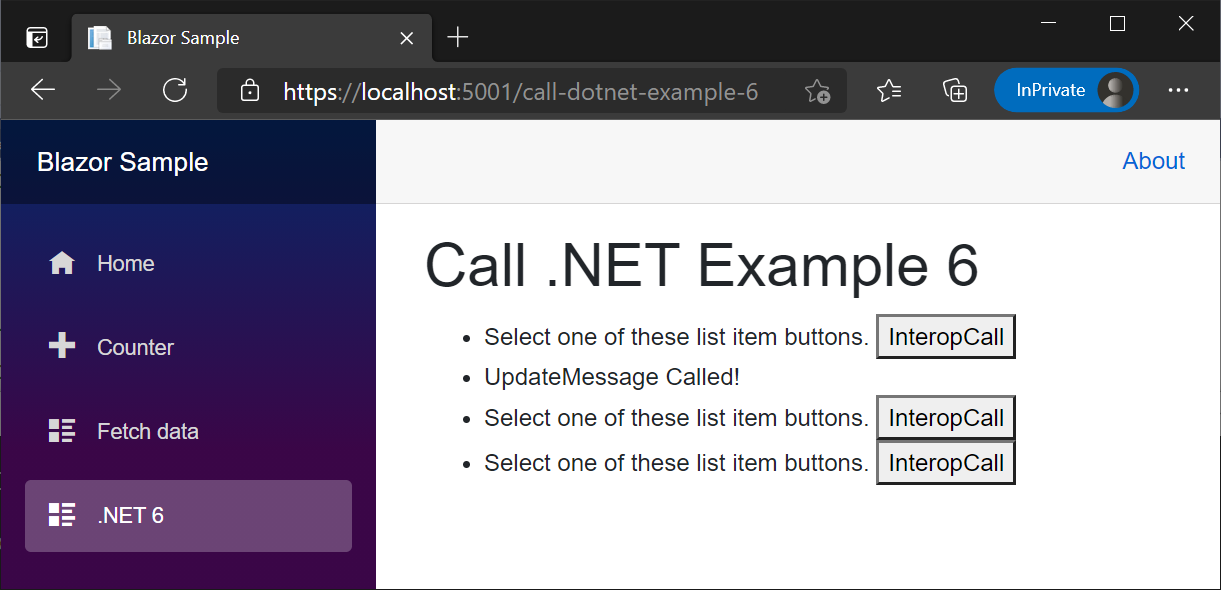
下图显示了在选择第二个“InteropCall”按钮后呈现的父组件:
- 第二个
ListItem1组件已显示UpdateMessage Called!消息。 - 第二个
InteropCall组件的“ListItem1”按钮不可见,因为该按钮的 CSSdisplay属性被设置为none。
从分配给元素属性的 DotNetObjectReference 调用的组件实例 .NET 方法
将 DotNetObjectReference 分配给 HTML 元素的属性允许在组件实例上调用 .NET 方法:
- 元素引用被捕获 (ElementReference)。
- 在组件的
OnAfterRender{Async}方法中,JavaScript (JS) 函数被调用,其中元素引用和组件实例作为 DotNetObjectReference。 JS 函数将 DotNetObjectReference 附加到属性中的元素。 - 在 JS 中调用元素事件时(例如
onclick),元素的附加 DotNetObjectReference 用于调用 .NET 方法。
与组件实例 .NET 方法帮助程序类部分中介绍的方法类似,此方法在使用静态 .NET 方法不适用的情况下非常有用:
- 同一类型的多个组件呈现在同一页上。
- 在客户端应用中,有多个用户同时使用同一组件。
- .NET 方法调用自 JS 事件(例如
onclick),而非调用自 Blazor 事件(例如@onclick)。
在以下示例中:
- 该组件包含多个
ListItem2组件,是一个共享组件。 - 每个
ListItem2组件由列表项消息<span>和第二个<span>组成,其中displayCSS 属性设置为inline-block以进行显示。 - 当选择
ListItem2组件列表项时,ListItem2的UpdateMessage方法会更改第一个<span>中的列表项文本,并通过将其<span>属性设置为display来隐藏第二个none。
以下 assignDotNetHelperJS 函数将 DotNetObjectReference 分配给名为 dotNetHelper 的属性中的元素。 以下 interopCallJS 函数对传递的元素使用 DotNetObjectReference 来调用名为 UpdateMessage 的 .NET 方法。
ListItem2.razor.js:
export function assignDotNetHelper(element, dotNetHelper) {
  element.dotNetHelper = dotNetHelper;
}

export async function interopCall(element) {
  await element.dotNetHelper.invokeMethodAsync('UpdateMessage');
}
ListItem2.razor.js:
export function assignDotNetHelper(element, dotNetHelper) {
  element.dotNetHelper = dotNetHelper;
}

export async function interopCall(element) {
  await element.dotNetHelper.invokeMethodAsync('UpdateMessage');
}
<script>
  window.assignDotNetHelper = (element, dotNetHelper) => {
    element.dotNetHelper = dotNetHelper;
  }

  window.interopCall = async (element) => {
    await element.dotNetHelper.invokeMethodAsync('UpdateMessage');
  }
</script>
Note
有关 JS 的常规指导和我们对常规应用的建议,请参阅 ASP.NET Core Blazor 应用中的 JavaScript 位置。
在上一示例中,变量名称 dotNetHelper 是任意的,可更改为任何首选名称。
下面的 ListItem2 组件是一个共享组件,可在父组件中使用任意次,为一个 HTML 列表(<li>...</li> 或 <ul>...</ul>)创建列表项 (<ol>...</ol>)。
每个 ListItem2 组件实例使用元素引用(列表项的第一个 assignDotNetHelper 元素)调用 JS 中的 OnAfterRenderAsync<span> 函数,组件实例作为 DotNetObjectReference。
选择 ListItem2 组件的消息 <span> 时,将调用将 interopCall 元素作为参数 (<span>) 传递的 this,该参数将调用 UpdateMessage .NET 方法。 在 UpdateMessage 中,当设置 StateHasChanged 并更新第二个 message 的 display 属性时,调用 <span> 来更新 UI。 如果不调用 StateHasChanged,则 Blazor 无法判断在调用该方法时是否应更新 UI。
在释放组件时释放 DotNetObjectReference。
ListItem2.razor:
@inject IJSRuntime JS
@implements IAsyncDisposable

<li>
    <span style="font-weight:bold;color:@color" @ref="elementRef"
        @onclick="CallJSToInvokeDotnet">
        @message
    </span>
    <span style="display:@display">
        Not Updated Yet!
    </span>
</li>

@code {
    private IJSObjectReference? module;
    private DotNetObjectReference<ListItem2>? objRef;
    private ElementReference elementRef;
    private string display = "inline-block";
    private string message = "Select one of these list items.";
    private string color = "initial";

    protected override async Task OnAfterRenderAsync(bool firstRender)
    {
        if (firstRender)
        {
            module = await JS.InvokeAsync<IJSObjectReference>("import",
                "./Components/ListItem2.razor.js");

            objRef = DotNetObjectReference.Create(this);
            await module.InvokeVoidAsync("assignDotNetHelper", elementRef, objRef);
        }
    }

    public async Task CallJSToInvokeDotnet()
    {
        if (module is not null)
        {
            await module.InvokeVoidAsync("interopCall", elementRef);
        }
    }

    [JSInvokable]
    public void UpdateMessage()
    {
        message = "UpdateMessage Called!";
        display = "none";
        color = "MediumSeaGreen";
        StateHasChanged();
    }

    async ValueTask IAsyncDisposable.DisposeAsync()
    {
        if (module is not null)
        {
            try
            {
                await module.DisposeAsync();
            }
            catch (JSDisconnectedException)
            {
            }
        }

        objRef?.Dispose();
    }
}
@inject IJSRuntime JS
@implements IAsyncDisposable

<li>
    <span style="font-weight:bold;color:@color" @ref="elementRef"
        @onclick="CallJSToInvokeDotnet">
        @message
    </span>
    <span style="display:@display">
        Not Updated Yet!
    </span>
</li>

@code {
    private IJSObjectReference? module;
    private DotNetObjectReference<ListItem2>? objRef;
    private ElementReference elementRef;
    private string display = "inline-block";
    private string message = "Select one of these list items.";
    private string color = "initial";

    protected override async Task OnAfterRenderAsync(bool firstRender)
    {
        if (firstRender)
        {
            module = await JS.InvokeAsync<IJSObjectReference>("import",
                "./Components/ListItem2.razor.js");

            objRef = DotNetObjectReference.Create(this);
            await module.InvokeVoidAsync("assignDotNetHelper", elementRef, objRef);
        }
    }

    public async Task CallJSToInvokeDotnet()
    {
        if (module is not null)
        {
            await module.InvokeVoidAsync("interopCall", elementRef);
        }
    }

    [JSInvokable]
    public void UpdateMessage()
    {
        message = "UpdateMessage Called!";
        display = "none";
        color = "MediumSeaGreen";
        StateHasChanged();
    }

    async ValueTask IAsyncDisposable.DisposeAsync()
    {
        if (module is not null)
        {
            try
            {
                await module.DisposeAsync();
            }
            catch (JSDisconnectedException)
            {
            }
        }

        objRef?.Dispose();
    }
}
@inject IJSRuntime JS

<li>
    <span @ref="elementRef" onclick="interopCall(this)">@message</span>
    <span style="display:@display">Not Updated Yet!</span>
</li>

@code {
    private DotNetObjectReference<ListItem2>? objRef;
    private ElementReference elementRef;
    private string display = "inline-block";
    private string message = "Select one of these list items.";

    protected override async Task OnAfterRenderAsync(bool firstRender)
    {
        if (firstRender)
        {
            objRef = DotNetObjectReference.Create(this);
            await JS.InvokeVoidAsync("assignDotNetHelper", elementRef, objRef);
        }
    }

    [JSInvokable]
    public void UpdateMessage()
    {
        message = "UpdateMessage Called!";
        display = "none";
        StateHasChanged();
    }

    public void Dispose() => objRef?.Dispose();
}
@inject IJSRuntime JS

<li>
    <span @ref="elementRef" onclick="interopCall(this)">@message</span>
    <span style="display:@display">Not Updated Yet!</span>
</li>

@code {
    private DotNetObjectReference<ListItem2>? objRef;
    private ElementReference elementRef;
    private string display = "inline-block";
    private string message = "Select one of these list items.";

    protected override async Task OnAfterRenderAsync(bool firstRender)
    {
        if (firstRender)
        {
            objRef = DotNetObjectReference.Create(this);
            await JS.InvokeVoidAsync("assignDotNetHelper", elementRef, objRef);
        }
    }

    [JSInvokable]
    public void UpdateMessage()
    {
        message = "UpdateMessage Called!";
        display = "none";
        StateHasChanged();
    }

    public void Dispose() => objRef?.Dispose();
}
@inject IJSRuntime JS

<li>
    <span @ref="elementRef" onclick="interopCall(this)">@message</span>
    <span style="display:@display">Not Updated Yet!</span>
</li>

@code {
    private DotNetObjectReference<ListItem2> objRef;
    private ElementReference elementRef;
    private string display = "inline-block";
    private string message = "Select one of these list items.";

    protected override async Task OnAfterRenderAsync(bool firstRender)
    {
        if (firstRender)
        {
            objRef = DotNetObjectReference.Create(this);
            await JS.InvokeVoidAsync("assignDotNetHelper", elementRef, objRef);
        }
    }

    [JSInvokable]
    public void UpdateMessage()
    {
        message = "UpdateMessage Called!";
        display = "none";
        StateHasChanged();
    }

    public void Dispose() => objRef?.Dispose();
}
@inject IJSRuntime JS

<li>
    <span @ref="elementRef" onclick="interopCall(this)">@message</span>
    <span style="display:@display">Not Updated Yet!</span>
</li>

@code {
    private DotNetObjectReference<ListItem2> objRef;
    private ElementReference elementRef;
    private string display = "inline-block";
    private string message = "Select one of these list items.";

    protected override async Task OnAfterRenderAsync(bool firstRender)
    {
        if (firstRender)
        {
            objRef = DotNetObjectReference.Create(this);
            await JS.InvokeVoidAsync("assignDotNetHelper", elementRef, objRef);
        }
    }

    [JSInvokable]
    public void UpdateMessage()
    {
        message = "UpdateMessage Called!";
        display = "none";
        StateHasChanged();
    }

    public void Dispose() => objRef?.Dispose();
}
以下父组件包括四个列表项,每个列表项都是 ListItem2 组件的一个实例。
CallDotnet7.razor:
@page "/call-dotnet-7"

<PageTitle>Call .NET 7</PageTitle>

<h1>Call .NET Example 7</h1>

<ul>
    <ListItem2 />
    <ListItem2 />
    <ListItem2 />
    <ListItem2 />
</ul>
CallDotnet7.razor:
@page "/call-dotnet-7"

<PageTitle>Call .NET 7</PageTitle>

<h1>Call .NET Example 7</h1>

<ul>
    <ListItem2 />
    <ListItem2 />
    <ListItem2 />
    <ListItem2 />
</ul>
CallDotNetExample7.razor:
@page "/call-dotnet-example-7"

<h1>Call .NET Example 7</h1>

<ul>
    <ListItem2 />
    <ListItem2 />
    <ListItem2 />
    <ListItem2 />
</ul>
CallDotNetExample7.razor:
@page "/call-dotnet-example-7"

<h1>Call .NET Example 7</h1>

<ul>
    <ListItem2 />
    <ListItem2 />
    <ListItem2 />
    <ListItem2 />
</ul>
CallDotNetExample7.razor:
@page "/call-dotnet-example-7"

<h1>Call .NET Example 7</h1>

<ul>
    <ListItem2 />
    <ListItem2 />
    <ListItem2 />
    <ListItem2 />
</ul>
CallDotNetExample7.razor:
@page "/call-dotnet-example-7"

<h1>Call .NET Example 7</h1>

<ul>
    <ListItem2 />
    <ListItem2 />
    <ListItem2 />
    <ListItem2 />
</ul>
客户端组件中的同步 JS 互操作
本部分仅适用于客户端组件。
JS 互操作调用是异步的,无论调用的代码是同步还是异步。 调用是异步的,以确保组件在服务器端和客户端渲染模式之间兼容。 在服务器上,所有 JS 互操作调用都必须是异步的,因为它们通过网络连接发送。
如果你确定组件只在 WebAssembly 上运行,则可以选择执行同步 JS 互操作调用。 这比进行异步调用的开销略少,并且可能会导致呈现周期更少,因为在等待结果时没有中间状态。
若要在客户端组件中进行从 JavaScript 到 .NET 的同步调用,请使用 DotNet.invokeMethod 而不是 DotNet.invokeMethodAsync。
同步调用在以下情况下起作用:
JavaScript 位置
Warning
请勿将 <script> 标记置于组件文件 (.razor) 中,因为 <script> 标记无法动态更新。
JavaScript 模块中的 JavaScript 隔离
Blazor 在标准 JS (ECMAScript specification) 中启用 JavaScript () 隔离。 JavaScript 模块加载在 Blazor 中的工作方式与在其他类型的 Web 应用中相同,你可以随意自定义模块在应用中的定义方式。 有关如何使用 JavaScript 模块的指南,请参阅 MDN Web文档:JavaScript 模块。
JS 隔离具有以下优势:
- 导入的 JS 不再污染全局命名空间。
- 库和组件的使用者不需要导入相关的 JS。
有关详细信息,请参阅从 ASP.NET Core Blazor 中的 .NET 方法调用 JavaScript 函数。
if ({CONDITION}) import("/additionalModule.js");
在前面的示例中,{CONDITION} 占位符表示用于确定是否应加载模块的条件检查。
有关浏览器兼容性,请参阅是否可以使用:JavaScript 模块:动态导入。
避免循环引用对象
不能在客户端上针对以下调用就包含循环引用的对象进行序列化:
- .NET 方法调用。
- 返回类型具有循环引用时,从 C# 发出的 JavaScript 方法调用。
字节数组支持
Blazor 支持优化的字节数组 JavaScript (JS) 互操作,这可以避免将字节数组编码/解码为 Base64。 以下示例使用 JS 互操作将字节数组传递给 .NET。
提供 sendByteArrayJS 函数。 函数通过组件中的按钮静态调用,其中包括 invokeMethodAsync 调用中的程序集名称参数,并且不返回值:
CallDotnet8.razor.js:
export function sendByteArray() {
  const data = new Uint8Array([0x45, 0x76, 0x65, 0x72, 0x79, 0x74, 0x68, 0x69,
    0x6e, 0x67, 0x27, 0x73, 0x20, 0x73, 0x68, 0x69, 0x6e, 0x79, 0x2c,
    0x20, 0x43, 0x61, 0x70, 0x74, 0x61, 0x69, 0x6e, 0x2e, 0x20, 0x4e,
    0x6f, 0x74, 0x20, 0x74, 0x6f, 0x20, 0x66, 0x72, 0x65, 0x74, 0x2e]);
  DotNet.invokeMethodAsync('BlazorSample', 'ReceiveByteArray', data)
    .then(str => {
      alert(str);
    });
}

export function addHandlers() {
  const btn = document.getElementById("btn");
  btn.addEventListener("click", sendByteArray);
}
<script>
  window.sendByteArray = () => {
    const data = new Uint8Array([0x45,0x76,0x65,0x72,0x79,0x74,0x68,0x69,
      0x6e,0x67,0x27,0x73,0x20,0x73,0x68,0x69,0x6e,0x79,0x2c,
      0x20,0x43,0x61,0x70,0x74,0x61,0x69,0x6e,0x2e,0x20,0x4e,
      0x6f,0x74,0x20,0x74,0x6f,0x20,0x66,0x72,0x65,0x74,0x2e]);
    DotNet.invokeMethodAsync('BlazorSample', 'ReceiveByteArray', data)
      .then(str => {
        alert(str);
      });
  };
</script>
Note
有关 JS 的常规指导和我们对常规应用的建议,请参阅 ASP.NET Core Blazor 应用中的 JavaScript 位置。
CallDotnet8.razor:
@page "/call-dotnet-8"
@using System.Text
@implements IAsyncDisposable
@inject IJSRuntime JS

<PageTitle>Call .NET 8</PageTitle>

<h1>Call .NET Example 8</h1>

<p>
    <button id="btn">Send Bytes</button>
</p>

<p>
    Quote ©2005 <a href="https://www.uphe.com">Universal Pictures</a>:
    <a href="https://www.uphe.com/movies/serenity-2005">Serenity</a><br>
    <a href="https://www.imdb.com/name/nm0821612/">Jewel Staite on IMDB</a>
</p>

@code {
    private IJSObjectReference? module;

    protected override async Task OnAfterRenderAsync(bool firstRender)
    {
        if (firstRender)
        {
            module = await JS.InvokeAsync<IJSObjectReference>("import",
                "./Components/Pages/CallDotnet8.razor.js");

            await module.InvokeVoidAsync("addHandlers");
        }
    }

    [JSInvokable]
    public static Task<string> ReceiveByteArray(byte[] receivedBytes) =>
        Task.FromResult(Encoding.UTF8.GetString(receivedBytes, 0,
            receivedBytes.Length));

    async ValueTask IAsyncDisposable.DisposeAsync()
    {
        if (module is not null)
        {
            try
            {
                await module.DisposeAsync();
            }
            catch (JSDisconnectedException)
            {
            }
        }
    }
}
CallDotnet8.razor:
@page "/call-dotnet-8"
@using System.Text
@implements IAsyncDisposable
@inject IJSRuntime JS

<PageTitle>Call .NET 8</PageTitle>

<h1>Call .NET Example 8</h1>

<p>
    <button id="btn">Send Bytes</button>
</p>

<p>
    Quote ©2005 <a href="https://www.uphe.com">Universal Pictures</a>:
    <a href="https://www.uphe.com/movies/serenity-2005">Serenity</a><br>
    <a href="https://www.imdb.com/name/nm0821612/">Jewel Staite on IMDB</a>
</p>

@code {
    private IJSObjectReference? module;

    protected override async Task OnAfterRenderAsync(bool firstRender)
    {
        if (firstRender)
        {
            module = await JS.InvokeAsync<IJSObjectReference>("import",
                "./Components/Pages/CallDotnet8.razor.js");

            await module.InvokeVoidAsync("addHandlers");
        }
    }

    [JSInvokable]
    public static Task<string> ReceiveByteArray(byte[] receivedBytes) =>
        Task.FromResult(Encoding.UTF8.GetString(receivedBytes, 0,
            receivedBytes.Length));

    async ValueTask IAsyncDisposable.DisposeAsync()
    {
        if (module is not null)
        {
            try
            {
                await module.DisposeAsync();
            }
            catch (JSDisconnectedException)
            {
            }
        }
    }
}
CallDotNetExample8.razor:
@page "/call-dotnet-example-8"
@using System.Text

<PageTitle>Call .NET 8</PageTitle>

<h1>Call .NET Example 8</h1>

<p>
    <button onclick="sendByteArray()">Send Bytes</button>
</p>

<p>
    Quote ©2005 <a href="https://www.uphe.com">Universal Pictures</a>:
    <a href="https://www.uphe.com/movies/serenity-2005">Serenity</a><br>
    <a href="https://www.imdb.com/name/nm0821612/">Jewel Staite on IMDB</a>
</p>

@code {
    [JSInvokable]
    public static Task<string> ReceiveByteArray(byte[] receivedBytes)
    {
        return Task.FromResult(
            Encoding.UTF8.GetString(receivedBytes, 0, receivedBytes.Length));
    }
}
CallDotNetExample8.razor:
@page "/call-dotnet-example-8"
@using System.Text

<h1>Call .NET Example 8</h1>

<p>
    <button onclick="sendByteArray()">Send Bytes</button>
</p>

<p>
    Quote ©2005 <a href="https://www.uphe.com">Universal Pictures</a>:
    <a href="https://www.uphe.com/movies/serenity-2005">Serenity</a><br>
    <a href="https://www.imdb.com/name/nm0821612/">Jewel Staite on IMDB</a>
</p>

@code {
    [JSInvokable]
    public static Task<string> ReceiveByteArray(byte[] receivedBytes)
    {
        return Task.FromResult(
            Encoding.UTF8.GetString(receivedBytes, 0, receivedBytes.Length));
    }
}
有关从 .NET 调用 JavaScript 时使用字节数组的信息,请参阅在 ASP.NET Core Blazor 中从 .NET 方法调用 JavaScript 函数。
从 JavaScript 流式传输到 .NET
Blazor 支持将数据直接从 JavaScript 流式传输到 .NET。 使用 Microsoft.JSInterop.IJSStreamReference 接口请求流。
Microsoft.JSInterop.IJSStreamReference.OpenReadStreamAsync 返回 Stream 并使用以下参数:
-
maxAllowedSize:JavaScript 中读取操作允许的最大字节数,如果未指定,则默认为 512,000 个字节。 -
cancellationToken:CancellationToken 用于取消读取。
在 JavaScript 中:
function streamToDotNet() {
  return new Uint8Array(10000000);
}
在 C# 代码中:
var dataReference =
    await JS.InvokeAsync<IJSStreamReference>("streamToDotNet");
using var dataReferenceStream =
    await dataReference.OpenReadStreamAsync(maxAllowedSize: 10_000_000);

var outputPath = Path.Combine(Path.GetTempPath(), "file.txt");
using var outputFileStream = File.OpenWrite(outputPath);
await dataReferenceStream.CopyToAsync(outputFileStream);
在上面的示例中:
-
JS是一个注入的 IJSRuntime 实例。 IJSRuntime 由 Blazor 框架注册。 -
dataReferenceStream被写入磁盘 (file.txt) 的当前用户临时文件夹路径 (GetTempPath) 中。
在 ASP.NET Core Blazor 中从 .NET 方法调用 JavaScript 函数介绍了反向操作,即使用 DotNetStreamReference 从 .NET 流式传输到 JavaScript。
ASP.NET Core Blazor 文件上传介绍了如何在 Blazor 中上传文件。 有关在客户端组件中流式传输 <textarea> 数据的表单示例,请参阅排查 ASP.NET Core Blazor 表单问题。
JavaScript [JSImport]/[JSExport] 互操作
本部分适用于客户端组件。
作为基于 JS 接口使用 Blazor 的 JS 互操作机制与客户端组件中的 JavaScript (IJSRuntime) 交互的替代方法,JS[JSImport]/[JSExport] 互操作 API 可用于面向 .NET 7 或更高版本的应用。
有关详细信息,请参阅 JavaScript JSImport/JSExport 与 ASP.NET Core 互操作Blazor。
JavaScript 互操作对象引用的释放
JavaScript (JS) 互操作文章中的示例演示了典型的对象释放模式:
如本文中所述,从 JS 调用 .NET 时,要释放从 .NET 或从 DotNetObjectReference 创建的 JS,以避免泄漏 .NET 内存。
从 .NET 调用 JS 时,如在 ASP.NET Core Blazor 中从 .NET 方法调用 JavaScript 函数中所述,释放从 .NET 或从 IJSObjectReference 创建的任何 /IJSInProcessObjectReference/
JSObjectReferenceJS,以避免泄漏 JS 内存。
JS 互操作对象引用作为映射实现,该映射按创建引用的 JS 互操作调用端的标识符键控。 从 .NET 或 JS 端启动对象释放时,Blazor 会从映射中删除该条目,只要不存在对对象的其他强引用,就可以对对象进行垃圾回收。
至少应始终释放在 .NET 端创建的对象,避免泄漏 .NET 托管内存。
组件处置期间的 DOM 清理任务
有关详细信息,请参阅 ASP.NET Core BlazorJavaScript 互操作性(JS 互操作)。
无线路的 JavaScript 互操作调用
有关详细信息,请参阅 ASP.NET Core BlazorJavaScript 互操作性(JS 互操作)。
其他资源
- 在 ASP.NET Core Blazor 中从 .NET 方法调用 JavaScript 函数
-
InteropComponent.razor示例(dotnet/AspNetCoreGitHub 存储库main分支):main分支表示产品单元针对下一个 ASP.NET Core 版本的当前开发。 若要为其他版本选择分支(例如,release/{VERSION},其中{VERSION}占位符是版本),请使用切换分支或标记下拉列表来选择分支。 对于不再存在的分支,请使用标记选项卡查找 API(例如v7.0.0)。 - 与 DOM 交互
-
Blazor 示例 GitHub 存储库 (
dotnet/blazor-samples)(下载方法) - 处理 ASP.NET Core Blazor 应用中的错误(“JavaScript 互操作”部分)
- 威胁缓解措施:从浏览器调用的 .NET 方法
