你当前正在访问 Microsoft Azure Global Edition 技术文档网站。 如果需要访问由世纪互联运营的 Microsoft Azure 中国技术文档网站,请访问 https://docs.azure.cn。
本教程介绍如何通过模型上下文协议(MCP)公开 FastAPI 应用的功能,将其作为工具添加到 GitHub Copilot,并在 Copilot Chat 代理模式下使用自然语言与应用交互。

如果 Web 应用程序已具有有用的功能(如购物、酒店预订或数据管理),则可以轻松地使这些功能可供以下功能使用:
- 支持 MCP 集成的任何应用程序,例如 Visual Studio Code 或 GitHub Codespaces 中的 GitHub Copilot Chat 代理模式。
- 使用 MCP 客户端访问远程工具的自定义代理。
通过将 MCP 服务器添加到 Web 应用,可以在代理响应用户提示时了解和使用应用的功能。 这意味着你的应用可以执行的任何作,代理也可以执行。
- 将 MCP 服务器添加到 Web 应用。
- 在 GitHub Copilot Chat 代理模式下本地测试 MCP 服务器。
- 将 MCP 服务器部署到 Azure 应用服务,并在 GitHub Copilot Chat 中连接到它。
先决条件
本教程假设你使用的是在 Azure 中使用 PostgreSQL 部署 Python FastAPI Web 应用中使用的示例。
至少,在 GitHub Codespaces 中打开 示例应用程序 ,并通过运行 azd up来部署应用。

将 MCP 服务器添加到 Web 应用
在 codespace 资源管理器中,打开 src/pyproject.toml,添加到
mcp[cli]依赖项列表,如以下示例所示:dependencies = [ ... "mcp[cli]", ]在 src/fastapi_app 中创建名为 mcp_server.py 的文件,并将以下 MCP 服务器初始化代码粘贴到文件中:
import asyncio
import contextlib
from contextlib import asynccontextmanager

from mcp.server.fastmcp import FastMCP
from sqlalchemy.sql import func
from sqlmodel import Session, select

from .models import Restaurant, Review, engine

# Create a FastMCP server. Use stateless_http=True for simple mounting. Default path is .../mcp
mcp = FastMCP("RestaurantReviewsMCP", stateless_http=True)

# Lifespan context manager to start/stop the MCP session manager with the FastAPI app
@asynccontextmanager
async def mcp_lifespan(app):
    async with contextlib.AsyncExitStack() as stack:
        await stack.enter_async_context(mcp.session_manager.run())
        yield

# MCP tool: List all restaurants with their average rating and review count
@mcp.tool()
async def list_restaurants_mcp() -> list[dict]:
    """List restaurants with their average rating and review count."""

    def sync():
        with Session(engine) as session:
            statement = (
                select(
                    Restaurant,
                    func.avg(Review.rating).label("avg_rating"),
                    func.count(Review.id).label("review_count"),
                )
                .outerjoin(Review, Review.restaurant == Restaurant.id)
                .group_by(Restaurant.id)
            )
            results = session.exec(statement).all()
            rows = []
            for restaurant, avg_rating, review_count in results:
                r = restaurant.dict()
                r["avg_rating"] = float(avg_rating) if avg_rating is not None else None
                r["review_count"] = review_count
                r["stars_percent"] = (
                    round((float(avg_rating) / 5.0) * 100) if review_count > 0 and avg_rating is not None else 0
                )
                rows.append(r)
            return rows

    return await asyncio.to_thread(sync)

# MCP tool: Get a restaurant and all its reviews by restaurant_id
@mcp.tool()
async def get_details_mcp(restaurant_id: int) -> dict:
    """Return the restaurant and its related reviews as objects."""

    def sync():
        with Session(engine) as session:
            restaurant = session.exec(select(Restaurant).where(Restaurant.id == restaurant_id)).first()
            if restaurant is None:
                return None
            reviews = session.exec(select(Review).where(Review.restaurant == restaurant_id)).all()
            return {"restaurant": restaurant.dict(), "reviews": [r.dict() for r in reviews]}

    return await asyncio.to_thread(sync)

# MCP tool: Create a new review for a restaurant
@mcp.tool()
async def create_review_mcp(restaurant_id: int, user_name: str, rating: int, review_text: str) -> dict:
    """Create a new review for a restaurant and return the created review dict."""

    def sync():
        with Session(engine) as session:
            review = Review()
            review.restaurant = restaurant_id
            review.review_date = __import__("datetime").datetime.now()
            review.user_name = user_name
            review.rating = int(rating)
            review.review_text = review_text
            session.add(review)
            session.commit()
            session.refresh(review)
            return review.dict()

    return await asyncio.to_thread(sync)

# MCP tool: Create a new restaurant
@mcp.tool()
async def create_restaurant_mcp(restaurant_name: str, street_address: str, description: str) -> dict:
    """Create a new restaurant and return the created restaurant dict."""

    def sync():
        with Session(engine) as session:
            restaurant = Restaurant()
            restaurant.name = restaurant_name
            restaurant.street_address = street_address
            restaurant.description = description
            session.add(restaurant)
            session.commit()
            session.refresh(restaurant)
            return restaurant.dict()

    return await asyncio.to_thread(sync)
FastMCP() 初始值设定项使用 MCP Python SDK 中的无状态模式模式创建 MCP 服务器。 默认情况下,其可流式传输 HTTP 终结点设置为
/mcp子路径。-
@mcp.tool()修饰器使用其实现将工具添加到 MCP 服务器。 - 工具函数的说明可帮助调用代理了解如何使用该工具及其参数。
这些工具复制基于表单的 FastAPI Web 应用程序中的现有餐厅评论功能。 如果需要,可以添加更多用于更新和删除功能的工具。
-
在 src/fastapi_app/app.py 中,找到第 24 行,
app = FastAPI()并将其替换为以下代码:from .mcp_server import mcp, mcp_lifespan app = FastAPI(lifespan=mcp_lifespan) app.mount("/mcp", mcp.streamable_http_app())此代码将 MCP 服务器的可流式传输 HTTP 终结点装载到路径
/mcp中的现有 FastAPI 应用。 与可流式传输 HTTP 终结点的默认路径一起,完整路径为/mcp/mcp。
在本地测试 MCP 服务器
在 codespace 终端中,使用以下命令运行应用程序:
python3 -m venv .venv
source .venv/bin/activate
pip install -r src/requirements.txt
pip install -e src
python3 src/fastapi_app/seed_data.py
python3 -m uvicorn fastapi_app:app --reload --port=8000
选择 “在浏览器中打开”,然后添加几个餐馆和评论。
保持
uvicorn运行状态。 MCP 服务器现在http://localhost:8000/mcp/mcp正在运行。返回代码空间,打开 Copilot Chat,然后在提示框中选择 代理 模式。
选择 “工具” 按钮,然后选择弹出窗口右上角的 “添加 MCP 服务器 ”图标。
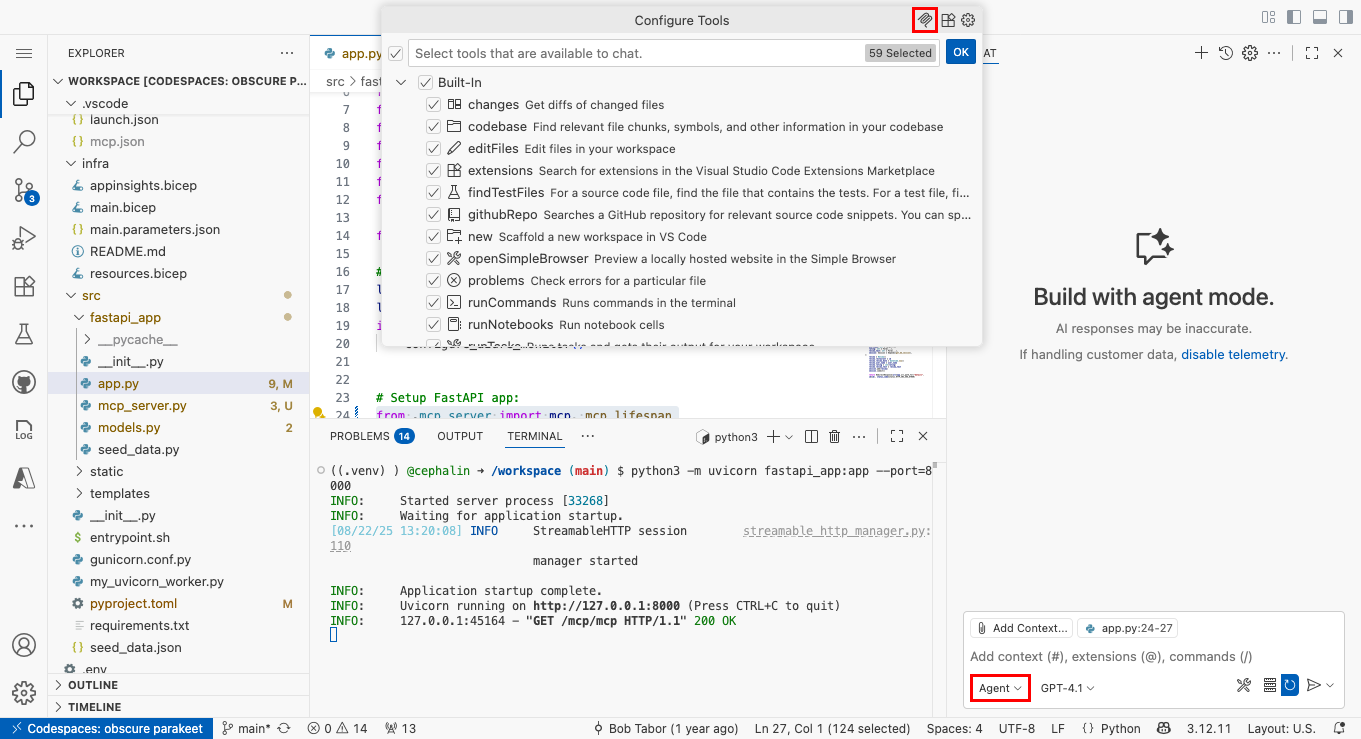
选择 HTTP(HTTP 或 Server-Sent 事件)。
在 Enter 服务器 URL 中,键入 http://localhost:8000/mcp/mcp。
在 Enter 服务器 ID 中,键入 restaurant_ratings 或任何喜欢的名称。
选择 工作区设置。
在新的 Copilot 聊天窗口中,键入类似于“向我显示餐厅评级”之类的内容。
默认情况下,GitHub Copilot 在调用 MCP 服务器时会显示安全确认。 选择继续。

现在应会看到一个响应,指示 MCP 工具调用成功。
将 MCP 服务器部署到应用服务
返回 codespace 终端,通过提交更改(GitHub Actions 方法)或运行
azd up(Azure 开发人员 CLI 方法)来部署更改。在 AZD 输出中,找到应用的 URL。 该 URL 在 AZD 输出中如下所示:
 Deploying services (azd deploy)

   (✓) Done: Deploying service web
   - Endpoint: <app-url>
完成后
azd up,打开 .vscode/mcp.json。 将 URL 更改为<app-url>/mcp/mcp.在修改后的 MCP 服务器配置上方,选择“ 开始”。

启动新的 GitHub Copilot 聊天窗口。 你应该能够查看餐厅评级,并在科皮洛特代理中创建新的餐馆和新评级。
安全最佳做法
当 MCP 服务器由由大型语言模型(LLM)提供支持的代理调用时,请注意 提示注入 攻击。 请考虑以下安全最佳做法:
- 身份验证和授权:使用 Microsoft Entra 身份验证保护 MCP 服务器,以确保只有经过授权的用户或代理才能访问工具。 有关分步指南,请参阅 使用 Microsoft Entra 身份验证通过 Visual Studio Code 对 Azure 应用服务的安全模型上下文协议调用 。
- 输入验证和清理:始终验证传入数据以防止无效或恶意输入。 对于 Python 应用,请使用 Pydantic 等库使用专用输入模型(如 RestaurantCreate 和 ReviewCreate)强制实施数据验证规则。 有关最佳做法和实现详细信息,请参阅其文档。
- HTTPS: 此示例依赖于 Azure 应用服务,该服务默认强制实施 HTTPS,并提供免费的 TLS/SSL 证书来加密传输中的数据。
- 最低特权原则:仅公开用例所需的工具和数据。 除非必要,否则避免公开敏感作。
- 速率限制和限制:使用 API 管理 或自定义中间件来防止滥用和拒绝服务攻击。
- 日志记录和监视:用于审核和异常检测的 MCP 终结点的日志访问和使用情况。 监视可疑活动。
- CORS 配置:如果从浏览器访问 MCP 服务器,请将跨域请求限制为受信任的域。 有关详细信息,请参阅 “启用 CORS”。
- 常规更新:使依赖项保持最新,以缓解已知漏洞。