你当前正在访问 Microsoft Azure Global Edition 技术文档网站。 如果需要访问由世纪互联运营的 Microsoft Azure 中国技术文档网站,请访问 https://docs.azure.cn。
了解如何创建和配置后端应用服务应用以接受前端应用的用户凭据,然后将该凭据交换到下游 Azure 服务。 此方法允许用户登录到前端应用服务应用,将其凭据传递给后端应用服务,然后使用同一标识访问 Azure 服务。
本教程中,您将学习如何:
- 配置后端身份验证应用以提供适用于下游 Azure 服务的令牌。
- 使用 JavaScript 代码将已登录用户的访问令牌交换为下游服务的新令牌。
- 使用 JavaScript 代码访问下游服务。
先决条件
在开始本教程之前, 请先以用户身份从受保护的 JavaScript 应用中访问 Microsoft Graph。 不要在教程结束时删除资源。 本教程假定你有两个应用服务及其相应的身份验证应用。
上一教程使用 Azure Cloud Shell 作为 Azure CLI 的 shell。 本教程将继续使用该用法。
建筑
本教程演示如何将前端应用提供的用户凭据传递到后端应用,然后传递到 Azure 服务。 在本教程中,下游服务是 Microsoft Graph。 用户的凭据用于从 Microsoft Graph 获取其个人资料。
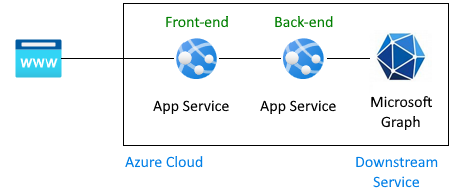
用户在此体系结构中获取 Microsoft Graph 信息的身份验证流:
上一篇教程已介绍:
- 将用户登录到配置为使用 Active Directory 作为标识提供者的前端应用。
- 前端应用服务将用户的令牌传递给后端应用服务。
- 后端应用受到保护,允许前端发出 API 请求。 用户的访问令牌具有后端 API 的受众和范围
user_impersonation。 - 后端应用注册已具有范围为
User.Read的 Microsoft Graph。 默认情况下,此范围将添加到所有应用注册。 - 在上一教程结束时,由于 Graph 未连接,虚假的配置文件被返回到了前端应用。
本教程扩展了体系结构:
- 授予管理员同意以绕过后端应用的用户同意屏幕。
- 更改应用程序代码,将从前端应用发送的访问令牌转换为具有 Microsoft Graph 所需权限的访问令牌。
- 提供代码,让后端应用交换令牌,获取具有下游 Azure 服务(例如 Microsoft Graph)范围的新令牌。
- 提供代码,让后端应用 使用新令牌 作为当前经过身份验证的用户访问下游服务。
- 使用
az webapp up重新部署后端应用。 - 在本教程结束时,由于已连接 Graph,真实配置文件会返回到前端应用。
本指南不包括:
- 更改上一教程中的前端应用。
- 更改后端身份验证应用的范围权限,因为
User.Read默认情况下会添加到所有身份验证应用。
1.为后端应用配置管理员同意
在上一教程中,当用户登录到前端应用时,弹出窗口会要求用户同意。
在本教程中,若要从 Microsoft Graph 读取用户配置文件,后端应用需要将已登录用户的访问令牌交换为具有 Microsoft Graph 所需权限的新 访问令牌 。 由于用户未直接连接到后端应用,因此他们无法以交互方式访问许可屏幕。 若要 授予管理员同意,必须在 Microsoft Entra ID 中配置后端应用的应用注册来解决此问题。 Microsoft Entra 管理员通常会更改此设置。
打开 Azure 门户并搜索后端应用服务的资源。
查找“设置>”部分。
选择标识提供者以转到身份验证应用。
在身份验证应用中,选择“ 管理>API 权限”。
为 默认目录选择“授予管理员许可”。
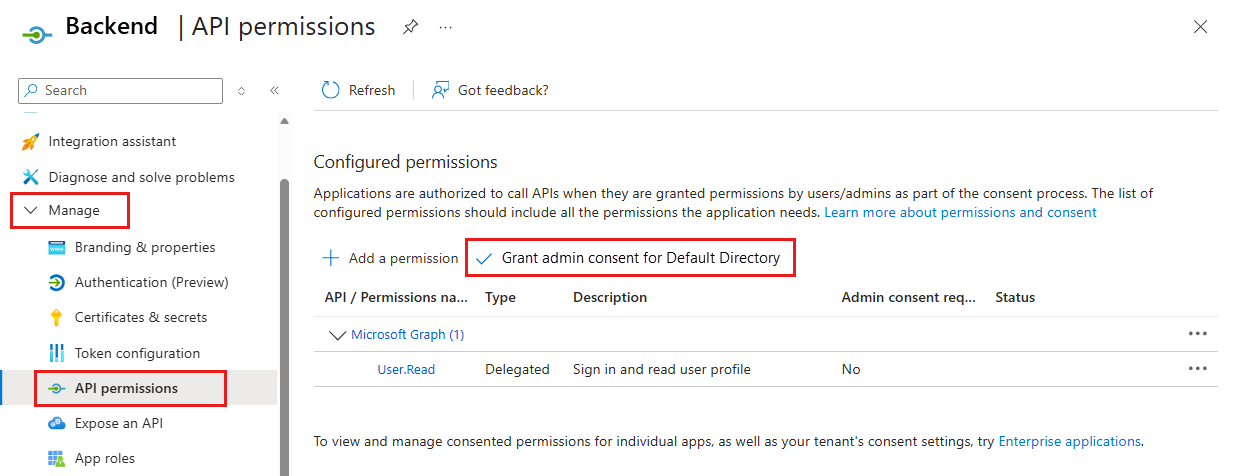
在弹出窗口中,选择“ 是 ”以确认同意。
验证“状态”列是否为“为默认目录授予”。 使用此设置,不再需要后端应用向已登录用户显示同意屏幕,并且可以直接请求访问令牌。 已登录用户有权访问
User.Read范围设置,因为这是创建应用注册的默认范围。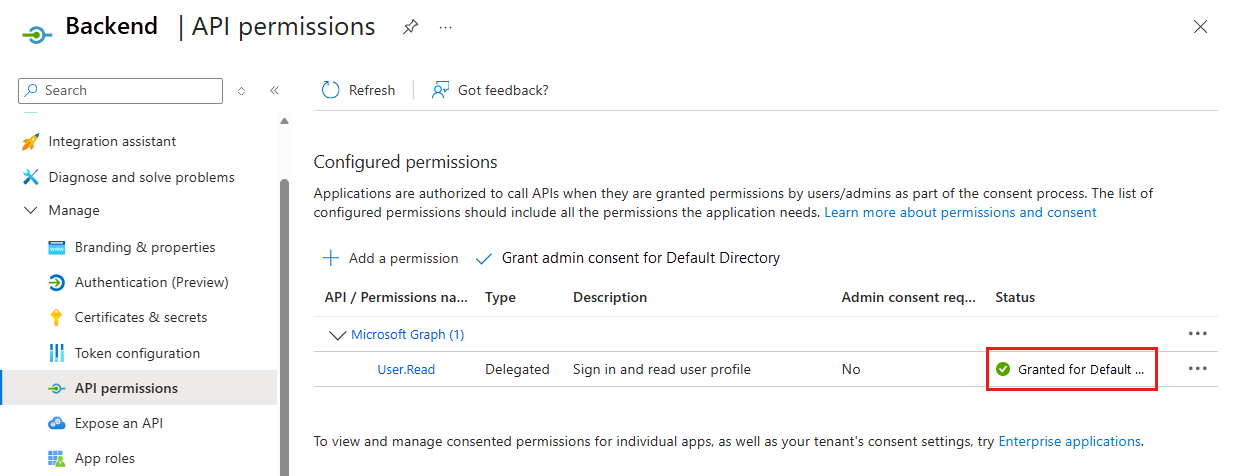
2. 安装 npm 包
在上一教程中,后端应用不需要任何 npm 包进行身份验证,因为唯一的身份验证是通过在 Azure 门户中配置标识提供者提供的。 在本教程中,必须将已登录用户的后端 API 访问令牌交换为包含 Microsoft Graph 范围的访问令牌。 通过两个库完成此交换,因为此交换不再使用应用服务的身份验证。 而是直接使用 Microsoft Entra ID 并 MSAL.js。
- @azure/msal-node:交换令牌
- @microsoft/microsoft-graph-client:连接到 Microsoft Graph
打开 Azure Cloud Shell 并切换到示例目录路径的后端应用程序:
cd js-e2e-web-app-easy-auth-app-to-app/backend安装 Azure Microsoft 身份验证库 (MSAL) npm 包:
npm install @azure/msal-node安装 Microsoft Graph npm 包:
npm install @microsoft/microsoft-graph-client
3.添加代码以交换当前令牌以获取 Microsoft Graph 令牌
提供完成此步骤的源代码。 使用以下步骤将其纳入。
打开
./src/server.js文件。在文件顶部取消注释以下依赖项:
import { getGraphProfile } from './with-graph/graph';在同一文件中,取消注释
graphProfile变量:let graphProfile={};在同一文件中,取消注释
getGraphProfile路由中的以下get-profile行,以从 Microsoft Graph 获取配置文件:// where did the profile come from profileFromGraph=true; // get the profile from Microsoft Graph graphProfile = await getGraphProfile(accessToken); // log the profile for debugging console.log(`profile: ${JSON.stringify(graphProfile)}`);保存更改: Ctrl + s。
重新部署后端应用:
az webapp up --resource-group myAuthResourceGroup --name <back-end-app-name>
4. 检查后端代码以将后端 API 令牌交换为 Microsoft Graph 令牌
为了将后端 API 的受众令牌替换为 Microsoft Graph 令牌,后端应用需要查找租户 ID,并将其作为 MSAL.js 配置对象的一部分使用。 由于后端应用将Microsoft配置为标识提供者,因此租户ID和其他几个必需值已在应用服务应用设置中。
示例应用中提供了以下代码。 你需要了解它的原因及其工作原理,以便你可以将此工作应用到需要相同功能的其他应用。
检查用于获取租户 ID 的代码
打开
./backend/src/with-graph/auth.js文件。查看
getTenantId()函数。export function getTenantId() { const openIdIssuer = process.env.WEBSITE_AUTH_OPENID_ISSUER; const backendAppTenantId = openIdIssuer.replace(/https:\/\/sts\.windows\.net\/(.{1,36})\/v2\.0/gm, '$1'); return backendAppTenantId; }此函数从
WEBSITE_AUTH_OPENID_ISSUER环境变量中获取当前租户 ID。 ID 通过正则表达式从变量中分析出来。
检查代码以使用 MSAL.js 获取 Graph 令牌
在
./backend/src/with-graph/auth.js文件中,查看函数getGraphToken()。生成 MSAL.js 配置对象。 使用 MSAL 配置创建
clientCredentialAuthority. 配置代理请求。 然后使用acquireTokenOnBehalfOf来将后端 API 访问令牌换成 Graph 访问令牌。// ./backend/src/auth.js // Exchange current bearerToken for Graph API token // Env vars were set by App Service export async function getGraphToken(backEndAccessToken) { const config = { // MSAL configuration auth: { // the backend's authentication CLIENT ID clientId: process.env.WEBSITE_AUTH_CLIENT_ID, // the backend's authentication CLIENT SECRET clientSecret: process.env.MICROSOFT_PROVIDER_AUTHENTICATION_SECRET, // OAuth 2.0 authorization endpoint (v2) // should be: https://login.microsoftonline.com/BACKEND-TENANT-ID authority: `https://login.microsoftonline.com/${getTenantId()}` }, // used for debugging system: { loggerOptions: { loggerCallback(loglevel, message, containsPii) { console.log(message); }, piiLoggingEnabled: true, logLevel: MSAL.LogLevel.Verbose, } } }; const clientCredentialAuthority = new MSAL.ConfidentialClientApplication(config); const oboRequest = { oboAssertion: backEndAccessToken, // this scope must already exist on the backend authentication app registration // and visible in resources.azure.com backend app auth config scopes: ["https://graph.microsoft.com/.default"] } // This example has App Service validate token in runtime // from headers that can't be set externally // If you aren't using App Service's authentication, // you must validate your access token yourself // before calling this code try { const { accessToken } = await clientCredentialAuthority.acquireTokenOnBehalfOf(oboRequest); return accessToken; } catch (error) { console.log(`getGraphToken:error.type = ${error.type} ${error.message}`); } }
5.检查后端代码以使用新令牌访问 Microsoft Graph
若要以登录到前端应用程序的用户身份访问 Microsoft Graph,更改包括:
- 具有对下游服务 Microsoft Graph 的 API 权限的 Active Directory 应用注册的配置,其必要范围为
User.Read。 - 授予管理员同意以绕过后端应用的用户同意屏幕。
- 更改应用程序代码,将从前端应用发送的访问令牌转换为具有下游服务所需权限的访问令牌,Microsoft Graph。
现在代码有了Microsoft Graph的正确令牌,使用它创建一个连接到Microsoft Graph的客户端,然后获取用户的个人资料。
打开
./backend/src/graph.js在
getGraphProfile()函数中,首先获取令牌,然后从令牌中获取经过身份验证的客户端,最后获取用户档案。// import graph from "@microsoft/microsoft-graph-client"; import { getGraphToken } from "./auth.js"; // Create client from token with Graph API scope export function getAuthenticatedClient(accessToken) { const client = graph.Client.init({ authProvider: (done) => { done(null, accessToken); } }); return client; } export async function getGraphProfile(accessToken) { // exchange current backend token for token with // graph api scope const graphToken = await getGraphToken(accessToken); // use graph token to get Graph client const graphClient = getAuthenticatedClient(graphToken); // get profile of user const profile = await graphClient .api('/me') .get(); return profile; }
6.测试更改
在浏览器中使用前端网站。 如果令牌过期,可能需要刷新令牌。
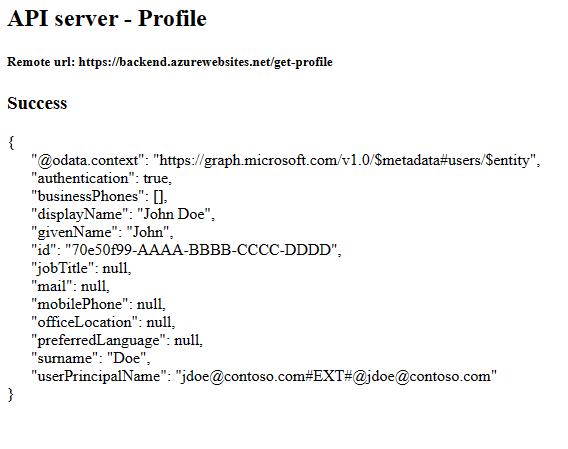
选择
Get user's profile。 这会将持有者令牌中的身份验证传递到后端。后端使用你的帐户的真实 Microsoft Graph 配置文件进行响应。
7. 清理
在前面的步骤中,你在资源组中创建了 Azure 资源。
若要删除资源组,请在 Cloud Shell 中运行以下命令。 运行此命令可能需要一分钟时间。
az group delete --name myAuthResourceGroup使用先前在后端和前端的
Enable authentication and authorization部分中找到并记录的客户端 ID。删除前端和后端应用的应用注册。
# delete app - do this for both front-end and back-end client ids
az ad app delete --id <client-id>
常见问题
我收到错误 80049217,这意味着什么?
此错误 CompactToken parsing failed with error code: 80049217表示后端应用服务无权返回 Microsoft Graph 令牌。 之所以出现此错误,是因为应用注册缺少 User.Read 权限。
我收到错误 AADSTS65001,这意味着什么?
此错误 AADSTS65001: The user or administrator has not consented to use the application with ID \<backend-authentication-id>. Send an interactive authorization request for this user and resource表示尚未为管理员同意配置后端身份验证应用。 由于错误显示在后端应用的日志中,因此前端应用程序无法告知用户为什么在前端应用中看不到其配置文件。
如何以用户身份连接到其他下游 Azure 服务?
本教程演示了向 Microsoft Graph 进行身份验证的 API 应用。 可以应用相同的常规步骤来代表用户访问任何 Azure 服务。
- 对前端应用程序没有更改。 仅对后端的身份验证应用注册和后端应用源代码进行更改。
- 将限定为后端 API 的用户令牌交换为要访问的下游服务的令牌。
- 在下游服务的 SDK 中使用令牌创建客户端。
- 使用下游客户端访问服务功能。