你当前正在访问 Microsoft Azure Global Edition 技术文档网站。 如果需要访问由世纪互联运营的 Microsoft Azure 中国技术文档网站,请访问 https://docs.azure.cn。
将Azure Cosmos DB中的矢量搜索与 Node.js 客户端库配合使用。 在应用程序中有效地存储和查询矢量数据。
本快速入门将 JSON 文件中的示例酒店数据集与 text-embedding-3-small 模型中的矢量结合使用。 数据集包括酒店名称、位置、说明和矢量嵌入。
在 GitHub 上查找具有资源预配的示例代码。
先决条件
Azure的订阅
- 如果没有Azure订阅,请创建免费帐户
现有的 Azure Cosmos DB 资源数据平面访问
- 如果没有资源,请创建新资源
- 防火墙已配置为允许访问您的客户端 IP 地址
- 分配的基于角色的访问控制 (RBAC) 角色:
- Cosmos DB 内置数据参与者 (数据平面)
- 角色 ID:
00000000-0000-0000-0000-000000000002
-
- 配置的自定义域
- 分配的基于角色的访问控制 (RBAC) 角色:
- 认知服务 OpenAI 用户
- 角色 ID:
5e0bd9bd-7b93-4f28-af87-19fc36ad61bd
-
text-embedding-3-small已部署的模型
TypeScript:全局安装 TypeScript:
npm install -g typescript
使用矢量创建数据文件
为酒店数据文件创建新的数据目录:
mkdir data将包含矢量的 raw 数据文件下载到
data目录:curl -o data/HotelsData_toCosmosDB_Vector.json https://raw.githubusercontent.com/Azure-Samples/cosmos-db-vector-samples/refs/heads/main/data/HotelsData_toCosmosDB_Vector.json
创建 Node.js 项目
在与数据目录相同的级别为项目创建新的同级目录,并在Visual Studio Code中打开它:
mkdir vector-search-quickstart
code vector-search-quickstart
在终端中,初始化 Node.js 项目:
npm init -y
npm pkg set type="module"
安装所需的包:
npm install @azure/identity @azure/cosmos openai npm install @types/node cross-env --save-dev- @azure/identity - 用于无密码(托管标识)连接的Azure身份验证库
- @azure/cosmos - 用于数据库操作的Azure Cosmos DB客户端库
- openai - OpenAI SDK,用于使用 Azure OpenAI 生成嵌入
- @types/node (dev) - Node.js API 的 TypeScript 类型定义
- cross-env (dev) - npm 脚本的跨平台环境变量设置
.env在项目根目录中为环境变量创建文件:# Identity for local developer authentication with Azure CLI AZURE_TOKEN_CREDENTIALS=AzureCliCredential # Azure OpenAI Embedding Settings AZURE_OPENAI_EMBEDDING_MODEL=text-embedding-3-small AZURE_OPENAI_EMBEDDING_API_VERSION=2023-05-15 AZURE_OPENAI_EMBEDDING_ENDPOINT= # Cosmos DB configuration AZURE_COSMOSDB_ENDPOINT= # Data file DATA_FILE_WITH_VECTORS=../data/HotelsData_toCosmosDB_Vector.json FIELD_TO_EMBED=Description EMBEDDED_FIELD=DescriptionVector EMBEDDING_DIMENSIONS=1536将文件中的
.env占位符值替换为你自己的信息:-
AZURE_OPENAI_EMBEDDING_ENDPOINT:您的 Azure OpenAI 资源端点 URL -
AZURE_COSMOSDB_ENDPOINT:您的 Azure Cosmos DB 终端 URL
-
添加文件
tsconfig.json以配置 TypeScript:{ "compilerOptions": { "target": "ES2020", "module": "NodeNext", "moduleResolution": "nodenext", "declaration": true, "outDir": "./dist", "strict": true, "esModuleInterop": true, "skipLibCheck": true, "noImplicitAny": false, "forceConsistentCasingInFileNames": true, "sourceMap": true, "resolveJsonModule": true, }, "include": [ "src/**/*" ], "exclude": [ "node_modules", "dist" ] }
了解文档架构
在生成应用程序之前,请了解向量如何存储在Azure Cosmos DB文档中。 每个酒店文档都包含:
-
标准字段:
HotelId、、HotelNameDescription、Category等。 -
矢量字段:
DescriptionVector- 一个由 1536 个浮点数构成的数组,表示酒店描述的语义含义
下面是酒店文档结构的简化示例:
{
  "HotelId": "1",
  "HotelName": "Stay-Kay City Hotel",
  "Description": "This classic hotel is fully-refurbished...",
  "Rating": 3.6,
  "DescriptionVector": [
    -0.04886505,
    -0.02030743,
    0.01763356,
    ...
    // 1536 dimensions total
  ]
}
有关存储嵌入的要点:
- 矢量数组 作为标准 JSON 数组存储在文档中
-
矢量策略定义路径()、数据类型(
/DescriptionVectorfloat32)、维度(1536)和距离函数(余弦) - 索引策略 在矢量字段上创建矢量索引,以便进行高效的相似性搜索
- 应 从标准索引中排除 向量字段以优化插入性能
此示例项目的距离指标的 Bicep 模板中定义了这些策略。 有关矢量策略和索引的详细信息,请参阅在 Azure Cosmos DB 中的 矢量搜索。
创建 npm 脚本
编辑package.json文件,并且添加以下脚本:
使用这些脚本编译 TypeScript 文件并运行 DiskANN 索引实现。
"scripts": {
    "build": "tsc",
    "start:diskann": "cross-env VECTOR_ALGORITHM=diskann node --env-file .env dist/vector-search.js"
}
为矢量搜索创建代码文件
src为 TypeScript 文件创建目录。 添加两个文件:vector-search.ts 和 utils.ts 用于您的矢量搜索实现:
mkdir src
touch src/vector-search.ts
touch src/utils.ts
为矢量搜索创建代码
将以下代码粘贴到 vector-search.ts 文件中。
 import path from 'path';
import { readFileReturnJson, getClientsPasswordless, validateFieldName, insertData, printSearchResults, getQueryActivityId } from './utils.js';

// ESM specific features - create __dirname equivalent
import { fileURLToPath } from "node:url";
import { dirname } from "node:path";
const __filename = fileURLToPath(import.meta.url);
const __dirname = dirname(__filename);

type VectorAlgorithm = 'diskann' | 'quantizedflat';

interface AlgorithmConfig {
    containerName: string;
    algorithmName: string;
}

const algorithmConfigs: Record<VectorAlgorithm, AlgorithmConfig> = {
    diskann: {
        containerName: 'hotels_diskann',
        algorithmName: 'DiskANN'
    },
    quantizedflat: {
        containerName: 'hotels_quantizedflat',
        algorithmName: 'QuantizedFlat'
    }
};

const config = {
    query: "quintessential lodging near running trails, eateries, retail",
    dbName: "Hotels",
    algorithm: (process.env.VECTOR_ALGORITHM || 'diskann').trim().toLowerCase() as VectorAlgorithm,
    dataFile: process.env.DATA_FILE_WITH_VECTORS!,
    embeddedField: process.env.EMBEDDED_FIELD!,
    embeddingDimensions: parseInt(process.env.EMBEDDING_DIMENSIONS! || process.env.VECTOR_EMBEDDING_DIMENSIONS || '1536', 10),
    deployment: process.env.AZURE_OPENAI_EMBEDDING_MODEL!,
    distanceFunction: process.env.VECTOR_DISTANCE_FUNCTION || 'cosine',
};

async function main() {
    const { aiClient, dbClient } = getClientsPasswordless();

    try {
        // Validate algorithm selection
        if (!Object.keys(algorithmConfigs).includes(config.algorithm)) {
            throw new Error(`Invalid algorithm '${config.algorithm}'. Must be one of: ${Object.keys(algorithmConfigs).join(', ')}`);
        }

        if (!aiClient) {
            throw new Error('Azure OpenAI client is not configured. Please check your environment variables.');
        }
        if (!dbClient) {
            throw new Error('Database client is not configured. Please check your environment variables.');
        }

        const algorithmConfig = algorithmConfigs[config.algorithm];
        const collectionName = algorithmConfig.containerName;

        try {
            const database = dbClient.database(config.dbName);
            console.log(`Connected to database: ${config.dbName}`);

            const container = database.container(collectionName);
            console.log(`Connected to container: ${collectionName}`);
            console.log(`\n📊 Vector Search Algorithm: ${algorithmConfig.algorithmName}`);
            console.log(`📏 Distance Function: ${config.distanceFunction}`);

            // Verify container exists by attempting a read
            await container.read();

            const data = await readFileReturnJson(path.join(__dirname, "..", config.dataFile));
            await insertData(container, data);

            const createEmbeddedForQueryResponse = await aiClient.embeddings.create({
                model: config.deployment,
                input: [config.query]
            });

            const safeEmbeddedField = validateFieldName(config.embeddedField);
            const queryText = `SELECT TOP 5 c.HotelName, c.Description, c.Rating, VectorDistance(c.${safeEmbeddedField}, @embedding) AS SimilarityScore FROM c ORDER BY VectorDistance(c.${safeEmbeddedField}, @embedding)`;

            console.log('\n--- Executing Vector Search Query ---');
            console.log('Query:', queryText);
            console.log('Parameters: @embedding (vector with', createEmbeddedForQueryResponse.data[0].embedding.length, 'dimensions)');
            console.log('--------------------------------------\n');

            const queryResponse = await container.items
                .query({
                    query: queryText,
                    parameters: [
                        { name: "@embedding", value: createEmbeddedForQueryResponse.data[0].embedding }
                    ]
                })
                .fetchAll();

            const activityId = getQueryActivityId(queryResponse);
            if (activityId) {
                console.log('Query activity ID:', activityId);
            }

            const { resources, requestCharge } = queryResponse;

            printSearchResults(resources, requestCharge);
        } catch (error) {
            if ((error as any).code === 404) {
                throw new Error(`Container or database not found. Ensure database '${config.dbName}' and container '${collectionName}' exist before running this script.`);
            }
            throw error;
        }
    } catch (error) {
        console.error('App failed:', error);
        process.exitCode = 1;
    }
}

// Execute the main function
main().catch(error => {
    console.error('Unhandled error:', error);
    process.exitCode = 1;
});
此代码:
- 从环境变量配置
DiskANN或quantizedFlat失量算法。 - 使用无密码身份验证连接到 Azure OpenAI 和Azure Cosmos DB。
- 从 JSON 文件加载预矢量化酒店数据。
- 将数据插入相应的容器。
- 生成自然语言查询的嵌入(
quintessential lodging near running trails, eateries, retail)。 -
VectorDistance执行 SQL 查询,以检索按相似性分数排名的前 5 个语义上相似的酒店。 - 处理缺少的客户端、无效的算法选择以及不存在的容器/数据库的错误。
了解代码:使用 Azure OpenAI 生成嵌入内容
该代码为查询文本创建嵌入内容:
const createEmbeddedForQueryResponse = await aiClient.embeddings.create({
    model, // OpenAI embedding model, e.g. "text-embedding-3-small"
    input  // Array of description strings to embed, e.g. ["quintessential lodging near running trails"]
});
此 OpenAI API 调用 用于 client.embeddings.create,将“经典住宿毗邻跑步小径”等文本转换为一个 1536 维的向量,以捕捉其语义含义。 有关生成嵌入的更多详细信息,请参阅 Azure OpenAI 嵌入文档。
了解代码:在 Azure Cosmos DB 中存储向量
使用executeBulkOperations函数将具有矢量数组的所有文档按比例大规模插入:
const response = await container.items.executeBulkOperations(operations);
这会将酒店文档(包括其预生成的 DescriptionVector 数组)插入到容器中。 可以安全地传入所有文档数据,客户端库会为你处理批处理和重试。
了解代码:运行矢量相似性搜索
该代码使用 VectorDistance 函数执行矢量搜索:
const queryText = `SELECT TOP 5 c.HotelName, c.Description, c.Rating, VectorDistance(c.${safeEmbeddedField}, @embedding) AS SimilarityScore FROM c ORDER BY VectorDistance(c.${safeEmbeddedField}, @embedding)`;

const queryResponse = await container.items
    .query({
        query: queryText,
        parameters: [
            { name: "@embedding", value: createEmbeddedForQueryResponse.data[0].embedding }
        ]
    })
    .fetchAll();
此代码生成参数化的 SQL 查询,该查询使用 VectorDistance 函数将查询的嵌入向量(@embedding)与每个文档的存储向量字段(DescriptionVector)进行比较,并返回名称与相似性分数最高的前 5 家酒店(从最相似到最不相似)。 查询嵌入被作为参数进行传递以防止注入,并且该嵌入来自先前的 Azure OpenAI embeddings.create 调用。
此查询返回的内容:
- 基于矢量距离的前 5 家最相似的酒店
- 酒店属性:
HotelName、Description、Rating -
SimilarityScore:一个数值,该值指示每个酒店与查询的相似程度 - 从最类似于最不相似的结果排序
有关函数 VectorDistance 的详细信息,请参阅 VectorDistance 文档。
创建实用工具函数
将以下代码粘贴到 utils.ts:
import { CosmosClient, BulkOperationType } from '@azure/cosmos';
import { AzureOpenAI } from "openai";
import { promises as fs } from "fs";
import { DefaultAzureCredential, getBearerTokenProvider } from "@azure/identity";
// Define a type for JSON data
export type JsonData = Record<string, any>;

export function getClients(): { aiClient: AzureOpenAI | null; dbClient: CosmosClient | null } {

    let aiClient: AzureOpenAI | null = null;
    let dbClient: CosmosClient | null = null;

    const apiKey = process.env.AZURE_OPENAI_EMBEDDING_KEY!;
    const apiVersion = process.env.AZURE_OPENAI_EMBEDDING_API_VERSION!;
    const endpoint = process.env.AZURE_OPENAI_EMBEDDING_ENDPOINT!;
    const deployment = process.env.AZURE_OPENAI_EMBEDDING_MODEL!;

    if (apiKey && apiVersion && endpoint && deployment) {

        aiClient = new AzureOpenAI({
            apiKey,
            apiVersion,
            endpoint,
            deployment
        });
    }

    // Cosmos DB connection string or endpoint/key
    // You may need to use endpoint and key separately for CosmosClient
    const cosmosEndpoint = process.env.AZURE_COSMOSDB_ENDPOINT!;
    const cosmosKey = process.env.AZURE_COSMOSDB_KEY!;

    if (cosmosEndpoint && cosmosKey) {
        dbClient = new CosmosClient({ endpoint: cosmosEndpoint, key: cosmosKey });
    }

    return { aiClient, dbClient };
}

/**
 * Get Azure OpenAI and Cosmos DB clients using passwordless authentication (managed identity)
 * This function uses DefaultAzureCredential for authentication instead of API keys
 *
 * @returns Object containing AzureOpenAI and CosmosClient instances or null if configuration is missing
 */
export function getClientsPasswordless(): { aiClient: AzureOpenAI | null; dbClient: CosmosClient | null } {
    let aiClient: AzureOpenAI | null = null;
    let dbClient: CosmosClient | null = null;

    // For Azure OpenAI with DefaultAzureCredential
    const apiVersion = process.env.AZURE_OPENAI_EMBEDDING_API_VERSION!;
    const endpoint = process.env.AZURE_OPENAI_EMBEDDING_ENDPOINT!;
    const deployment = process.env.AZURE_OPENAI_EMBEDDING_MODEL!;

    if (apiVersion && endpoint && deployment) {
        const credential = new DefaultAzureCredential();
        const scope = "https://cognitiveservices.azure.com/.default";
        const azureADTokenProvider = getBearerTokenProvider(credential, scope);
        aiClient = new AzureOpenAI({
            apiVersion,
            endpoint,
            deployment,
            azureADTokenProvider
        });
    }

    // For Cosmos DB with DefaultAzureCredential
    const cosmosEndpoint = process.env.AZURE_COSMOSDB_ENDPOINT!;

    if (cosmosEndpoint) {
        const credential = new DefaultAzureCredential();

        dbClient = new CosmosClient({
            endpoint: cosmosEndpoint,
            aadCredentials: credential // Use DefaultAzureCredential instead of key
        });
    }

    return { aiClient, dbClient };
}
export async function readFileReturnJson(filePath: string): Promise<JsonData[]> {

    console.log(`Reading JSON file from ${filePath}`);

    const fileAsString = await fs.readFile(filePath, "utf-8");
    return JSON.parse(fileAsString);
}
export async function writeFileJson(filePath: string, jsonData: JsonData): Promise<void> {
    const jsonString = JSON.stringify(jsonData, null, 2);
    await fs.writeFile(filePath, jsonString, "utf-8");

    console.log(`Wrote JSON file to ${filePath}`);
}

/**
 * Check if a container has any documents
 * @param container - Cosmos DB container reference
 * @returns Number of documents in the container
 */
async function getDocumentCount(container: any): Promise<number> {
    const countResult = await container.items
        .query('SELECT VALUE COUNT(1) FROM c')
        .fetchAll();

    return countResult.resources[0];
}

export async function insertData(container, data): Promise<{ total: number; inserted: number; failed: number; skipped: number; requestCharge: number }> {
    // Check if container already has documents
    const existingCount = await getDocumentCount(container);

    if (existingCount > 0) {
        console.log(`Container already has ${existingCount} documents. Skipping insert.`);
        return { total: 0, inserted: 0, failed: 0, skipped: existingCount, requestCharge: 0 };
    }

    // Cosmos DB uses containers instead of collections
    // Use SDK bulk operations; let SDK handle batching, dispatch, and throttling
    console.log(`Inserting ${data.length} items using executeBulkOperations...`);

    // Prepare bulk operations for all items
    const operations = data.map((item: any) => ({
        operationType: BulkOperationType.Create,
        resourceBody: {
            id: item.HotelId,  // Map HotelId to id (required by Cosmos DB)
            ...item,
        },
        // Partition key must be passed as array: [value] for /HotelId partition
        partitionKey: [item.HotelId],
    }));

    let inserted = 0;
    let failed = 0;
    let skipped = 0;
    let totalRequestCharge = 0;

    try {
        const startTime = Date.now();
        console.log(`Starting bulk insert (${operations.length} items)...`);

        const response = await container.items.executeBulkOperations(operations);

        const endTime = Date.now();
        const duration = ((endTime - startTime) / 1000).toFixed(2);
        console.log(`Bulk insert completed in ${duration}s`);

        totalRequestCharge += getBulkOperationRUs(response);

        // Count inserted, skipped, and failed
        if (response) {
            response.forEach((result: any) => {
                if (result.statusCode >= 200 && result.statusCode < 300) {
                    inserted++;
                } else if (result.statusCode === 409) {
                    skipped++;
                } else {
                    failed++;
                }
            });
        }
    } catch (error) {
        console.error(`Bulk insert failed:`, error);
        failed = operations.length;
    }

    console.log(`\nInsert Request Charge: ${totalRequestCharge.toFixed(2)} RUs\n`);
    return { total: data.length, inserted, failed, skipped, requestCharge: totalRequestCharge };
}

/**
 * Validates a field name to ensure it's a safe identifier for use in queries.
 * This prevents NoSQL injection when using string interpolation in query construction.
 *
 * @param fieldName - The field name to validate
 * @returns The validated field name
 * @throws Error if the field name contains invalid characters
 *
 * @example
 * ```typescript
 * const safeField = validateFieldName(config.embeddedField);
 * const query = `SELECT * FROM c WHERE c.${safeField} = @value`;
 * ```
 */
export function validateFieldName(fieldName: string): string {
    // Allow only alphanumeric characters and underscores, must start with letter or underscore
    const validIdentifierPattern = /^[A-Za-z_][A-Za-z0-9_]*$/;

    if (!validIdentifierPattern.test(fieldName)) {
        throw new Error(
            `Invalid field name: "${fieldName}". ` +
            `Field names must start with a letter or underscore and contain only letters, numbers, and underscores.`
        );
    }

    return fieldName;
}

/**
 * Print search results in a consistent format
 */
export function printSearchResults(searchResults: any[], requestCharge?: number): void {
    console.log('\n--- Search Results ---');
    if (!searchResults || searchResults.length === 0) {
        console.log('No results found.');
        return;
    }

    searchResults.forEach((result, index) => {
        console.log(`${index + 1}. ${result.HotelName}, Score: ${result.SimilarityScore.toFixed(4)}`);
    });

    if (requestCharge !== undefined) {
        console.log(`\nVector Search Request Charge: ${requestCharge.toFixed(2)} RUs`);
    }
    console.log('');
}

export function getQueryActivityId(queryResponse: any): string | undefined {
    if (!queryResponse) {
        return undefined;
    }

    const diagnostics = queryResponse.diagnostics as any;
    const gatewayStats = Array.isArray(diagnostics?.clientSideRequestStatistics?.gatewayStatistics)
        ? diagnostics.clientSideRequestStatistics.gatewayStatistics
        : [];
    const gatewayActivityId = gatewayStats.find((entry: any) => entry?.activityId)?.activityId;

    return queryResponse.activityId ?? gatewayActivityId;
}

export function getBulkOperationRUs(response: any): number {
    // Response shape can vary depending on SDK/version:
    // - An array of operation results
    // - An object with `resources` or `results` array
    // - A single operation result object
    if (!response) {
        console.warn('Empty response. Cannot calculate RUs from bulk operation.');
        return 0;
    }

    // Normalize into an array of result items
    let items: any[] = [];
    if (Array.isArray(response)) {
        items = response;
    } else if (Array.isArray(response.resources)) {
        items = response.resources;
    } else if (Array.isArray(response.results)) {
        items = response.results;
    } else if (Array.isArray(response.result)) {
        items = response.result;
    } else if (typeof response === 'object') {
        // If it's a single operation result, wrap it so downstream logic is uniform
        items = [response];
    } else {
        console.warn('Response does not contain bulk operation results.');
        return 0;
    }

    let totalRequestCharge = 0;

    items.forEach((result: any) => {
        let requestCharge = 0;

        // 1) Direct numeric property
        if (typeof result.requestCharge === 'number') {
            requestCharge = result.requestCharge;
        }

        // 1b) Some SDKs nest the operation response under `response` and expose requestCharge there
        if (!requestCharge && result.response && typeof result.response.requestCharge === 'number') {
            requestCharge = result.response.requestCharge;
        }

        if (!requestCharge && result.response && typeof result.response.requestCharge === 'string') {
            const parsed = parseFloat(result.response.requestCharge);
            requestCharge = isNaN(parsed) ? 0 : parsed;
        }

        // 2) String numeric value
        if (!requestCharge && typeof result.requestCharge === 'string') {
            const parsed = parseFloat(result.requestCharge);
            requestCharge = isNaN(parsed) ? 0 : parsed;
        }

        // 3) operationResponse may contain headers in different shapes
        if (!requestCharge && result.operationResponse) {
            const op = result.operationResponse;
            const headerVal = op.headers?.['x-ms-request-charge']
                ?? (typeof op.headers?.get === 'function' ? op.headers.get('x-ms-request-charge') : undefined)
                ?? op._response?.headers?.['x-ms-request-charge'];

            if (headerVal !== undefined) {
                const parsed = parseFloat(headerVal as any);
                requestCharge = isNaN(parsed) ? 0 : parsed;
            }
        }

        // 4) Some responses include headers at top-level or in `headers`
        if (!requestCharge && result.headers) {
            const hv = result.headers['x-ms-request-charge'] ?? (typeof result.headers.get === 'function' ? result.headers.get('x-ms-request-charge') : undefined);
            if (hv !== undefined) {
                const parsed = parseFloat(hv as any);
                requestCharge = isNaN(parsed) ? 0 : parsed;
            }
        }

        // 5) Fallback: some SDKs expose RU on resourceOperation or nested fields
        if (!requestCharge) {
            // Try several nested locations where headers may be present
            const candidateHeaders =
                result.operationResponse?._response?.headers
                ?? result.operationResponse?.headers
                ?? result._response?.headers
                ?? result.headers;

            const fallback = candidateHeaders ? (candidateHeaders['x-ms-request-charge'] ?? (typeof candidateHeaders.get === 'function' ? candidateHeaders.get('x-ms-request-charge') : undefined)) : undefined;

            if (fallback !== undefined) {
                const parsed = parseFloat(fallback as any);
                requestCharge = isNaN(parsed) ? 0 : parsed;
            }
        }

        totalRequestCharge += requestCharge;
    });

    // If we didn't find any RUs, print a small sample to help debugging
    if (totalRequestCharge === 0) {
        try {
            const sample = items[0];
            const sampleKeys = sample ? Object.keys(sample) : [];
            console.warn('getBulkOperationRUs: no RUs found. Sample result keys:', sampleKeys);
            if (sample && sample.response) {
                try {
                    const respKeys = Object.keys(sample.response);
                    console.warn('  sample.response keys:', respKeys);
                    const hdrs = sample.response.headers ?? sample.response._response?.headers ?? sample.response?.operationResponse?.headers;
                    console.warn('  sample.response headers sample:', hdrs ? Object.keys(hdrs) : hdrs);
                } catch (e) {
                    console.warn('  Could not inspect sample.response for headers:', e);
                }
            }
        } catch (e) {
            console.warn('Could not inspect sample result for debugging:', e);
        }
    }

    return totalRequestCharge;
}
此实用工具模块提供以下 关键 功能:
-
getClientsPasswordless:使用无密码身份验证为 Azure OpenAI 和Azure Cosmos DB创建和返回客户端。 在资源上启用 RBAC 并登录到Azure CLI -
insertData:将数据批量插入到Azure Cosmos DB容器中,并在指定字段上创建标准索引 -
printSearchResults:打印矢量搜索的结果,包括分数和酒店名称 -
validateFieldName:验证数据中是否存在字段名称 -
getBulkOperationRUs:根据文档数量和向量维度估计批量操作的请求单位(RU)
使用Azure CLI进行身份验证
在运行应用程序之前登录到Azure CLI,以便应用可以安全地访问Azure资源。
az login
代码使用你的本地开发人员身份验证,通过 utils.ts 中的 getClientsPasswordless 函数访问 Azure Cosmos DB 和 Azure OpenAI。 设置 AZURE_TOKEN_CREDENTIALS=AzureCliCredential后,可以确定性地从其凭据链中选择使用哪个凭据 DefaultAzureCredential 。 此函数依赖于来自 @azure/identity 的 DefaultAzureCredential,这会按顺序遍历凭据提供程序链,但会采用环境变量来首先解析为 Azure CLI 凭据。 了解更多有关如何使用 Azure 标识库对 JavaScript 应用进行身份验证以访问 Azure 服务。
生成并运行应用程序
生成 TypeScript 文件,然后运行应用程序:
应用日志记录和输出显示:
- 数据插入状态
- 矢量索引创建
- 具有酒店名称和相似性分数的搜索结果
Connected to database: Hotels
Connected to container: hotels_diskann

📊 Vector Search Algorithm: DiskANN
📏 Distance Function: cosine
Reading JSON file from C:\azure-samples\cosmos-db-vector-samples\data\HotelsData_toCosmosDB_Vector.json
Inserting 50 items using executeBulkOperations...
Starting bulk insert (50 items)...
Bulk insert completed in 3.19s

Insert Request Charge: 6805.25 RUs


--- Executing Vector Search Query ---
Query: SELECT TOP 5 c.HotelName, c.Description, c.Rating, VectorDistance(c.DescriptionVector, @embedding) AS SimilarityScore FROM c ORDER BY VectorDistance(c.DescriptionVector, @embedding)
Parameters: @embedding (vector with 1536 dimensions)
--------------------------------------

Query activity ID: <ACTIVITY_ID>

--- Search Results ---
1. Royal Cottage Resort, Score: 0.4991
2. Country Comfort Inn, Score: 0.4786
3. Nordick's Valley Motel, Score: 0.4635
4. Economy Universe Motel, Score: 0.4461
5. Roach Motel, Score: 0.4388


Vector Search Request Charge: 5.32 RUs
距离指标
Azure Cosmos DB支持三个距离函数,用于矢量相似性:
| 距离函数 | 评分范围 | 解释 | 最适用于 |
|---|---|---|---|
| 余弦 (默认) | 0.0 到 1.0 | 更高的分数(接近 1.0)表示更相似性 | 通用文本相似性,Azure OpenAI 嵌入(在本快速入门教程中使用) |
| 尤克利丹 (L2) | 0.0 到∞ | 较低值 = 更相似 | 空间数据,当数量级很重要时 |
| 点积 | -∞ 到 +∞ | 更高 = 更相似 | 标准化矢量数量级时 |
创建容器时,在 矢量嵌入策略 中设置距离函数。 这在示例存储库中的 infrastructure 中提供。 它定义为容器定义的一部分。
{
    name: 'hotels_diskann'
    partitionKeyPaths: [
        '/HotelId'
    ]
    indexingPolicy: {
        indexingMode: 'consistent'
        automatic: true
        includedPaths: [
        {
            path: '/*'
        }
        ]
        excludedPaths: [
        {
            path: '/_etag/?'
        }
        {
            path: '/DescriptionVector/*'
        }
        ]
        vectorIndexes: [
        {
            path: '/DescriptionVector'
            type: 'diskANN'
        }
        ]
    }
    vectorEmbeddingPolicy: {
        vectorEmbeddings: [
        {
            path: '/DescriptionVector'
            dataType: 'float32'
            dimensions: 1536
            distanceFunction: 'cosine'
        }
        ]
    }
}
此Bicep代码定义用于存储具有矢量搜索功能的酒店文档的Azure Cosmos DB容器配置。
| 资产 | Description |
|---|---|
partitionKeyPaths |
按 HotelId 分布式存储对文档进行分区。 |
indexingPolicy |
配置除系统/*字段和_etag数组以外的所有文档属性(DescriptionVector)的自动索引,以优化写入性能。 矢量字段不需要标准索引,因为它们改用专用 vectorIndexes 配置。 |
vectorIndexes |
在指定路径 /DescriptionVector 上创建 DiskANN 或 quantizedFlat 索引,以进行高效的相似性搜索。 |
vectorEmbeddingPolicy |
定义矢量字段的特征: float32 具有 1536 维度的数据类型(与模型输出匹配 text-embedding-3-small )和余弦作为距离函数,以在查询期间测量矢量之间的相似性。 |
解释相似性分数
在使用 余弦相似性的示例输出中:
- 0.4991(皇家小屋度假村)- 相似度最高,最符合“靠近跑步道、餐馆、零售店的住宿”这一条件
- 0.4388 (罗奇汽车旅馆) - 较低的相似性,仍然相关,但不太匹配
- 分数接近 1.0 表示更强的语义相似性
- 接近 0 的分数表示几乎没有相似性
重要说明:
- 绝对分数值取决于嵌入模型和数据
- 关注 相对排名 而不是绝对阈值
- Azure OpenAI 嵌入在余弦相似性中表现最佳
有关距离函数的详细信息,请参阅 什么是距离函数?
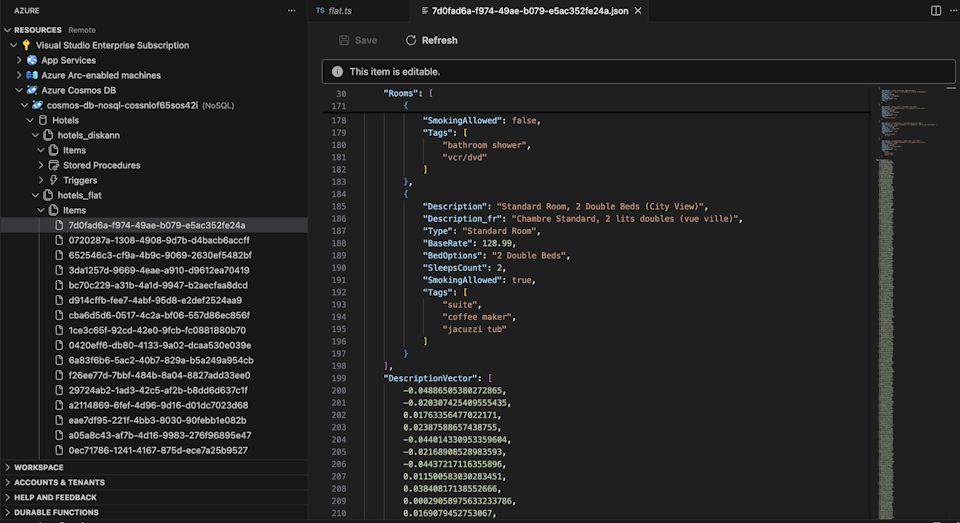
在Visual Studio Code中查看和管理数据
在 Visual Studio Code 中选择 Cosmos DB 扩展以连接到Azure Cosmos DB帐户。
查看 Hotels 数据库中的数据和索引。
清理资源
不再需要用于NoSQL帐户的 API 时,可以删除相应的资源组。
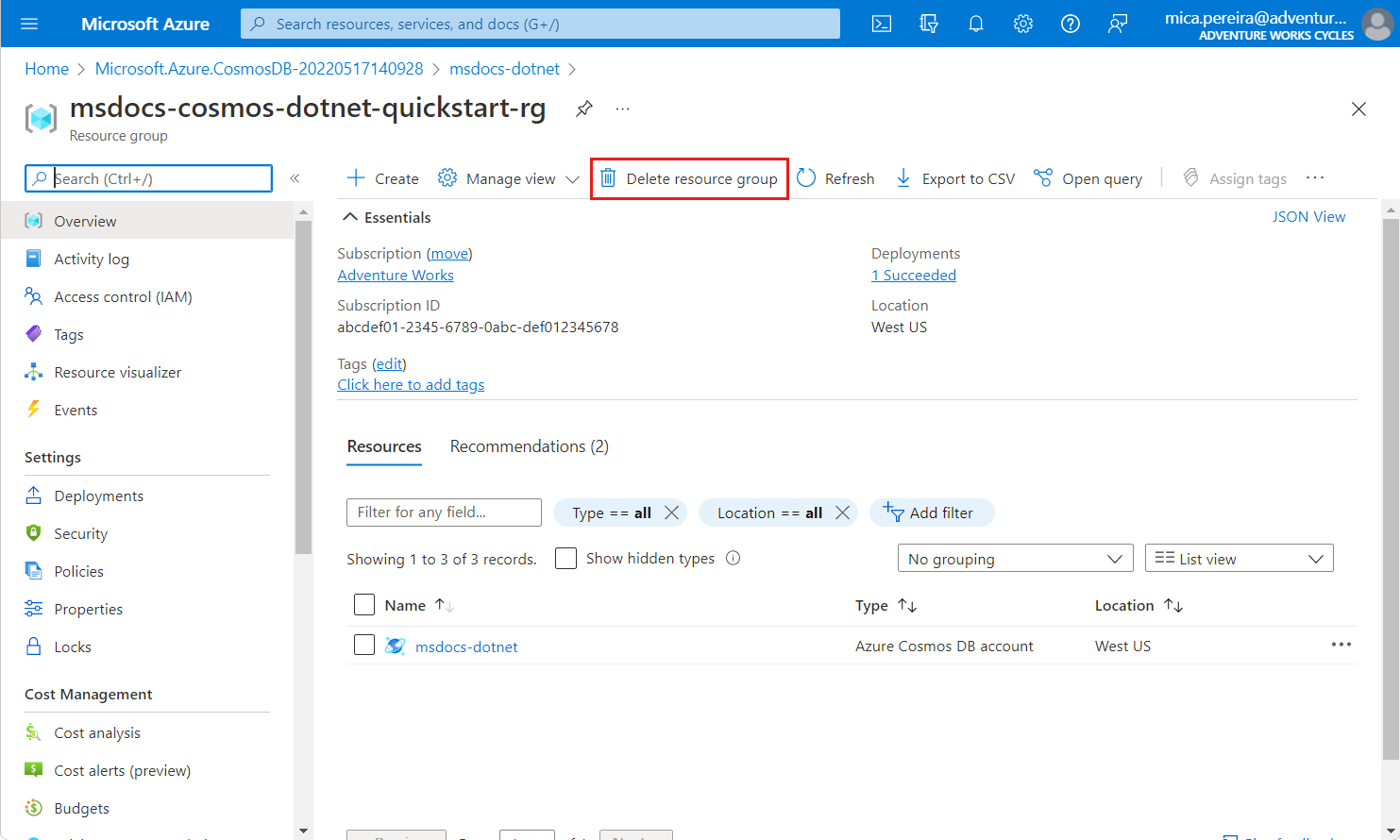
导航到之前在Azure门户中创建的资源组。
小窍门
在本快速入门中,我们建议使用名称
msdocs-cosmos-quickstart-rg。选择“删除资源组”。
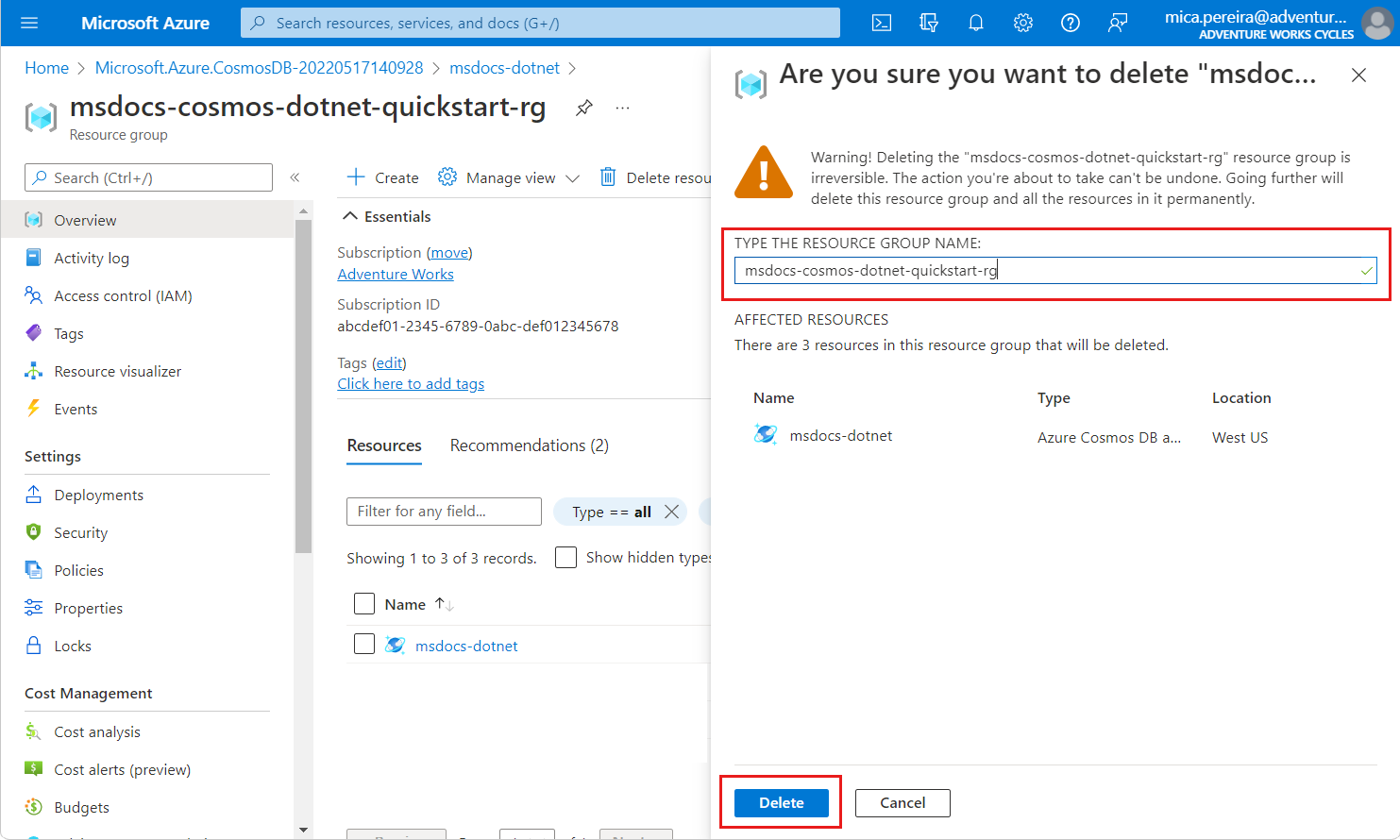
在“ 确定要删除 ”对话框中,输入资源组的名称,然后选择“ 删除”。