你当前正在访问 Microsoft Azure Global Edition 技术文档网站。 如果需要访问由世纪互联运营的 Microsoft Azure 中国技术文档网站,请访问 https://docs.azure.cn。
Azure 数据工厂和 Azure Synapse Analytics 中的删除活动
适用于: Azure 数据工厂 Azure Synapse Analytics
提示
试用 Microsoft Fabric 中的数据工厂,这是一种适用于企业的一站式分析解决方案。 Microsoft Fabric 涵盖从数据移动到数据科学、实时分析、商业智能和报告的所有内容。 了解如何免费开始新的试用!
可以使用 Azure 数据工厂中的 Delete 活动从“本地存储”库或“云存储”库中删除文件或文件夹。 使用此活动在不再需要文件时清理或存档文件。
警告
无法还原已删除的文件或文件夹(除非存储已启用软删除)。 使用 Delete 活动删除文件或文件夹时务必谨慎。
最佳实践
以下是使用 Delete 活动的一些建议:
如果将来需要还原,则先备份文件,然后使用 Delete 活动删除文件。
确保该服务具有从“存储”库中删除文件夹或文件的写入权限。
请确保不会同时删除正在写入的文件。
如果要从本地系统中删除文件或文件夹,请确保使用版本大于 3.14 的自承载集成运行时。
支持的数据存储
- Azure Blob 存储
- Azure Data Lake Storage Gen1
- Azure Data Lake Storage Gen2
- Azure 文件
- 文件系统
- FTP
- SFTP
- Microsoft Fabric 湖屋
- Amazon S3
- Amazon S3 兼容存储
- Google Cloud Storage
- Oracle 云存储
- HDFS
使用 UI 创建 Delete 活动
若要在管道中使用 Delete 活动,请完成以下步骤:
在管道“活动”窗格中搜索“删除”,然后将删除活动拖动到管道画布上。
选择画布上的新“删除”活动(如果尚未选择)及其 “源 ”选项卡以编辑其详细信息。
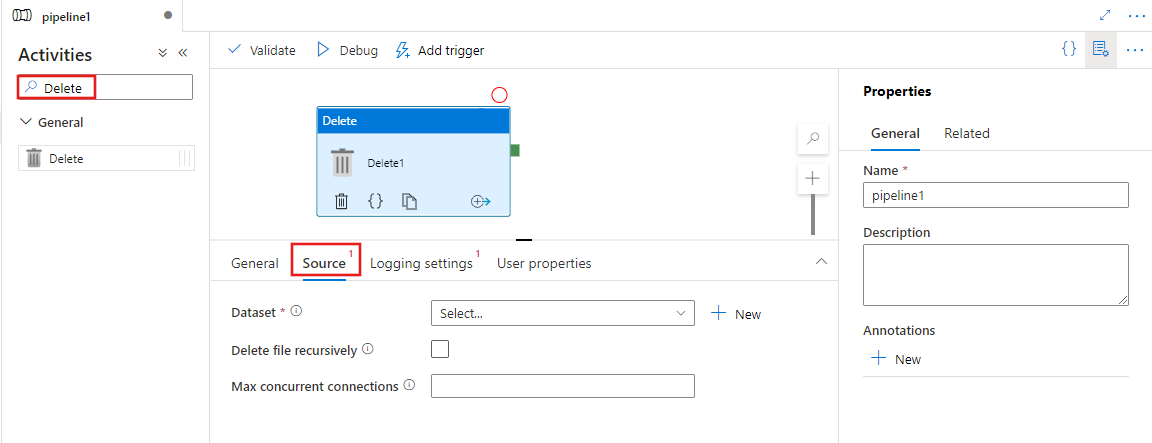
选择现有数据集或创建新数据集,指定要删除的文件。 如果选择了多个文件,可选择启用递归删除,这也会删除任何子文件夹中的数据。 还可以为操作指定最大并发连接数。
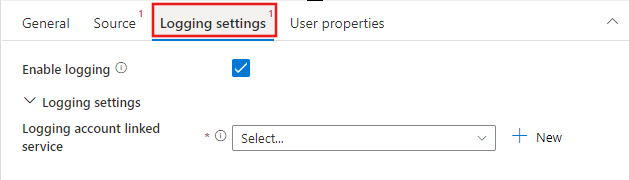
可选择通过选择“记录设置”选项卡并选择现有的或新建日志记录帐户链接服务位置来配置日志记录,以记录执行的删除操作的结果。
语法
{
    "name": "DeleteActivity",
    "type": "Delete",
    "typeProperties": {
        "dataset": {
            "referenceName": "<dataset name>",
            "type": "DatasetReference"
        },
        "storeSettings": {
            "type": "<source type>",
            "recursive": true/false,
            "maxConcurrentConnections": <number>
        },
        "enableLogging": true/false,
        "logStorageSettings": {
            "linkedServiceName": {
                "referenceName": "<name of linked service>",
                "type": "LinkedServiceReference"
            },
            "path": "<path to save log file>"
        }
    }
}
Type 属性
| 属性 | 描述 | 必须 |
|---|---|---|
| dataset | 提供数据集引用以确定要删除的文件或文件夹 | 是 |
| recursive | 表明从子文件夹中以递归方式删除数据,还是只从指定文件夹中删除数据。 | 否。 默认为 false。 |
| maxConcurrentConnections | 用于删除文件夹或文件而同时连接到“存储”库的连接数。 | 否。 默认值为 1。 |
| 启用日志记录 | 指示是否需要记录已删除的文件夹或文件名。 如果为 true,则需要进一步提供存储帐户来保存日志文件,以便可以通过读取日志文件跟踪 Delete 活动的行为。 | 否 |
| logStorageSettings | 仅适用于 enablelogging = true 时。 可以指定一组存储属性,可在其中保存包含“删除”活动删除的文件夹或文件名的日志文件。 |
否 |
| linkedServiceName | 仅适用于 enablelogging = true 时。 Azure 存储、Azure Data Lake 存储 Gen1 或 Azure Data Lake 存储 Gen2 的链接服务,用于存储包含 Delete 活动删除的文件夹或文件名的日志文件。 请注意,必须为它配置与删除活动用来删除文件的集成运行时类型相同的集成运行时类型。 |
否 |
| path | 仅适用于 enablelogging = true 时。 在存储帐户中保存日志文件的路径。 如果未提供路径,服务会为用户创建一个容器。 |
否 |
监视
可以在两个位置查看和监视 Delete 活动的结果:
- 从 Delete 活动的输出。
- 从日志文件。
Delete 活动的示例输出
{
  "datasetName": "AmazonS3",
  "type": "AmazonS3Object",
  "prefix": "test",
  "bucketName": "adf",
  "recursive": true,
  "isWildcardUsed": false,
  "maxConcurrentConnections": 2,
  "filesDeleted": 4,
  "logPath": "https://sample.blob.core.windows.net/mycontainer/5c698705-a6e2-40bf-911e-e0a927de3f07",
  "effectiveIntegrationRuntime": "MyAzureIR (West Central US)",
  "executionDuration": 650
}
Delete 活动的示例日志文件
| 名称 | 类别 | 状态 | 错误 |
|---|---|---|---|
| test1/yyy.json | 文件 | Deleted | |
| test2/hello789.txt | 文件 | Deleted | |
| test2/test3/hello000.txt | 文件 | Deleted | |
| test2/test3/zzz.json | 文件 | Deleted |
使用 Delete 活动的示例
删除特定文件夹或文件
库具有以下文件夹结构:
Root/
Folder_A_1/
1.txt
2.txt
3.csv
Folder_A_2/
4.txt
5.csv
Folder_B_1/
6.txt
7.csv
Folder_B_2/
8.txt
现在,使用 Delete 活动通过数据集和 Delete 活动的不同属性值组合删除文件夹或文件:
| folderPath | fileName | recursive | 输出 |
|---|---|---|---|
| Root/ Folder_A_2 | Null | False | Root/ Folder_A_1/ 1.txt 2.txt 3.csv Folder_A_2/ Folder_B_1/ 6.txt 7.csv Folder_B_2/ 8.txt |
| Root/ Folder_A_2 | Null | True | Root/ Folder_A_1/ 1.txt 2.txt 3.csv |
| Root/ Folder_A_2 | *.txt | False | Root/ Folder_A_1/ 1.txt 2.txt 3.csv Folder_A_2/ 5.csv Folder_B_1/ 6.txt 7.csv Folder_B_2/ 8.txt |
| Root/ Folder_A_2 | *.txt | True | Root/ Folder_A_1/ 1.txt 2.txt 3.csv Folder_A_2/ 5.csv Folder_B_1/ 7.csv Folder_B_2/ |
定期清理分时文件夹或文件
可以创建管道来定期清理分时文件夹或文件。 例如,文件夹结构类似于 /mycontainer/2018/12/14/*.csv。 可以使用计划触发器中的服务系统变量来标识每个管道运行中应删除的文件夹或文件。
示例管道
{
    "name":"cleanup_time_partitioned_folder",
    "properties":{
        "activities":[
            {
                "name":"DeleteOneFolder",
                "type":"Delete",
                "dependsOn":[

                ],
                "policy":{
                    "timeout":"7.00:00:00",
                    "retry":0,
                    "retryIntervalInSeconds":30,
                    "secureOutput":false,
                    "secureInput":false
                },
                "userProperties":[

                ],
                "typeProperties":{
                    "dataset":{
                        "referenceName":"PartitionedFolder",
                        "type":"DatasetReference",
                        "parameters":{
                            "TriggerTime":{
                                "value":"@formatDateTime(pipeline().parameters.TriggerTime, 'yyyy/MM/dd')",
                                "type":"Expression"
                            }
                        }
                    },
                    "logStorageSettings":{
                        "linkedServiceName":{
                            "referenceName":"BloblinkedService",
                            "type":"LinkedServiceReference"
                        },
                        "path":"mycontainer/log"
                    },
                    "enableLogging":true,
                    "storeSettings":{
                        "type":"AzureBlobStorageReadSettings",
                        "recursive":true
                    }
                }
            }
        ],
        "parameters":{
            "TriggerTime":{
                "type":"string"
            }
        },
        "annotations":[

        ]
    }
}
示例数据集
{
    "name":"PartitionedFolder",
    "properties":{
        "linkedServiceName":{
            "referenceName":"BloblinkedService",
            "type":"LinkedServiceReference"
        },
        "parameters":{
            "TriggerTime":{
                "type":"string"
            }
        },
        "annotations":[

        ],
        "type":"Binary",
        "typeProperties":{
            "location":{
                "type":"AzureBlobStorageLocation",
                "folderPath":{
                    "value":"@dataset().TriggerTime",
                    "type":"Expression"
                },
                "container":{
                    "value":"mycontainer",
                    "type":"Expression"
                }
            }
        }
    }
}
示例触发器
{
    "name": "DailyTrigger",
    "properties": {
        "runtimeState": "Started",
        "pipelines": [
            {
                "pipelineReference": {
                    "referenceName": "cleanup_time_partitioned_folder",
                    "type": "PipelineReference"
                },
                "parameters": {
                    "TriggerTime": "@trigger().scheduledTime"
                }
            }
        ],
        "type": "ScheduleTrigger",
        "typeProperties": {
            "recurrence": {
                "frequency": "Day",
                "interval": 1,
                "startTime": "2018-12-13T00:00:00.000Z",
                "timeZone": "UTC",
                "schedule": {
                    "minutes": [
                        59
                    ],
                    "hours": [
                        23
                    ]
                }
            }
        }
    }
}
清理于 2018 年 1 月 1 日之前进行了最后一次修改的过期文件
可以使用数据集中的文件属性筛选器“LastModified”创建管道来清理旧文件或过期文件。
示例管道
{
    "name":"CleanupExpiredFiles",
    "properties":{
        "activities":[
            {
                "name":"DeleteFilebyLastModified",
                "type":"Delete",
                "dependsOn":[

                ],
                "policy":{
                    "timeout":"7.00:00:00",
                    "retry":0,
                    "retryIntervalInSeconds":30,
                    "secureOutput":false,
                    "secureInput":false
                },
                "userProperties":[

                ],
                "typeProperties":{
                    "dataset":{
                        "referenceName":"BlobFilesLastModifiedBefore201811",
                        "type":"DatasetReference"
                    },
                    "logStorageSettings":{
                        "linkedServiceName":{
                            "referenceName":"BloblinkedService",
                            "type":"LinkedServiceReference"
                        },
                        "path":"mycontainer/log"
                    },
                    "enableLogging":true,
                    "storeSettings":{
                        "type":"AzureBlobStorageReadSettings",
                        "recursive":true,
                        "modifiedDatetimeEnd":"2018-01-01T00:00:00.000Z"
                    }
                }
            }
        ],
        "annotations":[

        ]
    }
}
示例数据集
{
    "name":"BlobFilesLastModifiedBefore201811",
    "properties":{
        "linkedServiceName":{
            "referenceName":"BloblinkedService",
            "type":"LinkedServiceReference"
        },
        "annotations":[

        ],
        "type":"Binary",
        "typeProperties":{
            "location":{
                "type":"AzureBlobStorageLocation",
                "fileName":"*",
                "folderPath":"mydirectory",
                "container":"mycontainer"
            }
        }
    }
}
通过链接 Copy 活动和 Delete 活动来移动文件
可以通过在管道中使用 Copy 活动复制文件,然后使用 Delete 活动删除文件来移动文件。 如果要移动多个文件,可以使用 GetMetadata 活动 + Filter 活动 + Foreach 活动 + Copy 活动 + Delete 活动,如以下示例所示。
注意
如果想要通过仅定义包含文件夹路径的数据集,然后使用 Copy 活动和 Delete 活动引用表示某文件夹的同一数据集来移动整个文件夹,则需要十分谨慎。 必须确保在复制操作和删除操作之间不会有任何新文件进入文件夹。 如果在 Copy 活动刚完成复制作业,但 Delete 活动尚未开始时新文件进入文件夹,则 Delete 活动可能会通过删除整个文件夹来删除尚未复制到目标的新文件。
示例管道
{
"name":"MoveFiles",
"properties":{
"activities":[
{
"name":"GetFileList",
"type":"GetMetadata",
"dependsOn":[
],
"policy":{
"timeout":"7.00:00:00",
"retry":0,
"retryIntervalInSeconds":30,
"secureOutput":false,
"secureInput":false
},
"userProperties":[
],
"typeProperties":{
"dataset":{
"referenceName":"OneSourceFolder",
"type":"DatasetReference",
"parameters":{
"Container":{
"value":"@pipeline().parameters.SourceStore_Location",
"type":"Expression"
},
"Directory":{
"value":"@pipeline().parameters.SourceStore_Directory",
"type":"Expression"
}
}
},
"fieldList":[
"childItems"
],
"storeSettings":{
"type":"AzureBlobStorageReadSettings",
"recursive":true
},
"formatSettings":{
"type":"BinaryReadSettings"
}
}
},
{
"name":"FilterFiles",
"type":"Filter",
"dependsOn":[
{
"activity":"GetFileList",
"dependencyConditions":[
"Succeeded"
]
}
],
"userProperties":[
],
"typeProperties":{
"items":{
"value":"@activity('GetFileList').output.childItems",
"type":"Expression"
},
"condition":{
"value":"@equals(item().type, 'File')",
"type":"Expression"
}
}
},
{
"name":"ForEachFile",
"type":"ForEach",
"dependsOn":[
{
"activity":"FilterFiles",
"dependencyConditions":[
"Succeeded"
]
}
],
"userProperties":[
],
"typeProperties":{
"items":{
"value":"@activity('FilterFiles').output.value",
"type":"Expression"
},
"batchCount":20,
"activities":[
{
"name":"CopyAFile",
"type":"Copy",
"dependsOn":[
],
"policy":{
"timeout":"7.00:00:00",
"retry":0,
"retryIntervalInSeconds":30,
"secureOutput":false,
"secureInput":false
},
"userProperties":[
],
"typeProperties":{
"source":{
"type":"BinarySource",
"storeSettings":{
"type":"AzureBlobStorageReadSettings",
"recursive":false,
"deleteFilesAfterCompletion":false
},
"formatSettings":{
"type":"BinaryReadSettings"
},
"recursive":false
},
"sink":{
"type":"BinarySink",
"storeSettings":{
"type":"AzureBlobStorageWriteSettings"
}
},
"enableStaging":false,
"dataIntegrationUnits":0
},
"inputs":[
{
"referenceName":"OneSourceFile",
"type":"DatasetReference",
"parameters":{
"Container":{
"value":"@pipeline().parameters.SourceStore_Location",
"type":"Expression"
},
"Directory":{
"value":"@pipeline().parameters.SourceStore_Directory",
"type":"Expression"
},
"filename":{
"value":"@item().name",
"type":"Expression"
}
}
}
],
"outputs":[
{
"referenceName":"OneDestinationFile",
"type":"DatasetReference",
"parameters":{
"Container":{
"value":"@pipeline().parameters.DestinationStore_Location",
"type":"Expression"
},
"Directory":{
"value":"@pipeline().parameters.DestinationStore_Directory",
"type":"Expression"
},
"filename":{
"value":"@item().name",
"type":"Expression"
}
}
}
]
},
{
"name":"DeleteAFile",
"type":"Delete",
"dependsOn":[
{
"activity":"CopyAFile",
"dependencyConditions":[
"Succeeded"
]
}
],
"policy":{
"timeout":"7.00:00:00",
"retry":0,
"retryIntervalInSeconds":30,
"secureOutput":false,
"secureInput":false
},
"userProperties":[
],
"typeProperties":{
"dataset":{
"referenceName":"OneSourceFile",
"type":"DatasetReference",
"parameters":{
"Container":{
"value":"@pipeline().parameters.SourceStore_Location",
"type":"Expression"
},
"Directory":{
"value":"@pipeline().parameters.SourceStore_Directory",
"type":"Expression"
},
"filename":{
"value":"@item().name",
"type":"Expression"
}
}
},
"logStorageSettings":{
"linkedServiceName":{
"referenceName":"BloblinkedService",
"type":"LinkedServiceReference"
},
"path":"container/log"
},
"enableLogging":true,
"storeSettings":{
"type":"AzureBlobStorageReadSettings",
"recursive":true
}
}
}
]
}
}
],
"parameters":{
"SourceStore_Location":{
"type":"String"
},
"SourceStore_Directory":{
"type":"String"
},
"DestinationStore_Location":{
"type":"String"
},
"DestinationStore_Directory":{
"type":"String"
}
},
"annotations":[
]
}
}
示例数据集
GetMetadata 活动用于枚举文件列表的数据集。
{
    "name":"OneSourceFolder",
    "properties":{
        "linkedServiceName":{
            "referenceName":"AzureStorageLinkedService",
            "type":"LinkedServiceReference"
        },
        "parameters":{
            "Container":{
                "type":"String"
            },
            "Directory":{
                "type":"String"
            }
        },
        "annotations":[

        ],
        "type":"Binary",
        "typeProperties":{
            "location":{
                "type":"AzureBlobStorageLocation",
                "folderPath":{
                    "value":"@{dataset().Directory}",
                    "type":"Expression"
                },
                "container":{
                    "value":"@{dataset().Container}",
                    "type":"Expression"
                }
            }
        }
    }
}
Copy 活动和 Delete 活动用于数据源的数据集。
{
    "name":"OneSourceFile",
    "properties":{
        "linkedServiceName":{
            "referenceName":"AzureStorageLinkedService",
            "type":"LinkedServiceReference"
        },
        "parameters":{
            "Container":{
                "type":"String"
            },
            "Directory":{
                "type":"String"
            },
            "filename":{
                "type":"string"
            }
        },
        "annotations":[

        ],
        "type":"Binary",
        "typeProperties":{
            "location":{
                "type":"AzureBlobStorageLocation",
                "fileName":{
                    "value":"@dataset().filename",
                    "type":"Expression"
                },
                "folderPath":{
                    "value":"@{dataset().Directory}",
                    "type":"Expression"
                },
                "container":{
                    "value":"@{dataset().Container}",
                    "type":"Expression"
                }
            }
        }
    }
}
Copy 活动用于数据目标的数据集。
{
    "name":"OneDestinationFile",
    "properties":{
        "linkedServiceName":{
            "referenceName":"AzureStorageLinkedService",
            "type":"LinkedServiceReference"
        },
        "parameters":{
            "Container":{
                "type":"String"
            },
            "Directory":{
                "type":"String"
            },
            "filename":{
                "type":"string"
            }
        },
        "annotations":[

        ],
        "type":"Binary",
        "typeProperties":{
            "location":{
                "type":"AzureBlobStorageLocation",
                "fileName":{
                    "value":"@dataset().filename",
                    "type":"Expression"
                },
                "folderPath":{
                    "value":"@{dataset().Directory}",
                    "type":"Expression"
                },
                "container":{
                    "value":"@{dataset().Container}",
                    "type":"Expression"
                }
            }
        }
    }
}
还可以从此处获取移动文件的模板。
已知的限制
删除活动不支持删除由 wild卡 描述的文件夹列表。
在删除活动中使用文件属性筛选器 modifiedDatetimeStart 和 modifiedDatetimeEnd 选择要删除的文件时,请务必在删除活动中设置 "wildcardFileName": "*"。
相关内容
详细了解如何在 Azure 数据工厂和 Synapse 管道中移动文件。