此示例笔记本演示如何在 Databricks 上训练机器学习分类模型。 用于机器学习的 Databricks Runtime 预安装了许多库,包括 scikit-learn,用于训练和预处理算法,MLflow,用于跟踪模型开发过程,还有 Optuna,用于进行超参数调节。
在此笔记本中,你将创建一个分类模型来预测葡萄酒是否被视为“高质量”。 数据集包含不同葡萄酒的 11 个特征(如酒精含量、酸度和残糖)以及 1 到 10 之间的质量排名。
本教程涉及:
- 第 1 部分:使用 MLflow 跟踪训练分类模型
- 第 2 部分:超参数优化以提高模型性能
- 第 3 部分:将结果和模型保存到 Unity 目录
- 第 4 部分:部署模型
有关在 Databricks 上生产机器学习(包括模型生命周期管理和模型推理)的更多详细信息,请参阅 ML 端到端示例。
数据集可从 UCI 机器学习 存储库 获取,并在文献 通过物理化学属性的数据挖掘来建模葡萄酒偏好 [Cortez et al., 2009] 中呈现。
要求
- 运行 Databricks Runtime 17.3 LTS ML 或更高版本的群集。 如果运行的是 Databricks Runtime 16.4 LTS ML 或更低版本,请参阅 教程:在 Databricks (Hyperopt) 上生成第一个机器学习模型。
Setup
在本部分中,将执行以下操作:
- 将 MLflow 客户端配置为使用 Unity 目录作为模型注册表。
- 设置要在其中注册模型的目录和架构。
- 读取数据并将其保存到 Unity 目录中的表。
- 预处理数据。
配置 MLflow 客户端
默认情况下,MLflow Python客户端在 Databricks 工作区模型注册表中创建模型。 若要在 Unity 目录中保存模型,请配置 MLflow 客户端,如以下单元格所示。
import mlflow
mlflow.set_registry_uri("databricks-uc")
以下单元格设定了将注册模型的目录和模式。 你必须对目录具有USE CATALOG特权,并且对架构具有USE_SCHEMA、CREATE_TABLE 和 CREATE_MODEL特权。 如有必要,请更改以下单元格中的目录和架构名称。
有关详细信息,请参阅 Unity 目录文档。
# Specify the catalog and schema to use. You must have USE_CATALOG privilege on the catalog and USE_SCHEMA, CREATE_TABLE, and CREATE_MODEL privileges on the schema.
# Change the catalog and schema here if necessary.
CATALOG_NAME = "main"
SCHEMA_NAME = "default"
读取数据并将其保存到 Unity 目录中的表
数据集在 databricks-datasets. 在以下单元格中,将 .csv 文件中的数据加载到 Spark 数据帧。 然后将数据帧写入 Unity 目录中的表。 这两者都保留数据,并允许你控制如何与他人共享数据。
white_wine = spark.read.csv("/databricks-datasets/wine-quality/winequality-white.csv", sep=';', header=True)
red_wine = spark.read.csv("/databricks-datasets/wine-quality/winequality-red.csv", sep=';', header=True)

# Remove the spaces from the column names
for c in white_wine.columns:
    white_wine = white_wine.withColumnRenamed(c, c.replace(" ", "_"))
for c in red_wine.columns:
    red_wine = red_wine.withColumnRenamed(c, c.replace(" ", "_"))

# Define table names
red_wine_table = f"{CATALOG_NAME}.{SCHEMA_NAME}.red_wine"
white_wine_table = f"{CATALOG_NAME}.{SCHEMA_NAME}.white_wine"

# Write to tables in Unity Catalog
spark.sql(f"DROP TABLE IF EXISTS {red_wine_table}")
spark.sql(f"DROP TABLE IF EXISTS {white_wine_table}")
white_wine.write.saveAsTable(f"{CATALOG_NAME}.{SCHEMA_NAME}.white_wine")
red_wine.write.saveAsTable(f"{CATALOG_NAME}.{SCHEMA_NAME}.red_wine")
预处理数据
# Import required libraries
import numpy as np
import pandas as pd
import sklearn.datasets
import sklearn.metrics
import sklearn.model_selection
import sklearn.ensemble

import matplotlib.pyplot as plt

import optuna
from mlflow.optuna.storage import MlflowStorage
from mlflow.pyspark.optuna.study import MlflowSparkStudy
# Load data from Unity Catalog as Pandas dataframes
white_wine = spark.read.table(f"{CATALOG_NAME}.{SCHEMA_NAME}.white_wine").toPandas()
red_wine = spark.read.table(f"{CATALOG_NAME}.{SCHEMA_NAME}.red_wine").toPandas()

# Add Boolean fields for red and white wine
white_wine['is_red'] = 0.0
red_wine['is_red'] = 1.0
data_df = pd.concat([white_wine, red_wine], axis=0)

# Define classification labels based on the wine quality
data_labels = data_df['quality'].astype('int') >= 7
data_df = data_df.drop(['quality'], axis=1)

# Split 80/20 train-test
X_train, X_test, y_train, y_test = sklearn.model_selection.train_test_split(
  data_df,
  data_labels,
  test_size=0.2,
  random_state=1
)
第 1 部分。 训练分类模型
# Enable MLflow autologging for scikit-learn
mlflow.sklearn.autolog()
接下来,在 MLflow 运行的上下文中训练分类器,该分类器会自动记录训练的模型和许多关联的指标和参数。
可以使用其他指标(例如模型对测试数据集的 AUC 分数)来补充日志记录。
with mlflow.start_run(run_name='gradient_boost') as run:
    model = sklearn.ensemble.GradientBoostingClassifier(random_state=0)

    # Models, parameters, and training metrics are tracked automatically
    model.fit(X_train, y_train)

    predicted_probs = model.predict_proba(X_test)
    roc_auc = sklearn.metrics.roc_auc_score(y_test, predicted_probs[:,1])
    roc_curve = sklearn.metrics.RocCurveDisplay.from_estimator(model, X_test, y_test)

    # Save the ROC curve plot to a file
    roc_curve.figure_.savefig("roc_curve.png")

    # The AUC score on test data is not automatically logged, so log it manually
    mlflow.log_metric("test_auc", roc_auc)

    # Log the ROC curve image file as an artifact
    mlflow.log_artifact("roc_curve.png")

    print("Test AUC of: {}".format(roc_auc))
查看 MLflow 运行记录
若要查看记录的训练过程,请单击笔记本右上角的试验图标 。 如有必要,请单击刷新图标以获取并监视最新的运行。
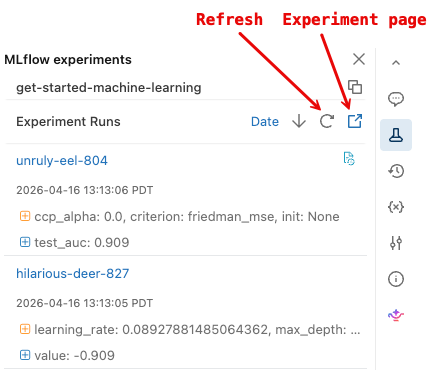
若要显示更详细的 MLflow 试验页,请单击实验页图标。 通过此页面可以比较任务运行并查看特定任务运行的详细信息。 请参阅使用 MLflow 跟踪模型开发。
加载模型
还可以使用 MLflow API 访问特定运行的结果。 以下单元格中的代码演示如何加载在给定 MLflow 运行中训练的模型,并使用它进行预测。 还可以在 MLflow 运行页上查找用于加载特定模型的代码片段。
# After a model has been logged, you can load it in different notebooks or jobs
# mlflow.pyfunc.load_model makes model prediction available under a common API
model_loaded = mlflow.pyfunc.load_model(
  'runs:/{run_id}/model'.format(
    run_id=run.info.run_id
  )
)

predictions_loaded = model_loaded.predict(X_test)
predictions_original = model.predict(X_test)

# The loaded model should match the original
assert(np.array_equal(predictions_loaded, predictions_original))
第 2 部分。 超参数优化
此时,你已训练了一个简单的模型,并使用 MLflow 跟踪服务来组织工作。 接下来,可以使用 Optuna 执行更复杂的优化。
使用 Optuna 进行并行训练
Optuna 是一个开源Python库,用于超参数优化,可在多个计算资源之间水平缩放。 有关在 Databricks 中使用 Optuna 的详细信息,请参阅 使用 Optuna 进行超参数优化。
def objective(trial):
  # Enable autologging on each worker
  mlflow.sklearn.autolog()
  with mlflow.start_run(nested=True):
    params = {
      'n_estimators': trial.suggest_int('n_estimators', 20, 1000),
      'learning_rate': trial.suggest_float('learning_rate', 0.05, 1.0, log=True),
      'max_depth': trial.suggest_int('max_depth', 2, 5),
    }
    model_hp = sklearn.ensemble.GradientBoostingClassifier(
      random_state=0,
      **params
    )
    model_hp.fit(X_train, y_train)
    predicted_probs = model_hp.predict_proba(X_test)
    # Tune based on the test AUC
    # In production, you could use a separate validation set instead
    roc_auc = sklearn.metrics.roc_auc_score(y_test, predicted_probs[:,1])
    mlflow.log_metric('test_auc', roc_auc)

    # Negate the AUC because Optuna minimizes the objective by default
    return -roc_auc


with mlflow.start_run(run_name='gb_optuna') as run:
  # Use the MLflow Tracking Server as the Optuna storage backend
  experiment_id = mlflow.active_run().info.experiment_id
  mlflow_storage = MlflowStorage(experiment_id=experiment_id)

  # MlflowSparkStudy distributes the tuning using Spark workers
  mlflow_study = MlflowSparkStudy(
    study_name="gb-optuna-tuning",
    storage=mlflow_storage,
  )

  mlflow_study.optimize(objective, n_trials=32, n_jobs=4)
搜索操作以检索最佳模型
由于 MLflow 跟踪了所有运行,因此可以使用 MLflow 搜索运行 API 检索最佳运行的指标和参数,以查找具有最高测试 auc 的优化运行。
此优化模型的性能应优于第 1 部分中训练的更简单的模型。
# Sort runs by their test auc. In case of ties, use the most recent run.
best_run = mlflow.search_runs(
  order_by=['metrics.test_auc DESC', 'start_time DESC'],
  max_results=10,
).iloc[0]
print('Best Run')
print('AUC: {}'.format(best_run["metrics.test_auc"]))
print('Num Estimators: {}'.format(best_run["params.n_estimators"]))
print('Max Depth: {}'.format(best_run["params.max_depth"]))
print('Learning Rate: {}'.format(best_run["params.learning_rate"]))

best_model_pyfunc = mlflow.pyfunc.load_model(
  'runs:/{run_id}/model'.format(
    run_id=best_run.run_id
  )
)

# Make a dataset with all predictions
best_model_predictions = X_test
best_model_predictions["prediction"] = best_model_pyfunc.predict(X_test)
第 3 部分。 将结果和模型保存到 Unity 目录
predictions_table = f"{CATALOG_NAME}.{SCHEMA_NAME}.predictions"
spark.sql(f"DROP TABLE IF EXISTS {predictions_table}")

results = spark.createDataFrame(best_model_predictions)

# Write results back to Unity Catalog from Python
results.write.saveAsTable(f"{CATALOG_NAME}.{SCHEMA_NAME}.predictions")
model_uri = 'runs:/{run_id}/model'.format(
    run_id=best_run.run_id
  )

mlflow.register_model(model_uri, f"{CATALOG_NAME}.{SCHEMA_NAME}.wine_quality_model")
第 4 部分。 部署模型
将模型保存到 Unity 目录后,可以使用服务 UI 部署它。 以下说明提供了简要描述。 有关详细信息,请参阅 创建自定义模型服务终结点。
- 单击边栏中的“服务”以显示服务 UI。
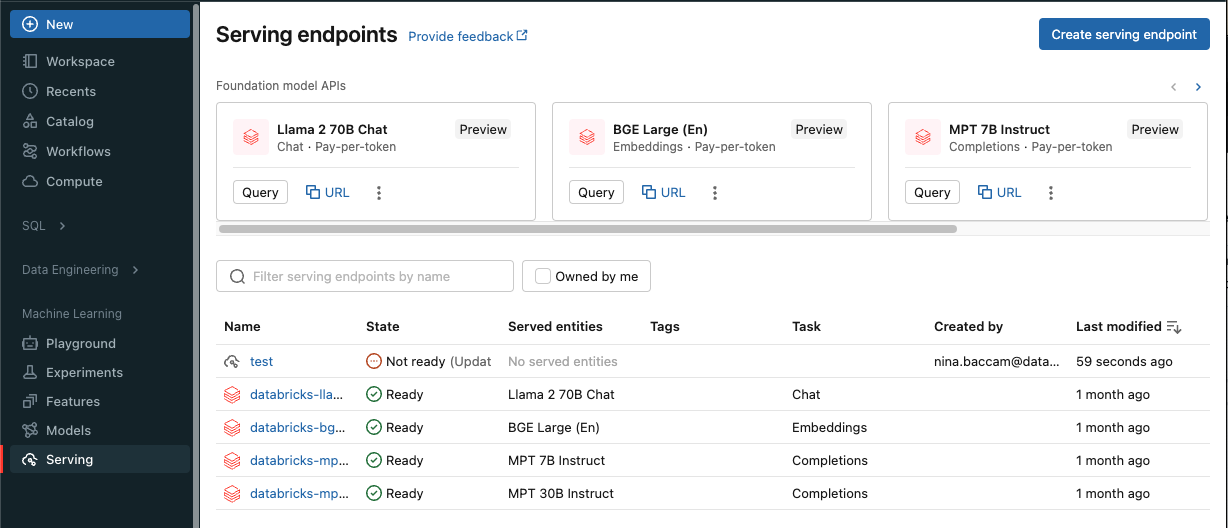
单击“创建服务终结点”。
在“名称”字段中,提供终结点的名称。
在“服务的实体”部分中
- 单击“实体”字段以打开“选择服务的实体”窗体。
- 选择 “我的模型- Unity 目录”。 窗体会根据您的选择动态更新。
- 选择您要使用并提供服务的
wine_quality_model模型版本。 - 选择 100 作为您希望路由到已部署模型的流量百分比。
- 选择 CPU 作为此示例的计算类型。
- 在 “计算横向扩展”下,选择“ 小 ”作为计算横向扩展大小。
单击 “创建” 。 “ 服务终结点 ”页显示“ 服务终结点”状态 显示为 “未就绪”。
终结点 准备就绪后,选择 使用向终结点提交推理请求。