一个管道中可能包含多个几乎相同的流,它们仅在少数几个参数上有所不同。 显式定义这些流容易出错,冗余且难以维护。 使用Python内部函数进行元编程会动态生成重复流,每个调用都提供一组不同的参数。
元编程概述
Lakeflow 管道中的元编程使用Python内部函数。 由于这些函数在管道运行时被延迟评估,因此可以将 @dp.table 修饰器封装在工厂方法中,并使用不同的参数多次调用该工厂方法。 每次调用都会注册一个新流,而无需复制代码。
有关在 Lakeflow 管道中使用 for 循环的详细信息,请参阅 在循环中创建 for 表。
示例:消防部门响应时间
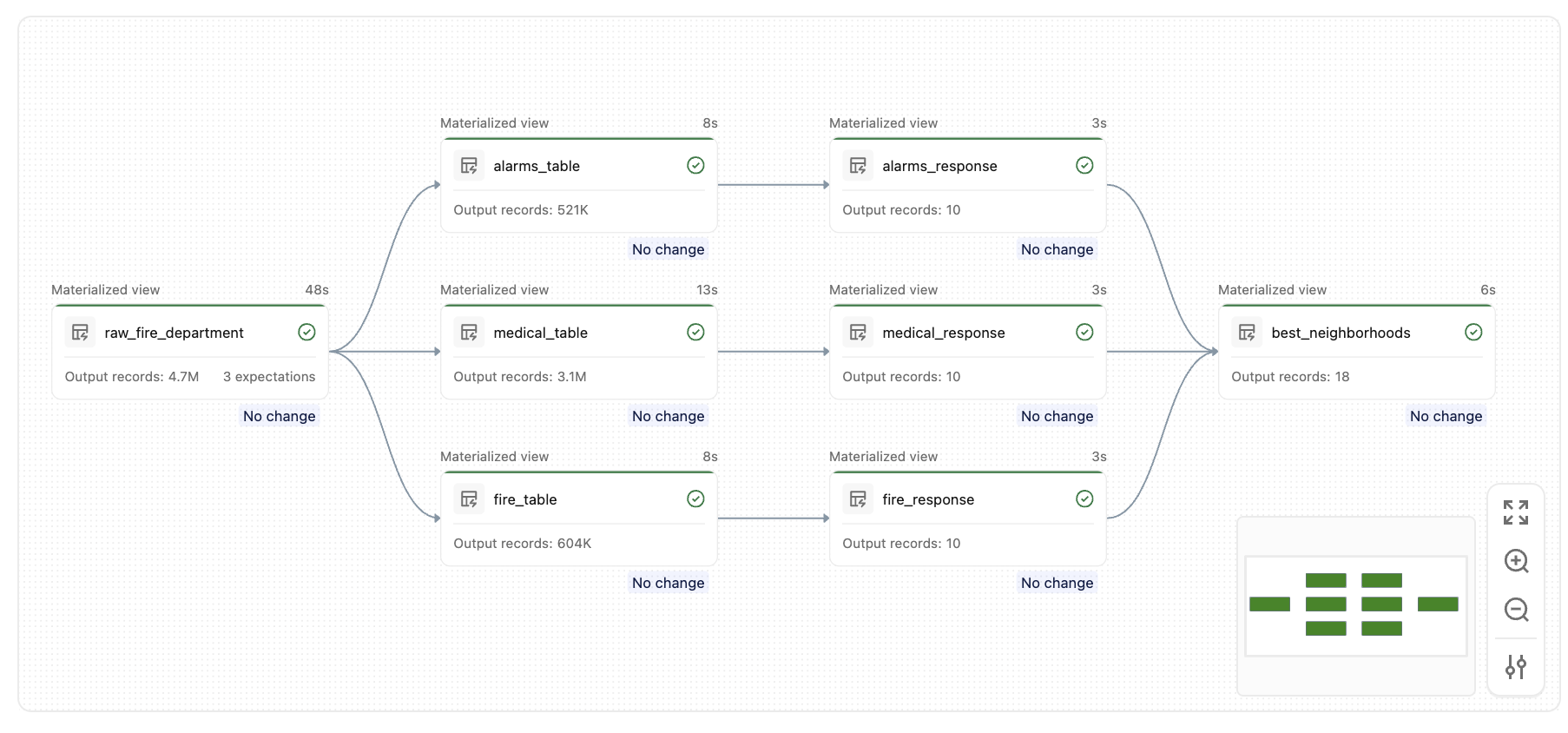
以下示例使用内置的消防部门数据集查找每个呼叫类型具有最快紧急响应时间的社区。 如果没有元编程,必须为每个调用类型(警报、结构火灾、医疗事件)编写几乎相同的表定义。 使用元编程,单个工厂函数将生成所有这些函数。
步骤 1:定义原始摄取表
import functools
from pyspark import pipelines as dp
from pyspark.sql.functions import *

@dp.table(
  name="raw_fire_department",
  comment="raw table for fire department response"
)
@dp.expect_or_drop("valid_received", "received IS NOT NULL")
@dp.expect_or_drop("valid_response", "responded IS NOT NULL")
@dp.expect_or_drop("valid_neighborhood", "neighborhood != 'None'")
def get_raw_fire_department():
  return (
    spark.read.format('csv')
      .option('header', 'true')
      .option('multiline', 'true')
      .load('/databricks-datasets/timeseries/Fires/Fire_Department_Calls_for_Service.csv')
      .withColumnRenamed('Call Type', 'call_type')
      .withColumnRenamed('Received DtTm', 'received')
      .withColumnRenamed('Response DtTm', 'responded')
      .withColumnRenamed('Neighborhooods - Analysis Boundaries', 'neighborhood')
      .select('call_type', 'received', 'responded', 'neighborhood')
  )
步骤 2:定义流工厂函数
工厂 generate_tables 函数为每个调用类型注册两个表:筛选的调用表和排名的响应时间表。 这两个内部函数都是用@dp.table修饰而创建的。
all_tables = []

def generate_tables(call_table, response_table, filter):
  @dp.table(
    name=call_table,
    comment="top level tables by call type"
  )
  def create_call_table():
    return spark.sql("""
      SELECT
        unix_timestamp(received,'M/d/yyyy h:m:s a') as ts_received,
        unix_timestamp(responded,'M/d/yyyy h:m:s a') as ts_responded,
        neighborhood
      FROM raw_fire_department
      WHERE call_type = '{filter}'
    """.format(filter=filter))

  @dp.table(
    name=response_table,
    comment="top 10 neighborhoods with fastest response time"
  )
  def create_response_table():
    return spark.sql("""
      SELECT
        neighborhood,
        AVG((ts_received - ts_responded)) as response_time
      FROM {call_table}
      GROUP BY 1
      ORDER BY response_time
      LIMIT 10
    """.format(call_table=call_table))

  all_tables.append(response_table)
步骤 3:调用工厂并定义摘要表
针对每种调用类型调用工厂函数一次,然后定义一个汇总表,合并结果以查找在所有类别中最常出现的区域。
generate_tables("alarms_table", "alarms_response", "Alarms")
generate_tables("fire_table", "fire_response", "Structure Fire")
generate_tables("medical_table", "medical_response", "Medical Incident")

@dp.table(
  name="best_neighborhoods",
  comment="which neighbor appears in the best response time list the most"
)
def summary():
  target_tables = [dp.read(t) for t in all_tables]
  unioned = functools.reduce(lambda x, y: x.union(y), target_tables)
  return (
    unioned.groupBy(col("neighborhood"))
      .agg(count("*").alias("score"))
      .orderBy(desc("score"))
  )
运行此管道后,将创建一组类似的表,如下所示:
重要概念
-
内部函数是惰性注册的:
@dp.table修饰器不会立即运行函数。 此修饰器将函数注册到管道运行时,该运行时会在执行开始前解析完整的数据流图。 -
闭包捕获参数:每个内部函数关闭传递给工厂的参数(
call_table、response_table和filter),因此每个注册的流都使用各自独立的一组值。 -
动态表列表:使用类似于
all_tables的列表以编程方式跟踪生成的表名称,这使得以后引用它们变得简便(例如,在并集或连接中)。