特征表可以通过两种方式提供:
- 模型服务:部署一个在特征表上训练过的模型。 同一端点用于特征查找和模型推断。 终结点会自动查找或计算特征值,利用记录模型时追踪的世系。 使用它来提供模型预测。
-
功能服务:部署一个直接引用特征表的
FeatureSpec,无需模型。 端点返回请求的功能输出。 当应用程序需要特征值而不是模型预测时,请使用此功能。 如果你最终用特征进行模型推断,Databricks建议直接使用模型服务。
这两种方法都支持预计算和按需功能。
要求
- Databricks Runtime 14.2 ML 或更高版本。
- 若要使用 Python API,功能服务需要
databricks-feature-engineering0.1.2 或更高版本,该版本内置于 Databricks Runtime 14.2 ML 中。 对于早期 Databricks Runtime ML 版本,请使用%pip install databricks-feature-engineering>=0.1.2手动安装所需的版本。 如果使用 Databricks 笔记本,则必须通过在新单元格中运行以下命令来重启Python内核:dbutils.library.restartPython()。 - 若要使用 Databricks SDK,功能服务需要
databricks-sdk0.18.0 或更高版本。 若要手动安装所需的版本,请使用%pip install databricks-sdk>=0.18.0。 如果使用 Databricks 笔记本,则必须通过在新单元格中运行以下命令来重启Python内核:dbutils.library.restartPython()。
Databricks 功能服务提供了一个 UI 和多个编程选项,用于创建、更新、查询和删除终结点。 本文包括以下每个选项的说明:
- Databricks 用户界面
- REST API
- Python API
- Databricks SDK
若要使用 REST API 或 MLflow 部署 SDK,必须具有 Databricks API 令牌。
重要说明
作为适用于生产场景的安全最佳做法,Databricks 建议在生产期间使用计算机到计算机 OAuth 令牌来进行身份验证。
对于测试和开发,Databricks 建议使用属于服务主体(而不是工作区用户)的个人访问令牌。 若要为服务主体创建令牌,请参阅管理服务主体的令牌。
功能服务的身份验证
有关身份验证的信息,请参阅 授权访问 Azure Databricks 资源。
创建 FeatureSpec
FeatureSpec 是用户定义的一组功能和函数。 可以在一个 FeatureSpec 中合并功能和函数。
FeatureSpecs 由 Unity 目录储存和管理,并显示在目录资源管理器中。
必须将 FeatureSpec 中指定的表发布到在线功能商店或第三方在线商店。 请参阅 Databricks Online 特征库。
必须使用 databricks-feature-engineering 包来创建 FeatureSpec。
首先,定义函数:
from unitycatalog.ai.core.databricks import DatabricksFunctionClient

client = DatabricksFunctionClient()

CATALOG = "main"
SCHEMA = "default"

def difference(num_1: float, num_2: float) -> float:
  """
  A function that accepts two floating point numbers, subtracts the second one
  from the first, and returns the result as a float.

  Args:
      num_1 (float): The first number.
      num_2 (float): The second number.

  Returns:
      float: The resulting difference of the two input numbers.
  """
  return num_1 - num_2

client.create_python_function(
  func=difference,
  catalog=CATALOG,
  schema=SCHEMA,
  replace=True
)
然后,可以在FeatureSpec中使用该函数。
from databricks.feature_engineering import (
  FeatureFunction,
  FeatureLookup,
  FeatureEngineeringClient,
)

fe = FeatureEngineeringClient()

features = [
  # Lookup column `average_yearly_spend` and `country` from a table in UC by the input `user_id`.
  FeatureLookup(
    table_name="main.default.customer_profile",
    lookup_key="user_id",
    feature_names=["average_yearly_spend", "country"]
  ),
  # Calculate a new feature called `spending_gap` - the difference between `ytd_spend` and `average_yearly_spend`.
  FeatureFunction(
    udf_name="main.default.difference",
    output_name="spending_gap",
    # Bind the function parameter with input from other features or from request.
    # The function calculates num_1 - num_2.
    input_bindings={"num_1": "ytd_spend", "num_2": "average_yearly_spend"},
  ),
]

# Create a `FeatureSpec` with the features defined above.
# The `FeatureSpec` can be accessed in Unity Catalog as a function.
fe.create_feature_spec(
  name="main.default.customer_features",
  features=features,
)
指定默认值
若要指定功能的默认值,请使用 default_values .. 中的 FeatureLookup参数。 请参阅以下示例:
feature_lookups = [
    FeatureLookup(
        table_name="ml.recommender_system.customer_features",
        feature_names=[
            "membership_tier",
            "age",
            "page_views_count_30days",
        ],
        lookup_key="customer_id",
        default_values={
          "age": 18,
          "membership_tier": "bronze"
        },
    ),
]
如果使用 rename_outputs 参数重命名特征列,则 default_values 必须使用重命名后的特征名称。
FeatureLookup(
  table_name = 'main.default.table',
  feature_names = ['materialized_feature_value'],
  lookup_key = 'id',
  rename_outputs={"materialized_feature_value": "feature_value"},
  default_values={
    "feature_value": 0
  }
)
添加 Python 依赖
如果用户定义的函数(UDF)导入 Python 包,请在创建 FeatureSpec 时声明这些包。 该 extra_pip_requirements 参数需要 databricks-feature-engineering 版本 0.17.0 或更高版本。 特征服务会自动安装 MLflow 和 databricks-feature-lookup 软件包。
例如,如果你的功能规范中的一个 UDF 导入了 NumPy,可以在规范中添加以下要求:
fe.create_feature_spec(
    name="main.default.customer_features_with_dependencies",
    features=features,
    extra_pip_requirements=["numpy==1.26.4"],
)
在main.default.customer_features_with_dependencies时,使用作为规范名称。
extra_pip_requirements 中的每个条目都必须是 PyPI 依赖项字符串(例如 numpy==1.26.4),或者是 Unity Catalog 卷中 .whl 文件的路径。 例如,对于你已上传的车轮,请使用 /Volumes/main/libraries/wheels/custom_features-1.0.0-py3-none-any.whl。 端点创建者必须在卷上拥有 USE CATALOG,并在其父目录和架构上拥有 USE SCHEMA 和 READ VOLUME。
对于来自私有仓库的包,配置 工作空间默认包仓库。 不要将 pip 命令选项(例如 --index-url)放在 extra_pip_requirements 中。
Unity Catalog UDF ENVIRONMENT 中的依赖适用于离线 SQL 执行。 功能服务不会自动复制这些内容。 在功能规范要求中声明所有UDF所需的包,包括上游特征中的UDF。
如果终端部署失败,检查构建日志是否有包安装错误、版本冲突或轮式访问失败。 请参阅 “监视模型质量和终结点运行状况”。
关于带有 CustomUDF 和 FeatureViewSource的示例,请参见 Serve CustomUDF 特征及其依赖关系。 关于模型服务依赖,请参见 自定义UDF依赖。
创建终结点
FeatureSpec 定义了终结点。 有关详细信息,请参阅创建提供终结点的自定义模型、Python API 文档或 Databricks SDK 文档了解详细信息。
注意
对于延迟敏感或每秒需要高查询的工作负荷,模型服务在自定义模型服务终结点上提供路由优化,请参阅 服务终结点上的路由优化。
Databricks SDK - Python
from databricks.sdk import WorkspaceClient
from databricks.sdk.service.serving import EndpointCoreConfigInput, ServedEntityInput

workspace = WorkspaceClient()

# Create endpoint
workspace.serving_endpoints.create(
  name="my-serving-endpoint",
  config = EndpointCoreConfigInput(
    served_entities=[
    ServedEntityInput(
        entity_name="main.default.customer_features",
        scale_to_zero_enabled=True,
        workload_size="Small"
      )
    ]
  )
)
Python API
from databricks.feature_engineering.entities.feature_serving_endpoint import (
  ServedEntity,
  EndpointCoreConfig,
)

fe.create_feature_serving_endpoint(
  name="customer-features",
    config=EndpointCoreConfig(
    served_entities=ServedEntity(
      feature_spec_name="main.default.customer_features",
             workload_size="Small",
             scale_to_zero_enabled=True,
             instance_profile_arn=None,
    )
  )
)
REST API
curl -X POST -u token:$DATABRICKS_API_TOKEN ${WORKSPACE_URL}/api/2.0/serving-endpoints \
    -H 'Content-Type: application/json' \
    -d '"name": "customer-features",
   "config": {
       "served_entities": [
           {
               "entity_name": "main.default.customer_features",
               "workload_size": "Small",
               "scale_to_zero_enabled": true
           }
       ]
   }'
若要查看终结点,请单击 Databricks UI 左侧边栏中的“服务”。 当状态为“就绪”时,终结点可以响应查询。 若要了解有关模型服务的详细信息,请参阅 模型服务。
在推理表中保存扩充的数据帧
对于从 2025 年 2 月开始创建的终结点,可以将模型服务终结点配置为记录包含查找特征值和函数返回值的扩充数据帧。 DataFrame 将保存到服务模型的推断表中。
有关设置此配置的说明,请参阅将功能查找数据帧记录到推理表中。
有关推理表的信息,请参阅记录服务端点的请求和响应日志(旧版)。
获取终结点
可以使用 Databricks SDK 或 Python API 获取终结点的元数据和状态。
Databricks SDK - Python
from databricks.sdk import WorkspaceClient
workspace = WorkspaceClient()

endpoint = workspace.serving_endpoints.get(name="customer-features")
# print(endpoint)
Python API
endpoint = fe.get_feature_serving_endpoint(name="customer-features")
# print(endpoint)
获取终结点的架构
可以使用 Databricks SDK 或 REST API 来获取终结点的架构。 有关终结点架构的详细信息,请参阅“获取提供终结点架构的模型”。
Databricks SDK - Python
from databricks.sdk import WorkspaceClient
workspace = WorkspaceClient()

# Create endpoint
endpoint = workspace.serving_endpoints.get_open_api(name="customer-features")
REST API
ACCESS_TOKEN=<token>
ENDPOINT_NAME=<endpoint name>

curl "https://example.databricks.com/api/2.0/serving-endpoints/$ENDPOINT_NAME/openapi" -H "Authorization: Bearer $ACCESS_TOKEN" -H "Content-Type: application/json"
查询终结点
可以使用 REST API、MLflow 部署 SDK 或服务 UI 查询终结点。
以下代码展示了如何在使用 MLflow 部署 SDK 时设置凭据并创建客户端。
  # Set up credentials
  export DATABRICKS_HOST=...
  export DATABRICKS_TOKEN=...
  # Set up the client
  import mlflow.deployments

  client = mlflow.deployments.get_deploy_client("databricks")
注意
作为安全最佳做法,在使用自动化工具、系统、脚本和应用进行身份验证时,Databricks 建议使用属于服务主体(而不是工作区用户)的个人访问令牌。 若要为服务主体创建令牌,请参阅管理服务主体的令牌。
使用 API 查询终结点
本部分包括使用 REST API 或 MLflow 部署 SDK 查询终结点的示例。
MLflow 部署 SDK
重要说明
以下示例使用 predict() 中的 API。 此 API 是实验性的,API 定义可能会发生变化。
import mlflow.deployments

client = mlflow.deployments.get_deploy_client("databricks")
response = client.predict(
    endpoint="test-feature-endpoint",
    inputs={
        "dataframe_records": [
            {"user_id": 1, "ytd_spend": 598},
            {"user_id": 2, "ytd_spend": 280},
        ]
    },
)
REST API
curl -X POST -u token:$DATABRICKS_API_TOKEN $ENDPOINT_INVOCATION_URL \
  -H 'Content-Type: application/json' \
  -d '{"dataframe_records": [
          {"user_id": 1, "ytd_spend": 598},
          {"user_id": 2, "ytd_spend": 280}
      ]}'
使用 UI 查询终结点
可以直接从服务 UI 查询服务终结点。 UI 包含可用于查询终结点的生成的代码示例。
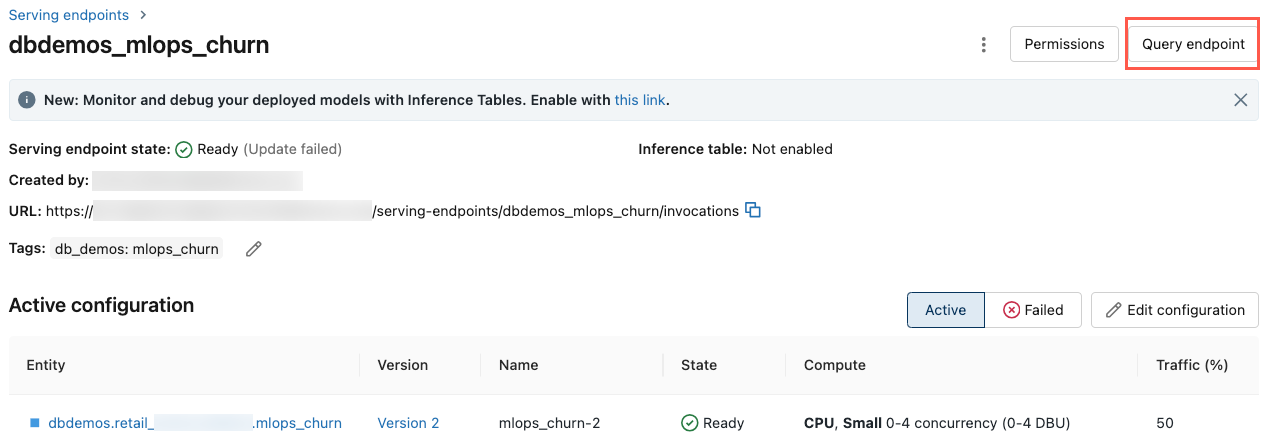
在Azure Databricks工作区的左侧栏中,单击Serving。
单击要查询的终结点。
在屏幕右上角,单击“查询终结点”。
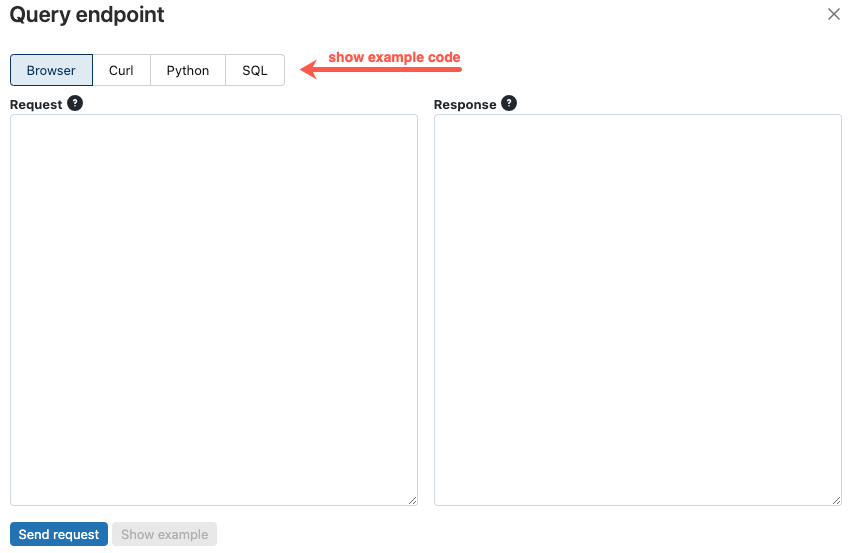
在“请求”框中,键入 JSON 格式的请求正文。
单击“发送请求”。
// Example of a request body.
{
  "dataframe_records": [
    { "user_id": 1, "ytd_spend": 598 },
    { "user_id": 2, "ytd_spend": 280 }
  ]
}
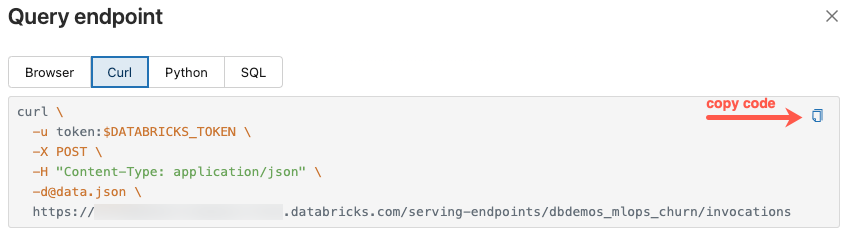
Query 终结点对话框在 curl、Python 和 SQL 中包含生成的示例代码。 单击选项卡查看并复制示例代码。
若要复制代码,请单击文本框右上角的复制图标。
更新终结点
重要说明
若要修改功能服务终结点的配置(如更改 FeatureSpec 或工作负荷大小),请始终使用本节中所述的更新 API。 请勿删除并重新创建终结点以应用更改。 删除一个正在运行的终结点会立即引起停机,并中断所有查询它的应用程序。
可以使用 REST API、Databricks SDK 或服务 UI 更新终结点。
使用 API 更新终结点
Databricks SDK - Python
from databricks.sdk import WorkspaceClient
workspace = WorkspaceClient()

workspace.serving_endpoints.update_config(
  name="my-serving-endpoint",
  served_entities=[
    ServedEntityInput(
      entity_name="main.default.customer_features",
      scale_to_zero_enabled=True,
      workload_size="Small"
    )
  ]
)
REST API
curl -X PUT -u token:$DATABRICKS_API_TOKEN ${WORKSPACE_URL}/api/2.0/serving-endpoints/<endpoint_name>/config \
  -H 'Content-Type: application/json' \
  -d '"served_entities": [
        {
            "name": "customer-features",
            "entity_name": "main.default.customer_features_new",
            "workload_size": "Small",
            "scale_to_zero_enabled": True
        }
    ]'
使用 UI 创建终结点
按照以下步骤使用服务 UI:
- 在Azure Databricks工作区的左侧栏中,单击Serving。
- 在表中,单击要更新的终结点的名称。 会显示终结点屏幕。
- 在屏幕右上角,单击“编辑终结点”。
- 在编辑服务终结点对话框中,根据需要编辑终结点设置。
- 单击“更新”以保存更改。

删除终结点
警告
此操作不可逆。 删除功能服务终结点会导致查询该功能的任何应用程序立即停机。 如果要更改终结点的配置,请使用 更新终结点 ,而不是删除和重新创建终结点。
可以使用 REST API、Databricks SDK、Python API 或服务 UI 删除终结点。
使用 API 删除终结点
Databricks SDK - Python
from databricks.sdk import WorkspaceClient
workspace = WorkspaceClient()

workspace.serving_endpoints.delete(name="customer-features")
Python API
fe.delete_feature_serving_endpoint(name="customer-features")
REST API
curl -X DELETE -u token:$DATABRICKS_API_TOKEN ${WORKSPACE_URL}/api/2.0/serving-endpoints/<endpoint_name>
使用 UI 删除终结点
按照以下步骤使用服务 UI 删除终结点:
- 在Azure Databricks工作区的左侧栏中,单击Serving。
- 在表中,单击要删除的终结点的名称。 会显示终结点屏幕。
- 在屏幕右上角,单击烤肉串
 然后选择“ 删除”。

监视终结点的运行状况
有关功能服务终结点可用的日志和指标的信息,请参阅监视模型质量和终结点运行状况。
访问控制
有关功能服务终结点的权限的信息,请参阅 管理模型服务终结点的权限。
示例笔记本
此笔记本展示如何使用 Databricks SDK 通过 Databricks Online 功能存储创建功能服务端点。