Azure DevOps Services |Azure DevOps Server |Azure DevOps Server 2022
你可以将管道整理到作业中。 每个管道至少有一个作业。 作业是作为一个单元按顺序运行的一系列步骤。 换句话说,作业是可以计划运行的最小工作单位。
若要了解构成管道的关键概念和组件,请参阅 新 Azure Pipelines 用户的关键概念。
Azure Pipelines 不支持 YAML 管道的作业优先级。 若要控制作业运行时,可以指定条件和依赖项。
定义单个作业
在最简单的情况下,管道有一个作业。 在这种情况下,除非使用job,否则不必显式使用 关键字。 可以直接在 YAML 文件中指定步骤。
此 YAML 文件具有在 Microsoft 托管代理 上运行并输出 Hello world 的作业。
pool:
  vmImage: 'ubuntu-latest'
steps:
- bash: echo "Hello world"
你可能想要在该作业上指定其他属性。 在这种情况下,可以使用 job 关键字。
jobs:
- job: myJob
  timeoutInMinutes: 10
  pool:
    vmImage: 'ubuntu-latest'
  steps:
  - bash: echo "Hello world"
管道可以有多个作业。 在这种情况下,可以使用 jobs 关键字。
jobs:
- job: A
  steps:
  - bash: echo "A"

- job: B
  steps:
  - bash: echo "B"
管道可能有多个阶段,每个阶段具有多个作业。 在这种情况下,可以使用 stages 关键字。
stages:
- stage: A
  jobs:
  - job: A1
  - job: A2

- stage: B
  jobs:
  - job: B1
  - job: B2
用于指定作业的完整语法为:
- job: string  # name of the job, A-Z, a-z, 0-9, and underscore
  displayName: string  # friendly name to display in the UI
  dependsOn: string | [ string ]
  condition: string
  strategy:
    parallel: # parallel strategy
    matrix: # matrix strategy
    maxParallel: number # maximum number simultaneous matrix legs to run
    # note: `parallel` and `matrix` are mutually exclusive
    # you may specify one or the other; including both is an error
    # `maxParallel` is only valid with `matrix`
  continueOnError: boolean  # 'true' if future jobs should run even if this job fails; defaults to 'false'
  pool: pool # agent pool
  workspace:
    clean: outputs | resources | all # what to clean up before the job runs
  container: containerReference # container to run this job inside
  timeoutInMinutes: number # how long to run the job before automatically cancelling
  cancelTimeoutInMinutes: number # how much time to give 'run always even if cancelled tasks' before killing them
  variables: { string: string } | [ variable | variableReference ]
  steps: [ script | bash | pwsh | powershell | checkout | task | templateReference ]
  services: { string: string | container } # container resources to run as a service container
用于指定作业的完整语法为:
- job: string  # name of the job, A-Z, a-z, 0-9, and underscore
  displayName: string  # friendly name to display in the UI
  dependsOn: string | [ string ]
  condition: string
  strategy:
    parallel: # parallel strategy
    matrix: # matrix strategy
    maxParallel: number # maximum number simultaneous matrix legs to run
    # note: `parallel` and `matrix` are mutually exclusive
    # you may specify one or the other; including both is an error
    # `maxParallel` is only valid with `matrix`
  continueOnError: boolean  # 'true' if future jobs should run even if this job fails; defaults to 'false'
  pool: pool # agent pool
  workspace:
    clean: outputs | resources | all # what to clean up before the job runs
  container: containerReference # container to run this job inside
  timeoutInMinutes: number # how long to run the job before automatically cancelling
  cancelTimeoutInMinutes: number # how much time to give 'run always even if cancelled tasks' before killing them
  variables: { string: string } | [ variable | variableReference ]
  steps: [ script | bash | pwsh | powershell | checkout | task | templateReference ]
  services: { string: string | container } # container resources to run as a service container
  uses: # Any resources (repos or pools) required by this job that are not already referenced
    repositories: [ string ] # Repository references to Azure Git repositories
    pools: [ string ] # Pool names, typically when using a matrix strategy for the job
如果作业的主要目的是部署应用(而不是生成或测试应用),则可以使用称为部署作业的特殊作业类型。
部署作业的语法为:
- deployment: string        # instead of job keyword, use deployment keyword
  pool:
    name: string
    demands: string | [ string ]
  environment: string
  strategy:
    runOnce:
      deploy:
        steps:
        - script: echo Hi!
尽管可以在 job 中添加部署任务的步骤,但我们建议改用部署作业。 部署作业有一些好处。 例如,可以部署到环境,其中包括能够查看已部署内容历史记录等好处。

作业类型
作业可以是不同类型,具体取决于它们的运行位置。
代理池作业
代理池作业是最常见的任务。 这些作业在代理池中的代理上运行。 可以指定运行作业的池,还可以指定需求,以指定代理运行作业必须具备的功能。 代理可以由微软托管或自行托管。 有关详细信息,请参阅 Azure Pipelines 代理。
- 使用 Microsoft 托管代理时,管道中的每个作业都会获得一个新的代理。
- 使用自承载代理时,可以使用要求来指定代理必须具备哪些功能才能运行作业。 你可能会为连续作业获取相同的代理,具体取决于代理池中是否存在多个与管道需求匹配的代理。 如果池中只有一个与管道需求匹配的代理,则管道将等待,直到此代理可用。
注意
需求和功能设计用于自托管代理,以便作业可与满足作业要求的代理匹配。 使用 Microsoft 托管代理时,可以为代理选择一个符合作业要求的映像。 尽管可以将功能添加到 Microsoft 托管的代理,但无需在 Microsoft 托管的代理中使用功能。
pool:
  name: myPrivateAgents    # your job runs on an agent in this pool
  demands: agent.os -equals Windows_NT    # the agent must have this capability to run the job
steps:
- script: echo hello world
或多个需求:
pool:
  name: myPrivateAgents
  demands:
  - agent.os -equals Darwin
  - anotherCapability -equals somethingElse
steps:
- script: echo hello world
详细了解代理功能。
服务器作业
服务器协调和执行服务器作业中的任务。 服务器作业不需要代理或任何目标计算机。 服务器作业目前仅支持少数任务。 服务器作业的最大时间为 30 天。
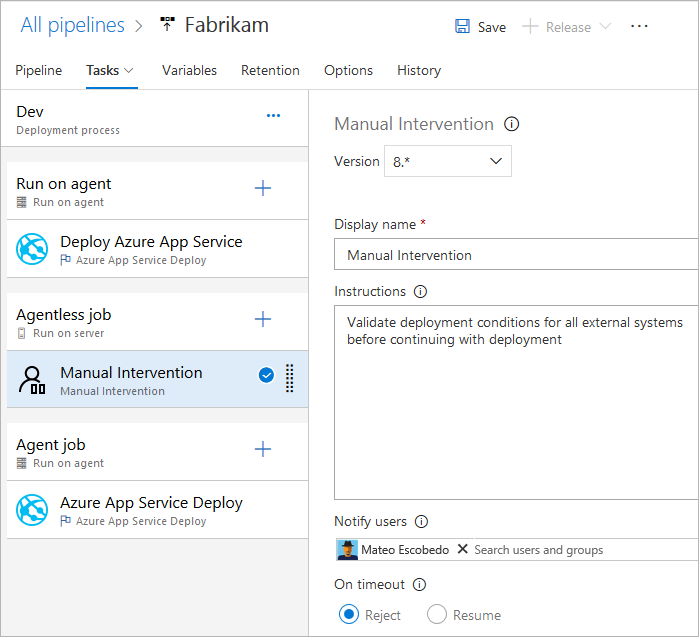
无代理作业支持的任务
目前,无代理作业仅支持以下现成任务:
由于任务是可扩展的,因此可以使用扩展添加更多无代理任务。 无代理作业的默认超时时间为 60 分钟。
用于指定服务器作业的完整语法为:
jobs:
- job: string
  timeoutInMinutes: number
  cancelTimeoutInMinutes: number
  strategy:
    maxParallel: number
    matrix: { string: { string: string } }

  pool: server # note: the value 'server' is a reserved keyword which indicates this is an agentless job
还可以使用简化的语法:
jobs:
- job: string
  pool: server # note: the value 'server' is a reserved keyword which indicates this is an agentless job
依赖项
在单个阶段中定义多个作业时,可以指定这些作业之间的依赖关系。 管道必须包含至少一个没有依赖关系的作业。 默认情况下,除非设置了值 dependsOn,否则 Azure DevOps YAML 管道作业将并行运行。
注意
每个代理一次只能运行一个作业。 若要并行运行多个作业,必须配置多个代理。 还需要足够的并行作业。
用于定义多个作业及其依赖关系的语法为:
jobs:
- job: string
  dependsOn: string
  condition: string
按顺序生成的示例作业:
jobs:
- job: Debug
  steps:
  - script: echo hello from the Debug build
- job: Release
  dependsOn: Debug
  steps:
  - script: echo hello from the Release build
并行生成的示例作业(无依赖关系):
jobs:
- job: Windows
  pool:
    vmImage: 'windows-latest'
  steps:
  - script: echo hello from Windows
- job: macOS
  pool:
    vmImage: 'macOS-latest'
  steps:
  - script: echo hello from macOS
- job: Linux
  pool:
    vmImage: 'ubuntu-latest'
  steps:
  - script: echo hello from Linux
扇出示例:
jobs:
- job: InitialJob
  steps:
  - script: echo hello from initial job
- job: SubsequentA
  dependsOn: InitialJob
  steps:
  - script: echo hello from subsequent A
- job: SubsequentB
  dependsOn: InitialJob
  steps:
  - script: echo hello from subsequent B
扇入示例:
jobs:
- job: InitialA
  steps:
  - script: echo hello from initial A
- job: InitialB
  steps:
  - script: echo hello from initial B
- job: Subsequent
  dependsOn:
  - InitialA
  - InitialB
  steps:
  - script: echo hello from subsequent
条件
可以指定每个作业运行的条件。 默认情况下,如果作业不依赖于任何其他作业,或者其所依赖的所有作业都已成功完成,则该作业就会运行。 可以通过强制作业运行(即使先前的作业失败)或通过指定自定义条件来自定义此行为。
基于运行上一作业的状态运行作业的示例:
jobs:
- job: A
  steps:
  - script: exit 1

- job: B
  dependsOn: A
  condition: failed()
  steps:
  - script: echo this will run when A fails

- job: C
  dependsOn:
  - A
  - B
  condition: succeeded('B')
  steps:
  - script: echo this will run when B runs and succeeds
使用自定义条件的示例:
jobs:
- job: A
  steps:
  - script: echo hello

- job: B
  dependsOn: A
  condition: and(succeeded(), eq(variables['build.sourceBranch'], 'refs/heads/main'))
  steps:
  - script: echo this only runs for master
可以指定作业根据上一作业中设置的输出变量的值运行。 在这种情况下,只能使用直接依赖作业中设置的变量:
jobs:
- job: A
  steps:
  - script: "echo '##vso[task.setvariable variable=skipsubsequent;isOutput=true]false'"
    name: printvar

- job: B
  condition: and(succeeded(), ne(dependencies.A.outputs['printvar.skipsubsequent'], 'true'))
  dependsOn: A
  steps:
  - script: echo hello from B
超时
为了避免在作业无响应或等待太长时占用资源,可以设置作业运行时间限制。 使用作业超时设置来指定作业运行限制(以分钟为单位)。 将值设置为零表示作业可以:
- 在自托管代理上永久运行
- 在具有公共项目和公共存储库的 Microsoft 托管代理上运行 360 分钟(6 小时)
- 在具有专用项目或专用存储库的 Microsoft 托管代理上运行 60 分钟(除非支付了额外的容量)
超时期限从作业开始运行时开始。 不包括工作排队或等待代理的时间。
timeoutInMinutes 允许为作业执行时间设置限制。 如果未指定,则默认值为 60 分钟。 指定 0 后,会使用最大限制。
当部署任务设置为在上一个任务失败时继续运行,cancelTimeoutInMinutes 允许为作业取消时间设置限制。 如果未指定,默认值为 5 分钟。 该值的范围应介于 1 到 35790 分钟之间。
注意
设置 timeoutInMinutes 或 cancelTimeoutInMinutes 高于 Microsoft 托管代理的最大作业时长不会影响托管代理的作业管道,因为这些作业将由于托管代理的限制而超时。 有关详细信息,请参阅前面的 超时 部分。
jobs:
- job: Test
  timeoutInMinutes: 10 # how long to run the job before automatically cancelling
  cancelTimeoutInMinutes: 2 # how much time to give 'run always even if cancelled tasks' before stopping them
超时的优先级如下。
- 在 Microsoft 托管的代理上,根据项目类型以及是否使用付费并行作业运行来限制作业可以运行多长时间。 当 Microsoft 托管的作业超时间隔过时,作业将终止。 在 Microsoft 托管的代理上,作业的运行时间不能超过此间隔,不管作业中指定的任何作业级别超时。
- 在作业级别配置的超时指定要运行的作业的最大持续时间。 作业级别超时间隔过后,作业将终止。 在 Microsoft 托管代理上运行作业时,将作业级别超时设置为大于内置 Microsoft 托管作业级别超时不起作用。
- 还可以单独为每个任务设置超时 - 请参阅任务控制选项。 如果作业级别超时间隔在任务完成之前已过,则运行作业将终止,即使任务配置了更长的超时间隔。
多作业配置
在创作的单个作业中,可以在多个代理上并行运行多个作业。 示例包括:
多配置生成:可以并行生成多个配置。 例如,可以在
debug和release平台上为x86和x64配置生成 Visual C++ 应用。 有关详细信息,请参阅 Visual Studio 生成 - 多个平台的多个配置。多配置部署:例如,可以在不同的地理区域并行运行多个部署。
多配置测试:可以并行运行测试多个配置。
即使多配置变量为空,多配置也始终生成至少一个作业。
matrix 策略允许使用不同的变量集多次调度作业。
maxParallel 标记限制并行度。 以下作业将调度三次,并将“位置”和“浏览器”设置为指定值。 但是,只有两个作业将同时运行。
jobs:
- job: Test
  strategy:
    maxParallel: 2
    matrix:
      US_IE:
        Location: US
        Browser: IE
      US_Chrome:
        Location: US
        Browser: Chrome
      Europe_Chrome:
        Location: Europe
        Browser: Chrome
注意
矩阵配置名称(如示例中的 US_IE)只能包含基本拉丁字母(A - Z 和 a - z)、数字以及下划线 (_)。
它们必须以字母开头。
此外,名称长度不能超过 100 个字符。
还可以使用输出变量生成矩阵。 如果需要使用脚本生成矩阵,此方法可能很方便。
matrix 将接受包含字符串化 JSON 对象的运行时表达式。
展开时,该 JSON 对象必须与矩阵语法匹配。
在以下示例中,我们硬编码了 JSON 字符串,但可以使用脚本语言或命令行程序生成它。
jobs:
- job: generator
  steps:
  - bash: echo "##vso[task.setVariable variable=legs;isOutput=true]{'a':{'myvar':'A'}, 'b':{'myvar':'B'}}"
    name: mtrx
  # This expands to the matrix
  #   a:
  #     myvar: A
  #   b:
  #     myvar: B
- job: runner
  dependsOn: generator
  strategy:
    matrix: $[ dependencies.generator.outputs['mtrx.legs'] ]
  steps:
  - script: echo $(myvar) # echos A or B depending on which leg is running
切片
代理作业可用于并行运行一套测试。 例如,你可以在一个代理上运行一大套测试(1000 个)。 也可以使用两个代理,在每个代理上并行运行 500 个测试。
若要应用切片,作业中的任务应当足够智能,了解自己所属的切片。
Visual Studio 测试任务是支持测试切片的此类任务之一。 如果已安装多个代理,则可以指定 Visual Studio 测试任务在这些代理上并行运行的方式。
parallel 策略使作业可以重复多次。
变量 System.JobPositionInPhase 和 System.TotalJobsInPhase 将添加到每个作业。 然后,可以在脚本中使用变量在作业之间划分工作。
请参阅使用代理作业进行并行和多次执行。
以下作业将被调度五次,并相应地设置 System.JobPositionInPhase 和 System.TotalJobsInPhase 的值。
jobs:
- job: Test
  strategy:
    parallel: 5
作业变量
如果使用 YAML,则可以在作业上指定变量。 可以使用宏语法 $ (variableName) 将变量传递给任务输入,或使用阶段变量在脚本中访问变量。
下面是在作业中定义变量并在任务中使用变量的示例。
variables:
  mySimpleVar: simple var value
  "my.dotted.var": dotted var value
  "my var with spaces": var with spaces value

steps:
- script: echo Input macro = $(mySimpleVar). Env var = %MYSIMPLEVAR%
  condition: eq(variables['agent.os'], 'Windows_NT')
- script: echo Input macro = $(mySimpleVar). Env var = $MYSIMPLEVAR
  condition: in(variables['agent.os'], 'Darwin', 'Linux')
- bash: echo Input macro = $(my.dotted.var). Env var = $MY_DOTTED_VAR
- powershell: Write-Host "Input macro = $(my var with spaces). Env var = $env:MY_VAR_WITH_SPACES"
有关使用条件的信息,请参阅指定条件。
工作区
运行代理池作业时,它会在代理上创建工作区。 工作区是一个目录,它在其中下载源、运行步骤并生成输出。 可以在作业中使用 Pipeline.Workspace 变量引用工作区目录。 在该目录下,将创建各种子目录:
-
Build.SourcesDirectory是任务下载应用程序源代码的位置。 -
Build.ArtifactStagingDirectory是任务下载管道所需的生成工件或在发布生成工件之前上传生成工件的位置。 -
Build.BinariesDirectory是任务写入其输出的位置。 -
Common.TestResultsDirectory是任务上传其测试结果的位置。
在每次构建之前,$(Build.ArtifactStagingDirectory) 和 $(Common.TestResultsDirectory) 始终会被删除并重新创建。
在自托管代理上运行管道时,默认情况下,不会在两个连续运行之间清理除 $(Build.ArtifactStagingDirectory) 和 $(Common.TestResultsDirectory) 之外的任何子目录。 因此,可以执行增量生成和部署,前提是实现了相应的任务。 可以使用作业上的 workspace 设置替代此行为。
重要
工作区清理选项仅适用于自托管代理。 使用 Microsoft 托管代理时,作业始终在新代理上运行。
- job: myJob
  workspace:
    clean: outputs | resources | all # what to clean up before the job runs
指定其中 clean 一个选项时,其解释如下:
-
outputs:在运行新作业之前删除Build.BinariesDirectory。 -
resources:在运行新作业之前删除Build.SourcesDirectory。 -
all:在运行新作业之前删除整个Pipeline.Workspace目录。
  jobs:
  - deployment: MyDeploy
    pool:
      vmImage: 'ubuntu-latest'
    workspace:
      clean: all
    environment: staging
注意
根据代理功能和管道需求,每个作业可能会路由到自托管池中的不同代理。 因此,你可能会在后续管道运行(或同一管道中的阶段或作业)中获得新代理,因此不清理并不能保证后续运行、作业或阶段将能够访问以前运行、作业或阶段的输出。 你可以配置代理功能和管道要求,以指定哪些代理用于运行管道作业。 但是,除非池中只有一个代理可以满足需求,否则无法保证后续作业使用与先前作业相同的代理。 有关详细信息,请参阅指定需求。
除了工作区清理之外,还可以通过在管道设置 UI 中配置清理设置来配置清理。 当清理设置为 true 时(这也是其默认值),就等效于为管道中的每个clean: true步骤指定 。 指定 clean: true时,先运行 git clean -ffdx 然后再运行 git reset --hard HEAD,之后再进行 git fetch。
配置“清理”设置:
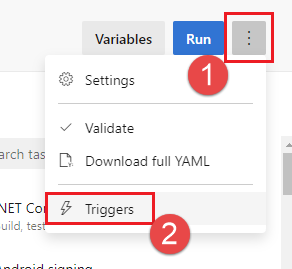
编辑管道,选择 ...,然后选择触发器。
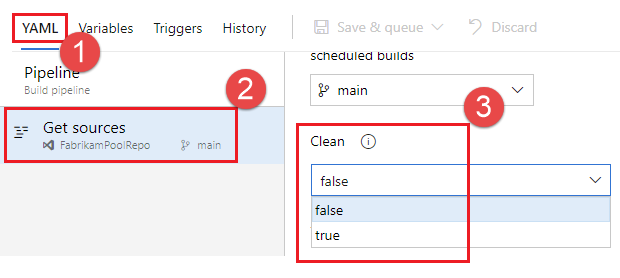
选择 YAML、获取源,并配置所需的清理设置。 默认值为 true。
生成工件下载
此示例 YAML 文件发布生成工件 Website,然后将生成工件下载到 $(Pipeline.Workspace)。 仅当生成作业成功时,部署作业才会运行。
# test and upload my code as an artifact named Website
jobs:
- job: Build
  pool:
    vmImage: 'ubuntu-latest'
  steps:
  - script: npm test
  - task: PublishPipelineArtifact@1
    inputs:
      artifactName: Website
      targetPath: '$(System.DefaultWorkingDirectory)'

# download the artifact and deploy it only if the build job succeeded
- job: Deploy
  pool:
    vmImage: 'ubuntu-latest'
  steps:
  - checkout: none #skip checking out the default repository resource
  - task: DownloadPipelineArtifact@2
    displayName: 'Download Pipeline Artifact'
    inputs:
      artifactName: Website
      targetPath: '$(Pipeline.Workspace)'
  dependsOn: Build
  condition: succeeded()
有关使用 dependsOn 和条件的信息,请参阅指定条件。
访问 OAuth 令牌
可以允许作业中运行的脚本访问当前的 Azure Pipelines OAuth 安全令牌。 此令牌可用于向 Azure Pipelines REST API 进行身份验证。
OAuth 令牌始终可用于 YAML 管道。
必须使用 env 将其显式映射到任务或步骤中。
下面是一个示例:
steps:
- powershell: |
    $url = "$($env:SYSTEM_TEAMFOUNDATIONCOLLECTIONURI)$env:SYSTEM_TEAMPROJECTID/_apis/build/definitions/$($env:SYSTEM_DEFINITIONID)?api-version=4.1-preview"
    Write-Host "URL: $url"
    $pipeline = Invoke-RestMethod -Uri $url -Headers @{
      Authorization = "Bearer $env:SYSTEM_ACCESSTOKEN"
    }
    Write-Host "Pipeline = $($pipeline | ConvertTo-Json -Depth 100)"
  env:
    SYSTEM_ACCESSTOKEN: $(system.accesstoken)