你当前正在访问 Microsoft Azure Global Edition 技术文档网站。 如果需要访问由世纪互联运营的 Microsoft Azure 中国技术文档网站,请访问 https://docs.azure.cn。
在本快速入门中,你将现有的 .NET Durable Task SDK 示例部署到 Azure Kubernetes Service (AKS),并将 Durable Task 计划程序作为业务流程后端。 部署使用 Azure Developer CLI(azd)和 document 处理示例。
你将学会如何:
- 在本地设置并运行 Durable Task Scheduler 模拟器。
- 在 AKS 场景示例中运行 .NET 客户端和工作器项目。
- 使用
azd up.. 将示例基础结构和应用部署到 AKS。 - 通过查看 Pod 日志来验证 AKS 中的编排执行。
先决条件
开始之前:
安装:
登录到 Azure 和 Azure 开发人员 CLI:
az login
azd auth login
在本地准备并运行示例
从存储库根目录转到 AKS 方案示例:
cd samples/scenarios/DocumentProcessingOnAKS启动 Durable Task Scheduler 模拟器:
docker run --name dts-emulator -d -p 8080:8080 -p 8082:8082 mcr.microsoft.com/dts/dts-emulator:latest模拟器公开:
-
8080用于 gRPC 应用连接。 -
8082用于计划程序仪表板。
-
生成解决方案:
dotnet build DurableTaskOnAKS.sln在一个终端中,运行辅助角色:
cd Worker
dotnet run
在第二个终端中,运行客户端:
cd Client
dotnet run
在客户端终端中确认类似于以下内容的输出:
Endpoint: http://localhost:8080 | TaskHub: default
Submitting 3 documents...

  Scheduled [...] 'Cloud Migration Strategy'
  -> Processed 'Cloud Migration Strategy': Sentiment=Positive, Topic=Technology, Priority=Normal

  Scheduled [...] 'Quarterly Incident Report'
  -> Processed 'Quarterly Incident Report': Sentiment=Positive, Topic=Technology, Priority=Normal

  Scheduled [...] 'ML Model Evaluation'
  -> Processed 'ML Model Evaluation': Sentiment=Positive, Topic=Technology, Priority=Normal

Done.
使用 Azure 开发人员 CLI 部署到 AKS
从
samples/scenarios/DocumentProcessingOnAKS中运行:azd up出现提示时,请提供:
参数 说明 环境名称 用于部署资源的前缀。 Azure订阅 用于部署的 Azure 订阅。 Azure 位置 资源的 Azure 区域。
azd up 预配和部署完整的解决方案,包括:
- 用于客户端和工作节点工作负荷的 AKS 群集。
- Azure 容器注册表(ACR)用于存储容器映像。
- 用于业务流程状态和执行的持久任务计划程序。
- 用户分配的托管标识和用于 AKS 工作负载标识身份验证的联合凭据。
验证 AKS 部署
获取 AKS 凭据:
az aks get-credentials --resource-group <resource-group-name> --name <aks-cluster-name>您可以从
azd env get-values获取这些值。确认 Pod 正在运行:
kubectl get pods检查客户端日志:
kubectl logs -l app=client --tail=30检查工作者日志:
kubectl logs -l app=worker --tail=30
部署正常工作时,客户端日志会显示计划的业务流程和已完成的文档处理结果。
使用 Durable Task Scheduler 仪表板进行验证
还可以使用 Durable Task Scheduler 仪表板验证任务中心和业务流程状态。
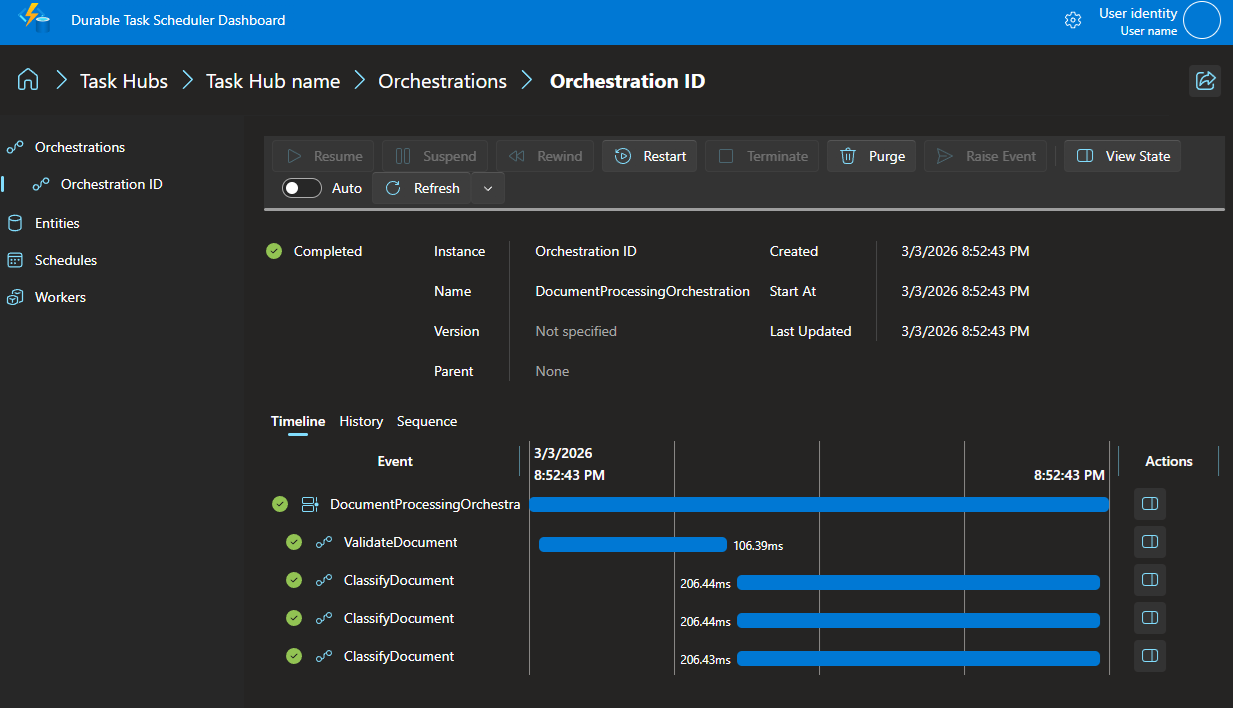
可以通过 Durable Task Scheduler 仪表板查看业务流程状态和历史记录。默认情况下,仪表板在端口 8082 上运行。
在 Web 浏览器中导航到 http://localhost:8082 。
单击 默认 任务中心。 您创建的协调实例位于列表中。
单击编排实例 ID 以查看执行详细信息。
了解代码
客户端应用
客户端创建 Durable Task 客户端、安排编排流程并等待其完成。
foreach (var doc in docs)
{
    string id = await client.ScheduleNewOrchestrationInstanceAsync(
        "DocumentProcessingOrchestration", doc);

    var meta = await client.WaitForInstanceCompletionAsync(id, getInputsAndOutputs: true);
    if (meta.RuntimeStatus == OrchestrationRuntimeStatus.Completed)
        Console.WriteLine($"  -> {meta.ReadOutputAs<string>()}\n");
}
此示例从环境变量(ENDPOINT、TASKHUB、AZURE_CLIENT_ID)生成连接字符串,当这些变量未设置时,使用本地模拟器的默认值。
工人应用
辅助角色注册业务流程和活动,然后连接到持久任务计划程序。
builder.Services.AddDurableTaskWorker()
    .AddTasks(r =>
    {
        r.AddOrchestrator<DocumentProcessingOrchestration>();
        r.AddActivity<ValidateDocument>();
        r.AddActivity<ClassifyDocument>();
    })
    .UseDurableTaskScheduler(connectionString);
业务流程流
DocumentProcessingOrchestration 演示了活动链式执行和扇出/扇入:
bool isValid = await context.CallActivityAsync<bool>(nameof(ValidateDocument), doc);

var tasks = new[]
{
    context.CallActivityAsync<ClassificationResult>(nameof(ClassifyDocument), new ClassifyRequest(doc.Id, doc.Content, "Sentiment")),
    context.CallActivityAsync<ClassificationResult>(nameof(ClassifyDocument), new ClassifyRequest(doc.Id, doc.Content, "Topic")),
    context.CallActivityAsync<ClassificationResult>(nameof(ClassifyDocument), new ClassifyRequest(doc.Id, doc.Content, "Priority")),
};

ClassificationResult[] results = await Task.WhenAll(tasks);
清理资源
若要避免产生费用,请删除已部署Azure资源:
azd down
若要停止并删除本地模拟器,请执行以下作:
docker stop dts-emulator
docker rm dts-emulator
后续步骤
- 在 Durable Task SDK 概述中了解详细信息。