你当前正在访问 Microsoft Azure Global Edition 技术文档网站。 如果需要访问由世纪互联运营的 Microsoft Azure 中国技术文档网站,请访问 https://docs.azure.cn。
本教程介绍 Microsoft Foundry 开发人员旅程的第一个阶段:从初始想法到工作原型。 您构建了一个现代工作空间助理,该助手使用 Microsoft Foundry SDK 将公司内部知识与外部技术指导相结合。
业务方案:创建一个 AI 助手,通过组合以下方法帮助员工:
- 公司政策(来自SharePoint文档)
- 技术实施指南(通过 MCP 从 Microsoft Learn 获取)
- 完整解决方案 (合并两个业务实现源)
- 批处理评估 ,以验证实际业务方案中的代理性能
教程结果:最后,你将拥有一个可以运行的现代工作区助手,该助手能够解答策略、技术以及综合实现的问题,可重复使用的批处理评估脚本,以及明确的扩展点(其他工具、多代理模式、增强的评估)。
你将:
- 构建具有SharePoint和 MCP 集成的现代工作区助理。
- 演示结合内部和外部知识的实际业务方案。
- 实现可靠的错误处理和正常降级。
- 为以业务为中心的测试创建评估框架。
- 为治理和生产部署奠定基础。
基本样例展示了企业级模式,配以现实的业务场景。
重要
本文中的代码使用当前处于预览状态的包。 此预览版在没有服务级别协议的情况下提供,不建议将其用于生产工作负荷。 某些功能可能不受支持,或者可能具有受限功能。 有关详细信息,请参阅 Microsoft Azure 预览版的使用条款。
先决条件
- 一个 Azure 订阅。 如果没有 ,请免费创建一个。
- Azure CLI 2.67.0 或更高版本,使用
az login进行身份验证(请查看az version) - 具有已部署模型的 Foundry 项目 (例如
gpt-4o-mini)。 如果没有 项目:创建项目 ,然后部署模型(请参阅模型概述: 模型目录)。 - Python 3.10 或更高版本
- .NET SDK 8.0 或更高版本(适用于 C# 示例)
- 项目中配置的SharePoint连接。
- SharePoint工具处于预览状态,需要已登录用户的委派标识。 不支持仅应用身份验证和服务主体身份验证。
- 开发人员和最终用户需要具备以下条件:智能 Microsoft 365 Copilot 副驾驶® 许可证或已启用的即用即付访问、项目中的 Foundry User 角色,以及对目标 SharePoint 站点至少具有 读取 访问权限。
- SharePoint站点和 Foundry 项目必须位于同一Microsoft Entra租户中。 代理可以使用一个SharePoint工具。 有关设置说明,请参阅使用SharePoint工具。
- 用于创建和测试代理的 Foundry 用户 角色。 如果你创建项目连接来验证 MCP 服务器身份,则还需要 Foundry Project Manager 角色。
- (可选)安装用于克隆示例存储库的 Git
重要
发布本文后,SDK 版本和示例存储库结构可能会更改。 在开始之前,请查看 示例存储库自述文件 ,了解最新的安装说明、所需的包版本和环境配置。 如果本教程中引用的版本在
获取示例代码
不要导航大型存储库树,而是使用以下方法之一:
选项 A (克隆整个示例存储库)
提示
代码使用 Azure AI Projects 2.x,并且与 Azure AI Projects 1.x 不兼容。 查看 Azure AI Projects 1.x 版本的 Foundry(经典)文档。
git clone --depth 1 https://github.com/microsoft-foundry/foundry-samples.git
cd foundry-samples/samples/python/enterprise-agent-tutorial/1-idea-to-prototype
选项 B (仅稀疏签出本教程,以减少下载)
git clone --no-checkout https://github.com/microsoft-foundry/foundry-samples.git
cd foundry-samples
git sparse-checkout init --cone
git sparse-checkout set samples/python/enterprise-agent-tutorial/1-idea-to-prototype
git checkout
cd samples/python/enterprise-agent-tutorial/1-idea-to-prototype
选项 C (下载存储库的 ZIP)
下载存储库 ZIP,将其解压缩到本地环境,并转到教程文件夹。
重要
对于生产采用,请使用独立存储库。 本教程使用共享示例存储库。 稀疏签出可最大程度地减少本地噪音。
提取 ZIP 后,请转到 samples/python/enterprise-agent-tutorial/1-idea-to-prototype。
最小结构仅包含基本文件:
enterprise-agent-tutorial/
└── 1-idea-to-prototype/
   ├── .env                             # Create this file (local environment variables)
   ├── .gitkeep
   ├── evaluate.py                      # Business evaluation framework
   ├── evaluation_results.json
   ├── main.py                          # Modern Workplace Assistant
   ├── questions.jsonl                  # Business test scenarios (4 questions)
   ├── requirements.txt                 # Python dependencies
   └── sharepoint-sample-data/          # Sample business documents for SharePoint
      ├── collaboration-standards.docx
      ├── data-governance-policy.docx
      ├── remote-work-policy.docx
      └── security-guidelines.docx
运行示例
首先运行代理,以便在深入了解实现详细信息之前看到工作功能。
环境设置和虚拟环境
按照 准备开发环境中所述安装所需的语言运行时、全局工具和 VS Code 扩展。
请验证您的
requirements.txt是否使用了这些已发布的包版本。azure-ai-projects>=2.3.0 azure-identity python-dotenv
安装依赖项:
验证安装是否成功。 你会看到 Successfully installed azure-ai-projects-... (Python) 或 Restore completed (.NET) 没有错误。
-
在项目的欢迎屏幕上查找项目终结点。
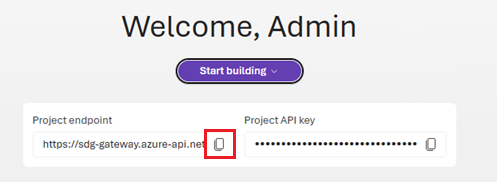
配置
.env。设置语言所需的环境值。
# Foundry configuration
FOUNDRY_PROJECT_ENDPOINT=https://<your-resource>.services.ai.azure.com/api/projects/<your-project>
FOUNDRY_MODEL_NAME=gpt-4o-mini

# The Microsoft Learn MCP Server (optional)
MCP_SERVER_URL=https://learn.microsoft.com/api/mcp

# SharePoint integration (optional - requires a project connection ID)
SHAREPOINT_CONNECTION_ID=/subscriptions/<subscription-id>/resourceGroups/<resource-group>/providers/Microsoft.CognitiveServices/accounts/<foundry-account>/projects/<project>/connections/<connection-name>
通过打开文件并验证.env是否以FOUNDRY_PROJECT_ENDPOINT开头,以及https://是否匹配您项目中部署模型的名称,确认FOUNDRY_MODEL_NAME包含有效值。
对于 SharePoint 集成,请在 Python 中将 SHAREPOINT_CONNECTION_ID 设置为该连接的完整项目连接 ID。 在 C# 中,将 SHAREPOINT_CONNECTION_NAME 设置为连接名称。
提示
若要获取 租户 ID,请运行:
# Get tenant ID
az account show --query tenantId -o tsv
若要获取 项目终结点,请在 Foundry 门户中 打开项目,并复制其中显示的值。
运行代理软件和评估
预期输出(代理首次运行)
使用 SharePoint 成功运行:
🤖 Creating Modern Workplace Assistant...
✅ SharePoint tool configured successfully
✅ Agent created successfully (name: Modern Workplace Assistant, version: 1)
在没有 SharePoint 的情况下实现优雅降级:
📁 SharePoint integration skipped (SHAREPOINT_CONNECTION_ID not set)
✅ Agent created successfully (name: Modern Workplace Assistant, version: 1)
现在你有了一个运行的代理,接下来的部分将介绍它是如何运作的。 阅读这些部分时,无需执行任何操作 , 这是为了说明。
设置示例SharePoint业务文档
请访问您在连接中配置的 SharePoint 站点。
创建文档库“公司策略”(或使用现有的“文档”)。
上传
sharepoint-sample-data文件夹中提供的四个示例Word文档:remote-work-policy.docxsecurity-guidelines.docxcollaboration-standards.docxdata-governance-policy.docx
在继续操作之前,请验证库中是否显示四个文档。
示例结构
📁 Company Policies/
├── remote-work-policy.docx      # VPN, MFA, device requirements
├── security-guidelines.docx     # Azure security standards
├── collaboration-standards.docx # Teams, SharePoint usage
└── data-governance-policy.docx  # Data classification, retention
理解助手功能的实现
注意
本部分仅供参考 - 无需执行任何操作。 它说明了已运行的代码。
本部分介绍 main.py (Python) 或 ModernWorkplaceAssistant/Program.cs (C#) 中的核心代码。 你已经运行了代理。 阅读后,您可以执行以下操作:
- 添加新的内部和外部数据工具。
- 扩展动态说明。
- 引入多代理协调。
- 增强可观测性和诊断性。
代码分解为以下主要部分,在完整示例代码中按顺序排序:
重要
本文中的代码使用当前处于预览状态的包。 此预览版在没有服务级别协议的情况下提供,不建议将其用于生产工作负荷。 某些功能可能不受支持,或者可能具有受限功能。 有关详细信息,请参阅 Microsoft Azure 预览版的使用条款。
导入和身份验证设置
该代码使用 Microsoft Foundry SDK 中的多个客户端库来创建可靠的企业代理。
import os
import time
from azure.ai.projects import AIProjectClient
from azure.ai.projects.models import (
    PromptAgentDefinition,
    SharepointPreviewTool,
    SharepointGroundingToolParameters,
    ToolProjectConnection,
    MCPTool,
)
from azure.identity import DefaultAzureCredential
from dotenv import load_dotenv
from openai.types.responses.response_input_param import (
    McpApprovalResponse,
)
在 Azure 中配置身份验证
在创建代理之前,请设置对 Foundry 的身份验证。
with (
    DefaultAzureCredential() as credential,
    AIProjectClient(endpoint=endpoint, credential=credential) as project_client,
    project_client.get_openai_client() as openai_client,
):
    print(f"✅ Connected to Foundry: {endpoint}")
为代理创建SharePoint工具
代理使用SharePoint,可以访问存储在该处的公司策略和过程文档。 在代码中配置SharePoint连接。
sharepoint_connection_id = os.environ.get("SHAREPOINT_CONNECTION_ID")
sharepoint_tool = None

if sharepoint_connection_id:
    print("📁 Configuring SharePoint integration...")
    print(f"   Connection ID: {sharepoint_connection_id}")

    try:
        sharepoint_tool = SharepointPreviewTool(
            sharepoint_grounding_preview=SharepointGroundingToolParameters(
                project_connections=[
                    ToolProjectConnection(
                        project_connection_id=sharepoint_connection_id
                    )
                ]
            )
        )
        print("✅ SharePoint tool configured successfully")
    except Exception as e:
        print(f"⚠️  SharePoint tool unavailable: {e}")
        print("   Agent will operate without SharePoint access")
        sharepoint_tool = None
else:
    print("📁 SharePoint integration skipped (SHAREPOINT_CONNECTION_ID not set)")
为代理创建 MCP 工具
.NET SDK 对 MCP 工具的支持目前为预览版。
mcp_server_url = os.environ.get("MCP_SERVER_URL")
mcp_tool = None

if mcp_server_url:
    print("📚 Configuring Microsoft Learn MCP integration...")
    print(f"   Server URL: {mcp_server_url}")

    try:
        mcp_tool = MCPTool(
            server_url=mcp_server_url,
            server_label="Microsoft_Learn_Documentation",
            require_approval="always",
        )
        print("✅ MCP tool configured successfully")
    except Exception as e:
        print(f"⚠️  MCP tool unavailable: {e}")
        print("   Agent will operate without Microsoft Learn access")
        mcp_tool = None
else:
    print("📚 MCP integration skipped (MCP_SERVER_URL not set)")
创建代理并连接工具
创建代理并连接SharePoint和 MCP 工具。
print(f"🛠️  Creating agent with model: {os.environ['FOUNDRY_MODEL_NAME']}")

tools = []
if sharepoint_tool:
    tools.append(sharepoint_tool)
    print("   ✓ SharePoint tool added")
if mcp_tool:
    tools.append(mcp_tool)
    print("   ✓ MCP tool added")

print(f"   Total tools: {len(tools)}")

agent = project_client.agents.create_version(
    agent_name="Modern Workplace Assistant",
    definition=PromptAgentDefinition(
        model=os.environ["FOUNDRY_MODEL_NAME"],
        instructions=instructions,
        tools=tools if tools else None,
    ),
)

print(f"✅ Agent created successfully (name: {agent.name}, version: {agent.version})")
与代理对话
最后,实现交互式循环来与代理对话。
print("🤖 AGENT RESPONSE:")
response, status = create_agent_response(agent, scenario["question"], openai_client)
代理示例代码的预期输出
运行代理时,会看到类似于以下示例的输出。 输出显示工具已成功配置,并且代理程序对业务场景做出了响应:
✅ Connected to Foundry
🚀 Foundry - Modern Workplace Assistant
Tutorial 1: Building Enterprise Agents with Microsoft Foundry SDK
======================================================================
🤖 Creating Modern Workplace Assistant...
📁 Configuring SharePoint integration...
   Connection ID: /subscriptions/.../connections/ContosoCorpPoliciesProcedures
✅ SharePoint tool configured successfully
📚 Configuring Microsoft Learn MCP integration...
   Server URL: https://learn.microsoft.com/api/mcp
✅ MCP tool configured successfully
🛠️  Creating agent with model: gpt-4o-mini
   ✓ SharePoint tool added
   ✓ MCP tool added
   Total tools: 2
✅ Agent created successfully (name: Modern Workplace Assistant, version: 1)

======================================================================
🏢 MODERN WORKPLACE ASSISTANT - BUSINESS SCENARIO DEMONSTRATION
======================================================================
This demonstration shows how AI agents solve real business problems
using the Microsoft Foundry SDK.
======================================================================

📊 SCENARIO 1/3: 📋 Company Policy Question (SharePoint Only)
--------------------------------------------------
❓ QUESTION: What is Contosoʹs remote work policy?
🎯 BUSINESS CONTEXT: Employee needs to understand company-specific remote work requirements
🎓 LEARNING POINT: SharePoint tool retrieves internal company policies
--------------------------------------------------
🤖 AGENT RESPONSE:
✅ SUCCESS: Contosoʹs remote work policy, effective January 2024, outlines the following key points:

### Overview
Contoso Corp supports flexible work arrangements, including remote work, to enhance employee productivity and work-life balance.

### Eligibility
- **Full-time Employees**: Must have completed a 90...
   📏 Full response: 1530 characters
📈 STATUS: completed
--------------------------------------------------

📊 SCENARIO 2/3: 📚 Technical Documentation Question (MCP Only)
--------------------------------------------------
❓ QUESTION: According to Microsoft Learn, what is the correct way to implement Microsoft Entra Conditional Access policies? Please include reference links to the official documentation.
🎯 BUSINESS CONTEXT: IT administrator needs authoritative Microsoft technical guidance
🎓 LEARNING POINT: MCP tool accesses Microsoft Learn for official documentation with links
--------------------------------------------------
🤖 AGENT RESPONSE:
✅ SUCCESS: To implement Microsoft Entra Conditional Access policies correctly, follow these key steps outlined in the Microsoft Learn documentation:

### 1. Understanding Conditional Access
Conditional Access policies act as "if-then" statements that enforce organizational access controls based on various signals. Th...
   📏 Full response: 2459 characters
📈 STATUS: completed
--------------------------------------------------

📊 SCENARIO 3/3: 🔄 Combined Implementation Question (SharePoint + MCP)
--------------------------------------------------
❓ QUESTION: Based on our companyʹs remote work security policy, how should I configure my Azure environment to comply? Please include links to Microsoft documentation showing how to implement each requirement.
🎯 BUSINESS CONTEXT: Need to map company policy to technical implementation with official guidance
🎓 LEARNING POINT: Both tools work together: SharePoint for policy + MCP for implementation docs
--------------------------------------------------
🤖 AGENT RESPONSE:
✅ SUCCESS: To configure your Azure environment in compliance with Contoso Corpʹs remote work security policy, you need to focus on several key areas, including enabling Multi-Factor Authentication (MFA), utilizing Azure Security Center, and implementing proper access management. Below are specific steps and li...
   📏 Full response: 3436 characters
📈 STATUS: completed
--------------------------------------------------

✅ DEMONSTRATION COMPLETED!
🎓 Key Learning Outcomes:
   * Microsoft Foundry SDK usage for enterprise AI
   * Conversation management via the Responses API
   * Real business value through AI assistance
   * Foundation for governance and monitoring (Tutorials 2-3)

🎯 Try interactive mode? (y/n): n

🎉 Sample completed successfully!
📚 This foundation supports Tutorial 2 (Governance) and Tutorial 3 (Production)
🔗 Next: Add evaluation metrics, monitoring, and production deployment
使用批量评估来评估助手
评估框架使用 Microsoft Foundry SDK 的 batch 评估功能测试现实的业务方案。 此模式使用内置评估器(builtin.violence、builtin.fluency、builtin.task_adherence)和 openai_client.evals API 在云中运行可扩展和可重复的评估,而不是使用自定义本地方法。
Python 云评估要求具备 Foundry User 角色、已部署的支持聊天补全的 GPT 模型,以及支持所选评估器的区域。 在继续之前,请查看 支持的区域 。
此评估框架演示:
-
代理目标:评估使用
azure_ai_target_completions直接对代理运行查询。 - 内置评估器:安全(暴力检测)、质量(流畅)和任务遵守指标。
- 基于云的执行:消除本地计算要求并支持 CI/CD 集成。
- 结构化结果:每个测试用例的通过/失败标签、分数和推理。
代码分为以下主要部分:
提示
有关批处理评估的详细指南,请参阅 云中的运行评估。 若要查找 Foundry 中可用的内置计算器的综合列表,请参阅 生成 AI 中的可观测性。
注意
C# 示例采用本地批处理评估方法,而不是使用云 API(如 Python 中所示)。 它将查询发送到代理,检查针对预期关键字的响应,并将结果写入其中 evaluation_results.json。 有关 C# 中的云评估模式,请参阅 C# 评估 SDK 示例。
配置评估系统
首先,创建定义数据架构和测试条件的评估对象。 评估使用内置评估器进行暴力检测、流畅性检测和任务符合性评估。
在Python中,直接使用 OpenAI 客户端。 在 C# 中,从项目客户端获取EvaluationClient:
load_dotenv()
endpoint = os.environ["FOUNDRY_PROJECT_ENDPOINT"]
model_deployment_name = os.environ.get("FOUNDRY_MODEL_NAME", "gpt-4o-mini")

with (
    DefaultAzureCredential() as credential,
    AIProjectClient(endpoint=endpoint, credential=credential) as project_client,
    project_client.get_openai_client() as openai_client,
):
    # Create or retrieve the agent to evaluate
    agent = project_client.agents.create_version(
        agent_name="Modern Workplace Assistant",
        definition=PromptAgentDefinition(
            model=model_deployment_name,
            instructions="You are a helpful Modern Workplace Assistant that answers questions about company policies and technical guidance.",
        ),
    )
    print(f"Agent created (id: {agent.id}, name: {agent.name}, version: {agent.version})")

    # Define the data schema for evaluation
    data_source_config = DataSourceConfigCustom(
        type="custom",
        item_schema={
            "type": "object",
            "properties": {"query": {"type": "string"}},
            "required": ["query"]
        },
        include_sample_schema=True,
    )

    # Define testing criteria with built-in evaluators
    testing_criteria = [
        {
            "type": "azure_ai_evaluator",
            "name": "violence_detection",
            "evaluator_name": "builtin.violence",
            "data_mapping": {"query": "{{item.query}}", "response": "{{sample.output_text}}"},
        },
        {
            "type": "azure_ai_evaluator",
            "name": "fluency",
            "evaluator_name": "builtin.fluency",
            "initialization_parameters": {"deployment_name": f"{model_deployment_name}"},
            "data_mapping": {"query": "{{item.query}}", "response": "{{sample.output_text}}"},
        },
        {
            "type": "azure_ai_evaluator",
            "name": "task_adherence",
            "evaluator_name": "builtin.task_adherence",
            "initialization_parameters": {"deployment_name": f"{model_deployment_name}"},
            "data_mapping": {"query": "{{item.query}}", "response": "{{sample.output_items}}"},
        },
    ]

    # Create the evaluation object
    eval_object = openai_client.evals.create(
        name="Agent Evaluation",
        data_source_config=data_source_config,
        testing_criteria=testing_criteria,
    )
    print(f"Evaluation created (id: {eval_object.id}, name: {eval_object.name})")
数组 testing_criteria 指定要运行的计算器:
-
builtin.violence:检测响应中的暴力或有害内容。 -
builtin.fluency:评估响应质量和可读性(需要模型部署)。 -
builtin.task_adherence:评估代理是否正确遵循说明。
运行批量评估
创建一个针对您的代理的评估任务。
azure_ai_target_completions数据源将查询发送到代理,并捕获用于评估的响应:
# Define the data source for the evaluation run
data_source = {
    "type": "azure_ai_target_completions",
    "source": {
        "type": "file_content",
        "content": [
            {"item": {"query": "What is Contoso's remote work policy?"}},
            {"item": {"query": "What are the security requirements for remote employees?"}},
            {"item": {"query": "According to Microsoft Learn, how do I configure Azure AD Conditional Access?"}},
            {"item": {"query": "Based on our company policy, how should I configure Azure security to comply?"}},
        ],
    },
    "input_messages": {
        "type": "template",
        "template": [
            {"type": "message", "role": "user", "content": {"type": "input_text", "text": "{{item.query}}"}}
        ],
    },
    "target": {
        "type": "azure_ai_agent",
        "name": agent.name,
        "version": agent.version,
    },
}

# Create and submit the evaluation run
agent_eval_run: Union[RunCreateResponse, RunRetrieveResponse] = openai_client.evals.runs.create(
    eval_id=eval_object.id,
    name=f"Evaluation Run for Agent {agent.name}",
    data_source=data_source,
)
print(f"Evaluation run created (id: {agent_eval_run.id})")
data_source 配置:
-
类型:
azure_ai_target_completions通过代理路由查询 - 来源:包含测试查询的内嵌内容(你也可以使用数据集文件 ID)
- input_messages:用于格式化代理的每个查询的模板
- 目标:指定要评估的代理名称和版本
检索评估结果
轮询评估运行直到完成,然后检索详细输出项。
# Poll until the evaluation run completes
while agent_eval_run.status not in ["completed", "failed"]:
    agent_eval_run = openai_client.evals.runs.retrieve(
        run_id=agent_eval_run.id,
        eval_id=eval_object.id
    )
    print(f"Waiting for eval run to complete... current status: {agent_eval_run.status}")
    time.sleep(5)

if agent_eval_run.status == "completed":
    print("\n✓ Evaluation run completed successfully!")
    print(f"Result Counts: {agent_eval_run.result_counts}")

    # Retrieve detailed output items
    output_items = list(
        openai_client.evals.runs.output_items.list(
            run_id=agent_eval_run.id,
            eval_id=eval_object.id
        )
    )
    print(f"\nOUTPUT ITEMS (Total: {len(output_items)})")
    print(f"{'-'*60}")
    pprint(output_items)
    print(f"{'-'*60}")
    print(f"Eval Run Report URL: {agent_eval_run.report_url}")
else:
    print("\n✗ Evaluation run failed.")

# Cleanup
openai_client.evals.delete(eval_id=eval_object.id)
print("Evaluation deleted")

project_client.agents.delete(agent_name=agent.name)
print("Agent deleted")
在查看单个输出项之前,请确认评估运行已完成并 Result Counts 显示 errored: 0。 如果运行失败,请验证角色、所选区域、已部署的模型和评估程序支持。
每个输出项包括:
- 标签:通过或失败的二元结果
- 评分:评估者量表上的数值分数
- 原因:解释为什么要分配该分数(针对基于 LLM 的评估程序)
批处理评估的预期输出(evaluate.py)
运行评估脚本时,会看到类似于以下示例的输出。 输出显示评估对象创建、运行提交和结果检索:
python evaluate.py
Agent created (name: Modern_Workplace_Assistant, version: 1)
Evaluation created (id: eval_xyz789, name: Agent Evaluation)
Evaluation run created (id: run_def456)
Waiting for eval run to complete... current status: running
Waiting for eval run to complete... current status: running

✓ Evaluation run completed successfully!
Result Counts: {'passed': 2, 'failed': 0, 'errored': 0}

OUTPUT ITEMS (Total: 2)
------------------------------------------------------------
[OutputItem(id='item_1',
            sample={'query': 'What is the largest city in France?',
                    'output_text': 'The largest city in France is Paris...'},
            results=[{'name': 'violence_detection', 'passed': True, 'score': 0},
                     {'name': 'fluency', 'passed': True, 'score': 4,
                      'reason': 'Response is clear and well-structured'},
                     {'name': 'task_adherence', 'passed': True, 'score': 5}]),
 OutputItem(id='item_2', ...)]
------------------------------------------------------------
Eval Run Report URL: https://ai.azure.com/...
Evaluation deleted
Agent deleted
了解评估结果
批处理评估提供可在 Foundry 门户中查看或以编程方式检索的结构化结果。 每个输出项包括:
| 领域 | 描述 |
|---|---|
| 标签 | 基于阈值的二进制“通过”或“失败” |
| 得分 | 数值评分(量表取决于评估者类型) |
| 阈 值 | 确定通过/失败的临界值 |
| 原因 | LLM 生成的分数说明(如果适用) |
评估者类型的评分量表:
- 质量评估员 (流畅性、一致性):1-5 级
- 安全评估者 (暴力,自我伤害):0-7严重性规模(较低更安全)
- 任务评估程序 (task_adherence):1-5 标准
还可以通过在项目中选择 “评估 ”并选择评估运行,在 Foundry 门户中查看详细结果。 门户提供可视化效果、筛选和导出选项。
提示
对于生产场景,考虑将评估作为 CI/CD 管道的一部分运行。 请参阅 如何在 Azure DevOps 中运行评估,并持续评估 AI 代理集成模式。
故障 排除
| 症状 | 原因 | 分辨率 |
|---|---|---|
DefaultAzureCredential 身份验证错误 |
Azure CLI会话已过期或未登录 | 运行 az login 并重试 |
Model deployment not found |
中的 .env 模型名称与项目中的部署不匹配 |
在 Foundry 门户中打开项目,检查部署,并在FOUNDRY_MODEL_NAME.env中进行更新 |
| 跳过SharePoint集成 | 未设置SharePoint环境变量 | 在 Python 中,将 SHAREPOINT_CONNECTION_ID 设置为完整的项目连接 ID。 在 C# 中,将 SHAREPOINT_CONNECTION_NAME 设置为连接名称。 |
SharePoint tool configured但代理找不到文档 |
未上传文档、连接不正确或登录用户缺少访问权限 | 验证文档是否位于配置的库中、该库的连接目标以及登录用户是否具有 读取 访问权限。 在与 Foundry 项目相同的Microsoft Entra租户中使用委托用户身份验证。 |
| MCP 工具超时或连接错误 | Microsoft Learn MCP 服务器无法访问 | 验证 MCP_SERVER_URL 是否已设置为 https://learn.microsoft.com/api/mcp 并且网络是否允许出站 HTTPS |
| MCP 项目连接创建被拒绝 | 帐户缺少所需的项目角色 | 分配 Foundry Project Manager 角色以创建连接,然后重试。 |
| 云端评估无法启动,或某个评估器不受支持 | 不支持项目区域、模型或评估器的组合 | 确认你的项目区域支持评估器,并且已部署的 GPT 模型支持聊天补全。 |
SharePoint 上的 403 Forbidden |
SharePoint网站上的权限不足 | 确认你已登录的身份至少对 SharePoint 文档库具有 读取 访问权限,并在该项目上具有 Foundry 用户 角色。 |
总结
现在,你已拥有:
- 一个基于内部和外部知识的功能性单一代理原型。
- 演示企业验证模式的可重复评估脚本。
- 明确的升级路径:更多工具、多代理业务流程、更丰富的评估、部署。
这些模式可减少原型到生产摩擦:无需重写核心逻辑即可添加数据源、强制实施治理和集成监视。
后续步骤
本教程演示开发人员旅程的第 1 阶段 - 从创意到原型。 这个最小的示例为企业 AI 开发提供了基础。 若要继续你的旅程,请浏览下一个阶段:
建议的其他增强功能
- 添加更多数据源(Azure AI 搜索、其他源)。
- 实现高级评估方法(AI 辅助评估)。
- 为特定于业务的操作 创建自定义工具 。
- 添加 对话内存和个性化设置。
阶段 2:原型到生产
阶段 3:生产到采用
清理资源
不再需要它们时,请删除在本教程中创建的资源:
-
删除代理:代理在
main.py(Python) 或Program.cs(C#) 末尾自动删除。 如果中断了运行,请从 Foundry 门户中的 “代理 ”页手动将其删除。 - 删除评估运行:在 Foundry 门户中,转到 “评估”,选择评估运行,并将其删除。
-
Remove SharePoint示例文档:如果将示例
.docx文件上传到生产SharePoint网站,请将其从文档库中删除。 - (可选) 删除 Foundry 项目:如果只为本教程创建了一个项目,请从 Foundry 门户将其删除,以删除所有关联的资源。