.NET 中的配置是使用一个或多个 配置提供程序执行的。 配置提供程序通过各种配置来源从键值对中读取配置数据。
- 设置文件,例如 appsettings.json
- 环境变量
- Azure Key Vault
- Azure 应用配置
- 命令行参数
- 自定义提供程序(已安装或创建)
- 目录文件
- 内存中 .NET 对象
- 第三方提供程序
注释
有关配置 .NET 运行时本身的信息,请参阅 .NET 运行时配置设置。
概念和抽象
给定一个或多个配置源,该 IConfiguration 类型提供配置数据的统一视图。 配置是只读的,配置模式不是以编程方式可写的。 该 IConfiguration 接口是所有配置源的单个表示形式,如下图所示:
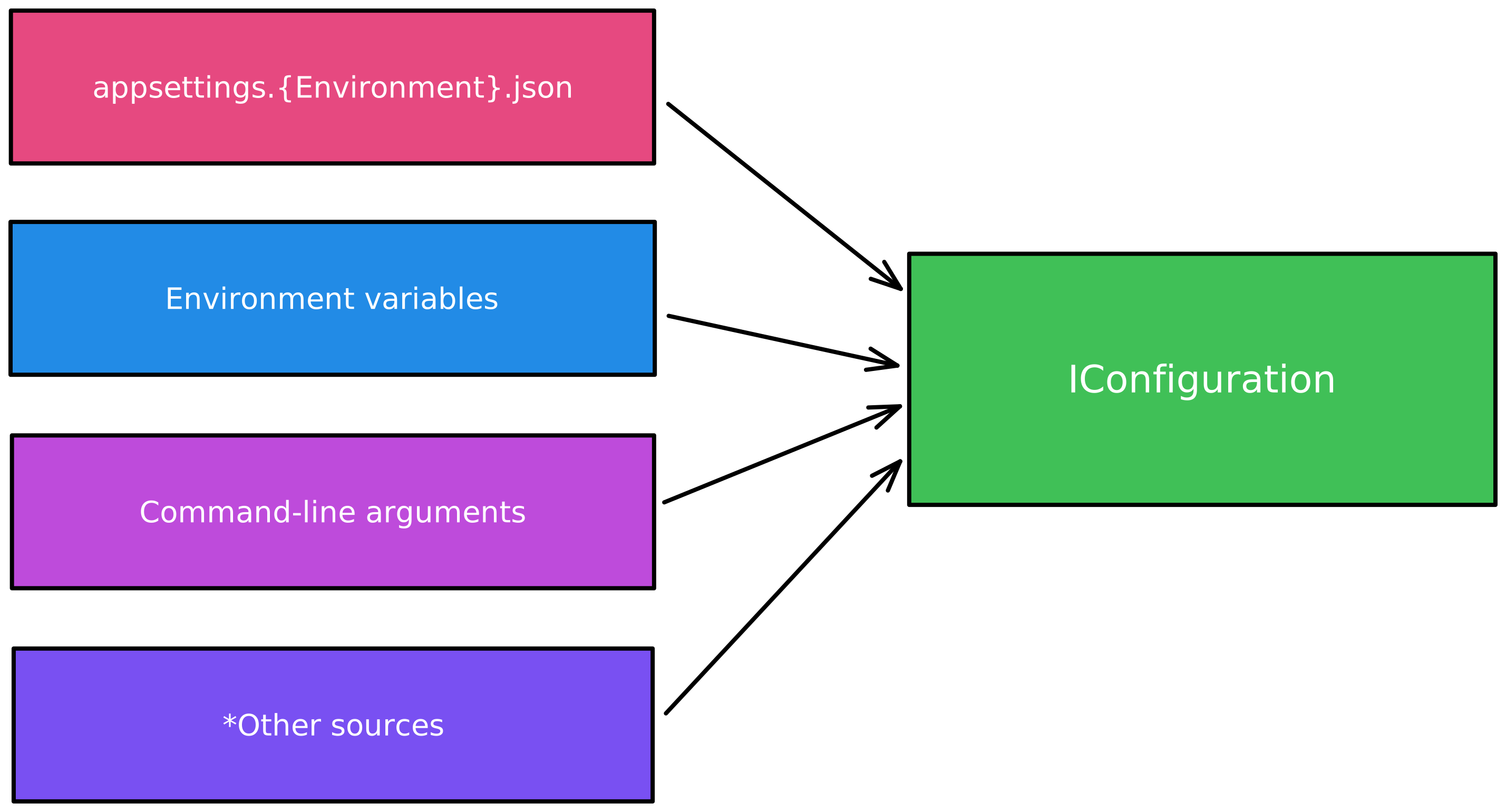
配置控制台应用
默认情况下,使用 dotnet new 命令模板或 Visual Studio 创建的 .NET 控制台应用 不会 公开配置功能。 若要在新的 .NET 控制台应用程序中添加配置,请添加对 📦的包引用。 此包是 .NET 应用中配置的基础。 它提供 ConfigurationBuilder 和相关类型。
using Microsoft.Extensions.Configuration;

var configuration = new ConfigurationBuilder()
    .AddInMemoryCollection(new Dictionary<string, string?>()
    {
        ["SomeKey"] = "SomeValue"
    })
    .Build();

Console.WriteLine(configuration["SomeKey"]);

// Outputs:
//   SomeValue
前面的代码:
- 创建新的 ConfigurationBuilder 实例。
- 将键值对的内存中集合添加到配置生成器。
- Build()调用方法以创建IConfiguration实例。
- 将键的值
SomeKey写入控制台。
虽然此示例使用内存中配置,但有许多配置提供程序可用,为基于文件的、环境变量、命令行参数和其他配置源公开功能。 有关详细信息,请参阅 .NET 中的配置提供程序。
替代托管方法
通常,应用不仅会读取配置。 它们可能会使用依赖项注入、日志记录和其他服务。 对于使用这些服务的应用,建议使用 .NET 通用主机 方法。 相反,请考虑添加对📦 Microsoft.Extensions.Hosting的包引用。 修改 Program.cs 文件以匹配以下代码:
using Microsoft.Extensions.Hosting;

using IHost host = Host.CreateApplicationBuilder(args).Build();

// Application code should start here.

await host.RunAsync();
该方法 Host.CreateApplicationBuilder(String[]) 按以下顺序为应用提供默认配置,从最高优先级到最低优先级:
- 使用命令行配置提供程序通过命令行参数提供。
- 使用环境变量配置提供程序来配置环境变量。
- 在环境中运行时的
Development。 - 使用 JSON 配置提供程序通过
Environment.json 提供。 例如,appsettings.Production.json 和 appsettings.Development.json。 - 使用 JSON 配置提供程序通过 appsettings.json 提供。
-
ChainedConfigurationProvider :添加现有
IConfiguration作为源。
添加配置提供程序会替代以前的配置值。 例如, 命令行配置提供程序 会替代来自其他提供程序的所有值,因为它最后添加。 如果在 SomeKeyappsettings.json 和环境中设置,则使用环境值,因为它是在 appsettings.json之后添加的。
绑定
使用 .NET 配置抽象的主要优点之一是能够将配置值 绑定到 .NET 对象的实例。 例如,JSON 配置提供程序可用于将 appsettings.json 文件映射到 .NET 对象,并用于 依赖项注入。 这可以实现选项模式,它使用类来提供对相关设置组的强类型访问。 默认绑定器是基于反射的,但有一个 源生成器替代方法 很容易启用。
.NET 配置提供各种抽象。 请考虑以下接口:
- IConfiguration:表示一组键/值应用程序配置属性。
-
IConfigurationRoot:表示层次结构的
IConfiguration根。 - IConfigurationSection:表示应用程序配置值的一部分。
这些抽象与它们的底层配置提供程序 (IConfigurationProvider) 无关。 换句话说,可以使用 IConfiguration 实例从多个提供程序访问任何配置值。
绑定器可以使用不同的方法来处理配置值:
- 对于基元类型,采用直接反序列化(使用内置转换器)。
- 当类型有一个复杂类型时,使用 TypeConverter。
- 对于具有属性的复杂类型,使用反射。
注释
绑定器有一些限制:
- 如果属性具有私有设置器或其类型无法转换,则忽略这些属性。
- 忽略不带相应配置键的属性。
绑定层次结构
配置值可以包含分层数据。 分层对象使用配置键中的分隔符表示 : 。 若要访问配置值,请使用 : 字符分隔层次结构。 例如,请考虑以下配置值:
{
  "Parent": {
    "FavoriteNumber": 7,
    "Child": {
      "Name": "Example",
      "GrandChild": {
        "Age": 3
      }
    }
  }
}
下表表示前面的示例 JSON 的示例键及其对应的值:
| 密钥 | 价值 |
|---|---|
"Parent:FavoriteNumber" |
7 |
"Parent:Child:Name" |
"Example" |
"Parent:Child:GrandChild:Age" |
3 |
高级绑定情境
使用特定类型时,配置绑定器会表现出特定的行为和限制。 本节包括下列小节:
绑定到字典
将配置绑定到 Dictionary<TKey,TValue> 时,如果值为可变集合类型(如数组或列表),则对同一键的重复绑定会扩展集合值,而不是替换它们。
以下示例演示了此行为:
IConfiguration config = new ConfigurationBuilder()
    .AddInMemoryCollection()
    .Build();

config["Queue:0"] = "Value1";
var dict = new Dictionary<string, string[]>() { { "Queue", new[] { "InitialValue" } } };

Console.WriteLine("=== Dictionary Binding with Collection Values ===");
Console.WriteLine($"Initially: {string.Join(", ", dict["Queue"])}");

// In .NET 7+, binding extends the collection instead of replacing it.
config.Bind(dict);
Console.WriteLine($"After Bind: {string.Join(", ", dict["Queue"])}");

config["Queue:1"] = "Value2";
config.Bind(dict);
Console.WriteLine($"After 2nd Bind: {string.Join(", ", dict["Queue"])}");
有关更多信息,请参阅 将配置绑定到字典以扩展值。
带冒号的字典键
冒号 (:) 字符保留为配置键中的层次结构分隔符。 这意味着绑定配置时无法在字典键中使用冒号。 如果密钥包含冒号(如 URL 或其他格式化标识符),则配置系统将其解释为层次结构路径,而不是文本字符。 请考虑以下解决方法:
- 在配置键中使用备用分隔符(如双下划线
__),并根据需要以编程方式转换它们。 - 使用 System.Text.Json 或类似库将配置手动反序列化为原始 JSON,该库支持键中的冒号。
- 创建自定义映射层,该层使用冒号将安全密钥转换为所需的密钥。
绑定到 IReadOnly* 类型
配置绑定器不支持直接绑定到IReadOnlyList<T>、IReadOnlyDictionary<TKey, TValue>或其他只读集合接口。 这些接口缺少绑定器填充集合所需的机制。
若要处理只读集合,请对绑定器填充的属性使用可变类型,然后将这些属性公开为供使用者访问的只读接口。
Console.WriteLine("=== IReadOnly* Types (NOT Directly Supported) ===");

var readonlyConfig = new ConfigurationBuilder()
    .AddInMemoryCollection(new Dictionary<string, string?>
    {
        ["Settings:Values:0"] = "Item1",
        ["Settings:Values:1"] = "Item2",
        ["Settings:Values:2"] = "Item3",
    })
    .Build();

// This class uses List<string> for binding, exposes as IReadOnlyList<string>.
var settings = new SettingsWithReadOnly();
readonlyConfig.GetSection("Settings").Bind(settings);

Console.WriteLine("Values bound to mutable List, exposed as IReadOnlyList:");
foreach (var value in settings.ValuesReadOnly)
{
    Console.WriteLine($"  {value}");
}
这个配置类的实现:
class SettingsWithReadOnly
{
    // Use mutable type for binding
    public List<string> Values { get; set; } = [];

    // Expose as read-only for consumers
    public IReadOnlyList<string> ValuesReadOnly => Values;
}
这种方法允许绑定器在通过IReadOnlyList<string>向使用者呈现不可变接口的同时填充可变的List<string>。
与参数化构造函数绑定
从 .NET 7 开始,配置绑定器支持使用单个公共参数化构造函数绑定到类型。 这样,即可直接从配置填充不可变类型和记录:
Console.WriteLine("=== Parameterized Constructor Binding ===");

var ctorConfig = new ConfigurationBuilder()
    .AddInMemoryCollection(new Dictionary<string, string?>
    {
        ["AppSettings:Name"] = "MyApp",
        ["AppSettings:MaxConnections"] = "100",
        ["AppSettings:Timeout"] = "30"
    })
    .Build();

// Binding to a type with a single parameterized constructor
var appSettings = ctorConfig.GetSection("AppSettings").Get<AppSettings>();
if (appSettings != null)
{
    Console.WriteLine($"Name: {appSettings.Name}");
    Console.WriteLine($"MaxConnections: {appSettings.MaxConnections}");
    Console.WriteLine($"Timeout: {appSettings.Timeout}");
}
不可变设置类:
// Immutable type with single parameterized constructor.
class AppSettings
{
    public string Name { get; }
    public int MaxConnections { get; }
    public int Timeout { get; }

    public AppSettings(string name, int maxConnections, int timeout)
    {
        Name = name;
        MaxConnections = maxConnections;
        Timeout = timeout;
    }
}
重要
绑定器仅支持具有单个公共参数化构造函数的类型。 如果类型具有多个公共参数化构造函数,则绑定器无法确定要使用的构造函数,绑定将失败。 使用单个参数化构造函数或具有属性集的无参数构造函数。
基本示例
若要以基本形式访问配置值,无需 泛型主机 方法的帮助,请直接使用 ConfigurationBuilder 类型。
小提示
该 System.Configuration.ConfigurationBuilder 类型与 Microsoft.Extensions.Configuration.ConfigurationBuilder 类型不同。 所有这些内容都特定于 Microsoft.Extensions.* NuGet 包和命名空间。
请考虑以下 C# 项目:
<Project Sdk="Microsoft.NET.Sdk">

  <PropertyGroup>
    <OutputType>Exe</OutputType>
    <TargetFramework>net10.0</TargetFramework>
    <Nullable>enable</Nullable>
    <ImplicitUsings>true</ImplicitUsings>
  </PropertyGroup>

  <ItemGroup>
    <Content Include="appsettings.json">
      <CopyToOutputDirectory>Always</CopyToOutputDirectory>
    </Content>
  </ItemGroup>

  <ItemGroup>
    <PackageReference Include="Microsoft.Extensions.Configuration.Binder" Version="10.0.3" />
    <PackageReference Include="Microsoft.Extensions.Configuration.Json" Version="10.0.3" />
    <PackageReference Include="Microsoft.Extensions.Configuration.EnvironmentVariables" Version="10.0.3" />
  </ItemGroup>

</Project>
前面的项目文件引用多个配置 NuGet 包:
-
Microsoft.Extensions.Configuration.Binder:用于将对象绑定到配置提供程序
Microsoft.Extensions.Configuration中的数据的功能。 -
Microsoft.Extensions.Configuration.Json:
Microsoft.Extensions.Configuration的 JSON 配置提供程序实现。 -
Microsoft.Extensions.Configuration.EnvironmentVariables:为
Microsoft.Extensions.Configuration提供环境变量配置提供程序的实现。
请考虑 appsettings.json文件的示例 :
{
    "Settings": {
        "KeyOne": 1,
        "KeyTwo": true,
        "KeyThree": {
            "Message": "Oh, that's nice...",
            "SupportedVersions": {
                "v1": "1.0.0",
                "v3": "3.0.7"
            }
        },
        "IPAddressRange": [
            "46.36.198.121",
            "46.36.198.122",
            "46.36.198.123",
            "46.36.198.124",
            "46.36.198.125"
        ]
    }
}
现在,鉴于此 JSON 文件,下面是直接使用配置生成器的示例使用模式:
using Microsoft.Extensions.Configuration;

// Build a config object, using env vars and JSON providers.
IConfigurationRoot config = new ConfigurationBuilder()
    .AddJsonFile("appsettings.json")
    .AddEnvironmentVariables()
    .Build();

// Get values from the config given their key and their target type.
Settings? settings = config.GetRequiredSection("Settings").Get<Settings>();

// Write the values to the console.
Console.WriteLine($"KeyOne = {settings?.KeyOne}");
Console.WriteLine($"KeyTwo = {settings?.KeyTwo}");
Console.WriteLine($"KeyThree:Message = {settings?.KeyThree?.Message}");

// Application code which might rely on the config could start here.

// This will output the following:
//   KeyOne = 1
//   KeyTwo = True
//   KeyThree:Message = Oh, that's nice...
上述 C# 代码:
- 将 ConfigurationBuilder 实例化。
- 添加
"appsettings.json"文件,以便由 JSON 配置提供程序识别。 - 添加环境变量,以便由环境变量配置提供程序识别。
- 使用
"Settings"实例获取所需的Settings部分和相应的config实例。
对象 Settings 的形状如下:
public sealed class Settings
{
    public required int KeyOne { get; set; }
    public required bool KeyTwo { get; set; }
    public required NestedSettings KeyThree { get; set; } = null!;
}
public sealed class NestedSettings
{
    public required string Message { get; set; } = null!;
}
托管的基本示例
若要访问 IConfiguration 该值,可以再次依赖于 Microsoft.Extensions.Hosting NuGet 包。 创建新的控制台应用程序,并将以下项目文件内容粘贴到其中:
<Project Sdk="Microsoft.NET.Sdk">

  <PropertyGroup>
    <OutputType>Exe</OutputType>
    <TargetFramework>net10.0</TargetFramework>
    <Nullable>enable</Nullable>
    <ImplicitUsings>true</ImplicitUsings>
  </PropertyGroup>

  <ItemGroup>
    <Content Include="appsettings.json">
      <CopyToOutputDirectory>Always</CopyToOutputDirectory>
    </Content>
  </ItemGroup>

  <ItemGroup>
    <PackageReference Include="Microsoft.Extensions.Configuration.Binder" Version="10.0.3" />
    <PackageReference Include="Microsoft.Extensions.Hosting" Version="10.0.3" />
  </ItemGroup>

</Project>
前面的项目文件定义:
- 应用程序是可执行文件。
- 编译项目时,appsettings.json文件将复制到输出目录。
- 添加
Microsoft.Extensions.HostingNuGet 包引用。
使用以下内容将 appsettings.json 文件添加到项目的根目录中:
{
    "KeyOne": 1,
    "KeyTwo": true,
    "KeyThree": {
        "Message": "Thanks for checking this out!"
    }
}
将 Program.cs 文件的内容替换为以下 C# 代码:
using Microsoft.Extensions.Configuration;
using Microsoft.Extensions.DependencyInjection;
using Microsoft.Extensions.Hosting;

using IHost host = Host.CreateApplicationBuilder(args).Build();

// Ask the service provider for the configuration abstraction.
IConfiguration config = host.Services.GetRequiredService<IConfiguration>();

// Get values from the config given their key and their target type.
int keyOneValue = config.GetValue<int>("KeyOne");
bool keyTwoValue = config.GetValue<bool>("KeyTwo");
string? keyThreeNestedValue = config.GetValue<string>("KeyThree:Message");

// Write the values to the console.
Console.WriteLine($"KeyOne = {keyOneValue}");
Console.WriteLine($"KeyTwo = {keyTwoValue}");
Console.WriteLine($"KeyThree:Message = {keyThreeNestedValue}");

// Application code which might rely on the config could start here.

await host.RunAsync();

// This will output the following:
//   KeyOne = 1
//   KeyTwo = True
//   KeyThree:Message = Thanks for checking this out!
运行此应用程序时,Host.CreateApplicationBuilder 会定义发现 JSON 配置的行为,并通过 IConfiguration 实例对其进行公开。 在 host 实例中,你可以向服务提供程序获取 IConfiguration 实例,然后向其获取值。
小提示
以这种方式使用原始 IConfiguration 实例虽然方便,但不能很好地缩放。 当应用程序变得复杂,其相应的配置变得更加复杂时,建议使用 选项模式 作为替代方法。
托管和使用索引器 API 的基本示例
请考虑前面示例中的相同 appsettings.json 文件内容:
{
    "SupportedVersions": {
        "v1": "1.0.0",
        "v3": "3.0.7"
    },
    "IPAddressRange": [
        "46.36.198.123",
        "46.36.198.124",
        "46.36.198.125"
    ]
}
将 Program.cs 文件的内容替换为以下 C# 代码:
using Microsoft.Extensions.Configuration;
using Microsoft.Extensions.DependencyInjection;
using Microsoft.Extensions.Hosting;

using IHost host = Host.CreateApplicationBuilder(args).Build();

// Ask the service provider for the configuration abstraction.
IConfiguration config = host.Services.GetRequiredService<IConfiguration>();

// Get values from the config given their key and their target type.
string? ipOne = config["IPAddressRange:0"];
string? ipTwo = config["IPAddressRange:1"];
string? ipThree = config["IPAddressRange:2"];
string? versionOne = config["SupportedVersions:v1"];
string? versionThree = config["SupportedVersions:v3"];

// Write the values to the console.
Console.WriteLine($"IPAddressRange:0 = {ipOne}");
Console.WriteLine($"IPAddressRange:1 = {ipTwo}");
Console.WriteLine($"IPAddressRange:2 = {ipThree}");
Console.WriteLine($"SupportedVersions:v1 = {versionOne}");
Console.WriteLine($"SupportedVersions:v3 = {versionThree}");

// Application code which might rely on the config could start here.

await host.RunAsync();

// This will output the following:
//     IPAddressRange:0 = 46.36.198.123
//     IPAddressRange:1 = 46.36.198.124
//     IPAddressRange:2 = 46.36.198.125
//     SupportedVersions:v1 = 1.0.0
//     SupportedVersions:v3 = 3.0.7
使用索引器 API 访问这些值,其中每个键都是字符串,值是字符串。 配置支持属性、对象、数组和字典。
配置提供程序
下表显示了可用于 .NET Core 应用的配置提供程序。
| 配置提供商 | 通过以下对象提供配置 |
|---|---|
| Azure 应用配置 | Azure 应用程序配置 |
| Azure Key Vault | Azure Key Vault |
| 命令行 | 命令行参数 |
| 自定义 | 自定义源 |
| 环境变量 | 环境变量 |
| File | JSON、XML 和 INI 文件 |
| 逐文件秘钥 | 目录文件 |
| Memory | 内存中集合 |
| 应用机密(机密管理器) | 用户配置文件目录中的文件 |
小提示
添加配置提供程序的顺序很重要。 使用多个配置提供程序,并且多个提供程序指定同一个键时,会使用最后添加的提供程序。
有关各种配置提供程序的详细信息,请参阅 .NET 中的配置提供程序。
另请参阅
- .NET 中的配置提供程序
- 实现自定义配置提供程序
- 配置 Bug 应在 github.com/dotnet/runtime 存储库中创建
- ASP.NET Core 中的配置
