ImageCell 类
定义
重要
一些信息与预发行产品相关,相应产品在发行之前可能会进行重大修改。 对于此处提供的信息,Microsoft 不作任何明示或暗示的担保。
注意
The controls which use ImageCell (ListView and TableView) are obsolete. Please use CollectionView instead.
包含图像的 TextCell。
public ref class ImageCell : Microsoft::Maui::Controls::TextCell[System.Obsolete("The controls which use ImageCell (ListView and TableView) are obsolete. Please use CollectionView instead.")]
public class ImageCell : Microsoft.Maui.Controls.TextCellpublic class ImageCell : Microsoft.Maui.Controls.TextCell[<System.Obsolete("The controls which use ImageCell (ListView and TableView) are obsolete. Please use CollectionView instead.")>]
type ImageCell = class
inherit TextCelltype ImageCell = class
inherit TextCellPublic Class ImageCell
Inherits TextCell- 继承
- 属性
注解
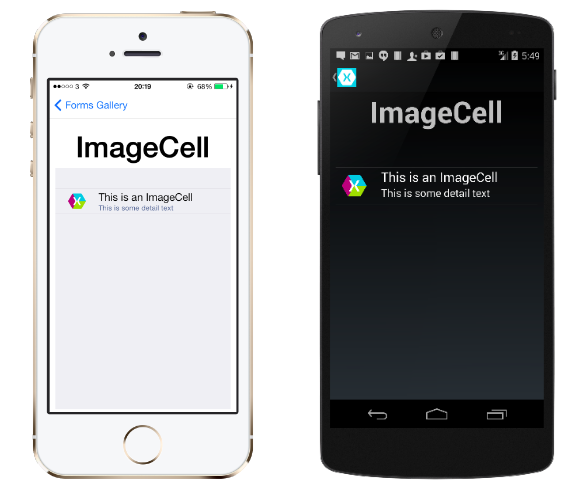
ImageCell 对象用于将图像和随附的文本放入表中。
下面的示例演示了基本用法。
using System;
using Microsoft.Maui.Controls;

namespace FormsGallery
{
    class ImageCellDemoPage : ContentPage
    {
        public ImageCellDemoPage()
        {
            Label header = new Label
            {
                Text = "ImageCell",
                FontSize = Device.GetNamedSize (NamedSize.Large, typeof(Label)),
                HorizontalOptions = LayoutOptions.Center
            };

            TableView tableView = new TableView
            {
                Intent = TableIntent.Form,
                Root = new TableRoot
                {
                    new TableSection
                    {
                        new ImageCell
                        {
                            // Some differences with loading images in initial release.
                            ImageSource =
                                Device.OnPlatform(ImageSource.FromUri(new Uri("http://xamarin.com/images/index/ide-xamarin-studio.png")),
                                                  ImageSource.FromFile("ide_xamarin_studio.png"),
                                                  ImageSource.FromFile("Images/ide-xamarin-studio.png")),
                            Text = "This is an ImageCell",
                            Detail = "This is some detail text",
                        }
                    }
                }
            };

            // Accomodate iPhone status bar.
            this.Padding = new Thickness(10, Device.OnPlatform(20, 0, 0), 10, 5);

            // Build the page.
            this.Content = new StackLayout
            {
                Children =
                {
                    header,
                    tableView
                }
            };
        }
    }
}
构造函数
| 名称 | 说明 |
|---|---|
| ImageCell() |
已过时.
初始化 ImageCell 类的新实例。 |
字段
| 名称 | 说明 |
|---|---|
| DefaultCellHeight |
已过时.
单元的默认高度。 (继承自 Cell) |
| ImageSourceProperty |
已过时.
的可绑定属性 ImageSource。 |
| transientNamescope |
已过时.
包含图像的 TextCell。 (继承自 Element) |
属性
| 名称 | 说明 |
|---|---|
| AutomationId |
已过时.
获取或设置允许自动化框架查找此元素并与其交互的值。 (继承自 Element) |
| BindingContext |
已过时.
获取或设置一个对象,该对象包含由属于此 BindableObject属性的绑定属性所面向的属性。 这是一种可绑定属性。 (继承自 BindableObject) |
| ClassId |
已过时.
获取或设置用于标识语义相似元素集合的值。 (继承自 Element) |
| Command |
已过时.
获取或设置要在点击 TextCell 时执行的 ICommand。 这是一种可绑定属性。 (继承自 TextCell) |
| CommandParameter |
已过时.
获取或设置在调用该命令时要传递的参数。 这是一种可绑定属性。 (继承自 TextCell) |
| ContextActions |
已过时.
获取当用户在 Cell 上执行特定于设备的上下文手势时要显示的菜单项列表。 (继承自 Cell) |
| Detail |
已过时.
获取或设置 TextCell 中要显示的辅助文本。 这是一种可绑定属性。 (继承自 TextCell) |
| DetailColor |
已过时.
获取或设置辅助文本的呈现颜色。 这是一种可绑定属性。 (继承自 TextCell) |
| Dispatcher |
已过时.
获取创建此可绑定对象时可用的调度程序,否则会尝试查找最近的可用调度程序(可能是窗口的/应用)。 (继承自 BindableObject) |
| EffectControlProvider |
已过时.
供 .NET MAUI 内部使用。 (继承自 Element) |
| Effects |
已过时.
获取或设置将在运行时应用于元素的样式和属性。 (继承自 Element) |
| Handler |
已过时.
获取或设置此元素的关联处理程序。 (继承自 Element) |
| HasContextActions |
已过时.
获取一个值,该值指示单元在其 ContextActions 列表属性中是否至少具有一个菜单项。 (继承自 Cell) |
| Height |
已过时.
获取或设置 Cell 的高度。 (继承自 Cell) |
| Id |
已过时.
获取一个值,该值可用于在应用程序运行过程中唯一标识元素。 (继承自 Element) |
| ImageSource |
已过时.
获取或设置要从中加载图像的 ImageSource。 这是一种可绑定属性。 |
| IsContextActionsLegacyModeEnabled |
已过时.
获取或设置上下文作是否使用旧模式。 默认值为 |
| IsEnabled |
已过时.
获取或设置 Cell 的 IsEnabled 状态。 这是一种可绑定属性。 (继承自 Cell) |
| LogicalChildren |
已过时.
包含图像的 TextCell。 (继承自 Element) |
| Parent |
已过时.
获取或设置此元素的父 Element 级。 (继承自 Element) |
| RealParent |
已过时.
供 .NET MAUI 内部使用。 (继承自 Element) |
| RenderHeight |
已过时.
获取设备上呈现的单元的高度。 (继承自 Cell) |
| StyleId |
已过时.
获取或设置用于唯一地标识元素的用户定义的值。 (继承自 Element) |
| Text |
已过时.
获取或设置要显示的主要文本。 这是一种可绑定属性。 (继承自 TextCell) |
| TextColor |
已过时.
获取或设置主要文本的呈现颜色。 这是一种可绑定属性。 (继承自 TextCell) |
方法
活动
| 名称 | 说明 |
|---|---|
| Appearing |
已过时.
包含图像的 TextCell。 (继承自 Cell) |
| BindingContextChanged |
已过时.
当 BindingContext 属性的值更改时发生。 (继承自 BindableObject) |
| ChildAdded |
已过时.
每当将子元素添加到元素时引发。 (继承自 Element) |
| ChildRemoved |
已过时.
每当从元素中删除子元素时引发。 (继承自 Element) |
| DescendantAdded |
已过时.
每当将子元素添加到元素的子树时引发。 (继承自 Element) |
| DescendantRemoved |
已过时.
每当从元素子树中删除子元素时引发。 (继承自 Element) |
| Disappearing |
已过时.
包含图像的 TextCell。 (继承自 Cell) |
| ForceUpdateSizeRequested |
已过时.
包含图像的 TextCell。 (继承自 Cell) |
| HandlerChanged |
已过时.
每当元素的处理程序发生更改时引发。 (继承自 Element) |
| HandlerChanging |
已过时.
每当元素的处理程序开始更改时引发。 (继承自 Element) |
| ParentChanged |
已过时.
每当元素的父级发生更改时引发。 (继承自 Element) |
| ParentChanging |
已过时.
每当元素开始更改时引发。 (继承自 Element) |
| PropertyChanged |
已过时.
在属性值更改时发生。 (继承自 BindableObject) |
| PropertyChanging |
已过时.
在属性值更改时发生。 (继承自 BindableObject) |
| Tapped |
已过时.
包含图像的 TextCell。 (继承自 Cell) |
显式接口实现
| 名称 | 说明 |
|---|---|
| IContextFlyoutElement.ContextFlyout |
已过时.
获取 ContextFlyout 视图。 菜单浮出控件、菜单浮出控件子项和菜单浮出控件分隔符可以添加到上下文浮出控件中。 (继承自 Element) |
| IDynamicResourceHandler.SetDynamicResource(BindableProperty, String) |
已过时.
包含图像的 TextCell。 (继承自 BindableObject) |
| IEffectControlProvider.RegisterEffect(Effect) |
已过时.
注册此元素的指定 |
| IElement.Parent |
已过时.
获取元素的父级。 (继承自 Element) |
| IElementController.Descendants() |
已过时.
供 .NET MAUI 内部使用。 (继承自 Element) |
| IElementController.LogicalChildren |
已过时.
供 .NET MAUI 内部使用。 (继承自 Element) |
| IElementController.SetValueFromRenderer(BindableProperty, Object) |
已过时.
供 .NET MAUI 内部使用。 (继承自 Element) |
| INameScope.RegisterName(String, Object) |
已过时.
供 .NET MAUI 内部使用。 (继承自 Element) |
| INameScope.UnregisterName(String) |
已过时.
供 .NET MAUI 内部使用。 (继承自 Element) |
| IToolTipElement.ToolTip |
已过时.
表示一个小矩形弹出窗口,当用户将指针放在视图上时,显示视图用途的简要说明。 (继承自 Element) |
| IVisualTreeElement.GetVisualChildren() |
已过时.
包含图像的 TextCell。 (继承自 Cell) |
| IVisualTreeElement.GetVisualParent() |
已过时.
获取元素的视觉父级。 (继承自 Element) |
