ContentControl.Content 属性
定义
重要
一些信息与预发行产品相关,相应产品在发行之前可能会进行重大修改。 对于此处提供的信息,Microsoft 不作任何明示或暗示的担保。
获取或设置 . 的内容 ContentControl。
public:
 property System::Object ^ Content { System::Object ^ get(); void set(System::Object ^ value); };
[System.ComponentModel.Bindable(true)]
public object Content { get; set; }[<System.ComponentModel.Bindable(true)>]
member this.Content : obj with get, setPublic Property Content As Object属性值
包含控件内容的对象。 默认值为 null。
- 属性
示例
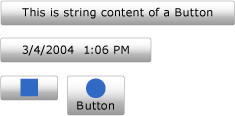
以下示例演示如何创建 Button 四个控件,该 Content 控件设置为下列控件之一:
注释
尽管该示例的可扩展应用程序标记语言(XAML)版本可以使用 <Button.Content> 每个按钮内容周围的标记,但没有必要。 有关详细信息,请参阅 XAML 概述 (WPF)。
<!--Create a Button with a string as its content.-->
<Button>This is string content of a Button</Button>

<!--Create a Button with a DateTime object as its content.-->
<Button xmlns:sys="clr-namespace:System;assembly=mscorlib">
  <sys:DateTime>2004/3/4 13:6:55</sys:DateTime>
</Button>

<!--Create a Button with a single UIElement as its content.-->
<Button>
  <Rectangle Height="40" Width="40" Fill="Blue"/>
</Button>

<!--Create a Button with a panel that contains multiple objects
as its content.-->
<Button>
  <StackPanel>
    <Ellipse Height="40" Width="40" Fill="Blue"/>
    <TextBlock TextAlignment="Center">Button</TextBlock>
  </StackPanel>
</Button>
// Create a Button with a string as its content.
Button stringContent = new Button();
stringContent.Content = "This is string content of a Button";

// Create a Button with a DateTime object as its content.
Button objectContent = new Button();
DateTime dateTime1 = new DateTime(2004, 3, 4, 13, 6, 55);

objectContent.Content = dateTime1;

// Create a Button with a single UIElement as its content.
Button uiElementContent = new Button();

Rectangle rect1 = new Rectangle();
rect1.Width = 40;
rect1.Height = 40;
rect1.Fill = Brushes.Blue;
uiElementContent.Content = rect1;

// Create a Button with a panel that contains multiple objects
// as its content.
Button panelContent = new Button();
StackPanel stackPanel1 = new StackPanel();
Ellipse ellipse1 = new Ellipse();
TextBlock textBlock1 = new TextBlock();

ellipse1.Width = 40;
ellipse1.Height = 40;
ellipse1.Fill = Brushes.Blue;

textBlock1.TextAlignment = TextAlignment.Center;
textBlock1.Text = "Button";

stackPanel1.Children.Add(ellipse1);
stackPanel1.Children.Add(textBlock1);

panelContent.Content = stackPanel1;
' Add a string to a button.
Dim stringContent As New Button()
stringContent.Content = "This is string content of a Button"

' Add a DateTime object to a button.
Dim objectContent As New Button()
Dim dateTime1 As New DateTime(2004, 3, 4, 13, 6, 55)

objectContent.Content = dateTime1

' Add a single UIElement to a button.
Dim uiElementContent As New Button()

Dim rect1 As New Rectangle()
rect1.Width = 40
rect1.Height = 40
rect1.Fill = Brushes.Blue
uiElementContent.Content = rect1

' Add a panel that contains multpile objects to a button.
Dim panelContent As New Button()
Dim stackPanel1 As New StackPanel()
Dim ellipse1 As New Ellipse()
Dim textBlock1 As New TextBlock()

ellipse1.Width = 40
ellipse1.Height = 40
ellipse1.Fill = Brushes.Blue

textBlock1.TextAlignment = TextAlignment.Center
textBlock1.Text = "Button"

stackPanel1.Children.Add(ellipse1)
stackPanel1.Children.Add(textBlock1)

panelContent.Content = stackPanel1
下图显示了在上一示例中创建的四个按钮。
注解
由于该 Content 属性的类型 Object,因此对可以放入的属性 ContentControl没有限制。 该Content对象由位于ContentPresenter其中ControlTemplate一个位置的 A ContentControl显示。 ContentControl WPF 中的每个类型都有一个ContentPresenter默认ControlTemplate类型。 有关显示ContentPresenter方式Content的详细信息,请参阅ContentPresenter。
Dependency 属性信息
| 项目 | 价值 |
|---|---|
| 标识符字段 | ContentProperty |
元数据属性设置为 true |
None |
XAML 属性用法
<object Content="content"/>
XAML 属性元素用法
<object> content</object>
XAML 值
Content 文本或单个对象。
