本文介绍如何为 Microsoft.Testing.Platform (MTP) 创建自定义测试框架。 测试框架是唯一必需的扩展。 它发现并运行测试,并将结果报告回平台。
有关完整的扩展点摘要和进程内/进程外概念,请参阅 “创建自定义扩展”。
如果你正在迁移基于 VSTest 的现有测试框架,建议采用本机实现方式实现 ITestFramework 接口。
VSTest Bridge 扩展作为过渡步骤提供,但本机实现提供最佳体验。
测试框架扩展
测试框架是为测试平台提供发现和执行测试能力的主要扩展。 测试框架负责将测试结果传回测试平台。 测试框架是执行测试会话所需的唯一强制性扩展。
注册测试框架
本部分介绍如何在测试平台上注册测试框架。 使用 TestApplication.RegisterTestFramework API 为每个测试应用程序生成器注册一个测试框架,如 MTP 体系结构 文档中所示。
注册 API 的定义如下:
ITestApplicationBuilder RegisterTestFramework(
    Func<IServiceProvider, ITestFrameworkCapabilities> capabilitiesFactory,
    Func<ITestFrameworkCapabilities, IServiceProvider, ITestFramework> adapterFactory);
RegisterTestFramework API 需要两个工厂:
Func<IServiceProvider, ITestFrameworkCapabilities>:这是一个委托,它接受一个实现IServiceProvider接口的对象,并返回一个实现ITestFrameworkCapabilities接口的对象。IServiceProvider允许访问平台服务,如配置、日志记录器和命令行参数。ITestFrameworkCapabilities接口用于向平台和扩展公布测试框架支持的功能。 它通过实施和支持特定行为,使平台和扩展能够正确交互。 要想更好地理解功能概念,请参阅相关部分。Func<ITestFrameworkCapabilities, IServiceProvider, ITestFramework>:这是一个委托,它接收一个 ITestFrameworkCapabilities 对象(即Func<IServiceProvider, ITestFrameworkCapabilities>返回的实例)和一个 IServiceProvider 以再次提供对平台服务的访问。 预期返回对象是实现 ITestFramework 接口的对象。ITestFramework会充当执行引擎,负责发现和运行测试,然后将结果传回测试平台。
平台需要将 ITestFrameworkCapabilities 的创建与 ITestFramework 的创建分开,这是为了避免在所支持的功能不足以执行当前测试会话时创建测试框架而进行的优化。
请考虑下面的用户代码示例,演示了测试框架注册,该注册返回一个空的能力集。
internal class TestingFrameworkCapabilities : ITestFrameworkCapabilities
{
    public IReadOnlyCollection<ITestFrameworkCapability> Capabilities => [];
}

internal class TestingFramework : ITestFramework
{
   public TestingFramework(ITestFrameworkCapabilities capabilities, IServiceProvider serviceProvider)
   {
       // ...
   }
   // Omitted for brevity...
}

public static class TestingFrameworkExtensions
{
    public static void AddTestingFramework(this ITestApplicationBuilder builder)
    {
        builder.RegisterTestFramework(
            _ => new TestingFrameworkCapabilities(),
            (capabilities, serviceProvider) => new TestingFramework(capabilities, serviceProvider));
    }
}

// ...
现在,请考虑本例中带有注册码的相应入口点:
var testApplicationBuilder = await TestApplication.CreateBuilderAsync(args);
// Register the testing framework
testApplicationBuilder.AddTestingFramework();
using var testApplication = await testApplicationBuilder.BuildAsync();
return await testApplication.RunAsync();
注释
返回空 ITestFrameworkCapabilities 不应阻止测试会话的执行。 所有测试框架都应能够发现和运行测试。 其影响应仅限于在测试框架缺乏某种功能时可能选择退出的扩展。
创建测试框架
通过扩展实现Microsoft.Testing.Platform.Extensions.TestFramework.ITestFramework,这些扩展提供测试框架:
public interface ITestFramework : IExtension
{
    Task<CreateTestSessionResult> CreateTestSessionAsync(CreateTestSessionContext context);
    Task ExecuteRequestAsync(ExecuteRequestContext context);
    Task<CloseTestSessionResult> CloseTestSessionAsync(CloseTestSessionContext context);
}
IExtension 接口
该 ITestFramework 接口继承自 IExtension 接口,这是所有扩展点继承的接口。
IExtension 用于检索扩展的名称和说明。 通过 IExtension,Task<bool> IsEnabledAsync() 还提供了在设置中动态启用或禁用扩展的一种方法。 如果没有禁用此方法的特定要求,请确保从此方法返回 true。
CreateTestSessionAsync 方法
CreateTestSessionAsync 方法在测试会话开始时调用,并被用于初始化测试框架。 该 API 接受一个 CreateTestSessionContext 对象,并返回一个 CreateTestSessionResult 对象。
public sealed class CreateTestSessionContext : TestSessionContext
{
    public CancellationToken CancellationToken { get; }
}
该 SessionUid 属性继承自 TestSessionContext (请参阅 TestSessionContext 部分)。
CancellationToken 用于停止 CreateTestSessionAsync 的执行。
返回对象是 CreateTestSessionResult:
public sealed class CreateTestSessionResult
{
    public string? WarningMessage { get; set; }
    public string? ErrorMessage { get; set; }
    public bool IsSuccess { get; set; }
}
IsSuccess 属性用于指示会话创建是否成功。 当返回 false 时,测试停止执行。
CloseTestSessionAsync 方法
CloseTestSessionAsync 方法在功能上与 CreateTestSessionAsync 方法并列,唯一的区别是对象名称不同。 有关详细信息,请参阅 CreateTestSessionAsync 部分。
ExecuteRequestAsync 方法
ExecuteRequestAsync 方法接受一个 ExecuteRequestContext 类型的对象。 正如其名称所示,此对象包含测试框架应执行的操作的具体内容。
ExecuteRequestContext 的定义是:
public sealed class ExecuteRequestContext
{
    public IRequest Request { get; }
    public IMessageBus MessageBus { get; }
    public CancellationToken CancellationToken { get; }
    public void Complete();
}
IRequest:这是任何类型请求的基本接口。 应将测试框架视为“进程内的有状态服务器”,其中的生命周期是:
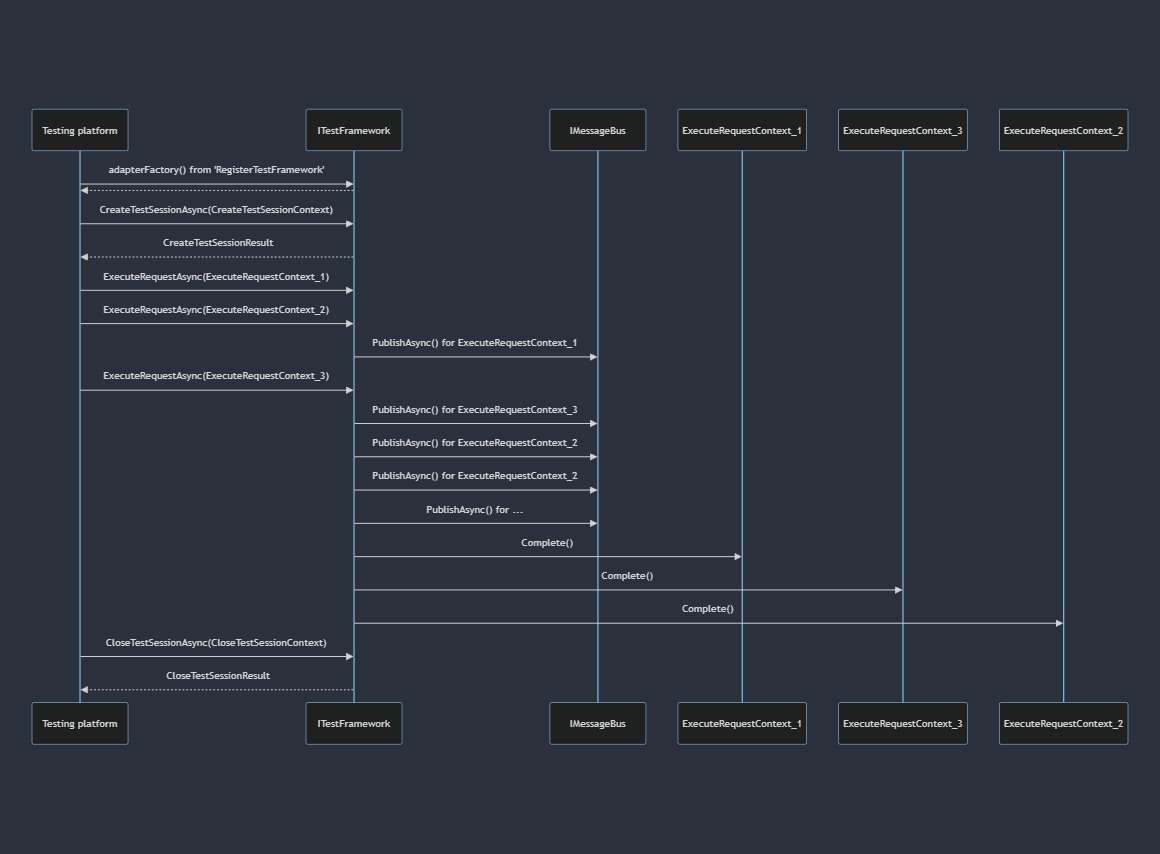
上图显示,测试平台在创建测试框架实例后会发出三个请求。 测试框架会处理这些请求,并利用请求本身包含的 IMessageBus 服务来提供每个特定请求的结果。 一旦某个请求得到处理,测试框架就会调用 Complete() 方法,向测试平台表明该请求已得到满足。
测试平台会监控所有已发送的请求。 一旦所有请求都得到满足,它就会调用 CloseTestSessionAsync 并处置实例(如果实现了 IDisposable/IAsyncDisposable)。
显然,请求及其完成可以重叠,从而实现请求的并发和异步执行。
注释
目前,测试平台不会发送重叠请求,而是等待请求 >> 完成后再发送下一个请求。 然而,这种行为今后可能会改变。 对并发请求的支持将通过功能系统来确定。
IRequest 实现指定了需要满足的精确请求。 测试框架会识别请求类型并进行相应处理。 如果请求类型无法识别,就会出现异常。
有关可用请求的详细信息,请参阅 IRequest 部分。
IMessageBus:此服务与请求相关联,允许测试框架“异步”向测试平台发布有关正在进行的请求的信息。
消息总线是平台的中心枢纽,为所有平台组件和扩展之间的异步通信提供便利。
有关可发布到测试平台的信息的完整列表,请参阅 IMessageBus 部分。
CancellationToken:此令牌用于中断对某个请求的处理。
Complete():如上一序列所示,Complete 方法通知平台已成功处理请求,所有相关信息已传输到 IMessageBus 中。
警告
在请求中忽略调用 Complete() 会导致测试程序无响应。
要根据自己或用户的要求定制测试框架,可以在配置文件中使用个性化部分,或使用自定义命令行选项。
处理请求
下一部分将详细介绍测试框架可能接收和处理的各种请求。
在进入下一部分之前,彻底理解 IMessageBus 的概念至关重要,它是向测试平台传递测试执行信息的基本服务。
TestSessionContext
TestSessionContext 是所有请求的共享属性,提供有关正在进行的测试会话的信息:
public class TestSessionContext
{
    public SessionUid SessionUid { get; }
}

public readonly struct SessionUid(string value)
{
    public string Value { get; }
}
TestSessionContext 包括 SessionUid,后者是正在进行的测试会话的唯一标识符,有助于记录和关联测试会话数据。
DiscoverTestExecutionRequest
public class DiscoverTestExecutionRequest
{
    public TestSessionContext Session { get; }
    public ITestExecutionFilter Filter { get; }
}
DiscoverTestExecutionRequest 指示测试框架”发现“测试,并将此信息传递给 IMessageBus。
如上一部分所述,被发现测试的属性是 DiscoveredTestNodeStateProperty。 以下是一个供参考的通用代码段:
var testNode = new TestNode
{
    Uid = GenerateUniqueStableId(),
    DisplayName = GetDisplayName(),
    Properties = new PropertyBag(
        DiscoveredTestNodeStateProperty.CachedInstance),
};

await context.MessageBus.PublishAsync(
    this,
    new TestNodeUpdateMessage(
        discoverTestExecutionRequest.Session.SessionUid,
        testNode));

// ...
RunTestExecutionRequest
public class RunTestExecutionRequest
{
    public TestSessionContext Session { get; }
    public ITestExecutionFilter Filter { get; }
}
RunTestExecutionRequest 指示测试框架执行测试,并将此信息传达给IMessageBus。
以下是一个供参考的通用代码段:
var skippedTestNode = new TestNode()
{
    Uid = GenerateUniqueStableId(),
    DisplayName = GetDisplayName(),
    Properties = new PropertyBag(
        SkippedTestNodeStateProperty.CachedInstance),
};

await context.MessageBus.PublishAsync(
    this,
    new TestNodeUpdateMessage(
        runTestExecutionRequest.Session.SessionUid,
        skippedTestNode));

// ...

var successfulTestNode = new TestNode()
{
    Uid = GenerateUniqueStableId(),
    DisplayName = GetDisplayName(),
    Properties = new PropertyBag(
        PassedTestNodeStateProperty.CachedInstance),
};

await context.MessageBus.PublishAsync(
    this,
    new TestNodeUpdateMessage(
        runTestExecutionRequest.Session.SessionUid,
        successfulTestNode));

// ...

var assertionFailedTestNode = new TestNode()
{
    Uid = GenerateUniqueStableId(),
    DisplayName = GetDisplayName(),
    Properties = new PropertyBag(
        new FailedTestNodeStateProperty(assertionException)),
};

await context.MessageBus.PublishAsync(
    this,
    new TestNodeUpdateMessage(
        runTestExecutionRequest.Session.SessionUid,
        assertionFailedTestNode));

// ...

var failedTestNode = new TestNode()
{
    Uid = GenerateUniqueStableId(),
    DisplayName = GetDisplayName(),
    Properties = new PropertyBag(
        new ErrorTestNodeStateProperty(ex.InnerException!)),
};

await context.MessageBus.PublishAsync(
    this,
    new TestNodeUpdateMessage(
        runTestExecutionRequest.Session.SessionUid,
        failedTestNode));
标准测试执行
从 MTP 2.5 预览版开始,可使用进行中的 TestNodeUpdateMessage 调用 ExecuteRequestContext.StartTestExecutionAsync,以启动实验性的规范 TestExecution。 start 方法发布正在进行的更新,并返回一个对象,该对象将执行生命周期、消息排序和遥测关联一起保留。
使用 Run 或 RunAsync 调用规范执行上下文中的框架和测试代码。 当 OpenTelemetry 处于活动状态时,测试创建的子活动将保留在相同的测试执行活动中。
使用有序的结果消息以及生成者观察到的执行结束时间调用 CompleteAsync。 每个结果都必须使用起始消息中的会话、测试 UID 和父 UID。 最后一条消息是最终结果。 空集合在不发明结果的情况下发布执行完成的更新。
丢弃未完成的 TestExecution 即可放弃它而不发布结果。 在完成或处置后,对象会拒绝额外的执行或完成操作调用。
重要
StartTestExecutionAsync 和 TestExecution 使用 TPEXP 诊断 ID,并且可能会在将来的版本中更改或被移除。
TestNodeUpdateMessage 数据
如 IMessageBus 部分中所述,在使用消息总线之前,必须指定要提供的数据类型。 测试平台定义了一个已知的 TestNodeUpdateMessage 类型,用来表示“测试更新信息”的概念。
本文档的这一部分将介绍如何利用这些有效负载数据。 让我们来检查一下表面:
public sealed class TestNodeUpdateMessage(
    SessionUid sessionUid,
    TestNode testNode,
    TestNodeUid? parentTestNodeUid = null)
{
    public TestNode TestNode { get; }
    public TestNodeUid? ParentTestNodeUid { get; }
}

public class TestNode
{
    public required TestNodeUid Uid { get; init; }
    public required string DisplayName { get; init; }
    public PropertyBag Properties { get; init; } = new();
}

public sealed class TestNodeUid(string value);

public sealed partial class PropertyBag
{
    public PropertyBag();
    public PropertyBag(params IProperty[] properties);
    public PropertyBag(IEnumerable<IProperty> properties);
    public int Count { get; }
    public void Add(IProperty property);
    public bool Any<TProperty>();
    public TProperty? SingleOrDefault<TProperty>();
    public TProperty Single<TProperty>();
    public TProperty[] OfType<TProperty>();
    public IEnumerable<IProperty> AsEnumerable();
    public IEnumerator<IProperty> GetEnumerator();
    ...
}

public interface IProperty
{
}
TestNodeUpdateMessage:TestNodeUpdateMessage由两个属性组成:一个TestNode和一个ParentTestNodeUid。ParentTestNodeUid表示一个测试可能有一个父测试,引入了“测试树”的概念,其中TestNode可以相互排列。 此结构允许根据节点之间的“树”关系对未来功能进行增强。 如果测试框架不需要测试树结构,则可以选择不使用测试树结构,只需将其设置为 null,从而得到一个直接的TestNode平面列表。TestNode:TestNode由三个属性组成,其中一个属性是Uid类型的TestNodeUid。 此Uid用作节点的唯一稳定 ID。 术语 UNIQUE STABLE ID 意味着同一TestNode应在不同运行和操作系统中保持一致Uid。TestNodeUid是测试平台按原样接受的任意不透明字符串。
重要
在测试领域,ID 的稳定性和唯一性至关重要。 它们可以精确定位执行单个测试,并允许 ID 作为测试的持久标识符,从而为强大的扩展和功能提供便利。
第二个属性是 DisplayName,这是测试的用户友好名称。 例如,执行 --list-tests 命令行时就会显示此名称。
第三个属性是 Properties,属于 PropertyBag 类型。 如代码所示,这是一个专门的属性包,用于保存 TestNodeUpdateMessage 的一般属性。 这意味着可以向实现占位符接口 IProperty 的节点附加任何属性。
测试平台会识别添加到 TestNode.Properties 中的特定属性,以确定测试是否通过、失败或跳过。
可以在 TestNodeUpdateMessage.TestNode部分中找到具有相对说明的可用属性的当前列表。
PropertyBag 类型通常可在每个 IData 中访问,并被用于存储平台和扩展可以查询的其他属性。 通过这种机制,我们可以利用新的信息来增强平台,而无需引入重大更改。 如果组件能识别该属性,则可以对其进行查询;否则,会将其忽略。
最后,本部分明确指出,测试框架实现需要像下面的示例一样,实现产生 IDataProducer 的 TestNodeUpdateMessage:
internal sealed class TestingFramework
    : ITestFramework, IDataProducer
{
   // ...

   public Type[] DataTypesProduced =>
   [
       typeof(TestNodeUpdateMessage)
   ];

   // ...
}
如果测试适配器在执行过程中生成 文件 ,则平台可识别两种不同的机制,正确的机制取决于文件是属于特定测试还是整个运行。 请参阅消息总线文件工件,了解详细信息。
- 运行级或会话级文件是独立的总线消息:发布
FileArtifact(无范围)或SessionFileArtifact(范围限定为通过其SessionUid运行)。 - 特定于测试的附件不是独立邮件。 将它们作为
FileArtifactProperty条目添加到TestNodeUpdateMessage内部的TestNode.Properties上,以便终端、dotnet test和 IDE 将每个文件与其对应的测试关联起来。
如果你打算发布一个 SessionFileArtifact,则必须如下面所示,提前通过 DataTypesProduced 向平台声明该运行时类型。 请注意,FileArtifactProperty 未单独列出,因为它是在 TestNodeUpdateMessage 内部传输的,而不是作为一种独立的消息类型:
internal sealed class TestingFramework
    : ITestFramework, IDataProducer
{
   // ...

   public Type[] DataTypesProduced =>
   [
       typeof(TestNodeUpdateMessage),
       typeof(SessionFileArtifact)
   ];

   // ...
}
已知属性
如 请求部分所述,测试平台通过识别添加到TestNodeUpdateMessage中的特定属性来确定TestNode的状态(例如,成功、失败、跳过等)。 这样,运行时就能在控制台中准确显示失败测试的列表及其相应信息,并为测试进程设置适当的退出代码。
如 请求部分所述,测试平台会识别添加到 TestNodeUpdateMessage 的特定属性,以确定 TestNode 的状态(例如成功、失败和跳过)。 这样,运行时就能在控制台中准确显示失败测试的列表及其相应信息,并为测试进程设置适当的退出代码。
本部分介绍各种已知 IProperty 选项及其各自的含义。
有关已知属性的综合列表,请参阅 TestNodeStateProperties.cs (以及同一目录中的其他类型的 Property )。 如果发现缺少属性说明,请提出问题。
这些属性可以分为以下类别:
- 一般信息:可包含在任何类型请求中的属性。
-
发现信息:在
DiscoverTestExecutionRequest发现请求期间提供的属性。 -
执行信息:在测试执行请求
RunTestExecutionRequest期间提供的属性。
一些属性是“必需”的,而其他属性则是可选的。 强制属性是提供基本测试功能所必需的,如报告失败的测试和显示整个测试会话是否成功。
而可选属性通过提供更多信息来增强测试体验。 在 IDE 方案(如 VS、VSCode 等)、控制台运行或支持需要更详细信息才能正确运行的特定扩展时,它们尤为有用。 但是,这些可选属性不会影响测试的执行。
注释
当扩展需要特定信息才能正确运行时,它们的任务就是提醒和管理异常情况。 如果扩展缺少必要的信息,则它不应导致测试执行失败,而应直接选择退出。
一般信息
public record KeyValuePairStringProperty(
    string Key,
    string Value)
        : IProperty;
KeyValuePairStringProperty 代表一般的键/值对数据。
public record struct LinePosition(
    int Line,
    int Column);

public record struct LinePositionSpan(
    LinePosition Start,
    LinePosition End);

public abstract record FileLocationProperty(
    string FilePath,
    LinePositionSpan LineSpan)
        : IProperty;

public sealed record TestFileLocationProperty(
    string FilePath,
    LinePositionSpan LineSpan)
        : FileLocationProperty(FilePath, LineSpan);
TestFileLocationProperty 用于确定测试在源文件中的位置。 当发起程序是 IDE(如Visual Studio或Visual Studio Code)时,这特别有用。
public sealed record TestMethodIdentifierProperty(
    string AssemblyFullName,
    string Namespace,
    string TypeName,
    string MethodName,
    string[] ParameterTypeFullNames,
    string ReturnTypeFullName)
TestMethodIdentifierProperty 是测试方法的唯一标识符。
public sealed record TestMetadataProperty(
    string Key,
    string Value)
TestMetadataProperty 用来传达的特性或TestNode。
从 MTP 2.4 开始,可向失败的测试节点添加 AssertionFailureProperty,以分别提供预先格式化的预期值和实际值。 报表使用者可以使用这些值来呈现结构化差异,而不是分析失败消息。 至少一个值必须是非null值。 使用方优先使用此属性,但也可以回退为使用 Data 中旧版的 assert.expected 和 assert.actual 条目。
从 MTP 2.4 开始,在进程内重试序列中的每次更新中添加 RetryAttemptProperty。
AttemptNumber 从 1 开始计数,而 IsSuperseded 用于标记随后被后续尝试替代的尝试。 TRX、JUnit 和进程退出代码忽略被取代的尝试,而终端、HTML 和 CTRF 使用者可以保留完整历史记录。 此属性不表示--retry-failed-tests进程外尝试。
发现信息
public sealed record DiscoveredTestNodeStateProperty(
    string? Explanation = null)
{
    public static DiscoveredTestNodeStateProperty CachedInstance { get; }
}
DiscoveredTestNodeStateProperty 表示已发现该 TestNode。 在将 DiscoverTestExecutionRequest 发送到测试框架时会用到它。
请记下 CachedInstance 属性提供的便捷缓存值。
此属性为“必需”。
执行信息
public sealed record InProgressTestNodeStateProperty(
    string? Explanation = null)
{
    public static InProgressTestNodeStateProperty CachedInstance { get; }
}
InProgressTestNodeStateProperty 会通知测试平台 TestNode 已安排执行,并且目前正在进行中。
请记下 CachedInstance 属性提供的便捷缓存值。
public readonly record struct TimingInfo(
    DateTimeOffset StartTime,
    DateTimeOffset EndTime,
    TimeSpan Duration);

public sealed record StepTimingInfo(
    string Id,
    string Description,
    TimingInfo Timing);

public sealed record TimingProperty : IProperty
{
    public TimingProperty(TimingInfo globalTiming)
        : this(globalTiming, [])
    {
    }

    public TimingProperty(
        TimingInfo globalTiming,
        StepTimingInfo[] stepTimings)
    {
        GlobalTiming = globalTiming;
        StepTimings = stepTimings;
    }

    public TimingInfo GlobalTiming { get; }

    public StepTimingInfo[] StepTimings { get; }
}
TimingProperty 用于传递有关 TestNode 执行的时间详细信息。 它还允许通过 StepTimingInfo 为各个执行步骤计时。 当测试概念分为初始化、执行和清理等多个阶段时,这尤为有用。
以下属性,并将 的结果传送给测试平台。
public sealed record PassedTestNodeStateProperty(
    string? Explanation = null)
        : TestNodeStateProperty(Explanation)
{
    public static PassedTestNodeStateProperty CachedInstance
        { get; } = new PassedTestNodeStateProperty();
}
PassedTestNodeStateProperty 会通知测试平台该 TestNode 已通过。
请记下 CachedInstance 属性提供的便捷缓存值。
public sealed record SkippedTestNodeStateProperty(
    string? Explanation = null)
        : TestNodeStateProperty(Explanation)
{
    public static SkippedTestNodeStateProperty CachedInstance
        { get; } =  new SkippedTestNodeStateProperty();
}
SkippedTestNodeStateProperty 通知测试平台跳过了此 TestNode。
请记下 CachedInstance 属性提供的便捷缓存值。
public sealed record FailedTestNodeStateProperty : TestNodeStateProperty
{
    public FailedTestNodeStateProperty()
        : base(default(string))
    {
    }

    public FailedTestNodeStateProperty(string explanation)
        : base(explanation)
    {
    }

    public FailedTestNodeStateProperty(
        Exception exception,
        string? explanation = null)
        : base(explanation ?? exception.Message)
    {
        Exception = exception;
    }

    public Exception? Exception { get; }
}
FailedTestNodeStateProperty 通知测试平台此 TestNode 在断言后失败。
public sealed record ErrorTestNodeStateProperty : TestNodeStateProperty
{
    public ErrorTestNodeStateProperty()
        : base(default(string))
    {
    }

    public ErrorTestNodeStateProperty(string explanation)
        : base(explanation)
    {
    }

    public ErrorTestNodeStateProperty(
        Exception exception,
        string? explanation = null)
            : base(explanation ?? exception.Message)
    {
        Exception = exception;
    }

    public Exception? Exception { get; }
}
ErrorTestNodeStateProperty 通知测试平台此 TestNode 已失败。 这种失败类型不同于用于断言故障的 FailedTestNodeStateProperty。 例如,可以使用 ErrorTestNodeStateProperty 来报告测试初始化错误等问题。
public sealed record TimeoutTestNodeStateProperty : TestNodeStateProperty
{
    public TimeoutTestNodeStateProperty()
        : base(default(string))
    {
    }

    public TimeoutTestNodeStateProperty(string explanation)
        : base(explanation)
    {
    }

    public TimeoutTestNodeStateProperty(
        Exception exception,
        string? explanation = null)
            : base(explanation ?? exception.Message)
    {
        Exception = exception;
    }

    public Exception? Exception { get; }

    public TimeSpan? Timeout { get; init; }
}
TimeoutTestNodeStateProperty 通知测试平台此 TestNode 因超时而失败。 可以使用 Timeout 属性来报告超时。
public sealed record CancelledTestNodeStateProperty : TestNodeStateProperty
{
    public CancelledTestNodeStateProperty()
        : base(default(string))
    {
    }

    public CancelledTestNodeStateProperty(string explanation)
        : base(explanation)
    {
    }

    public CancelledTestNodeStateProperty(
        Exception exception,
        string? explanation = null)
        : base(explanation ?? exception.Message)
    {
        Exception = exception;
    }

    public Exception? Exception { get; }
}
CancelledTestNodeStateProperty 通知测试平台此 TestNode 因取消而失败。
