LINQ 中的集运算是指根据相同或单独集合中是否存在等效元素来生成结果集的查询运算。
重要
这些示例使用 System.Collections.Generic.IEnumerable<T> 数据源。 基于 System.Linq.IQueryProvider 的数据源使用 System.Linq.IQueryable<T> 数据源和表达式树。 表达式树对允许的 C# 语法有限制。 此外,每个 IQueryProvider 数据源(如 EF Core)可能会施加更多限制。 查看数据源的文档。
| 方法名称 | 说明 | C# 查询表达式语法 | 详细信息 |
|---|---|---|---|
Distinct 或 DistinctBy |
删除集合中的重复值。 | 不适用。 | Enumerable.Distinct Enumerable.DistinctBy Queryable.Distinct Queryable.DistinctBy |
Except 或 ExceptBy |
返回差集,即一个集合中不在另一个集合中的元素。 | 不适用。 | Enumerable.Except Enumerable.ExceptBy Queryable.Except Queryable.ExceptBy |
Intersect 或 IntersectBy |
返回集合的交集,指同时出现在两个集合中的元素。 | 不适用。 | Enumerable.Intersect Enumerable.IntersectBy Queryable.Intersect Queryable.IntersectBy |
Union 或 UnionBy |
返回两个集合的并集,即两个集合中任一集合中出现的唯一元素。 | 不适用。 | Enumerable.Union Enumerable.UnionBy Queryable.Union Queryable.UnionBy |
Distinct 和 DistinctBy
以下示例演示字符串序列上 Enumerable.Distinct 方法的行为。 返回的序列包含输入序列的唯一元素。

string[] words = ["the", "quick", "brown", "fox", "jumped", "over", "the", "lazy", "dog"];

IEnumerable<string> query = from word in words.Distinct()
                            select word;

foreach (var str in query)
{
    Console.WriteLine(str);
}

/* This code produces the following output:
 *
 * the
 * quick
 * brown
 * fox
 * jumped
 * over
 * lazy
 * dog
 */
DistinctBy 是 Distinct 的替代方法,它采用 keySelector。
keySelector 用作源类型的比较鉴别器。 在以下代码中,单词根据其 Length 进行区分,并且显示每个长度的第一个单词:
string[] words = ["the", "quick", "brown", "fox", "jumped", "over", "the", "lazy", "dog"];

foreach (string word in words.DistinctBy(p => p.Length))
{
    Console.WriteLine(word);
}

// This code produces the following output:
//     the
//     quick
//     jumped
//     over
Except 和 ExceptBy
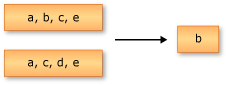
以下示例演示 Enumerable.Except 的行为。 返回的序列只包含位于第一个输入序列但不位于第二个输入序列的元素。
注意
本文中的以下示例使用此区域的常见数据源。
每个 Student 都有年级、主要院系和一系列分数。
Teacher 还有一个 City 属性,用于标识教师的授课校区。
Department 有一个名称,并且关联到一个作为部门负责人的 Teacher。
可以在源存储库中找到示例数据集。
public enum GradeLevel
{
    FirstYear = 1,
    SecondYear,
    ThirdYear,
    FourthYear
};

public class Student
{
    public required string FirstName { get; init; }
    public required string LastName { get; init; }
    public required int ID { get; init; }

    public required GradeLevel Year { get; init; }
    public required List<int> Scores { get; init; }

    public required int DepartmentID { get; init; }
}

public class Teacher
{
    public required string First { get; init; }
    public required string Last { get; init; }
    public required int ID { get; init; }
    public required string City { get; init; }
}

public class Department
{
    public required string Name { get; init; }
    public int ID { get; init; }

    public required int TeacherID { get; init; }
}
注意
可以在 标准查询运算符概述 文章中参考此区域的常见数据源。
string[] words1 = ["the", "quick", "brown", "fox"];
string[] words2 = ["jumped", "over", "the", "lazy", "dog"];

IEnumerable<string> query = from word in words1.Except(words2)
                            select word;

foreach (var str in query)
{
    Console.WriteLine(str);
}

/* This code produces the following output:
 *
 * quick
 * brown
 * fox
 */
ExceptBy 方法是 Except 的替代方法,它采用可能是异构类型的两个序列和一个 keySelector。
keySelector 的类型与第一个集合的类型相同。 请考虑以下要排除的 Teacher 数组和教师 ID。 若要查找第一个集合中没有出现在第二个集合中的教师,可以将教师的 ID 投影到第二个集合中:
int[] teachersToExclude =
[
    901,    // English
    965,    // Mathematics
    932,    // Engineering
    945,    // Economics
    987,    // Physics
    901     // Chemistry
];

foreach (Teacher teacher in
    teachers.ExceptBy(
        teachersToExclude, teacher => teacher.ID))
{
    Console.WriteLine($"{teacher.First} {teacher.Last}");
}
在前述 C# 代码中:
- 已筛选
teachers数组以仅包含不在teachersToExclude数组中的那些教师。 -
teachersToExclude数组包含所有部门负责人的ID值。 - 对
ExceptBy的调用会生成一个新的值集,这些值被写入到控制台。
新的值集的类型为 Teacher,这是第一个集合的类型。 对于 teacher 数组中的每个 teachers,如果在 teachersToExclude 数组中没有相应 ID 值,则会写入到控制台。
Intersect 和 IntersectBy
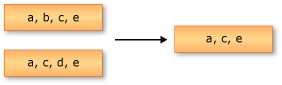
以下示例演示 Enumerable.Intersect 的行为。 返回的序列包含两个输入序列共有的元素。
string[] words1 = ["the", "quick", "brown", "fox"];
string[] words2 = ["jumped", "over", "the", "lazy", "dog"];

IEnumerable<string> query = from word in words1.Intersect(words2)
                            select word;

foreach (var str in query)
{
    Console.WriteLine(str);
}

/* This code produces the following output:
 *
 * the
 */
IntersectBy 方法是 Intersect 的替代方法,它采用可能是异构类型的两个序列和一个 keySelector。
keySelector 用作第二个集合类型的比较鉴别器。 请考虑以下学生和教师数组。 查询按名称匹配每个序列中的项,以查找那些也是教师的学生:
foreach (Student person in
    students.IntersectBy(
        teachers.Select(t => (t.First, t.Last)), s => (s.FirstName, s.LastName)))
{
    Console.WriteLine($"{person.FirstName} {person.LastName}");
}
在前述 C# 代码中:
- 该查询通过比较名称生成
Teacher和Student的交集。 - 只有在这两个阵列中都找到的人员才会出现在结果序列中。
- 将生成的
Student实例写入控制台。
Union 和 UnionBy
以下示例演示对两个字符串序列执行的联合操作。 返回的序列包含两个输入序列的唯一元素。

string[] words1 = ["the", "quick", "brown", "fox"];
string[] words2 = ["jumped", "over", "the", "lazy", "dog"];

IEnumerable<string> query = from word in words1.Union(words2)
                            select word;

foreach (var str in query)
{
    Console.WriteLine(str);
}

/* This code produces the following output:
 *
 * the
 * quick
 * brown
 * fox
 * jumped
 * over
 * lazy
 * dog
*/
UnionBy 方法是 Union 的替代方法,它采用相同类型的两个序列和一个 keySelector。
keySelector 用作源类型的比较鉴别器。 以下查询生成所有人员(学生或教师)的列表。 那些同时是教师的学生仅会被加入到联合集合中一次。
foreach (var person in
    students.Select(s => (s.FirstName, s.LastName)).UnionBy(
        teachers.Select(t => (FirstName: t.First, LastName: t.Last)), s => (s.FirstName, s.LastName)))
{
    Console.WriteLine($"{person.FirstName} {person.LastName}");
}
在前述 C# 代码中:
-
teachers和students数组使用其名称作为键选择器编织在一起。 - 生成的名称将写入控制台。
