System.IO.Pipelines 是一个库,旨在简化 .NET 中的高性能 I/O。 该包面向 .NET Standard,实现广泛的兼容性、.NET Framework 和新式 .NET。 在现代 .NET 版本中, System.IO.Pipelines 包含在共享框架中,不需要单独的 NuGet 包。
该库也可用作 System.IO.Pipelines NuGet 包。
System.IO.Pipelines 可以解决什么问题?
分析流数据的应用由样板代码组成,后者由许多专门且不寻常的代码流组成。 样板代码和特殊情况代码很复杂且难以进行维护。
System.IO.Pipelines 已构建为:
- 具有高性能的流数据分析功能。
- 减少代码复杂性。
以下代码是从客户端接收以'\n'作为分隔符划分行的消息的 TCP 服务器的典型例子:
async Task ProcessLinesAsync(NetworkStream stream)
{
    var buffer = new byte[1024];
    await stream.ReadAsync(buffer, 0, buffer.Length);

    // Process a single line from the buffer
    ProcessLine(buffer);
}
前面的代码有几个问题:
- 单次调用
ReadAsync可能无法接收整条消息(行尾)。 - 忽略了
stream.ReadAsync的结果。stream.ReadAsync返回读取的数据量。 - 它不能处理在单个
ReadAsync调用中读取多行的情况。 - 它为每次读取分配一个
byte数组。
若要修复上述问题,请进行以下更改:
缓冲传入的数据,直到找到新行。
分析缓冲区中返回的所有行。
该行可能大于 1 KB(1024 字节)。 代码需要调整输入缓冲区的大小,直到找到分隔符以适应缓冲区内的完整行。
- 如果调整缓冲区的大小,当输入中出现较长的行时,将生成更多缓冲区副本。
- 压缩用于读取行的缓冲区,以减少空余。
请考虑使用缓冲池来避免重复分配内存。
此代码解决了以下一些问题:
async Task ProcessLinesAsync(NetworkStream stream)
{
    byte[] buffer = ArrayPool<byte>.Shared.Rent(1024);
    var bytesBuffered = 0;
    var bytesConsumed = 0;

    while (true)
    {
        // Calculate the amount of bytes remaining in the buffer.
        var bytesRemaining = buffer.Length - bytesBuffered;

        if (bytesRemaining == 0)
        {
            // Double the buffer size and copy the previously buffered data into the new buffer.
            var newBuffer = ArrayPool<byte>.Shared.Rent(buffer.Length * 2);
            Buffer.BlockCopy(buffer, 0, newBuffer, 0, buffer.Length);
            // Return the old buffer to the pool.
            ArrayPool<byte>.Shared.Return(buffer);
            buffer = newBuffer;
            bytesRemaining = buffer.Length - bytesBuffered;
        }

        var bytesRead = await stream.ReadAsync(buffer, bytesBuffered, bytesRemaining);
        if (bytesRead == 0)
        {
            // EOF
            break;
        }

        // Keep track of the amount of buffered bytes.
        bytesBuffered += bytesRead;
        var linePosition = -1;

        do
        {
            // Look for a EOL in the buffered data.
            linePosition = Array.IndexOf(buffer, (byte)'\n', bytesConsumed,
                                         bytesBuffered - bytesConsumed);

            if (linePosition >= 0)
            {
                // Calculate the length of the line based on the offset.
                var lineLength = linePosition - bytesConsumed;

                // Process the line.
                ProcessLine(buffer, bytesConsumed, lineLength);

                // Move the bytesConsumed to skip past the line consumed (including \n).
                bytesConsumed += lineLength + 1;
            }
        }
        while (linePosition >= 0);
    }
}
前面的代码很复杂,不能解决所识别的所有问题。 高性能网络通常意味着编写复杂的代码以使性能最大化。
System.IO.Pipelines 的设计目的是使编写此类代码更容易。
管道
使用 Pipe 类创建一个 PipeWriter/PipeReader 对。 写入 PipeWriter 的所有数据都在 PipeReader 中可用。
var pipe = new Pipe();
PipeReader reader = pipe.Reader;
PipeWriter writer = pipe.Writer;
管道基本用法
async Task ProcessLinesAsync(Socket socket)
{
    var pipe = new Pipe();
    Task writing = FillPipeAsync(socket, pipe.Writer);
    Task reading = ReadPipeAsync(pipe.Reader);

    await Task.WhenAll(reading, writing);
}

async Task FillPipeAsync(Socket socket, PipeWriter writer)
{
    const int minimumBufferSize = 512;

    while (true)
    {
        // Allocate at least 512 bytes from the PipeWriter.
        Memory<byte> memory = writer.GetMemory(minimumBufferSize);
        try
        {
            int bytesRead = await socket.ReceiveAsync(memory, SocketFlags.None);
            if (bytesRead == 0)
            {
                break;
            }
            // Tell the PipeWriter how much was read from the Socket.
            writer.Advance(bytesRead);
        }
        catch (Exception ex)
        {
            LogError(ex);
            break;
        }

        // Make the data available to the PipeReader.
        FlushResult result = await writer.FlushAsync();

        if (result.IsCompleted)
        {
            break;
        }
    }

     // By completing PipeWriter, tell the PipeReader that there's no more data coming.
    await writer.CompleteAsync();
}

async Task ReadPipeAsync(PipeReader reader)
{
    while (true)
    {
        ReadResult result = await reader.ReadAsync();
        ReadOnlySequence<byte> buffer = result.Buffer;

        while (TryReadLine(ref buffer, out ReadOnlySequence<byte> line))
        {
            // Process the line.
            ProcessLine(line);
        }

        // Tell the PipeReader how much of the buffer has been consumed.
        reader.AdvanceTo(buffer.Start, buffer.End);

        // Stop reading if there's no more data coming.
        if (result.IsCompleted)
        {
            break;
        }
    }

    // Mark the PipeReader as complete.
    await reader.CompleteAsync();
}

bool TryReadLine(ref ReadOnlySequence<byte> buffer, out ReadOnlySequence<byte> line)
{
    // Look for a EOL in the buffer.
    SequencePosition? position = buffer.PositionOf((byte)'\n');

    if (position == null)
    {
        line = default;
        return false;
    }

    // Skip the line + the \n.
    line = buffer.Slice(0, position.Value);
    buffer = buffer.Slice(buffer.GetPosition(1, position.Value));
    return true;
}
两个循环处理读取和写入:
-
FillPipeAsync从Socket读取并写入PipeWriter。 -
ReadPipeAsync从PipeReader读取并分析传入的行。
未分配显式缓冲区。 所有缓冲区管理都委托给 PipeReader 和 PipeWriter 实现。 委派缓冲区管理使使用代码更容易集中关注业务逻辑。
在第一个循环中:
- 调用 PipeWriter.GetMemory(Int32) 从基础编写器获取内存。
- 调用 PipeWriter.Advance(Int32) 以告知
PipeWriter有多少数据已写入缓冲区。 - 调用 PipeWriter.FlushAsync 以使数据可用于
PipeReader。
在第二个循环中,PipeReader 使用由 PipeWriter 写入的缓冲区。 缓冲区来自套接字。 对 PipeReader.ReadAsync 的调用:
返回包含两条重要信息的 ReadResult:
- 以 ReadOnlySequence<T> 形式读取的数据。
- 布尔值
IsCompleted,指示是否已到达数据结尾 (EOF)。
找到行尾(EOL)分隔符并解析该行后:
- 该逻辑处理缓冲区以跳过已处理的内容。
- 调用 PipeReader.AdvanceTo 以告知
PipeReader已消耗和检查了多少数据。
读取器和写入器循环的结束是通过调用函数 PipeReader.Complete 和 PipeWriter.Complete 实现的。 调用 Complete 释放由底层 Pipe 分配的内存。
反压和流量控制
理想情况下,读取和分析可协同工作:
- 读取线程使用来自网络的数据并将其放入缓冲区。
- 分析线程负责构造适当的数据结构。
通常,分析所花费的时间比仅从网络复制数据块所用时间更长:
- 读取线程领先于分析线程。
- 读取线程必须减缓或分配更多内存来存储用于分析线程的数据。
为了获得最佳性能,需要在频繁暂停和分配更多内存之间取得平衡。
为解决上述问题,Pipe 提供了两个设置来控制数据流:
- PauseWriterThreshold:用于确定在调用 FlushAsync 暂停之前应该缓冲多少数据。
- ResumeWriterThreshold:确定在恢复对 PipeWriter.FlushAsync 的调用之前,读取器必须观察多少数据。
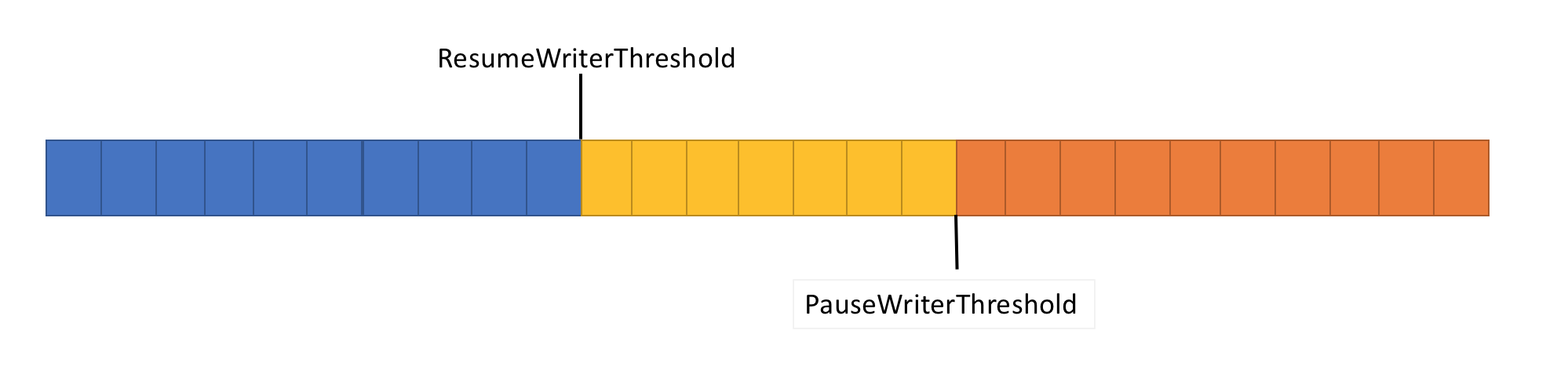
- 当
ValueTask<FlushResult>中的数据量超过Pipe时,返回不完整的PauseWriterThreshold。 - 当
ValueTask<FlushResult>低于ResumeWriterThreshold时完成。
使用两个值可防止快速循环,如果只使用一个值,则可能发生这种循环。
示例
// The Pipe will start returning incomplete tasks from FlushAsync until
// the reader examines at least 5 bytes.
var options = new PipeOptions(pauseWriterThreshold: 10, resumeWriterThreshold: 5);
var pipe = new Pipe(options);
管道调度器
通常在使用 async 和 await 时,异步代码会在 TaskScheduler 或当前 SynchronizationContext 上恢复。
在执行 I/O 时,对执行 I/O 的位置进行细粒度控制非常重要。 此控件允许高效利用 CPU 缓存。 高效的缓存对于 Web 服务器等高性能应用至关重要。 PipeScheduler 提供对异步回调运行位置的控制。 默认情况下:
- 使用当前的 SynchronizationContext。
- 如果没有
SynchronizationContext,它将使用线程池运行回调。
public static void Main(string[] args)
{
    var writeScheduler = new SingleThreadPipeScheduler();
    var readScheduler = new SingleThreadPipeScheduler();

    // Tell the Pipe what schedulers to use and disable the SynchronizationContext.
    var options = new PipeOptions(readerScheduler: readScheduler,
                                  writerScheduler: writeScheduler,
                                  useSynchronizationContext: false);
    var pipe = new Pipe(options);
}

// This is a sample scheduler that async callbacks on a single dedicated thread.
public class SingleThreadPipeScheduler : PipeScheduler
{
    private readonly BlockingCollection<(Action<object> Action, object State)> _queue =
     new BlockingCollection<(Action<object> Action, object State)>();
    private readonly Thread _thread;

    public SingleThreadPipeScheduler()
    {
        _thread = new Thread(DoWork);
        _thread.Start();
    }

    private void DoWork()
    {
        foreach (var item in _queue.GetConsumingEnumerable())
        {
            item.Action(item.State);
        }
    }

    public override void Schedule(Action<object?> action, object? state)
    {
        if (state is not null)
        {
            _queue.Add((action, state));
        }
        // else log the fact that _queue.Add was not called.
    }
}
PipeScheduler.ThreadPool 是 PipeScheduler 实现,用于对线程池的回调进行排队。
PipeScheduler.ThreadPool 是默认选项,通常也是最佳选项。
PipeScheduler.Inline 可能会导致意外后果,如死锁。
管道重置
通常重用这个Pipe对象是高效的。 若要重置管道,请在 PipeReader 和 Reset 完成时调用 PipeReaderPipeWriter。
PipeReader
PipeReader 代表调用方管理内存。 在调用 之后始终调用 PipeReader.AdvanceTo。 这使 PipeReader 知道调用方何时用完内存,以便可以对其进行跟踪。 从ReadOnlySequence<T>返回的值在调用PipeReader.AdvanceTo时仍然有效。 调用 ReadOnlySequence<T> 后,不能使用 PipeReader.AdvanceTo。
PipeReader.AdvanceTo 采用两个 SequencePosition 参数:
- 第一个参数确定消耗的内存量。
- 第二个参数确定观察到的缓冲区数。
将数据标记为“已使用”意味着管道可以将内存返回到底层缓冲池。 将数据标记为“已观察”可控制对 PipeReader.ReadAsync 的下一个调用的作用。 将所有内容都标记为“已观察”意味着下次对 PipeReader.ReadAsync 的调用将不会返回,直到有更多数据写入管道。 其他任何值都会使下一次调用PipeReader.ReadAsync立即返回观察到和未观察到的数据,但不包括已使用的数据。
读取流数据场景
读取流数据时会出现几个典型的模式:
- 给定数据流时,分析单条消息。
- 给定数据流时,分析所有可用消息。
这些示例使用 TryParseLines 方法解析来自 ReadOnlySequence<T> 的消息。
TryParseLines 分析单条消息并更新输入缓冲区,以从缓冲区中剪裁已分析的消息。
TryParseLines 不是 .NET 的一部分;这是以下各节中使用的用户编写方法。
bool TryParseLines(ref ReadOnlySequence<byte> buffer, out Message message);
读取单条消息
此代码从某个 PipeReader 消息中读取单个消息,并将其返回到调用方。
async ValueTask<Message?> ReadSingleMessageAsync(PipeReader reader,
 CancellationToken cancellationToken = default)
{
    while (true)
    {
        ReadResult result = await reader.ReadAsync(cancellationToken);
        ReadOnlySequence<byte> buffer = result.Buffer;

        // In the event that no message is parsed successfully, mark consumed
        // as nothing and examined as the entire buffer.
        SequencePosition consumed = buffer.Start;
        SequencePosition examined = buffer.End;

        try
        {
            if (TryParseLines(ref buffer, out Message message))
            {
                // A single message was successfully parsed so mark the start of the
                // parsed buffer as consumed. TryParseLines trims the buffer to
                // point to the data after the message was parsed.
                consumed = buffer.Start;

                // Examined is marked the same as consumed here, so the next call
                // to ReadSingleMessageAsync will process the next message if there's
                // one.
                examined = consumed;

                return message;
            }

            // There's no more data to be processed.
            if (result.IsCompleted)
            {
                if (buffer.Length > 0)
                {
                    // The message is incomplete and there's no more data to process.
                    throw new InvalidDataException("Incomplete message.");
                }

                break;
            }
        }
        finally
        {
            reader.AdvanceTo(consumed, examined);
        }
    }

    return null;
}
前面的代码:
- 分析单条消息。
- 更新已使用的
SequencePosition并检查SequencePosition以指向已剪裁的输入缓冲区的开始。
因为 SequencePosition 从输入缓冲区中删除了已分析的消息,所以更新了两个 TryParseLines 参数。 通常,分析来自缓冲区的单条消息时,检查的位置应为以下位置之一:
- 消息的结尾。
- 如果未找到消息,则指向接收缓冲区的结尾。
单条消息案例最有可能出现错误。 传递给 检查 的错误值可能会导致内存溢出异常或进入无限循环。 有关详细信息,请参阅本文中的 PipeReader 常见问题部分。
重要
ReadSingleMessageAsync 不调用 PipeReader.CompleteAsync。 调用方负责完成该操作 PipeReader。 在 ReadSingleMessageAsync 内调用 PipeReader.CompleteAsync 表示无法读取更多数据,从而阻止读取后续消息。
读取多条消息
此代码从 PipeReader 读取所有消息,并对每个消息调用 ProcessMessageAsync。
async Task ProcessMessagesAsync(PipeReader reader, CancellationToken cancellationToken = default)
{
    try
    {
        while (true)
        {
            ReadResult result = await reader.ReadAsync(cancellationToken);
            ReadOnlySequence<byte> buffer = result.Buffer;

            try
            {
                // Process all messages from the buffer, modifying the input buffer on each
                // iteration.
                while (TryParseLines(ref buffer, out Message message))
                {
                    await ProcessMessageAsync(message);
                }

                // There's no more data to be processed.
                if (result.IsCompleted)
                {
                    if (buffer.Length > 0)
                    {
                        // The message is incomplete and there's no more data to process.
                        throw new InvalidDataException("Incomplete message.");
                    }
                    break;
                }
            }
            finally
            {
                // Since all messages in the buffer are being processed, you can use the
                // remaining buffer's Start and End position to determine consumed and examined.
                reader.AdvanceTo(buffer.Start, buffer.End);
            }
        }
    }
    finally
    {
        await reader.CompleteAsync();
    }
}
由于 ProcessMessagesAsync 拥有完整的消息读取循环,因此它在完成时调用 PipeReader.CompleteAsync 。 与单消息情况不同,调用方无需完成读取器。
ProcessMessagesAsync 完全拥有 PipeReader 的生命周期。
取消
- 支持传递 CancellationToken。
- 如果在读取挂起期间取消了 OperationCanceledException,则会引发
CancellationToken。 - 支持通过 PipeReader.CancelPendingRead 取消当前读取操作的方法,这样可以避免引发异常。 调用
PipeReader.CancelPendingRead将导致对 PipeReader.ReadAsync 的当前或下次调用返回 ReadResult,并将IsCanceled设置为true。 这对于以非破坏性和非异常方式停止现有读取循环非常有用。
private PipeReader reader;

public MyConnection(PipeReader reader)
{
    this.reader = reader;
}

public void Abort()
{
    // Cancel the pending read so the process loop ends without an exception.
    reader.CancelPendingRead();
}

public async Task ProcessMessagesAsync()
{
    try
    {
        while (true)
        {
            ReadResult result = await reader.ReadAsync();
            ReadOnlySequence<byte> buffer = result.Buffer;

            try
            {
                if (result.IsCanceled)
                {
                    // The read was canceled. You can quit without reading the existing data.
                    break;
                }

                // Process all messages from the buffer, modifying the input buffer on each
                // iteration.
                while (TryParseLines(ref buffer, out Message message))
                {
                    await ProcessMessageAsync(message);
                }

                // There's no more data to be processed.
                if (result.IsCompleted)
                {
                    break;
                }
            }
            finally
            {
                // Since all messages in the buffer are being processed, you can use the
                // remaining buffer's Start and End position to determine consumed and examined.
                reader.AdvanceTo(buffer.Start, buffer.End);
            }
        }
    }
    finally
    {
        await reader.CompleteAsync();
    }
}
PipeReader 常见问题
将错误的值传递给
consumed或examined可能导致读取已处理过的数据。buffer.End按检查传递可能会导致:- 数据停滞
- 如果不消耗数据,将会引发内存不足(OOM)异常。 例如,当一次处理来自缓冲区的单条消息时,可能会出现
PipeReader.AdvanceTo(position, buffer.End)。
将错误值传递给
consumed或examined可能导致无限循环。 例如,PipeReader.AdvanceTo(buffer.Start)如果buffer.Start没有更改,则会导致下一次调用PipeReader.ReadAsync在新数据到达之前立即返回。将错误的值传递给
consumed或examined可能导致无限缓冲(最终OOM)。调用ReadOnlySequence<T>后使用PipeReader.AdvanceTo可能会导致内存损坏(释放后使用)。
调用失败 Complete/CompleteAsync 可能会导致内存泄漏。
在处理缓冲区之前检查 ReadResult.IsCompleted 并退出读取逻辑会导致数据丢失。 循环退出条件应基于
ReadResult.Buffer.IsEmpty和ReadResult.IsCompleted。 如果错误执行此操作,可能会导致无限循环。
有问题的代码
❌ 数据丢失
当 ReadResult 被设置为 IsCompleted 时,true 可能会返回最后一段数据。 在退出读取循环之前不读取该数据会导致数据丢失。
警告
不要使用以下代码。 使用此示例将导致数据丢失、挂起和安全问题,并且不应复制。 下面的示例提供了说明 PipeReader 常见问题。
Environment.FailFast("This code is terrible, don't use it!");
while (true)
{
    ReadResult result = await reader.ReadAsync(cancellationToken);
    ReadOnlySequence<byte> dataLossBuffer = result.Buffer;

    if (result.IsCompleted)
        break;

    Process(ref dataLossBuffer, out Message message);

    reader.AdvanceTo(dataLossBuffer.Start, dataLossBuffer.End);
}
警告
不要使用上述代码。 使用此示例将导致数据丢失、挂起和安全问题,并且不应复制。 提供了前面的示例来解释 PipeReader 常见问题。
❌ 无限循环
如果 Result.IsCompleted 存在 true 但缓冲区中从未出现完整消息,则以下逻辑可能会导致无限循环。
警告
不要使用以下代码。 使用此示例将导致数据丢失、挂起和安全问题,并且不应复制。 下面的示例提供了说明 PipeReader 常见问题。
Environment.FailFast("This code is terrible, don't use it!");
while (true)
{
    ReadResult result = await reader.ReadAsync(cancellationToken);
    ReadOnlySequence<byte> infiniteLoopBuffer = result.Buffer;
    if (result.IsCompleted && infiniteLoopBuffer.IsEmpty)
        break;

    Process(ref infiniteLoopBuffer, out Message message);

    reader.AdvanceTo(infiniteLoopBuffer.Start, infiniteLoopBuffer.End);
}
警告
不要使用上述代码。 使用此示例将导致数据丢失、挂起和安全问题,并且不应复制。 提供了前面的示例来解释 PipeReader 常见问题。
下面是另一段具有相同问题的代码。 该代码在检查 ReadResult.IsCompleted 之前检查非空缓冲区。 因为它在else if,因此,如果缓冲区中从未存在完整的消息,它将一直循环。
警告
不要使用以下代码。 使用此示例将导致数据丢失、挂起和安全问题,并且不应复制。 下面的示例提供了说明 PipeReader 常见问题。
Environment.FailFast("This code is terrible, don't use it!");
while (true)
{
    ReadResult result = await reader.ReadAsync(cancellationToken);
    ReadOnlySequence<byte> infiniteLoopBuffer = result.Buffer;

    if (!infiniteLoopBuffer.IsEmpty)
        Process(ref infiniteLoopBuffer, out Message message);

    else if (result.IsCompleted)
        break;

    reader.AdvanceTo(infiniteLoopBuffer.Start, infiniteLoopBuffer.End);
}
警告
不要使用上述代码。 使用此示例将导致数据丢失、挂起和安全问题,并且不应复制。 提供了前面的示例来解释 PipeReader 常见问题。
❌ 应用程序无响应
无条件地使用buffer.End在examined位置调用PipeReader.AdvanceTo,可能会导致程序在解析单个消息时变得无响应。 对 PipeReader.AdvanceTo 的下次调用将在以下情况下返回:
- 更多数据已写入管道中。
- 新的数据之前未曾检查过。
警告
不要使用以下代码。 使用此示例将导致数据丢失、挂起和安全问题,并且不应复制。 下面的示例提供了说明 PipeReader 常见问题。
Environment.FailFast("This code is terrible, don't use it!");
while (true)
{
    ReadResult result = await reader.ReadAsync(cancellationToken);
    ReadOnlySequence<byte> hangBuffer = result.Buffer;

    Process(ref hangBuffer, out Message message);

    if (result.IsCompleted)
        break;

    reader.AdvanceTo(hangBuffer.Start, hangBuffer.End);

    if (message != null)
        return message;
}
警告
不要使用上述代码。 使用此示例将导致数据丢失、挂起和安全问题,并且不应复制。 提供了前面的示例来解释 PipeReader 常见问题。
❌ 内存不足 (OOM)
根据以下条件,此代码会持续缓冲,直到 OutOfMemoryException 发生:
- 没有最大消息大小。
- 从
PipeReader返回的数据不会生成完整的消息。 例如,另一方正在编写大型消息(例如 4 GB 消息)。
警告
不要使用以下代码。 使用此示例将导致数据丢失、挂起和安全问题,并且不应复制。 下面的示例提供了说明 PipeReader 常见问题。
Environment.FailFast("This code is terrible, don't use it!");
while (true)
{
    ReadResult result = await reader.ReadAsync(cancellationToken);
    ReadOnlySequence<byte> thisCouldOutOfMemory = result.Buffer;

    Process(ref thisCouldOutOfMemory, out Message message);

    if (result.IsCompleted)
        break;

    reader.AdvanceTo(thisCouldOutOfMemory.Start, thisCouldOutOfMemory.End);

    if (message != null)
        return message;
}
警告
不要使用上述代码。 使用此示例将导致数据丢失、挂起和安全问题,并且不应复制。 提供了前面的示例来解释 PipeReader 常见问题。
❌ 内存损坏
编写读取缓冲区的帮助程序时,请在调用 Advance之前复制返回的任何有效负载。 以下示例返回已放弃的 Pipe 内存,并可能将其重新用于下一个操作(可读/写)。
警告
不要使用以下代码。 使用此示例将导致数据丢失、挂起和安全问题,并且不应复制。 下面的示例提供了说明 PipeReader 常见问题。
public class Message
{
    public ReadOnlySequence<byte> CorruptedPayload { get; set; }
}
    Environment.FailFast("This code is terrible, don't use it!");
    Message message = null;

    while (true)
    {
        ReadResult result = await reader.ReadAsync(cancellationToken);
        ReadOnlySequence<byte> buffer = result.Buffer;

        ReadHeader(ref buffer, out int length);

        if (length <= buffer.Length)
        {
            message = new Message
            {
                // Slice the payload from the existing buffer
                CorruptedPayload = buffer.Slice(0, length)
            };

            buffer = buffer.Slice(length);
        }

        if (result.IsCompleted)
            break;

        reader.AdvanceTo(buffer.Start, buffer.End);

        if (message != null)
        {
            // This code is broken since reader.AdvanceTo() was called with a position *after* the buffer
            // was captured.
            break;
        }
    }

    return message;
}
警告
不要使用上述代码。 使用此示例将导致数据丢失、挂起和安全问题,并且不应复制。 提供了前面的示例来解释 PipeReader 常见问题。
PipeWriter
PipeWriter 负责管理缓冲区,以代表调用方执行写入操作。
PipeWriter 可实现 IBufferWriter<byte>。
IBufferWriter<byte> 提供对缓冲区的访问,以执行写入,而无需额外的缓冲区副本。
async Task WriteHelloAsync(PipeWriter writer, CancellationToken cancellationToken = default)
{
    // Request at least 5 bytes from the PipeWriter.
    Memory<byte> memory = writer.GetMemory(5);

    // Write directly into the buffer.
    int written = Encoding.ASCII.GetBytes("Hello".AsSpan(), memory.Span);

    // Tell the writer how many bytes were written.
    writer.Advance(written);

    await writer.FlushAsync(cancellationToken);
}
之前的代码:
- 使用
PipeWriter从 GetMemory 请求至少 5 个字节的缓冲区。 - 将 ASCII 字符串
"Hello"的字节写入到被返回的Memory<byte>中。 - 调用 Advance 以指示写入缓冲区的字节数。
- 冲刷
PipeWriter,从而将字节发送到基础设备。
以前的写入方法使用 PipeWriter 提供的缓冲区。 它还可以使用 PipeWriter.WriteAsync,例如:
- 将现有缓冲区复制到
PipeWriter。 - GetSpan 和 FlushAsync 根据需要调用,Advance 也调用。
async Task WriteHelloAsync(PipeWriter writer, CancellationToken cancellationToken = default)
{
    byte[] helloBytes = Encoding.ASCII.GetBytes("Hello");

    // Write helloBytes to the writer, there's no need to call Advance here
    // (Write does that).
    await writer.WriteAsync(helloBytes, cancellationToken);
}
取消
FlushAsync 支持传递 CancellationToken。 如果令牌在刷新挂起时被取消,则传递 CancellationToken 将导致 OperationCanceledException。
PipeWriter.FlushAsync 支持通过 PipeWriter.CancelPendingFlush 取消当前刷新操作,不引发异常。 调用 PipeWriter.CancelPendingFlush 将导致对 PipeWriter.FlushAsync 或 PipeWriter.WriteAsync 的当前或下次调用返回 FlushResult,并将 IsCanceled 设置为 true。 这对于以非破坏性和非异常方式停止生成刷新非常有用。
PipeWriter 常见问题
- GetSpan 和 GetMemory 返回至少具有请求内存量的缓冲区。 请勿假设确切的缓冲区大小 。
- 不保证连续调用返回相同的缓冲区或相同大小的缓冲区。
- 在调用 Advance 之后,必须请求一个新的缓冲区来继续写入更多数据。 无法将数据写入到已获取的缓冲区中。
- 如果未完成对 GetMemory 的调用,则调用 GetSpan 或 FlushAsync 将不安全。
- 调用 Complete 或 CompleteAsync 时,如果存在未刷新数据,可能会导致内存损坏。
PipeReader 和 PipeWriter 的提示
使用以下提示以成功运用 System.IO.Pipelines 类:
- 始终完成 PipeReader 和 PipeWriter(包括适用时的例外情况)。
- 在调用 PipeReader.AdvanceTo 之后始终调用 PipeReader.ReadAsync。
- 写入时定期
awaitPipeWriter.FlushAsync,并始终检查 FlushResult.IsCompleted。 如果IsCompleted为true,则中止写入,因为这表示读取器已完成,不再关心所写入的内容。 - 编写您希望
PipeReader可以访问的内容,然后调用PipeWriter.FlushAsync。 - 如果读取器在
FlushAsync完成之前无法启动,请不要调用FlushAsync,因为这可能会造成死锁。 - 确保只有一个上下文可以“拥有”或访问
PipeReader或PipeWriter。 这些类型不是线程安全的。 - 在调用 ReadResult.Buffer 或完成 PipeReader.AdvanceTo 后,切勿访问
PipeReader。
IDuplexPipe
IDuplexPipe 是一种同时支持读取和写入的类型契约。 例如,网络连接通过 IDuplexPipe 表示。
与包含 Pipe 和 PipeReader 的 PipeWriter 不同,IDuplexPipe 表示全双工连接的一个部分。 向 PipeWriter 写入的内容不会从 PipeReader 读取。
流
在读取或写入流数据时,通常使用反序列化程序读取数据,并使用序列化程序写入数据。 大多数读取和写入流 API 都有一个 Stream 参数。 为了更轻松地与这些现有 API 集成,PipeReader 和 PipeWriter 公开了一个 AsStream 方法。
AsStream 返回围绕 Stream 或 PipeReader 的 PipeWriter 实现。
流示例
使用给定PipeReader对象和可选相应创建选项的静态PipeWriter方法创建Create和Stream实例。
StreamPipeReaderOptions 允许使用以下参数控制 PipeReader 实例的创建:
-
StreamPipeReaderOptions.BufferSize 是从池中租用内存时使用的最小缓冲区大小(以字节为单位),默认值为
4096。 -
StreamPipeReaderOptions.LeaveOpen 标志确定在
PipeReader完成之后基础流是否保持打开状态,默认值为false。 -
StreamPipeReaderOptions.MinimumReadSize 表示分配新缓冲区之前缓冲区中剩余字节的阈值,默认值为
1024。 -
StreamPipeReaderOptions.Pool 是分配内存时使用的
MemoryPool<byte>,默认值为null。
StreamPipeWriterOptions 允许使用以下参数控制 PipeWriter 实例的创建:
-
StreamPipeWriterOptions.LeaveOpen 标志确定在
PipeWriter完成之后基础流是否保持打开状态,默认值为false。 -
StreamPipeWriterOptions.MinimumBufferSize 表示从 Pool 租用内存时要使用的最小缓冲区大小,默认值为
4096。 -
StreamPipeWriterOptions.Pool 是分配内存时使用的
MemoryPool<byte>,默认值为null。
重要
使用PipeReader方法创建PipeWriter和Create实例时,请考虑对象Stream生存期。 如果在读取器或编写器完成后需要访问流,请将 LeaveOpen 标志设置为 true 在创建选项上。 否则,流将被关闭。
此代码演示如何使用PipeReader流中的方法创建PipeWriter和Create实例。
using System.Buffers;
using System.IO.Pipelines;
using System.Text;

class Program
{
    static async Task Main()
    {
        using var stream = File.OpenRead("lorem-ipsum.txt");

        var reader = PipeReader.Create(stream);
        var writer = PipeWriter.Create(
            Console.OpenStandardOutput(),
            new StreamPipeWriterOptions(leaveOpen: true));

        WriteUserCancellationPrompt();

        var processMessagesTask = ProcessMessagesAsync(reader, writer);
        var userCanceled = false;
        var cancelProcessingTask = Task.Run(() =>
        {
            while (char.ToUpperInvariant(Console.ReadKey().KeyChar) != 'C')
            {
                WriteUserCancellationPrompt();
            }

            userCanceled = true;

            // No exceptions thrown
            reader.CancelPendingRead();
            writer.CancelPendingFlush();
        });

        await Task.WhenAny(cancelProcessingTask, processMessagesTask);

        Console.WriteLine(
            $"\n\nProcessing {(userCanceled ? "cancelled" : "completed")}.\n");
    }

    static void WriteUserCancellationPrompt() =>
        Console.WriteLine("Press 'C' to cancel processing...\n");

    static async Task ProcessMessagesAsync(
        PipeReader reader,
        PipeWriter writer)
    {
        try
        {
            while (true)
            {
                ReadResult readResult = await reader.ReadAsync();
                ReadOnlySequence<byte> buffer = readResult.Buffer;

                try
                {
                    if (readResult.IsCanceled)
                    {
                        break;
                    }

                    if (TryParseLines(ref buffer, out string message))
                    {
                        FlushResult flushResult =
                            await WriteMessagesAsync(writer, message);

                        if (flushResult.IsCanceled || flushResult.IsCompleted)
                        {
                            break;
                        }
                    }

                    if (readResult.IsCompleted)
                    {
                        if (!buffer.IsEmpty)
                        {
                            throw new InvalidDataException("Incomplete message.");
                        }
                        break;
                    }
                }
                finally
                {
                    reader.AdvanceTo(buffer.Start, buffer.End);
                }
            }
        }
        catch (Exception ex)
        {
            Console.Error.WriteLine(ex);
        }
        finally
        {
            await reader.CompleteAsync();
            await writer.CompleteAsync();
        }
    }

    static bool TryParseLines(
        ref ReadOnlySequence<byte> buffer,
        out string message)
    {
        SequencePosition? position;
        StringBuilder outputMessage = new();

        while(true)
        {
            position = buffer.PositionOf((byte)'\n');

            if (!position.HasValue)
                break;

            outputMessage.Append(Encoding.ASCII.GetString(buffer.Slice(buffer.Start, position.Value)))
                        .AppendLine();

            buffer = buffer.Slice(buffer.GetPosition(1, position.Value));
        };

        message = outputMessage.ToString();
        return message.Length != 0;
    }

    static ValueTask<FlushResult> WriteMessagesAsync(
        PipeWriter writer,
        string message) =>
        writer.WriteAsync(Encoding.ASCII.GetBytes(message));
}
应用程序使用 StreamReader 以流形式读取 lorem-ipsum.txt 文件,并且必须以空白行结尾。
FileStream 传递给 PipeReader.Create,后者实例化 PipeReader 对象。 然后,控制台应用程序使用 PipeWriter.Create 将其标准输出流传递到 Console.OpenStandardOutput()。 示例支持取消。
