本快速入门介绍如何实现 MIP C++ SDK 在运行时使用的客户端初始化模式。
注释
任何使用 MIP 文件、策略或保护 SDK 的客户端应用程序都需要本快速入门中所述的步骤。 尽管本快速入门演示了文件 SDK 的使用,但此模式同样适用于使用策略和保护 SDK 的客户端。 请依次完成其余快速入门,因为每一个都建立在前一个的基础上,而本文是第一个。
先决条件
如果尚未这样做,请确保:
- 完成 Microsoft信息保护 (MIP) SDK 设置和配置中的步骤。 本“客户端应用程序初始化”快速入门依赖于正确的 SDK 设置和配置。
- 可选:
创建 Visual Studio 解决方案和项目
首先,创建并配置初始 Visual Studio 解决方案和项目,其他快速入门都将在此基础上展开。
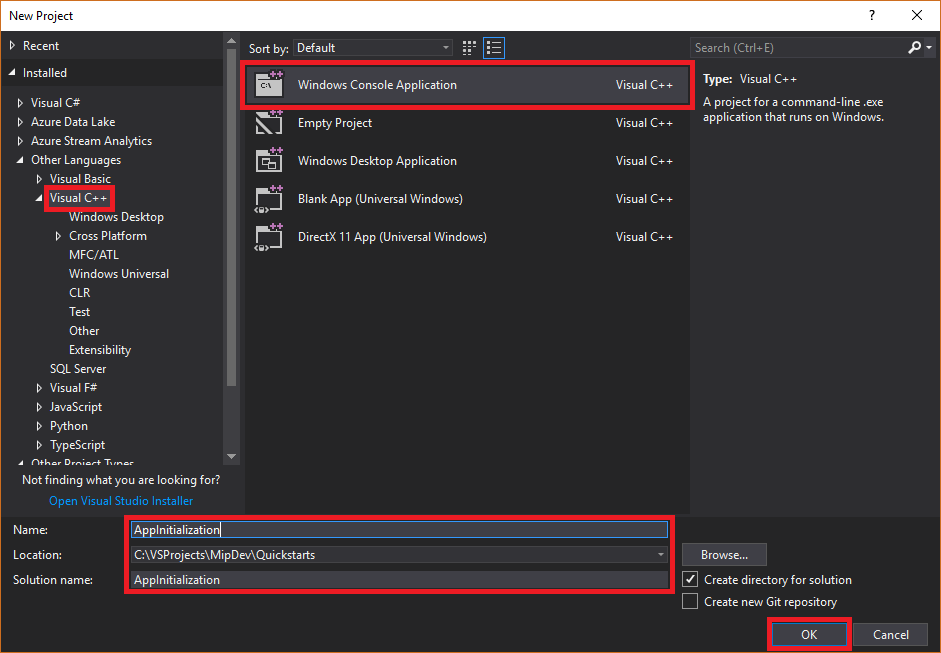
打开 Visual Studio 2022 或更高版本,选择 “文件 ”菜单“ 新建”和 “项目”。 在 “新建项目 ”对话框中:
在左窗格中的 “已安装”下,选择“ 其他语言”,选择 “视觉对象C++。
在中心窗格中,选择 Windows 控制台应用程序
在底部窗格中,相应地更新项目 名称、 位置和包含 的解决方案名称 。
完成后,单击右下角的 “确定 ”按钮。
将 MIP 文件 SDK 的 NuGet 包添加到项目:
在 解决方案资源管理器中,右键单击项目节点(直接在顶部/解决方案节点下),然后选择“ 管理 NuGet 包...”:
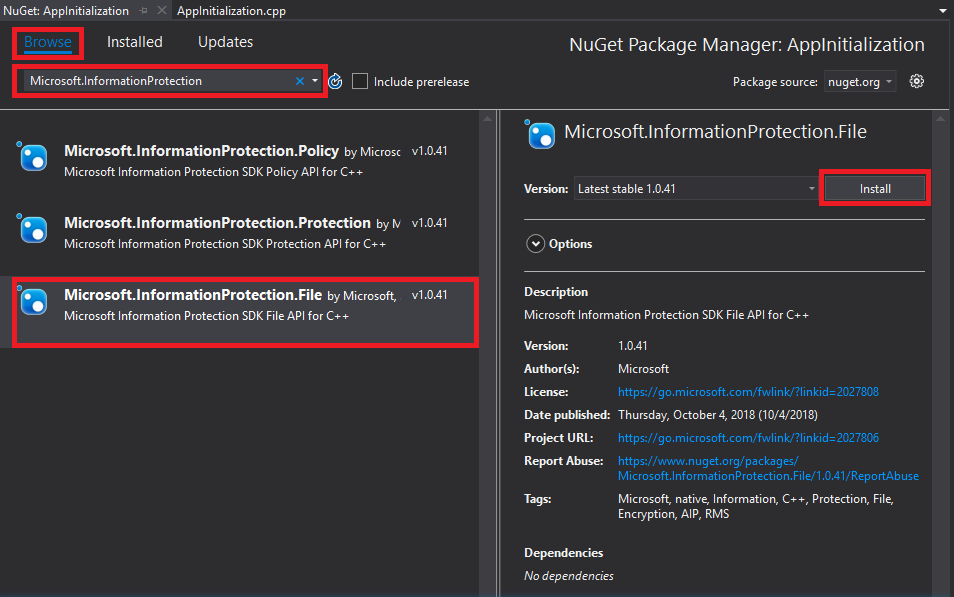
当编辑器组选项卡区域打开 NuGet 包管理器 选项卡时:
- 选择“浏览”。
- 在搜索框中输入“Microsoft.InformationProtection”。
- 选择“Microsoft.InformationProtection.File”包。
- 单击“安装”,然后在 “预览”更改 确认对话框显示时单击“确定”。
实现观察程序类来监视文件配置文件和引擎对象
现在,通过扩展 SDK 的 mip::FileProfile::Observer 类,为 File 配置文件观察器类创建一个基本实现。 您随后实例化并使用该观察器,以监视 File 配置文件对象的加载过程,以及将引擎对象添加到该配置文件中。
将新类添加到项目,这将会生成 header/.h 和 implementation/.cpp 文件:
在“解决方案资源管理器”中,再次右键单击项目节点,选择“添加”,然后选择“类”。
在 “添加类 ”对话框中:
- 在 “类名 ”字段中,输入“profile_observer”。 请注意,系统会根据输入的名称自动填充“.h 文件”和“.cpp 文件”字段。
- 完成后,单击“确定”按钮。

生成类的 .h 和.cpp文件后,Visual Studio在编辑器组选项卡中打开这两个文件。 现在更新每个文件,实现新的观察程序类:
通过选择/删除生成的
profile_observer类来更新“profile_observer.h”。 不要删除上一步生成的预处理器指令(#pragma、#include)。 然后,将以下源复制/粘贴到文件中的任何现有预处理器指令之后:#include <memory> #include "mip/file/file_profile.h" class ProfileObserver final : public mip::FileProfile::Observer { public: ProfileObserver() { } void OnLoadSuccess(const std::shared_ptr<mip::FileProfile>& profile, const std::shared_ptr<void>& context) override; void OnLoadFailure(const std::exception_ptr& error, const std::shared_ptr<void>& context) override; void OnAddEngineSuccess(const std::shared_ptr<mip::FileEngine>& engine, const std::shared_ptr<void>& context) override; void OnAddEngineFailure(const std::exception_ptr& error, const std::shared_ptr<void>& context) override; };通过选择/删除生成的
profile_observer类实现来更新“profile_observer.cpp”。 不要删除上一步生成的预处理器指令(#pragma、#include)。 然后,将以下源复制/粘贴到文件中的任何现有预处理器指令之后:#include <future> using std::promise; using std::shared_ptr; using std::static_pointer_cast; using mip::FileEngine; using mip::FileProfile; void ProfileObserver::OnLoadSuccess(const shared_ptr<FileProfile>& profile, const shared_ptr<void>& context) { auto promise = static_pointer_cast<std::promise<shared_ptr<FileProfile>>>(context); promise->set_value(profile); } void ProfileObserver::OnLoadFailure(const std::exception_ptr& error, const shared_ptr<void>& context) { auto promise = static_pointer_cast<std::promise<shared_ptr<FileProfile>>>(context); promise->set_exception(error); } void ProfileObserver::OnAddEngineSuccess(const shared_ptr<FileEngine>& engine, const shared_ptr<void>& context) { auto promise = static_pointer_cast<std::promise<shared_ptr<FileEngine>>>(context); promise->set_value(engine); } void ProfileObserver::OnAddEngineFailure(const std::exception_ptr& error, const shared_ptr<void>& context) { auto promise = static_pointer_cast<std::promise<shared_ptr<FileEngine>>>(context); promise->set_exception(error); }
(可选)使用 F6(生成解决方案)运行解决方案的测试编译/链接,以确保在继续之前成功完成生成。

实施身份验证委托
MIP SDK 使用类扩展性实现身份验证,该扩展性提供一种机制,用于与客户端应用程序共享身份验证工作。 客户端必须获取合适的 OAuth2 访问令牌,并在运行时将其提供给 MIP SDK。
现在,通过扩展 SDK 的 mip::AuthDelegate 类并重写或实现 mip::AuthDelegate::AcquireOAuth2Token() 纯虚拟函数,为身份验证委托创建实现。 File 配置文件和 File 引擎对象会实例化身份验证委托,并在之后使用该委托。
使用上一部分的步骤 #1 中使用的同一 Visual Studio“添加类”功能,将另一个类添加到项目。 这一次,在 “类名 ”字段中输入“auth_delegate”。
现在更新每个文件以实现新的身份验证委托类:
通过将所有生成的
auth_delegate类代码替换为以下源,更新“auth_delegate.h”。 请勿 删除上一步生成的预处理器指令(#pragma,#include):#include <string> #include "mip/common_types.h" class AuthDelegateImpl final : public mip::AuthDelegate { public: AuthDelegateImpl() = delete; // Prevents default constructor AuthDelegateImpl( const std::string& appId) // AppID for registered Microsoft Entra app : mAppId(appId) {}; bool AcquireOAuth2Token( // Called by MIP SDK to get a token const mip::Identity& identity, // Identity of the account to be authenticated, if known const OAuth2Challenge& challenge, // Authority (Microsoft Entra tenant issuing token), and resource (API being accessed; "aud" claim). const std::shared_ptr<void>& context, // Opaque context passed by the host application through the MIP API OAuth2Token& token) override; // Token handed back to MIP SDK private: std::string mAppId; std::string mToken; std::string mAuthority; std::string mResource; };通过将所有生成的
auth_delegate类实现替换为以下源来更新“auth_delegate.cpp”。 不要删除上一步生成的预处理器指令(#pragma、#include)。重要
以下令牌获取代码不适用于生产用途。 在生产环境中,请将其替换为通过以下方式动态获取令牌的代码:
- Microsoft Entra 应用注册中指定的 appId 和回复/重定向 URI(回复/重定向 URI 必须与 应用注册匹配)
- SDK 在
challenge参数中传递的权限和资源 URL(资源 URL 必须与应用注册的 API/权限匹配) - 有效的应用/用户凭据,其中帐户与 SDK 传递的参数匹配
identity。 OAuth2“本地”客户端应提示输入用户凭据并使用“获取授权代码”流程。 OAuth2“机密客户端”可以通过“客户端凭据”流(例如服务)使用自己的安全凭据,或通过“授权代码”流(例如 Web 应用)提示输入用户凭据。
OAuth2 令牌获取是一种复杂的协议,通常使用库来完成。 根据需要,TokenAcquireOAuth2Token() 仅由 MIP SDK 调用。
#include <iostream>
using std::cout;
using std::cin;
using std::string;

bool AuthDelegateImpl::AcquireOAuth2Token(const mip::Identity& identity, const OAuth2Challenge& challenge, const std::shared_ptr<void>& context, OAuth2Token& token)
{
     (void)context;
     // Acquire a token manually, reuse previous token if same authority/resource. In production, replace with token acquisition code.
     string authority = challenge.GetAuthority();
     string resource = challenge.GetResource();
     if (mToken == "" || (authority != mAuthority || resource != mResource))
     {
         cout << "\nRun the PowerShell script to generate an access token using the following values, then copy/paste it below:\n";
         cout << "Set $authority to: " + authority + "\n";
         cout << "Set $resourceUrl to: " + resource + "\n";
         cout << "Sign in with user account: " + identity.GetEmail() + "\n";
         cout << "Enter access token: ";
         cin >> mToken;
         mAuthority = authority;
         mResource = resource;
         system("pause");
     }

     // Pass access token back to MIP SDK
     token.SetAccessToken(mToken);

     // True = successful token acquisition; False = failure
     return true;
}
(可选)使用 F6(生成解决方案)运行解决方案的测试编译/链接,以确保在继续之前成功完成生成。
实现许可委托
现在,通过扩展 SDK 的 mip::ConsentDelegate 类并重写或实现 mip::AuthDelegate::GetUserConsent() 纯虚函数,创建一个同意委托实现。 File 配置文件和 File 引擎对象会实例化同意委托,并在之后使用该委托。
使用以前使用的同一 Visual Studio“添加类”功能,将另一个类添加到项目中。 这一次,在 “类名 ”字段中输入“consent_delegate”。
现在更新每个文件以实现新的同意委托类:
通过将生成的所有
consent_delegate类代码替换为以下源代码,更新“consent_delegate.h”。 请勿 删除上一步生成的预处理器指令(#pragma,#include):#include "mip/common_types.h" #include <string> class ConsentDelegateImpl final : public mip::ConsentDelegate { public: ConsentDelegateImpl() = default; virtual mip::Consent GetUserConsent(const std::string& url) override; };通过将所有生成的
consent_delegate类实现替换为以下源来更新“consent_delegate.cpp”。 不要删除上一步生成的预处理器指令(#pragma、#include)。#include <iostream> using mip::Consent; using std::string; Consent ConsentDelegateImpl::GetUserConsent(const string& url) { // Accept the consent to connect to the url std::cout << "SDK will connect to: " << url << std::endl; return Consent::AcceptAlways; }
(可选)使用 F6(生成解决方案)运行解决方案的测试编译/链接,以确保在继续之前成功完成生成。
构造文件配置文件和引擎
如上所述,使用 MIP API 的 SDK 客户端需要配置文件和引擎对象。 添加代码以实例化配置文件和引擎对象,完成此快速入门的编码部分:
在 解决方案资源管理器中,打开项目中包含该方法实现
main()的.cpp文件。 它默认与其所在项目同名,这是您在创建项目时指定的。删除生成的
main()实现。 不要 在项目创建期间删除 Visual Studio 生成的预处理器指令(#pragma,#include)。 在任何预处理器指令之后追加以下代码:
#include "mip/mip_context.h"
#include "auth_delegate.h"
#include "consent_delegate.h"
#include "profile_observer.h"

using std::promise;
using std::future;
using std::make_shared;
using std::shared_ptr;
using std::string;
using std::cout;
using mip::ApplicationInfo;
using mip::FileProfile;
using mip::FileEngine;

int main()
{
  // Construct/initialize objects required by the application's profile object
  // ApplicationInfo object (App ID, name, version)
  ApplicationInfo appInfo{"<application-id>",
                          "<application-name>",
                          "<application-version>"};

  // Create MipConfiguration object.
  std::shared_ptr<mip::MipConfiguration> mipConfiguration = std::make_shared<mip::MipConfiguration>(appInfo,
                                                                                                    "mip_data",
                                                                                                    mip::LogLevel::Trace,
                                                                                                    false,
                                                                                                    mip::CacheStorageType::OnDisk);


  std::shared_ptr<mip::MipContext> mMipContext = mip::MipContext::Create(mipConfiguration);

  auto profileObserver = make_shared<ProfileObserver>();                     // Observer object
  auto authDelegateImpl = make_shared<AuthDelegateImpl>("<application-id>"); // Authentication delegate object (App ID)
  auto consentDelegateImpl = make_shared<ConsentDelegateImpl>();             // Consent delegate object

  // Construct/initialize profile object
  FileProfile::Settings profileSettings(
                                mMipContext,
                                mip::CacheStorageType::OnDisk,
                                consentDelegateImpl,
                                profileObserver);

  // Set up promise/future connection for async profile operations; load profile asynchronously
  auto profilePromise = make_shared<promise<shared_ptr<FileProfile>>>();
  auto profileFuture = profilePromise->get_future();

  try
	  {
		  mip::FileProfile::LoadAsync(profileSettings, profilePromise);
  }
	  catch (const std::exception& e)
	  {
		  cout << "An exception occurred... are the Settings and ApplicationInfo objects populated correctly?\n\n" << e.what() << "'\n";

		  system("pause");
		  return 1;
	  }
	  auto profile = profileFuture.get();

  // Construct/initialize engine object
  FileEngine::Settings engineSettings(
                                  mip::Identity("<engine-account>"), // Engine identity (account used for authentication)
                                  authDelegateImpl,		       // Token acquisition implementation
				    "<engine-state>",                  // User-defined engine state
                                  "en-US");                          // Locale (default = en-US)

  // Set the engineId for caching.
  engineSettings.SetEngineId("<engine-account>");
  // Set up promise/future connection for async engine operations; add engine to profile asynchronously
  auto enginePromise = make_shared<promise<shared_ptr<FileEngine>>>();
  auto engineFuture = enginePromise->get_future();
  profile->AddEngineAsync(engineSettings, enginePromise);
  std::shared_ptr<FileEngine> engine;
  try
  {
    engine = engineFuture.get();
  }
  catch (const std::exception& e)
  {
    cout << "An exception occurred... is the access token incorrect/expired?\n\n" << e.what() << "'\n";

    system("pause");
    return 1;
  }

  // Application shutdown. Null out profile and engine, call ReleaseAllResources();
  // Application may crash at shutdown if resources aren't properly released.
  // handler = nullptr; // This will be used in later quick starts.
  engine = nullptr;
  profile = nullptr;
  mMipContext->ShutDown();
  mMipContext = nullptr;

  return 0;
  }
使用字符串常量替换粘贴的源代码中的所有占位符值:
占位符 价值 示例: <application-id> 分配给注册于《MIP SDK 设置和配置》一文中第 2 步的应用程序的 Microsoft Entra 应用程序 ID(GUID)。 替换 2 个实例。 "00001111-aaaa-2222-bbbb-3333cccc4444"<应用程序名称> 您的应用程序的自定义友好名称。 必须包含有效的 ASCII 字符(不包括“;”),并且理想情况下与在 Microsoft Entra 注册中使用的应用程序名称匹配。 "AppInitialization"<应用程序版本> 应用程序的用户定义的版本信息。 必须包含有效的 ASCII 字符(不包括“;”)。 "1.1.0.0"<引擎账户> 用于引擎标识的帐户。 在获取令牌期间使用用户帐户进行身份验证时,它必须与此值匹配。 "user1@tenant.onmicrosoft.com"<引擎状态> 与引擎关联的用户定义的状态。 "My App State"对应用程序进行最终构建,并解决所有错误。 代码应成功生成,但尚未正确运行。 在完成下一个快速入门之前,你还没有可提供的访问令牌。
后续步骤
完成初始化代码后,即可开始体验 MIP 文件 SDK 的下一个快速入门。