检查应用是否使用最少的权限来调用 API。 使用来自指定 Azure API 中心实例的 API 信息。
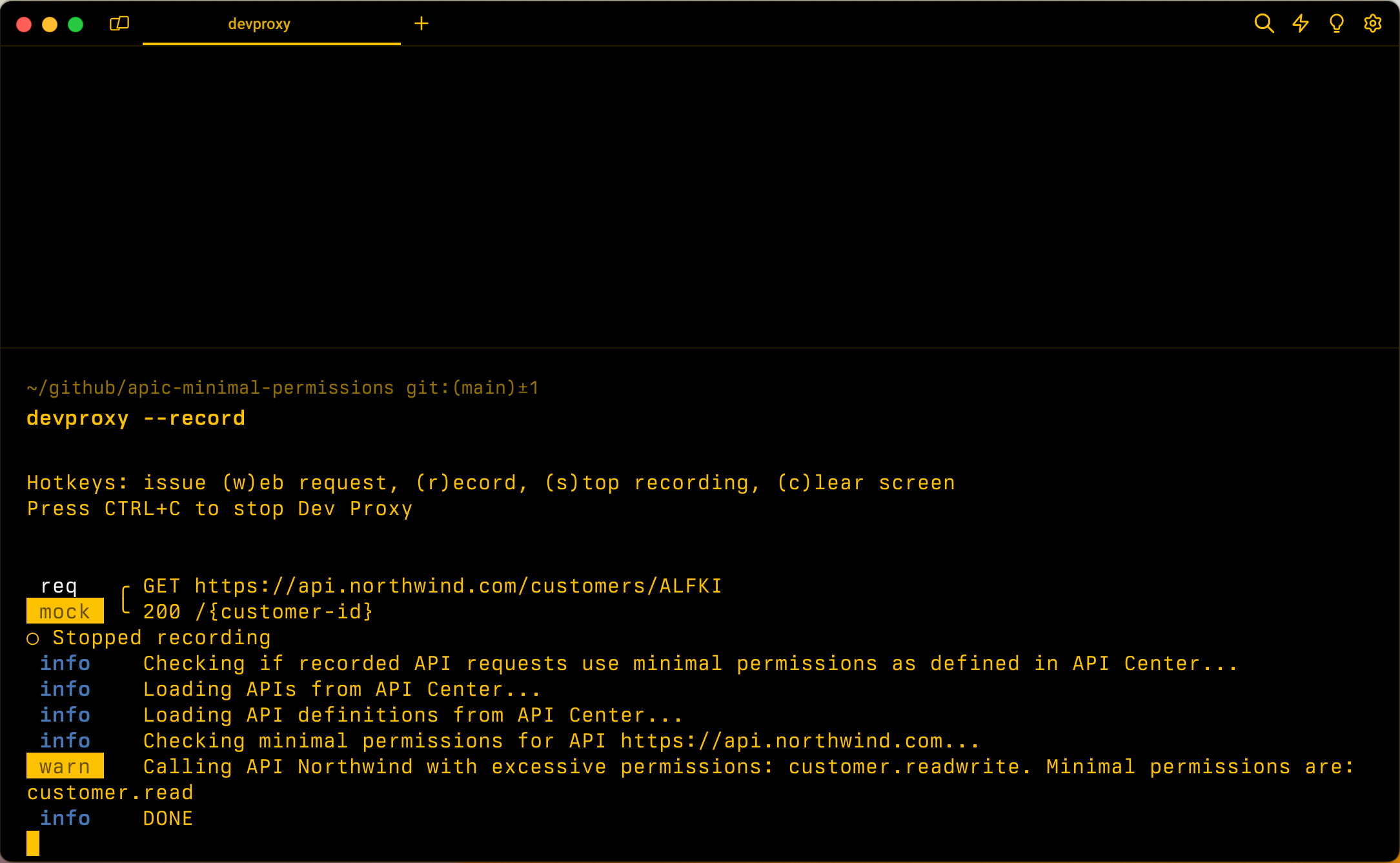
配置示例
{
  "$schema": "https://raw.githubusercontent.com/dotnet/dev-proxy/main/schemas/v3.3.1/rc.schema.json",
  "plugins": [
    {
      "name": "ApiCenterMinimalPermissionsPlugin",
      "enabled": true,
      "pluginPath": "~appFolder/plugins/DevProxy.Plugins.dll",
      "configSection": "apiCenterMinimalPermissionsPlugin"
    }
  ],
  "apiCenterMinimalPermissionsPlugin": {
    "$schema": "https://raw.githubusercontent.com/dotnet/dev-proxy/main/schemas/v3.3.1/apicenterminimalpermissionsplugin.schema.json",
    "subscriptionId": "aaaa0a0a-bb1b-cc2c-dd3d-eeeeee4e4e4e",
    "resourceGroupName": "resource-group-name",
    "serviceName": "apic-instance",
    "workspaceName": "default"
  }
}
配置属性
| properties | 说明 | 默认 |
|---|---|---|
resourceGroupName |
Azure API 中心所在的资源组的名称。 | 无 |
serviceName |
开发代理应用于检查应用中使用的 API 是否已注册的 Azure API 中心实例的名称。 | 无 |
subscriptionId |
Azure API 中心实例所在的 Azure 订阅的 ID。 | 无 |
workspaceName |
要使用的 Azure API 中心工作区的名称。 | default |
schemeName |
用于确定最小权限的安全方案定义的名称。 如果未指定,插件将从规范中的第一个 oauth2 方案读取信息 | 无 |
命令行选项
无
注解
该 ApiCenterMinimalPermissionsPlugin 插件检查应用是否使用最少的权限来调用 API。 为了检查权限,插件使用有关在指定 Azure API 中心实例中注册的 API 的信息。
连接到 Azure API 中心
若要连接到 Azure API 中心,插件使用 Azure 凭据(按以下顺序):
- 环境
- 工作负载标识
- 托管标识
- Visual Studio
- Visual Studio Code
- Azure CLI
- Azure PowerShell
- Azure Developer CLI
如果插件无法获取访问 Azure 的访问令牌,则会显示错误,开发人员代理会禁用它。 使用这些工具之一登录到 Azure,然后重启开发代理以使用该 ApiCenterMinimalPermissionsPlugin 插件。
如果在 CI/CD 管道中使用开发代理,则可以将值subscriptionId作为环境变量传递, resourceGroupNameserviceName和workspaceName属性。 若要使用环境变量,请附加值 @的名称,例如:
{
  "$schema": "https://raw.githubusercontent.com/dotnet/dev-proxy/main/schemas/v3.3.1/rc.schema.json",
  "plugins": [
    {
      "name": "ApiCenterMinimalPermissionsPlugin",
      "enabled": true,
      "pluginPath": "~appFolder/plugins/DevProxy.Plugins.dll",
      "configSection": "apiCenterMinimalPermissionsPlugin"
    }
  ],
  "apiCenterMinimalPermissionsPlugin": {
    "$schema": "https://raw.githubusercontent.com/dotnet/dev-proxy/main/schemas/v3.3.1/apicenterminimalpermissionsplugin.schema.json",
    "subscriptionId": "@AZURE_SUBSCRIPTION_ID",
    "resourceGroupName": "@AZURE_RESOURCE_GROUP_NAME",
    "serviceName": "@AZURE_APIC_INSTANCE_NAME",
    "workspaceName": "@AZURE_APIC_WORKSPACE_NAME"
  }
}
在此示例中,ApiCenterMinimalPermissionsPlugin插件分别设置subscriptionId、resourceGroupName、serviceName和workspaceName环境变量的值AZURE_SUBSCRIPTION_IDAZURE_RESOURCE_GROUP_NAMEAZURE_APIC_INSTANCE_NAME和AZURE_APIC_WORKSPACE_NAME属性。
定义 API 权限
该 ApiCenterMinimalPermissionsPlugin 插件支持检查使用 Azure API 中心注册的 OAuth 保护的 API 的 OAuth 权限。 该插件使用 API 中心的信息计算调用应用中使用的 API 所需的最小权限。 然后,该插件将 JSON Web 令牌(JWT)令牌中使用的权限与开发代理记录的请求所需的最低范围进行比较。
若要定义 API 的权限,请在 API 的 OpenAPI 定义中包括这些权限。 以下示例演示如何在 OpenAPI 定义中定义 API 的权限:
{
  "openapi": "3.0.1",
  "info": {
    "title": "Northwind API",
    "description": "Northwind API",
    "version": "v1.0"
  },
  "servers": [
    {
      "url": "https://api.northwind.com"
    }
  ],
  "components": {
    "securitySchemes": {
      "OAuth2": {
        "type": "oauth2",
        "flows": {
          "authorizationCode": {
            "authorizationUrl": "https://login.microsoftonline.com/common/oauth2/authorize",
            "tokenUrl": "https://login.microsoftonline.com/common/oauth2/token",
            "scopes": {
              "customer.read": "Grants access to ready customer info",
              "customer.readwrite": "Grants access to read and write customer info"
            }
          }
        }
      }
    },
    "schemas": {
      "Customer": {
        "type": "object",
        "properties": {}
      }
    }
  },
  "paths": {
    "/customers/{customers-id}": {
      "description": "Provides operations to manage a customer",
      "get": {
        "summary": "Get customer by ID",
        "operationId": "getCustomerById",
        "security": [
          {
            "OAuth2": [
              "customer.read"
            ]
          },
          {
            "OAuth2": [
              "customer.readwrite"
            ]
          }
        ],
        "responses": {
          "200": {
            "description": "OK",
            "content": {
              "application/json; charset=utf-8": {
                "schema": {
                  "$ref": "#/components/schemas/Customer"
                }
              }
            }
          }
        }
      },
      "patch": {
        "summary": "Update customer by ID",
        "operationId": "updateCustomerById",
        "security": [
          {
            "OAuth2": [
              "customer.readwrite"
            ]
          }
        ],
        "requestBody": {
          "required": true,
          "content": {
            "application/json": {
              "schema": {
                "$ref": "#/components/schemas/Customer"
              }
            }
          }
        },
        "responses": {
          "204": {
            "description": "No Content"
          }
        }
      },
      "parameters": [
        {
          "name": "customers-id",
          "in": "path",
          "required": true,
          "schema": {
            "type": "string"
          }
        }
      ]
    }
  },
  "x-ms-generated-by": {
    "toolName": "Dev Proxy",
    "toolVersion": "0.27.0"
  }
}
相关部分是 securitySchemes 该部分,可在其中定义 API 使用的 OAuth 范围。 然后,对于每个操作,你将在部分中包括所需的范围 security 。
