提示 API 是一个试验性 Web API,可用于从网站或浏览器扩展的 JavaScript 代码提示小型语言模型 (内置于 Microsoft Edge 中的 SLM) 。 使用提示 API 根据用户输入生成和分析文本或创建应用程序逻辑,并探索将提示工程功能集成到 Web 应用程序中的创新方法。
详细内容:
- 提示 API 的可用性
- 提示 API 的替代方法和优点
- 内置于 Microsoft Edge 中的小型语言模型
- Phi-4-mini 模型
- Aion-1.0-Instruct 型号
- 启用提示 API
- 查看工作示例
- 使用提示 API
- 发送反馈
- 另请参阅
提示 API 的可用性
提示 API 从版本 138.0.3309.2 开始,在 Microsoft Edge Canary 和 Edge Dev 频道中作为开发人员预览版提供。
提示 API 旨在帮助发现用例并了解内置 SLM 面临的挑战。 此 API 预计将由其他实验性 API 接替,用于特定的 AI 支持任务,例如写作协助和文本翻译。 若要了解有关这些其他 API 的详细信息,请参阅:
提示 API 的替代方法和优点
若要在网站和浏览器扩展中利用 AI 功能,还可以使用以下方法:
将网络请求发送到基于云的 AI 服务,例如 Azure AI 解决方案。
使用 Web 神经网络 (WebNN) API 或 ONNX Runtime for Web 运行本地 AI 模型。
提示 API 使用在使用模型输入和输出的同一设备上运行的 SLM,该设备 (即本地) 。 与基于云的解决方案相比,这具有以下优势:
降低成本: 使用云 AI 服务没有相关费用。
网络独立性: 除了初始模型下载之外,提示模型时不会出现网络延迟,并且也可能在设备脱机时使用。
改进了隐私: 输入到模型的数据永远不会离开设备,也不会收集数据来训练 AI 模型。
提示 API 使用 Microsoft Edge 提供并内置于浏览器中的模型,与自定义本地解决方案(例如基于 WebGPU、WebNN 或 WebAssembly 的解决方案)相比,它具有其他优势:
共享一次性成本: 浏览器提供的模型在首次调用 API 时下载,并在浏览器中运行的所有网站之间共享,从而降低用户和开发人员的网络成本。
简化了 Web 开发人员的使用: 内置模型可以使用简单的 Web API 运行,不需要 AI/ML 专业知识或使用第三方框架。
内置于 Microsoft Edge 中的小型语言模型
在 Microsoft Edge Canary 和 Dev 渠道中,从版本 138.0.3309.2 开始,提示 API 使用 Phi-4-mini 模型,该模型内置于 Microsoft Edge 中。
从版本 150.0.4070 开始,提示 API 还可以与预发布的 Aion-1.0-Instruct 模型一起使用,该模型也内置于 Microsoft Edge 中。 Aion-1.0-Instruct 是比 Phi-4-mini 更小、更快、更高效的模型,并且通过 CPU 推理在 GPU 功能较差或没有 GPU 的设备上受支持。 如果设备的性能等级不够高,无法支持 Phi-4-mini,可以测试预发行版 Aion-1.0-Instruct 型号。
要了解有关这两个模型的更多信息,以及如何启用 Aion-1.0-Instruct,请阅读以下部分。
Phi-4-mini 模型
提示 API 允许提示内置于 Microsoft Edge 中的 Phi-4-mini。 Phi-4-mini 是一个功能强大的小型语言模型,擅长基于文本的任务。 要了解有关 Phi-4-mini 及其功能的详细信息,请参阅 microsoft/Phi-4-mini-instruct 中的模型卡。
免责声明
与其他语言模型一样,Phi 系列模型可能会表现出不公平、不可靠或冒犯性的方式。 要了解有关模型的 AI 注意事项的详细信息,请参阅 负责任的 AI 注意事项。
硬件要求
提示 API 开发人员预览版旨在适用于具有硬件功能的设备,这些设备能够生成具有可预测质量和延迟的 SLM 输出。 提示 API 当前仅限于:
操作系统:Windows 10 或 11 以及 macOS 13.3 或更高版本。
存储: 包含 Edge 配置文件的卷上至少有 20 GB 可用。 如果可用存储空间低于 10 GB,则将删除该模型,以确保其他浏览器功能有足够的空间来运行。
GPU: 5.5 GB VRAM 或以上。
网络: 无限流量套餐或不限流量的连接。 如果使用按流量计费的连接,则不下载模型。
若要检查设备是否支持提示 API 开发人员预览版,请参阅下面的启用提示 API 并检查设备性能类。
由于提示 API 的实验性质,你可能会观察到特定硬件配置的问题。 如果看到有关特定硬件配置的问题,请通过在 MSEdgeExplainers 存储库中 打开新问题 来提供反馈。
Phi-4-mini 型号的可用性
网站首次调用需要设备上模型的 API 时,需要初始下载 Phi-4-mini 模型。 创建新的提示 API 会话时,可以使用监视选项监视 Phi-4-mini 模型的下载。 要了解更多信息,请参阅下面的 监视模型下载的进度。
Aion-1.0-Instruct 型号
在 Microsoft Edge Canary 或 Edge Dev 中,从版本 150.0.4070 开始,提示 API 还可以与内置于 Microsoft Edge 中的预发行版 Aion-1.0-Instruct 模型一起使用。
此 Aion-1.0-Instruct 型号比 Phi-4-mini 更小、更快、更高效,并且通过 CPU 推理在 GPU 性能较差或没有 GPU 的设备上受支持。
Aion-1.0-Instruct 预计将于 2026 年 7 月作为开放源代码型号提供。
为提示 API 启用 Aion-1.0-Instruct
默认情况下,提示 API 使用 Phi-4-mini 模型。 若要在 Microsoft Edge Canary 或 Edge Dev 中使用 Aion-1.0-Instruct,请启用“启用预发布设备上语言模型”标志,如以下步骤所述。 启用此标志后,Aion-1.0-Instruct 将替代 Phi-4-mini 作为提示 API 的默认模型。
请确保使用的是最新版本的 Edge Canary 或 Edge Dev (版本 150.0.4070 或更高版本) 。 请参阅 成为 Microsoft Edge 预览体验成员。
在 Edge Canary 或 Edge Dev 中,打开新选项卡或窗口,然后转到
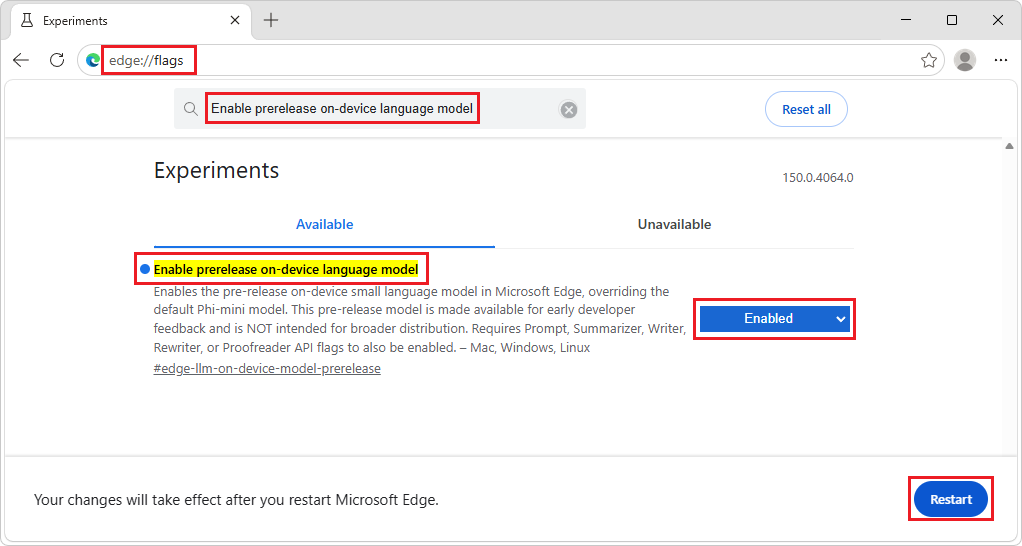
edge://flags。在页面顶部的搜索框中输入 “启用预发布设备上语言模型”。
在 “启用预发布设备上语言模型” 下拉列表中,选择 “已启用”,然后单击“ 重启 ”按钮:
要检查 Aion-1.0-Instruct 是否正在用作设备上的语言模型,请转到
edge://on-device-internals,单击“模型状态”,然后检查模型名称是否设置为 Aion-1.0-Instruct。
免责声明
Aion-1.0-Instruct 模型可在 Microsoft Edge 中进行早期开发人员测试和反馈。 除了上面列出的负责任 AI 注意事项外,请注意,鉴于其预发行状态,模型行为和功能可能会发生更改。
Aion-1.0-Instruct 型号的可用性
网站首次调用需要设备上模型的 API 时,需要初始下载 Aion-1.0-Instruct 模型。 您可以在创建新的 Prompt API 会话时使用 monitor 选项来监控 Aion-1.0-Instruct 模型的下载。 要了解更多信息,请参阅下面的 监视模型下载的进度。
启用提示 API
若要在 Microsoft Edge 中使用提示 API,请执行以下操作:
请确保使用最新版本的 Microsoft Edge Canary 或 Edge Dev (版本 138.0.3309.2 或更高版本) 。 请参阅 成为 Microsoft Edge 预览体验成员。
在 Edge Canary 或 Edge Dev 中,打开新选项卡或窗口,然后转到
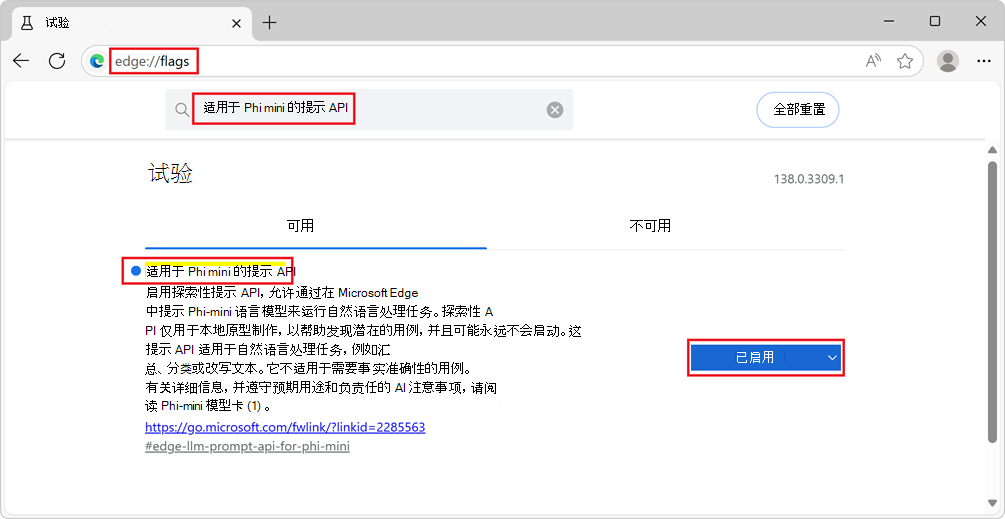
edge://flags/。在页面顶部的搜索框中,输入 设备上语言模型的提示 API。
筛选页面以显示匹配标志。
在 “设备上语言模型的提示 API”下,选择“ 已启用”:
(可选)若要在本地记录可能对调试问题有用的信息,还可以启用“ 在设备上启用 AI 模型调试日志” 标志。
重启 Edge Canary 或 Edge Dev。
若要检查设备是否满足提示 API 开发人员预览版的硬件要求,请打开新选项卡,转到
edge://on-device-internals,然后检查设备性能等级值。如果设备性能等级为 “高 ”或更高,则设备应支持提示 API。
如果设备性能等级为“中”或“低”,则仅通过预发行版 Aion-1.0-Instruct 模型支持提示 API,该模型从 Edge 版本 150.0.4070 开始提供。 要测试 Aion-1.0-Instruct 模型,请参阅上面的为提示 API 启用 Aion-1.0-Instruct。
如果您发现这些模型存在问题,请在 MSEdgeExplainers 存储库中 创建一个新问题 。
查看工作示例
若要查看提示 API 的实际应用,并查看使用该 API 的现有代码:
启用提示 API,如上所述。
在 Edge Canary 或 Edge Dev 中,打开选项卡或窗口,然后转到 提示 API 操场。
在左侧的 内置 AI 操场 导航中,已选择“ 提示” 。
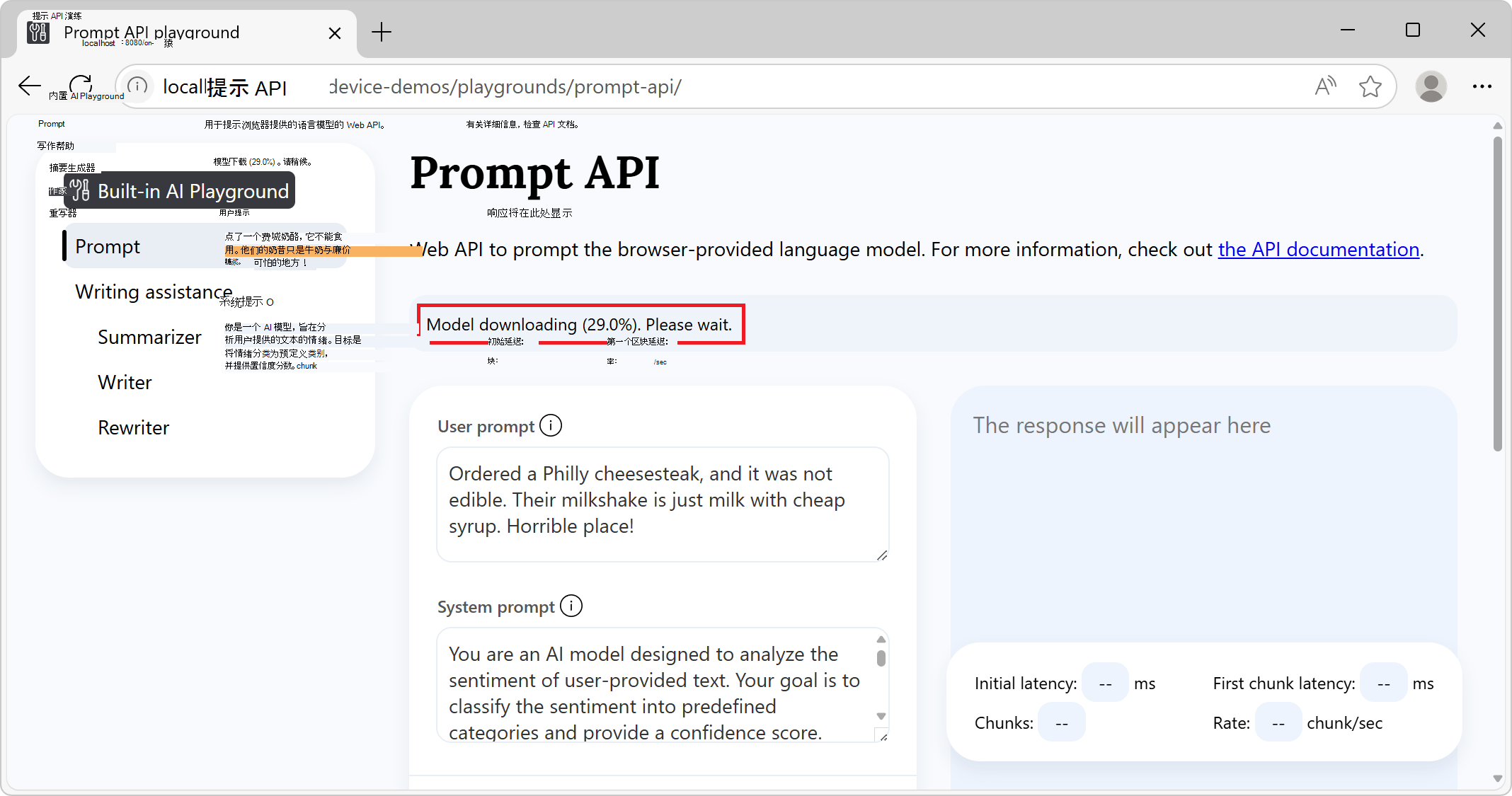
在顶部的信息横幅中,检查状态:它最初显示模型下载,请等待:
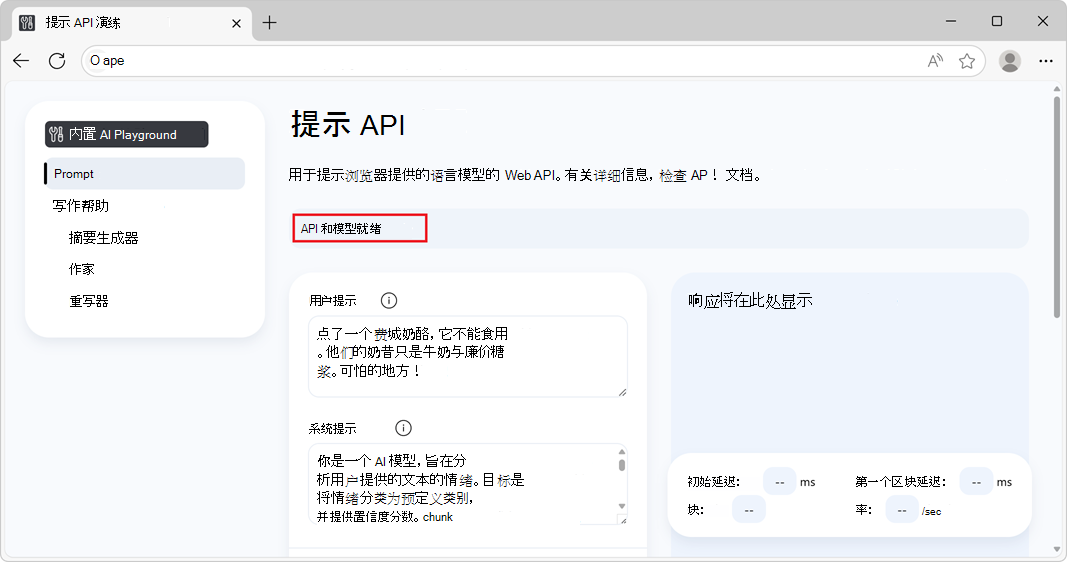
模型下载完成后,信息横幅上显示 API 和模型就绪,表示可以使用 API 和模型:
如果模型下载未启动,请重启 Microsoft Edge 并重试。
只有满足某些硬件要求的设备才支持提示 API。 有关详细信息,请参阅上面的 硬件要求。
(可选)更改提示设置值,例如:
- 用户提示
- 系统提示
- 响应约束架构
- 更多设置>N-shot 提示说明
单击页面底部的 “提示 ”按钮。
页面的响应部分将生成响应:
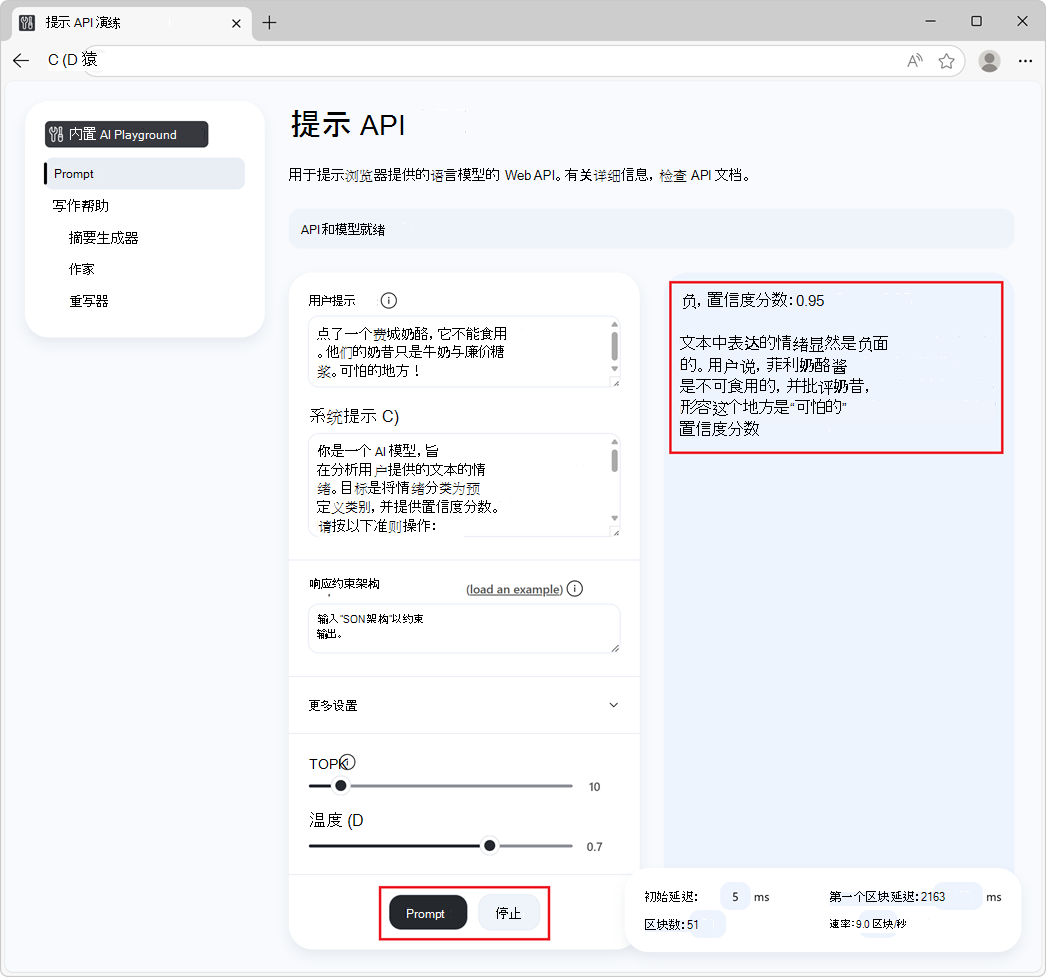
若要停止生成响应,请随时单击“ 停止 ”按钮。
另请参阅:
- /built-in-ai/ - 内置 AI 操场(包括提示 API 操场)的源代码和自述文件。
使用提示 API
检查 API 是否已启用
在网站或扩展代码中使用 API 之前,请通过测试对象的存在来检查 API 是否已启用:LanguageModel
if (!LanguageModel) {
  // The Prompt API is not available.
} else {
  // The Prompt API is available.
}
检查该模型是否可以使用
仅当设备支持运行模型,并且 Microsoft Edge 下载了语言模型和模型运行时后,才能使用提示 API。
若要检查是否可以使用 API,请使用以下LanguageModel.availability()方法:
const availability = await LanguageModel.availability();

if (availability == "unavailable") {
  // The model is not available.
}

if (availability == "downloadable" || availability == "downloading") {
  // The model can be used, but it needs to be downloaded first.
}

if (availability == "available") {
  // The model is available and can be used.
}
创建新会话
创建会话会指示浏览器在内存中加载语言模型,以便可以使用它。 在提示语言模型之前,请使用以下 create() 方法创建一个新会话:
// Create a LanguageModel session.
const session = await LanguageModel.create();
要自定义模型会话,可以将选项传递给 create() 方法:
// Create a LanguageModel session with options.
const session = await LanguageModel.create(options);
可用的选项包括:
monitor,以关注模型下载的进度。initialPrompts,为模型提供有关将发送到模型的提示的上下文,并建立模型在未来提示时应遵循的用户/助手交互模式。
下面介绍了这些选项。
监视模型下载的进度
您可以使用该 monitor 选项跟踪模型下载进度。 当模型尚未完全下载到将要使用的设备上时,这很有用,可以通知您网站的用户他们应该等待。
// Create a LanguageModel session with the monitor option to monitor the model
// download.
const session = await LanguageModel.create({
  monitor: m => {
    // Use the monitor object argument to add an listener for the
    // downloadprogress event.
    m.addEventListener("downloadprogress", event => {
      // The event is an object with the loaded and total properties.
      if (event.loaded == event.total) {
        // The model is fully downloaded.
      } else {
        // The model is still downloading.
        const percentageComplete = (event.loaded / event.total) * 100;
      }
    });
  }
});
为模型提供系统提示
要定义系统提示,这是一种为响应提示生成文本时向模型提供指令的方法,请使用 initialPrompts 该选项。
即使上下文窗口由于提示过多而溢出,在创建新会话时提供的系统提示将在整个会话期间保留。
// Create a LanguageModel session with a system prompt.
const session = await LanguageModel.create({
  initialPrompts: [{
    role: "system",
    content: "You are a helpful assistant."
  }]
});
将提示放置在除第 0 个位置initialPrompts之外的任何位置都{ role: "system", content: "You are a helpful assistant." }将拒绝并显示一个 TypeError.
使用 initialPrompts 的 N 次提示
该initialPrompts选项还允许您提供用户/助手交互的示例,您希望模型在出现提示时继续使用这些示例。
此技术也称为 N 次提示 ,可用于使模型生成的响应更具确定性。
// Create a LanguageModel session with multiple initial prompts, for N-shot
// prompting.
const session = await LanguageModel.create({
  initialPrompts: [
    { role: "system", content: "Classify the following product reviews as either OK or Not OK." },
    { role: "user", content: "Great shoes! I was surprised at how comfortable these boots are for the price. They fit well and are very lightweight." },
    { role: "assistant", content: "OK" },
    { role: "user", content: "Terrible product. The manufacturer must be completely incompetent." },
    { role: "assistant", content: "Not OK" },
    { role: "user", content: "Could be better. Nice quality overall, but for the price I was expecting something more waterproof" },
    { role: "assistant", content: "OK" }
  ]
});
克隆会话以使用相同选项重新开始对话
克隆现有会话以在不了解先前交互的情况下提示模型,但使用相同的会话选项。
当您想要使用上一个会话中的选项但不影响具有以前响应的模型时,克隆会话非常有用。
// Create a first LanguageModel session.
const firstSession = await LanguageModel.create({
  initialPrompts: [
    role: "system",
    content: "You are a helpful assistant."
  ]
});

// Later, create a new session by cloning the first session to start a new
// conversation with the model, but preserve the first session's settings.
const secondSession = await firstSession.clone();
提示模型
若要提示模型,请在 session.prompt() 创建模型会话后使用 OR session.promptStreaming() 方法。
等待最终响应
该 prompt 方法返回一个承诺,该承诺在模型完成响应提示生成文本后解析:
// Create a LanguageModel session.
const session = await LanguageModel.create();

// Prompt the model and wait for the response to be generated.
const result = await session.prompt(promptString);

// Use the generated text.
console.log(result);
在生成令牌时显示令牌
该 promptStreaming 方法立即返回一个流对象。 使用流在生成响应令牌时显示它们:
// Create a LanguageModel session.
 const session = await LanguageModel.create();

// Prompt the model.
 const stream = session.promptStreaming(myPromptString);

// Use the stream object to display tokens that are generated by the model, as
// they are being generated.
for await (const chunk of stream) {
  console.log(chunk);
}
可以在同一会话对象中多次调用 prompt and promptStreaming 方法,以继续根据该会话中与模型的先前交互生成文本。
使用 JSON 架构或正则表达式约束模型输出
要使模型响应的格式更具确定性且更易于在编程方式中使用,请在提示模型时使用该 responseConstraint 选项。
该 responseConstraint 选项接受 JSON 架构或正则表达式:
要使模型使用遵循给定架构的字符串化 JSON 对象进行响应,请设置为
responseConstraint要使用的 JSON 架构。要使模型使用与正则表达式匹配的字符串进行响应,请设置为
responseConstraint该正则表达式。
下面的示例演示如何使用遵循给定架构的 JSON 对象使模型响应提示:
// Create a LanguageModel session.
const session = await LanguageModel.create();

// Define a JSON schema for the Prompt API to constrain the generated response.
const schema = {
  "type": "object",
  "required": ["sentiment", "confidence"],
  "additionalProperties": false,
  "properties": {
    "sentiment": {
      "type": "string",
      "enum": ["positive", "negative", "neutral"],
      "description": "The sentiment classification of the input text."
    },
    "confidence": {
      "type": "number",
      "minimum": 0,
      "maximum": 1,
      "description": "A confidence score indicating certainty of the sentiment classification."
    }
  }
}
;

// Prompt the model, by providing a system prompt and the JSON schema in the
// responseConstraints option.
const response = await session.prompt(
  "Ordered a Philly cheesesteak, and it was not edible. Their milkshake is just milk with cheap syrup. Horrible place!",
  {
    initialPrompts: [
      {
        role: "system",
        content: "You are an AI model designed to analyze the sentiment of user-provided text. Your goal is to classify the sentiment into predefined categories and provide a confidence score. Follow these guidelines:\n\n- Identify whether the sentiment is positive, negative, or neutral.\n- Provide a confidence score (0-1) reflecting the certainty of the classification.\n- Ensure the sentiment classification is contextually accurate.\n- If the sentiment is unclear or highly ambiguous, default to neutral.\n\nYour responses should be structured and concise, adhering to the defined output schema."
      },
    ],
    responseConstraint: schema
  }
);
运行上述代码将返回包含字符串化 JSON 对象的响应,例如:
{"sentiment": "negative", "confidence": 0.95}
然后,可以通过使用以下 JSON.parse() 函数解析响应,在代码逻辑中使用该响应:
// Parse the JSON string generated by the model and extract the sentiment and
// confidence values.
const { sentiment, confidence } = JSON.parse(response);

// Use the values.
console.log(`Sentiment: ${sentiment}`);
console.log(`Confidence: ${confidence}`);
为每个提示发送多条消息
除了字符串之外, prompt and promptStreaming 方法还接受用于发送具有自定义角色的多条消息的对象数组。 您发送的对象应采用 的形式,{ role, content }其中 role 是 或 assistantuser ,是content消息。
例如,要在同一提示中提供多个用户消息和一条助手消息:
// Create a LanguageModel session.
const session = await LanguageModel.create();

// Prompt the model by sending multiple messages at once.
const result = await session.prompt([
  { role: "user", content: "First user message" },
  { role: "user", content: "Second user message" },
  { role: "assistant", content: "The assistant message" }
]);
停止生成文本
若要在解析返回的 Promise 之前或返回的session.prompt()session.promptStreaming()流结束之前中止提示,请使用AbortController信号:
// Create a LanguageModel session.
const session = await LanguageModel.create();

// Create an AbortController object.
const abortController = new AbortController();

// Prompt the model by passing the AbortController object by using the signal
// option.
const stream = session.promptStreaming(myPromptString , {
  signal: abortController.signal
});

// Later, perhaps when the user presses a "Stop" button, call the abort()
// method on the AbortController object to stop generating text.
abortController.abort();
销毁会话
销毁会话,让浏览器知道你不再需要语言模型,以便可以从内存中卸载模型。
可以通过两种不同方式销毁会话:
- 通过使用该
destroy()方法。 - 通过使用
AbortController.
使用 destroy () 方法销毁会话
// Create a LanguageModel session.
const session = await LanguageModel.create();

// Later, destroy the session by using the destroy method.
session.destroy();
使用 AbortController 销毁会话
// Create an AbortController object.
const controller = new AbortController();

// Create a LanguageModel session and pass the AbortController object by using
// the signal option.
const session = await LanguageModel.create({ signal: controller.signal });

// Later, perhaps when the user interacts with the UI, destroy the session by
// calling the abort() function of the AbortController object.
controller.abort();
发送反馈
提示 API 开发人员预览版旨在帮助发现浏览器提供的语言模型的用例。
我们希望了解:
- 你打算使用提示 API 的方案范围。
- 提示 API 的任何问题。
- 语言模型的任何问题。
- 新的特定于任务的 API 是否有用。
若要发送有关方案和要实现的任务的反馈,请在 提示 API 反馈问题中添加注释。
如果在改用 API 时发现任何问题,请 在存储库中报告。
你还可以参与 W3C Web 机器学习工作组存储库中有关提示 API 设计的讨论。
另请参阅
- 提示 API 草稿规范
- webmachinelearning/prompt-api GitHub 存储库
- 使用写作辅助 API 编写、改写和汇总文本
- 使用校对器 API 更正文本中的语法、拼写和标点符号错误
- 使用翻译器 API 翻译文本
- /built-in-ai/ - 内置 AI 操场(包括提示 API 操场)的源代码和自述文件。