基本身份验证 是 HTTP 协议的一部分的 身份验证 方法。
WebView2 应用的基本身份验证包括一系列身份验证和导航步骤,用于从 HTTP 服务器检索网页。 WebView2 控件充当主机应用与 HTTP 服务器之间通信的中介。
使用 HTTPS 发送凭据
警告:使用基本身份验证时必须使用 HTTPS。 否则,用户名和密码不会加密。 你可能想要考虑其他形式的身份验证。
基本身份验证的 HTTP 标准包括身份验证凭据 (未加密) 用户名和密码。 因此,必须使用 https来确保凭据已加密。
导航事件的顺序
基本身份验证事件发生在事件序列的中间:
-
NavigationStarting- 导航事件 -
ContentLoading- 导航事件 BasicAuthenticationRequestedDOMContentLoaded-
NavigationCompleted- 导航事件
有关详细信息,请参阅 WebView2 应用的导航事件。
HTTP 服务器、WebView2 控件和主机应用之间的通信
HTTP 服务器) 检查身份验证 (用户名和密码凭据,并返回错误文档或请求的网页。
WebView2 控件实例引发事件。 WebView2 控件位于 HTTP 服务器和主机应用之间。 WebView2 控件充当主机应用与 HTTP 服务器之间通信的中介。
编写 主机应用。 主机应用在事件参数上设置用户名和密码, (
EventArgs) 响应对象。
BasicAuthenticationRequestedEventArgs 具有 属性 Response 。 属性 Response 是包含用户名和密码属性的对象。
导航事件序列
下图显示了 WebView2 应用基本身份验证的导航事件流:
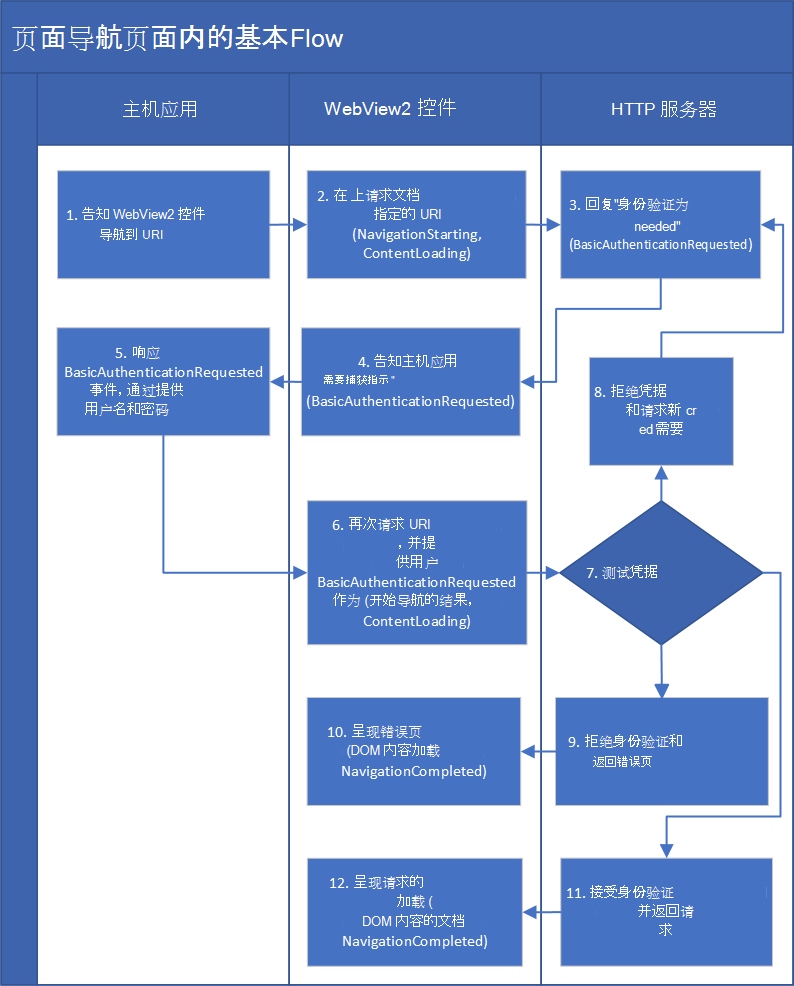
主机应用指示 WebView2 控件导航到 URI。
WebView2 控件与 HTTP 服务器通信,请求获取指定 URI 处的文档。
HTTP 服务器会回复 WebView2 控件,指出“如果没有身份验证,无法获取文档) (URI”。
WebView2 控件告知主机应用“需要身份验证” (这是
BasicAuthenticationRequested事件) 。主机应用通过向 WebView2 控件提供用户名和密码来响应该事件。
WebView2 控件再次从 HTTP 服务器请求 URI,但这次使用身份验证 (用户名和密码) 。
HTTP 服务器 (用户名和密码) 评估凭据。
HTTP 服务器可能会拒绝凭据并请求新凭据。
HTTP 服务器可能会拒绝用户名和密码;它可能会告知 WebView2 控件“不允许获取该 URI/文档”。
WebView2 控件呈现 HTTP 服务器返回的错误页。 呈现发生在事件和
DOMContentLoaded事件之间ContentLoading。HTTP 服务器可能接受身份验证凭据并返回请求的文档。
WebView2 控件呈现返回的文档。 呈现发生在事件和
DOMContentLoaded事件之间ContentLoading。
示例代码:提供提前知道的凭据的应用
以下简化示例演示了主机应用, (事先知道的用户名和密码) 提供凭据。 此示例是 WebView2Samples 存储库 > WebView2APISample > ScenarioAuthentication.cpp 中略有修改的代码版本。
此示例不现实,因为:
- 实际上,你会提示用户输入用户名和密码,而不是像 和
"pass"一样"user"对用户进行硬编码。 - 此代码是同步代码,但你可能改用异步代码。
有关更真实的代码,请参阅后续部分。
// Prerequisite: Before using this code, make sure you read the section "Use HTTPS
// for sending credentials" in this article.
    webView.CoreWebView2.BasicAuthenticationRequested += delegate (
       object sender,
       CoreWebView2BasicAuthenticationRequestedEventArgs args)
    {
        args.Response.UserName = "user";
        args.Response.Password = "pass";
    };
蜜蜂属:
示例代码:提示用户输入凭据
此示例演示了一个主机应用,该应用提示用户输入凭据 (用户名和密码) ,并使用异步代码。
此示例基于上述示例,添加了以下功能:
- 显示一个对话框,提示用户输入其用户名和密码。
-
GetDeferral对event参数调用 方法。
// Prerequisite: Before using this code, make sure you read the section "Use HTTPS
// for sending credentials" in this article.
webView.CoreWebView2.BasicAuthenticationRequested += delegate (
    object sender,
    CoreWebView2BasicAuthenticationRequestedEventArgs args)
{
    // We need to show UI asynchronously so we obtain a deferral.
    // A deferral will delay the CoreWebView2 from
    // examining the properties we set on the event args until
    // after we call the Complete method asynchronously later.
    // This gives us time to asynchronously show UI.
    CoreWebView2Deferral deferral = args.GetDeferral();

    // We avoid potential reentrancy from running a message loop in the
    // event handler by showing our download dialog later when we
    // complete the deferral asynchronously.
    System.Threading.SynchronizationContext.Current.Post((_) =>
    {
        using (deferral)
        {
            // When prompting the end user for authentication its important
            // to show them the URI or origin of the URI that is requesting
            // authentication so the end user will know who they are giving
            // their username and password to.

            // Its also important to display the challenge to the end user
            // as it may have important site specific information for the
            // end user to provide the correct username and password.

            // Use an app or UI framework method to get input from the end user.
            TextInputDialog dialog = new TextInputDialog(
                title: "Authentication Request",
                description: "Authentication request from " + args.Uri + "\r\n" +
                    "Challenge: " + args.Challenge,
                defaultInput: "username\r\npassword");
            bool userNameAndPasswordSet = false;

            if (dialog.ShowDialog().GetValueOrDefault(false))
            {
                string[] userNameAndPassword = dialog.Input.Text.Split(
                    new char[] { '\r', '\n' }, StringSplitOptions.RemoveEmptyEntries);
                if (userNameAndPassword.Length > 1)
                {
                    args.Response.UserName = userNameAndPassword[0];
                    args.Response.Password = userNameAndPassword[1];
                    userNameAndPasswordSet = true;
                }
            }

            // If we didn't get a username and password from the end user then
            // we cancel the authentication request and don't provide any
            // authentication.
            if (!userNameAndPasswordSet)
            {
                args.Cancel = true;
            }
        }
    }, null);
};
蜜蜂属:
-
CoreWebView2BasicAuthenticationRequestedEventArgs 类
- 属性:
CancelChallengeResponseUri
- 方法:
GetDeferral()
- 属性:
导航的工作原理
本部分提供有关导航工作原理的可选背景信息。
导航对应于多个导航事件。 通过 导航,我们在这里是指每次重试,从 NavigationStarting 上图的框开始,通过框 NavigationCompleted 。
当新的导航开始时,将分配一个新的导航 ID。 对于新导航,HTTP 服务器为 WebView2 控件提供了一个文档。 这是“有文档”导航。
作为导航的一部分,WebView2 控件 (请求页或错误页呈现相应的页面,以 HTTP 服务器) 返回的两者为准,“成功”或“失败”结果引发成功或失败 NavigationCompleted 事件。
有关详细信息,请参阅 WebView2 应用的导航事件。
基本身份验证导航
流中有两种类型的导航:
- “服务器请求的身份验证”导航。
- “服务器为 WebView2 控件提供了文档”导航。
在第一种类型的导航之后,服务器已请求身份验证,应用需要再次尝试此类导航, () 新的导航 ID。 新导航将使用主机应用从事件参数响应对象获取的任何内容。
HTTP 服务器可能需要 HTTP 身份验证。 在本例中,第一个 导航具有上面列出的导航事件。 HTTP 服务器返回 401 或 407 HTTP 响应,因此事件 NavigationCompleted 具有相应的失败。 然后,WebView2 呈现一个空白页,并引发 BasicAuthenticationRequested 事件,这可能会提示用户输入凭据。
BasicAuthenticationRequested如果取消事件,则没有后续导航,并且 WebView2 将保留以显示空白页。
BasicAuthenticationRequested如果事件未取消,WebView2 将再次执行初始导航,但这次使用提供的任何凭据。 你将再次看到与之前相同的所有导航事件。
如果 HTTP 服务器不接受凭据,导航会再次失败,并显示 401 或 407。 在这种情况下, CoreWebView2 类实例再次引发 BasicAuthenticationRequested 事件,导航继续如上所示。
如果 HTTP 服务器接受凭据,导航会成功。 如果 HTTP 服务器拒绝身份验证,则导航会失败, (服务器通常会) 返回错误页。
事件前后的 BasicAuthenticationRequested 导航是不同的导航,并且具有不同的导航 ID。
导航 event args 具有属性: NavigationId。 将 NavigationId 对应于单个导航的导航事件联系在一起。 每次导航期间,都会 NavigationId 保持不变,例如重试。 在下一次通过事件流期间, NavigationId 使用不同的 。
API 参考概述
另请参阅
- MDN 的 HTTP 身份验证。