本文介绍如何为代码应用配置 内容安全策略 (CSP)。 可以设置单个 CSP 指令,选择是强制实施 CSP 还是仅使用报告,并指定发送报表的位置。
在环境级别设置这些设置,以应用于环境中的所有代码应用。
默认情况下,CSP 使用以下指令配置强制执行。
该值 <platform> 表示平台所需的值。
| 指令 | 默认值 |
|---|---|
| frame-ancestors | 'self' https://*.powerapps.com |
| script-src | 'self' <platform> |
| img-src | 'self' data: <platform> |
| style-src | 'self' 'unsafe-inline' |
| font-src | 'self' |
| connect-src | 'none' |
| frame-src | 'self' |
| form-action | 'none' |
| base-uri | 'self' |
| child-src | 'none' |
| default-src | 'self' |
| manifest-src | 'none' |
| media-src | 'self' data: |
| object-src | 'self' data: |
| worker-src | 'none' |
自定义指令时,提供的值将追加到默认值。
如果默认值为 'none',则自定义值将替换默认值。
如果环境有 Dataverse 实例,可以在 Power Platform 管理中心中配置 CSP 设置。 否则,请参阅使用 REST API 配置 CSP 的说明。
注释
对于大规模管理,可以使用 环境组和规则一次性为多个环境配置此设置。
先决条件
- 你必须是环境的管理员才能配置 CSP 设置。
使用 Power Platform 管理中心配置 CSP
若要访问代码应用的 CSP 设置,请执行以下作:
- 登录到 Power Platform 管理中心。
- 在导航窗格中,选择“ 管理”。 在管理窗格中,选择环境。
- 在“环境” 页上,选择一个环境。
- 在命令栏中,选择 设置。
- 展开产品,然后选择隐私和安全性。
- 在 “内容安全策略”下,选择 “应用 ”选项卡。
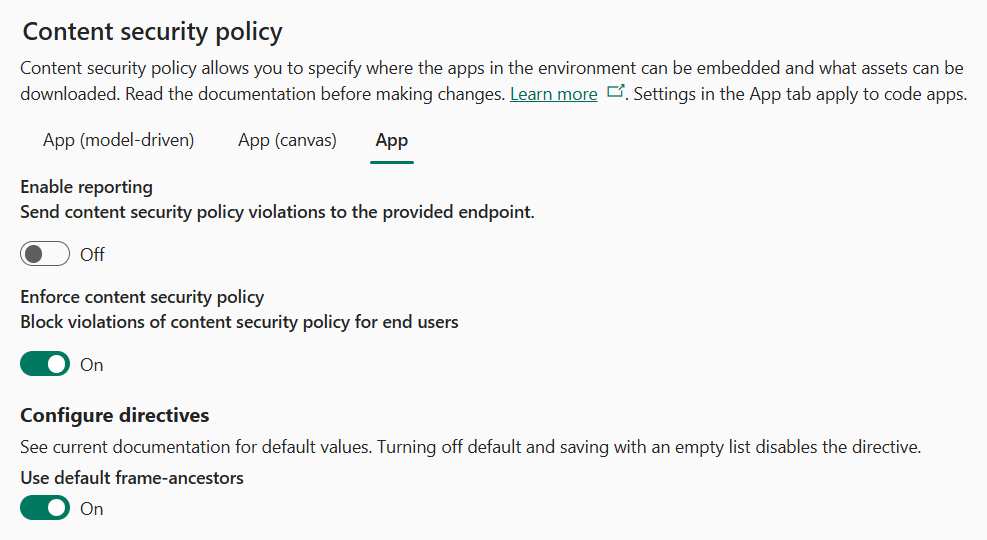
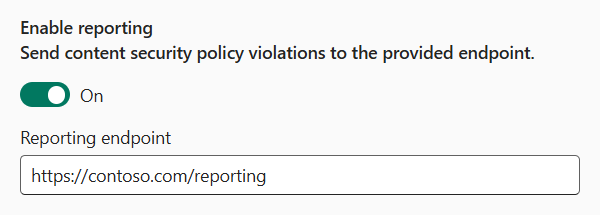
启用报告功能
启用报告切换控制是否发送 CSP 违规报告。 启用它时,请指定有效的终结点。 无论是否启用 “强制实施内容安全策略 ”,系统都会向此终结点发送冲突报告。 有关报告的详细信息,请参阅 报告文档。
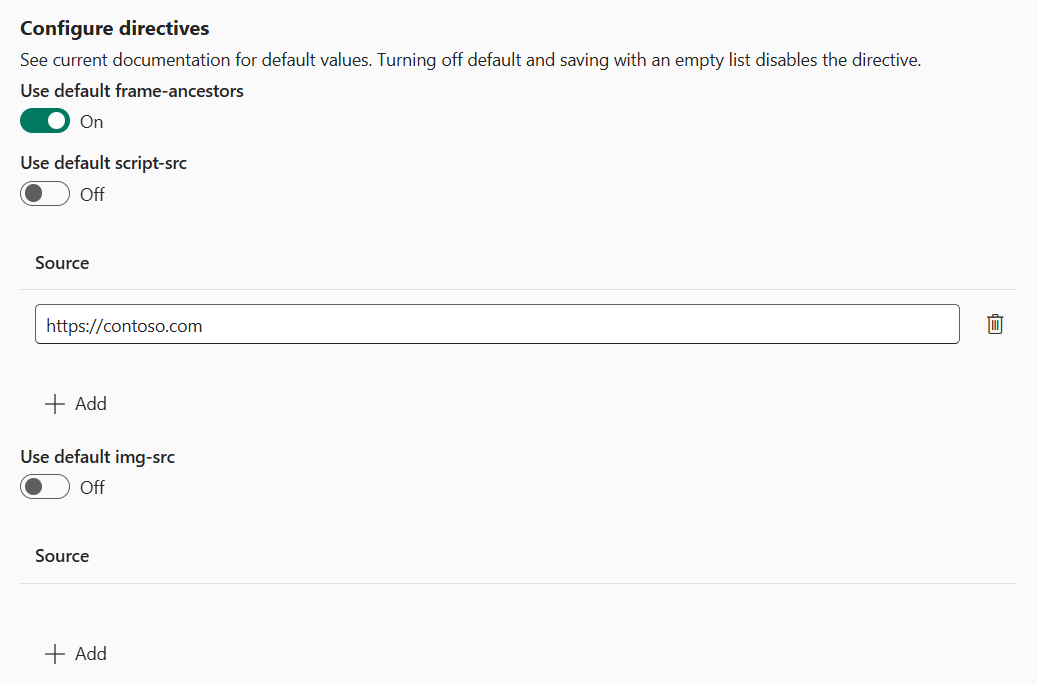
配置指令
使用 “配置指令” 部分控制单个指令的值。 如果您将默认设置保持开启,将使用之前指定的默认值。 如果关闭开关,则可以为指令添加自定义值。 自定义值与指令的默认值合并。 如果关闭开关并将源列表留空,则禁用该指令。
以下示例显示了三个具有不同配置的不同指令:
-
frame-ancestors已启用并设置为使用其默认值。 生成的指令值为:'self' https://*.powerapps.com -
script-src已启用,并且添加了一个与默认值合并的额外源。 生成的指令值为:script-src 'self' https://contoso.com -
img-src已禁用。 该指令从策略中省略。
使用 REST API 配置 CSP
可以使用 Microsoft Power Platform API 以编程方式配置 CSP。
使用 环境管理设置 API 管理设置:https://api.powerplatform.com/environmentmanagement/environments/{environmentId}/settings
提供了以下设置:
PowerApps_CSPEnabledCodeApps控制是否对代码应用强制实施 CSP。PowerApps_CSPReportingEndpoint控制 CSP 违规报告。 将该设置配置为一个有效的发送 CSP 违规报告的 URL,如果禁用报告,设置为null。PowerApps_CSPConfigCodeApps是指令的配置。 将此设置设置为格式为字符串化的 JSON 对象:{ "default-src": { "sources": [{ "source": "'self'" }] }, "style-src": { "sources": [{ "source": "'self'" }, { "source": "https://contoso.com" }] } // Additional directives }
PowerShell 辅助函数
若要简化调用 REST API,请使用以下 PowerShell 函数。
Get-CodeAppContentSecurityPolicy
使用 Get-CodeAppContentSecurityPolicy 函数检索指定环境中代码应用的当前 CSP 设置。 该函数返回强制状态、报告终结点和配置的指令。
  <#
  .SYNOPSIS
    Retrieves the Content Security Policy settings for code apps in a Power Platform environment.

  .DESCRIPTION
    Gets the current CSP configuration for code apps, including enforcement status,
    reporting endpoint, and configured directives from the Power Platform API.

  .PARAMETER Env
    The environment ID of the Power Platform environment.

  .PARAMETER Token
    A secure string containing the authentication token for the Power Platform API.

  .PARAMETER ApiEndpoint
    The base URI of the Power Platform API. Defaults to 'https://api.powerplatform.com/'.

  .OUTPUTS
    A hashtable containing:
    - ReportingEndpoint: The URL where CSP violation reports are sent.
    - Enabled: Whether CSP enforcement is enabled.
    - Directives: A hashtable of CSP directives and their configured sources.

  .EXAMPLE
    Get-CodeAppContentSecurityPolicy -Token $token -Env "00000000-0000-0000-0000-000000000000"
  #>
function Get-CodeAppContentSecurityPolicy {
  [CmdletBinding()]
  param(
    [Parameter(Mandatory = $true)]
    [string]$Env,

    [Parameter(Mandatory = $true)]
    [securestring]$Token,

    [uri]$ApiEndpoint = 'https://api.powerplatform.com/'
  )
  $ErrorActionPreference = 'Stop'

  $escapedEnv = [System.Uri]::EscapeDataString($Env)
  $uri = [Uri]::new($ApiEndpoint, "/environmentmanagement/environments/$escapedEnv/settings?api-version=2022-03-01-preview&`$select=PowerApps_CSPReportingEndpoint,PowerApps_CSPEnabledCodeApps,PowerApps_CSPConfigCodeApps")

  $resp = Invoke-RestMethod -Uri $uri -Method Get -Authentication Bearer -Token $Token
  $data = $resp.objectResult[0];

  if ($null -ne $data.PowerApps_CSPConfigCodeApps) {
    $parsed = $data.PowerApps_CSPConfigCodeApps | ConvertFrom-Json -AsHashtable -Depth 10
    $config = @{}
    foreach ($directive in $parsed.Keys) {
      $sources = $parsed[$directive].sources | Select-Object -ExpandProperty source
      $config[$directive] = $sources
    }
  }

  @{
    ReportingEndpoint = $data.PowerApps_CSPReportingEndpoint
    Enabled           = $data.PowerApps_CSPEnabledCodeApps ?? $true
    Directives        = $config
  }
}
Set-CodeAppContentSecurityPolicy
使用 Set-CodeAppContentSecurityPolicy 函数更新指定环境中的代码应用的 CSP 设置。 可以启用或禁用 CSP 强制、配置报告终结点和更新单个指令。
<#
.SYNOPSIS
  Updates the Content Security Policy settings for code apps in a Power Platform environment.

.DESCRIPTION
  Configures CSP settings for code apps, including enabling or disabling enforcement,
  setting a reporting endpoint for violation reports, and updating CSP directives.

.PARAMETER Env
  The environment ID of the Power Platform environment.

.PARAMETER Token
  A secure string containing the authentication token for the Power Platform API.

.PARAMETER ApiEndpoint
  The base URI of the Power Platform API. Defaults to 'https://api.powerplatform.com/'.

.PARAMETER ReportingEndpoint
  The URL where CSP violation reports are sent. Pass $null to disable reporting.

.PARAMETER Enabled
  Whether to enable or disable CSP enforcement for code apps.

.PARAMETER Directives
  A hashtable of CSP directives and their source values. Replaces the entire directive collection.

.EXAMPLE
  Set-CodeAppContentSecurityPolicy -Token $token -Env "00000000-0000-0000-0000-000000000000" -Enabled $true

.EXAMPLE
  Set-CodeAppContentSecurityPolicy -Token $token -Env "00000000-0000-0000-0000-000000000000" -ReportingEndpoint "https://contoso.com/report"
#>
function Set-CodeAppContentSecurityPolicy {
  [CmdletBinding(SupportsShouldProcess = $true)]
  param(
    [Parameter(Mandatory = $true)]
    [string]$Env,

    [Parameter(Mandatory = $true)]
    [securestring]$Token,

    [uri]$ApiEndpoint = 'https://api.powerplatform.com/',

    [AllowNull()]
    [string]$ReportingEndpoint,

    [bool]$Enabled,

    [hashtable]$Directives
  )
  $payload = @{}

  if ($PSBoundParameters.ContainsKey('ReportingEndpoint')) {
    $payload['PowerApps_CSPReportingEndpoint'] = $ReportingEndpoint
  }

  if ($PSBoundParameters.ContainsKey('Enabled')) {
    $payload['PowerApps_CSPEnabledCodeApps'] = $Enabled
  }

  if ($PSBoundParameters.ContainsKey('Directives')) {
    $allowed = @(
      'Frame-Ancestors', 'Script-Src', 'Img-Src', 'Style-Src', 'Font-Src',
      'Connect-Src', 'Frame-Src', 'Form-Action', 'Base-Uri', 'Child-Src',
      'Default-Src', 'Manifest-Src', 'Media-Src', 'Object-Src', 'Worker-Src'
    )
    $textInfo = [System.Globalization.CultureInfo]::InvariantCulture.TextInfo
    $config = @{}
    foreach ($key in $Directives.Keys) {
      $directive = $textInfo.ToTitleCase($key)
      if ($allowed -notcontains $directive) {
        throw "Invalid CSP directive: $directive"
      }
      $sources = $Directives[$key] | ForEach-Object { @{ source = $_ } }
      $config[$directive] = @{ sources = @($sources) }
    }
    $payload['PowerApps_CSPConfigCodeApps'] = ($config | ConvertTo-Json -Depth 10 -Compress)
  }

  $escapedEnv = [System.Uri]::EscapeDataString($Env)
  $uri = [Uri]::new($ApiEndpoint, "/environmentmanagement/environments/$escapedEnv/settings?api-version=2022-03-01-preview")
  $body = $payload | ConvertTo-Json -Depth 10

  Invoke-RestMethod -Uri $uri -Method Patch -Authentication Bearer -Token $Token -Body $body -ContentType 'application/json' | Out-Null
}
身份验证
若要使用 PowerShell 函数,请提供身份验证令牌。 使用 Microsoft 身份验证 CLI生成此令牌。 有关安装说明,请参阅其文档。 安装该工具后,使用以下命令生成身份验证令牌:
$tenantId = "<your-tenant-id>"
$clientId = "9cee029c-6210-4654-90bb-17e6e9d36617" # This is the client id of the Power Platform CLI
$token = azureauth aad --resource "https://api.powerplatform.com/" --tenant $tenantId --client $clientId --output token | ConvertTo-SecureString -AsPlainText -Force
例子
以下示例演示如何使用 PowerShell 帮助程序函数 来管理 CSP 设置。
获取设置
Get-CodeAppContentSecurityPolicy -Token $token -Env "<your-env-id>"
Name                           Value
----                           -----
Enabled                        True
ReportingEndpoint              http://constoso.com/report
Directives                     {[Frame-Ancestors, System.Object[]], [Script-Src, 'self']}
启用或禁用强制
使用 -Enabled 参数为代码应用打开或关闭 CSP 强制。
Set-CodeAppContentSecurityPolicy -Token $token -Env "<your-env-id>" -Enabled $true
启用或禁用报告
使用参数 -ReportingEndpoint 指定 CSP 违规报告的发送位置,或传递 $null 来禁用报告。
Set-CodeAppContentSecurityPolicy -Token $token -Env "<your-env-id>" -ReportingEndpoint "https://contoso.com/report"
要禁用报告,传递 $null:
Set-CodeAppContentSecurityPolicy -Token $token -Env "<your-env-id>" -ReportingEndpoint $null
更新指令
警告
更新指令将替换整个指令集合。 若要更新现有指令,请先检索它们,然后就地更新它们。
若要将指令重置为其默认值,请从集合中省略该指令。 若要完全禁用指令,请传递该指令的空数组。
$env = "<your-env-id>"
$directives = (Get-CodeAppContentSecurityPolicy -Token $token -Env $env).Directives
# Update existing directives
Set-CodeAppContentSecurityPolicy -Token $token -Env $env -Directives $directives